

Page 1

Front CoverBack Cover
Page 2
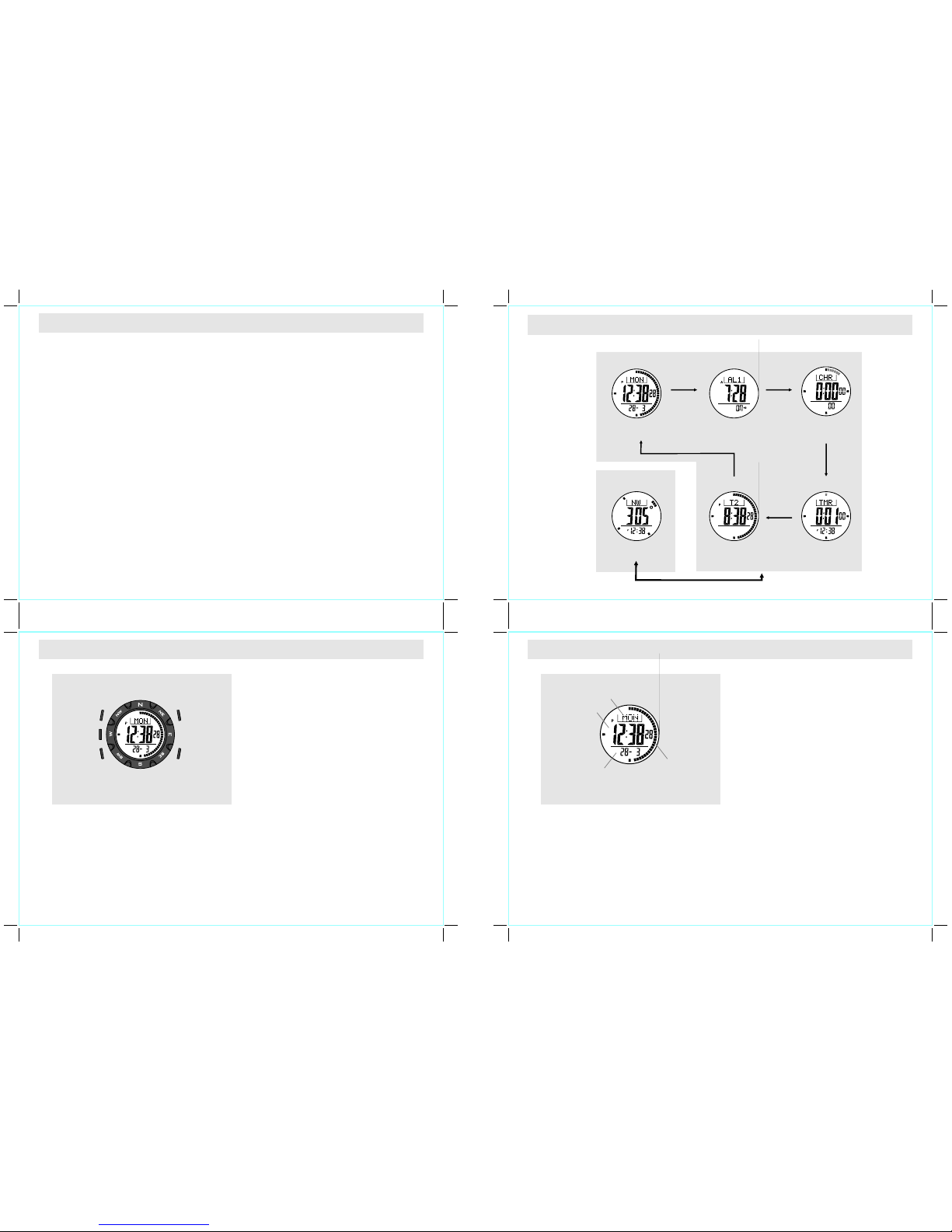
2.0 Buttons and Its Function s
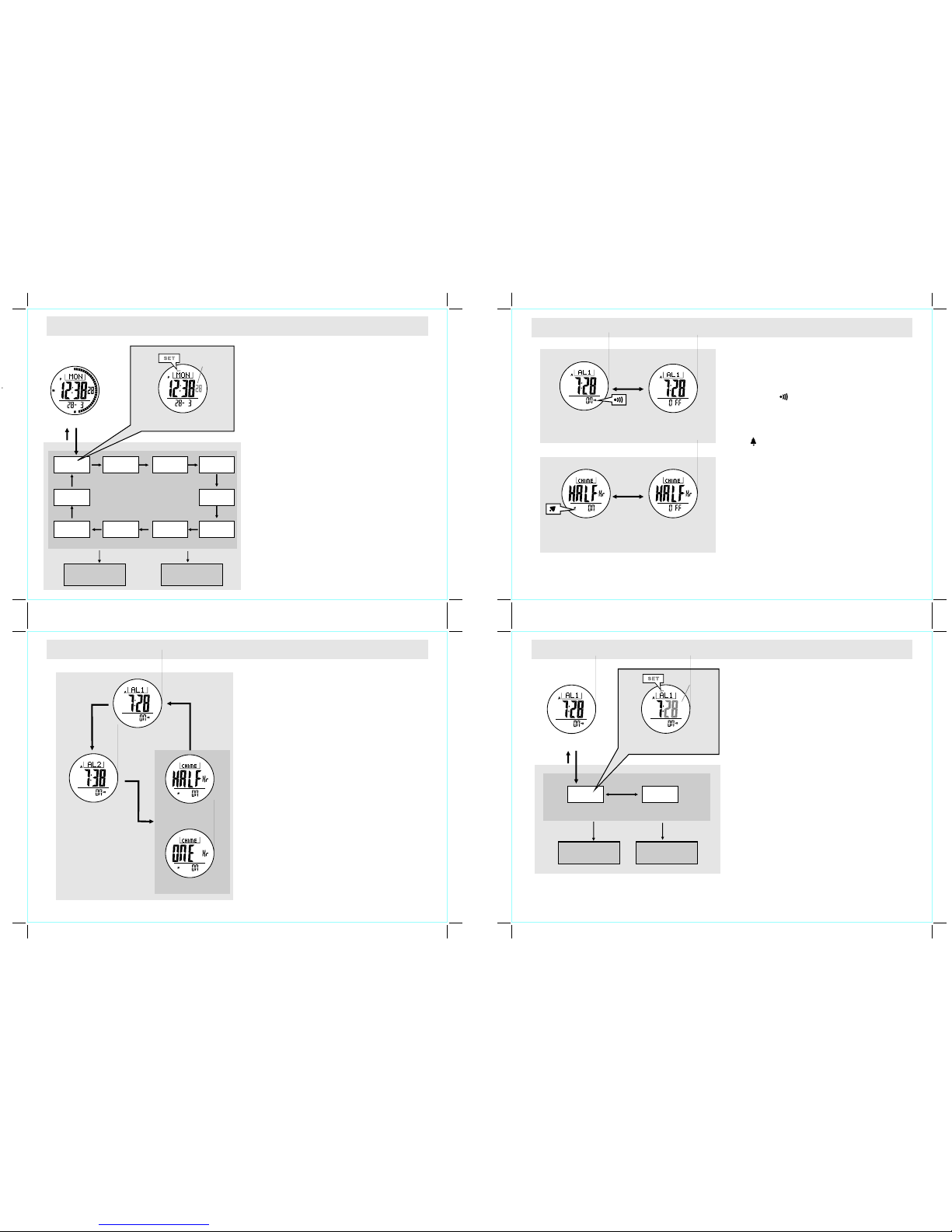
3.0 Major Function Modes - Tim ekeepi ng Mode an d Compas s Mode
+
+
ou tdo or
act iviti es
+ In add itio n to th e co mpas s fu ncti on, the
Watc h
+
dua l t ime
fun ction .
Tha nk you fo r purch asing o f this Wat ch.
Th e Wa tc h f eat ure s a ma gn eti c s ens or
whi ch m eas ures co mpas s di rect ion s, a nd
hen ce pro vides the dir ectio n info rmati on for
hi kin g, wi ld c am pin g an d o the r
inc ludes a r egatt a ti mer whi ch t ime
the s tarti ng of a rac e.
The Watc h also inc ludes cur rent t ime, d aily
ala rm, ch rono grap h, t ime r an d
+ Th e Wa tc h is c ar ef ul ly d es ig ned a nd
pro duced fo r ou tdoor ac tivit ies. In or der t o
uti lize t hese feat ures of y our wa tch, it i s
ad vi sa bl e t o re ad t he f oll ow in g n ot es
bef ore usi ng the Wat ch:
+ Avoi d ex posin g the Wa tch t o an ex treme
con ditio ns for an u nreas onabl e time.
+ Avoi d rou gh us ages o r sev ere im pacts to
you r Watch.
+ Do no t o pen the Watch 's cas e un less a
ce rt ifi ed s erv ic e a ge ncy be ca use t he
Wa t ch c on ta i ns p re ci s e e l ec tr o ni c
sen sors an d compo nents .
+ Cl ea n yo ur Wa tc h w it h a so ft cl ot h
occ asion ally th at wor king fo r a long er use
lif e of your w atch.
+ Kee p yo ur Wa tch awa y fr om m agnet s or
the ap plia nces whi ch c ontai ns m agne tic
obj ects suc h as m obile ph ones, sp eaker s
and m otors .
+ Sto re t he Watc h i n a d ry p lace w hen it
doe s not in us e for a lon g time.
Mode Butt on [M]
+ To s elect am ong t he C urren t Time , Da ily
Alar m, Ch ronogra ph, Time r and D ual Time
Mode .
+ To s elect amo ng th e set ting item s dur ing
sett ing d isplay.
Comp ass B utton [COM]
+ To se lec t b et wee n C omp ass Mo de an d
Timek eeping Mode.
Star t/Stop Butto n [S/ S]
+ To s elect betw een f unction al di splays un der
the same mode.
+ To activa te the 'star t' or 'stop' fun ction dur ing
chro nograph mode and timer mode.
+ To i ncrease the digits duri ng se tting displa y.
Lap/ Reset Button [L/R ]
+ To acti vate the 'l ap' or 're set' func tion dur ing
chro nograph mode .
+ To d ecrease the digits duri ng se tting displa y.
EL Button [EL]
+ To tur n on t he EL ba ck ligh t f or abo ut 3
seco nds.
N OT E: T he m aj o r ke y o pe r at io n s a r e
summ arized on the abo ve paragra phs, howev er
plea se read th e coming c hapters for th e detail
[L/R ]
[S/S ]
Current Tim e Mode
[COM ]
Timek eeping Mode
Daily Alarm M ode
Dual Time Mod e
[M] [M]
[M]
[M]
Comp ass Mod e
Chronog raph Mode
Timer Mode
[M]
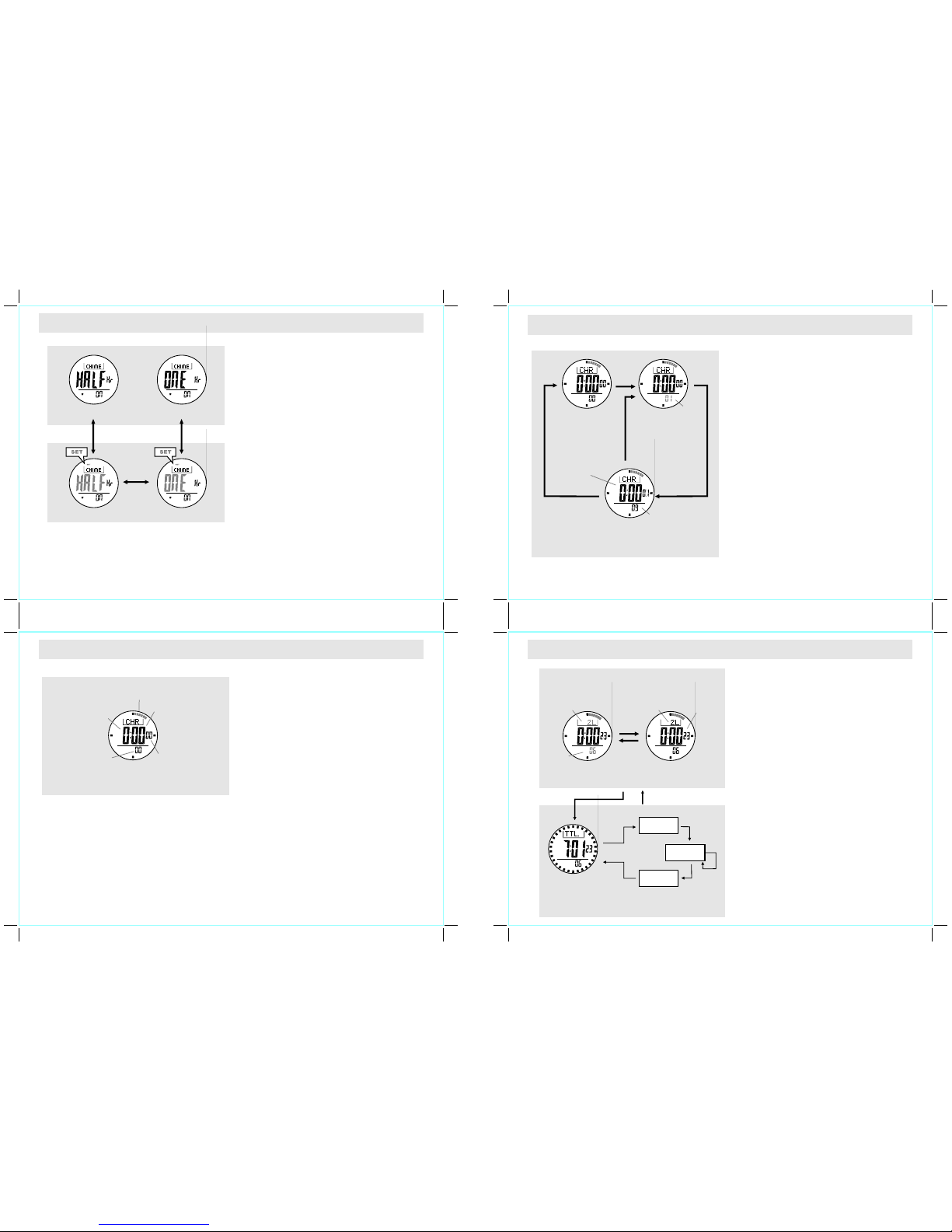
4.0 Current Ti me Mode - C urrent T ime Disp lay
Curr ent Ti me Di splay
+
+
+
+
+
Whe n th e Cu rrent Mod e is se lect ed, t he
Watch w ill sh ow th e foll owing ite ms on t he
disp lay:
The day of we ek wil l app ear o n the top row.
The cu rrent ti me will app ear on the m iddle
row.
The date will appear on the b ottom row.
Th e e la ps e o f s ec ond w ill r epr es ent
an alog ica lly by th e b ar- indi cat or w hic h
arou nd th e disp lay.
day of we ek
date
curre nt ti me
secon d
indic ator
Day of W eek Dis play
[COM ]
[M]
[EL]
1.0 Introduction
Page 3
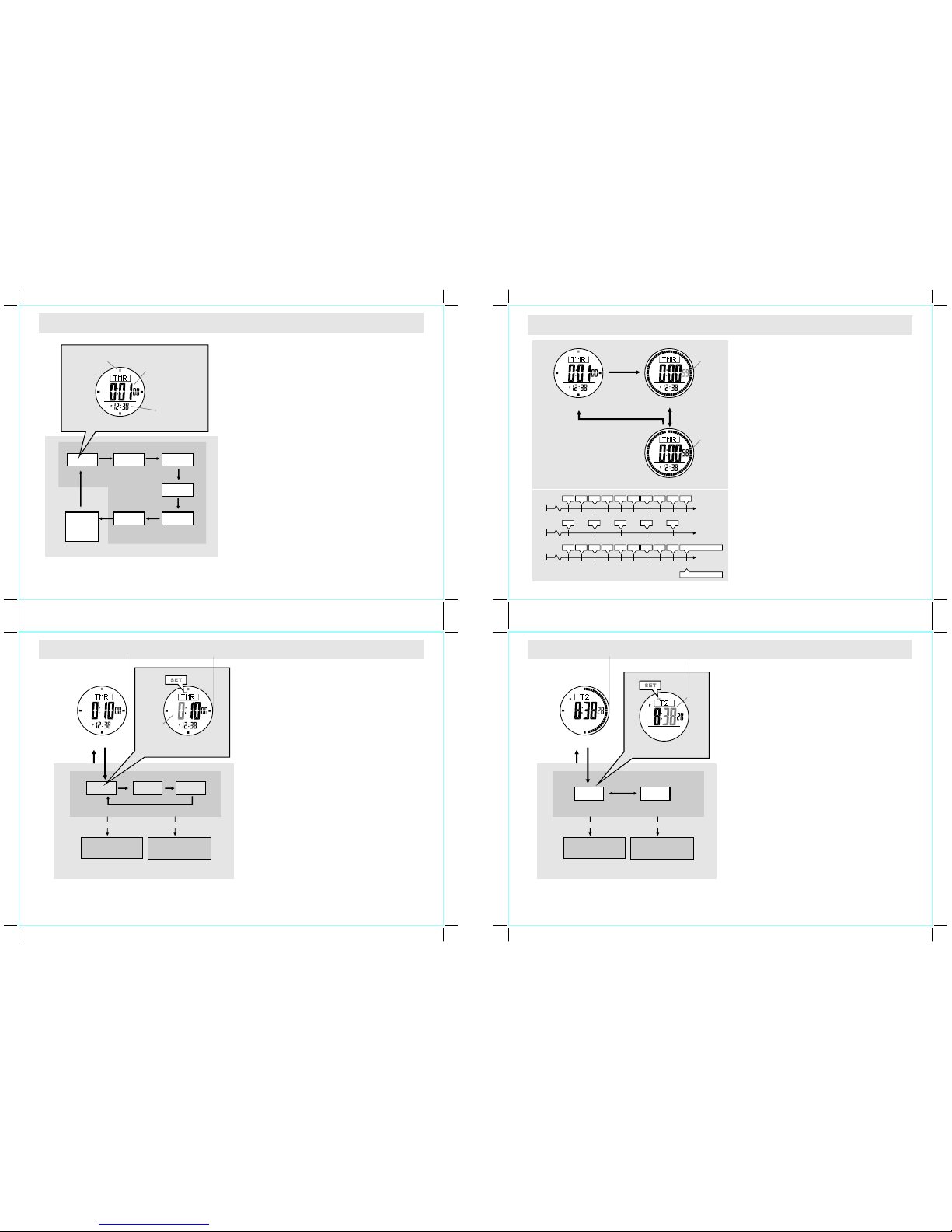
4.1 Current Ti me Mode - S etting t he Curre nt Time
How to S et th e Curr ent Ti me
+ To select the setti ng d isplay, press and hold the
[M] but ton for about 2 seco nds in Curren t Tim e
Disp lay, and the n the flas hing "S ET" ico n will
appe ar.
+ In set ting dis play, pre ss t he [ M] bu tton to
cha nge t he se lecti on fo llowi ng th e adj acent
diag ram.
+ Wh en one of the se tting ite ms (minut e, hour,
day, month, year ) is flashi ng (s electe d), p ress
th e [ S/S ] o r [L /R] bu tto n t o i ncr eas e /
decr ease the n umber. (Ho ld down th e button
to change the number at a hig her sp eed).
+ W he n th e se co n d d ig it s ar e f la sh in g
(sel ected), pres s the [S/ S] or [L/ R] butto n to
rese t t he d igits t o " 00". When month -day
orde r setti ng is sele cted, pres s the [S/S ] or
[L/R ] bu tton to select bet ween month- day and
day- month format .
+ Wh en 12/2 4 hour form at sett ing is sel ected,
pres s the [ S/S] bu tton to sel ect bet ween 12
and 24 ho ur for mat. When LC D con trast is
sele cted, pre ss the [S/S] o r [ L/R] to inc rease
or decre ase the contras t l evel from 1 (lowest )
to 10 (h ighest) .
+ Wh en key beep sett ing is select ed, press the
[S/S ] or [L/ R] bu tton t o sel ect b etween ON
and OFF the b eep.
+ Wh en the se tting is com pleted, hold down the
[M] butto n to exit the sett ing d isplay. The Watch
will als o ex it t he se tting disp lay if NO key stroke
has been activa ted f or 1 minute .
Dail y Alarm 2 D ispla y
Dail y Alarm 1 D ispla y
Half -Hour C hime Di splay
Hour ly Chim e Displ ay
[S/S ]
[S/S ]
[S/S ]
or
Dai ly Alarm M ode
Curr ent Tim e Displ ay
Curr ent Tim e Setti ng Sequ ence
Hold
[M]
Incr ease/ Decre ase
the nu mber at
a high er spee d
Incr ease/ Decre ase
the nu mber
12/2 4
hour f ormat
minu te hour
day
year
mont h
Sett ing Dis play
digi ts sele cted
(fla shing )
seco nd
[S/S ] / [L/R]
Hold
[M]
[M]
Mont h/Day
LCD
Cont rast
Key
Beep
[M] [M]
[M]
[M][M][M][M][M]
[M]
Hold
[S/S ] / [L/R]
5.0 Daily Alarm M ode - Dai ly Alarm 1, Daily Alarm 2 and Chime Disp lay
5.1 Daily Alarm M ode - Set ting the Daily Ala rm and Chime ON-OFF
Dail y Alar m 1 and Da ily Al arm 2
+ Th e Watch inc ludes two dail y a larms, they ar e
the Daily Alarm 1 an d Dai ly Alar m 2.
+ Th e Da ily Al arm 1 a nd Da ily A larm 2 a re
work ing i ndepend ently.
+ If the ala rm is t urned ON, the Watc h wi ll s ound
at the pre set a larm t ime e veryday. Whe n the
alar m sou nds, p ress any butt on (ex cept EL
butt on) t o stop the beep.
Hour ly Ch ime an d Hal f-Hour Chime
+ Th e Watch incl udes tw o chime func tions, they
are hourl y chim e and half -hour chime.
+ Ho urly Chime: If the hourl y chi me i s tur ned ON,
the Watch will beep once every hour at t he ho ur
(e.g . 1:0 0, 2:0 0,3:00 and etc.)
+ Ha lf-H our C hime : If the hal f-hou r ch ime is
turn ed ON, the Watc h will beep o nce every 3 0
minu tes at th e hour a nd at th e half pa st hour
(e.g . 1:0 0, 1:3 0 2:0 0, 2: 30, 3: 00 an d etc .)
+ Ch eck the com ing cha pter 5. 3 for m ore det ail
on set ting the ch ime inte rval betw een H ourly
Chim e and Half- Hour Chime.
How to Sw itch be tween A larm an d Chi me
Disp lay
+ Pr ess the [S/S ] b utton t o s witch a mong th e
Dail y Ala rm 1 , Dai ly Ala rm 2 and Chime Dis play
foll owing the a djacen t diag ram.
How to Tur n ON or O FF the Dail y Alar m
+ To tur n ON or OF F the dai ly alarm 1, pr ess
the [L/R] butto n in the Daily A larm 1 Dis play.
+ To tur n ON or OF F the dai ly alarm 2, pr ess
the [L/R] butto n in the Daily A larm 2 Dis play.
+ Wh en th e Da ily Al arm 1 or 2 is O N, th e al arm
indi cator ' ' will appear on the di splay.
How to Tur n ON or O FF the Chim e
+ To turn ON or OFF the Chim e fu nction, pr ess
the [L/R] butto n in Chime Displ ay.
+ Wh en the chi me is ON, the chi me ind icator
' ' will appe ar on the displa y.
Half -Hour C hime Di splay
Chim e ON
Alar m 1 Displ ay
Alar m ON
Half -Hour C hime Di splay
Chim e OFF
Alar m 1 Displ ay
Alar m OFF
[L/R ]
[L/R ]
To Turn th e Daily Al arm ON or O FF
To Turn th e Chime F uncti on ON or OF F
5.2 Daily Alarm M ode - Set ting the D aily Alar m
How to S et th e Dail y Alar m 1 and Al arm 2
+ To se lect th e s etting displ ay, h old the [M]
butt on fo r ab out 2 seco nds in Ala rm 1 (set ting
alar m 1) or Alarm 2 (settin g al arm 2 ) Di splay,
and then the flashin g "SE T" ico n wil l app ear.
+ In sett ing dis play, pre ss the [M] butto n t o
chan ge th e sel ectio n bet ween m inute and
hour foll owing the a djacent diag ram.
+ Wh en th e dig its are f lashing (se lected) , pr ess
th e [ S/S ] o r [L /R] bu tto n t o i ncr eas e /
decr ease the n umber. (Ho ld down th e button
to change the numb er at a h igher speed) .
+ Wh en t he se tting is comple ted, hold down the
[M] butto n t o e xit th e s etting displ ay. T he
Watch w ill also ex it the set ting disp lay if NO
keys troke has b een a ctivate d for 1 m inute.
Dail y Alarm 1 D ispla y
Dail y Alarm Ti me Sett ing Seq uence
hold
[M]
Incr ease/ Decre ase
the nu mber at
a high er spee d
Incr ease/ Decre ase
the nu mber
HourMinu te
[S/S ] / [L/R]
hold
[M]
[M]
Hold
[S/S ] / [L/R]
Sett ing Dis play
digit s sel ected
(flas hing)
Page 4
6.0 Chronograph Mode - Chron ograph D isplay
6.1 Chronograph Mode - Using t he Chron ograph
6.2 Chronograph Mode - Recor ding and R ecalli ng Lap Tim e
Chro nograph Disp lay
+ Th e Wat ch in cludes a Chr onogra ph M ode
whic h measur es elaps ed times , accumu lative
elap sed t ime an d lap time .
+ Th e dis play show s the 'A ll Ze ros' disp lay
when the c hronogr aph is b eing sel ected t he
firs t tim e or the ch ro no gr ap h h as be en
rese t.
+ Wh en th e Chr onogra ph Di splay is se lected ,
the Watch will show the followi ng it ems o n the
disp lay:
+ Th e chr onograp h hou r, minu te an d sec ond w ill
appe ar on the middle row.
+ Th e ch ronogra ph 1 /100 second will app ear on
the botto m row.
+ Th e chro nograph 1/ 10 seco nd wil l repr esent
by the b ar-indi cator around the displ ay.
How to u se th e Chro nograp h
+ W hen th e c hro no gra ph is st opp ed (n ot
coun ting), pres s th e [S/ S] b utton once to start
the ch ronogra ph ( countin g); pres s the [ S/S]
butt on on ce a gain to st op t he ch ronogr aph
(not coun ting).
+ Th e el apsed time betw een the two keystro kes
will appe ar on the displa y.
+ Re peat t he abo ve men tioned step s to get
the acc umulati ve el apsed time of wh ich t he
chro nograph is runnin g.
How to R eset the Ch ronogr aph
+ To record a new set of elapsed tim e, h old the
[L /R] but ton fo r 2 se cond s to re set the
chro nograph to 'A ll Zer os' d isplay whe n the
chro nograph was stopp ed.
+ In 'A ll Z eros' di splay, the ch ronog raph is
read y for a n ew cou nting.
What is Lap Ti me
+ Th e Wat ch in cludes a Chr onogra ph M ode
whic h mea sures an ela psed time (l ap ti me)
with out s topping the counti ng.
+ Th e Watc h all ows r ecordin g lap t ime u p to
100 laps.
How to R ecord Lap T ime
+ Wh en the chron ograph is co unting , p ress the
[L/R ] bu tton once to r ecord the lap time. Thi s
key opera tion w ill n ot aff ect/st op the coun ting.
+ Th e lap num ber and la p time wi ll appea r on
the displ ay f or 1 0 se conds, a nd t hen the
Watch will r eturn to c ountin g dis play aga in
auto matical ly.
+ Re peat t he ste ps men tioned abov e to get
anot her l ap tim e.
How to R ecall Lap T ime
+ To recall lap time, hold down the [M] butto n in
the Chron ograph Displ ay.
+ Wh en the Total Tim e D isplay is a ppeared ,
pres s the [S/S ] or [L/R ] butto n to reca ll lap
time foll owing the a djacent diag ram.
+ Ho ld do wn th e [M ] but ton w ill e xit t he la p ti me
reca ll se quence.
How to R eset Lap Ti me
+ To r ecord a n ew set of lap ti mes, h old th e
[L/R ] but ton f or 2 seco nds i n the Chr onograp h
Stop Disp lay.
Chro nogra ph
Coun ting Di splay
Chro nogra ph
Stop D ispla y
NOTE: T his diag ram exh ibits th e connec tion bet ween di fferent display s
only, and h ence the nu mbers sh owing on th ese disp lays do not c onform
to fact f or some ins tance.
Chro nogra ph
'All Z ero' Di splay
Chro nogra ph
'All Z ero' Di splay
hold
[L/R ]
digit s is
count ing
digit s sto p
count ing
1/100 sec
hours
minut es
secon ds
[S/S]
elaps ed
time
[S/S][S/S]
[S/S ] or [L/R ]
hold [ M] hold [ M]
1/10s
indic ator
Lap Ti mes Recall Seq uence
the nex t lap
Chron ograph
Lap Displa y
Chron ograph
Runni ng Di splay
[L/R ]
digit is
count ing
10
seco nds
the lap n umber
is stop f lashin g
the lap n umber
is flashin g
To Reco rd Lap Ti me
1st lap
the las t lap
the lap t ime
will freez e
for 10 se c.
[S/S ]*
hold [ M]
hold [ M]
[S/S ]*
[S/S ]*
[S/S ]*
[S/S ]*
Total T ime
Display
Half -Hour
Chim e Displ ay
Hour ly
Chim e Displ ay
Chim e Inter val Set ting Di splay
NOTE: This diagr am exh ibits the connect ion b etween diffe rent d isplay s
only, h ence th e numb ers sho wing on these displa ys DO N OT conf orm to
fact fo r some inst ance.
*Press the [L/ R] butt on wil l move the select ion in t he rever se direct ion
How to S et th e Chim e Int erval
+ To se lect t he sett ing dis play, ho ld down th e
[M] butt on for abo ut 2 seco nds in Hou rly
Chim e or Half- Hour Chi me Displa y, and then
the flash ing "S ET" i con w ill ap pear.
+ In sett ing dis play, pr ess the [M] butt on to
chan ge the sele ction b etween 'ho urly ch ime'
and 'h alf-hou r chi me' foll owing the a djacen t
diag ram.
+ Wh en t he se tting is comple ted, hold down the
[M] butto n t o e xit th e s etting disp lay. The
Watch w ill also ex it the set ting disp lay if NO
keys troke has b een a ctivate d for 1 m inute.
5.3 Daily Alarm M ode - Set ting the C hime Int erval
Page 5
7.1 Regatta Timer Mode - Setting the User Preset Value
How to S et th e User Pres et Valu e
+ To sel ect setti ng displ ay, hold th e [M] butt on
for 2 sec onds, and th e flas hing "SET " ico n
will appe ar.
+ In sett ing dis play, pr ess the [M] butt on to
chan ge t he s electio n a mong hour, minut e an d
seco nd fo llowing the adjace nt di agram.
+ Wh en t he digits are fla shing (sel ected) , pr ess
th e [ S/S ] o r [L /R ] bu tto n t o i ncr eas e /
decr ease the n umber. (Ho ld down th e button
to change the number at a hig her sp eed).
+ Wh en t he se tting is comple ted, hold down the
[M] butto n t o e xit th e s etting disp lay. T he
Watch w ill also ex it the set ting disp lay if NO
keys troke has b een a ctivate d for 1 m inute
Incr ease/ d ecrea se
the nu mber
Incr ease/ decre ase
the nu mber at
a high er spee d
hold [ S/S] / ho ld [L/R ][S/S ] / [L/R]
User P reset Va lue Set ting Se quenc e
Rega tta Tim er Disp lay
hold
[M]
Sett ing Dis play
minu te
Seco nd
hour
hold
[M]
[M]
[M]
[M]
digi ts
sele cted
(fla shing )
7.2 Regatta Ti mer Mod e - Using th e Regatta Timer
How to U se th e Rega tta Ti mer
+ Wh en a target ti me is set by usin g t he Quick
Set Value o r U ser prese t Value, pres s the [S/S]
butt on to star t the coun ting. When the timer is
coun ting, press the [S/S] butt on o nce a gain to
stop the counti ng.
+ On ce t he t imer is s tarted , the cou ntdown time
will sho w on the disp lay continu ously, and the
Wat ch wi ll a lert th e us er b y be eping as
foll ows:
+ Th e last 10 min utes: T he wat ch wil l beep
once for every minut e.
+ Th e last on e minute : The watc h will be ep
for every 10 seconds .
+ Th e last 10 se conds: The watc h will beep
for every secon d(s).
+ A t z er o : t h e Wa t ch w il l s wi t ch t o
Chro nograph Mod e and sta rt up- countin g
au tom ati cal ly, an d i t wi ll be ep fo r 3 0
seco nds.
How to R eload the T imer
+ To rel oad the t imer wit h th e cu rrent ta rget
time for a new c ounting befor e t he Wa tch
coun ts to zero , pres s the [L/ R] but ton onc e
when the timer was stoppe d.
+ To star t a new co unting fro m a new ta rget
time , set the timer again .
Rega tta Tim er Disp lay
Coun ting Di splay
Stop C ounti ng Disp lay
digi ts star t
coun ting
digi ts stop
coun ting
[S/S ]
[L/R ]
[S/S ]
8.0 Dual Time Mode - Dual Time and Setting the Dual Time
Dual Time Displ ay
+ Th e Wa tch includ es a D ual Time Mode whi ch
show s t he curr ent ti me for a sec ond tim e
zone .
+ Th e s econd d igits o f t he d ual ti me i s t he
same as the c urrent time.
+ Wh en the Dual Ti me Displa y is selec ted, the
Watch w ill sh ow th e foll owing ite ms on th e
disp lay:
+ Th e du al t ime will appe ar o n th e mi ddle
row.
+ T he el ap se o f s eco nd wi ll re pr ese nt
an alog ica lly by th e b ar- indi cat or w hic h
arou nd th e disp lay.
To Se t the Dual Time
+ To se lect s etting disp lay, hol d down the [M]
butt on fo r 2 secon ds i n Dua l Time Mo de, a nd
then the flashi ng "S ET" i con wi ll ap pear.
+ In sett ing dis play, pr ess the [M] butt on to
ch ang e th e s ele ctio n b etw een ho ur and
minu te.
+ Wh en t he digits are fla shing (sel ected), pr ess
the [S/S ] / [L/R] but ton to in crease / decrea se
the nu mber. (Hol d dow n th e but ton c hange
the numbe r at a hig her s peed).
+ Wh en t he se tting is comple ted, hold down the
[M] butto n t o e xit th e s etting disp lay. The
Watch w ill also ex it the set ting disp lay if NO
keys troke has b een a ctivate d for 1 m inute
Incr ease/ d ecrea se
the nu mber
Incr ease/ decre ase
the nu mber at
a high er spee d
hold [ S/S] / ho ld [L/R ][S/S ] / [L/R]
User P reset Va lue Set ting Se quenc e
hold
[M]
Sett ing Dis play
hourminu te
hold
[M]
[M]
Dual Ti me Disp lay
NOTE: Th is diagra m exhibit s t he
co nn e ct io n b et we en di ff er e nt
dis pl ays o nly, and h enc e the
numbe rs show ing on t hese di splay
do not confor m t o f act for some
insta nce.
Regatta Timer Alarm Sounds
digi ts
sele cted
(fla shing )
1050998
8
40
776
6
30
554
4
20
332
2
10
1
1 0
minute(s)
seconds
second(s)
Chronograph auto-start
start
start
start
7.0 Regatta Timer Mode - Countdown Timer and the Quick-Set-Values
Rega tta Ti mer D isplay
+ Th e Wa tch in cludes a Rega tta Timer Mode which
meas ures t he elap se of a f ix per iod of time (ta rget
time ).
+ Th e ti mer s tarts down- counti ng fr om t he t arget time to
zero and then it st arts up-coun ting.
+ Th e t arget tim e can be set by usi ng Quick Set Val ue
or User preset Value follow ing th e adj acent diagra m.
+ Wh en the Rega tta Timer Di splay is se lected, t he
Wat ch w ill sho w th e fo llow ing ite ms o n th e
disp lay:
+ Th e Target time will appea r on the m iddle row.
+ Th e cur rent t ime w ill a ppear on th e bot tom ro w.
+ Th e ela pse o f sec ond w ill r eprese nt an alogica lly
by the b ar-indi cator which aroun d the displ ay.
The Quick- Set-Valu e
+ Th e Quic k-Set- Value i s a set of valu es wh i c h p r e -
inst alled i nto th e Watch . These val ues ca n NOT b e
chan ged by the user.
+ Th e Watch incl udes 6 Qui ck-Set Valu es, they ar e 1,
3, 5, 10 , 15 and 4 5 min utes.
The User Preset Value
+ Th e Use r Pr eset Value is a val ue w hich can be s et by
the user, and it can be set up to 9 9 ho urs 59 m inutes
99 seconds .
+ On ce th e Us er P reset Value has been set, such as 30
minu tes, i t wil l sto re in to th e Watch for recal l the next
time .
+ To se t the User Prese t Value, chec k the comin g
chap ter 7. 1 for more detai l.
Rega tta Tim er Disp lay
1 min 3 min
45 min
5 min
10 min
15 min
Time r Setti ng Sequ ence
the in dicat or
flas hing
the ti me whic h the
time r will co untdo wn from
(hou r, minut e and sec ond)
[L/R ]
User
Pres et
Value
Quic k-Set -Value
[L/R ]
[L/R ]
[L/R ]
[L/R ][L/R ]
[L/R ]
Curr ent Time
Beep Beep Beep Beep Beep Beep Beep Beep Beep Beep
Beep Beep Beep Beep Beep
Beep Beep Beep Beep Beep Beep Beep Beep Beep Beep-Beep for 30 sec.
Page 6
9.0 Compass Mode - Precautions
9.1 Compass Mode - Compass Directions and Bearing Directions
9.2 Compass Mode - Compass Mode
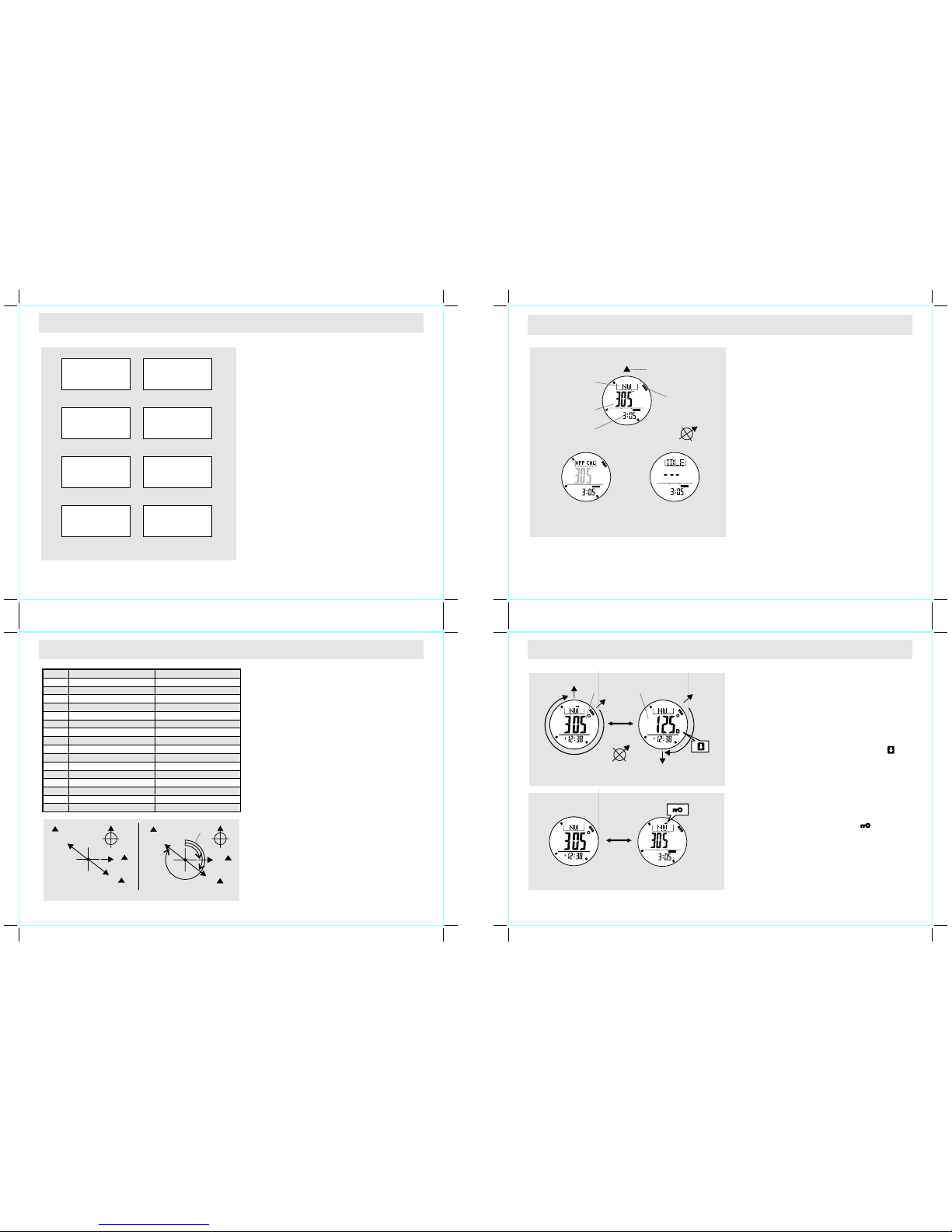
The Preca utions when Using the Compas s
+
+
Chec k th e 'W hat
is Mag neti c De clina tion ' sec tion fo r mo re
deta il on the di fferenc e bet ween
+
+
+
+
+
+
Keep your Watch away from magn ets or th e
ap pli anc es wh ich ma y c ont ain ma gne tic
obje cts s uch as mo bile p hones, spe akers,
moto rs an d etc.
The Wat ch, like mos t ma gneti c co mpass ,
poin ts to the mag netic nor th which is sl ightly
diffe rent from the true no rth.
magn etic
nort h and true north .
Perf orm the comp ass calib ration fro m t ime to
ti me be cau se c ali bra tio n re inf orc es th e
prec ision of th e com pass.
To a chieve a accurat e re sult, you should NOT
meas ure d irectio n on the followi ng co ndition s:
The wa tch i s pla ced c lose to a magn etic
obje cts,
The wa tch is pla ced cl ose to a m etal
obje cts,
The watc h is pla ced clo se to a n elect rical
appl iances, and
The wat ch is p laced ins ide a m oving obje ct
or a fer roconcr ete b uilding .
How to S pecify the Direct ion of an Object
+ Th e dir ection of an o bject from a p oint can be
spe cifi ed i n ei ther co mpas s di recti ons or
bear ing d irectio ns.
+ Th e Watc h inc ludes bot h com pass dire ction
and beari ng dir ection funct ions.
The Compa ss Dir ection
+ Th e c ompass direc tions are s hown on the
adja cent table.
+ Le t's u se th e adj acent diagr am as an exampl e
to illust rate comp ass d irectio n:
+ Ob ject B from poin t A is East.
+ Ob ject C from poin t A is South east.
+ Ob ject D from poin t A is North west.
The Beari ng Dir ection
+ Th e Bearing d irectio n of an objec t is defin ed
as the a ngular di fferenc e between N orth and
the ob ject. (Assu me 0 f or No rth, a nd the
meas uring range is f rom 0 to 35 9 ).
+ Le t's u se th e adj acent diagr am as an exampl e
to illust rate bear ing d irectio n
+ Ob ject B from poin t A is 90 .
+ Ob ject C from poin t A is 135 .
+ Ob ject D from poin t A is 315 .
8
8 8
8
8
8
Comp ass M ode
+ Th e Watch in cludes thre e diff erent disp lays,
they ar e th e C ompass Dis play, Idle Disp lay and
Dist ortion Displ ay.
Comp ass D isplay
+ Wh en the Com pass D isplay is sele cted, the
Watch wi ll sho w the fol lowing ite ms on the
disp lay:
+ T he c ompa ss dir ect ion of th e na vig atin g
dire ction will appear on the to p row.
+ T he be ari ng di rec tio n o f t he na vig ati ng
dire ction will appear on the mi ddle row.
+ Th e cur rent time w ill ap pear on the b ottom
row.
+ T he p oint er ( 3-ba r) enc ircl ed t he dis play
show s the direc tion of m agnetic no rth po le
anal ogicall y.
Idle Disp lay
+ If NO ke ystrok e h as been activ ated for abo ut 1
minu te, the Wat ch w ill swit ch t o Id le Di splay
auto matical ly fo r sav ing th e bat tery.
+ To act ivat e th e c ompa ss a gain , pr ess any
butt on.
Dist ortion Displ ay
+ If dist ortion is d etecte d, the indi cator "OFF CAL"
with f lashin g direct ion digit s will ap pear on th e
disp lay.
+ Pl ease refer to th e c oming chap ter 11.8 to 11.9
to rest ore th e com pass to n ormal ope ration
when dist ortion occur.
COMP
Compa ss Dis play
curr ent tim e
bear ing dir ectio n
of the n aviga tion
dire ction
magn etic
nort h pole
poin ter
navi gatio n direc tion
comp ass dir ectio n
of the n aviga tion
dire ction
objec t B
objec t B
objec t C
Comp ass Dir ectio ns
Bear ing Dir ectio ns
objec t C
objec t D
objec t D
angul ar
diffe rence
point A
N
E
908
SE
1358
NW
3158
point
A
08
N
08
N
Mark s
N
NE
E
SE
SSE
SSW
WNW
NNW
Comp ass Dir ectio ns Bear ing Dir ectio ns
Nort h
3498 - 11 8
Nort heast
East
Sout heast
East S outhe ast
Sout h South west
Nort h North west
S
SW
W
NW
Sout h
Sout hwest
West
Nort hwest
ESE
ENE
WSW
NNE
West N orthw est
West S outhw est
Sout h South east
East N orthe ast
Nort h North east
128 - 33 8
348 - 56 8
578 - 78 8
1028 - 1 238
798 - 10 18
1248 - 1 468
1478 - 1 688
1698 - 1 918
2148 - 2 368
1928 - 2 138
2378 - 2 588
2598 - 2 818
3048 - 3 268
2828 - 3 038
3278 - 3 488
Com pass Mo de
Idle D ispla y
COMP
Dist ortio n displ ay
COMP
9.3 Compass Mode - Backward Bearing Direction and Compass Lock
Back ward Bearing Dire ction
The Wat ch inc lude s a ba ckwa rd bea ring
func tion.
The back ward bearin g di rection is the beari ng
dire ction t hat on the opp osite d irecti on from
norm al be aring direct ion.
+ In Compa ss D isplay, press the [S/ S] b utton to
sele ct betwee n n ormal and ba ckward be aring
dire ction.
When th e 'B ackwar d Be aring' ind icator " "
is ap pea red , t he Wat ch is sh owi ng the
back ward be aring d irectio n of th e navig ation
dire ction.
Comp ass L ock
The Wat ch inclu des a comp ass lock func tion
whic h loc ks the impo rtant direct ion r eadings .
In Compa ss D isplay, pres s th e [L /R] button to
lock /unlock the d irectio n readi ngs.
When the "Loc k" ind icator, " " is
appe ared, the com pass dire ction, be arings
dire ction and th e magneti c north pol e p ointer
are locke d.
T he C om pa s s L o ck wi l l b e r el ea se d
auto matical ly when t he Watch is sw itched t o
Idle Disp lay.
+
+
+
+
+
+
+
08
Norm al Bearin g Dire ctio n Backwa rd Bearin g Dire ctio n
3058
1258
08
08
backw ard
beari ng
indic ator
norma l
beari ng
direc tion
backw ard
beari ng
direc tion
[S/S ]
Dire ction U nlock ed
Dire ction L ocked
comp ass
lock i ndica tor
[L/R ]
COMP
Keep t he Watc h
away f rom any
magn etic ob ject
Read ing rel ative t o
Magn etic No rth
inst ead of Tru e North
DO meas ure
a comp ass dir ectio n
o an
elec troni c appli ance
NOT
clos e t
DO meas ure
a comp ass dir ectio n
o a
magn etic ob ject
NOT
clos e t
DO meas ure
a comp ass dir ectio n
o meta l
NOT
clos e t
DO meas ure
a comp ass dir ectio n
insi de a
ferr oconc rete bu ildin g
NOT DO meas ure
a comp ass dir ectio n
insi de a
movi ng obje ct
NOT
Cali brate t he Watc h
from t ime to ti me
Prec autions when Usin g the compa ss
Page 7
9.5 Compass Mode - Magnetic Declination
9.4 Compass Mode - Applications of the Compass Display and Backward Bearing
9.6 Compass Mode - Magnetic Declination Compensation
What is Magneti c Dec linatio n
The a ngular d ifferen ce be tween Ma gnetic N orth Pol e
and Tru e North Pol e is calle d magnet ic declin ation. I ts
amou nt (de grees and min utes) and dir ection (e asterly
and weste rly) d epend on w here y ou ar e in the world.
Th e Wa tch al so i ncl ude s a s etti ng fo r M agn etic
Decl ination co mpensat ion. Check th e ch apter 9.6 and
9.10 fo r more det ail on how to co mpensat e Magn etic
Decl ination .
Magn etic Declina tion Informa tion
Most topog raphic maps i nclude a smal l ar row whi ch
sh own ma gnet ic no rth po le a nd or th e ma gne tic
decl ination info rmation .
This man ual also inc ludes the ma gnetic de clinati on for
some citi es in chapt er 9. 7.
For t he c ity whic h d oes not i nclude i n th is manu al,
plea se re fer to the below onlin e res ource:
http ://www.g eolab.n rcan.g c.ca/ge omag/mi rp_e.s html
http ://www.n gdc.noa a.gov/ seg/geo mag/jsp /strut s/calcD
ecli nation
+ Th e Ma gnetic Nor th Pole which is slig htly diffe rent from
the True North Pole.
+ Th e Watch, li ke most ma gnetic c ompass, p oints to t he
Mag net ic N orth Po le. On the co ntra ry, e very thi ng
meas ure f rom a map is re lated to th e True North Pole .
+
+ Fo r seriou s compass user o r whom int ends to pe rform
accu rate nav igation , th e Watc h mu st be adjus ted for
magn etic declina tion.
+
+
+
+
+
+
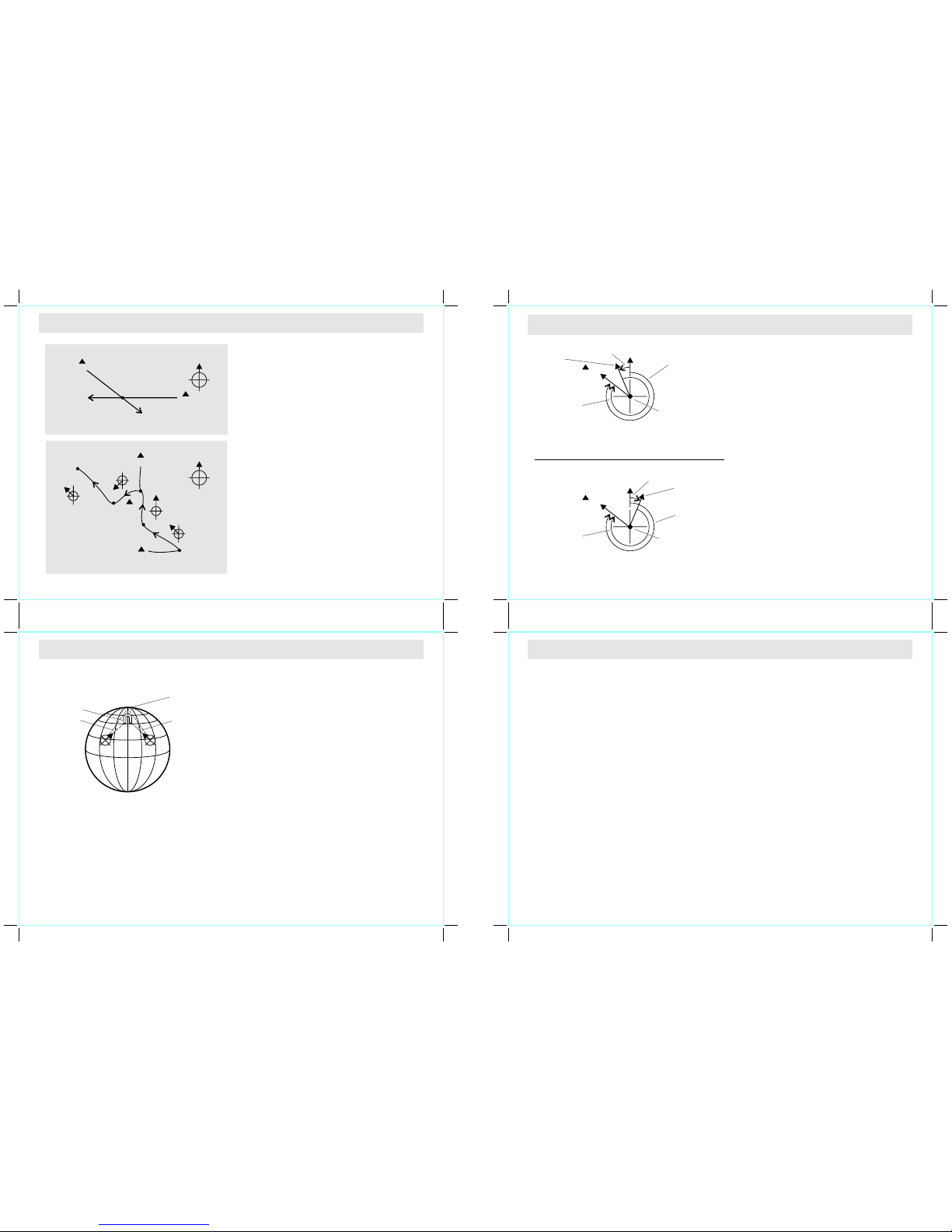
Chec k the posit ion b y Bac kward Bearin g
Spot two di stant id entifia ble lan dmarks s uch as
mou ntain s, li ght- house an d bui lding fr om y our
curr ent posi tion. L et's use the moun tain A and B
as the e xample.
Che ck o ut t he b ackw ard bea ring di rect ion of
moun tain A and B from your curr ent positi on: 135
from moun tain A and 2 70 from m ountai n B.
Draw the lin e 13 5 on the map whi ch s tarting fro m
the moun tain A , an d dra w an other line 270 on t he
map which start ing f rom t he mou ntain B.
Your curr ent po sition on th e map wil l be at the
inte rsectio n point (po int A) of the lin es 135 an d
270
Chec k the Trek Course Corre ct
The Watc h can kee p your co urse c orrect du ring
trek king. L ets use the s ample t rail A-E on the
adja cent diagram to illustr ate t his a pplicat ion.
Mark t he point s where t he trail t urns its d irecti on
or the tra il branch es its way, such as the po int A,
B, C, D and E on the adjacen t dia gram.
Chec k o ut the bearin g d irecti ons of poin t B from
poin t A (3 15 ), p oint C fro m point B ( 0 ), po int D
from poi nt C (225 ) , an d th en po int E fr om p oint D
(315 ).
Make sure tha t the hea ding directi on i s 315 in the
sect ion A to B. Perfo rming the simil ar ch ecking
when trek king i n the othe r trai l sec tions.
IMPO RTANT: If y ou are in dou bt of the dire ctions
and po siti ons of th e tr ail, co nsul ting the pa rk
admi nistrat ion o ffice before start ing t he tr ek.
+
+
8
8
+ 8
8
+
8
8
+
+
+
8 8
8
8
+ 8
Magn etic Declina tion Compens ation
+ To com pensat e an obje ct's ma gnetic b earing
to tr ue b ear in g: Su bt rac t w es ter ly ( W)
mag net ic d ecli nati on or add eas ter ly ( E)
ma gne ti c d ecl ina ti on wi th th e m ag net ic
bear ing ( MB).
+ 8
magn etic bearing 8
+ 8 8
+ 8 8
+ 8
+ 8
+ 8
magn etic bearing 8
+ 8 8
+ 8 8
+ 8
+ 8
Exam ple 1 : Wes terly magne tic d eclinat ion 2 3
and the 323 .
TB = M B - W. W hile MB = 323 ; W =23
TB = 3 23 - 23
TB = 300
The true bearin g wil l be 300 .
Exam ple 2 : Eas terly magnet ic d eclinat ion 2 2
and the 2 78 .
TB = MB + E. Whil e MB = 278 ; E = 22
TB = 278 + 22
TB = 300
The true bearin g wil l be 300 .
True No rth
Magne tic
Decli natio n
Magne tic
Decli natio n
Magne tic
North
4110 m
2120 m
3120 m
poin t A
(sta rting p oint)
poin t B
A Sampl e Trail on a M ap
poin t D
poin t E
(fin ish poi nt)
poin t C
3158
2258
08
3158
moun tain B
Check Curr ent P osition By Backwar d Bea ring
moun tain A
2708
1358
poin t A
0
0
Comp ensate the Bea ring
with W esterly (W) Ma gnetic Declin atio n
Comp ensate the Bea ring
with E asterly (E) Ma gnetic Declin atio n
True B earin g (TB) =
Magn etic Be aring (M B) - Wes terly M agneti c Decli nati on (W)
True B earin g (TB) =
Magn etic Be aring (M B) + Eas terly M agneti c Decli nati on (E)
3008 (T B) = 278 8 (MB) + 22 8 (E)
300 = (MB) - 23 (W) 8 (TB) 32 38 8
magn etic
decl inati on
238 W
magn etic
decl inati on
228 E
true
bear ing
3008
true
bear ing
3008
magn etic
bear ing
3238
magn etic
bear ing
2788
true n orth
08
true n orth
08
magn etic
nort h
magn etic
nort h
objec t B
obje ct B
poin t A
poin t A
9.7 Compass Mode - Magnetic Declination of Major Cities
No. Countr y/Place Major City De clination
1 Afghanis tan Kabul +3E
2 Australi a Canbe rra +12E
3 Austria Vienna +3E
4 Bahrain M anama +2E
5 Banglade sh Dhaka +0E
6 Belgium Brussel s +0E
7 Brazil Brasilia -21W
8 Canada Ott awa -14W
9 Chile Santiago +3E
10 C hina Beijing - 6W
11 C hina Hong Kong -2W
12 C osta Rica San Jose -1W
13 C uba Havana -4W
14 C zech Republic Pr ague +3E
15 D enmark Cope nhagen +3E
16 E gypt Cairo +4E
17 F inland Helsin ki +8E
18 F rance Paris - 1W
19 G ermany Berlin +3E
20 G reece Athens +4E
21 H ungary Budapes t +4E
22 I ndia New Delhi +1E
23 I ndonesia Jak arta +1E
24 I srael J erusalem +4E
25 I taly Rome +2E
26 J apan Tokyo -7W
27 J ordan Amman +4E
28 K enya Na irobi +0E
29 K orea Seoul -8W
30 M alaysia Kuala Lumpur +0E
31 M exico Me xico City +6E
32 N epal Kathman du +0E
No. Countr y/Place Major City De clination
33 N etherlands Amster dam +0E
34 N ew Zealand Wellin gton +2 2E
35 N orway Os lo +2E
36 P akistan Islamabad +2E
37 P hilippines Manila -1W
38 P ortugal Lisbo n -3W
39 R ussia Moscow +10E
40 S ingapore S ingapore +0E
41 S outh Africa Cape Town -2 4W
42 S pain Madri d -2 W
43 S weden S tockholm +5E
44 S witzerland Bern +1E
45 Taiwa n Tai-pei - 4W
46 T hailand Bangkok -1 W
47 U AE Abu Dh abi +2E
48 U nited Kingdom London -2W
49 U nited States Washington, DC -11W
50 U nited States Juneau +22E
51 U nited States Phoenix +11E
52 U nited States Little Rock +1E
53 U nited States Sacrament o + 14E
54 U nited States Denver +9 E
55 U nited States Atlanta -4W
56 U nited States Honolulu +10E
57 U nited States Boston -15W
58 U nited States Saint Paul +1E
59 U nited States Jackson +0E
60 U nited States Santa Fe +9E
61 U nited States Oklahoma Cit y +5E
62 U nited States Salem +16E
63 U nited States Harrisbur g -11W
64 U nited States Salt Lake City +1 2E
NOTE: Since ma gnetic declin ation will be chang ed as going with time , recommend to chec k the update data from fo llowing site:
http://w ww.magnetic- declinati on.com/ & http:/ /www.ngdc.no aa.gov/geo magmodels/ Declinatio n.jsp
Page 8
9.8 Calibrating Mode - Calibrating the Compass
9.9 Calibrating the Compass - Rotation Calibration Display
9.10 Calibrating the compass - Magnetic Declination Display
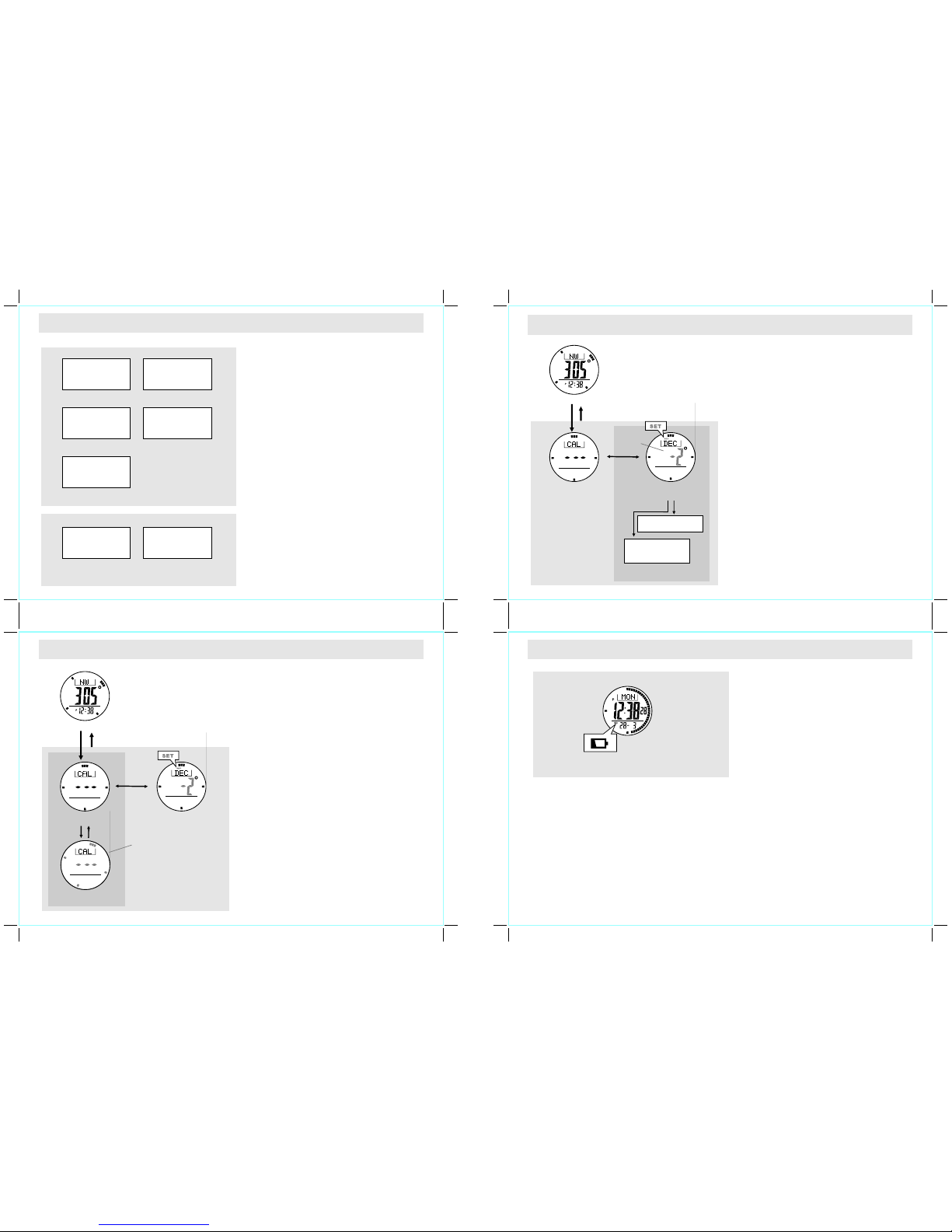
When to Calibra te th e Com pass
+ Th e Wa tch has to emplo y a com pass calib ration
in one o f the follo wing conditi ons:
+ Th e Watc h is used for t he fi rst ti me,
+
+
+
+
How to C alibrat e the Comp ass
+ Th e com pass cali bration i nclude s two di fferent
proc esses, the y ar e th e Ro tation Cal ibratio n a nd
Magn etic Declina tion Setting .
+ Ro tation C alibra tion: Tur n th e wa tch for m ore
than 2 turn s in the Ro tation C alibrat ion Disp lay
to
+ Ma gnetic Dec linatio n S etting: In put the magnet ic
decl ination of the city w hich is c lose to y our
curr ent posi tion in to the Wat ch in the Mag netic
Decl ination Disp lay
+ It i s a dvisab le to carry ou t them both fr om time
to time, this pra ctice achiev es t he m ore a ccurate
comp ass r eading.
IMPO RTANT: If th e Watch has not been calibra ted,
the dir ectio n mad e by the Wat ch ma y be an
inac curate direc tion.
The batte ry has been repl aced,
The bear ing dir ection digi ts are flas hing, a nd
the "OFF CAL" indica tor a ppeared ,
The comp ass use in a new regi on w here is far
apar t fro m the pla ce in whic h the com pass had
been cali brated,
The u ser int ends to reg ulate t he prec ision of
the digit al com pass.
regu late the pr ecisio n of the d igital compa ss.
Rota tion Calibra tion Display
+ To s elect the Rot ation Cali bratio n Disp lay,
hold the [M] button in C ompass Displ ay.
+ To start rotat ion c alibrat ion, press [S/S] butt on
once , and then the pointe r will star t rot ating.
+ Wh en the poin ters is rota ting, tu rn the watch
(kee p pa rallel to the hori zon) in the sa me
dire ction as th e rota ting po inters for more
than 2 t urns.
+ W hen th e 2 -t urn ro tat io n c ali bra ti on is
comp leted, pr ess the [S /S] or [L/R ] button t o
stop the calibr ation and the po inter.
+ Wh en t he p ointer is sto pped, ho ld the [ M]
butt on t o ba ck t o th e C ompass D isplay o r
pres s th e [M ] but ton once to set the m agneti c
decl ination .
Magn etic Declina tion Display
+ Ch eck t he pr evious c hapter 9. 7 to g et th e
magn etic declina tion of th e city whic h is close
to your cu rrent posi tion. That an gle wi ll be
inpu tted into t he Wat ch du ring t he ca librati on.
+ To selec t Ma gnetic Dec linatio n D isplay, pres s
the [M] button in R otatio n Cali bratio n Disp lay.
+ Wh en th e cu rrent mag netic de clinat ion is
appe ared, pr ess the [ S/S] or [ L/R] but ton to
incr ease / decr ease the nu mber. (Hol d down
the but ton to change t he number at a high er
spee d).
+ Wh en th e set ting is co mpleted , hol d dow n the
[M] b utton t o ex it the s etting displ ay. Th e
Watch wi ll also exit t he setting d isplay if NO
keys troke has b een a ctivate d for 1 m inute.
Magn etic
Decl inati on Disp lay
Magn etic
Decl inati on Disp lay
Magn etic
Decl inati on Disp lay
Com pass Ca libra tion
Com pass Ca libra tion
Rota tion Ca libra tion
Stop D ispla y
Rota tion Ca libra tion
Stop D ispla y
Rota tion Ca libra tion
Turni ng Disp lay
Hold [ M]
Hold [ M]
Hold [ M]
Hold [ M]
[M]
[M]
Comp ass Mod e
Comp ass Mod e
10.0 Battery Indication & Battery ReplacementLow
Batt ery L ow Det ection
+ Wh en th e batt ery-lo w indi cator appea rs on the
disp lay, it mean s t hat th e capa city o f the
batt ery i s low. It i s r ecomm ended to re place
the batte ry wit h a new C R2032.
+ Ho wever, if the appe arance of batt ery-lo w
indi cator is cau sed by usin g the Watch und er
ver y co ld c ondit ion, th e in dicat or w ill be
di sa pp ea red w he n n or ma l t em pe rat ur e
retu rns.
NOT E: It is re comme nded to comp lete the
ba tter y re pla ceme nt by
Watch
NOTE : I f t he batter y h as been repl aced, foll ow
the previ ous chapter 9.9 to 9.10 to c alibra te th e
comp ass b efore using the compass .
a cer tifi ed ser vic e
agen cy, be cause th is c ontain s pre cise
elec tronic senso rs an d comp onents .
Batte ry Indic ationLow
digit s sel ected
(flas hing)
The Wa tch is us ed
for th e first t ime
"OFF C AL"
indi cator a ppear ed
Rota tion Ca libra tion
To Regul ate the
comp ass's p recis ion
To use the Wa tch
in a new r egion
Magn etic
Decl inati on Sett ing
The ba ttery
has be en repl aced
When to Calibra te th e Com pass
Comp ass C alibrat ion P rocess
[S/S ] / [L/R] [ S/S]
poin ters
rota ted at
15 sec onds
per tu rn
COMPCOMP
[S/S ]/[L/ R]
hold [ S/S]/ [L/R]
Incr ease / De creas e
the nu mber
Incr ease / De creas e
the nu mber
at a hig her spe ed
Page 9

11.0 Specifications
Rega tta Ti mer M ode
Reso lution
+ 1 second reso lution
Meas uring range
+ 99 hours 59 minute s 59 second s
Oper ation Mode
+ Do wn-coun t to zero, and then start up-cou nt
Quic k Set
+ 6 quick set values : 1, 3, 5, 10, 15, 45 mi nutes
Timer Soun ds
+ La st 10 minut es: B eep on ce fo r eve ry mi nute.
+ La st 1 minute : Bee p once for every 10 seconds .
+ La st 10 secon ds: B eep on ce fo r eve ry se cond.
+ At zero: Beep for 30 s econds.
Comp ass M ode
Meas uring range
Back light
+ El ectro-L uminesc ent ( EL) b ackligh t
Batt ery
+ Si ngle 3 V lit hium battery (CR2 032)
Reso lution
+ 18 displ ay (d igital)
+ 08 to 3598 ( digital )
Othe rs
+ Co mpass lock and B ackward comp ass b earing
Curr ent Ti me Mo de
+ Ho ur, minut e, seco nd, am, pm, m onth, d ate, an d
day of w eek
Time Syste m
+ 12 -hour or 24 -hour format
Cale ndar System
+ Au to- Cale ndar pr e-pr ogra mmed fr om t he y ear
2004 to 2099
Dail y Alar m Mode
+ 2 daily alarm s
+ Ho urly a nd ha lf ho ur chi me
Alar m Sou nds
+ So unds for 30 secon ds a t pr eset daily al arm time
ever yday
Chro nograph Mode
Reso lution
+ 1/ 100 se cond
Meas uring Range
+ 99 hours 59 minute s 59.9 9 sec onds
Oper ation Mode
+ Up -count from zero
Lap
+ La p memo ry of 100 lap
+ Re call l ap ti me an d tota l tim e
Dual Time Mode
+ Ho ur, min ute, second, am, pm
 Loading...