

Page 1
PSUFM1288B
Portable PA Speaker System and Microphone System
Questions? Issues?
We are here to help!
Phone: (1) 718-535-1800
Email: [email protected]
with Flame light. Rechargeable Battery, Wireless BT Streaming,
Handheld Microphone, MP3/USB/Micro SD/FM Radio
(8’’ -inches, 40 Watt)
Page 2
To be sure you take maximum advantage of all the speaker has to oer, read
these instructions carefully and use the set properly. Be sure to keep this manual
for future reference, should any questions or problems arise.
WARNING
CAUTION: TO REDUCE THE RISK OF ELECTRIC SHOCK, DO NOT REMOVE THE
COVER ON THIS SPEAKER. THERE ARENO USER-SERVICEABLE PARTS INSIDE.
REFER ALL SERVICING TO A QUALIFIED TECHNICIAN
The lightning ash with arrowhead symbol within an equilateral triangle is intended to alert
the user to the presence of "dangerous" voltage within the product’s enclosure that may be
of sufcient magnitude to constitute a risk of electric shock to humans.
Users should exhibit extra safety when this symbol appears in this instruction manual and
follow all precautions as they are stated.
The exclamation point within an equilateral triangle is intended to alert the user to the
presence of important operating and maintenance (servicing) instructions in this manual.
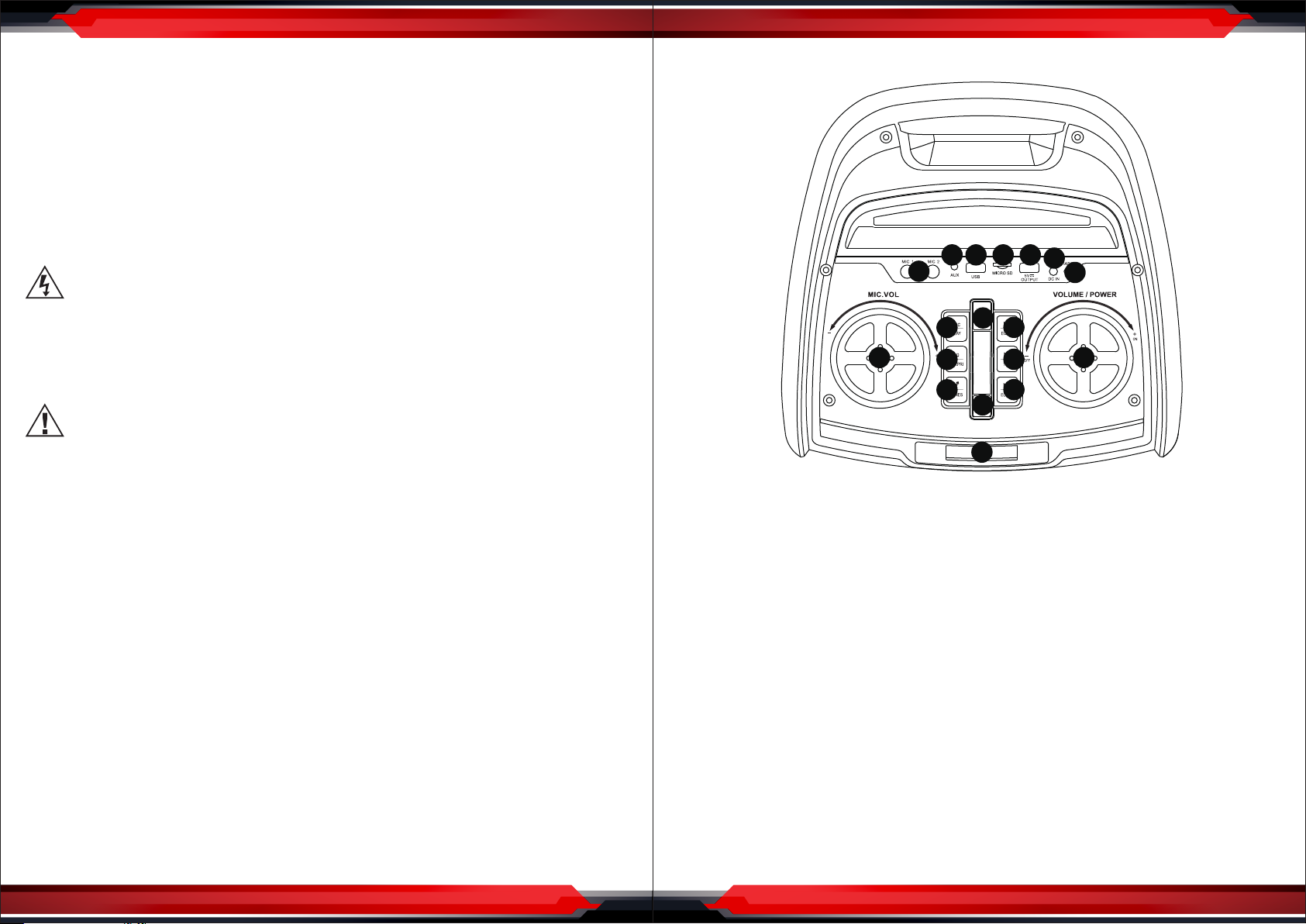
Control Panel Function:
2 3 4 5
1
12
9
8 17
10
11
14
15
16
6
DC 9V IN
7
13
18
1. Before using, please read the user manual carefully. Retain for future reference.
2. All warnings on the speaker and in the user manual should be adhered to.
3. Do not use the speaker near water.
4. For Ventilation Purposes:
• Do not block any of the ventilation openings.
• Do not install near any heat sources or re.
• Do not install in an airtight location.
5. Keep the cord and plugs in good order.
6. The speaker may be wiped down with a damp cloth once the unit has been
switched o and the plug removed.
7. Unplug the speaker during lightning storms or when not in use for long periods of
time.
8. Keep foreign objects and liquid from entering the unit to avoid a short circuit, re
and electrical accidents.
9. Keep the speaker in a dry location.
10. Refer all servicing to the agent or a similar qualied service center for repair.
www.PyleUSA.com
2
1. MIC 1/2 input jack
2. Aux input jack
3. USB connector
4. Micro SD card connector (The max memory size is 32G)
5. DC output (5V Output can charge your mobile phone/lpad)
6. DC input
7. Charging light indicator
8. Mic volume adjustment
9. Recording/Recording play
10. Microphone priority/EQ
11. Mic sound eect (5 kinds of dierent Mic sound eect)
12. LED mode (6 kinds of dierent ame light eect in whole metal grill)
13. MODE: AUX/USB/Micro SD/FM/BT selected
14. MP3 last song/FM last frequency/Echo VOL-
15. MP3 pause or play/FM auto scan frequency/TWS
16. MP3 next song/FM next frequency/Echo VOL+
17. Volume adjustment/Power ON/OFF
18. Working status display window
www.PyleUSA.com
3
Page 3
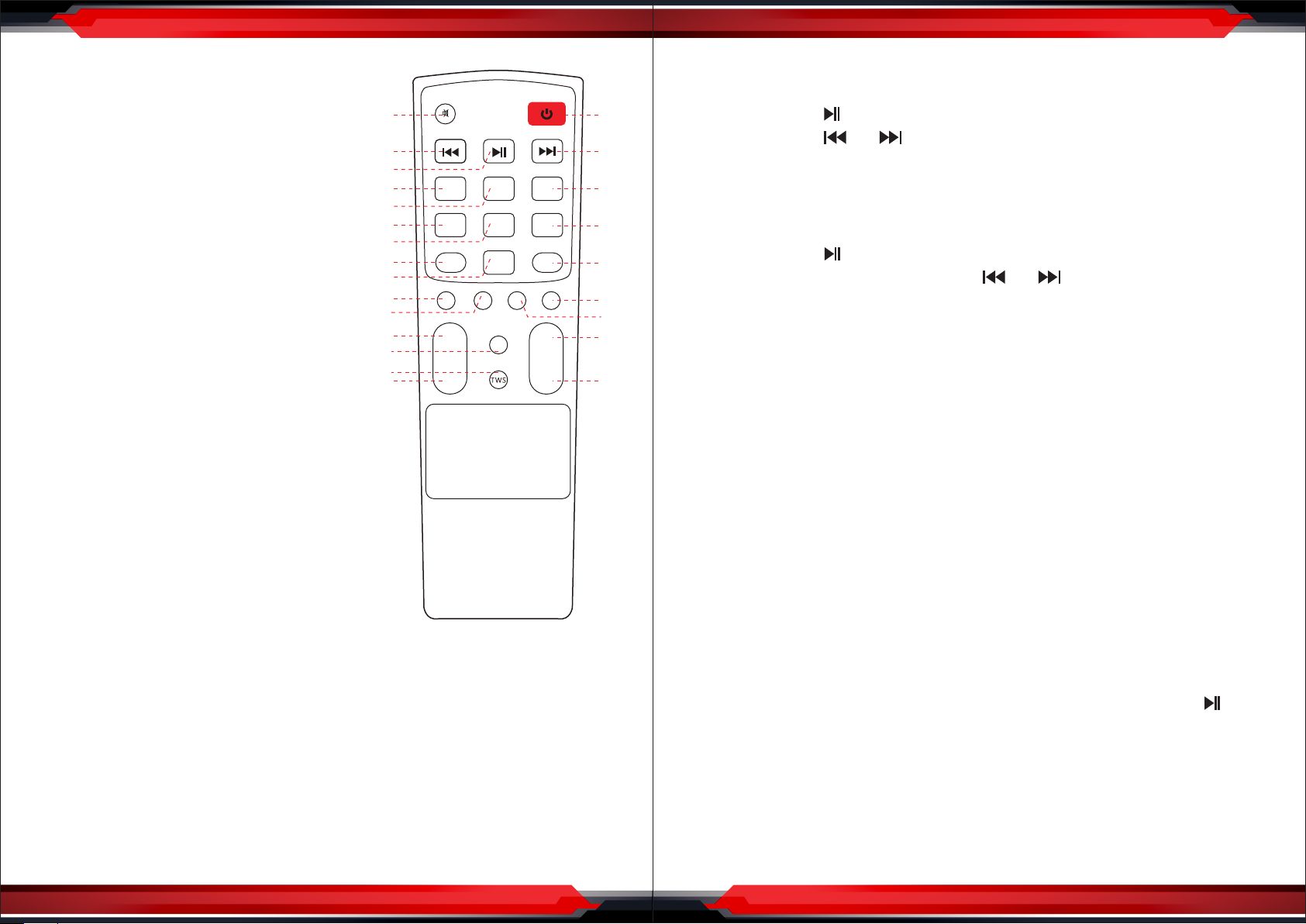
REMOTE CONTROL FUNCTIONS
1. Mute
2. MP3 previous song/FM last frequency
3. MP3 pause or play/FM auto scan frequency
4. AUX/USB/MicroSD/FM/BT input selected
5. LED ON/OFF
6. Record
7. Rec Play
8. Echo Volume -
9. Echo Volume +
10. BASS Volume -
11. BASS Volume +
12. MIC Volume +
13. EQ mode
14. TWS
15. MIC Volume -
16. POWER ON/OFF
17. MP3 next song/FM next frequency
18. Replay
19. Delete record
20. MIC FRI mode
21. Treble Volume +
22. Treble Volume -
23. Volume +
24. Volume -
10
11
12
13
14
15
FM Radio Operation
1. Press MODE Button to switch to FM mode.
1
16
2. Press and release ‘ ’ Button again to save a channel under auto scan.
3. Press and release ‘ ’ or ‘ ’ Button to select the previous or next channel.
2
3
4
5
6
7
8
9
LED
MODE
ON/OFF
REC
ECHO- ECHO+
-
M.VOL
REC
PLAY
+
BASS TREBLE
+
EQ
-
REPEAT
R-DEL
M-FRI
-
+
+
VOL
-
17
18
19
20
21
22
23
24
USB/MicroSD Operation
1. Insert a USB or MicroSD card memory device into the corresponding slot to play
mp3 les automatically.
2. Press and release ‘ ’ Button to pause or play the music.
3. During music playing, press and release ‘ ’ or ‘ ’ Button to play the previous
or next song.
Important: To avoid damaging the USB/Micro SD device, do not take it out while
music is being played from it.
Auxiliary AUX Operation
1. Use the provided audio cable to connect your external device’s (e.g. mp3 player)
REMOTE CONTROL POWER
AUDIO AMPLIFIER 101
audio out to the AUX input on the speaker.
2. Press MODE Button to switch to AUX mode.
3. Turn on your external device and start playback.
TWS Function
This function allows you to connect two speakers wirelessly and to reproduce the
music from the same source at the same time.
The process to connect two speakers is as below:
INSTRUCTIONS
Wireless BT Connection
1. Set the On/O Switch to the on position. If the speaker is in Standby mode, press
the Power Button on the remote control to turn it on.
2. Press the MODE button on the unit or remote control repeatedly until 'BLUE'
ashes on the display.
3. On your BT-enabled device, search for the speaker name 'PyleUSA' and choose it
to connect.
4. When the device is connected, 'BLUE' will stop ashing and remain on the display.
Your device will show as connected to 'PyleUSA'.
www.PyleUSA.com
4
1. Take 2 speakers and name them A and B, In advance, A unit switch to Wireless BT
and start the scan function from your device and the phone will directly connect.
Then also switch B unit to Wireless BT function and then press and hold ‘ ’ button
on A unit, it will change to TWS function and it will automatically connect to B unit.
When the connection is successful, a "tick" tone will be heard on the B unit.
2. After connected successfully, on the B unit, the LED display will stop ashing,
having static "Blue" word, then you can hear the music from both the speaker, it
becomes left and right channel, true stereo. Press the TWS button again to exit TWS.
www.PyleUSA.com
5
Page 4
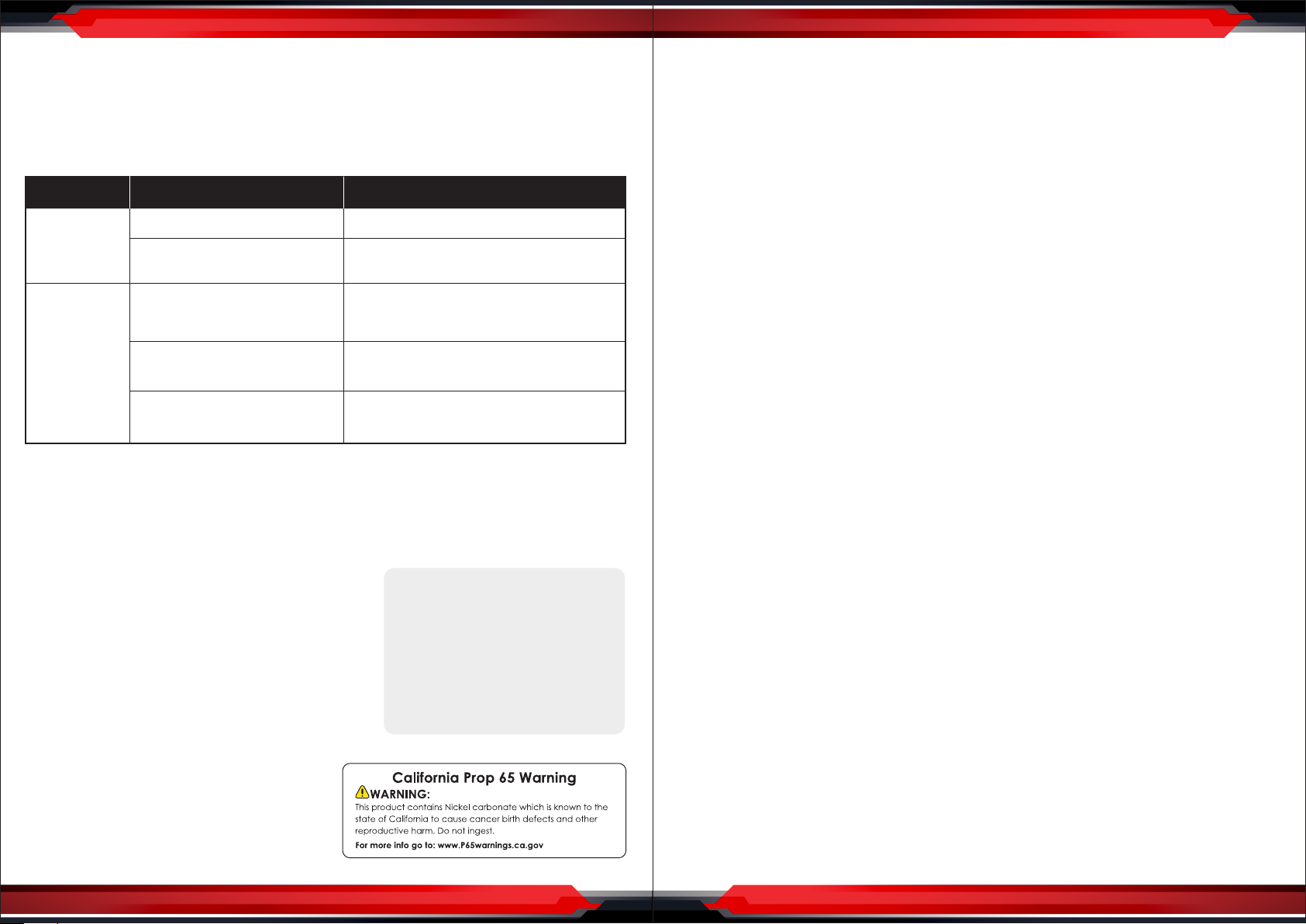
SIMPLE TROUBLESHOOTING
Try the troubleshooting steps below if you are having problems while using
your speaker. If problems still exist, please look for a qualied technician or
contact our company. To prevent electric shock or expand the scope of the
malfunction, do not repair by yourself.
Symptom
No function
light & No
sound
Function light
on but no
sound
lf the problem exists after checking related procedures above, please refer to the
appointed service agent or professional technician to x it. Do not attempt to open
the cover, otherwise we assumes no responsibility.
Possible problem Solution
1. Low Battery
2. Speaker power button
is not turned on
1. Cable misconnected
2. Speaker are not connected
or misconnected
3. Audio signal is not transmitted
to speaker
lnsert the Adapter to charge the battery
Turn on the button’
Turn off the power, check the input
jack to ensure proper audio signal is
connected to relevant input jack
Power off, then check and confirm the cable
connection again
Check all the speaker if there is audio
signal output
Wireless BT Connectivity:
Instant Wireless BT Music Streaming Ability
•
• Simple & Hassle-Free Pairing
• Works with All of Today’s Latest Devices
Smartphones, Tablets, Laptops, Computers, etc.
• Wireless BT Version: 5.0
• Wireless BT Network Name: 'PyleUSA’
• Wireless Range: Up to 30’+ ft.
What's in the Box:
Speaker
•
• Wireless Microphone
• Remote Control
• 3.5mm Audio Cable
• 2A Microphone Battery
• (2) 3A Remote Control Battery
Audio Recording Mode:
It's Easy: One Button Record Activation
•
• Record Vocals Via Microphone
• Ability to Record Vocals via Microphone
• Records to USB Flash & SD Memory Card
• Audio File Type Created: MP3
System Features:
•
PA Loudspeaker System
• High-Powered Rechargeable Speaker Tower
• Hassle-Free, Quick Setup Audio & Vocal Projection
• Wireless BT Music Streaming
• Built-in Rechargeable Battery for Portability
• Includes Wireless Handheld Microphone
• Mic Priority Control: Automatic Vocal Talkover over Music
• FM Radio with Digital LED Display
• Connect & Stream Audio from External Devices
• USB Flash & Micro SD Memory Card Readers
• 1/4'' Microphone Input
• Aux (3.5mm) Jack
• Treble Bass Echo Volume Controls
• Full Range Stereo Sound Reproduction
• Impressive Bass Response
• Convenient Carry Handle & Wheels
• External Battery/Power Supply Support: DC 5V
• Perfect for Karaoke, Crowd Control, Public Even Gatherings
Technical Specs:
•
Power Output: 40 Watt MAX
• Sound System: 8” Woofer with Piezoelectric Tweeter
• Wireless Microphone Type: VHF Band
• Frequency Response: 45Hz-20KHz
• Sensitivity (1w/1m): 650mV
• Impedance: 4 Ohm
• Maximum SPL: 128dB
• Dispersion (@6dB): H90 V50
• Crossover: 3kH LF: 120Hz-4kHz, HF: 4KHz-15KHz
• LED Lights Power Switch: ON/OFF
• Maximum USB Flash / Micro SD Memory Card Support: 32GB
• Microphone Battery Operated: Requires (2) x 'AA' Batteries, Included
• Rechargeable Battery: 7.4V Li-ion Battery, 3600mAh – 18W adapter
• Power Supply: 110-220V
• Unit Dimensions (L x W x H): 11.8’’ x 12.20’’ x 30.12’’ –inches DBL
www.PyleUSA.com
6
www.PyleUSA.com
7
 Loading...