

Page 1
Visit Our Website
SCAN ME
PyleUSA.com
Questions or Comments?
We are here to help!
Phone: 1.718.535.1800
PyleUSA.com/ContactUs
PSUFM1043BT
Wireless BT PA Loudspeaker Karaoke
Entertainment System
USER GUIDE
Page 2
We recommend that you read this manual carefully so that you can fully take
advantage of the advanced and convenient functions of the PA Loudspeaker
Karaoke Entertainment System. We also recommend that you keep this manual
in a safe and handy place for future reference.
CAUTION
TO PREVENT THE RISK OF ELECTRIC SHOCK, DO NOT REMOVE COVER OR BACK.
NO USER-SERVICEABLE PARTS INSIDE. REFER SERVICING TO QUALIFIED PERSONNEL.
SAFETY INSTRUCTION
1. Read this manual carefully before using. Retain for future reference.
2. All warnings on the speaker and in the operating instructions should be adhered to.
3. Do not use this apparatus near water.
4. Do not block any of the ventilation openings. Install in accordance with the
manufacturers instructions. Do not install near any heat sources such as radiators,
heat registers, stoves, or other apparatus (including ampliers) that produce heat.
Do not install the speaker in an airtight location.
5. Protect the power cord from being walked on or pinched particularly at plugs,
convenience receptacles, and the point where they exit from the apparatus.
6. Switch OFF and unplug then use a soft cloth to clean the exterior of the unit if it
becomes dirty. If necessary, use a damp cloth that has been wrung out well to
wipe it.
7.Unplug this apparatus during lightning storms or when unused for long periods of
time.
8. Keep foreign objects and liquid from entering the unit to avoid a short circuit, re
and electrical accidents.
9. Place the speaker in a dry location.
10. Refer all servicing to qualied service personnel. Servicing is required when the
apparatus has been damaged in any way, such as power-supply cord or plug is
damaged, liquid has been spilled or objects have fallen into the apparatus, the
apparatus has been exposed to rain or moisture , does not operate normally, or
has been dropped.
FCC STATEMENT
This equipment has been tested and complies with the limits for a Class B digital device, per part 15 of the FCC Rules. These limits are
designed to provide reasonable protection against harmful interference in a residential installation. This equipment generates, uses,
and can radiate radio frequency energy, and if not installed and used per the instructions, may cause harmful interference to radio
communications. However, there is no guarantee that interference will not occur in a specic installation. If this equipment does
cause harmful interference to radio or television reception, determined by turning the equipment o and on, the user is encouraged
to correct the interference with one or more of the following measures:
Reorient or relocate the receiving antenna.
Increase the distance between the equipment and the receiver. Connect the equipment to an outlet on a dierent circuit from the
one the receiver is connected to. Consult the dealer or an experienced radio/TV technician for help.
Caution: Changes or modications not explicitly approved by the manufacturer could void your authority to operate this equipment.
Compliance: This device complies with part 15 of the FCC Rules. Operation is subject to the following conditions: (1) This device must
not cause harmful interference, and (2) this device must accept any interference received, including interference that may cause
undesired operation.
RF Exposure Information:
The device meets general RF exposure requirements and can be used safely.
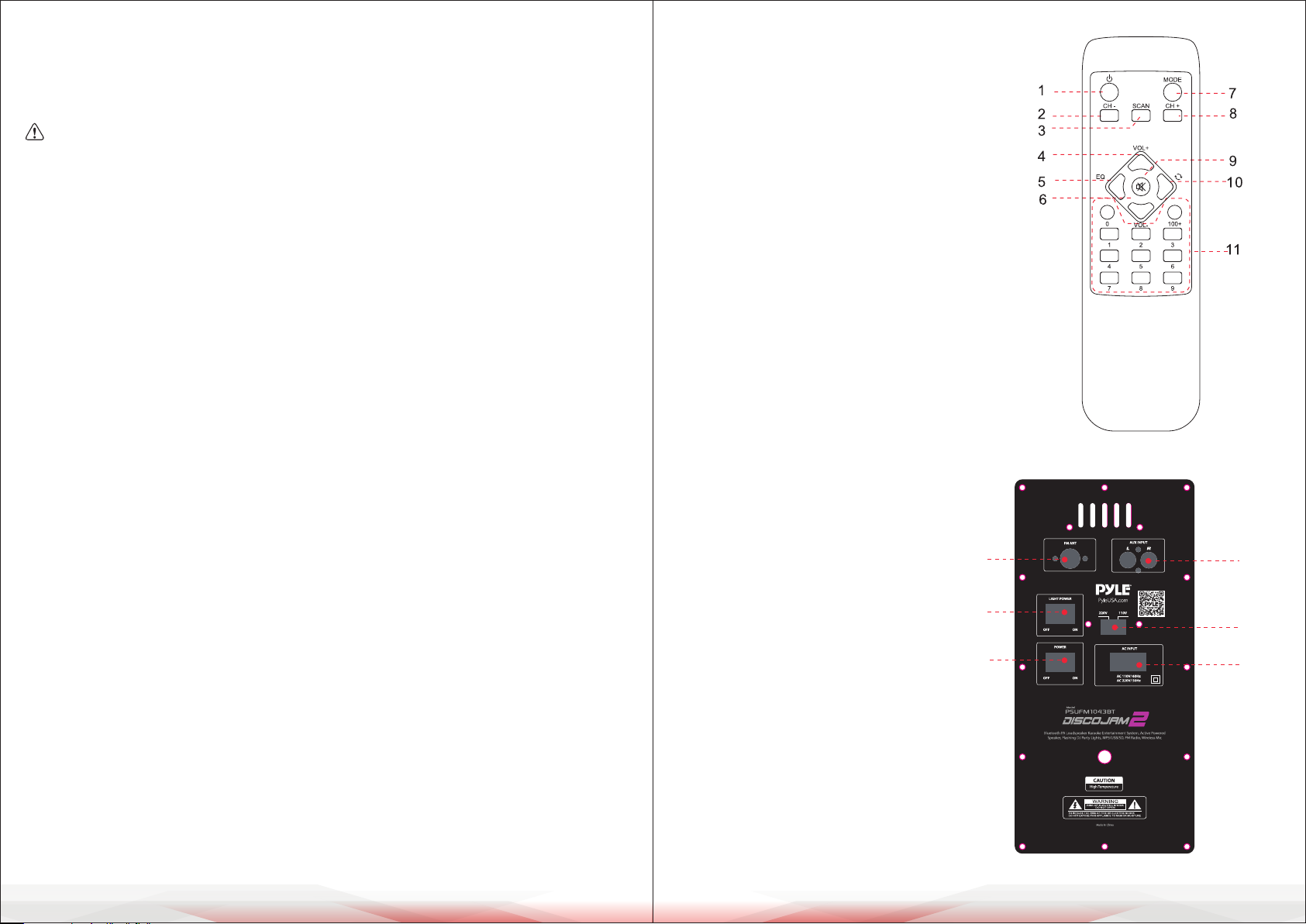
REMOTE CONTROL
1. Standby
2. MP3 last song/FM last frequency
3. MP3 pause, Play/FM scan frequency
4. Increase sound volume "+" of main channel
5. EQ mode adjustment
6. Decrease sound volume "-" of main channel
7. AUX/USB/SD/FM/BT Input selected
8. MP3 next song
9. Mute
10. Repeat
11. 0-9: through selected song
BACKBOARD FUNCTION
1. AUX input
2. 110V and 220V voltage switch
3. Electricity supply AC110V/60Hz,
AC 220V/50Hz
4. FM antenna
5. LED power ON/OFF
6. Power ON/OFF
4
5
6
1
2
3
www.PyleUSA.com
2
www.PyleUSA.com
3
Page 3
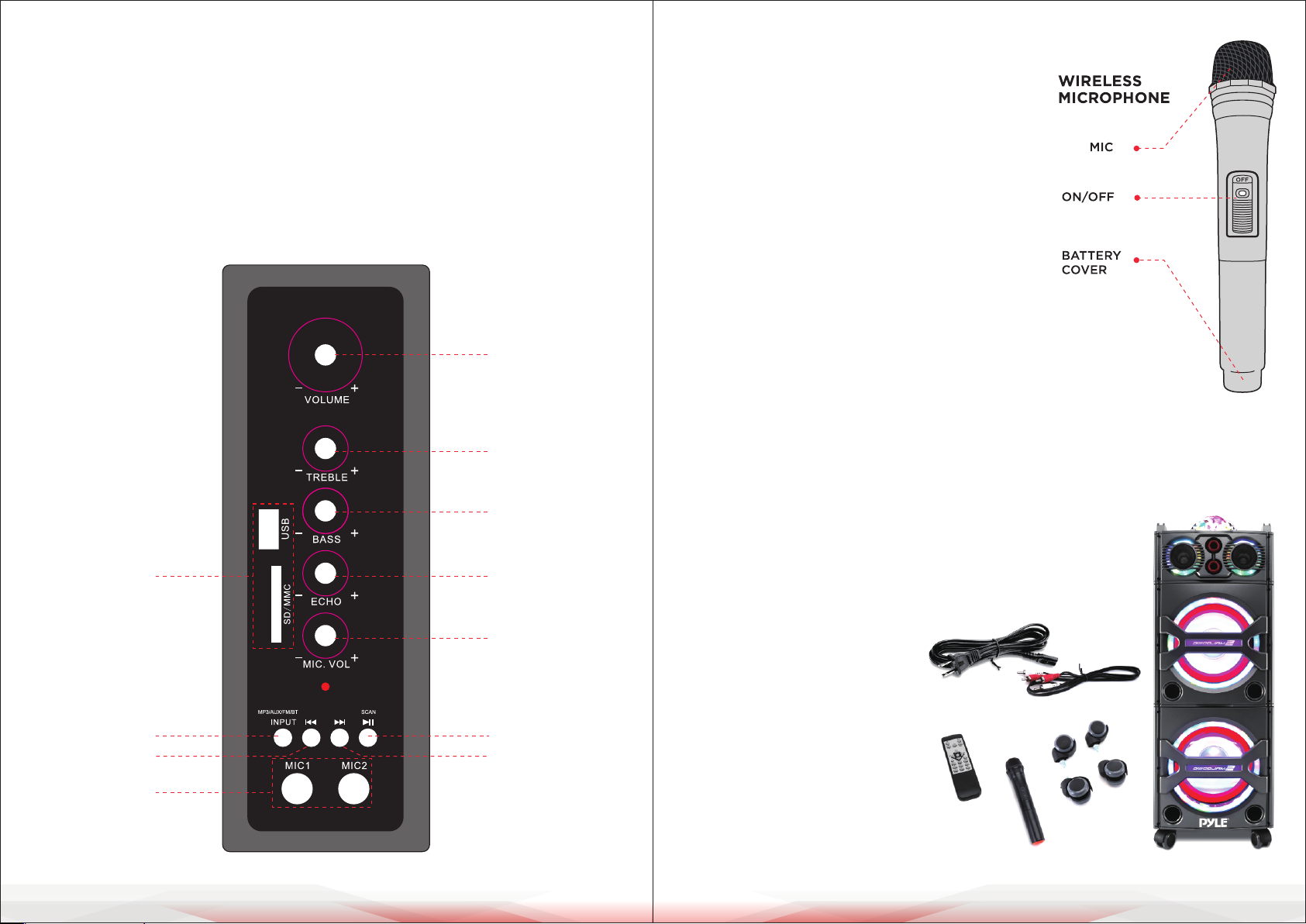
CONTROL PANEL
WIRELESS MICROPHONE OPERATION
Front board Function:
1. Volume adjustment
2. Treble adjustment
3. Bass adjustment
4. MIC echo adjustment
5. MIC volume adjustment
6. MP3 pause or play
7. MP3 next song/FM next frequency/VOL+
8. USB/SD/MMC card connector
9. AUX/DVD/MP3/FM/BT input select
10. MP3 last song/FM last frequency/Volume-
11. MIC input jack
1
2
3
1. Replace the battery when noise occurs during
use, staccato, or distortion.
2. Turn o the power switch after use.
3. If the microphone is not to be used for a long
period of time, remove the batteries to prevent
damage or injury from possible battery leakage.
4. When you turned ON the power switch and the
power indicator does not light, check the polarity
of the battery installation.
Wireless BT Streaming:
• Instantly Stream Music from Your Wireless BT Devices
• Works with All Your Favorite Wireless BT Devices
(iPhone, Android, Smartphone, iPad, Tablet, PC, etc.)
• Bluetooth Version: 5.0
• Wireless BT Range: 50'+ Feet
www.PyleUSA.com
4
10
11
• Wireless BT Network Name: 'Pyle Audio'
8
4
What's in the Box:
5
• Active Speaker Tower
• Wireless Microphone
• Power & Audio Connection Cables
9
6
7
• Detachable Rolling Wheels
• Remote Control
www.PyleUSA.com
5
Page 4
TROUBLESHOOTING
Try the troubleshooting steps below if you are having problems while using your
speaker. If problems still exist, please look for a qualied technician or contact our
company. To prevent electric shock or expand the scope of the malfunction, do
not repair by yourself.
SYMPTOM POSSIBLE PROBLEM SOLUTION
No function light
and No sound
Function light is
turned on but no
sound
Remote control
does not work
If the problem exists after checking related procedures above, please refer to
the appointed service ... Do not attempt to open the cover, otherwise we
assumes no responsibility
WARNING: Cancer and Reproductive Harm - www.P65warnings.ca.gov
1. Plug is not well connected
2. Speaker power button is
not turned on.
1. Cable misconnected
2. Speaker are not connected
or misconnected
3. Audio signal is not trans mitted to speaker
1. Before you press any function button, rst select the correct
source with the remote control instead of the main unit
2. Reduce the distance between the remote control and unit
3. Insert the battery with its polarities (+/-signs) aligned as
indicated
4. Replace the battery
5. Aim the remote controldirectly at the sensor on the front
of the unit.
1. Insert the plug into electrical
outlet.
2. Turn on the power button
1. Turn o the power, check the
input jack to ensure proper
audio signal is connected to
relevant input jack
2. Power o, then check and
conm the cable connection
again.
3. Check all the speaker if there
is audio signal output
Features:
• All-in-One Karaoke Entertainment System
• High-Powered Active Speaker Tower
• Multi-Colored DJ Flashing LED Lights
• Bluetooth Wireless Music Streaming
• USB Flash & SD Memory Card Readers
• Digital Audio File Support
• Includes Wireless Handheld Microphone
• FM Radio with Auto Station Scan
• (2) 1/4'' Microphone Inputs
• RCA (L/R) & Aux (3.5mm) Inputs
• Connect & Stream Audio from External Devices
• Convenient Carry Handles & Detachable Rolling Wheels
• Treble, Bass, Echo, Volume Controls
• DJ Party Lights ON/OFF Switch
Technical Specs:
• MAX Power Output: 2000 Watt
• Sound System: Dual 10'' Woofers, Dual 3'' Tweeters
• Frequency Response: 45Hz-20kHz
• Sensitivity (1w/1m): 92dB
• Impedance: 4 ohm
• Maximum SPL: 128dB
• Dispersion (@6dB): H90°X V50°
• Crossover: 3 KHZ
• Power Supply: 110/220V
• Microphone Battery Operated: Requires (2) x 'AA' Batteries, Not Included
• Maximum USB Flash / SD Memory Card Support: 32GB
• Dimensions: 16.1'' x 15.1'' x 42.0'' -inches
Register Product
Thank you for choosing PyleUSA. By registering your product, you
ensure that you receive the full benets of our exclusive warranty
and personalized customer support. Complete the form to access
expert support and to keep your PyleUSA purchase in perfect
condition.
PyleUSA.com/register
www.PyleUSA.com
6
www.PyleUSA.com
7
 Loading...