

Page 1

Page 2

PLEASE READ THIS MANUAL CAREFULLY BEFORE OPERATION
Subwoofer Specs:
Features:
• Loudspeaker PA System One
• Rugged, Durable & Reliable Sound
• Wireless BT Streaming Ability
• Wireless BT Music Streaming Ability
• Speaker System: 1x10'' Subwoofer, 8x3'' Neodymium Full Arrange Speaker
• Built-in Digital Audio Amplier with 4 Band DSP EQ Presets: Main, Monitor,
DJ, Speech
• 2 x XLR/F ¼'' -inch Combo (MIC/Line Input)
• 2 x 1/4’’ Jack line in, RCA input,1*Aux (3.5mm) Input, XLR Output
• Connect & amp; Stream Audio from External Devices
• TOP Panel Rotary Dial & Button Control Center
• Master Volume, SUB Volume, Treble, Bass Adjustable, Reverb
• Integrated Carry Handles
• Heavy Duty Engineered ABS Housing
Wireless BT Streaming:
• Instantly Stream Music from Your BT Devices
• Works with All Your Favorite BT Devices
(iPhone, Android, Smartphone, iPad, Tablet, PC, etc.)
• Wireless BT Version: 5.0
• Wireless BT Range: 100'+ Feet
• Wireless BT Network Name: 'Pyle'
• Size: 10'' -inch
• Material: Stamped Steel Basket
• Impendence: 4 Ohm
• Magnet: 30 oz.
• Voice Coil: 75mm, 1.5'' -inch
• Sensitivity: 120dB
• Frequency Response: 50Hz - 16kHz
Driver Specs:
• Size: 3'' -inch
• Material: Neodymium Magnetic
• Impendence: 16 Ohm
• Sensitivity: 104dB
• Voice Coil: Kapton
• Frequency Response: 200Hz-16kHz
Technical Specs:
• Max Power Output: 1600 Watt
• RMS Power Output: 350 Watt
• Amplier Class: D
• Inputs/Outputs XLR/F 1⁄4-Inch combo
• 1/4" TS/unbalanced and 3.5mm TRS/Stereo Input with RCA Input
• T.H.D.: 1%
What's in the Box:
• PA System One
• Power Cable
www.PyleUSA.com
2
• Crossover Frequency: 200Hz
• Power: 110-240V/ AC 50/60HZ
• Subwoofer Dimensions (L x W x H): 13’’ x 15.35’’ x 18.11’’ -inches
• Column Dimensions (L x W x H): 3.74’’ x 3.54 x 29.53’’ -inches
www.PyleUSA.com
3
Page 3
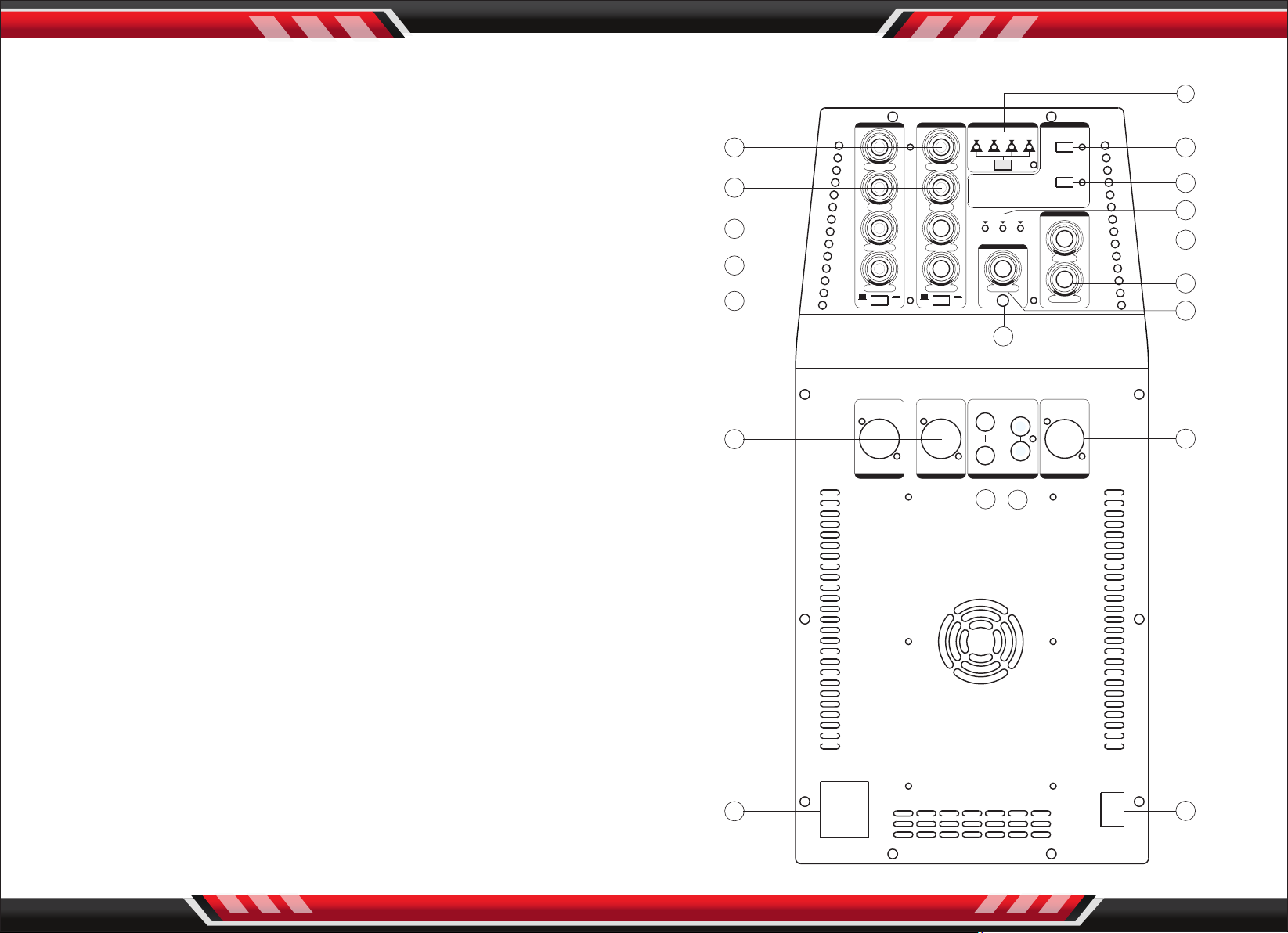
Function Description
Function Description
1. CH1/CH2 LINE IN/MIC IN Mix jack
2. LINE IN/MICIN Switch of CH1/CH2
Corresponding Channel
3. CH1/CH2 Corresponding Channel Volume control
4. CH1/CH2 Corresponding Channel Volume control eect
5. CH1/CH2 Corresponding Channel Bass control
6. CH1/CH2 Corresponding Channel Treble control
7. DSP mode selector switch and mode indicator
8. Wireless BT pairing button: Press and hold the button, the indicator light
ashes slowly, then press the indicator, the light ashes quickly.
Now you can connect your BT device such as mobile phone.
9. Link button: When two machines are used together, presses this button to
pair as a stereo.
7
CH1 CH2
6
TREB LE TREB LE
5
BASS BASS
4
REVE RB REVERB
3
VOLU ME VOLU ME VOLU ME
MIC MIC
2
LINE LINE
DSP BL UETO OTH
DJ
MONITO R
SPEECH
MAIN
STEP1: PRESS B UTTON T O PAIR YOUR B LUETOO TH DEVI CE.
STEP2: PRESS B UTTON O N BOTH ST EREO LOU DSPEA KERS
TOGETH ER.
POWER LIMIT SIGNA L
PA SYSTE M ONE
CH3/ 4
AUX IN
PAIR
LINK
VOLU ME
SUB
MAST ER
8
9
10
11
12
13
14
L
1
LINE I N/MI C IN LINE I N/MI C IN
CH1 CH2 CH3/4 LINK O UT
17
R
16
15
10. Indicator lamps: Signal indicator, power supply indicator and limit indicator
11. Subwoofer volume control
12. The whole device volume control
13. CH3/CH4 Volume control
14. CH3/CH4 3.5mm input jack
15. CH1/CH2CH3/CH4/BT Mixed Signal LINE OUT
16. CH3/CH4 RCA input jack
17. CH3/CH4 6.35mm input jack
18. Main power switch
19. Fused IEC mains inlet
www.PyleUSA.com
4
19
400W Max
100-240VAC 50/60Hz
FUSE TYPE: T5A L 250V
ON
18
OFF
POWE R
www.PyleUSA.com
5
 Loading...