

Page 1
使
HD LED PROJECTOR
User’s Manual
Page 2

Warning ……………………………………………………………1
Safety Precautions………………………………………………2
Caution ……………………………………………………………3
Introductions ………… ……………………4
Installation………………………………………………………7
full setting…………………………………………………7
standard setting( front projection)…………………8
installation method ………………………………………9
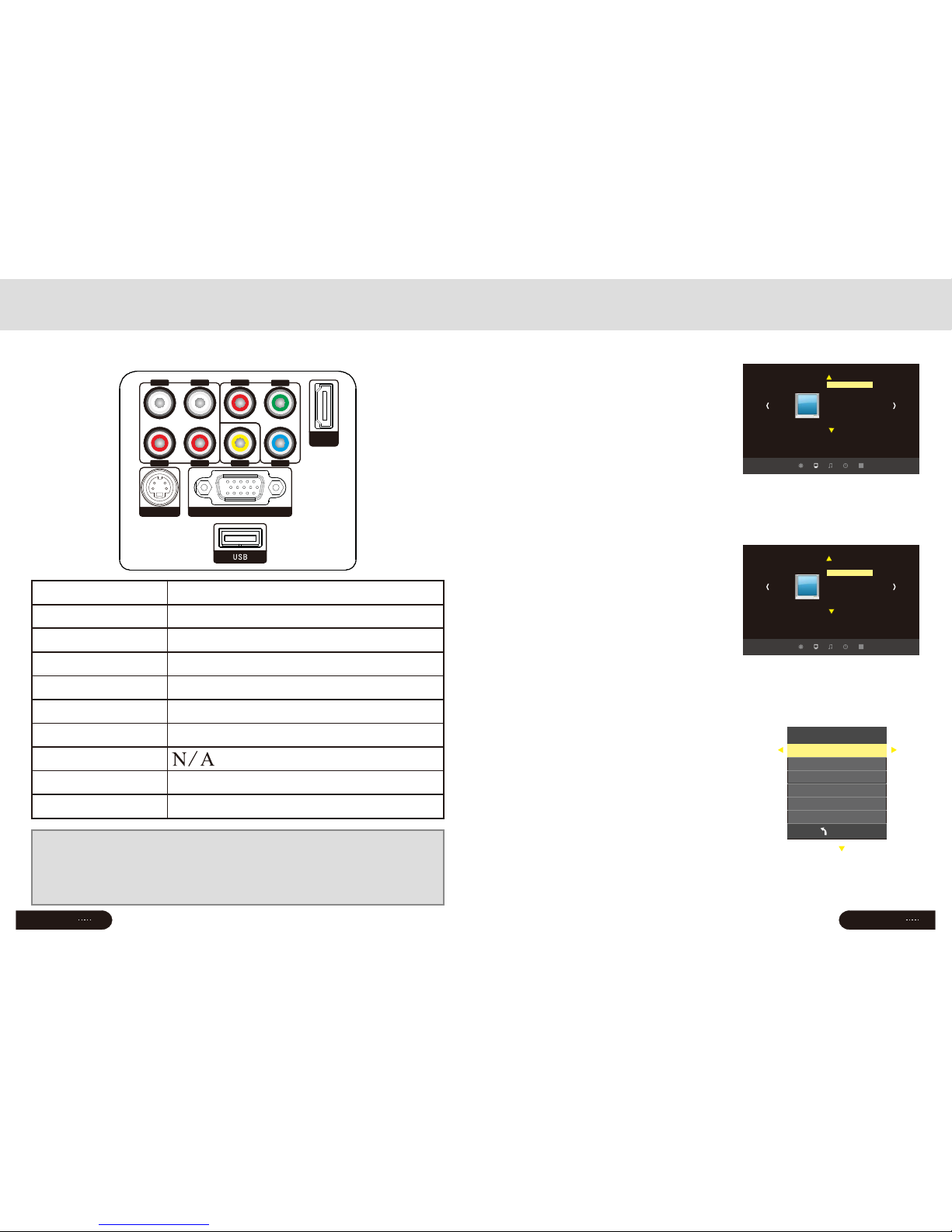
input terminals ……………………………………………10
Remote control ……………………………………11
Panel instruction …………………………………12
Turn on/shut down ………………………………………………13
turn on ………………………………………………………13
shut down ……………………………………………………13
Image adjustment…………………………………………………14
focus adjustment……………………………………………14
keystone adjustment………………………………………14
Menu settings ……………………………………………………15
1.Menu setting method ……………………………………15
2.Parameter adjustment……………………………………15
3.Picture ………………………………………………16
4.Audio ………………………………………………16
5.Time ………………………………………………16
6.OSD ………………………………………………17
7.Multimedia ……………………………………………17
Trouble shooting……………………………………………19
Specification ……………………………………………………21
Packing list&Accessories………………………………………22
……………………
………………
……………
………
…………
…………
……
Contents
Page 3
Warranty card Ⅰ
Return Date:
Cause of Malfuction:
Repair Record:
Service Station:
Signature:
Tes t Date:
Return Date:
Cause of Malfuction:
Repair Record:
Service Station:
Signature:
Tes t Date:
Return Date:
Cause of Malfuction:
Repair Record:
Service Station:
Signature:
Tes t Date:
Return Date:
Cause of Malfunction:
Repair Record:
Service Station:
Signature:
Tes t Date:
Maintenance record
Model Number:
Series Number
:
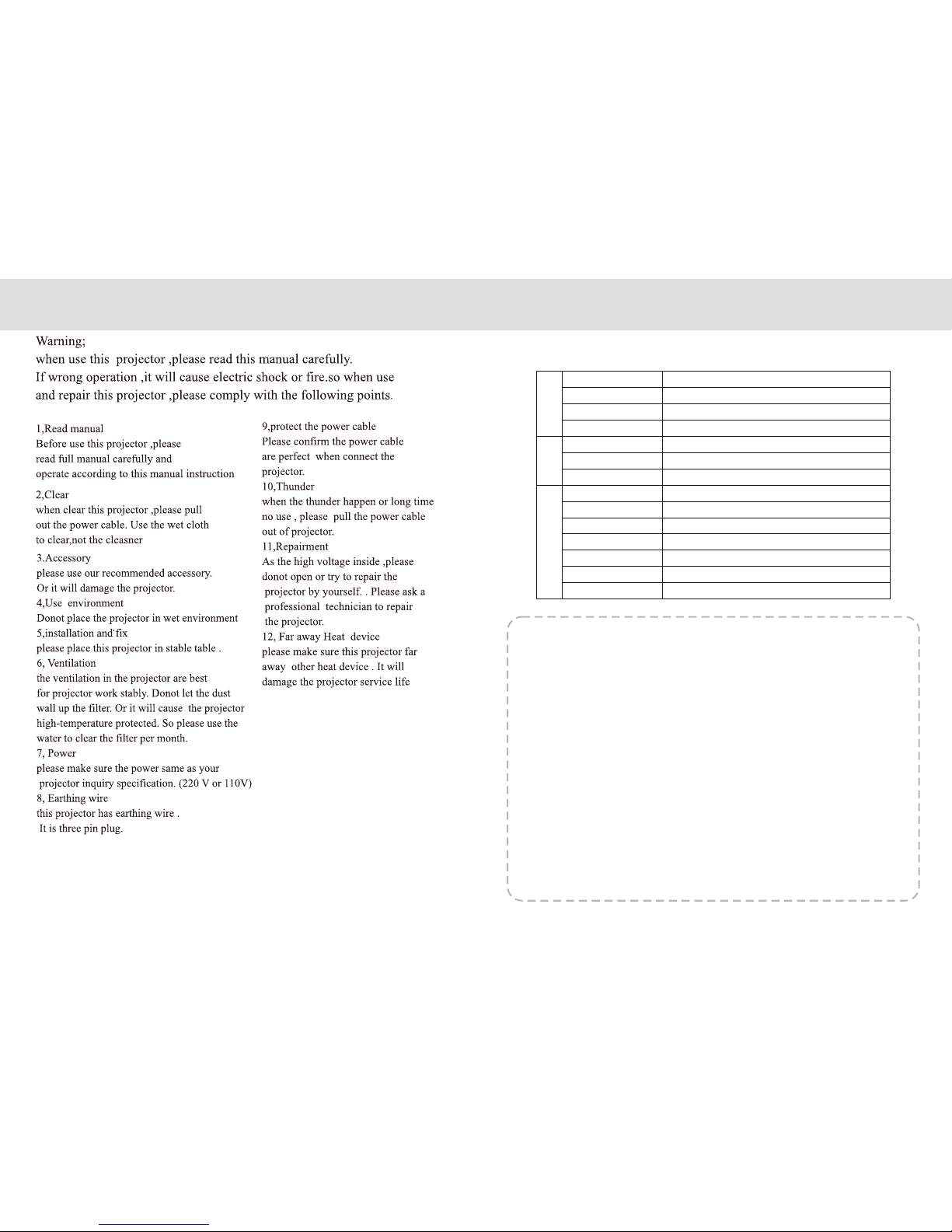
Warning:
Please remember the model and series
number of the projector in case of lost.
Please carefully check all accessories
with the pack list before throwing the package away.
When you use this projector, please carefully read user manual.
Warning:
High brightness lamp!
Avoid staring or look directly at the light,
specially for children.
Warning:
Avoid to place the projector in wet condition
in case of the electric shock danger.
High v oltag e insid e
DO NOT open except for technicians
WANING
It indicates there is a dangerous
Voltage inside that may cause shock
It indicates there is a instruction
for important operation
Warning:
As an A-class product, the projector may cause radio interference
Users shall take effective measures to deal with it.
• The remote control battery should be fixed correctly
Otherwise it will be damaged for overheat
• Make sure the remote control out of children reach
About the remote control battery
Warning
Page 4
Safety precautions
Warranty Card Ⅱ
The following information shall be f il led by sellers
Item NO .
Model NO.
Name
USER
Sales I NFO
Product
Address
Zip Code
Zip Code
Address
Sales Date
Installation Date
Invoice No
Series NO.
Phone NO.
Contact
INVOICE
Seller
2
Page 5
Page
3
Page
22
Page 6
VGA IN
HDMI
Svideo
L out
R out
R in
L in
Pr
Y
Pb
Video
Page
4
Introductions
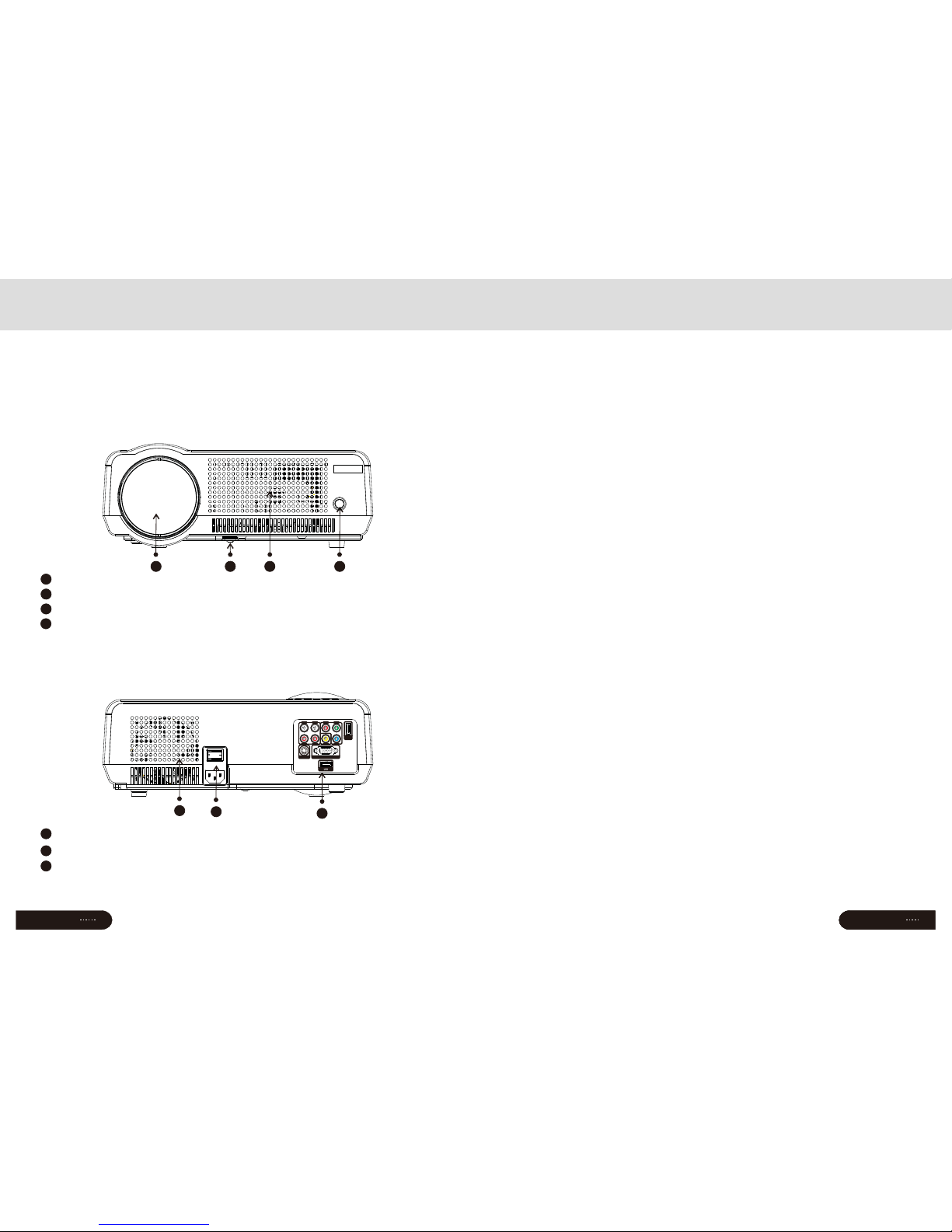
Projector Description
Front
Back
The projector is able to connect signals: HDMI,Y/Pb/Pr,VGA
and TV(optional),as well as stereo audio input. Please connect
in reference to the following diagrams
Input terminals
Details at page 10
7
Power switch
6
Hot winds output ventilation
5
21 3 4
6
5
7
Focus lens
1
IR receiver
2
Hight-feet adjustment
3
Cool winds input Ventilation
4
Packing list:
Please confirm the following after you open the package
Projector--------------------- ----1
Lens lid-----------------------------1
Remote control--------------------1
Power cable-------------------------1
AV cable--------------------------1
User manual-----------------------1
Extra fuse------------------------1
Len cleaner-------------------------1
PWM4x8 screws----------------------1
--
Optional accessories:
1.Projector screen(Matt White,Electric)
2.Ceiling Mounts
Packing list & Accessories
简体中文
13
Page
21
Page 7
简体中文
5
Page
5
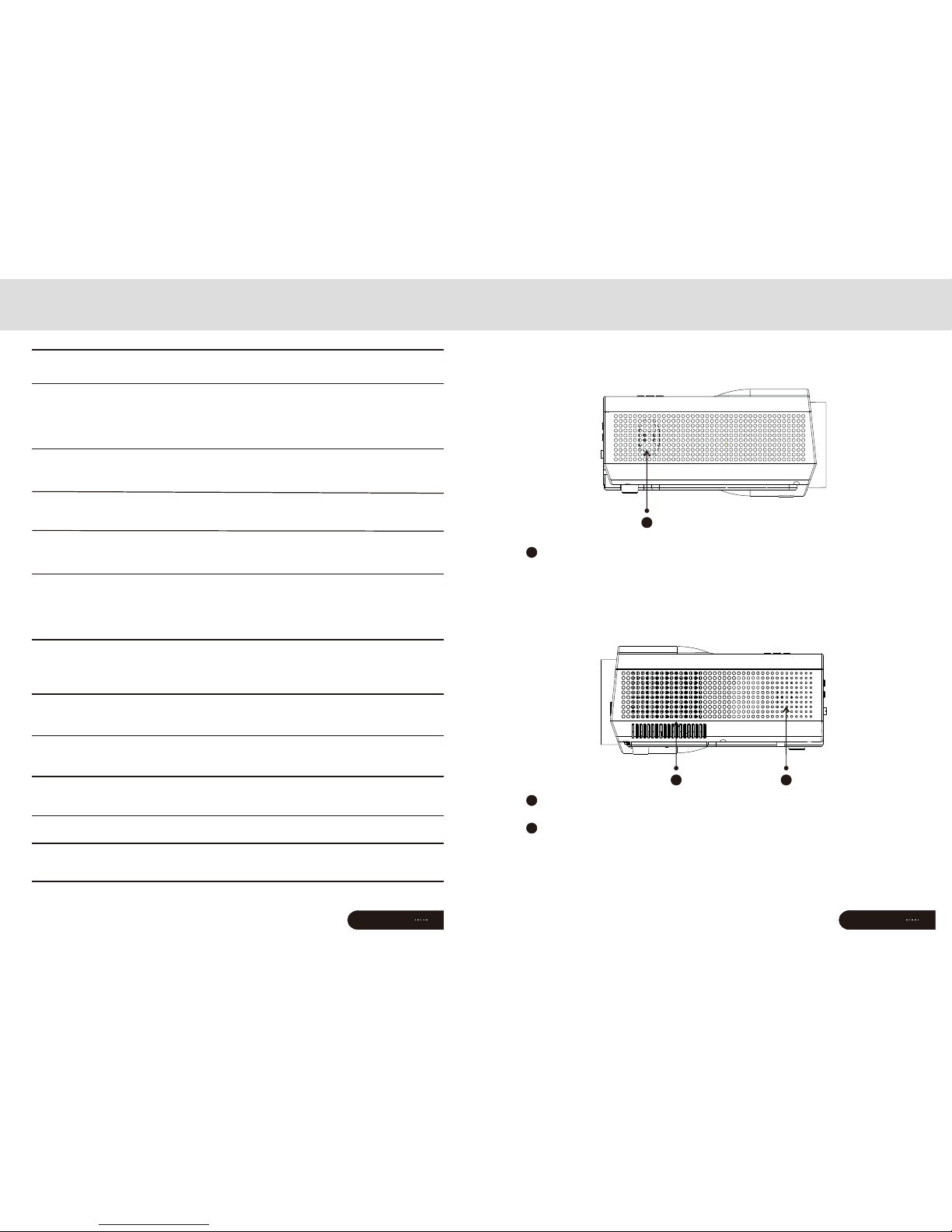
Instructions
Right
Left
1
2 3
Right channel speaker
1
Cool wind input ventilation
2
Left channel speaker
3
Specification
LCD Type 5.8"TFT Matrix RGB
Input signal video Component video(Ypbpr),VGA,
HDMI,USB,S-video,
Audio Stereo
Output signal Audio 2W*2 Speaker(optional)
LCD Native resolution 1280X768 support 1080P
Contrast ratio 2000∶1
Lens Aperture 3.8
Focus 198mm
Lamp LED 200W
Color-temputure 9300K
Life > 20000hours
Continuous working time < 24hours
Image Size 60~120inch
Brightness 2800 Lumens
Keystone ±15 degree
Power Voltage 100-220V~ 50-60Hz
Power
consumption 240W
Working condition Temperature +5℃~+35℃
Humidity 10%~65%
Store condition Temperature -10℃~+60℃
Humidity 10%~90%
Remote control Frequency 38KHz
Machine Size 350*275*140mm
Weight 3Kg
(Any changes on the parameter will not be noted)
Page
20
Page 8
Page
6
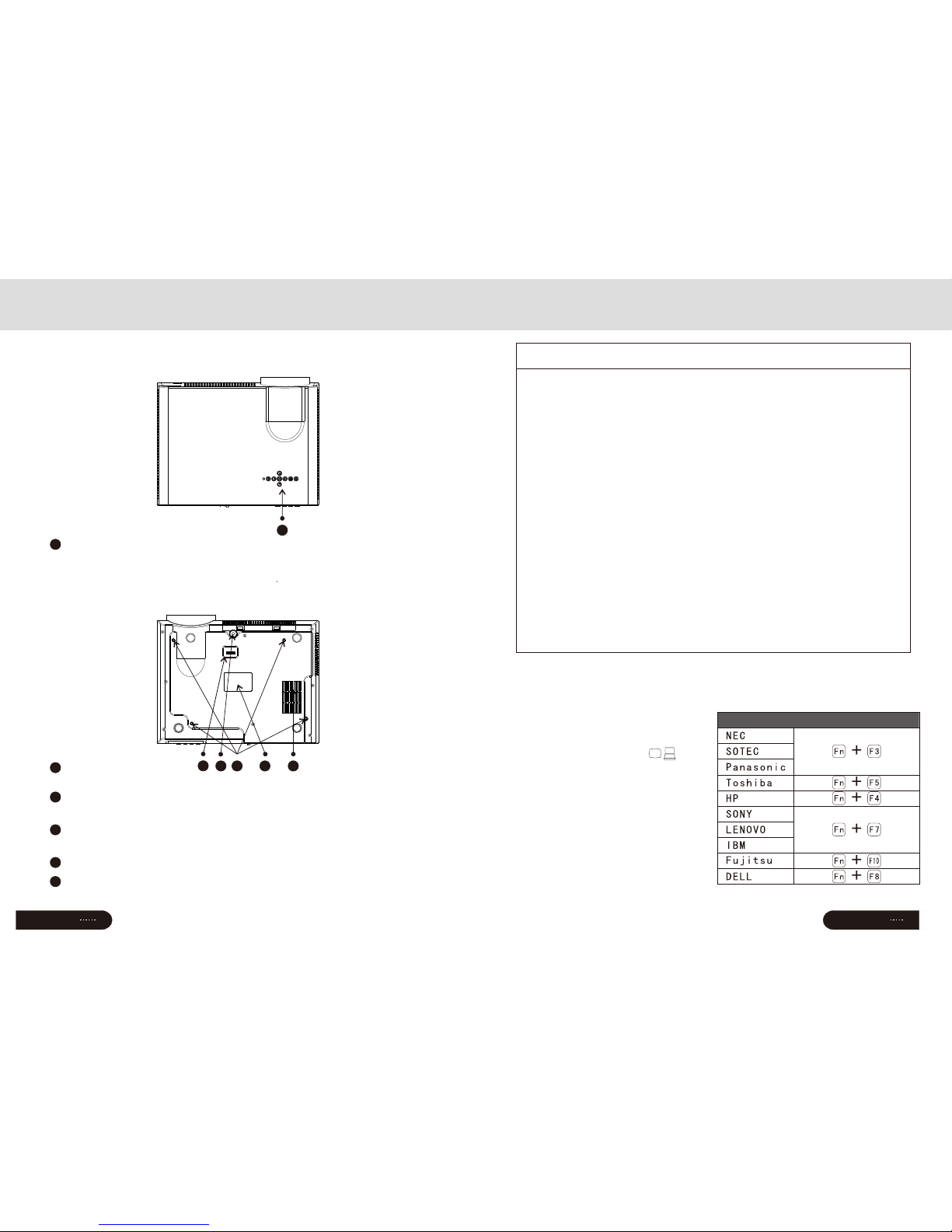
Introductions
TOP
Bottom
1
4 5 63
Control panel
Details at page 14
1
Projector mount hole(4holes)
Fix with M4x8mm。
4
Hight-feet adjustment
Details at page 14
3
Keystone adjustment
Details at page 14
2
Label
5
Cold wind input ventilation system
6
Page
19
FAQ
VGA with notebook
When connect the projector
with the note book,you may need
to press the Fn+F*(with on the
button
FAQ :
① Q:Blue screen,no picture,no sound
A:Input cables connected right?
② Q:Picture right,no sound
A:Input cables connected right?
Volum e at min. O r on Mu te
③ Q:Audio right,no picture
A:Input signal connected right?
In VGA mode,The P C refre sh ra te >75Hz
In VGA mode,The PC con trast r ati o is >1024* 768
④ Q:Can't find devi ces whe n plu ged wit h hard dr ive or fr esh d rive
A:Re-pl ug the de vic e
Check if the device is broken
⑤ Q:Can't play the movies
A:The for mat of th e vid eo is rig ht?
Files i s broke n?
Device is broken?
⑥ Q:There i s pictu re ,n o sound ?
A:The decode system doesn't match
2
VGA output function key
Page 9

Page
7
Speaker L
Subwoofer
Speaker C
Screen
Speaker R
Appreciate seats
DVD
Amplifier
Projector
Speaker LS Speaker RS
Please install in reference to the instruction below
Projector Installation
In order to get a good image quality, do not expose the projector to the
sunshine or other strong light, close the curtain if you use the projector
in daytime
Installation
Page
18
Trouble shooting
The projector is so easy to use as the TV.While some problems my
occur because of the environment and voltage. Please try to recognize the
fake malfunction before refer to the technicians
Problem
The possibility reason
1.when turn on
the power switch,
the indicator light
do not work
◎The power switch fuse is burned
2.The remote
control
can not
turn
on projector
◎The power switch turn on or off?
◎The remote control out of battery?
◎Something stands between the remote and IR
◎Strong light on IR directly
◎The power can does not connect well
◎Is there an input signal?
◎Is the input cable plugged well ?
◎Under PC model ,is the refresh rate >75KHz?
◎When the projector connect with the notebook,
set the screen as VGA mode
◎Is the channel set-up correct?
3.No
image on
the screen
4.Auto-off after
working for a
while
◎The voltage is not stable
◎The projector ventilation is block
◎The over-heat protection system
◎Check the over-heat protection system
Page 10

简体中文
13
Page
17
Projector Installation
Standard setting(Front projection)
Please refer to the below sheet, install the projector in distance according
to the screen size. Please make sure the projector is placed on stable mount,
Take care of the ventilation condition (nothing near 30cm blocking )
Warning:
Please check the following pictures for the trapezoid adjustment
Page
8
The data may have 3% error, due to the image size according to the
projector and screen. If the distance is less than 2M or more than 5M ,
the image may appears unclear
Distance
16:9 4:3
2.2m 2.5m
2.4m 2.75m
2.9m 3.28m
72"
86"
3.3m 3.75m
3.9m 4.5m
100"
63"
120"
Menu setting
6.Menu setting method
Language
YES/NO
OFF/LOW/MID/ HIGH
OFF/ S5 /10S/15S
Menu setting
Restore default
Blending
OsdDuration
Software update
Upgrate(USB)
Pycck /Arabic/ C N
^
Picture
Multimedia Menu
Music
Movie
TXT
View the photos in gallery
Play an album
Watch a movie
Rea d the boo k
Multimedia Format
MOVIE
MUSIC
PICTURE
.avi
.mpg
.dat
.rm/rmvb
.mov/mkv
DivX,Xvid,MPEG-4
MPEG-1,MPEG-2
MP EG -1
RealMedia,video
H.264
MP3,WMA,AAC
.jpg/jpeg
.bmp
.png
Progressive JPEG
Baseline JPEG
BMP
Non-interlaced
Interlaced
.mp3
.wma
.m4a/.aac
Mp3
WMA
AAC
--
--
--
--
--
--
Video Decode
Audio Decode
Format
Tas k
CAUTIONS:
1) The usb interface support USB1.1
USB 2.0,i nclud ing har d drive a nd fres h
dri ves
2) The max. Storage supported is 400Gb
3) The system format supported:
FAT16、FAT3 2、NTFS
4) The usb interface can support
mos t drive s but is no t unive rsal,
any unknown device problem is caused
by the device drive
5) The total voltage of the connected devices
sha ll not be o ver 120 0mAh, the pro blems c asued
by th e wrong o perat ion wil l not be wa rrant ed
Installed correctly
the image is rectangular
Incorrect installation
Incorrect installation
setting
OSD language English
Restore factory default
Blending
OSD duration
Software update(USB)
7,multimedia menu
Picture
Music
Moive
Text
Page 11
Page
9
简体中文
16
Projector Installation
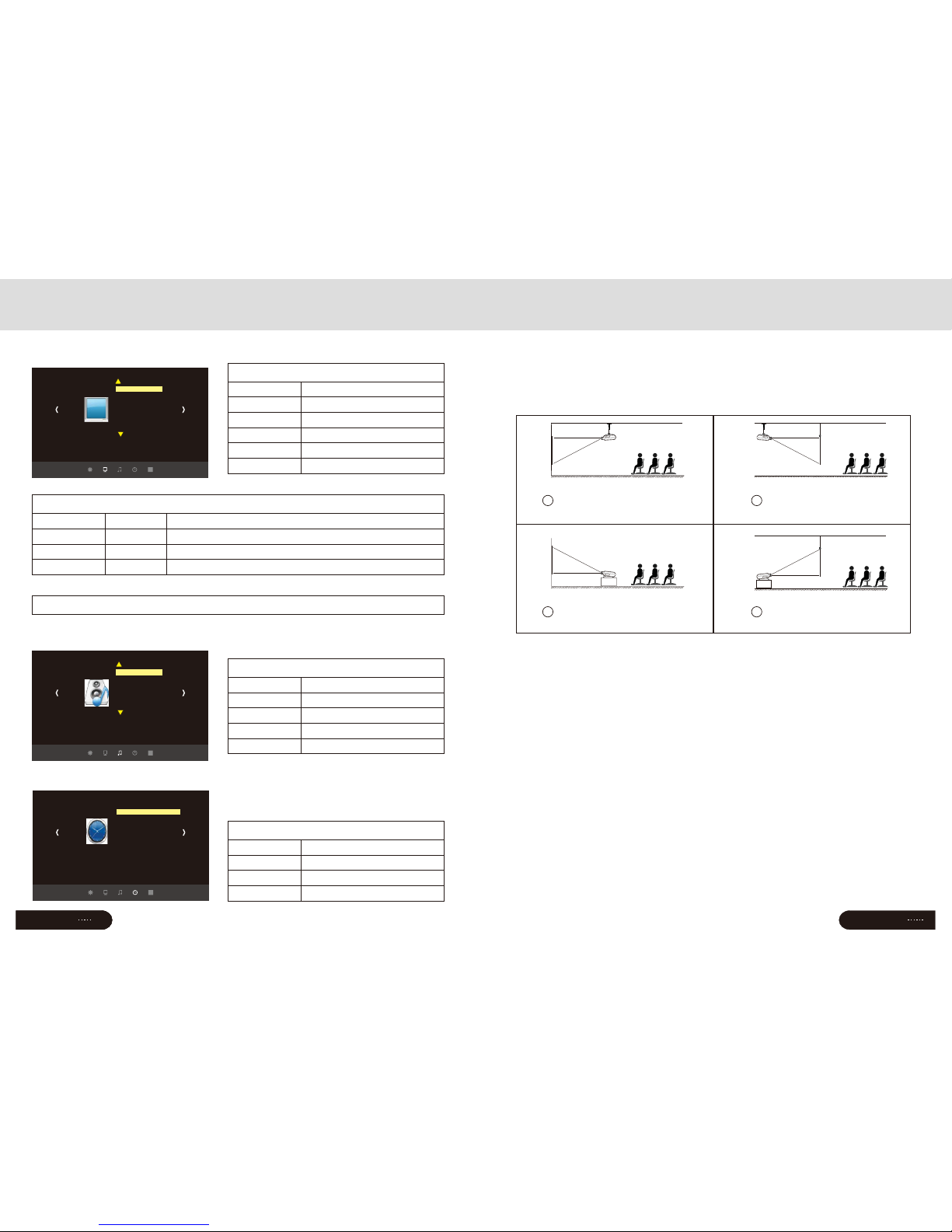
Installation method
Contact a professional service man to mount this projector to a ceiling
Follow the instruction below for the correct projector positions:
1
2
3
4
Front projection
Ceiling mount
Front projection
Table mount
Rear projection
Ceiling mount
Rear projection
Table mount
Warning:
1)This projector might damage beyond repair when it is incorrectly mounted
on a ceiling or when it is in correctly installed on a surface or installed on a
incorrect surface. It may also inflict damage to people nearby
2)This projector can only be used in an environment with a temperature
not exceeding the range of 0-35 degree.The projector may malfunction if temperatures
vary outside the normal operating rage
3)The sharpness of the screen might be interrupted when the
projector is being used in a dusty,wet,moist or smoke filled environment.
The projector might malfunction in a moist or wet environment
4)Take care of the sufficient ventilation around the projector.
Otherwise this projector might overheat and cause life threatening situations
5)The first operation of the projector may cause a unclear image,
Please refer to the image adjustment for help
Picture Mode
Standard/warm/user(Appendix 1)/Dynamic
Standard/warm/cool
Auto/4:3/16:9 …( Appendix 2)
OFF/LOW/MID/HIGH
OFF/ON
OFF/ON
Pictu re Menu
Color temperature
Aspect
Noise reduction
Flip horizon
Flip vertical
Page
16
Menu Setting
3.Picture Menu
☆ Appendix I
☆ Appendix II
Contrast
0~100
0~100
0~100
0~100
Picture
The setting of Hight-width is different under differe modes, zoom is not valid in picture mode
Brightness
HUE
Sharpness
Image contrast adjustment
Image brightness adjustment
Ima ge hue ad justm ent
Image sharpness adjustment
Sound mode
Music/Movie/Sport/User/Standard
(-5 0~5 0)
OFF/On
OFF/Surround
(120/500/1.5K/5K/10K) Hz 50
Sound Menu
Balance
Auto-volume
Surround Sound
Balance
4.Sound Menu
5.Time Menu
Clock -- -- --
D /Month /Year /Hr /Minate-- -- -- -- –
OFF/Once/ Everyday/ Monday~/Sunday
OFF/Once/ Everyday/ Monday~/Sunday
OFF Mins Mins Mins Mins Mins/10 /20 /30 /60 /90
Time M enu
OFF Time
On Time
Sleep Timer
7
Picture
Picture mode standard
Color temperature
Aspect ratio 4:3
Noise reduction middle
Flip horizon
Flip vertical
PC setup
Sound
Sound mode standard
Balance
Auto volume
Surround sound
EQ
Time
Clock------
Off Time
On Time
Sleep Timer
Page 12
Page
15
Page
10
Signal terminals description
Input terminals
Lout、Rout
Y/Pb/Pr
Vid eo
Lin、Rin
PC-RGB IN
Svideo
HDMI
USB
TV
Name
Description
Conponent video input
AV input
Audio output
Audio input
VGA input
Svideo input
HDMI Signal input
☆Turn off the power of projector and the device before connecting,
Eithe r on may ca use a b reak do wn of mac hine
☆Check t he shap e of th e plug, DO NOT try the w rong pl ug
CAUTION
1. Menu setting method
1. Using the projector,press“menu”.
The picture display on screen to adjust
menu(picture I)
2. Press“◀/▶”key,the menu in turn
circle into“picture”>“sound”
>“time”>“system”
3. Select the adjust interface,use“▲/▼”
key to choose the wanted item
(picture II)
4. Press“OK”or“◀/▶”to adjust
the item parameter.
5. Finished the elected item parameter, press
the “menu”key again, exit the page
6. Repeat operating step 2~5,till you
finished all the parameters, press“exit"
exit the menu page, otherwise, the menu page
will auto exit after a period time
2. Parameter adjustment
A.Press"menu"key,until display the above
picture of the menu;
b. Press“▲/▼”key,elect the option that
need to adjust
c. Press“OK”key,use“◀/▶”button
to adjust the certain parameters
d. Press the “menu”key again exit the
menu page parameter adjust station。
Menu Setting
USB signal input(details at page17)
PC-RGB IN
HDMI
Svideo
L out
R ou t
R in
L in
Pr
Y
Pb
Video
Picture1
Picture
Picture mode standard
Color temperature
Aspect ratio 4:3
Noise reduction middle
Flip horizon
Flip vertical
PC setup
Picture2
Picture
Picture mode standar
Aspect ratio 4:3
Noise reduction middle
Flip horizon
Flip vertical
PC setup
d
Color temperature
Pic ture mo de user
MENU
Contrast 0
Brightness 50
Color 50
Sharpness 50
Tune 50
Page 13
Page
11
Image adjustment
1、Rotate the lens into projector, the rotate it out slowly.At the same time,
looking at the resolution point carefully.When the image is clear, it is the
best situation of the lens
Focus adjustment
When you use the projector for the first time .It normally will
appear image faintness or the image is trapezoid. This is caused by
the wrong lens focus or trapezoid correction
Please follow the below steps to correct:
Keystone
1、If a projected picture has keystone distortion, correct image with
Keystone adjustment. The image becomes trapezoid shape when the screen
or projector is not leveled. Please reposition the projector to improve its
angle to the screen.However,the circumference of the image may not be
focused
(4) (5)
Page
14
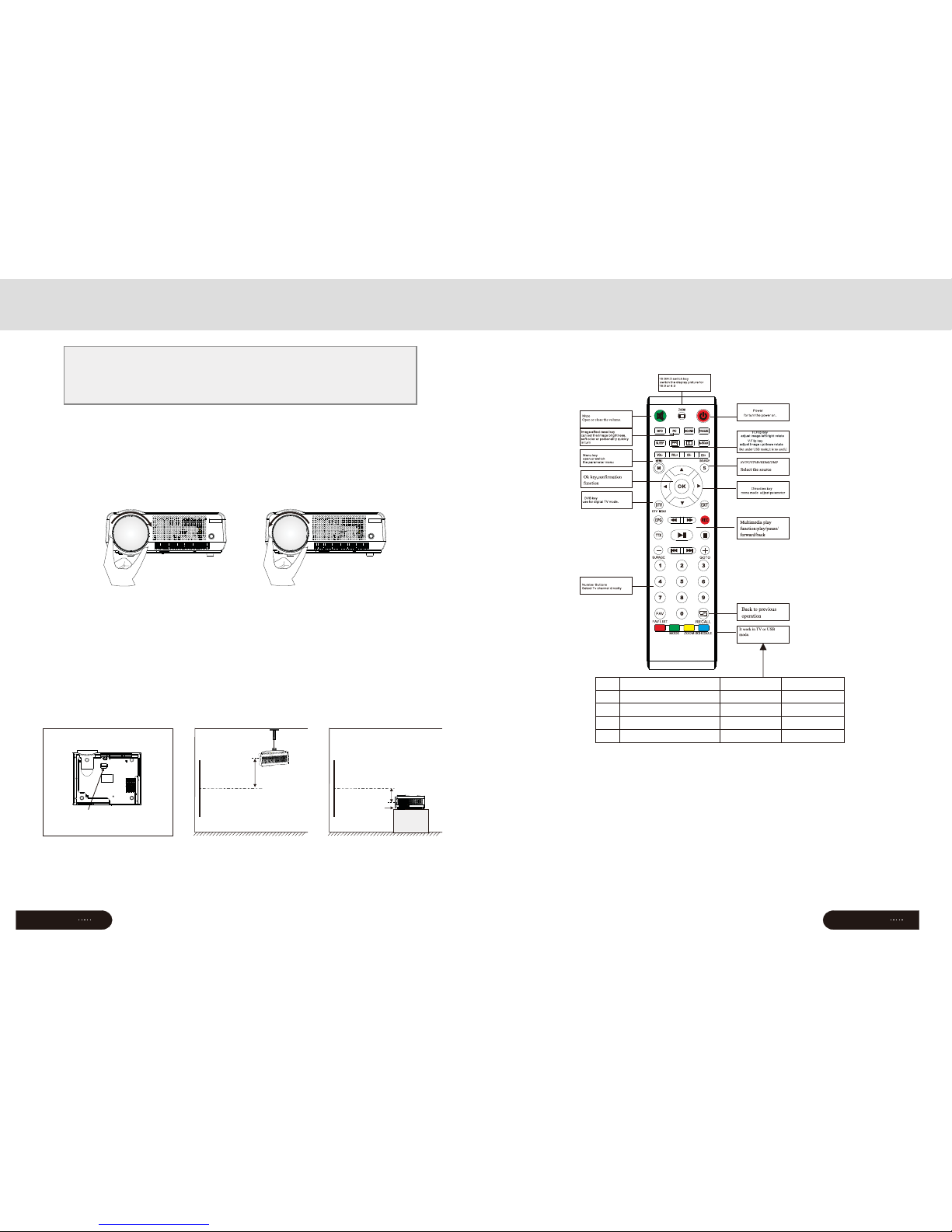
☆DO NOT mix-use the new and old
battery
☆Make sure nothi ng st ands in t he
middl e of remo te an d IR
☆Avoi d the lig ht sh ine on th e
IR directly
☆Point t he remo te ri ght to IR w ithin
6m,an d 30 degr ees
Cautions:
☆Pull out the battery if you are no t
going t o use it fo r a long ti me
☆Please change new b atter y when th e
remote malfunctions.
☆Do not place the remote in wet or heat
condition
Remote control instruction
Remote control
【Sub Menu】→【Delete】
【
Confirm】Delete
Multimedia Mode
Save
Manual channel search
Delete
Rename
Move
Skip
Channel Edit
Red
Yellow
Green
Blue
Keystone
Screen
Projector
Hight
Porjector
Screen
Hight
Hight-feet
adjustment
Page 14

1
KEY
Confirm
S-KEY
Source key (VGA,HDMI,etc.)
2
3
Menu
open or close the Menu
5
Direction key
Adjust with parameters, the same
function with the remote control
Indicator light
Red: Standby mode
Green: Working mode
4
Power KEY
This button can lead the projector to
working/standby mode
6
Panel instruction
Turn on/shut down
If the projector is a new one, please read the “projector install chapter,
place the projector and connect the cables,follow the below steps to turn
on/off
1.Put in two 7-size battery in
the remote control before using
2.Pull the power switch on
the backboard as the power light turn red
3.Press the power key on the remote or
panel ,the indicator light turn green
4.The lamp start working 2 seconds later, image projected on the screen
the machine is working smoothly
5.The new projector may have problems like image unclear or trapezoid distortion,
Please read “image adjustment” chapter
6.After the image is clear ,you may enjoy the program, in the meantime ,you can still
setup the system or adjust the parameters
1.Press the power button during using will lead the projector to standby mode
2.when the projector switch into standby mode ,the light will turn green
from red
Turn on
Turn off
Page
12
Page
13
 Loading...