

Page 1
PPHP1264A
12'' Portable Wireless BT PA Speaker System
Karaoke Speaker with LED Lights, USB/Micro SD/
Questions? Issues?
We are here to help!
Phone: (1) 718-535-1800
Email: [email protected]
FM/BT/Aux/Remote Control/Mic Inputs,
Built-in Rechargeable Battery, w/ Wheels
and Handle Bar (1000 Watt)
Page 2
WARNING
PLEASE READ THE INSTRUCTION MANUAL CAREFULLY
AND KEEP IT FOR FUTURE REFERENCE
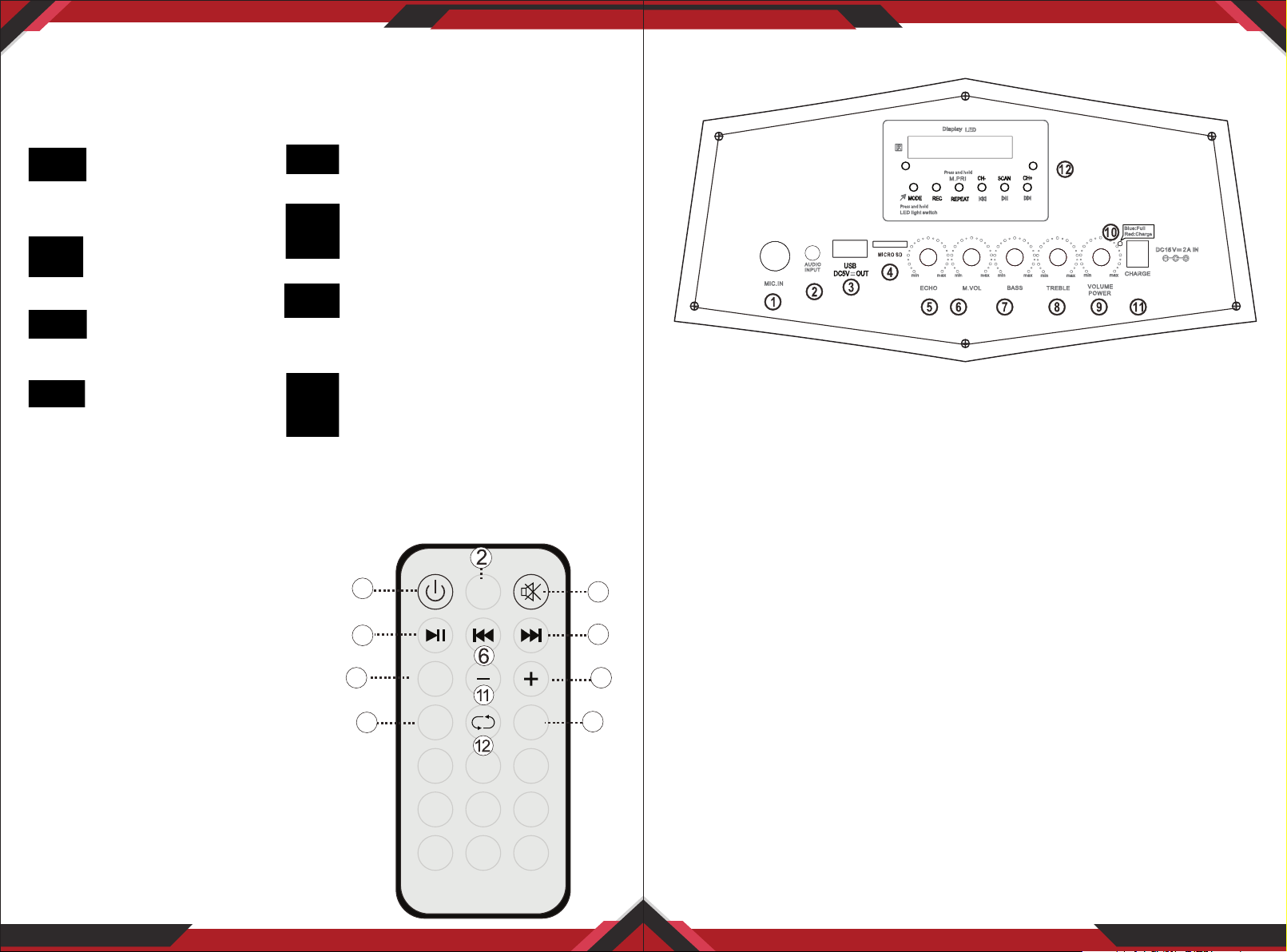
Control Board Functions
1. DO NOT place objects
on top of the device, as
objects may scratch
the device.
2. DO NOT expose the
device to dirty or
dusty environments.
3. DO NOT insert any
foreign objects into
the device.
4. DO NOT expose the
device to strong
magnetic or electrical
eld.
Illegal operation may cause personal injury, which could be fatal and may
cause damage to property.
5. DO NOT use the device in the
rain
6. Please check with your Local
Authority or retailer for proper
disposaI of electronic products.
7. DO NOT disassemble the
device. Only a certied service
technician should perform
repair.
8. The device has apertures to
disperse heat. DO NOT block
the device ventilation, the device
may become hot and malfunction
as a result.
REMOTE CONTROL Functions
1. STANDBY BUTTON
2. CHOOSE INPUT SIGNAL
3. MUTE BUTTON
4. PLAY/STOP BUTTON
5. NEXT SONG OF USB/SD
6. PREVIOUS SONG OF USB/SD
7. EQ SOLUTION
8. INCREASE SPEAKER VOLUME
9. CHOOSE SONG NUMBER DIRECTLY
10. CHOOSE USB/SD SIGNAL DIRECTLY
11. DECREASE MUSIC VOLUME
12. REPEAT SONG
1
MODE
4
7
9
EQ
0
1 2
5
4
7 8 9
SCN
SD/USB
3
6
10
1. 6.5 MM microphone input
2. 3.5MM audio input
3. USB input jack for play Mp3 music
4. Micro SD for play Mp3 music
5. Echo volume for microphone
3
5
8
6. Microphone volume knob
7. Music bass volume knob
8. Music treble volume knob
9. Music volume and power ON/OFF
10. LED indicator for charge and full charge
11. DC15V/2A adapter input jack
12. Mp3 control board
www.PyleUSA.com
2
www.PyleUSA.com
3
Page 3
Troubleshooting and Warning
PPHP1264A
Fault Possible Cause Solution
No sound
Distortion
of sound
Karaoke
does not
work
MP3
does not
play
1. No input sound source
2. Volume is too low
1. Volume too high
2. Speaker may be damaged
1. Microphone plug is not fully
inserted.
2. Microphone switch is not on
3. Microphone volume knob is
at the lowest position
1. The song format in the U disc
is incorrect
2. Improper operation has caused
a process disorder
3. USB disc is disconnected
1. Use a better music signal
2. Adjust volume
1. Turn down the volume
2. If speaker is damaged,
Repair or replace it
1. Plug microphone properly into
the socket
2. Turn on microphone switch
3. Adjust microphone volume
properly
1. Transform song format into
Mp3 format
2. Reboot the machine
3. Insert USB disc properly
12'' Portable Wireless BT PA Speaker System
Karaoke Speaker with LED Lights, USB/Micro SD/FM/BT/Aux/Remote
Control/Mic Inputs, Built-in Rechargeable Battery, w/ Wheels & Handle Bar
(1000 Watt)
Features:
• Portable PA Speaker System
• High-Powered Loudspeaker Design
• Master Volume, Mic Volume, Treble, Bass Adjustable
• ON/OFF Switch to Control LED Lights
• Wired Microphone for Home Karaoke Style Fun
• Wireless BT Music Streaming Ability
• Multi-Color Flashing LED Party Lights
www.PyleUSA.com
4
• LED Display
• Built-in Rechargeable Battery
This products can expose you to a chemical or group of checmicals, which
may include ”Lead and lead compounds” which is known in the state of
California to cause cancer, birth defects, or other reproductive harm. For
more info, go to https://www.p65warnings.ca.gov/.
www.PyleUSA.com
5
 Loading...