

Page 1
Visit Our Website
SCAN ME
PyleUSA.com
PMP57LIA
Portable Megaphone with USB/SD Readers
USER GUIDE
Page 2
This user manual contains important information for safe operation
and optimal megaphone performance. Please carefully read and
follow the safety notes and instructions. Save this manual for future
reference and ensure it is available to all persons using this device.
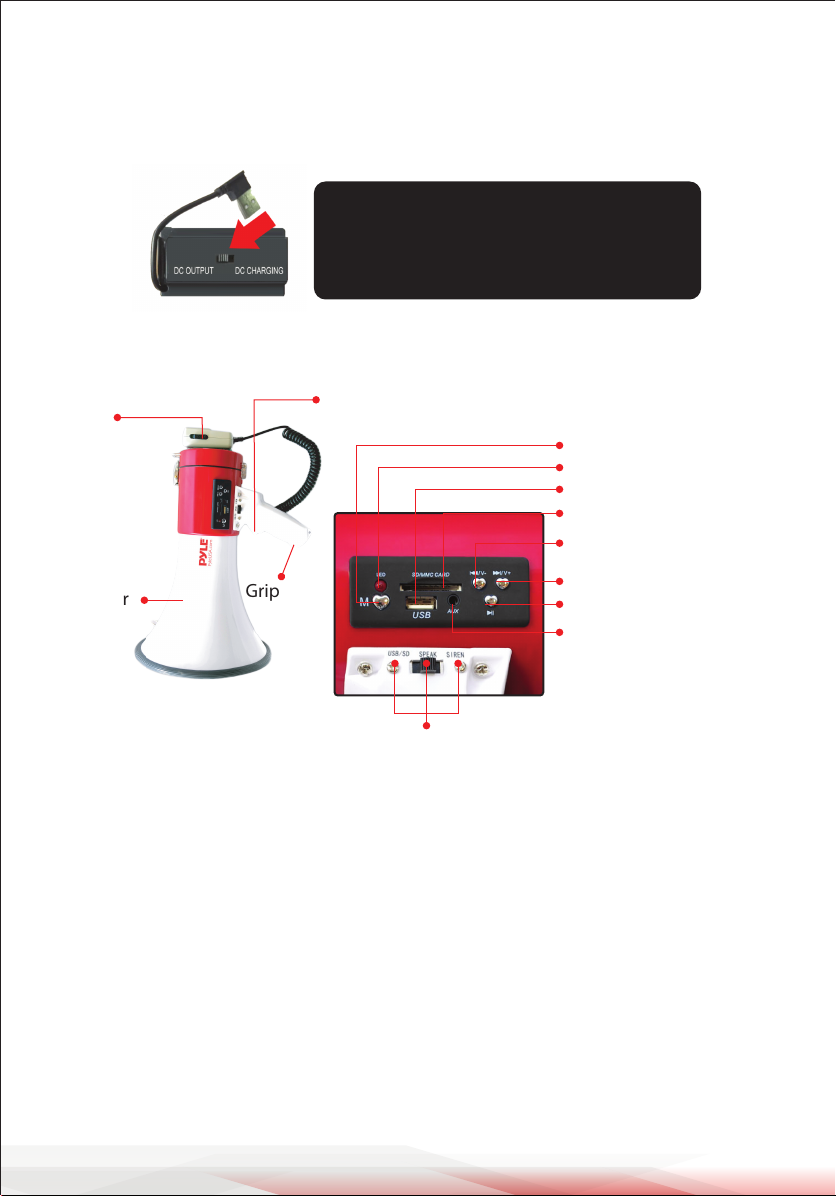
Important Note: Before operating the
megaphone, ensure you switch to the
correct position when in CHARGING/
OPERATING Mode.
(1) Press-to-talk switch
Press this switch to talk while
carrying the megaphone
on your shoulder
Speaker
Grip
(2) Press-to-talk switch
Press this switch to talk
while holding the grip
MUSIC button
LED Light Indicator
USB port
SD/MMC CARD port
Previous Track / Volume -
Next Track / Volume +
Play / Pause
AUX IN
Slide to select USB/SD, SPEAK, or SIREN MODE
Megaphone for handheld or shoulder-slung use (strap supplied).
Detachable anti-howl microphone on coiled lead with on-o switch and volume
control. Metal and ABS construction.
Safety
This megaphone is intended to be used only as described in this user manual.
Any other use or use under dierent operating conditions is considered
improper and may result in personal injury or damage to the device.
Please use the megaphone as described and under supervision if used by
children or minors.
• Ensure that plastic bags, packaging, etc. are kept away from children.
• Never let children use electrical devices unattended.
www.PyleUSA.com
2
Page 3
Operating Instructions
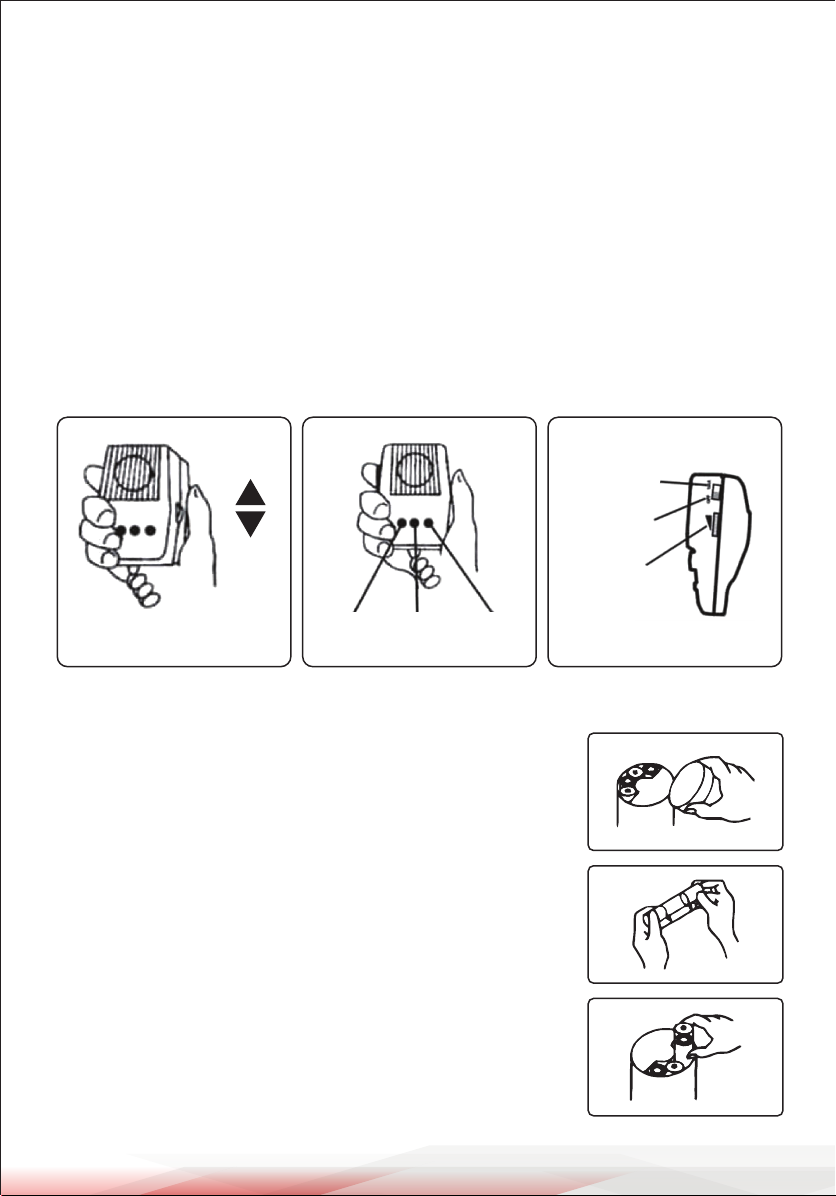
1. When carrying the megaphone on the shoulder, press the (1) press-to-talk
power on-o switch on the left side of the microphone.
2. When holding the megaphone by the grip, x the microphone hanger inlet
in the microphone xing hanger, then press the (2) press-to-talk power
on-o switch with your index nger.
3. Position the speaker opening towards the object, and speak through the
microphone mouthpiece. Bring the microphone mouthpiece close to your
lips and speak normally.
4. Turn the sound volume control on the right-hand side of the microphone
and adjust the sound level to the maximum without causing howling.
High
Talk
OFF
Low
Adjust the sound level
Siren
REC Play
To Replace Batteries
1. Loosen the locking screw of the battery compartment
cover on the back of the body.
The battery compartment cover will come o.
2. Insert 8 type "C" batteries into the battery case,
observing the correct polarity.
3. Insert the battery case with batteries into the battery
compartment of the megaphone, paying attention to
polarity.
Volume
www.PyleUSA.com
3
Page 4
Battery Charging
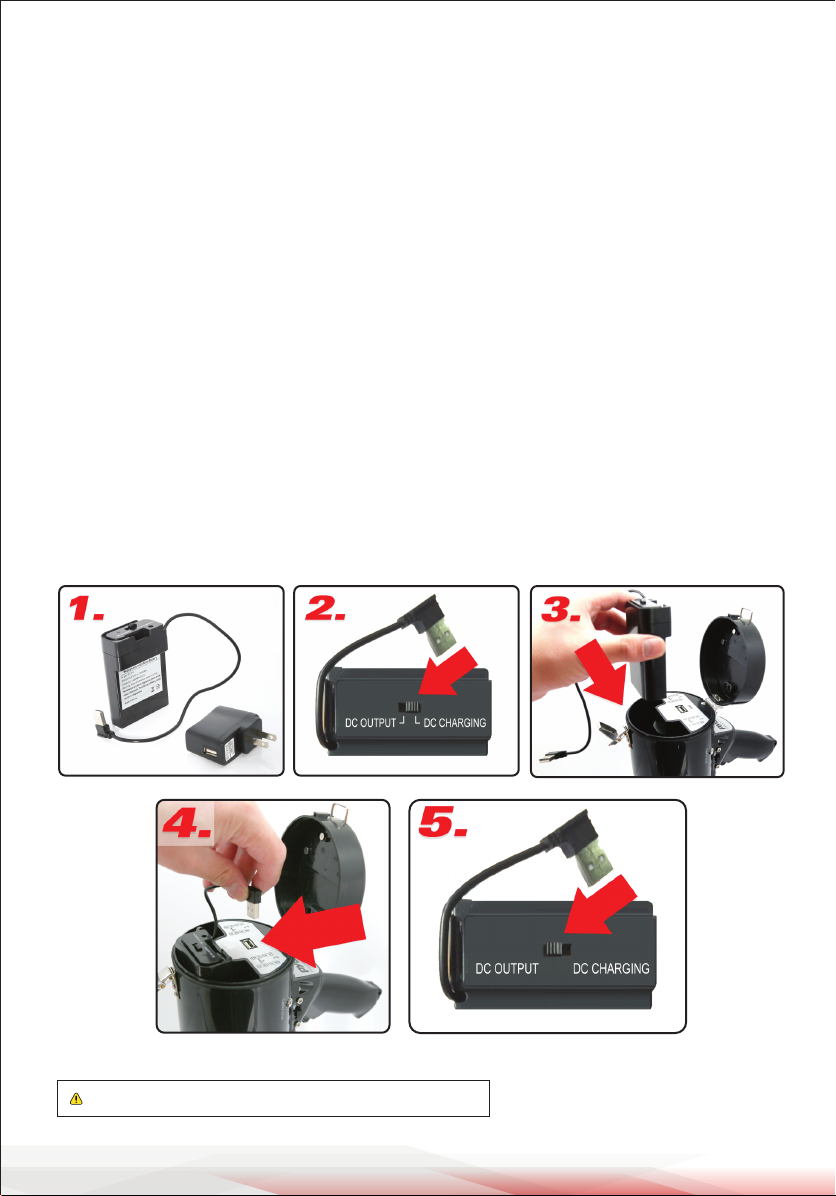
1. The megaphone features a removable rechargeable battery that plugs directly
into the USB wall power outlet for charging. Once connected to the wall power
outlet, the battery will begin charging automatically after you set the battery
to "Charge Mode" (average time for full charge: 8.5 hours). A red light will be
lit while charging and turns green when fully charged.
2. Important Note: Before charging the battery, ensure you switch it to
"DC CHARGING" as located on the battery, to enable Charge Mode.
3. Once fully charged, insert the battery into the megaphone by opening the
end cap in the rear of the megaphone. Be sure to slide the battery into the
compartment properly, ensuring the power connection cable is exposed.
4. Once the battery is inserted, connect the battery power cable connector into
the megaphone power input -- ensure you set the battery to "Power Output"
Mode.
5. Important Note: Before operating the megaphone, ensure you switch it to
"DC OUTPUT" as located on the battery, to enable Power Output Mode.
WARNING: Cancer and Reproductive Harm - www.P65warnings.ca.gov
www.PyleUSA.com
4
Page 5

Features:
• (3) Audio Function Modes: Talk, Siren, USB/SD Memory Playback
• Built-in USB Flash & SD Memory Card Readers
• MP3 Digital Audio File Playback
• Convenient Wired Handheld Microphone
• Ergonomic Pistol Grip and Light-Weight Chassis
• Rechargeable Battery for Wireless PA Speaker Portability
• Battery Charges via Included USB Wall Power Adapter
• *or Battery Powered by (8) x "C" Type Batteries, Not Included
• Aux (3.5mm) Input Connector Jack
• Connect & Stream Audio from External Devices
(Works with MP3 Players, Smartphones, Tablets, etc.)
• Used by U.S. Armed Forces
• For Indoor/Outdoor Use
What's in the Box:
Megaphone Speaker
•
• Rechargeable Battery
• USB Wall Adapter
Technical Specs:
• Power Output: 50 Watt MAX
• Projection Distance: Up to 1,200 Square Yards
• Rechargeable Battery: 11.1V Lithium-iOn, 1500mAh (16.6Wh, 166g)
• Megaphone Dimensions (Diameter x Length): 9.5'' x 13.8'' -inches
Register Product
Thank you for choosing PyleUSA. By registering your product,
you ensure that you receive the full benets of our exclusive
warranty and personalized customer support.
Complete the form to access expert support and to keep your
PyleUSA purchase in perfect condition.
PyleUSA.com/register
www.PyleUSA.com
5
Page 6

Questions or Comments?
We are here to help!
Phone: 1.718.535.1800
PyleUSA.com/ContactUs
 Loading...