

Page 1

OPERATINGINSTRUCTIONS
MODELPLDVD170
INDASHAM/FMDVD/CD/MP3PLAYER
Page 2
FEATURES
Operatingvoltagerange:12VD
LowpC.owerconsumptiondesign.
VIDEOOUTPUTSYSTEM
TVTYPE
AUDIOOUTPUT
2channelDoblydigitaloutputandsupports
analogoutputofMPEG-1,MPEG-2layer2andMP3.
SystemAUTO,NTSC,PALorPALMswitchable.
[4:3LB],[4:3PS]or[16:9]willbeselectedconformingtotheactualmonitorinuse.
Multi
Multi-angle,multi-view,multi-audiofunction
-levelforward,backwardmotion
program,resumestopandrepeatfunction
Playpositionmemoryfunction
ThisDVDplayercanplaythefollowingdiscs:
DVD,CD,VCD,DVCD,MP3,CD-R,CD-RW.
POWER
SYSTEMFUNCTIONS
ADDITIONALVIDEOFEATURES
COMPATIBILITY
AUDIOSYSTEM
FM15presetstations,receivingfrequencyrange(87.5-108MHz)
MW5presetstations,receivingfrequencyrange(530-1710KHz)
LW5presetstations,receivingfrequencyrange(144-279Khz)
SPECIALNOTE-PLEASEREAD
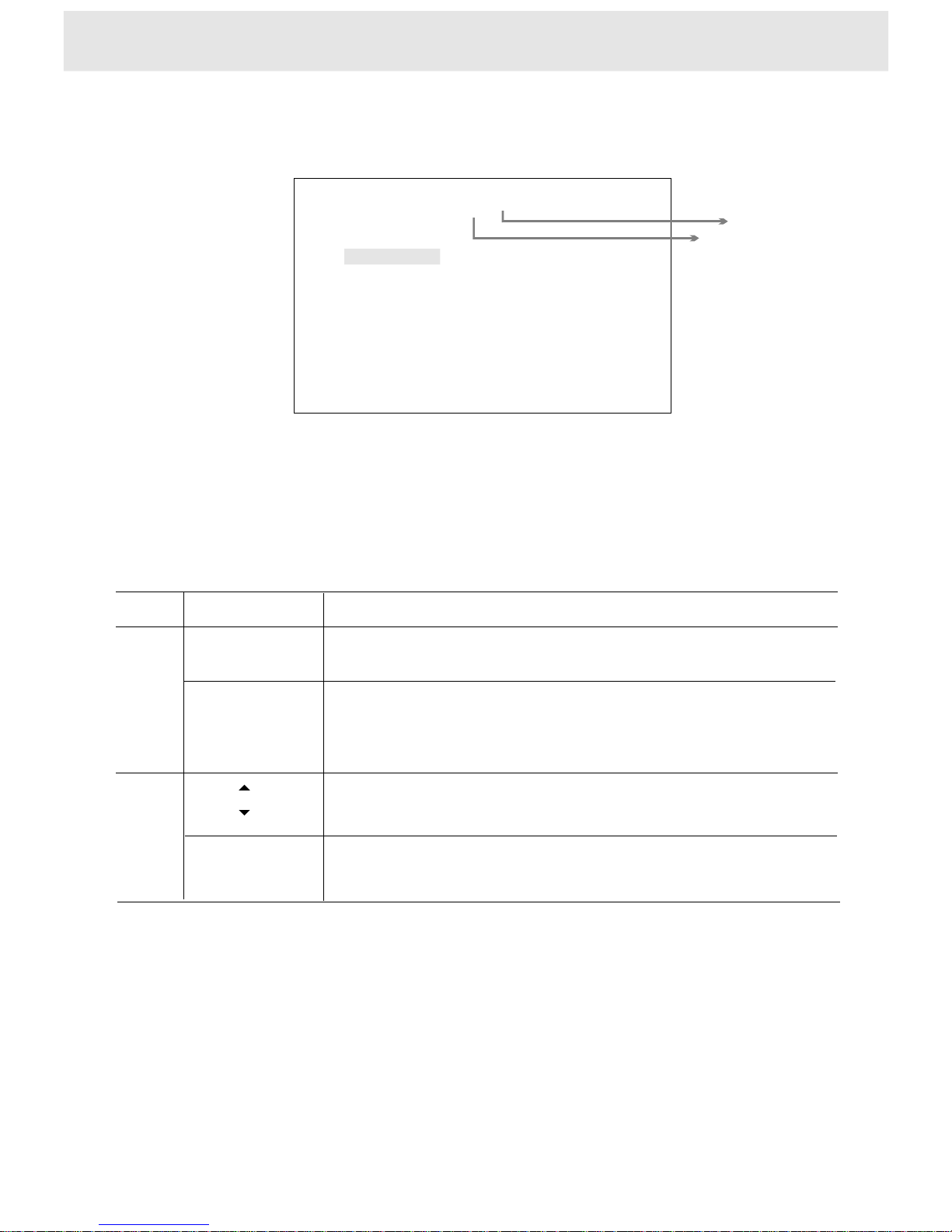
IftheFirmwareUpgrademenuappearsonthescreen,besure
toselect[CANCEL]bypressing/andthenpressENTER
toleavethemenu.
34
FirmwareUpgrade
Current:MC0.08New:JHDC0.91
CancelPartialTotal
OnScreen
DonotselectPartialorTotal,doingsomaycausetheplayer
tomalfunction.IfyouwanttoselectPartialorTotal,youmust
havetoconsultthequalifiedpersonnel.
+20%
-10%
Page 3

TABLEOFCONTENTS
Introduction ------------------------------------------------------------------------------
Safetyprecautions------------------------------------------------------------------------------------Importantinstructions-------------------------------------------------------------------------------Precautions---------------------------------------------------------------------------------------------Identificationofcontrols-----------------------------------------------------------------------------Whenusingremotecontrol--------------------------------------------------------------------------
Playingadisc--------------------------------------------------------------------------------------
Advancedplayback------------------------------------------------------------------------------
Basicplayback-----------------------------------------------------------------------------------Playingatvariousspeeds----------------------------------------------------------------------
Resumingplaybackfromthesamelocation--------------------------------------------
layingfromthedesiredlocation
ingaspecifictitle,chapterortrack
Playmode-------------------
----------------------------------------------------------------------------
Playingwithoutsound------------------------------------------------------------------------
Selectingaplaybackaudiosetting
Selectingthecameraangle-----------------------------------------------------------------Selectingsubtitles
P----------------------------------------------------------Locat------------------------------------------------
---------------------------------------------------------------------
Playingrepeatedly
-----------------------------------------------------------
-------------------------------------------------------------------------------
Selectingsoundeffect------------------------------------------------------------------------
1-7
8-10
11-13
14-20
21-23
27-32
24
2
3
4-6
8
11-12
14
16
15
18
17
19
20
21
22-23
27
28
30
13
9
10
1
Outletwiresconnection------------------------------------------------------------------------------Connectingtoanaudiosystemorspeakersandmonitorinput---------------------------AMPselect------------------------------------------------------------------------------------------------
Connections --------------------------------------------------------------------------------------
Noteonconnecting------------------------------------------------------------------------------------
Functionsetup -----------------------------------------------------------------------------------
Usingtheon-screendisplay---------------------------------------------------------------Customizingthefunctionsettings---------------------------------------------------------
Others ------------------------------------------------------------------------------------------------
MP3instruction---------------------------------------------------------------------------
Precautions------------------------------------------------------------------------------------Notesondiscs--------------------------------------------------------------------------------Troubleshooting------------------------------------------------------------------------------Specifications---------------------------------------------------------------------------------AccessoriesandHardware------------------------------------------------------------------Note-----------------------------------------------------------------------------------------------
25-26
Radiooperation---------------------------------------------------------------------------
31
7
17
20
10
32
14
29
Page 4

Thisdigitalversatiledisc(DVD)videoplayeruses12VDC.
Forfuturereference,recordthemodelandserialnumber
(locatedonthecaseoftheDVDplayer)inthespaceprovided.
CAUTION:
WARNING:classlaserproduct-AvoidLongTermviewingofDirectLaserRadiation.
WARNINGOFDEWFORMATION
THISDVDVIDEOPLAYERISACLASSIIaLASERPRODUCT.
USEOFCONTROLSORADJUSTMENTSORPERFORMANCEOFPROCEDURESOTHER
THANTHOSESPECIFIEDHEREINMAYRESULTINHAZARDOUSRADIATIONEXPOSURE.
ASTHELASERBEAMUSEDINTHISDVDVIDEOPLAYERISHARMFULTOTHEEYES,
DONOTATTEMPTTODISASSEMBLETHECABINET.
REFERSERVICINGTOQUALIFIEDPERSONNELONLY.
Dewmayformonthepickuplensinthefollowingconditions.
-Immediatelyafteraheaterhasbeenturnedon.
-Inasteamyorveryhumidroom.
Whentheunitissuddenlymovedfromacoldenvironmenttoawarmone.
Ifdewformsinsidethisunit,itmaynotoperateproperly.
Inthiscase,turnonthepowerandwaitabout2or3hoursforthedewtoevaporate.
IaI
Inaddition,whentheunitisusedunderlowtemperatures,
thepickuplensmightwarmupveryfastanddewwillform.
Inthiscase,turnonthepowerandwaitawhileforthedewtoevaporate.
Date:
S/N:
1
SAFETYPRECAUTIONS
+20%
-10%
Page 5

2
IMPORTANTINSTRUCTIONS
4.Heat
Theproductshouldbeplacedawayfromother
products(includingamplifiers)thatproduceheat.
5.WaterandMoisture
Donotallowtheproducttocomeincontactwith
wateratanytime.
6.Cleaning
Disconnectpowerfromthisproductbefore
cleaning.Donotuseliquidcleanersoraerosol
cleaners.Useadryclothforcleaning.
7.Foreignobjects
Neverpushobjectsofanykindintothis
productthroughopeningsastheymaytouch
dangerousvoltagepointsorshort-outparts
thatcouldresultinafireorelectricshock.
Neverspillliquidofanykindontheproduct.
8.Attachments
Donotuseattachmentsnotrecommended
bytheproductmanufacturerastheymay
causedamage.
Pleaseusecarewheninstallingtheunit,
theunitmayfall,causingserious
totheproduct.
9.
damage
Donotuseacracked,deformed,orrepaired
disc.Thesediscsareeasilybrokenandmay
causeseriouspersonalinjuryandproduct
malfunction.
10.
12.DamageRequiringService
Unplugtheunitand
qualifiedservicepersonnel
conditions:
a)Ifliquidhasbeenspilled,orobjectshave
fallenintotheproduct.
b)Iftheproducthasbeenexposedtorain
orwater.
referservicingto
underthe
following
11.Accessories
Anymountingoftheproductshouldfollowthe
manufacture'sinstructions,andshoulduse
amountingaccessoriesrecommendedbythe
manufacturer.Makesuretheplayeris
securelymounted.Quickstops,excessive
force,orimproperinstallationmaycause
damagetotheproduct.
3.Ventilation
Thisproductrequiresproperventilationasperthe
manufacturers'sinstructionsinordertoensure
properoperation.
c)Iftheproductdoesnotoperatenormally
byfollowingtheoperatinginstructions.
Adjustonlythosecontrolsthatarecovered
bytheoperatinginstructionsasanimproper
adjustmentofothercontrolsmayresultin
damageandwilloftenrequireextensive
workbyaqualifiedtechniciantorestorethe
producttoitsnormaloperation.
d)Iftheproducthasbeendroppedordamaged
inanyway.
e)Whentheproductexhibitsadistinctchange
inperformance-thisindicatesaneedfor
service.
13.Servicing
Donotattempttoservicethisproduct
yourself.Referallservicingtoqualified
servicepersonnel.
14.Replacementparts
Whenreplacementpartsarerequired,be
suretheservicetechnicianhasused
replacementpartsspecifiedbythe
manufacturerorhavethesame
characteristicsastheoriginalpart.
Unauthorizedsubstitutionsmayresultin
hazards.
1.Owner'smanual
Afterunpackingthisproduct,readtheowner's
manualcarefully,heedallwarningsandinstructionsgiveninthismanualandthosemarkedonthe
unit,andfollowalltheoperatingandotherinstructions.Keepthisbookletforfuturereference.
2.Powersources
Whentheproductoperatesfromthebattery,
pleaserefertotheoperatinginstructionson
properconnections.
Page 6

3
PRECAUTIONS
WhenshippingtheDVDplayer,theoriginalshippingcartonandpackingmaterialsmustbeused.
Formaximumprotection,re-packtheunitasitwasoriginallypackedatthefactory.
Donotusevolatileliquids,suchasaerosolspray,neartheDVDplayer.Donotleaveany
plasticproductsincontactwiththeDVDplayerforalongperiodoftime.Theywillleavemarkson
thefinish.
ThetopandrearpanelsoftheDVDplayermaybecomewarmafteralongperiodofuse.
Thisbehaviourisnormal.
WhentheDVDplayerisinuseandtheengineisoff,donotturnontheforalongtime.
Doingso,youmayrunthebatterytowhereyourcarwillnotstart.
player
IfyoudonotusetheDVDplayerforalongperiod,theunitmaynotfunctionproperlyinthe
future.TurnonandusetheDVDplayeroccasionally.
Notesonhandling
WhenyouplacethisDVDplayernearaLCD,radio,orVCR(VCD),theplaybackpicture
maybecomepoorandthesoundmaybedistorted.Inthiscase,placetheDVDplayer
awayfromanyLCD,radio,orVCR.
Notesonlocating
WhenyoubringtheDVDplayerdirectlyfromacoldplacetoawarmplace.
WhenyouusetheDVDplayerinaroomwhereyoujustturnedontheheater,oraplace
wherethecoldwindfromtheairconditionerdirectlyhitstheunit.
Insummer,whenyouusetheDVDplayerinahotandhumidplacejustafteryoumove
theunitfromanairconditionedarea.
WhenyouusetheDVDplayerinahumidplace.
IfyouusetheDVDplayerinsuchasituation,itmaydamagediscsandinternalparts.
Removethedisc,turnontheDVDplayer,andleaveitfor2or3hours.After2or3hours,
theDVDplayerwillhavewarmedupandevaporatedanymoisture.
Moisturecondensationoccurs,forexample,whenyoupouracolddrinkintoaglassonawarmday.
Dropsofwaterformontheoutsideoftheglass.Inthesameway,moisturemaycondenseonthe
opticalpick-uplensinsidethisunit,oneofthemostcrucialinternalpartsoftheDVDplayer.
MoisturecondensationdamagestheDVDplayer.Pleasereadthefollowingcarefully.
Moisturecondensationoccursduringthefollowingcases.
DonotusetheDVDplayerwhenmoisturecondensationmayoccur.
NotesonMoistureCondensation
Forstubborndirt,soaktheclothinaweakdetergentsolution,wringwellandwipe.Useadrycloth
towipeitdry.Donotuseanytypeofsolvent,suchasthinnerorbenzine,astheymaydamage
thesurfaceoftheDVDplayer.
Ifyouuseachemicalsaturatedclothtocleantheunit,followthatproduct'sinstructions.
Useasoft,dryclothforcleaning.
Notesoncleaning
TheDVDplayerisahightechnology,precisiondevice.Iftheopticalpick-uplensanddiscdrive
partsaredirtyorworndown,thepicturequalitybecomespoor.Toobtainaclearpicture,we
recommendregularinspectionandmaintenance(cleaningorpartsreplacement)every1,000hours
ofusedependingontheoperatingenvironment.
Toobtainaclearpicture
Page 7
4
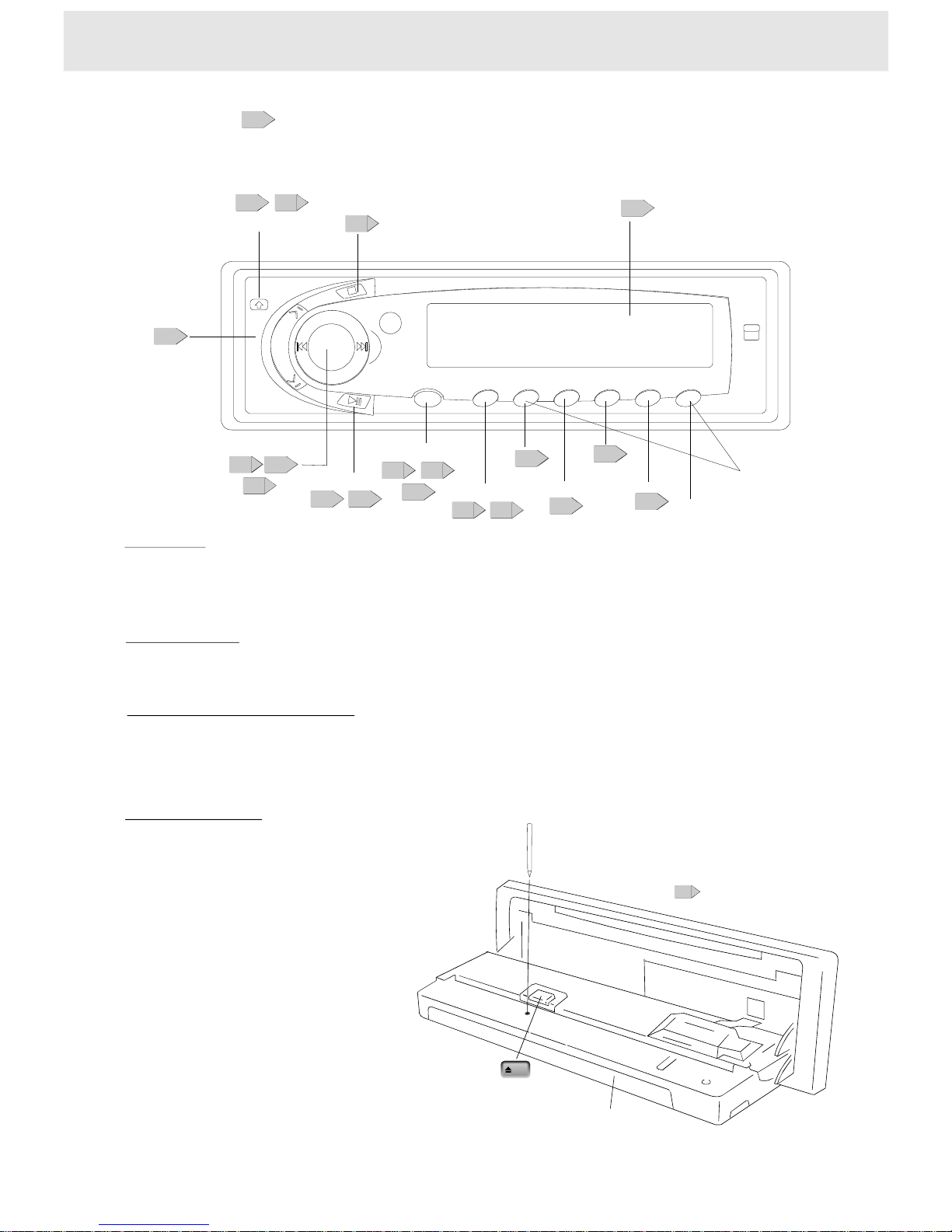
Frontpanel(Folddowndesignpanel)
Seethepageinforthedetails.
Discslot
11
Ejectbutton
Loadingandejectingthedisc
Frontpanel
PresstheOPENbuttontoopenthedoor.
InsertadiscintotheSlotandplayerwillstart.
PresstheEjectbuttontoejectadisc.
SKIPbutton
inDVDplaymode,
presstheSEEKbuttononthefrontpanelandreleasethebutton,theplayerplaysinSKIP,mode;
pressandholdtheSEEKbuttonformorethan1second,theplayerplaysinSCAN,mode.
9:
78
Identificationofcontrols
Eject
OPENbutton
1112
MEMORY/MUTE
1112
17
VOL(+,-)button
18
POWERbutton
DVD/RADIO
12
Display
5
PLAY,PAUSE,BANDbutton
12
SKIPbutton
SEEK
15
24
26
SCAN/SEL.
25
STOP
18
MENU
26
ENTER
15
REPEAT
17
17
AUDIO
PRESETSTATIONS
(1~5)
26
RESETbutton
Folddownthefrontpaneland
presstheRESETbuttonwithapointedobject,
suchasaballpointpen,asshown.
PressingtheRESETbutton
theunitwillbeoffforawhile.
AfterthatplaybackstartsfromRadio.
SopressingtheRESETbutton
willerasesomestoredcontents.
Resettingtheunit
Numberbuttons
OnlyinRadiomode,thenumberbuttonsworkas1~5
Page 8
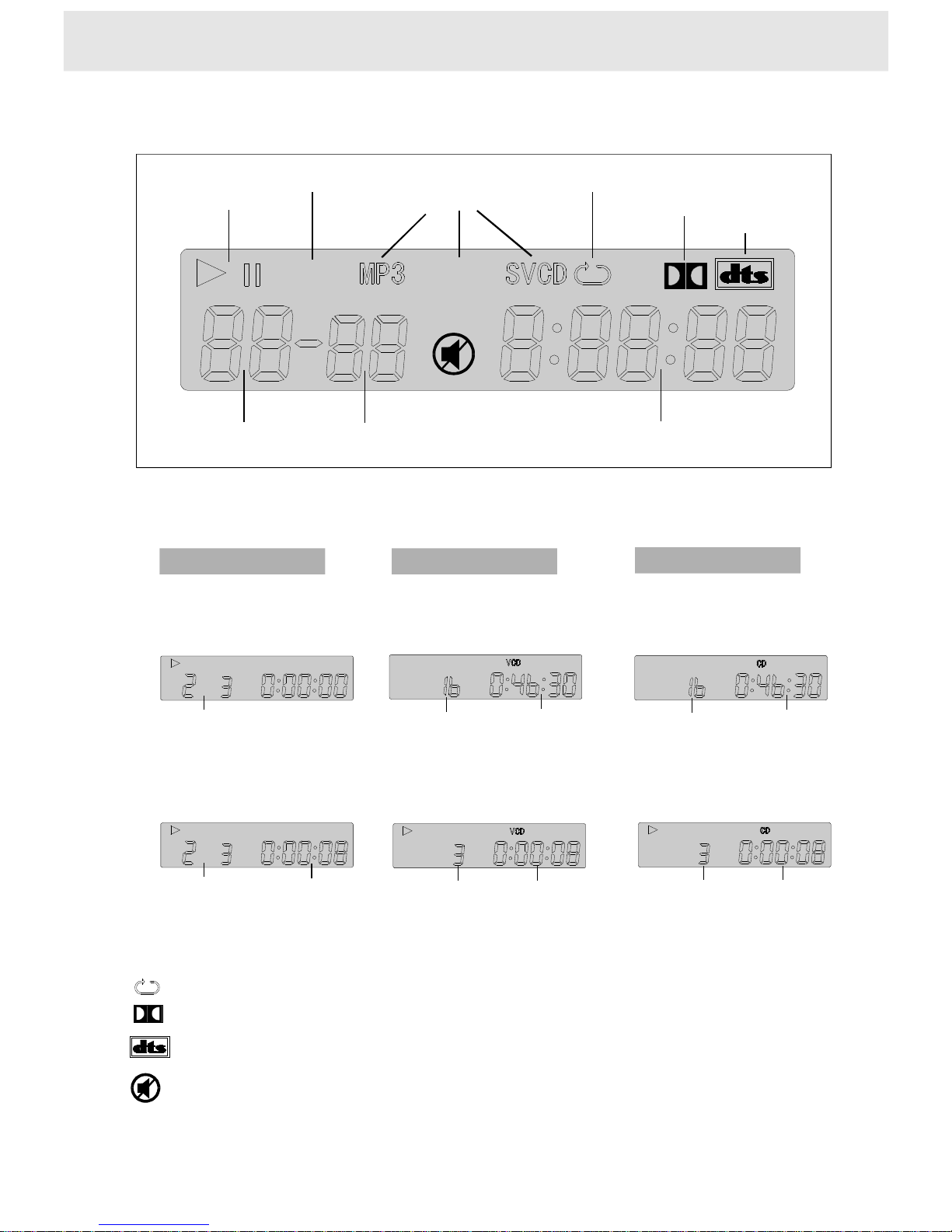
Playingchapter
3intitle2
Playingchapter
3intitle2
Elapsedtimeof
thecurrenttitle
Elapsedtimeof
thecurrenttrack
Elapsedtimeof
thecurrenttrack
Playingtrack3
Playingtrack3
SomeDVDvideodiscsmaynotdisplay
thechapternumbers
Totalnumberoftracks
Totalnumberoftracks
Totalplayingtime
ofthedisc
Totalplayingtime
ofthedisc
Theindicatorsvarydependingonthekindsofdiscsyouplay.
Otherindicators
DVDvideodiscVIDEOCD
AudioCD
Whenloading:
Duringplayback:
Duringplayback:
Duringplayback:
Whenloading:
Whenloading:
Example
Example
: Whenplayingbackthesametitle,chapter,trackrepeatedly.ortheentiredisc
: DuringDolbydiscplayback.
: Duringdtsdiscplayback.
Example
Example
Example
Example
Totalplayingtime/elapsedindicatorChapterindicator
Titleindicator
Operatingstatusindicator
Repeatindicator
MP3/DVD/VIDEOCDindicator
DolbyDigitalindicator
dtsindicator
5
DVD
DVD
DVD
AM
FM
ST
Bandindicator
: Whenmutefunctionsisengaged.
DVDdisplay
Identificationofcontrols
Page 9
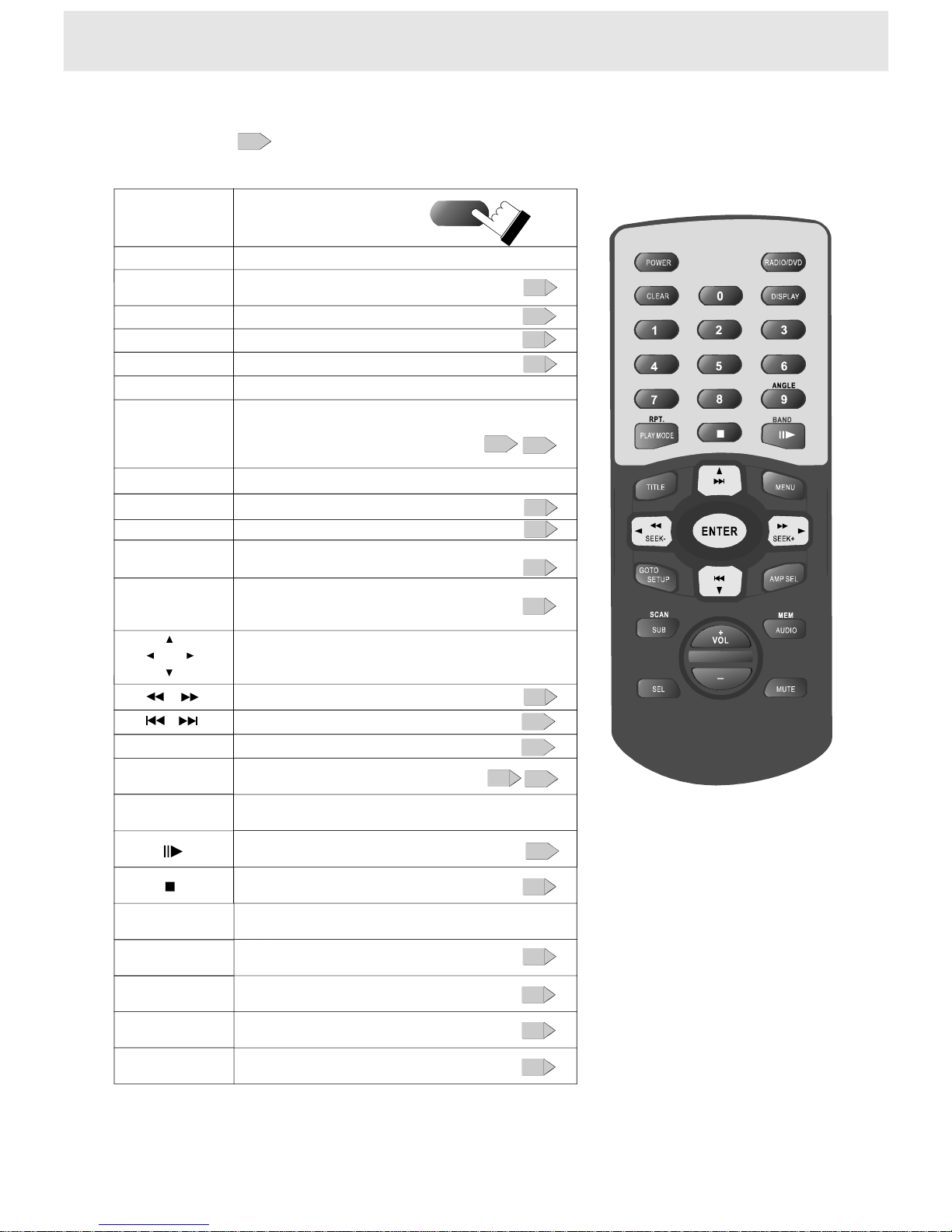
Theinstructionsinthismanualdescribethefunctionsontheremotecontrol.
Seethepageinforthedetails.
6
Identificationofcontrols
FulldirectionRemotecontrol
1342
5678
90
Poweron/off.
Selectthedesiredchannelwith
thenumberbuttondirectly
Remotecontroloperation
Thebutton
ontheremote
JoyStick/Volumecontrol/Bandcontrol
SUB
10+
AUDIO
ForDVDdiscs,toselectingaplaybackaudiosetting
Locatealocationbyenteringits
correspondingtracknumber,
chapternumberortime
GOTO
SelectingSubtitle
ANGLE
Selectingthecameraangle
Tochangetheplaybackspeed
Tolocatepreceding/succeedingchapterortrack
JoyStick
JoyStick/Volumecontrol/Bandcontrol
ForVCDdiscs,tochangetheaudiochannel
SEL
11
16
20
20
19
14
13
15
18
Note:RefertothePage26for
theinstructioninRadiomode;
Beforeyouconnectexternal
remotesensortotheplayer,
powerofftheunitfirst.
Toselecttheaudiofunctions
Playmode:PBC;Program;Off;Shuffle
PLAYMODE
16
AMPSEL
Toturnonorofftheamp.
10
VOL+,-
Tocontrolthevolume
18
ClearthewrongnumberyouenteredCLEAR
RPT.
Toplayrepeatedly
17
12
MUTE
Playingwithoutsound
DISPLAY
Usingtheon-screendisplay
21
17
POWER
Tostopplayback
12
Topauseplayback/play
12
SETUP
Functionsetup
23
22
TITLE/MENU
Locatingaspecifictitlechapterortrack
15
Page 10
7
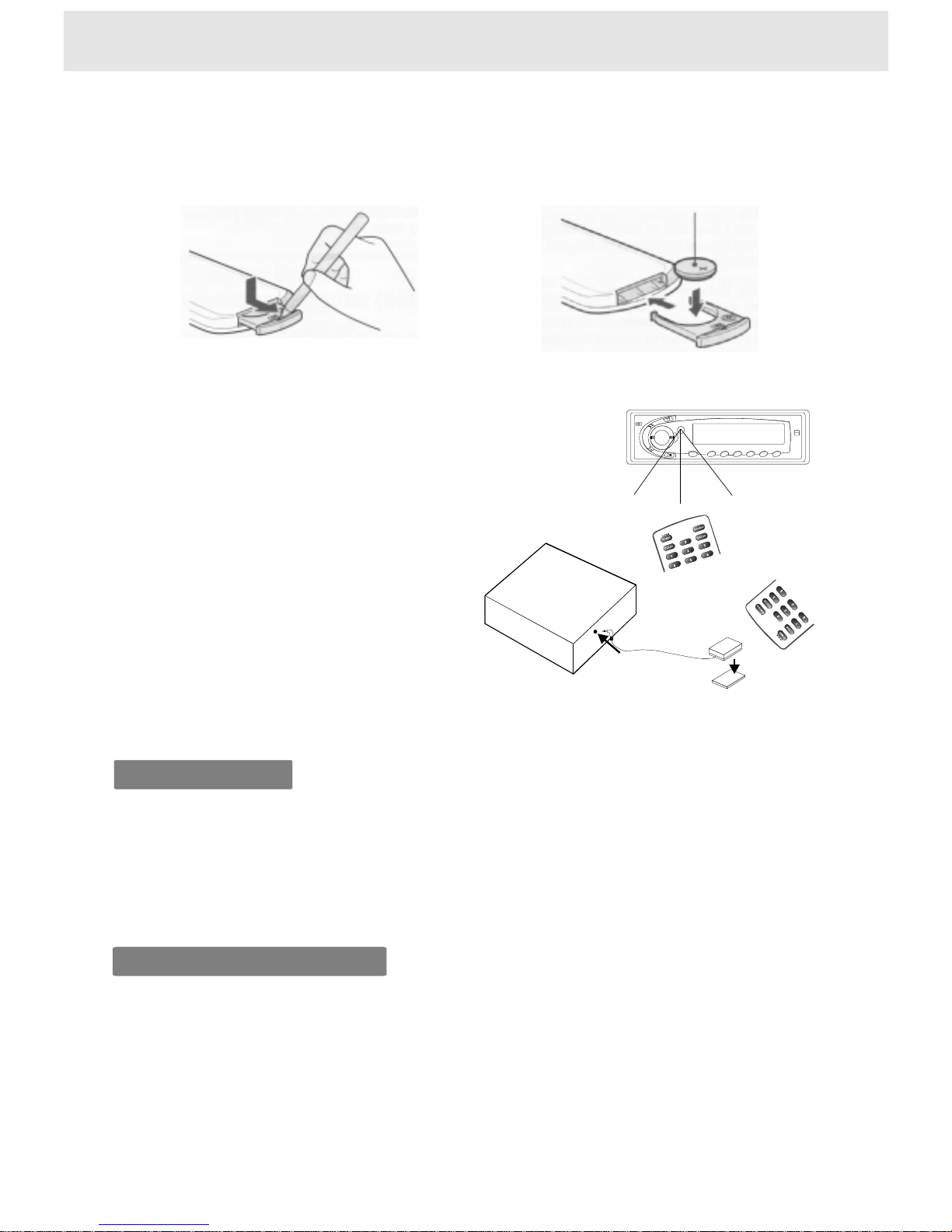
Whenusingremotecontrol
Preparingtheremotecontrol
1)Openthecover,
pullthecoverasillustrated
2)Insertcell(3V),Closethecover
InsertthebatteriesintotheremotecontrolsoyoucanuseittooperatetheDVDvideoplayer.
DonotexposetheremotesensoroftheDVDplayertoastronglightsourcesuchasdirect
sunlightorotherillumination.Ifyoudoso,youmaynotbeabletooperatetheDVDplayervia
theremotecontrol.
Makesuretomatchthe+and-onthelithiumbuttoncell(3V,CR2025)tothemarksinsidethe
cellcompartment.
Operatingwiththeremotecontrol
1)Thissectionshowsyouhowtousethe
remotecontrol.Pointtheremotecontrol
attheremotesensorandpressthebuttons.
Theremoterange:about4mfromthefront
oftheremotesensor.
(Is)offaxis:morethan30ineachdirection
ofthefrontoftheremotesensor.
2)Remotesensorandremotecontroleyejack
Connecttheremotecontroleyejacktothe
remotesensorunit.
L
Notusedwhenusingtheremotesensor
ontheremotecontroleyejack.
Double-sidetape
Remotesensor
DVDplayer
Remoteeyejack
Withabout4m
Notesonbattery
Notesontheremotecontrol
Tooperatetheremotecontrolcorrectly,followtheinstructionsbelow.
Donotinsertcellintotheremotecontrolinthewrongdirection.
Donotcharge,heat,open,orshort-circuitthecell.Donotthrowcellintoafire.
Iftheremotecontroldoesnotfunctioncorrectlyoriftheoperatingrangebecomesreduced,
replaceallcellwithnewone.
DirecttheremotecontrolattheremotesensoroftheDVDplayer.
Donotdroporgivetheremotecontrolashock.
Donotleavetheremotecontrolnearanextremelyhotorhumidplace.
Donotspillwaterorputanythingwetontheremotecontrol.
Donotdisassembletheremotecontrol.
Page 11
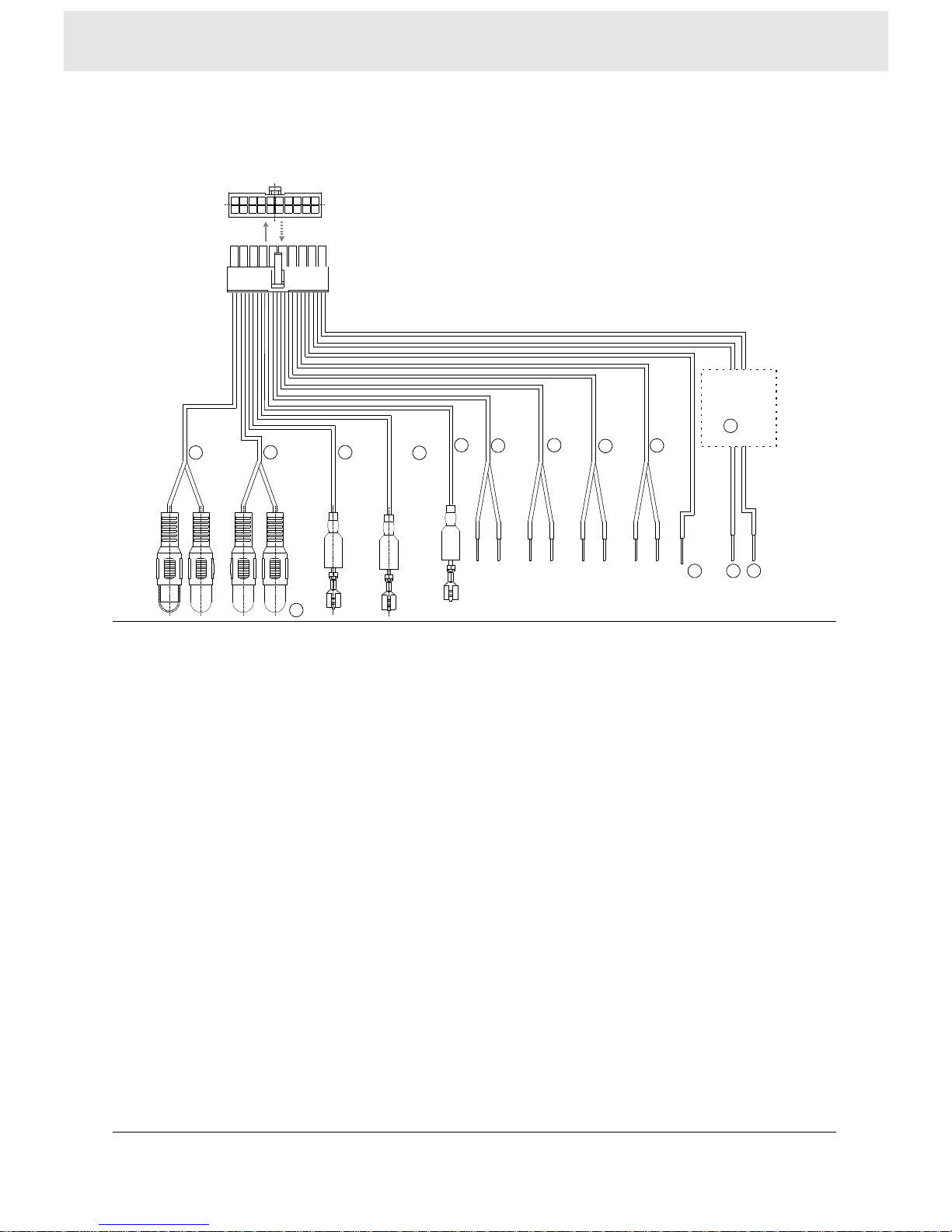
Outletwiresconnection
(supplied)
5
6
7
8
9
10
11
12
1YELLOWCABLE[VIDEO/AUDIO]:VIDEOOUT(YELLOW);
DIGITALAUDIOOUT(/)[Gotopage9]
2BLACKCABLE[AMPLIFIER:AUDIOOUT:Redright;Whiteleft[Gotopage9]
3
4
GREENCABLE[FRONTLEFTSPEAKER]:
GREENWITHWHITESTRIPE()
7GREYCABLE[
ORANGEYELLOW
]
PURPLECABLE:POWERANTENNA(Purple)
PURPLECABLE:AMPLIFIERTURNON(Purplewithwhitestripe)
5BROWNCABLE:POWERSCREEN
6GREEN(+);
FRONTRIGHTSPEAKER]:GREY(+)
GREYWITHWHITESTRIPE()
8BROWNCABLE[REARLEFTSPEAKER]:BROWN(+)
BROWNWITHWHITESTRIPE()
9BLUECABLE[REARRIGHTSPEAKER]:BLUE(+)
BLUEWITHWHITESTRIPE()
10REDCABLE[POWER]:12VOLT(+),ACCESSORY/SWITCHED
11BLACKCABLE[GROUND]:GROUND
12YELLOWCABLE:(+)12VOLT,CONSTANT
13BLACKBOX:EQUIPPEDWITHFUSEANDFILTER
14INSULATINGCOVER:SAMECOLORASTHECABLETERMINAL
-
-
-
-
ONOFF
8
Connections
1
23
4
13
13
Page 12
9
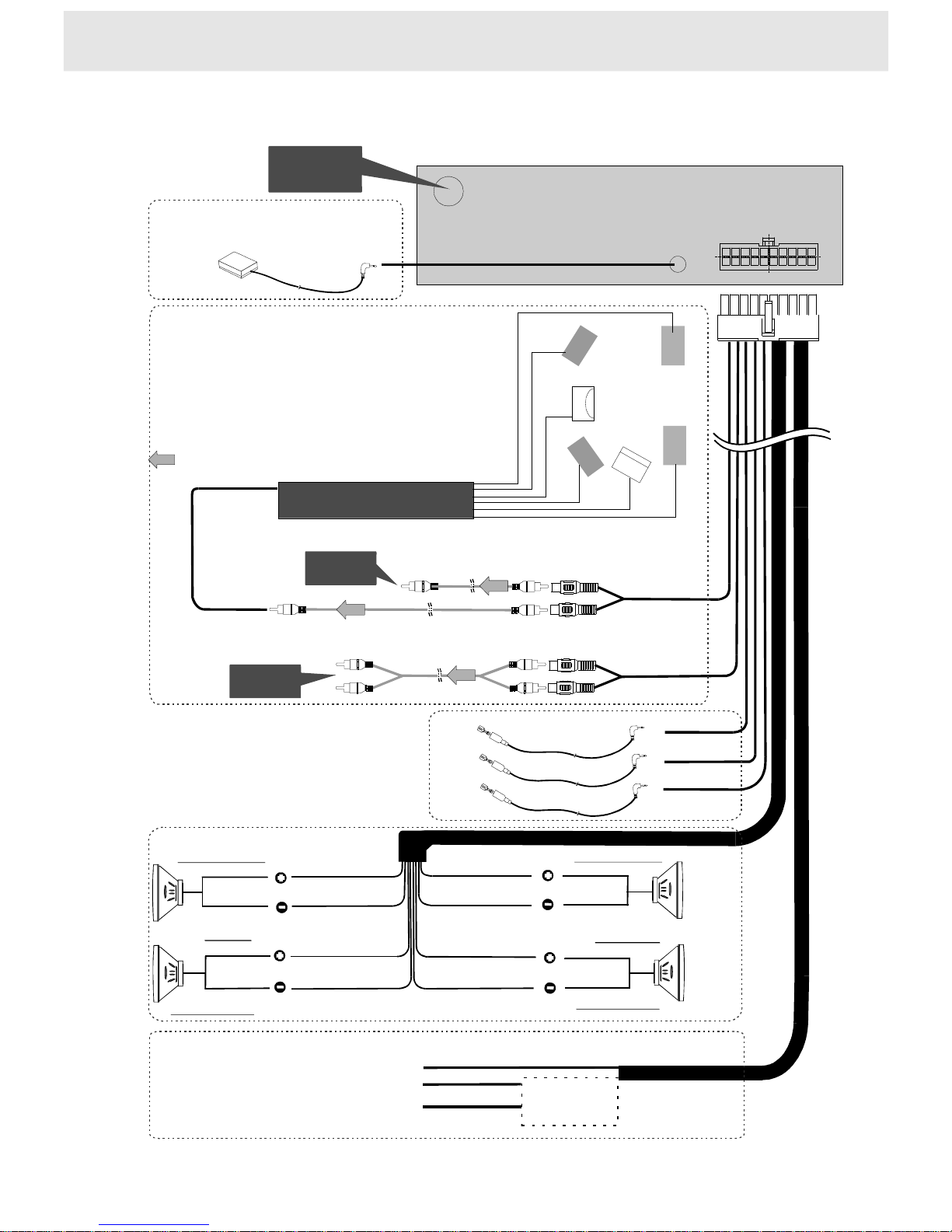
Connectingtoamonitorandspeakers,oraudiosystem
FMmodulator
oramplifier
TVorMonitor
VIDEOOUT
AUDIOOUT
Antennajack
Amplifierequippedwith
aDolbydigitaldecoder,or
aDTSdecoder,or
anMPEG2audiodecoder
75coaxialcableΩ
Frontspeaker
Frontspeaker
Centerspeaker
Rearspeaker
Rearspeaker
Subwoofer
Signalflow
Note:
1)Refertotheamplifiersownersmanual
andsettheFunctionsSetting(Audio,Digitalout)----Seepage23.
2)
3)
’’
WhenplayingDVDvideodiscsoraudioCDsencoded
viatheDTSrecording,pleaseusethecoaxialcable.
AndtheAudioSettingpleaserefertopage19.
Whenusingtheaudiocable,donotconnectthecoaxialcable
orspeakercable.
PowerAntenna
AmplifierTurnOn
PowerScreen
Frontspeaker
Green
Blue
Brown/White
Grey
Brown
Green/White
Grey/White
Blue/White
Filter/Fuse
Rearspeaker
Frontspeaker
Rearspeaker
Left
Right
12Volt(+),Accessory/Switched
Ground
+12Volt,constant
Remotesensorandremotecontroleyejack.
Connecttheremotecontroleyejacktothe
remotesensorunit.
PowerSupply
(Soldseparately)
Page 13
10
Connecting
Press
AMPSEL
toselect
themode
youneed
Usingthespeakercables
ConnectingPURPLEwithwhite
stripecabletotheRemoteeye
jackontherearofAmplifier,
orusingtheAudio/coaxialcable
Anyconnectionmode
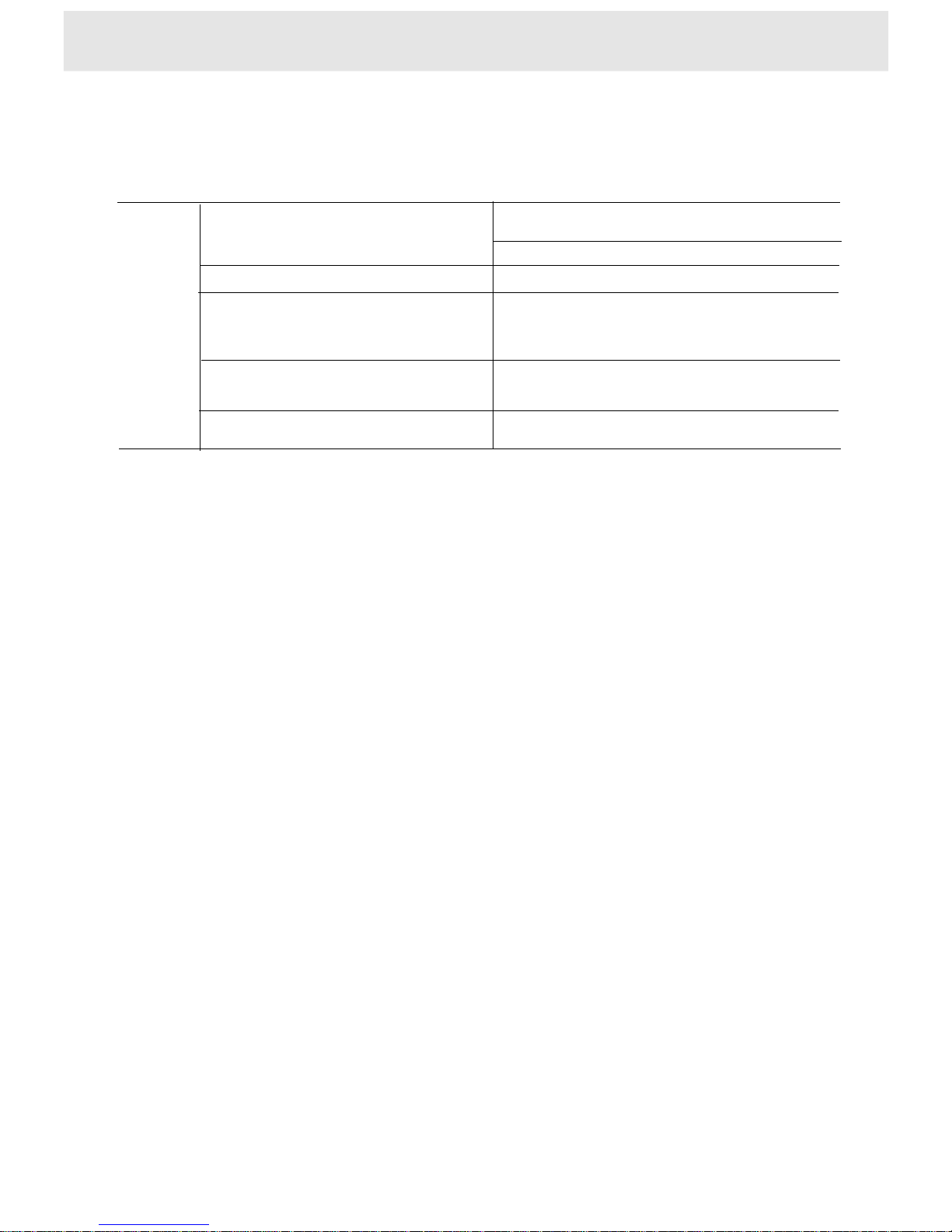
AMPSelect
PressAMPSELbuttonontheremoterepeatedly,selecttheamplifiermode
youneed(dependingontheconnectionmode).
AMPmode
Note:SettingtoALL,theplayerwillbeinhighconsumption.
Soweadvisetoselecttherightmodeforyourconnectionmode.
AAPOn
AAPOFF
EAPOn
IAPOn
ConnectingtheAudiocableto
themonitororaudiosystem
(refertopage9)
Connectionmode
Displayonpannel
NOTE1
LRLR
1)THEDVDPLAYERUSES12VDCANDTHECOVERISGROUNDED.
2)THEDVDPLAYERHASAHIGH-POWER4CHANNELBUILTINAMPLIFIER.
THESPEAKERCABLESUSEDMUSTBEAMINIMUMOF18GAUGECABLE,
IFONLYCONNECTING2SPEAKERS,YOUMUSTCONNECTTHE2FRONT
SPEAKERS(F,F)OR2REARSPEAKERS(R,R).
3)THEUNUSEDSPEAKERCABLESMUSTBEPROPERLYINSULATEDWITHTAPEOR
TERMINATINGCONNECTORSTOAVOIDASHORT.
NOTE2
1Refertotheowner'smanualfortheconnectedmonitoraswell.
2ConnecttheDVDvideoplayertoyourmonitordirectly.IfyouconnecttheDVDplayertoa
VTR,TV/VTRcombinationorvideoselector,theplaybackpicturemaybedistortedasDVD
discsarecopyprotected.(refertoNOTEONLOCATING)
""
""
NOTE3
1Refertotheowner'smanualoftheconnectedequipmentforadditionalinformation.
2WhenyouconnecttheDVDplayertootherequipment,besuretoturnoffthepower.
3IfyouplacetheDVDnearatunerorradio,theradiobroadcastsoundmightbedistorted.
Inthiscase,placetheDVDplayerawayfromanyothertunerorradio.
4TheoutputsoundoftheDVDplayerhasawidedynamicrange.Besuretoadjustthe
receiver'svolumetoamoderatelisteninglevel.Otherwise,thespeakersmaybedamagedby
asuddenhighoutput.
5TurnofftheamplifierbeforeyouconnectordisconnecttheDVDplayer'spowerleads.
Ifyouleavetheamplifierpoweron,thespeakersmaybedamaged.
NoteonConnecting
Page 14

MP3
Basicplayback
DVD
VCD
CD
11
Playingadisc
Thissectionshowsyouthebasicsonhowtoplayadisc.
Toobtainahigherqualitypicture
About
Occasionally,somepicturenoisenotusuallyvisibleduringanormalbroadcastmayappearonthe
monitorscreenwhileplayingaDVDdisc.Thisdistortionisbecausethehighresolutionpicture
dependsonthemonitoryouusewiththisDVDplayer.Youshouldgenerallyreducethesharpness
adjustmentonyourmonitorwhenviewingDVDdiscs.
Theiconsontheheadingbarshowtheplayablediscsforthefunctions
describedunderthatheading.
:YoucanusethisfunctionwithDVDdiscs.
:YoucanusethisfunctionwithVIDEOCDs.
:YoucanusethisfunctionwithCDs.
:YoucanusethisfunctionwithMP3discs.
3.
Pressbutton
TheDVDplayerejectsthediscautomatically.
Pressbuttonagainthediscgoesintotheslotautomatically.
PresstheOPENbuttontoopenthedoor.
2.
Placethedisc(withtheplaybacksidedown)intothediscslot
Placethediscintheslot,thediscwillgointotheslotautomatically.Donotpushthediscintothe
slotfast,doingsomaycausetheloadertomalfunction.
PresstheOPENbuttontoopenthedoor.
Thediscspinsandplaybackstarts.
IfyouinsertaDVDdiscthatcontainsatitlemenu,orinsertaPBC-equippedVIDEOCD,
amenuscreenmayappear.
--TostartplaybackofaPBC-equippedVIDEOCDfromthemenuscreen,
set"PBC"toon"viatheon-screendisplayswithMENUbutton.
--TostartplaybackofaDVDdiscfromthemenuscreen,
presstheTITLEorMENUbutton(dependingontheactualDVDdiscs.)
"
DVD
DVD
DVD
VCD
MP3
MP3
VCD
VCD
CD
CD
MP3
CD
Preparations
Whenyouwanttoviewadisc,turnonthemonitorandselectthevideoinputconnectedtothe
DVDplayer.
Whenyouwanttoenjoythesoundofdiscsfromtheaudiosystem,turnontheaudiosystemand
selecttheinputconnectedtotheDVDplayer.
Forconnectiondetails,see"Connections".
note:Donotputanyobjectsotherthandiscsintothediscslot,doingsomaycausetheplayer
tomalfunction.
1.PressPWRonthefrontpanelorPOWERontheremote
TheDVDplayerturnson
Page 15
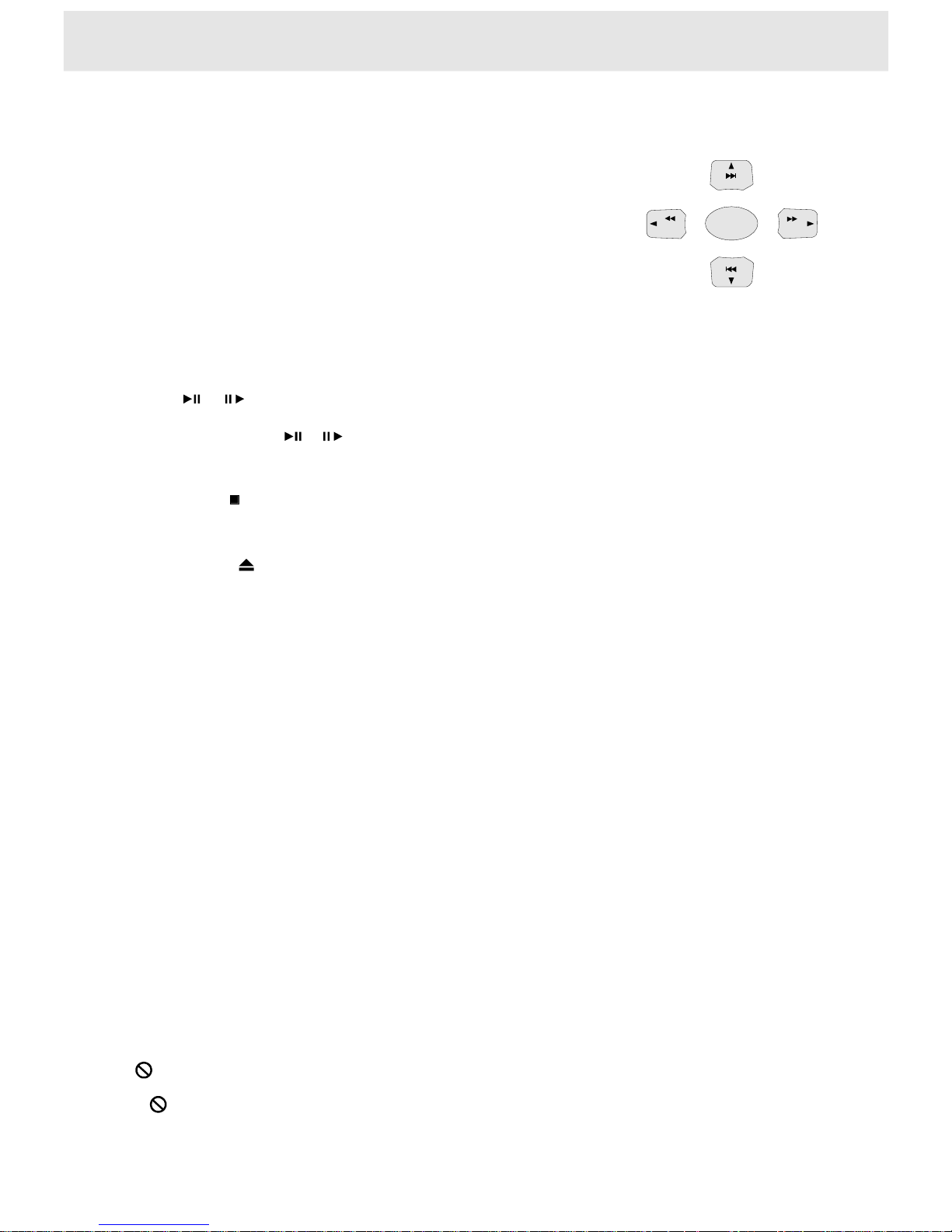
ENTER
SEEK+
SEEK-
Tostartplaybackfromthemenuscreen
Topauseplayback
Tostopplayback
Topoweron/offtheplayer
Toremovethedisc
Aboutthisowner'smanual
1Press///orthenumberbuttonsontheremotetoselectthetitleyouwant.
--titlenumberover10
Toinput13:press1and3.
-Toinput25:press2and5;
Toinput112:press1and1then2.
2P
TheDVDplayerbeginsplaybackfromtheselectedtitle.
WhennotusingthemenuscreenofaPBC-featuredVIDEOCD,
set"PBC"to"off"viatheon-screendisplays.
5634
MP3discs
ressENTERbutton
Pressorduringplayback.
Toresumenormalplayback,pressthisbuttonagain.
Eachtimeyoupressor,changePAUSE,PLAYmodeinturn.
PressSTOP.
1Duringplayback,pressPWRontheorfrontpanelmorethan1secondpressPOWER
ontheremote.theplayerpoweroff.
PressEJECTbutton.
TheDVDplayerejectsthediscautomatically.
Thisowner'smanualexplainsthebasicinstructionsofthisDVDplayer.SomeDVD
discsareproducedinamannerthatallowsspecificorlimitedoperationduringplayback.
Assuch,theDVDplayermaynotrespondtoalloperatingcommands.Thisisnota
defectintheDVDplayer.Refertotheinstructionnotesofdiscs.
""mayappearontheTVscreenduringoperation.
A""meansthattheoperationisnotpermittedbytheDVDplayerorthedisc.
12
2Aftertheplayerpoweroff,pressPWRorPOWERbuttonagain,theplaybackstarts.
Playingadisc
Note:pressPWRonthefrontpanellessthan1second,
theplaybackchangesbetweenDVDplayerandRadiomode.
Ifyoudonotpowerofftheunitbeforeturningofftheignition,
theunitwillpoweronfromthebeginningregardlessofthemode(DVD,Radio)
whereyouturnedofftheignition.
Playpositionmemoryfunction
EvenifyouturnpowerofforswitchtheignitionkeytoOFFduringplaybackorchange
thevideosource,playbackwillcontinuefromthepointwhereplaybackstoppedwhen
thepoweristurnedONagain.
TheplaypositionmemoryisreleasedifthediscisremovedortheResetbuttonispressed.
Page 16
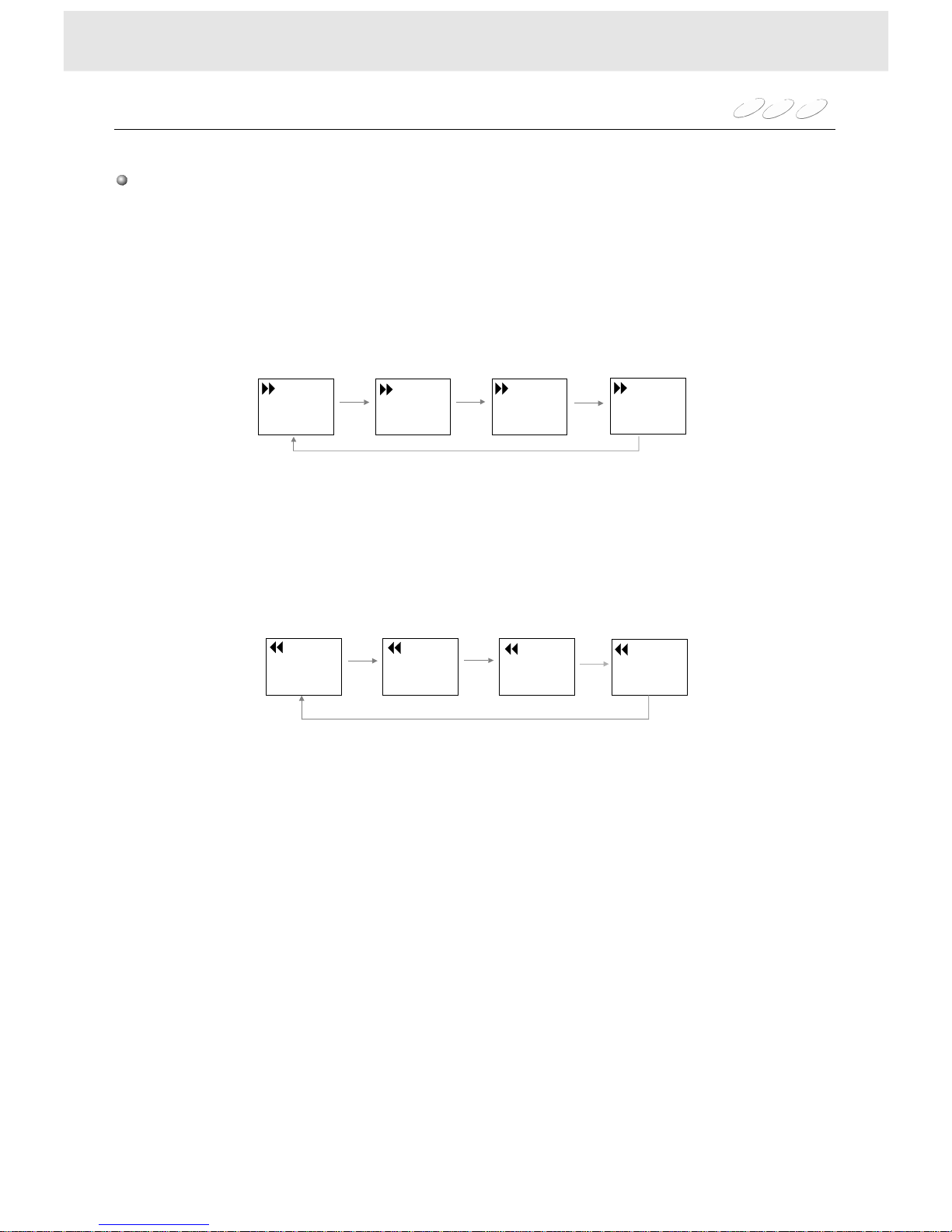
Eachtimeyoupresstheorbutton,theplaybackspeedchanges.78
8:Fastforwardplayback
DVD
VCD
CD
Playingatvariousspeeds
Pressorontheremoteduringplayback,orpressandholdtheSKIPbutton
onthefrontpanelformorethan1second,theplayerplaysin,mode.
78
78
Notes
TheDVDplayerdoesnotplaysoundandsubtitlesduringreverseandforwardscanof
DVDdiscsorVIDEOCDs.
However,theDVDplayerplayssoundduringfastforwardorfastreverseplayofaudioCDs.
7:Fastreverseplayback
13
X2
X2the
normalspeed
X4the
normalspeed
X8the
normalspeed
X20the
normalspeed
X4
X8
X20
X20
X2
X8
X4
Playingadisc
Pressreturntothenormalspeedplayback.PLAY
OnScreen
OnScreen
Page 17
DVD
VCD
MP3
CD
Resumingplaybackfromthesamelocation
Youcanstopplaybackandresumeplaybacklaterfromthesamelocationonthedisc.
1Pressatthelocationwhereyouwantto
interruptplayback.TheDVDplayermemorizesthelocation
whereplaybackisstopped.STOP(Playtoresume)appearsonthescreen.
2Press
TheDVDplayerresumesplaybackfromthelocationwhereyoustoppedplayback.
STOP
PLAY
Tostartplaybackfromthebeginningregardlessofthelocationwhereyoustoppedplayback.
1Presstwice.
TheDVDplayer'smemoryiscleared.
2Press.
Playbackstartsfromthebeginningofthedisc.
STOP
PLAY
Note
TheDVDplayer'smemoryisalsoclearedwhen:
--thePOWERturnsoffafteryoustopplayback.
--Youejectthedisc.
14
Playingfromthedesiredlocation
Youcanplayadiscfromthedesiredlocation.
Locatingaspecificlocationbyenteringthetracknumber,thechapternumberorthetime.
DVD
VCD
CD
Note
Somediscsmaynotrespondtothisprocess.
Somescenesmaynotbelocatedpreciselyasyouspecified.
Thismethodforaccessingspecificlocationsisavailableonlywithinthecurrenttitleofthe
DVDdiscorwithinthecurrenttrackoftheVIDEOCD/audioCD.
Youcanlocateaspecificlocationbyenteringitscorrespondingtracknumber,chapternumber,
ortime(hours,minutes,seconds).
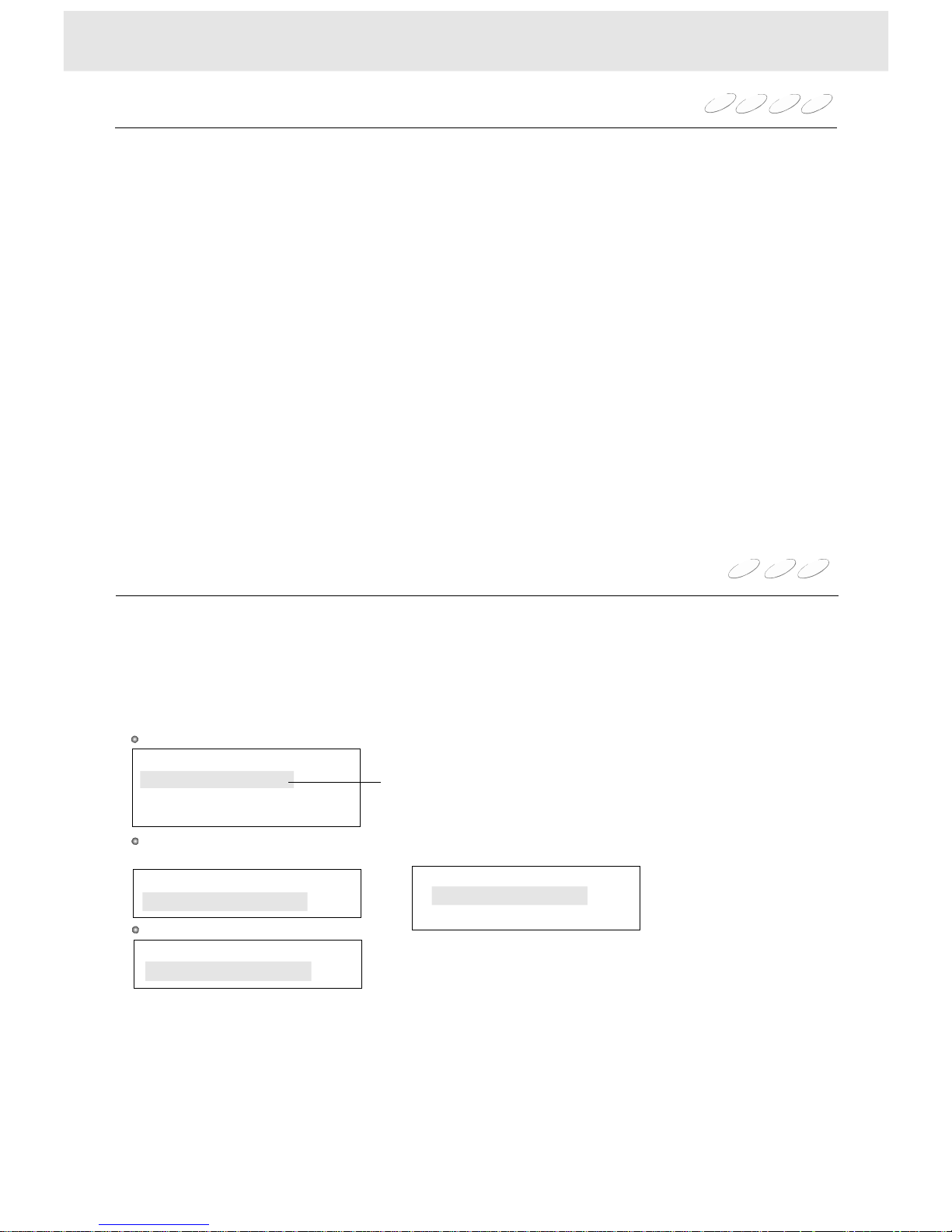
1Whileplayingpress,fordifferentdiscstheon-screendisplaychangesasfollows:GOTO
Advancedplayback
2PressENTER
TheDVDvideoplayerstartsplaybackfromthedesiredlocationyourentered.
DVD
VCD/CD(PBCOFF)
VCD(PBCON)
TrackSearch
Time:__:__:__
DiscSearch
Time:
Track:__
__:__:__
SearchTM/CH/TL
Time:__:__:_
Chapter:__
__
_
Title:
TrackSearch
Time:__:__:__
Elapsedtime
PressGOTO:
PressGOTOagain:
Page 18
1Pressor.(dependingontheactualDVDdiscs)
Thetitlemenuappearsonthescreen.
2Press///tothetitleyouwant.
Ifthetitlesinthemenuareassignedanumber,youcandirectlylocateaspecifictitlebypressingits
designatednumberwiththenumberbuttons.
3PressENTER
TheDVDplayerstartsplaybackfromchapter1oftheselectedtitle.
IfaDVDvideodisccontainsatitlemenu,youcanlocateaspecifictitleusingthetitlemenu
function.
TITLEMENU
5634
IfaDVDdisccontainsachaptermenu,youcanlocateaspecificchapterusing
thechaptermenufunction.
1PressMENU.
TheCHAPTERmenuappearsonthescreen.
2Press///tothechapteryouwant.
Ifthechaptersinthemenuareassignedanumber,youcandirectlylocateaspecificchapterby
pressingitsdesignatednumberwiththenumberbuttons.
3PressENTER
TheDVDplayerstartsplaybackfromtheselectedchapter.
5634
1PlayingaVIDEOCD,Thetrackmenuappearsonthescreen.
2Pressortoseetheprecedingornextpageofthemenu,pressthecorrespondingnumber
buttonsofthetrackyouwant.
Thedigestmenuofthediscappearsonthescreen.
--Pressortoseetheprecedingornextdigest,or
--pressthecorrespondingnumberbuttonsofthedigestyouwant
IfaVIDEOCDcontainsatrackmenu,youcanlocateaspecifictrackusingthetrack
menufunction.
PressMENU,inPBConmode
PressTITLE,indigestmode
PressENTER,theDVDplayerstartsplaybackfromtheselection.
9:
34
Pressorrepeatedly(intitle/PBCoffmode)todisplaythechapterortracknumberyouwant.
TheDVDvideoplayerstartsplaybackfromtheselectedchapterortrack.
:Tolocateprecedingchaptersortracks.
Whenyoupressthebutton,theDVDplayerstartsplaybackfromthebeginning
ofthecurrentchapterortrack.
Whenyoupressthetwice,theDVDplayerstartsplaybackfromthebeginningofthe
precedingchapterortrack.
:Tolocatesucceedingchaptersortracks.
Youcanlocateconsecutivechaptersortracks.
skip 9:
9
9
9
:
Note
Theinstructionsabovedescribebasicprocedureswhichmayvarydependingonthecontentsof
theDVDdisc.Ifdifferentinstructionsappearonthescreen,followthoseinstructions.
15
Locatingaspecifictitle,chapter,ortrack
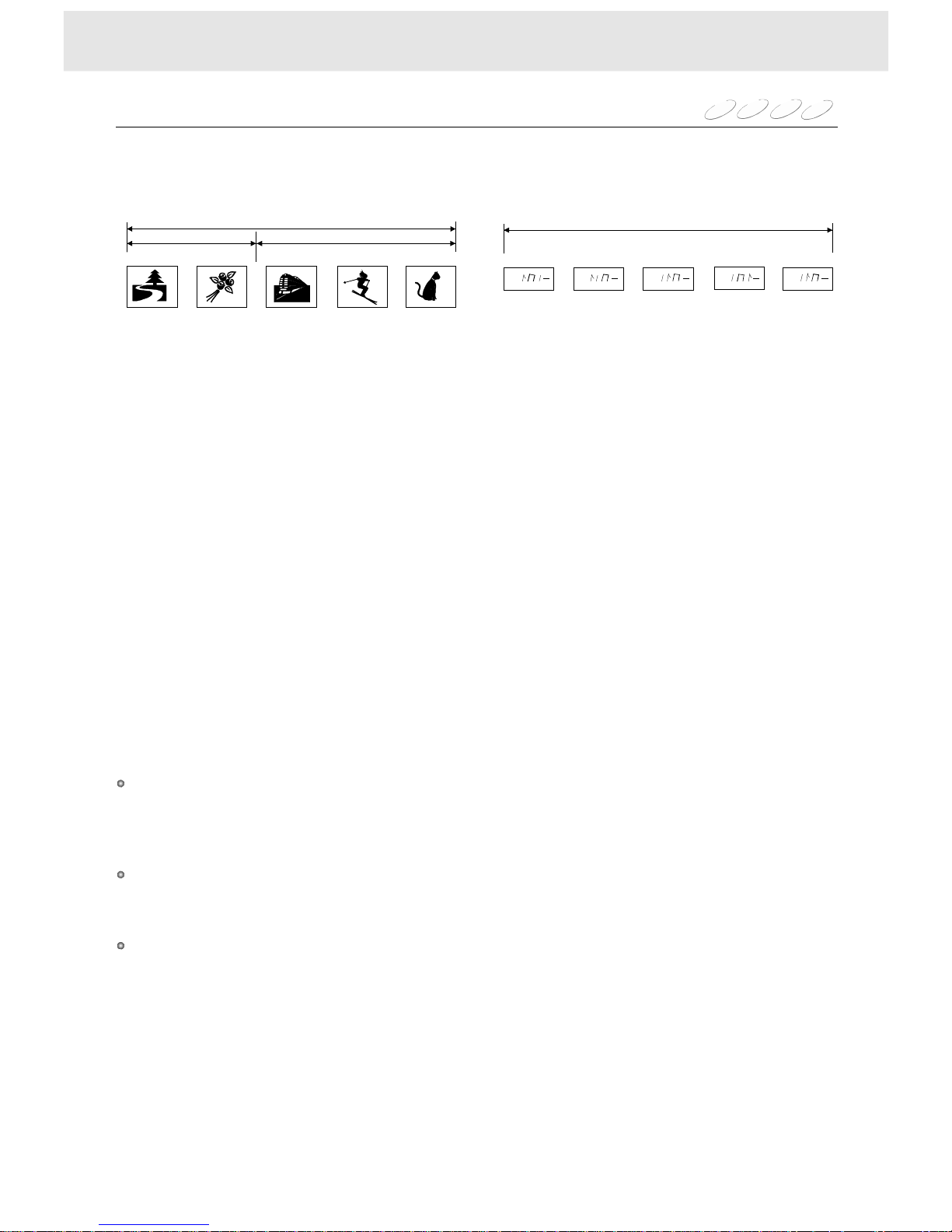
Normally,DVDvideodiscsaredividedintotitles,andthetitlesaresub-dividedintochapters.
VIDEOCDsandaudioCDsaredividedintotracks,youcanquicklylocateanyspecifictitle,
chapter,ortrack.
Chapter1
Track1
Title1
Title2
DVDdisc
VIDEOCD/AudioCD
Chapter1
Track3
Chapter2
Track2
Chapter2
Track4
Chapter3
Track5
NffffNffffNffffNffffNffff
DVD
VCD
MP3
CD
Advancedplayback
Page 19
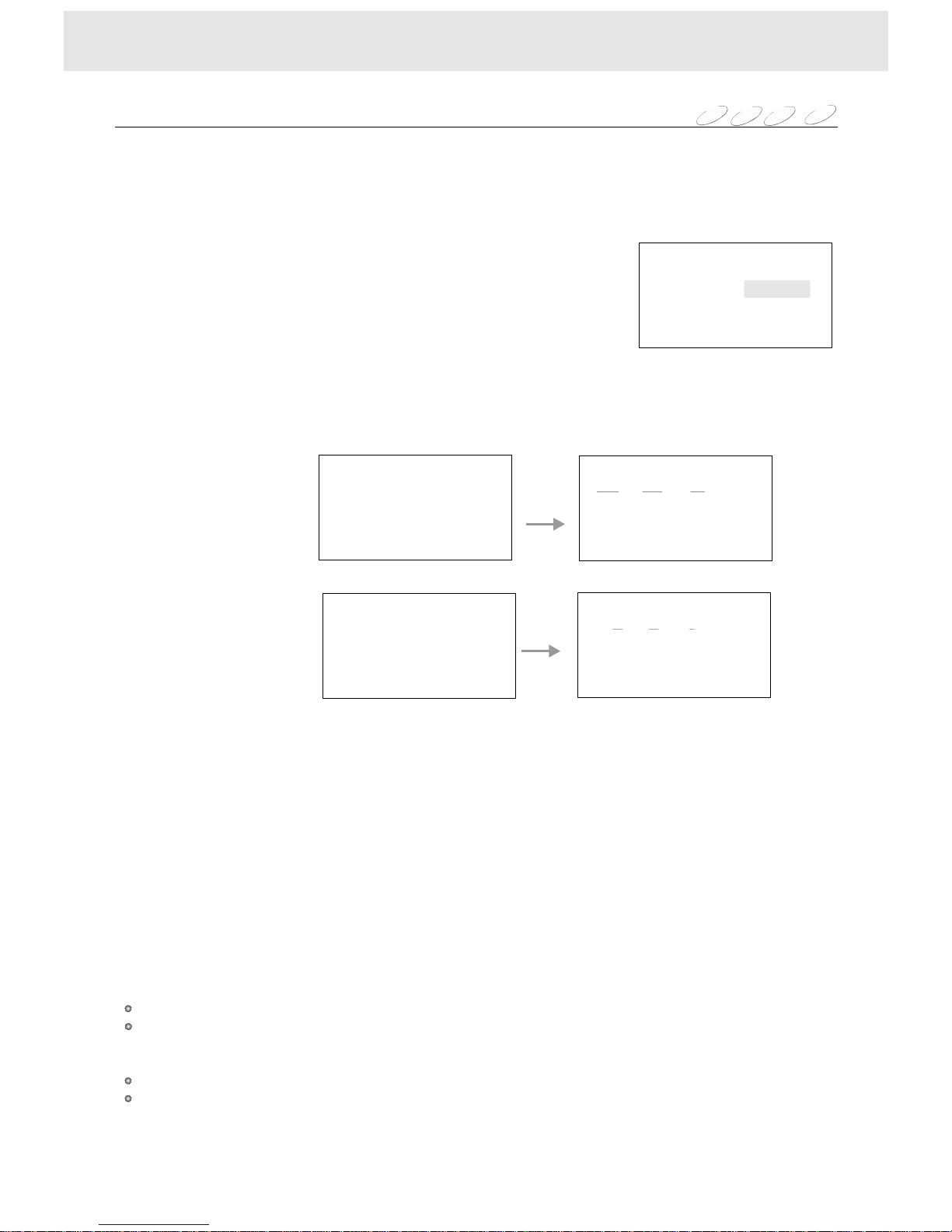
Youcancombineyourfavouritetitles,chapters,ortracksandplaytheminanyorder.
Youcanprogramupto16selectionsintothememory.(programplayback)
TheDVDplayerautomaticallyplaystitles,chapters,ortracksintheorderofyourprogram.
1SelectPROGRAMplaymode,thefollowingmenuappears.
PlayMode
DVD
VCD
CD
16
2Eachtimeyoupressthebutton,the__indicationishighlightedinturn.Highlightwhere
youwanttoenterthenpressthenumberbuttons(Theselectednumbermustbelessthanthetitle,
chapterortracknumber).
3MovethecursortoPlayProgramandpressENTERbutton,
TheDVDvideoplayerstartsprogramplayback.
4TochangetheprogrammedselectionsWhilethePROGRAMmenuappearsonthescreen,
pressthebuttontomovethehighlightedbartotheitemyouwanttochange,thenyoucan
pressthenumberbuttons.OrpresstheCLEARbutton.
5Tocanceltheprogrammedselections,
With(ClearAll)highlighted,pressENTERbutton.
6Toprogramduringplayback
Ifyouentertheplaymodeduringplayback,andtheprogrammenuappearstoacceptyour
programming.
5634
56
NOTES
Somediscsmaynotpermitprogramplaybackoperation.
IfyoupresstheREPEATduringprogramplayback,
theDVDvideoplayerrepeatscurrentprogramplayback.
IfyoupresstheSKIPtheplayerwillskiptotheprecedingorthenextitem.
Youcannotselecttitle,chapter,andtracknumbersnotincludedonthedisc.
Theprogrammedselectionswillbeclearedwhen:
--youturnofftheDVDplayer,or
--youremovethedisc.
、,9:
Youcanplayindeferentmode.
Inthestopmode,pressthePLAYMODEbuttonontheremote,
thefollowingmenuappearsonthescreen.
AndwiththeENTERbuttonyoucanchangethemodeas:PBC(forVCD),Program,Off,Shuffle.
Whenyouselectonemode,movethecursortoOKthenpressENTER.
1)ForProgram,theplaybackstartsinprogrammode.
2)PressPLAYbutton,
ForPBC,theplaybackstartsinPBConmode.
ForOff,theplaybackstartsinnomode.
Forshuffle,theplaybackstartsrandom.
OKCancel
PlayMode
Advancedplayback
ModePBC
PlayDVD
PlayVCD,CD
MP3
Play ProgramClearAllCancel
ProgramTitle/Charpter
1____5____9____13____
2____6____10____14____
3____7____11____15____
4____8____12____16____
15913____
2____6____10____14____
3____7____11____15____
4
12110142
____8____12____16____
1___5___9___13___
2___6___10___14___
3___7___11___15___
4___8___12___16___
15913___
2___6___10___14___
3___7___11___15___
4
15171
___8___12___16___
ProgramTrack
ProgramTitle/Charpter
ProgramTrack
Play ProgramClearAllCancel
Play ProgramClearAllCancel Play ProgramClearAllCancel
Page 20
17
Playingrepeatedly
DVD
VCD
MP3
CD
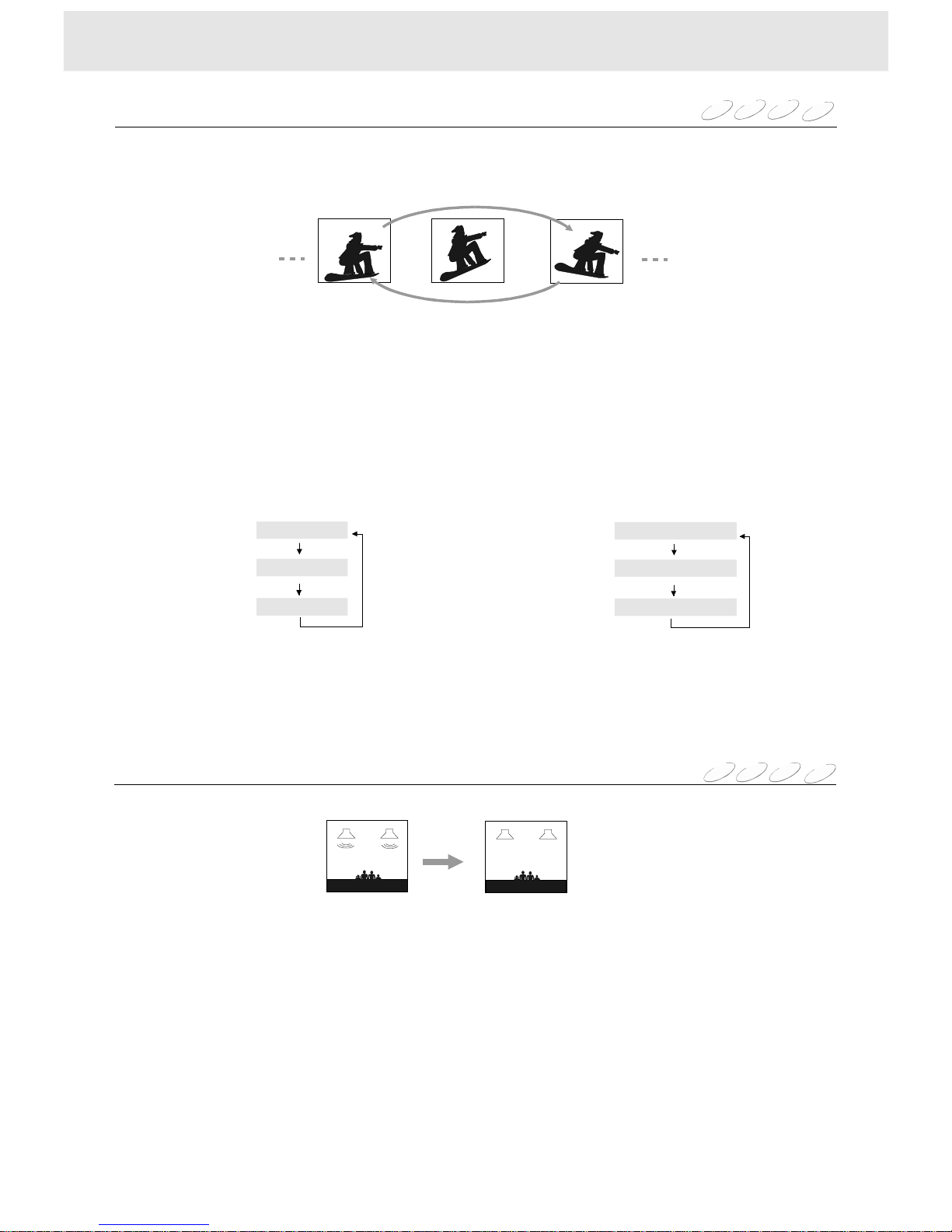
Youcanplaythesametrackordiscrepeatedly.
Whileplaying,eachtimeyoupresstheRPT.(REPEAT)button,therepeatmodechangesasfollows.
Note: Somediscsmaynotpermitrepeatoperation.
PlayingVCD/CD/MP3
PlayingDVD
Repeatingatitle,chapter,ortrack
Repeatsthesame
track
Repeatsthesame
chapter
Repeatstheentire
disc
Repeatsthesame
title
Resumesnormal
playback
Resumesnormal
playback
DVDVCD
MP3
CD
Playingwithoutsound
Whileplayingadisc
--PressMUTEbutton.
Theplayerplaysthediscwithoutsound
--PressMUTEagain,or
changethesoundbypressingVOL+orVOL-,orpressingAUDIOtwice,
theplayerplayswithsound(exceptMP3disc).
Advancedplayback
OffOff
Single
Chapter
All
Title
Page 21
Selectingsound
DVDVCDMP3CD
18
NOTE:
TheVOLUMEsettingisnotclearedwhen:
1)youturnthepoweroff,
2)youejectthedisc
3)youchangethedisc.
Advancedplayback
Volume36
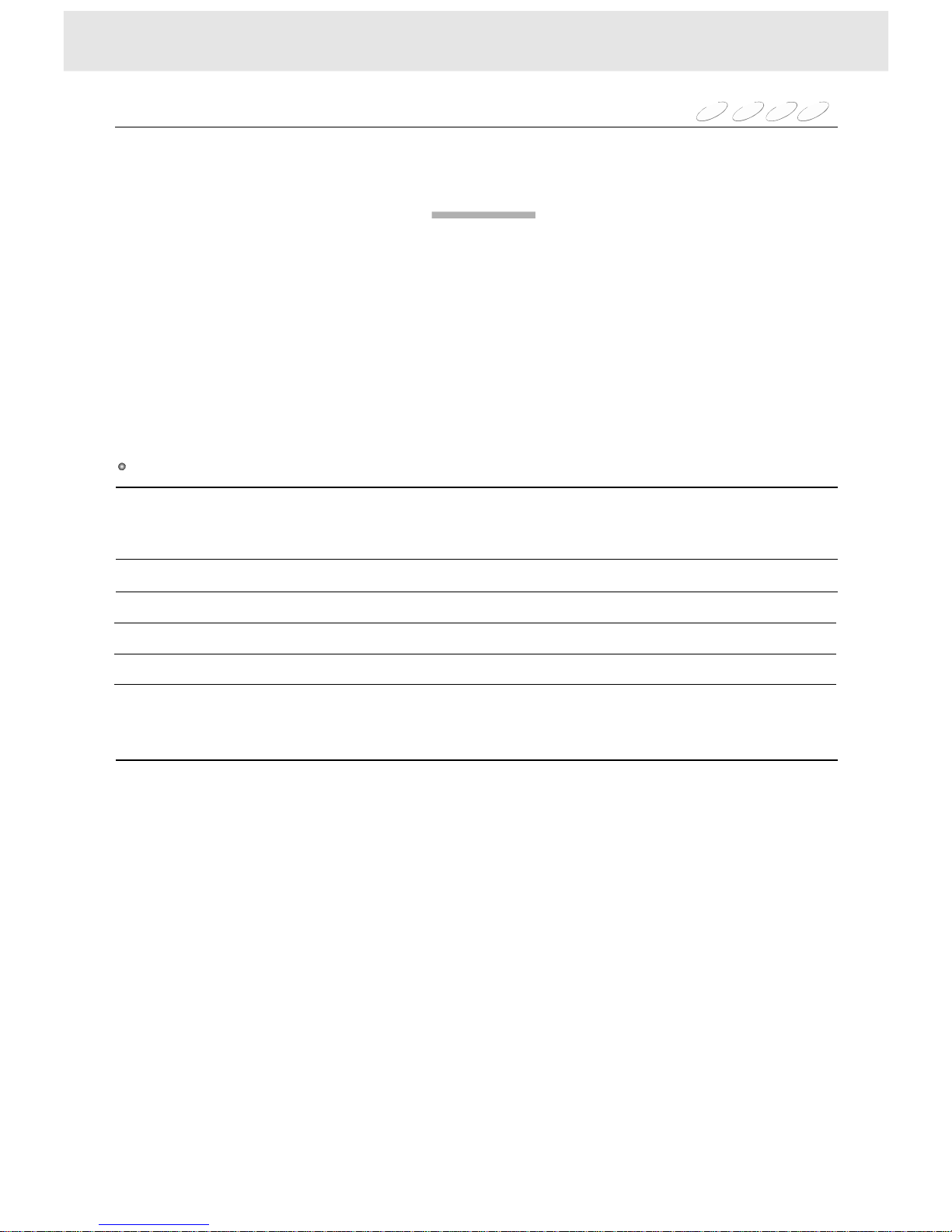
WiththeVOL+,VOL-button,youcanchangethevolume.
Whenthesettingappearsonthescreen,presstochangethevolume.
Volumechangesfrom0to36:
Inradiomode,VOLXX(volumelevel0~36)appearsonthefrontpanel.
34
AdjustSOUNDasyoulike:AdjustSOUNDasyoulike:
To
Balance
Bass
Treble
Fader
Loudness
BAlxx
BAssxx
trExx
FAdxx
Loudx
PresstheVOL+,-button
adjustthesetting
asyoulike
xxchangesfrom-8~8
xxchangesfrom-7~7
xxchangesfrom-7~7
xxchangesfrom-8~8
0(or1),pressENTERbutton
toselecttheitem.
0forloudoff,1forloudon
PressSELbuttonrepeatedly
theitemyouwanttoadjustappears
onthepanelDisplay
NOTE:
UsingtheSELbuttononthefrontpanel,pleasepressthisbuttonlessthan0.5seconds
andreleasethebuttontochoosethesoundeffect.
Page 22
19
Advancedplayback
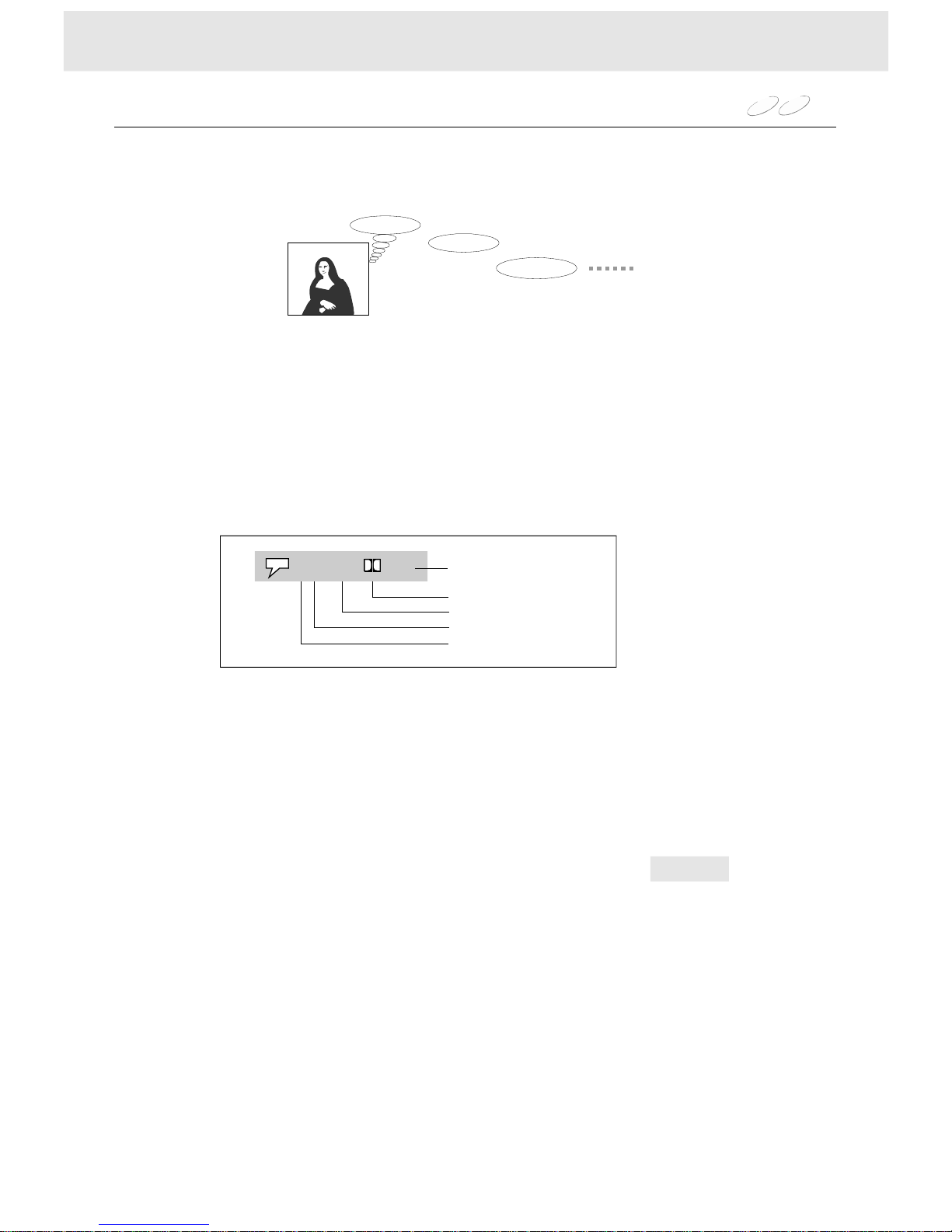
Youcanselectapreferredlanguagefromthoseincludedonthedisc.
1WhileplayingpressAUDIO,thecurrentaudiosettingappears.
2EachtimeyoupresstheAUDIO,theaudiosettingincludedontheDVDvideodiscchanges.
Selectingaplaybackaudiosetting
Buenosdias!
Goodmorning!
Bonjour!
!
WiththeAUDIObuttonandtheinstructionsappearonthescreen,youcanchangetheAUDIOMode.
PresstheAUDIObutton,thesettingappearsonthescreen:
StereoL/RMode
L/RmodehighlightedpressENTERtochangetheaudiochannel.
L/Rmodechangesasfollowing:Stereo,Left,Right,Mix.
,
DVD
VCD
FORDVDDISCS
FORVCDDISCS
WhenplayingthediscsintheDolbydigitalandDTSsystem,pleaseselecttheAUDIOmodeinDolby.
IfyouselectDTS,besuretousethecoaxialcableandconnecttoDTSequippedamplifier.
Pleaseseepage9.
Currentaudionumber
1/4Eng2Ch
Totalaudionumber
Language
Recordingsystem
Audiochannel
Page 23
20
Advancedplayback
DVD
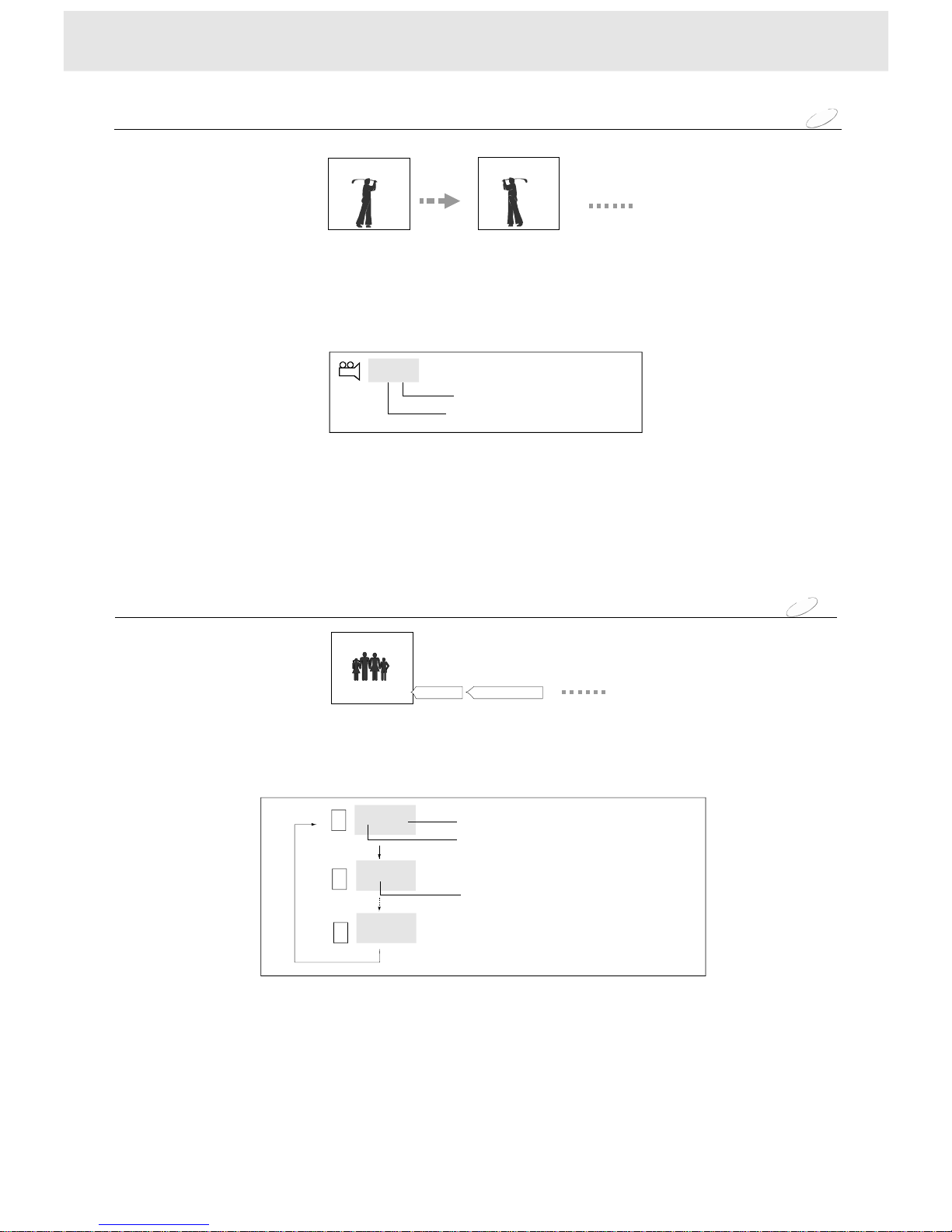
Selectingthecameraangle
NOTE
Ifyoupauseapictureimmediatelyafterchangingacameraangle,theresumedplaybackpicturemay
displaythenewcameraangle.
Youcanselectapreferredcameraangletowatchascene.
Ifthescenewasrecordedfrommultipleangles,youcaneasilychangethecameraangleofthescene
youarewatching.
1PressANGLEbutton,ifthetotalanglenumberincludedonthediscismorethan1,
thentheangleiconisdisplayed.
2EachtimeyoupresstheANGLEbutton,thecameraanglechanges.
X/X
[2/2]
[1/2]
Totalanglenumber
Currentanglenumber
ANGLE
ANGLE
Goodevening!
DVD
Youcandisplaysubtitlesonthescreenandselectapreferredsubtitlelanguage.
EachtimeyoupresstheSUB(SUBTITLE)button,thesubtitlelanguages
includedontheDVDdiscchange.
NOTE
SomeDVDdiscsaresettodisplaysubtitlesautomatically,andyoucannotturnthemoff
evenifyousetthesubtitlefunctiontooff.
Duringsomescenes,thesubtitlesmaynotappearimmediatelyafteryoupressSUBbutton.
SomeDVDdiscswillallowyoutomakesubtitleselectionsandturnsubtitlesonoroff
onlyviathediscmenu.
Duringsomescenes,thesubtitlesmaynotappearimmediatelyafteryouchangethelanguage
bypressingtheSUBbutton.
Selectingsubtitles
Bonsoir!Buenastardes!
!
Off
||||||||||||||||||
||||||||||||||||||
||||||||||||||||||
Eng
Fre
Currentsubtitlelanguagenumber
Totalsubtitlelanguagenumber
Currentsubtitlelanguage
1/3
2/3
Page 24
21
Functionsetup
Usingtheon-screendisplay
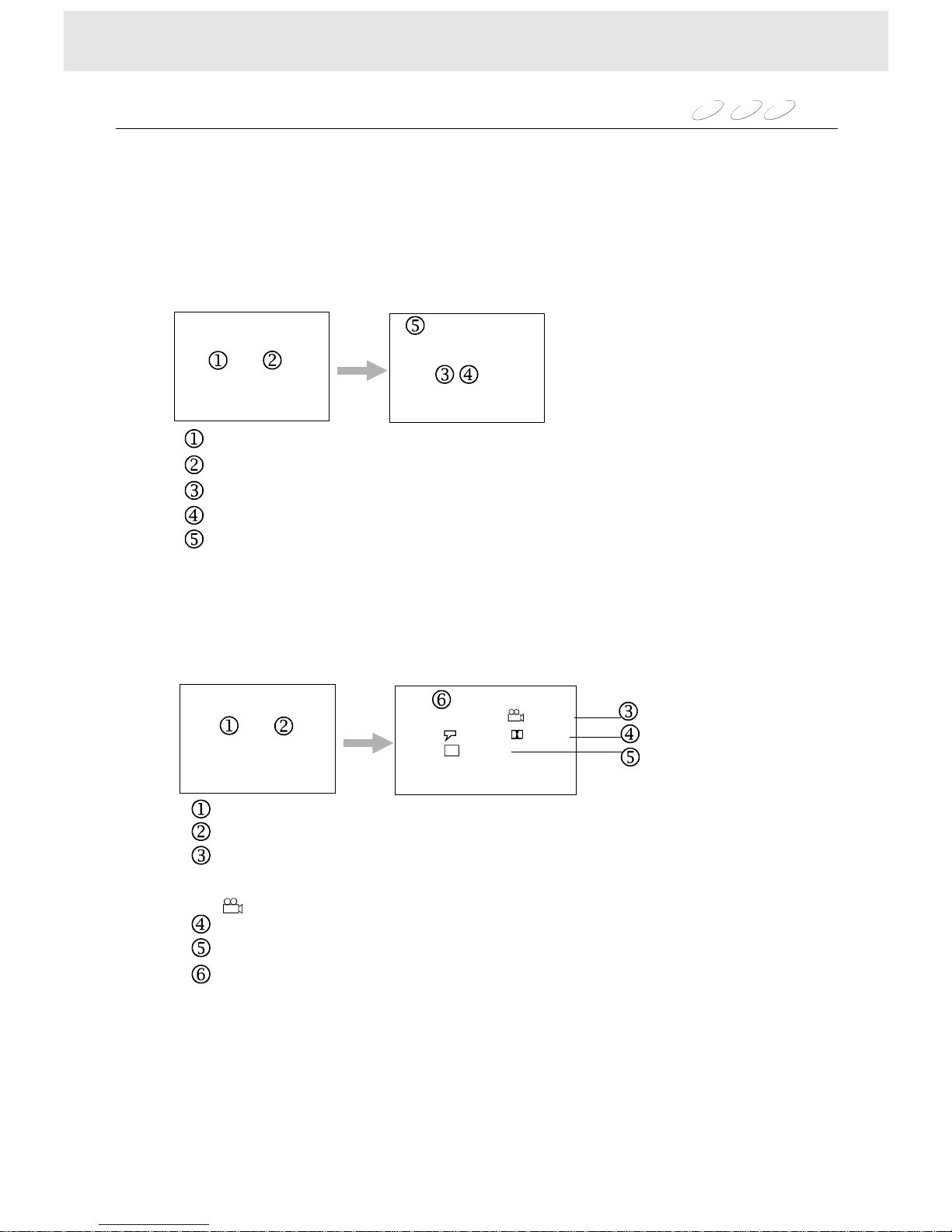
Youcanviewinformationaboutadiscanditsoperationalstatusonthescreen.
PresstheDISPLAYbutton,theon-screendisplayonthescreen.
Checkingtheoperationalstatus
DVD
VCD
CD
2PlayingDVD
1PlayingVIDEOCD/CD
Elapsedtime
Remainingtimeofthecurrenttrack
Elapsedtrack
Totaltracknumber
Disctype
Elapsedtime
Remainingtimeofthecurrenttitle
Elapsedchapterandtotalchapternumber
Elapsedtitleandtotaltitlenumber
AnglerefertoSelectingthecameraangle
Audio:refertoSelectingaplaybackaudiosetting
Subtitle:refertoSelectingsubtitle
Disctype
:,“”
“”
“”
X:XX:XXX:XX:XX
X:XX:XXX:XX:XX
VCDX:XX:XXX:XX:XX
TRACKX/X
DVDx:xx:xxx:xx:xx
Titlex/xChapterx/xAngle1/1
Audio1/4Eng2Ch
Subtitle1/3Eng
||||||||||||||||||
Page 25
Functionsetup
Customizingthefunctionsettings
DVD
VCD
CD
MP3
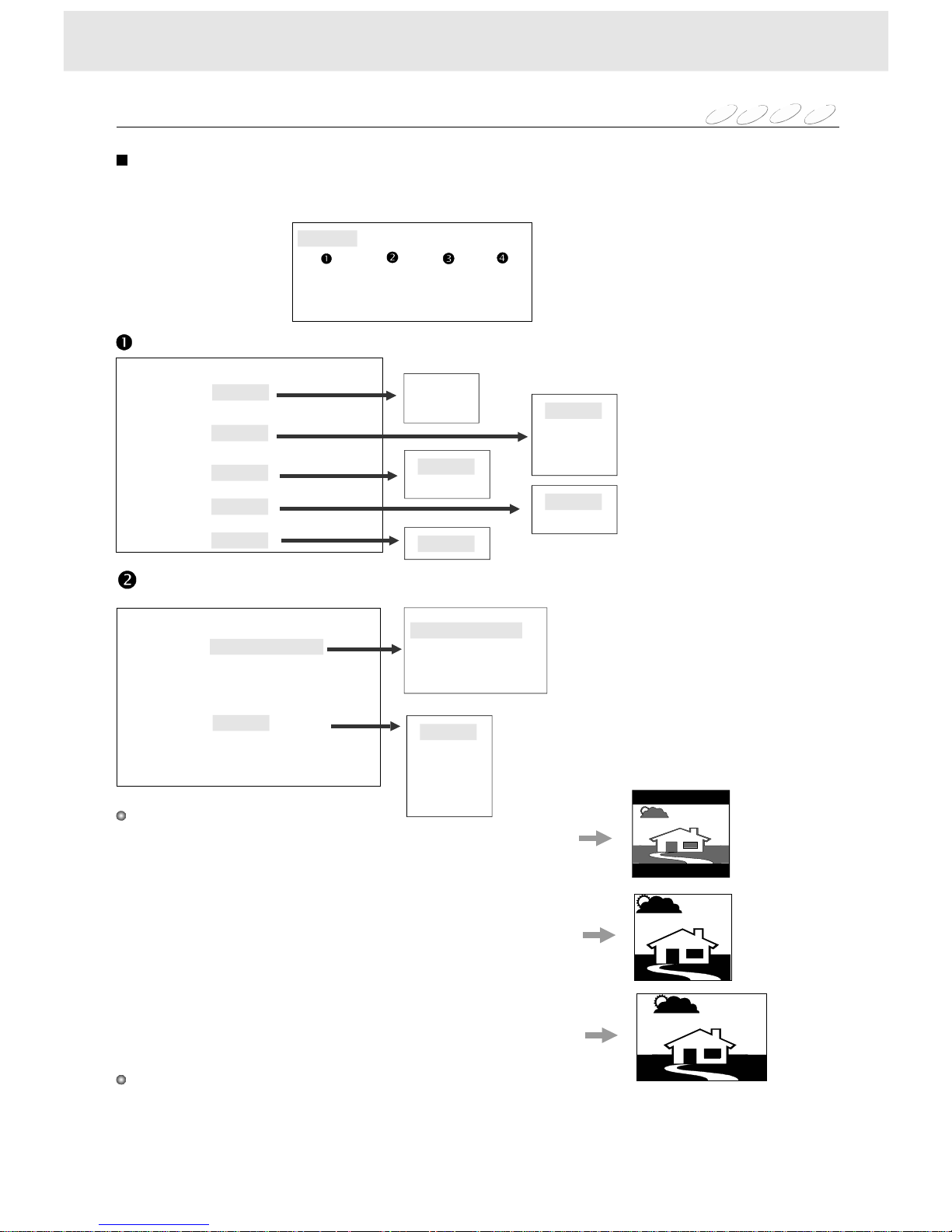
PressSETUPduringstop.Thesettingmenuappears.
Press,,563,buttontomovethecursortotheitem,
thenpressENTERtoselecttheitemyouwant.
4
LanguageVideoAudioRating
OSDMenuEnglish
SubtitleEnglish
English
English
Auto
Off
AudioEnglish
English
DVDMenuEnglish
English
OSDOn
Off
Language
Video
TVShape43PanScan:
43PanScan
43LetterBox
16:9
:
:
TVSystemNTSC
NTSC
PAL
PALM
AUTO
--4:3LETTERBOX:Selectwhen4:3TVisconnected
displaystheatricalimageswith
maskingbarsaboveandbelow
thepicture.
--4:3PAN-SCAN:Selectwhena4:3TVisconnected.
Displaypicturescroppedtofill
yourTVscreen.Eitherorbothsides
ofthepicturearecutoff.
--16:9WIDE:Selectwhena16:9wideTVisconnected.
TVSystem
TVShape
YoucanselecttheTVSystemforyourTV,dependingontheactualDVDdiscs.
Note:IfsomepicturenoisenotusuallyvisiblewhileplayingaDVDdisc,
pleasepicktherightTVsystemforthisdisc.
LanguageVideoAudioRating
LanguageVideoAudioRating
22
Page 26
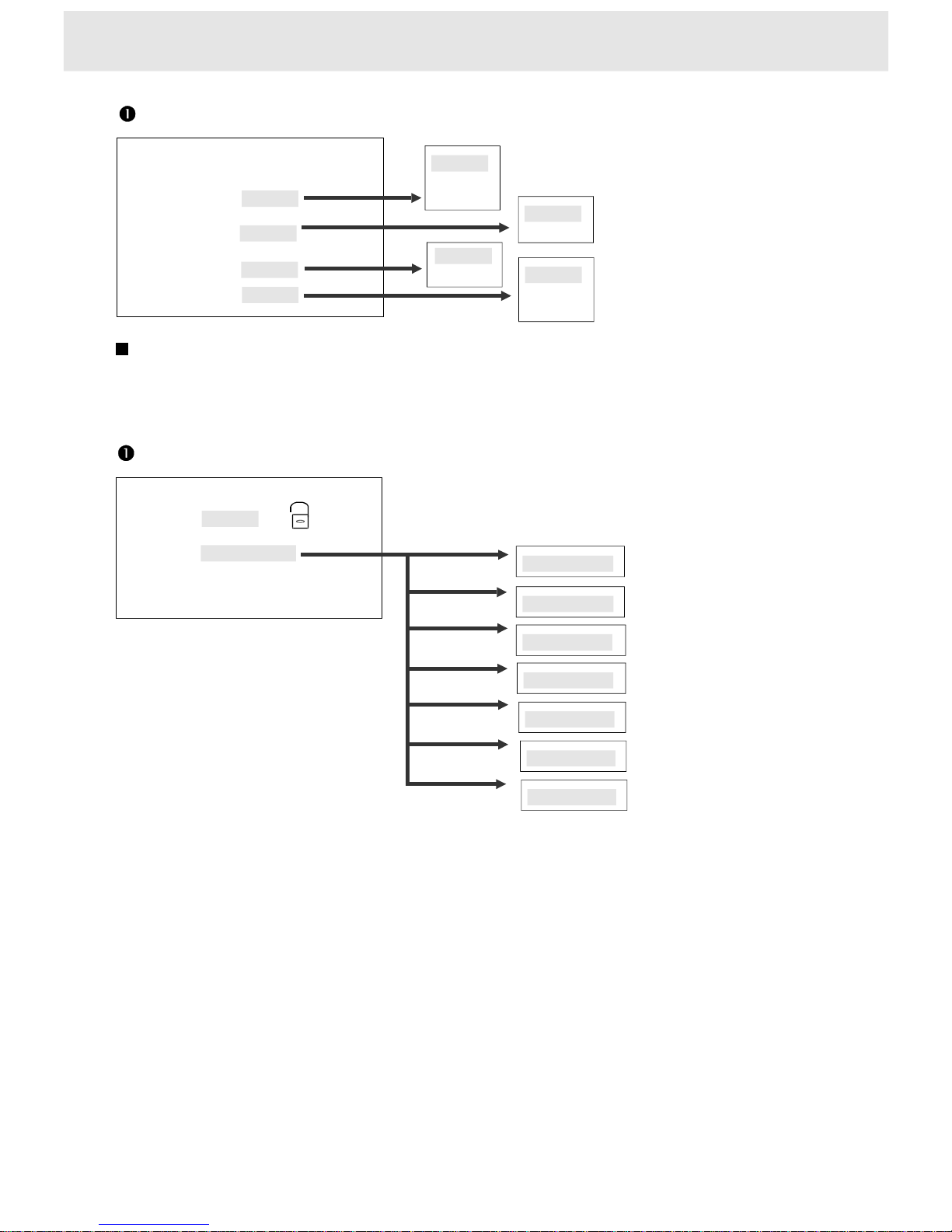
DolbyDOff
Off
PCM
Raw
Audio
LanguageVideoAudioRating
DTSOff
MP3Off
OthersOff
Off
Raw
Off
PCM
Off
PCM
Raw
Password----
Rating
LanguageVideoAudioRating
Rating1KidSafe
2.G
3.PG
4.PG-13
5.PG-R
6.R
7.NC-17
8.Adult
Theplayerwithoutthedefaultpassword.Pressthenumberbuttontocreateorchangeyour4-digital
securitypasswordtochangetherating,inputnumbersaredisplayed*.Then,youmustenterthe
correctpasswordtochangetheratingoryoucannotplayDVDvideodiscratedhigherthanthelevel
youselected.
ThisisthefunctionofDVDforrestrictingtheviewingageasstipulatedbylawsindifferentcountries.
ThewayinwhichviewingisrestricteddiffersfromDVDtoDVD.SometimestheDVDcannotbe
playedatall,othertimescertainscenesareskipped,andtheothertimescertainscenesare
replacedwithotherscenes.
””
Functionsetup
NOTE:PressEJECTbutton.Whilelogoappearsonthescreen,pressthebuttons
atthesametime,thefunctionsettingsreturntoFACTORYSETUP.
RPT.,AUDIO
onthefrontpanel
23
DigitalAudio
Whenusingthecoaxialcable(seepage9),youshouldsetDigitalOutPCMorRaw.
RefertotheamplifiersownersmanualandmakethesettingRaworPCM.
Selectonemode,ifthereisnosoundchangetotheotherone.
’’
Page 27
MP3Instruction
24
InserttheMP3discthenplaybackstart,theMENUofelapsedtrackappears.
1TRACK25TRACK32
TRACK26TRACK33
TRACK27RACK34
TRACK35
TRACK36
TRACK30TRACK37
TRACK31TRACK38
8
29
310T
4TRACK2811
5TRACK2912
613
714
MP3TrackXX/XXXXX:XX:XX
Mode
Press
Play
Stop/
Play
9:
Numberbutton
34
Numberbutton
WhentheMENUisnotonthescreen,
Toplaytheprecedingorthenexttrack
Toselectthetrackwiththenumberbuttonontheremote
directly,thenpressENTERbuttontoplaythetrack
Tomovethecursortothetrackyouwanttoplay,
thenpressENTERtoplaythetrack.
Toselectthetrackwiththenumberbuttonontheremote
directly,thenpressENTERbuttontoplaythetrack
Totaltracknumber
Elapsedtrack
SettheMENUonoroffbypressingtheMENUbuttonontheremote.
ENTERbutton
ENTERbutton
Page 28
MUTE
OPEN
MULTI-MEDIADISCPLAYERRECEIVER
MEMORY
BAND
VOL
SKIP SEEK
SCANMENUSTOPENTERRPT.AUDIO
DVD/RADIO
PWR
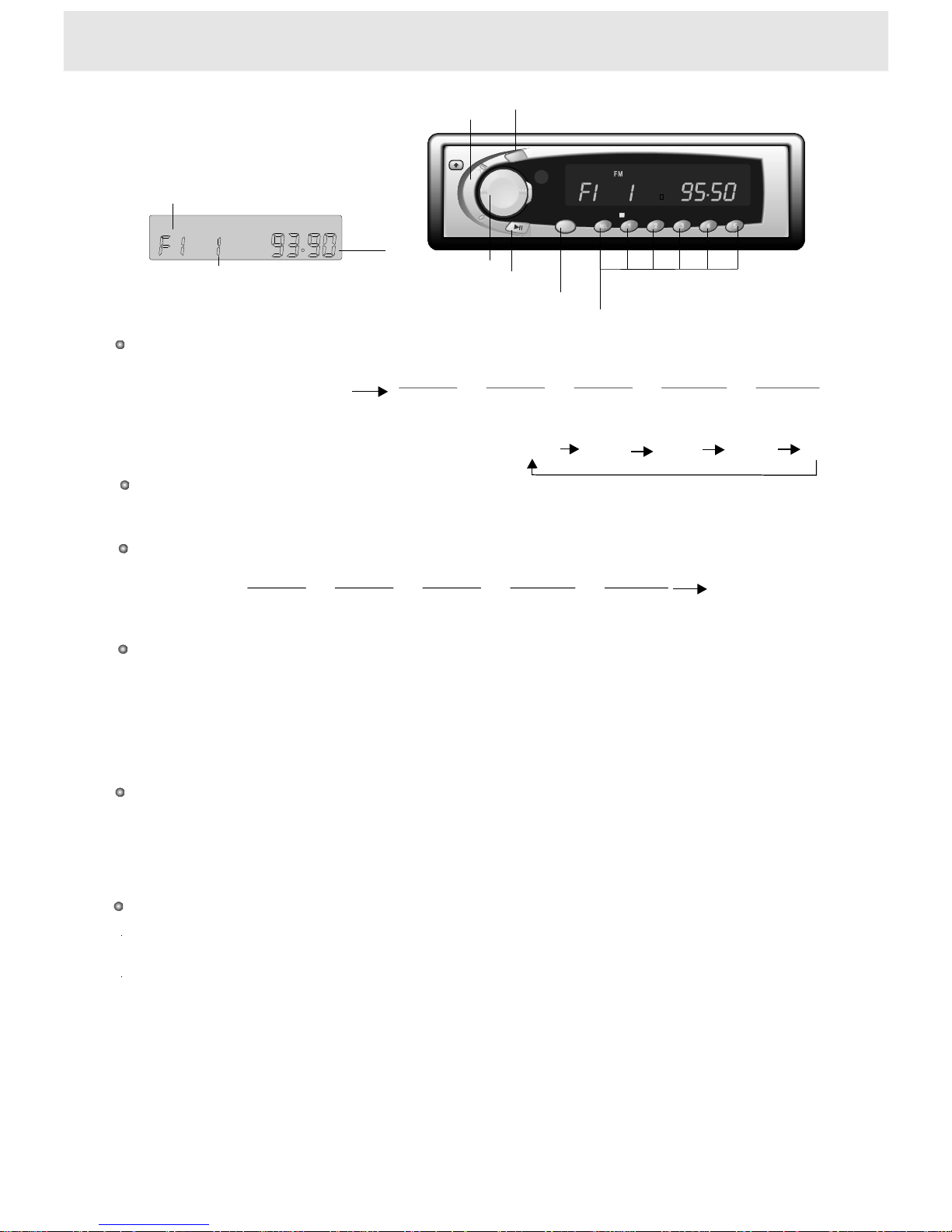
PresstheDVD/RADIObuttonlessthan1secondtoswitchfromDVDplayermodetotheradiomode.
DVDplayer
Automatictuning
PresstheSCANbuttononthefrontpanelmorethan1secondortheSCANbuttonontheremote
thesystemwillstartautomatictuningandplayeachreceivablestationsforseveralseconds,
pressSCANbuttonlessthan0.5seconds,stopautomatictuning.
Whenplayingthedesiredfrequency,p
Selectthedesiredband.
ressMEMbuttonmorethan1secondthenthenumberbutton
(from1~5),youcansavethestationwithyourdesirednumber.
Manualtuning
Thisfeatureisusefulwhenyouwanttocheckthesignalstrength.
1)Selectthedesiredband.
2)--Toquicklyscanupordowninfrequency,pressandholdtheSEEKbuttononthefrontpanelfor
morethan1second.
Releasethebuttonandthedisplayapproachesthedesiredfrequencyautomatically,
--Toselectfrequencyfinely,eachtimepresstheSEEKbuttononthefrontpanellessthan
0.5seconds,andreleasethebuttonthedisplaystepsupthedesiredfrequency.
--PressMEMbuttonmorethan1secondthenpressthenumberbutton(from1~5)onthe
frontpanel,youcansavethedesiredstationwithyourdesirednumber.
Selectingstoredstations
TheMEM(MEMORY)canbeusedtostore5stationsineachband(FM/MW/LW)forconvenient
accesstoyourfavouritestations.
Selectthedesiredchannel(fromch1~ch5),
pressoneofthe1~5numberbuttonsonthefrontpanelorontheremote.
2Radiotuning
1Selectingradiomode
PresstheDVD/RADIObuttonlessthan1secondtoswitchfrommodetomode.theradioDVDplayer
DVDplayer
FMF1FMF2FMF3MWA1LWA2orororor
(theprecedingsituation)
F1F2F3A1A2
FMF1FMF2FMF3MWA1LWA2orororor
(thecurrentsituation)
WhileplayinginFMsituationStereomode,
theindicatorSTonthefrontpaneldisplayilluminates
EachtimetheBANDbuttonispressed,
theselectedbandchangesasshownbelow
(exceptinSCANstationsmode)
Frontpaneloperation
BANDbutton
Currentstation
Current
frequency
FM
Currentband
25
Radiooperation
VOL(+,-)button
PWRDVD/RADIObutton
StoringPresetStation
MEMORY/MUTE
SCAN/SEL
SEEKbutton
ST
ST
Page 29
26
Radiooperation
1.Ifnostationcanbereceived,"-----"appearsinthedisplayfortheemptychannel.
2.Iffewerthan5stationscanbereceived,thesystemwillmemorizeasmany
stationsaspossible,thenplaybackstartsfromthefirstchannel.
3.YoucanselectAutoTravelPresetmodeinFMF2(orF3)andLWA2
or[FMF1(orF3)andMWA1]band.
4.PressthenumberSELbutton,youcanadjustthesoundoftheradio.
Whenyouaredrivinginanunfamiliarlocationandwanttomemorizelocalstationswithout
changingthestandardpresetstations(5FMF2and5LWA2).
Atotal10stations(5FMF2and5LWA2)canbeprogrammed.
Tosetthestations....seethe[theRADIOTUNINGonpage25]
3(AutoTravelPreset)operation
DVD/
RADIO
1342
5
SCAN
Poweronfromthebeginningregardlessofthemode
(DVD,FM,MW,LW)whereyoupoweroff.
Poweron/off.
Switchbetweenmode
andmode.
theradio
DVDplayer
Inradiomode,selectthedesired
channel(ch1~ch5)withthenumber
button(1~5)directly
Startautomatic tuningandplayeachreceivablestationsforseveralseconds
storethedesiredstationbypresstheMEMbuttonandfavournumberbutton.
Inradiomode,PresstheBANDbuttonyouchangethecurrentbandtoothersinturn:
F1F2F3A1A2
InMWband,pressSETUPbutton,
changetoMW-530(10K),MW-531(9K)inturn.Ifthereceivingrangeofyourlocationis531~1710K(Hz)
tuningstepis9K(Hz).Iftherangeis530~1710K,thestepis10K.Ifyouarenotsuretherangeofyour
location,andyoucannotreceivestationincurrentrange,trytheotherrange.
1)Inradiomode
2)Toquicklyscanupordowninfrequency,presstheSEEKbuttonReleasethebutton
andthedisplayapproachesthedesiredfrequencyautomatically.
3) storethedesiredstationbypresstheMEMbuttonandfavournumberbutton
1)Inradiomode
2)Toselectfrequencyfinely,presstheSKIPbutton.Eachtimeyoupressthebuttonthe
frequencytuneupordowninfrequency.
3) storethedesiredstationbypresstheMEMbuttonandfavournumberbutton
Storethecurrentstation
Remotecontroloperation
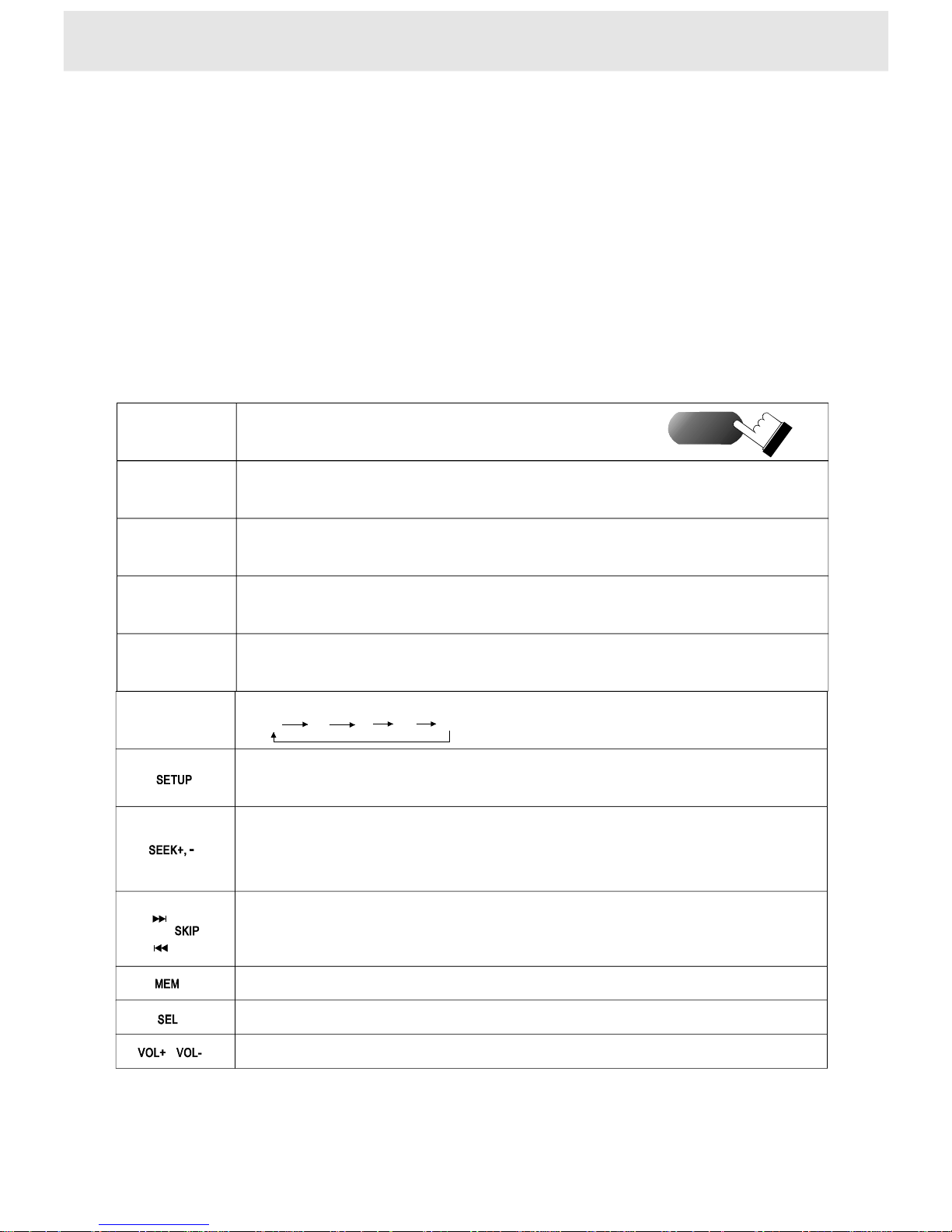
Thebutton
ontheremote
Pressthebuttonontheremote
Selecttheaudiofunctions:bass,treble,balance,fader,loudness
4Adjustingthevolume
TurnupordownthevolumewiththebuttonVOL+,VOL-.
Turnupordownthevolume
POWER
BAND
Page 30

27
Others
Safety
Asthelaserbeamusedinthisunitisharmfultotheeyes,donotattemptto
disassembletheunit.Referservicingtoqualifiedpersonnelonly.
Shouldanysolidobjectorliquidfallintothecabinet,unplugtheplayerand
haveitcheckedbyqualifiedpersonnelbeforeoperatingitanyfurther.
Placement
Placetheplayerinalocationwithadequateventilationtopreventheat
build-upintheplayer.
Donotplacetheplayerinalocationnearheatsources,orinaplacesubject
todirectsunlight,excessivedustormechanicalshock.
Operation
Iftheplayerisbroughtdirectlyfromacoldtoawarmlocation,orisplacedin
averydamproom,moisturemayformonthelensesinsidetheplayer.
Shouldthisoccur,theplayermaynotoperateproperly.Inthiscase,remove
thediscandleavetheplayerturnedonforaboutanhouruntilthemoisture
evaporates.
Cleaning
Cleantheunit,panelandcontrolswithasoftclothslightlymoistenedwitha
milddetergentsolution.Donotuseanytypeofabrasivepad,scouringpowder
orsolventsuchasalcoholorbenzine.
Powersources
Theoperatingvoltageisindicatedonthenameplateatthecoveroftheplayer.
Ifyouarenotgoingtousetheplayerforalongtime,besuretoturnofftheunit.
Page 31
Howtodealwithdiscs
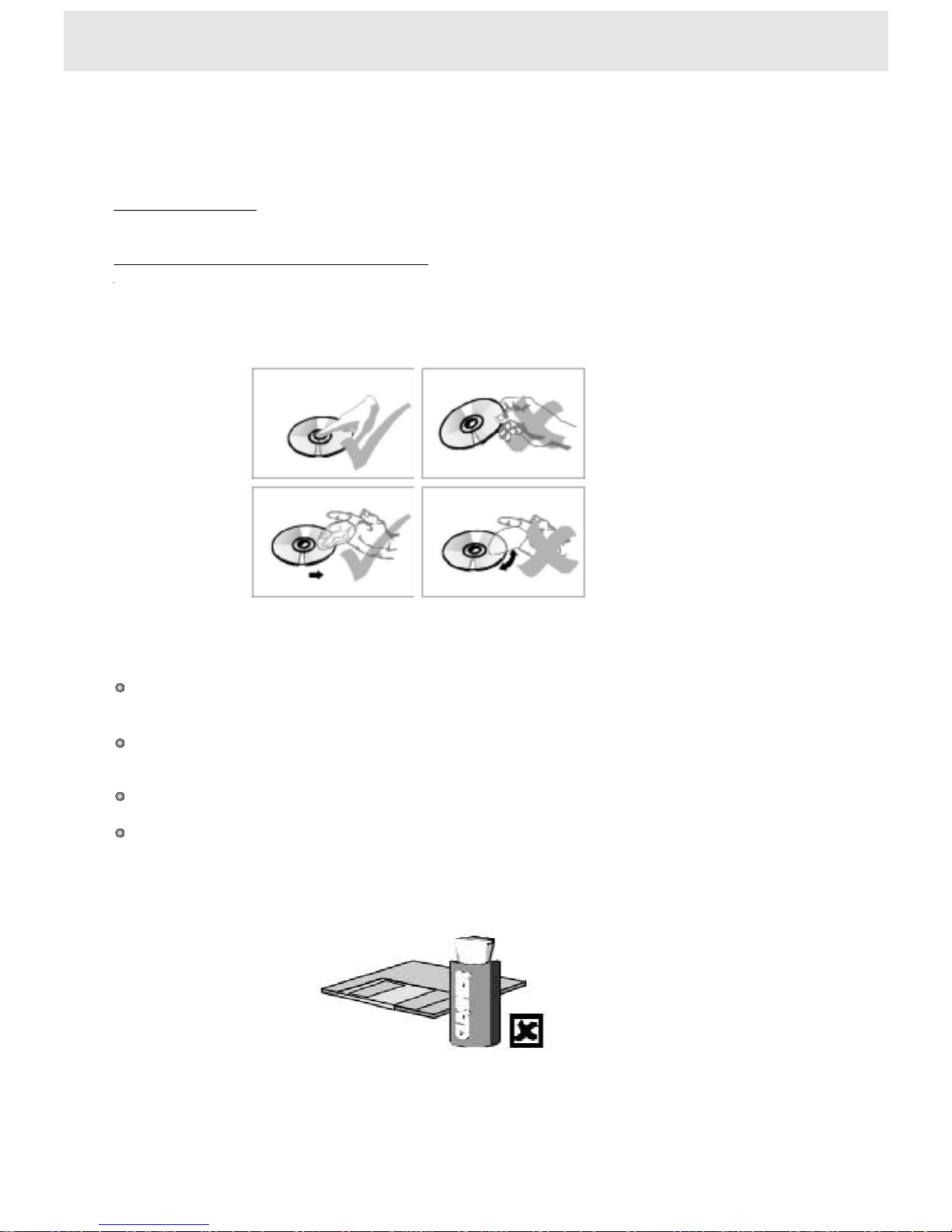
Howtoholdadisc
Whentherearestainsonthefaceofdisc
Donottouchthesurfaceoftheinformationside.
Wipewithawetclothandthenwithadryone.
Wipefromthecenterofthedisctotheouteredge.
Whenadiscisbroughtfromacoldenvironmenttoahotone,therecouldbe
steamonthefaceofdisc.Wipewithadry,soft,smoothclothbeforeusing.
Attention
Donotwriteondics.Donotusepickupcleaning
dispersingsolution,anti-staticelectricitysolutionoranyotherkindofsolutionstocleandisc.
Donotsticklabelorgluebasednoteondisc
(Donotusediscwithremainingglueordamagedglueylabel).
Donotusescrathing-preventingmaterialorcover,unlessitisassignedtouseonthismachine.
Donotputorstorethediscinthefollowingenvironments:directsunlight,atmoistor
dustyplaces,nearventswherehotairisblown.
preparation.Phenyl,chemicalsolution,
28
NOTESondiscs
Page 32

There'snosound
1Checkthattheplayerisconnectedsecurelyandcorrectly.
2Makesureyouoperatethemonitorortheamplifiercorrectly.
Donotplay
1There'snodiscinside("NODISC"appears).
Insertadisc.
2Insertadiscwiththelabelsideupinthediscslotcorrectly.
Cleanthedisc.
3Thedischasbeenshattered,changethedisc.
4Moisturehascondensedinsidetheplayer.
Removethediscandleavetheplayerturnedonfor2or3hours.
Theremotedoesn'tfunction
1Removetheobstaclesinthepathoftheremoteandtheplayer.
2Pointtheremoteattheremotesensorontheplayer.
3Replacethebatteryintheremotewithnewoneifitisweak.
There'snopicture
1Checkthattheplayerisconnectedsecurely.
2Makesureyouoperatethemonitorcorrectly,
turnonthemonitorandselecttheVIDEOmode.
Ifyouexperienceanyofthefollowingdifficultieswhileusingtheplayer,usethis
troubleshootingguidetohelpyouremedytheproblem.Shouldanyproblem
persist,consultaprofessionalmobilevideoinstaller.
29
PressEJECTbutton.Whilelogoappearsonthescreen,
pressthebuttonsRPT.,AUDIOatthesametime,
thefunctionsettingsreturntoFACTORYSETUP.
onthefrontpanel
Ifyouforgetthepassword
Troubleshooting
Page 33

30
Audiooutput:2V100k
Signal-to-noiseratio:morethan90dB
Dynamicrange:morethan90dB
Distortion:lessthan0.05%
±0.2(analog)
Audiooutput(digital):0.5V75
Ω
Ω
Videooutput:1V
Resolution:morethan500line
±0.2
loadimpedance:4Ω
Powerrequirement:12V
Powerconsumption:lessthan15W,
orlessthan100W(allspeakerson,seeCONNECTIONS)
DC
Dimensions(approx.):178x50x177mm
incl.Projectingparts
Weight:1.5Kg
(w/h/d)
Designandspecificationsaresubjecttochangewithoutnotice.
Audio
Video
Speakeroutput
Power
General
Frequencyrange87.5~108MHz
Usablesensitivity10dBf
Signal-to-Noiseratio50dB
Antennaimpedance75
FrequencyrangeMW:530KHz~1710KHz
LW:144~279KHz
Usablesensitivity(S/N20dB)MW:35V
LW:40
S/Nratio40dB
Antennaimpedance75
Ω
μ
μ
Ω
V
FM
MW/LW
Specifications
+20%
-10%
Theillustrationsinthismanualmayappeardifferent
fromtheactualproductduetoprintingconditions.
Normaloperatingtemperaturerange:14Fto120F
TUNERSECTION
Page 34
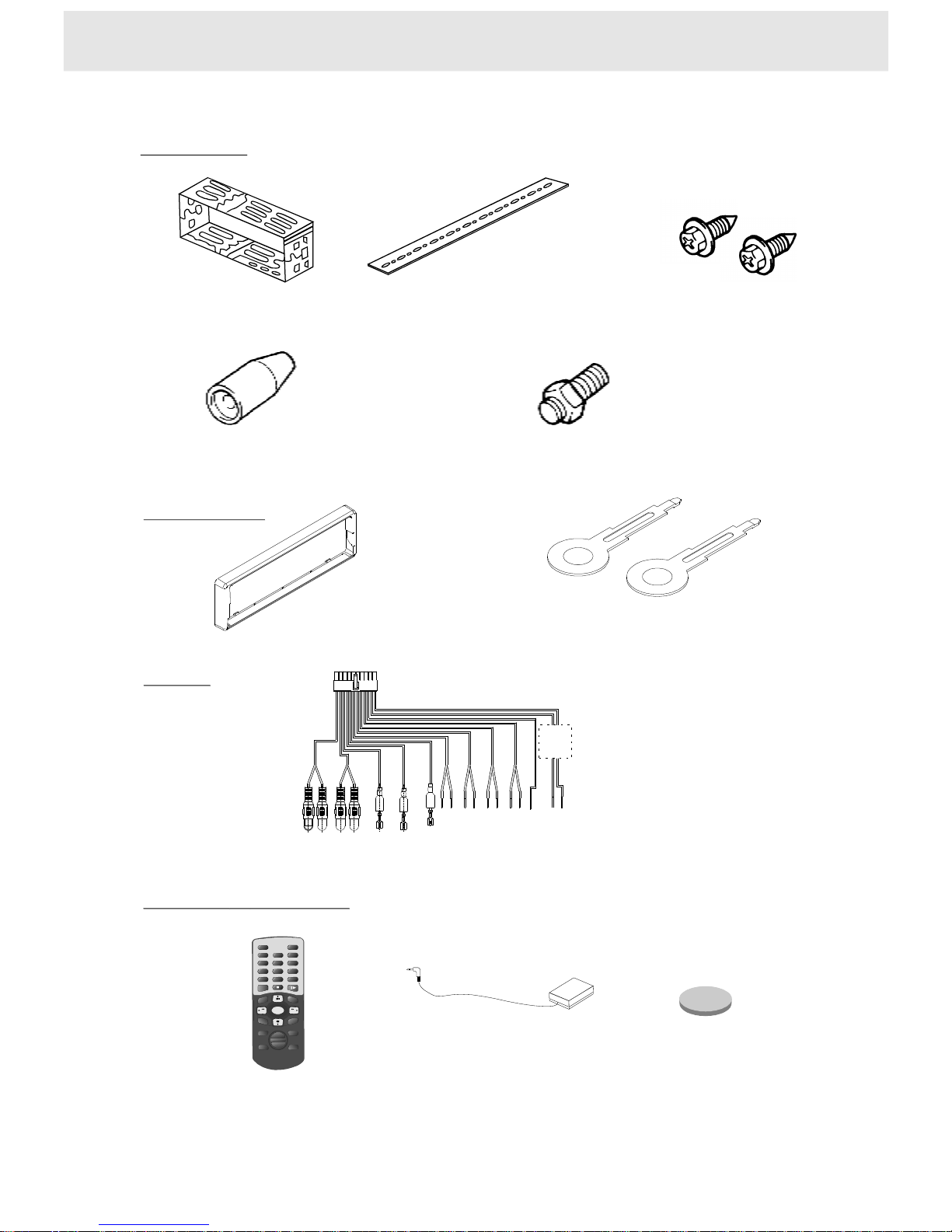
Installation
MountingBracket
(HalfSleeve)X1
RearStrap
(Brace)X1
HexboltM5x14
X2
SetRemoval
RemovableTrimRing
X1
equippedontheunit
UnlockLevers
X2
Connectioncablex1
CABLE
REMOTECONTROL
Remotecontrolx1
MountingGrommet
X1
MountingScrewM5
(equippedonthe
rearoftheunit)
X1
Remotesensorx1
31
AccessoriesandHardware
+
3V
LithiumButtonCell(3V)
x1
12
3
4
56
789
ENTER
TITLE
MENU
SETUP
+
VOL
_
MUTE
SUBAUDIO
GOTO
CLEAR
POWERDISPLAYRADIO/DVD
SEL
0
CLOCK
SEEK+
SEEK-
MEM
BANDST
PLAYMODE
DISPLAY
ANGLE
SCAN
Page 35
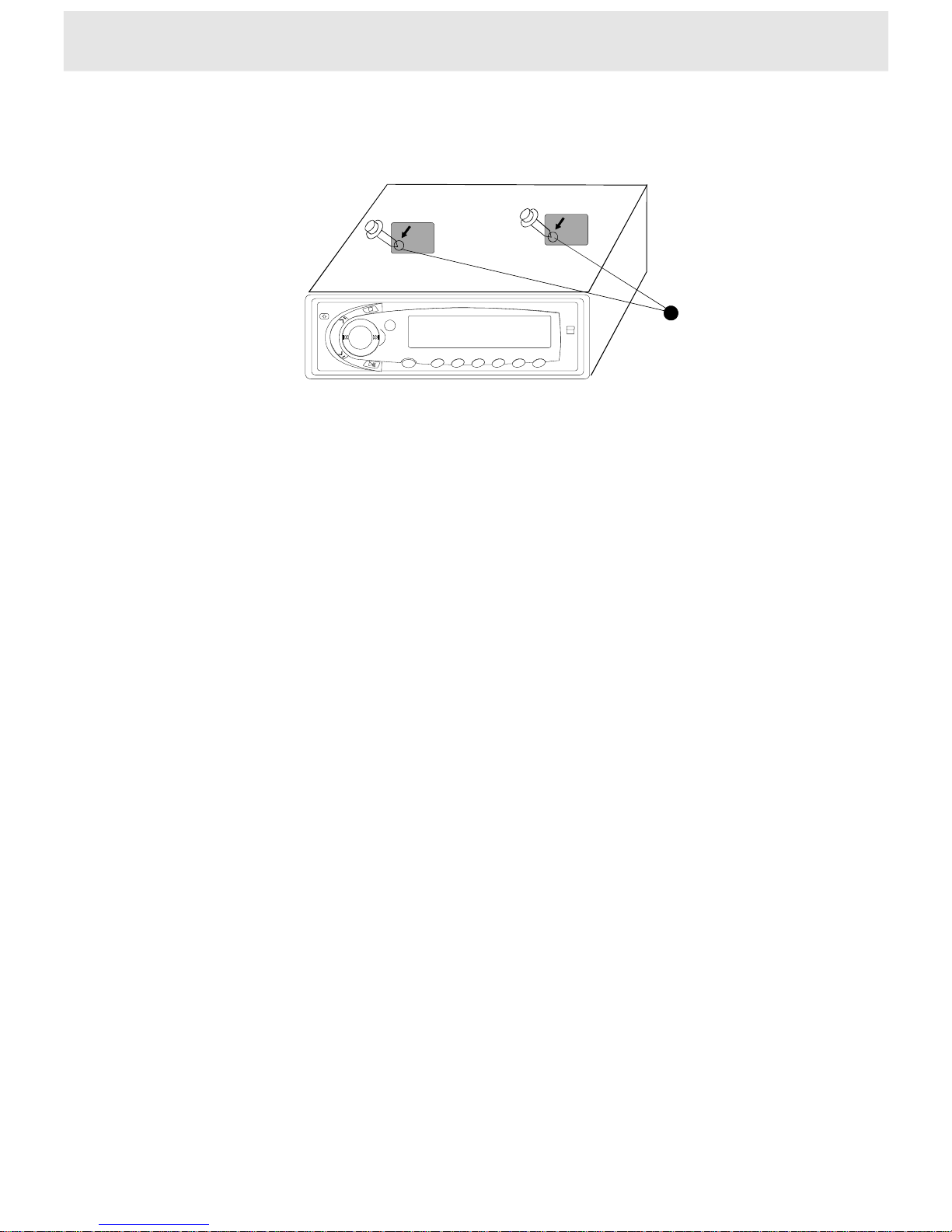
32
Note
RemovethisCD
stopperbeforeuse.
Applythepaper
cover(supplied)on
thescrewholeto
keepoutdust.
Twoblackstickingpapers
RemovethisCD
stopperbeforeuse.
Applythepaper
cover(supplied)on
thescrewholeto
keepoutdust.
Thereare2mountingscrewsonthecaseoftheDVDplayer(
shows)toprotecttheunitduringshipping.
Youneedtoremovethestickingpapersandscrewsafterunpackingthisproduct.
Applytheblackstickingpapers(supplied)onthescrewholestokeepoutdust.
asabovefigure
 Loading...