

Page 1
InstructionManual
Remark:Anyinformationsubjecttochangewithoutfurthernotice
MIC
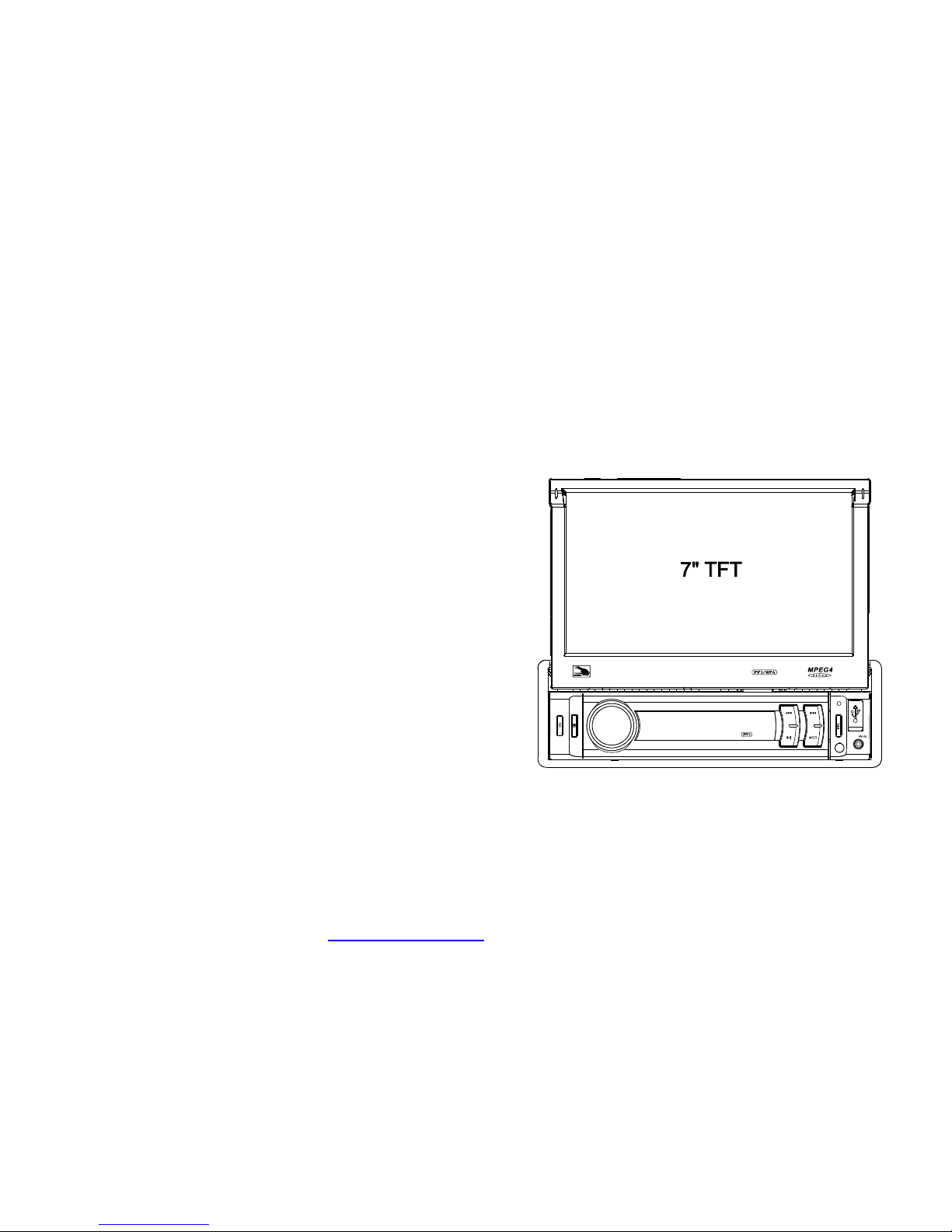
7"Single-DinIn-DashMotorized
TouchScreenLCDMonitor
w/DVD/CD/MP3/MP4/USB/SD/AM-FM
&BluetoothWirelessStreaming
PDF created with FinePrint pdfFactory trial version http://www.pdffactory.com
Page 2

1.BeforeOperation...........................................................................................2
1.1Precautions............................................................................................2
1.2BatteryInformationofRemoteControl......................................................2
1.3TheRemoteControlDescription...............................................................3
1.4LocationsandNamesoftheControls........................................................4
1.5DescriptionoftheRearCabinet...............................................................5
1.6UnitInstallation......................................................................................6
2.CommonOperation.......................................................................................7
3.RadioOperation............................................................................................9
4.USBandMMC/SDOperation........................................................................10
4.1PausePlayback.....................................................................................10
4.2StopPlayback.......................................................................................10
4.3SelectChapter/TrackwithUP/DNButtons................................................10
4.4SelectChapter/TrackwithNumberButtons..............................................10
4.5SelectChapter/TrackwithRootMenu......................................................11
4.6PlaybackwithSpeed..............................................................................11
4.7PlaybackwithSlowSpeed......................................................................11
4.8PlaybackRepeatedly.............................................................................13
4.8.1One/AllRepeat...................................................................................13
4.8.2A-BRepeat.........................................................................................13
4.9PlaybackfromaspecifiedChapter/TrackoraSpecifiedTime.....................13
4.10PlaybackinRandom.............................................................................13
4.11ZoomVideo/image...............................................................................13
4.12ChangeCaptionLanguage...................................................................14
4.13LookoverPlaybackStatus...................................................................14
4.14ProgramPlayback...............................................................................14
4.15Function.......................................................................................14
4.16SystemMenuSetupOperation.............................................................15
.............................................................19
6.TroubleShooting.........................................................................................21
7.Specification...............................................................................................22
Contents
ID3
5.BLUETOOTHHANDFREESYSTEM
7.Specification
GeneralSpecification
PowerSupplyRequirement..................................................DC12V
MaximumPowerOutput..............................................4x80(320W)
Dimensions(wxhxd)...........................................
USB/CARDSpecification
Format..........................................................MP4/JPEG/MP3/WMA
OutputVideoSystem.............................................................NTSC
AudioSystem..............................................................24bit/96KHz
Video
VideoType...................................................................16:9and4:3
VideoOutputlevel......................................Composite:1.00.2Vp-p
Loadimpedance:75ohms
Audio
AudioOutput(Analogaudio)......................................1200mV+/-300
FrequencyResponse.............................20Hz~20KHz(at1KHz0dB)
S/NRatio(Audio).............................................90dB
Separation..............................................................................50dB
Radio
FMSection
Frequencyrange..............................................87.5MHz-107.9MHz
Usablesensitivity......................................................................3uV
I.FFrequency....................................................................10.7MHz
AMSection
Frequency..........................................................530KHz-1710KHz
178x58x176mm
Specification
Specification
(at1KHz0dB)
Specification
±
≥
PDF created with FinePrint pdfFactory trial version http://www.pdffactory.com
Page 3
1.BeforeOperation
1.1Precautions
1.Readthroughthisinstructionmanualbeforeinstallationanduse.
2.Clearthepanelandcasewithsoftdryclothonly,donotapplyany
kindofthinner,alcoholorsprays.
3.Theapparatusshallnotbeexposedtodrippingorsplashing.
1.2BatteryInformationoftheRemoteControl
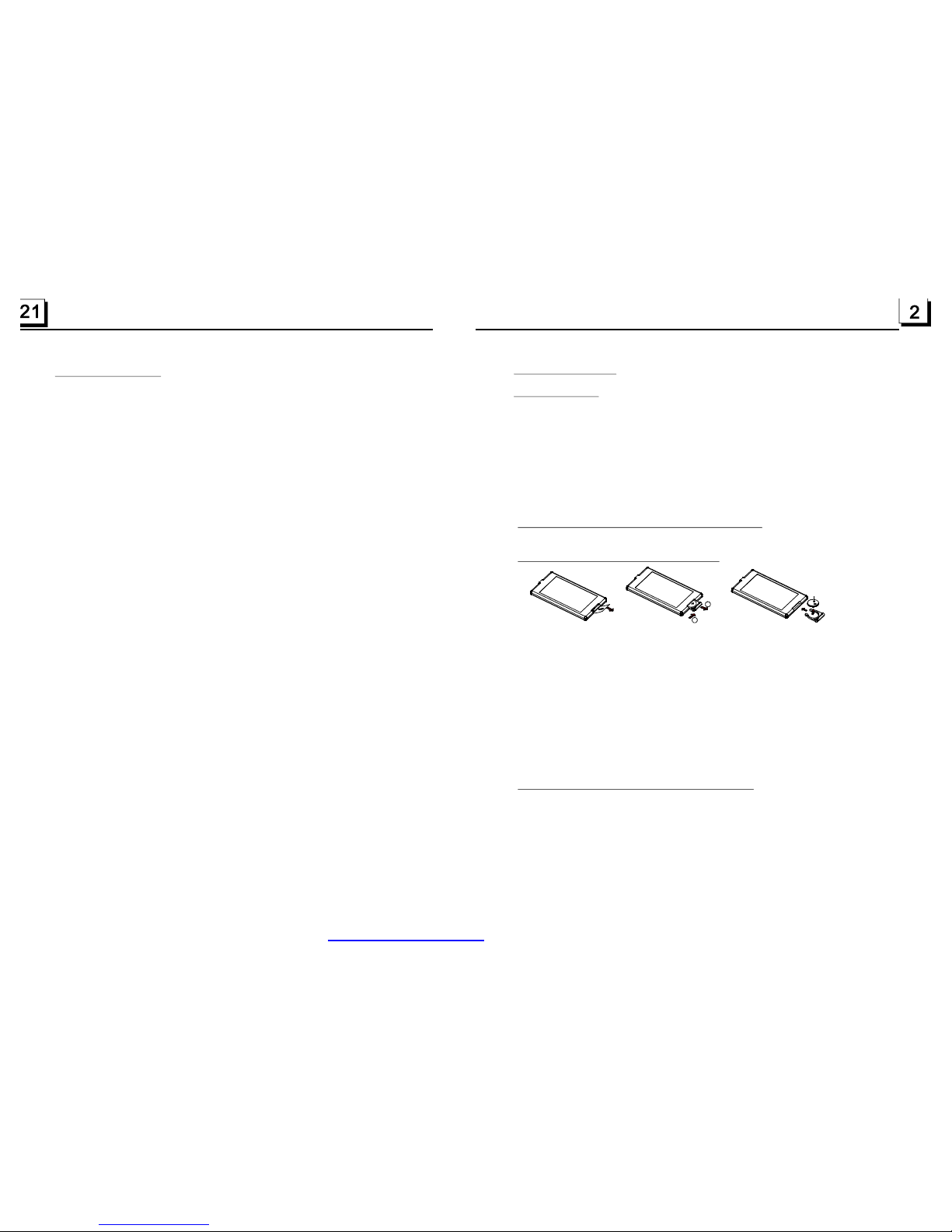
ReplaceBatteryintheRemoteControl
NoteabouttheBatteryoftheRemoteControl::
1.
3.Donotshortthebattery.
4.Donotthrowthebatteryintothefire.
5.Toavoidtheriskofaccident,keepthebatteryoutofreachofchildren.
1.Beforeusingtheremotecontrolforthefirsttime,pulltheinsulating
sheetoutoftheremotecontrolasthedirectionindicatedbythe
arrow.(seefig.1)
2.PressthemovableblockholdasthedirectionindicatedbytheAarrow
(Seefig.2),thenpullthebatteryholderoutoftheremotecontrolas
thedirectionindicatedbytheBarrow(seefig.2).
3.Replacetheoldbatterybyanewbatterywith(+)polaritysideupward.
(Seefig.3).
4.Insertthebatteryholdertotheoriginalpositioninremotecontrol.
(Seefig.3).
Improperuseofbatterymaycauseoverheatingorexplosion.sothat
Result ininjuryorfire.
2.Batteryleakagemaycausedamagetotheremotecontrol(Battery
Life:6monthswithnormaluseinnormalroomtemperature).
Fig.1
Fig.2
Fig.3
A
B
+sideup
6.TroubleShooting
Pleasereadtheusermanualcarefullybeforeusingthethisplayer.Ifyouhaveanytroubles
inusingthisplayer,trytosolvetheproblemsbythesuggestionsmentionedbelow.Ifyoucan
notremovethetroubleafterusingallthesuggestions,pleasecontactthecompanyorthe
technicalservicecentreauthorizedbyus.Forthesakeofyoursafety,pleasedonotopenthe
coverandrepairtheplayerbyyourself,ifthat,itmaycauseelectricshock.
NOPICTURE,SOUNDANDINDICATION
*Ensurethatthepowercordisnotdamagedorthefuseisnotblown.
NOSOUNDBUTHAVEPICTURE
*Ensurethattheplayer’saudiooutputhasagoodconnection.
*Checkwhetheryouhaveturneddownthevolume.
*EnsurethatyouhavesettherightAUDIOsetupoftheplayer.
*Ensurethattheaudioisnotundermute.
NOPICTUREBUTHAVESOUND
*Ensurethattheplayer’svideooutputhasagoodconnectionwithmonitor’svideoinput.
*Checkwhetherthevideoconnectorisdamaged.
*EnsurethatyouhavesettherightVIDEOsettingsoftheplayer.
FLAWSOFPICTUREORSOUND
*CheckwhetherthesettingofAUDIOisright.
REMOTECONTROLISINSENSITIVEORDOESNOTWORK
*Checkthebatteriesofremotecontrolandmakesurethattheyaretobepowerfuland
goodconductivity.
*DirecttheremotecontroltotheIRsensoroftheplayer.
*CheckwhethertherearesomeobstaclesbetweentheremotecontrolandIRsensor.
SOMEFUNCTIONBUTTONSDONOTWORK
*Turnoffthepower,thenturnonagain.
*Resettheunittozero,thenturnonagain.
*Removethefrontpanelfromtheunit,theninstallitagainandthenturnonagain.
THERADIODOESNOTWORK
*Checkwhethertheantennacableisconnectedfirmly.Ormanuallytuneforastation.
THETFTDISPLAYLOSTTOUCHEFFECT
Inanymode,presstheMENUontheremotetoturntothemaininterface,thenpressSETonthe
remotetoturntosettingmodethenpressrightarrowtoselectcalibratemodeandthentapthe
crosscursorasitshow.
*
PDF created with FinePrint pdfFactory trial version http://www.pdffactory.com
Page 4
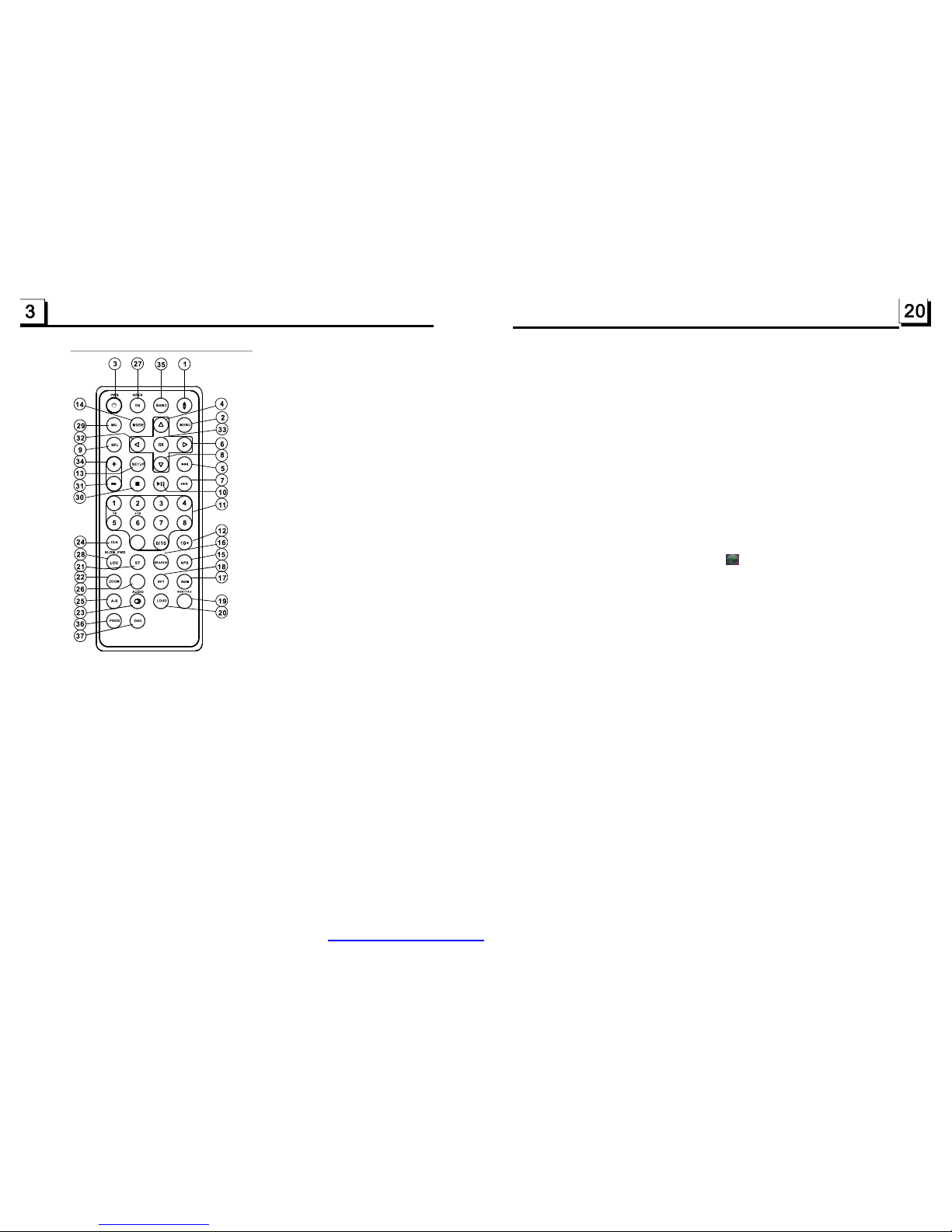
1.3TheRemoteControlDescription
16.SEARCHBUTTON
17.RDMBUTTON
18.RPTBUTTON
19.
22.ZOOMBUTTON
23.AUDIOBUTTON
24.CLKBUTTON
25.A-BBUTTON
SUBTITLEBUTTON
20.LOUDBUTTON
21.STBUTTON
26.STEPBUTTON
28.
29.MUTEBUTTON
30.STOPBUTTON
31.VOLUME-BUTTON
32.<BUTTON
33.OKBUTTON
34.+BUTTON
35.BANDBUTTON
36.PROGBUTTON
37.OSDBUTTON
27.EQ/OPENBUTTON
LOC/SLOW-FWDBUTTON
VOLUME
1.TILTBUTTON
2.MENUBUTTON
3.POWERBUTTON
4.^BUTTON
5.>>|BUTTON
6.>BUTTON
7.|<<BUTTON
8.vBUTTON
9.SELBUTTON
12.10+BUTTON
13.SETUPBUTTON
14.MODEBUTTON
15.
10.PLAY/PAUSEBUTTON
11.NUMBER(0~10,+10
-10)BUTTONS
APSBUTTON
STEP
9
4.Intheconnectionstatus:theaudioofmobilephonetransferstothecaraudio
systemwheneveradiallingtakesplaceorreceivingacall.
5.Diallingwheninconnectionstatus
5.1Dialwiththemobilephonedirectly.
5.2Dialwithremotecontrolwiththefollowingprocedures:
(1)Inputtelephonenumberwithnumberbuttons0-9
*PressCLEARbuttonbrieflytocancelthewronglyinputnumberifnecessary
(2)PressTELbrieflytoexecutethedialling.
5.3Toredialthelastphonenumberdialled
PressREDIALbuttonbrieflyortaptheicontovalidatethelastphonenumber.
6.Accept/Reject/End Call
6.1Whenringing,pressTELbuttonbrieflytoacceptthecall;
6.2Whenringing,pressHANGUPbuttonbrieflytorejectthecall;
6.3Whentalking,pressHANGUPbuttonbrieflytoendthecall.
Note:Duringringing,thephonenumberappears.
7.TotransfertheaudioofafileplayedbyMobilePhonetotheCarAudioPlayer
IntheconnectionstatusbetweentheBluetoothdevicesoftheCarAudioPlayer
andaMobilePhone,ifthemobilephonecanplayaudiofilesandsupportA2DP,
whentheMobilePhoneplaysanaudioorvideofile(ForsomeMobilePhones,
youmustselectPlaybyBTfirstly),theaudiooftheplayingfilewillbetransferred
totheCarAudioPlayer.
InA2DPmode,iftheBluetoothdeviceoftheMobilePhonesupportAVRCP,the
functionsofthe>>|,|<<,PLAY/PAUSE,EJECT,MUTE,EQ,LOUD,+,-andSEL
buttonsarethesameasoneinmediamode(nofastforward/backwardfunctionsfor
the>>|/|<<buttons).Theotherbuttonsavailableinmediamodearenotavailable.
PDF created with FinePrint pdfFactory trial version http://www.pdffactory.com
Page 5
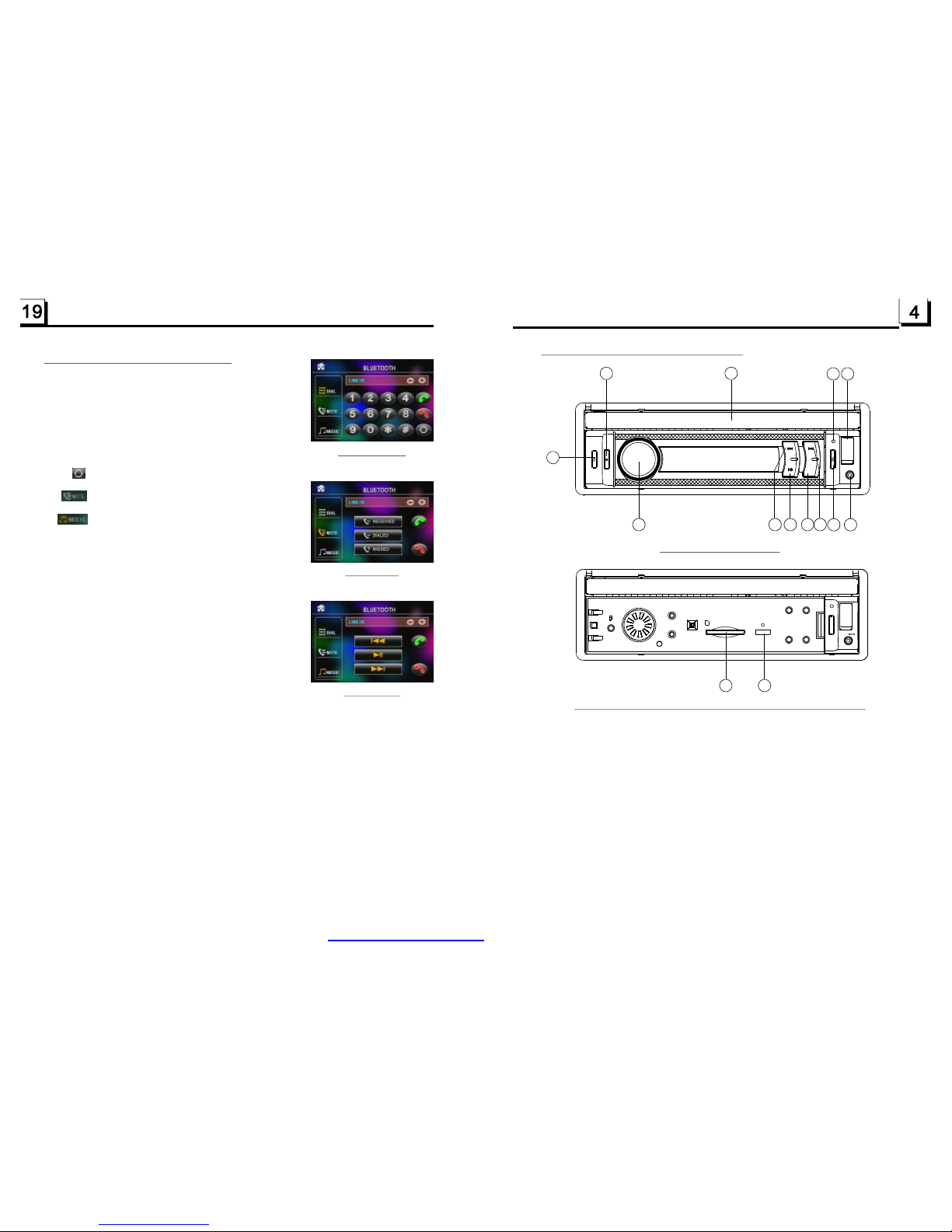
1.4LocationsandNamesoftheControls
1.POWER/MUTEBUTTON
2.MONITOR
3.USBJACK
4.RELBUTTON
5.VOLKNOB
6.>>IBUTTON
7.PLAY/PAUSEBUTTON
8BUTTON
9.I<<BUTTON
MICROPHONE
.MODE
10.SELBUTTON
11.AVINJACK
12.CARDSLOT
13.RESETBUTTON
14.
1
2
7
6 95
8
314
1110
4
ThefigureoftheUnitChassisFacetAfterremovingtheFrontPanel
Thefigureofthefrontpanel
12 13
SD
RESET
5.BLUETOOTHHANDFREESYSTEM
.Pairingandconnection
1)TurnontheBluetoothmodeofthemobilephone;
2)SelecttheitemofFindingtheBluetoothDeviceand
enterit.Afterfinishingthefinding,
itwillshowthenameoftheBluetoothDeviceiffinding
aBluetoothDevice.
Selectitandenterit,thenitwillshowainterfacethat
askyoutoinputapassword,
inputthepassword0000andthenenterit.ThenitwilltellyoupairOK.
3)Forsomemobilephones,theycanautomaticallyconnectwiththeBTdeviceofthe
caraudiosystemafterpairingisok;forsomemobilephones,theyneedtoselectthe
pairedBTdeviceandpresstheCONNECTIONbutton.Whenconnectionisok,the
LCDofthecaraudiosystemwillshowLINKOK.
*whenpairingisfailed,pressandholdthePAIRbuttonontheremotecontroltoenter
pairingmode,thentheLCDwilldisplayPAIRSTART,thenpairandconnectwith
mobilephoneagain.
3.Usethemobilephonetodoconnectionordisconnection
Intheconnectionstatus,findthepairedandconnectedBluetoothDevice,then
pressthedisconnectionbuttontododisconnection;
Inthedisconnectionstatus,findthepairedanddisconnectedBluetoothDevice,
thenpresstheconnectionbuttontodoconnection.
1.EnterBluetoothmode
WhenyouuseMODEbuttonorModeMenutoenter
Bluetoothmode,itwilldisplayBluetoothinterfaceas
right.
InBluetoothinterface,theiconsdescriptionsareas
follows:
:Tapthisiconcantransferaudiobetweenthe
CarAudioSystemandphone.
:Tapthisicontoturntocallmessagesinterface
asright.
:WhenconnectwittheBTdevic,thephone
musicplaybackcancontrolbytapthis
iconasright.
Theothericonsaresameasonesinthefrontpanel
andRemoteControl.
2
Bluetoothinterface
NOTEinterface
MUSICinterface
AV-IN
MOD
MIC
PDF created with FinePrint pdfFactory trial version http://www.pdffactory.com
Page 6
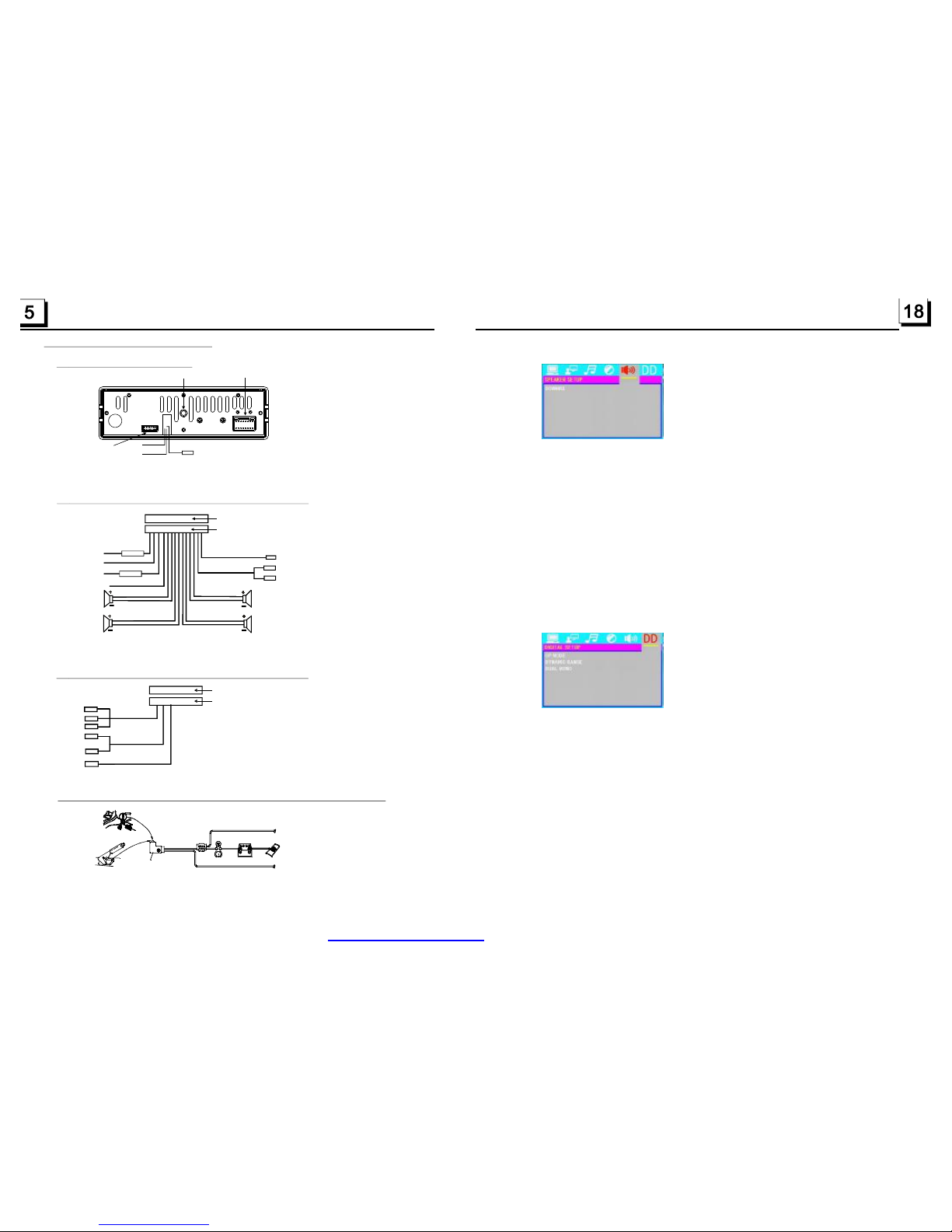
1.5WiresConnectionDescription
The DescriptionoftheWiresConnectionoftheWiringConnectingSocket1
Note:1.UsetheclipendofaGroundLineprovidedbymanufacturertoconnecttheFixingScrewBolt,useanotherendoftheGround
Linetoconnectthenegativepoleofthepowersource.Otherwise,thevideoonscreenmaybeflashes.
2.Whenturningonrearviewcamera,soundofthecurrentfunctionmodewillbemuted.
The DescriptionoftheWiresConnection
DescriptionofConnectingtheParkingBrakeLinetotheParkingBrakeSystemBuiltintheCar
Parkingbrake
Parkingbrakeswitch
(insidethecar)
Ground(-)/ParkBreak(Green)
Tometallicbodyorchassisofthecar
NOTE:afterconnectingtheParkingLine,thevideoonthesmallmonitorofthefrontpanelwillbedisplayonlyafterbrakingthecar.
The DescriptionoftheWiresConnectionoftheWiringConnectingSocket2
YELLOW
MEMORYB+
BLACK(GND)
IGNITIONSWITCH
BLUEAUTOANT
YELLOW
SUBWOOFERLINEOUT
RED
FRONT
REAR
RIGHT
SP
FRONT
WHITE
WHITE/BLACK
GREEN/BLACK
VIOLET/BLACK
GRAY/BLACK
GRAY
VIOLETGREEN
REAR
LEFT
SP
REDR
WHITEL
RCALINEOUT
WIRINGCONNECTINGSOCKET1
WIRINGCONNECTINGPLUG1
NOTES:
1.Onlyspeakerswith4ohmsimpedancemaybeused.
2.Ensurethattheblueautoantennacabledoesnotmakecontact
withanygroundconnection.
GREY
YELLOW
YELLOW
VIDEOOUTLINES
PARKINGLINE
BROWN
REARVIEWCAMERA
BLACK
YELLOW
REVERSALLINE
PINK
FixingScrewBolt
WiringConnectingSocket1
WiringConnectingSocket2
RadioAntennajack
Black
Black
WIRINGCONNECTINGSOCKET2
WIRINGCONNECTINGPLUG2
BROWN
AUXIN
REDR
WHITEL
YELLOWVIDEO
NOTES:TherearAUXINandthefrontAUXINcannotbeusedatthesametime.
LT/RT:WhenplayingamediawithPROLOGICDolby
Itisforselectingyourdesiredsoundeffectwhenthereisnocenterspeaker
andsubwoofer.Thereare3modes:LT/RT,STEREO,VSS.
stereoeffect,choosethe
item,soitwilloutputaudiosignalwithvividtheatreeffect.
STEREO:Ifyouchoosetheitem,whenoutputtingaudiosignalwith5.1channels,
itwilloutputtheleftandrightchannelsofsignal;whenoutputtingaudiosignal
with2channels,itwilloutputthecommon2channelsofstereosignal.
VSS:Ifyouchoosetheitem,whenplayingamediarecordedwith5.1channels,
themainchannelspeakerscanoutputaudiosignalwithVSSeffect.
Itisforselectingaudiooutputmode
AfterselectingthecompressionmodeofLINEOUT,settheitem,soyoucan
adjustthelinearcompressionratio.IfyousetittobeFULL,thePeak-to-Peak
valueoftheaudiosignalistheminimum;ifyousetittobeOFF,thePeak-toPeakvalueisthemaximum.
Itisforselectingadesiredaudiooutputmodefortheleftandrightwaysofsignal.
ItismainlyforKaraokeofAc3.Thereare4modesinallasfollows:
STEREO,MONOL,MONOR,MIXMONO.
4.16.5SPEAKERSETUP
4.16.6DIGITALSETUP
OPMODE
DYNAMICRANGE
DUALMONO
DOWNMIX
10AFUSES
0.5AFUSES
PDF created with FinePrint pdfFactory trial version http://www.pdffactory.com
Page 7
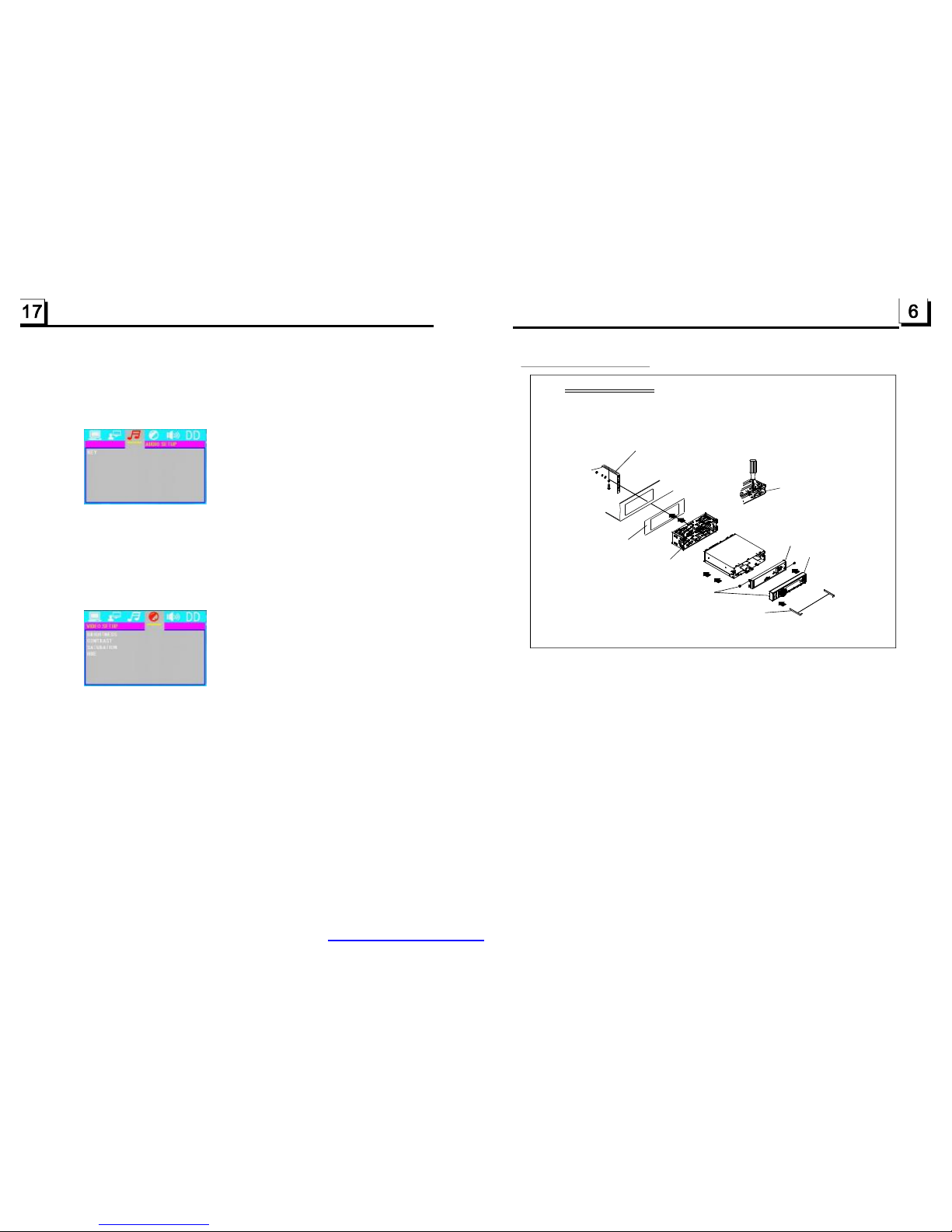
1.6UNITINSTALLATION
INSTALLATIONINSTRUCTIONS
TOBOOSTUPTHECAPABILITYOF
ANTI-JAMMING,PLEASEFIXTHE
METALSTRAPONTHEMETAL
CONNECTEDTOTHEBOTTOM
BRACKETOFTHECAR.
METALSTRAP
DASHBOARD
SLIDINGMETALHOUSING
TODRAWTHECHASSISOUTOF
THESLIDINGMETALHOUSING,
INSERTTHELEFTANDRIGHTKEY
PLATESINTOTHERIGHTPOSITION
OFTHE2SIDESOFCHASSIS.
SELECTTHEPROPERTAB
FORFIXINGTHESLIDING
METALHOUSING.
THEUNITISINSTALLEDTOBEANANTI-THEFTONE.THECHASSIS
OFTHEUNITWEARSASLIDINGMETALHOUSING.PLEASEDOTHE
CONNECTIONOFTHEPOWER,SPEAKERSANDANTENNAACCORDING
TOTHEREQUIREMENTOFTHEINSTRUCTIONBOOK,THENINSTALL
THESLIDINGMETALHOUSINGINTHECARASFOLLOWS.
FRONTPANEL
FIXEDTHEREARCABINTWITHTHESCREWS,
YOUCANPUSHOUTTHEFRONTPANEL
REARCABINET
Thisitemisforselectingamenulanguage.
Itisforselectingyourdesiredbasicmusictone(fromlowtohigh).
Itisforadjustingthebrightnessofthevideooutput.
Itisforadjustingthecontrastofthevideooutput.
MENULANG
4.16.3AUDIOSETUP
KEY
4.16.4VIDEOSETUP
BRIGHTNESS
CONTRAST
SATURATION
HUE
Itisforadjustingthesaturationofthevideooutput.
Itisforadjustingthehueofthevideooutput.
PDF created with FinePrint pdfFactory trial version http://www.pdffactory.com
Page 8
7
16
2.CommonOperation
1.Toturnon/offtheunit
Underpoweroffmode,pressthePOWERbuttontoturnontheunit.
Underpoweronmode,pressandholdthePOWERbuttononthefrontpanel
orbrieflypressthePOWERbuttonontheremotecontroltoturnofftheunit.
2.Topushinorpushoutthedisplay
Beforeusing,pushoutthedisplayplease,whenthereispoweroff,please
pushinthedisplay.
3.Toselectfunctionmode
PresstheMODEbuttontoselectTUNER,USB
(AfterinsertingaUSBstorage),Card(After
insertingaMMCorSDcard)AUXand
BLUETOOTHmode.
Duringplaying,selectthetouptothe
mainMenu.
PressandholdtheMODE buttonthedisplay
canbeturnedoffbuttheunitkeepsworking,
whenwepresswhateverbuttonitreturnson.
4.Toadjustsoundlevel
RotatetheVOLknoborpressorholdthe+or-buttontodirectlyadjustthe
volumelevel.
5.Tomutesound
PresstheMUTEbuttononremotecontroltoturnon/offMUTEmode.
BrieflypressingthePOWERbuttononthefrontpanelalsocanturnon/off
MUTEmode.
InMUTEmode,theMUTEmodecanbereleasedbypressingthefollowing
knob/buttons:VOL,+,-andSEL.
6.Todisplayandadjustthetime
PresstheCLKbuttontodisplaytimeonthesmallmonitorofthefrontpanel.
PressandholdtheCLKbuttonandthenrotatetheVOLknoborpressthe
+or-buttontoadjustthetime.
YoucanalsoadjusttimeinSETUPmode.
7.ToselectapresetEQmode
PresstheEQbuttontoselectthepresetmusicequalizercurves:FLAT,
CLASSIC,ROCK,POP,EQOFF.Thesoundeffectwillbechanged.
8
.Toturnon/offLOUDNESSmode
PresstheLOUDbuttontoturnon/offLOUDNESSmode.
WhenturningonLOUDNESSmode,itwillenhancebasslevelimmediately
whenthebassisnotenough.
.Toremovethefrontpanel
PresstheRELbuttononthefrontpaneltodetachthefrontpanelfromthe
unit,thenyoucanremovethefrontpanel.
9
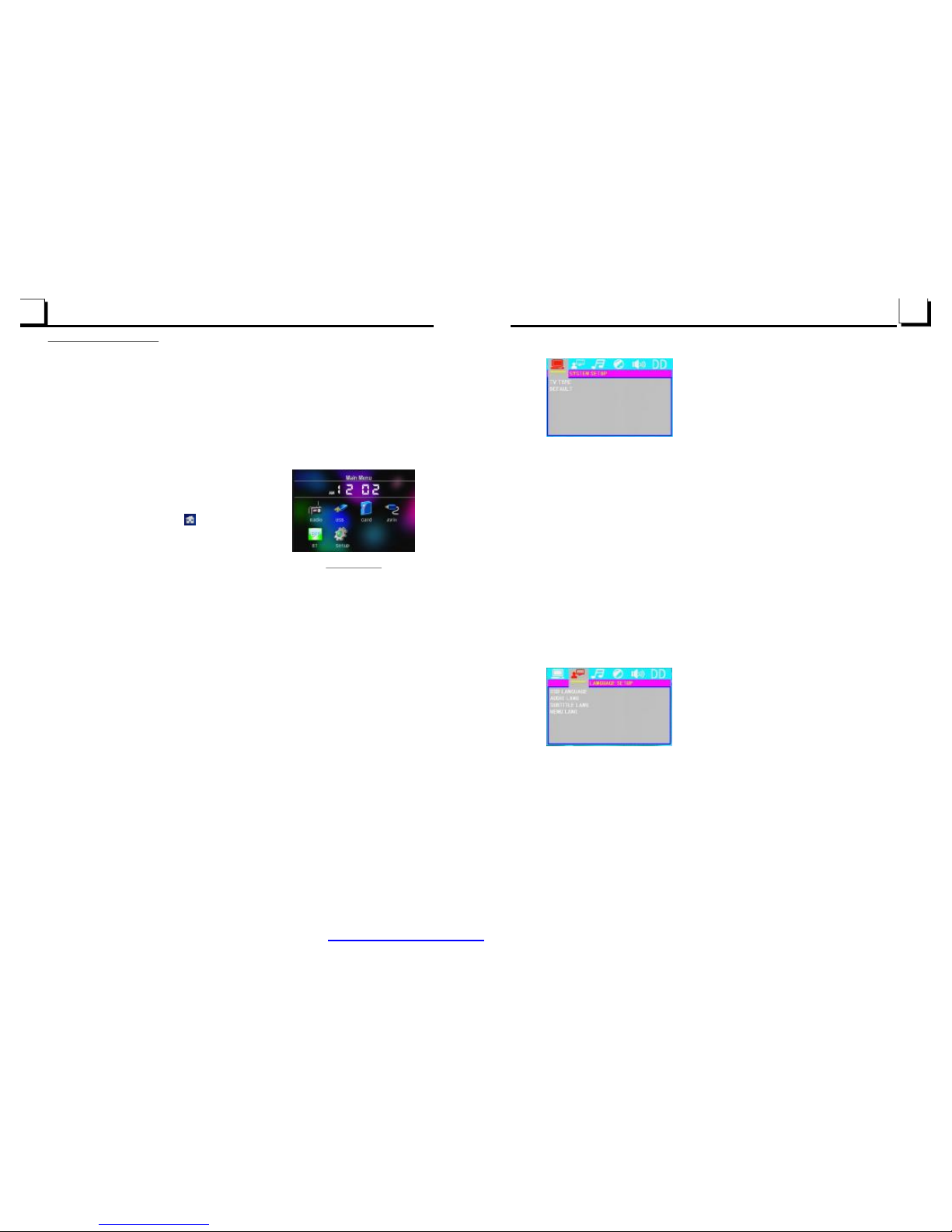
4.16.1SYSTEMSETUP
TVTYPE
DEFAULT
ThesetupitemisformatchingTVscreensize.
4:3PS:ChoosetheitemwhenconnectingaTVsetwith4:3screen.Whenplaying
thepictureswith16:9size,theleftandrightpartsofthevideowillbecutout,
anddisplayinfullscreen.
4:3LB:ChoosetheitemwhenconnectingaTVsetwith4:3screen.Whenplaying
thepictureswith16:9size,thetopandbottompartsoftheTVscreenwillbe
turnedintoablacksquarerespectively.
16:9:ChoosetheitemwhenconnectingaTVsetwith16:9widescreen.
Thisitemisformakingallsetupitemschangebacktooriginalstatus.
4.16.2LANGUAGESETUP
OSDLANGUAGE
AUDIOLANG
SUBTITLELANG
ThisitemisforselectingthelanguageoftheSYSTEMMENUandalloperating
promptinterfacedisplayedduringplayback.
Thisitemisforselectingaaudiolanguage.
Thisitemisforselectingasubtitlelanguage.
ModeMenu
PDF created with FinePrint pdfFactory trial version http://www.pdffactory.com
Page 9
10.Toresettheunit
whenthebuttonsarenoteffectiveorsound
isdistorted,presstheRELbuttontodetachthefrontpanelfromtheunitand
removeit,then
.
11.Toadjustsoundmodes
Toadjustthesoundmodes,brieflyandrepeatedlypresstheSELbuttononthe
frontpaneltoselectoneofthesoundmodessuchas:VOL,BAS(withoutpreset
EQ),TRE(withoutpresetEQ),BAL,FAD.
12.Todosetup
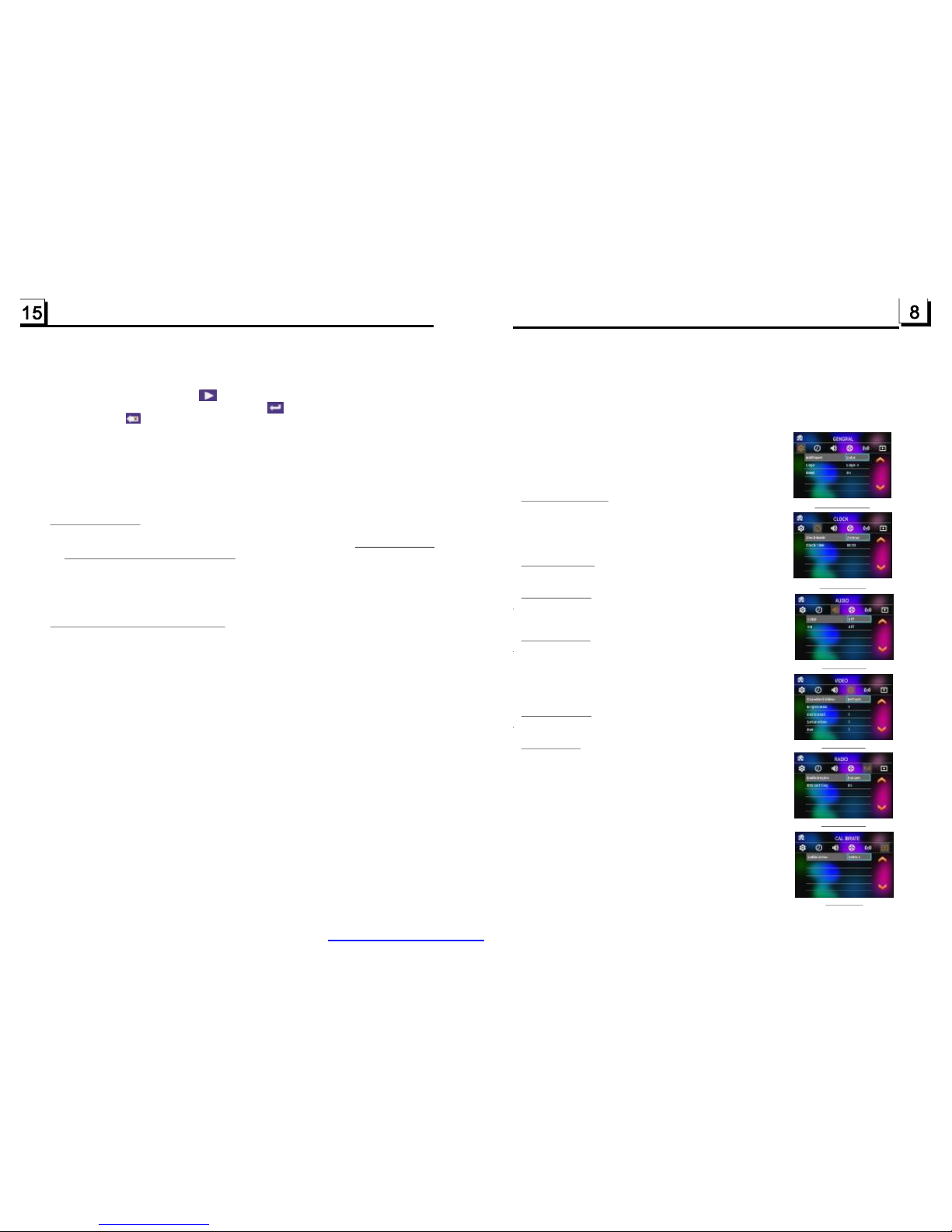
Insetupmode,selecttheGENERAL,TIME,AUDIO,
VIDEO,RADIO,asfollow:
displayisincorrect,orthefunction
usethesharpendofathingtopresstheRESETbutton,which
willresettofactorydefault,andre-instatethecorrectfunctions
CALIBRATE
Wallpaper:thisfunctionallowstochoosethedisplay
background.
Logo:thisfunctionallowstochoosethestartingscreen.
Beep:choosethebuttons'soundon/off
Clocktime:adjusttheclock.
Loud:choosebetweenLoudnessON/OFF.
EQ:choosebetweenthedifferenttypesofEQ.
Standardvideo
Brightness
Contrast
Saturation
Hue
Radioregion:choosetheradiozone.
calibratetheTFTdisplayasthearrow.
GENERALSETUP
CLOCKSETUP
AUDIOSETUP
VIDEOSETUP
RADIOSETUP
CALIBRATE
CLOCKSETUP
RADIOSETUP
AUDIOSETUP
GENERALSETUP
VIDEOSETUP
CALIBRATE
3Usethenumberbuttontoinputdesiredsequencenumberoftitle/chapter/
trackwithdesiredsequence.
InMP3/WMAmode,duringplayback,theinformationofthe
willbescrollingontheLCDdisplay.
Aslongasthecurrentplayingmusiccontainsrelevanttag
informationinversion1.0/2.0format,the3itemsunderlinedabovewillbe
scrollingontheLCDdisplay;otherwise,theywillnot.
1.PresstheSETUPbuttonontheremotecontrollertoaccesstheSystem
Menuonthemonitor.
2.Thereare6setuppagesinallfortheSystemMenu.Pressthe>or<button
toselectandesiredsetuppage.
3.Pressthe^orvbuttontoselectansetupitemintheselectedsetuppage.
4.Pressthe>buttontoenterthesetupitem.Thenpressthevor^buttonto
selectadesiredmodeofthesetupitem,finallypresstheOKbuttonto
confirmit.
*Pressthe<buttontoreturntotheupperlevel.
*PresstheSETUPbuttonagaintoexittheSystemMenu.
FortheSystemMenu,thereare6setuppagesinall.Theydisplayasfollows:
4.15Function
filename,folder
name,songstitle,artistandalbum
4.16SystemMenuSetupOperation
ID3
MP3ID3
4UsethedirectionbuttontomovecursorontoPlayitem,thenpressthePLAY
buttononremoteortapthetoplaytheprogrammedinprogrammed
order.Afterinputatracknumber,tapthetoturntonextsequence
number,taptocancelinputting.
*Toexitprogramplayback,pressthePROGbuttonortaptheESCtoexit.
*Tochangetheprogrammedsequence,movethecursorontotheitemyou
wanttochange,inputthedesiredsequencenumber.
*DuringJPEGplayback,pressthePROGbuttontochangethemodeof
refreshpicture.
PDF created with FinePrint pdfFactory trial version http://www.pdffactory.com
Page 10
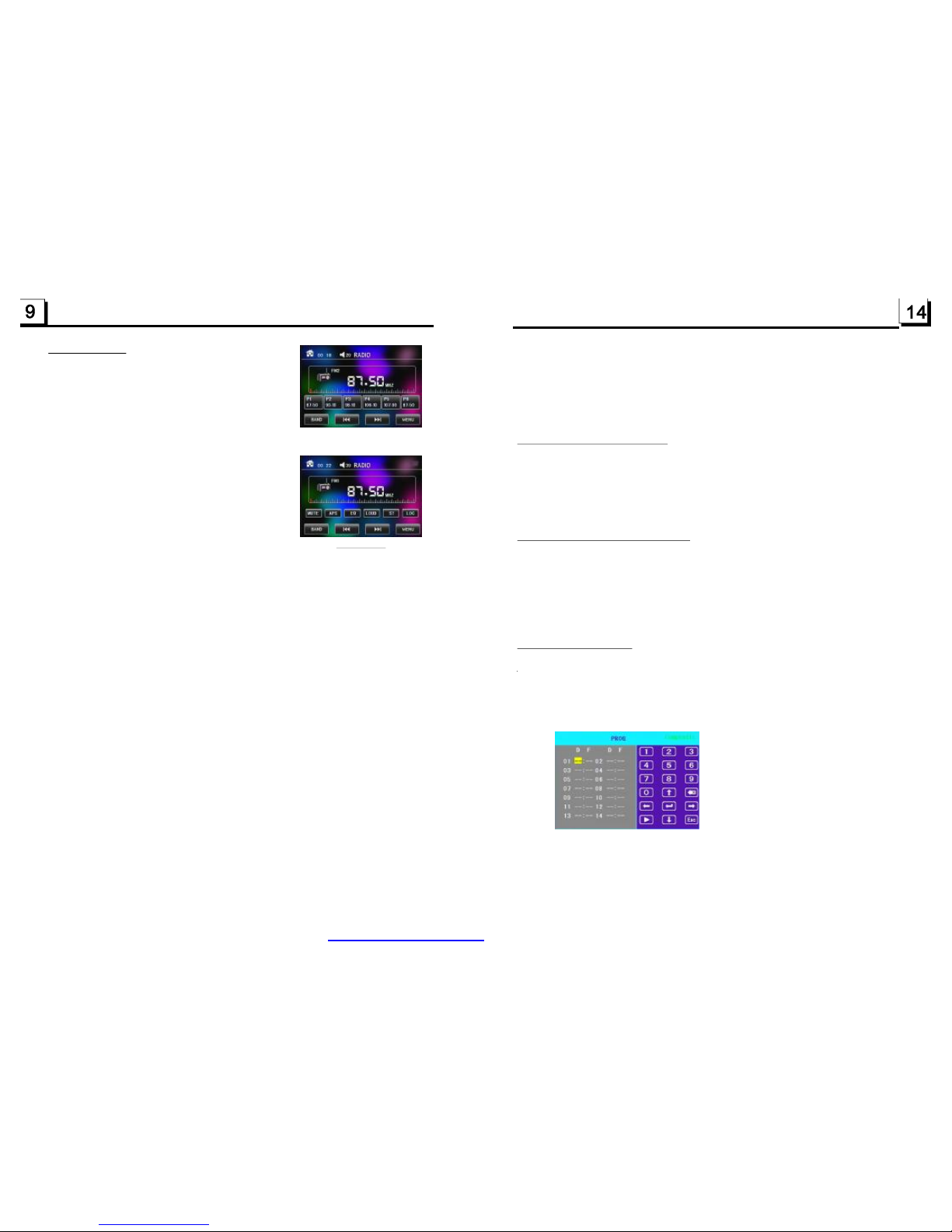
3.RadioOperation
1.BANDBUTTON
InRADIOmode,presstheBANDbuttonontheremote
controloronthefrontpaneltoselectyourdesiredradio
bandofandAM2,andtheselected
bandwillbedisplayedonthesmallmonitorofthefrontpanel.
2.TUNE/SEEKUP/DOWNBUTTONS
InRADIOmode:
1)PressandholdtheUP/DNbuttontoautomaticallysearch
up/downforaavailablestationfromthecurrentfrequency.
2)BrieflypresstheUP/DNbuttontomanuallysearchupor
downwithstepbystepforyourdesiredstationfromthe
currentfrequency.
3.APSBUTTON
InRADIOmode:
1)WhenpressingandholdingtheAPSbutton,theradio
searchesfromthelowestfrequencyandchecksthesignal
strengthleveluntil1cyclesearchisfinished.Andthenthe6strongeststationsarepresettothe
correspondingpresetnumbermemorybank.TheASoperationisimplementedineachbankof
theselectedband.WhentheASoperationisfinished,theradioexecutesthepresetscan,and
afterpresetscanningforonecycle,itwillstopscanningandbroadcastingtheNo.1stationfor
FM1.(Itcanstore3x6stationsforFMand2x6stationsforAMinall)
2)WhenbrieflypressingtheAPSbuttononthefrontpanelortheremotecontrol,theradiosearches
foreachpresetstationfromtheM1.Whenthefieldstrengthlevelismorethanthethresholdlevel
ofthestoplevel,theradioholdsatthatpresetnumberforfewsecondswithreleasingmute,and
thensearchesagain.Afterfinishingacircleofsearching,itwillstopsearchingontheM1.
NOTE:InFMband,FM1,FM2,FM3ischeckedoneatatime.
InAMband,ischeckedoneatatime.
4.PRESETSTATION[1-6]BUTTONS
1)Tomemorizethecurrentfrequencyonthecurrentband,pressandholdanyoneofthesix
Numberbuttons(1-6).
2)Torecallthememorystationonthecurrentband,pressoneoftheNumberbuttons[1-6].
5.STEREO/MONOBUTTON
PresstheSTbuttonontheremotecontroltoselecttheSTEREOorMONOsoundmodefor
FMband.
6.LOCBUTTON
1)Whenthesignalofthedistanceradiostationareveryweakandthereceivingeffectisbadduring
tuning,checkwhetherthereisthewordLOConLCD.IfthereisthewordLOConLCD,pressthis
buttontoturnofftheLOCfunction,thentuneagainforthedistanceradiostation;
2)Whenthesignalsfromthelocalradiostationsaretoostrong,thiscouldleadtointerference.
pressthisbuttontoturnontheLOCfunction,andtheLOCiconwillbelitupontheLCD.
Re-tuneforthelocalstationrequired.
FM1,FM2,FM3,AM1
AM1,AM2
RADIOinterface
Afterenlargingorminifyingvideosorimage,pressoneofthe^/v/>/<
buttonstoselecttheareayouwanttoview.
InMP3/WMAmode,theZOOMbuttonisinvalid.
Itallowsyoutoentertheorderinwhichyouwantsomechapters/tracksin
MP3/WMAmodetoplay.
1Duringplayback,pressthePROGbuttontoenteraprograminterfaceas
follows:
2Usethedirectionbuttonstomovecursorontothedesiredplaceforinputting
thesequencenumber.
4.12ChangeCaptionLanguage
4.13LookoverPlaybackInformation
InMP4mode,duringplayback,presstheSUBTITLEbuttonrepeatedly
toselectthelanguageofthecaptionorturnoffthecaption.(dependon
thefileplayed)
InJPEG/MP3/WMAmode,theSUBTITLEbuttonisinvalid.
1.InMP4/MP3/WMAmode,presstheOSDbuttonrepeatedlytoturnon/off
theplaybackinformation.Whenitison,itwilldisplaytheinformationsuch
as:Trackserialnumber,Trackelapsedtime,Trackremainedtime,etc.
2.InJPEGmode,presstheOSDbuttontodisplayordisappeartheTrackserial
number.
4.14ProgramPlayback
RADIOinterface
PDF created with FinePrint pdfFactory trial version http://www.pdffactory.com
Page 11
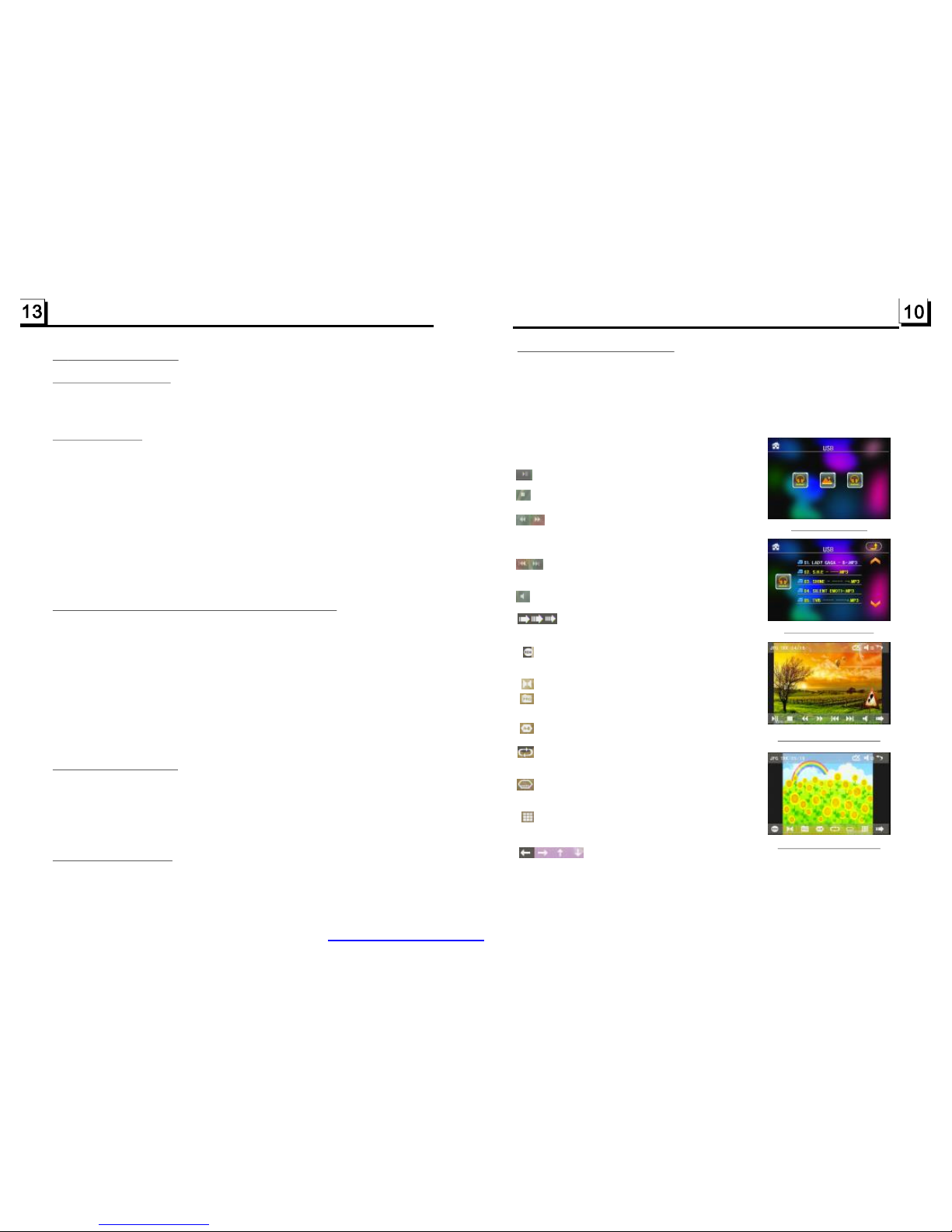
4.USBandMMC/SDOperation
nsertanUSBorMMC/SDCardintotheirslotsrespectively,thentheroot
menuwillbedisplayedonthemonitoranditwillplayaudiofileautomatically
iftheUSBorMMC/SDCardincludeaudiofiles.
uringplayback,presstheSTOPbuttontwicetostopplayback,thenpullthe
USBoutoftheUSBsocket;orpushthecardandthenpullitoutofthecardslot.
I
D
:selecttopauseplayback.
:selecttostopplayback.
:selectoneofthemcanswitchonbetween
thespeedlevelsoffastbackwardorforward.
(Exceptimagemode.)
:selectoneofthemcanselectnextor
previouschapter/track.
:selecttomutethesound.
:selecttoturntheselectingpageupand
down.
:selecttoRDMplaymodeastheremotecontrol.
(Onlyformusicmode.)
:Toselectaudiolanguage.
:SameasthePRGbuttonontheremotecontrol.
(Followtheinstructioninpage16.)
:SameastheA-Bbuttonontheremotecontrol.
:SameastheREPEATbuttonontheremote
control.
:SameastheSUBTITLEbuttonontheremote
control.
:Toselectthetrack/chapterfrom1-9andthen
selectOKtoplayyourselecting.
:Duringplayback,presstheZOOM
buttonandthentaponeofthemaresameasthedirectionbuttonsonthe
RemoteControl.
(Exceptmusic&imagemode.);Duringplayback,pressoneofthemto
changetheplaybackangle.(Onlyforimagemode.)
USB/CARDinterface
RootinterfaceforMUSIC
Keyboardinterface1
Keyboardinterface2
4.8
4.9Playfromaspecifiedchapter/trackoraspecifiedtime
4.10PlaybackinRandom
4.11ZoomVideo/Image
PlaybackRepeatedly
4.8.1ONE/ALLRepeat
4.8.2A-BRepeat
InMP4/JPEG/MP3/WMAmode,presstheRPTbuttontoselectREPONE,
REPDIR,REPALLorOFF.
InMP4/MP3/WMAmode,duringplayback,presstheA-Bbutton
ifyouwanttorepeataspecificsegmentthatyoudefine:
1.PresstheA-Bbuttonatapoint(A)whereyouwantittobethestartpointof
therepeatsegment.PresstheA-Bbuttonagainatapoint(B)whereyou
wantittobetheterminalpointoftherepeatsegment.Thenitwillplaythe
segmentrepeatedly.
2.TocancelA-Brepeatmodeandresumenormalplayback,presstheA-B
buttonforthethirdtime.
InJPEGmode,noA-BRepeatfunction.
InMP4/JPEG/MP3/WMAmode,presstheSEARCHbuttontodisplaya
interfaceandhighlightthetrackitem,then usethenumberbuttonstoinput
theserialnumberofthetrack;
youcanstillusethedirectionbuttonstohighlightthetimeitem,thenuse
thenumberbuttonstoinputthedesiredtimetostartplayback(invalidfor
JPEG);
finallypresstheOKbuttontoplaytheselectedtrackorplayfromthe
selectedtime.
InMP3/WMAmode,presstheRDMbuttontoswitchbetweenRandom
ON/OFF.WheninRandommode,itwillplayinrandom.
InMP4/JPEGmode,theRDMbuttonisinvalid.
InMP4/JPEGmode,duringplayback,presstheZOOMbuttoncontinuously
toenlargeorminifyvideosorimageatthefollowingmultiples:2x,4x,8x,
1/2x,1/4x,1/8x,OFF.
PDF created with FinePrint pdfFactory trial version http://www.pdffactory.com
Page 12
4.1PausePlayback
4.2StopPlayback
4.3SelectChapter/TrackwiththeUP/DNButton
4.4SelectChapter/TrackwiththeNumberButtons
WhenplayingMP4/JPEG/MP3/WMAfiles,pressthePAUSEbuttonto
pausetheplayback,pressthePLAYbuttontoresumenormalplayback.
InMP3/WMAmode,presstheSTOPbuttononcetopausetheplayback,
thenpressthePLAY/PAUSEbuttontoresumethenormalplayback(play
fromthepointplayingjustnow);presstheSTOPbuttontwicetofullstop
theplayback,thenpressthePLAY/PAUSEbuttontostartplaybackfrom
thefirsttrack.
InMP4/JPEGmode,duringplayback,pressingtheSTOPbuttoncan
returnbacktorootmenu.
InMP4/JPEG/MP3/WMAmode,duringplayback,PresstheUP/DNbutton
toselectnextorlastchapter/tracktoplayback.
NOTE:
PressingtheUP/DNbuttonmultipletimescanadvancemultiplechapters/
tracksforwardorbackward.
WhenplayingMP4/JPEG/MP3/WMAfiles,pressoneofthe1~9andthe0/
10numberbuttonstodirectlyselectandplaythe1stto10thtrack/chapter
(the0/10buttonisusedasthe10button).
Ifyouwanttoplaythetrack/chapterwithserialnumberbiggerthan10,use
the10+,1~9and0/10button.Forexample1,toplaythe13thtrack/chapter,
firstlypressthe10+buttononce,thenpressthe3button.Forexample2,to
:SameastheZOOMbuttonontheremotecontrol.
:Selecttoplaystepbystep,select>IItoturnto
normalplay.
:Toselectthetrack/chapterfrom0-9andthen
selectOKtoplayyourselecting.
.
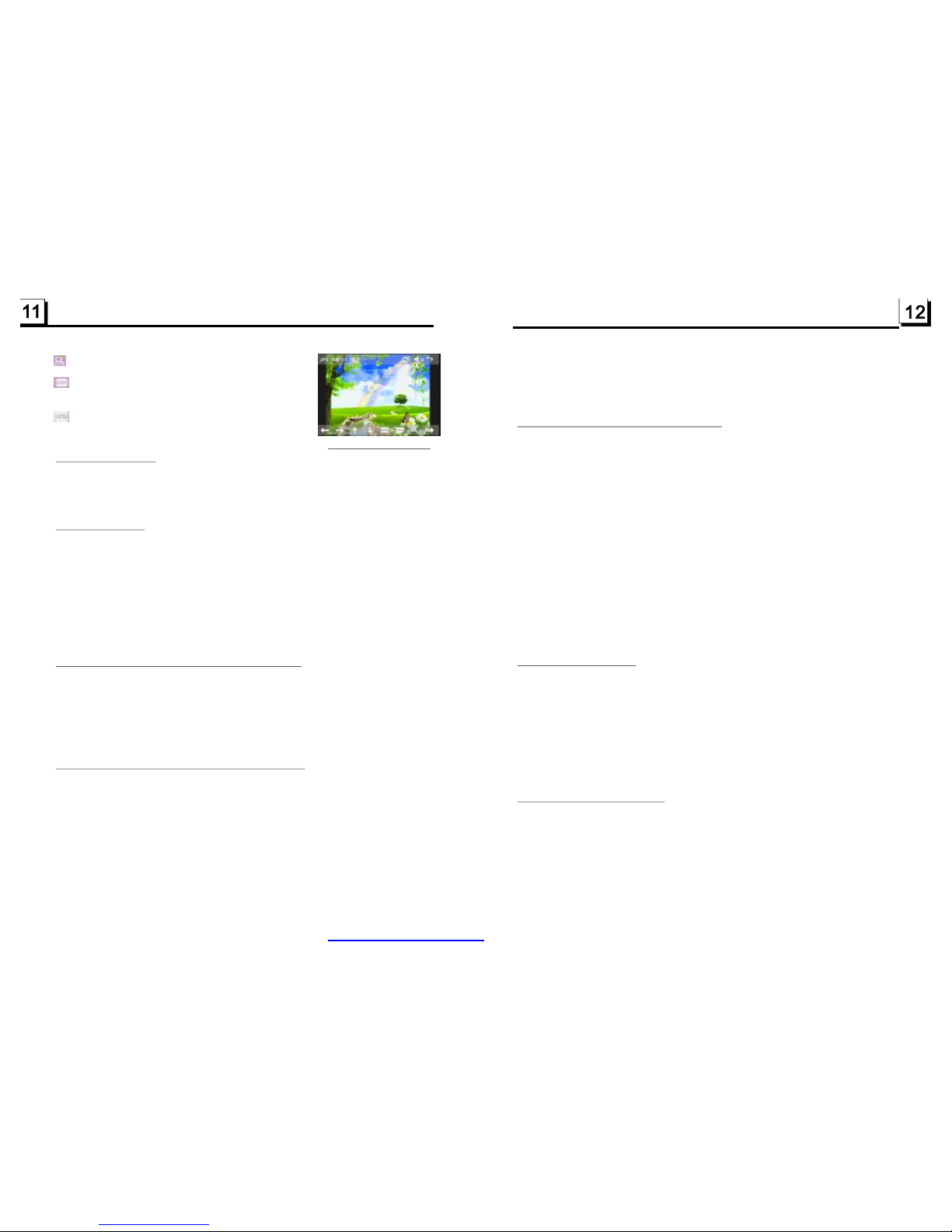
Keyboardinterface3
InMP3/WMAmode,duringplayback,therootmenuisdisplayedonthe
monitorallthetime.InMP4/JPEGmode,duringplayback,pressingthe
STOPbuttoncanreturnbacktotherootmenu.
Inthebottomoftherootmenu,theleftfilesorticonisforaudiofiles;the
middlefilesorticonisforimagefiles;therightfilesorticonisforvideo
Files.Ifoneofthe3sortsoffilesdoesnotexist,youcannotmovecursor
ontothefilesorticon.
Whendisplayingtherootmenu,pressthedirectionbuttonstoselectyour
desiredfolder,fileorfilesorticon,thenpresstheOKorPLAYbuttontoopen
theselectedfolder,orplaytheselectedfile,ordisplayonlythesortoffiles.
Whendisplayingtherootmenu,youcanalsousethenumberbuttonsto
selecttheserialnumberofthefileandplaythefile.
DuringJPEGplayback,pressoneofthedirection(>/</^/v)buttonsto
changetheangleofviewingpicturethatisdisplayingasfollows:
>:90degcw;<:90degccw;^:UP<-->DOWN;v:LEFT<-->RIGHT
InMP4/MP3/WMAmode,duringplayback,longpresstheUPorDNbutton
continuouslytofastplayforwardsorbackwardsatthemultiplespeeds
suchas
Duringspeedplayback,pressthePLAY/PAUSEbuttontoresumenormal
playback.
InJPEGmode,nofunctionofspeedplayback.
playthe34thtrack/chapter,firstlypressthe10+buttonfor3times,then
pressthe4button.(the0/10buttonisusedasthe0button)
Note:pressingandholdingthe+10or-10buttonswillallowyoutoplaythe
next10orlast10chapter/track(onlyforMP3/WMA).
x2,x4,x8,x20,normal.
DuringMP4playback,presstheSLOW_FWDbuttontoexecutetheSlow
Forwardfunction.
WitheachconsecutivepressingoftheSLOW_FWDbutton,theplayback
speeddecreases.ThespeedlevelsinSlowForwardasfollows:
x1/2,x1/3,x1/4,x1/5,x1/6,x1/7,normal.
Duringslowforward,pressthePLAYbuttontoresumenormalplayback.
Thefunctionisonlyforvideo.
4.5SelectChapter/TrackwithRootMenu
4.6PlaybackwithSpeed
4.7PlaybackwithSlowSpeed
PDF created with FinePrint pdfFactory trial version http://www.pdffactory.com
 Loading...