

Page 1

Page 2

Please read this user manual in detail in order to understand how to operate this
product properly. This is an external sound card, which is suitable for karaoke
online, live broadcasting and online game, etc.
We will give you a detailed introduction to the use of this product and some
common using problems through this manual.
Function Instructions
Function Instructions
1. Dynamic Microphone input
2. Condenser Microphone input
3. HEADSET input: Headphone with microphone
4. LIVE: for mobile podcasting
5. LINE IN: Music Accompaniment input
6. AUX: Audio output for earphone or speaker
7. POWER/OTG: Power input/Computer data jack. When you use computer for live
broadcasting, please connect with computer by this jack only.
8. VOLUME: Microphone Volume Control.
9. BASS: To control the bass of microphone.
10. ALTO: To control the alto of microphone.
11. TREBLE: To control the treble of microphone.
12. PC/OTG: To control the input volume of computer or OTG.
13. LIVE BROADCAST: To control the USB-C and 3.5mm audio output volume to the
PC or mobile device while live broadcasting.
14. BT/ACMP: To control bluetooth or accompaniment music audio input Volume
from any device.
15. ECHO: To control the level of ECHO.
16. Battery indicator: To show the energy of battery.
17. To show the level of the input accompaniment music.
18. To show the level of the monitor headphone.
19. Power ON/OFF switch: Press and hold to turn ON or OFF the unit.
20. BT ON/OFF: In order to connect or disconnect the BT from your device, press and
hold the BT ON/OFF button to turn it on or o.
21. REPEAT: To make a repeat sound
22. DENOISE: To reduce the pick-up noise of microphone.
23. DODGING: Dodge is a common mode for live broadcasting.
When playing accompaniment music, once you speak to the microphone,
the music volume will be weak or OFF.
When you stop speaking, the music will return to its original volume.
There are two modes: Music Quick In and Quick Out. Slow In and Slow Out.
24. VOICE OVER: To remove the human voice and keep the background music of the
accompaniment song.
25. ELECTRIC: There are 12 electrophonic tones.
Short press to turn ON or next mode, press and hold to turn OFF.
26. PITCH BEND: There are 3 dierent voices ---Female voice, Male Voice, Child Voice.
Short press to turn ON or change the voice.
www.PyleUSA.com
2
www.PyleUSA.com
3
Page 3
27. KTV: Karaoke mode. Your voice will become nice for karaoke.
28. ORIGINAL VOICE: Keep your original voice, no ECHO, TREBLE, ALTO, BASS, eect
in your voice.
29. PC LIVE: When you use PC for live broadcasting with others, please press this
button. Then you will not hear echo noise during live streaming.
30. SOLO: When you use smart phone for singing on live, some software may cause
some echo noise. Please press this button, then all audience will not hear echo
noise during live streaming. You will also not hear the voice of yourself from the
monitor earphone/speaker too.
31. AMBIENT MUSIC and CHARACTER SOUND.
32. MONITOR VOLUME: To control the output volume of the monitor earphone or
speaker.
Condenser Microphone
This is a professional condenser microphone, which adopts
the exacting complete electronic circuit control and large
diaphragm capsule, the microphone with a good pickup
pattern, high output, low self-noise, and the accurate
reproduction of even the most subtle sound, suitable
especially for studios, recording studios, broadcasting
stations, stage performances and computer.
Absolutely fulll the requirement of high quality for
broadcasting and recording.
Notice:
The sensitivity of cartridge is very high. Don’t drop, hit or apply strong shock to it.
To maintain the sensitivity and quality of sound reproduction, avoid exposing it to
moisture and extreme temperatures.
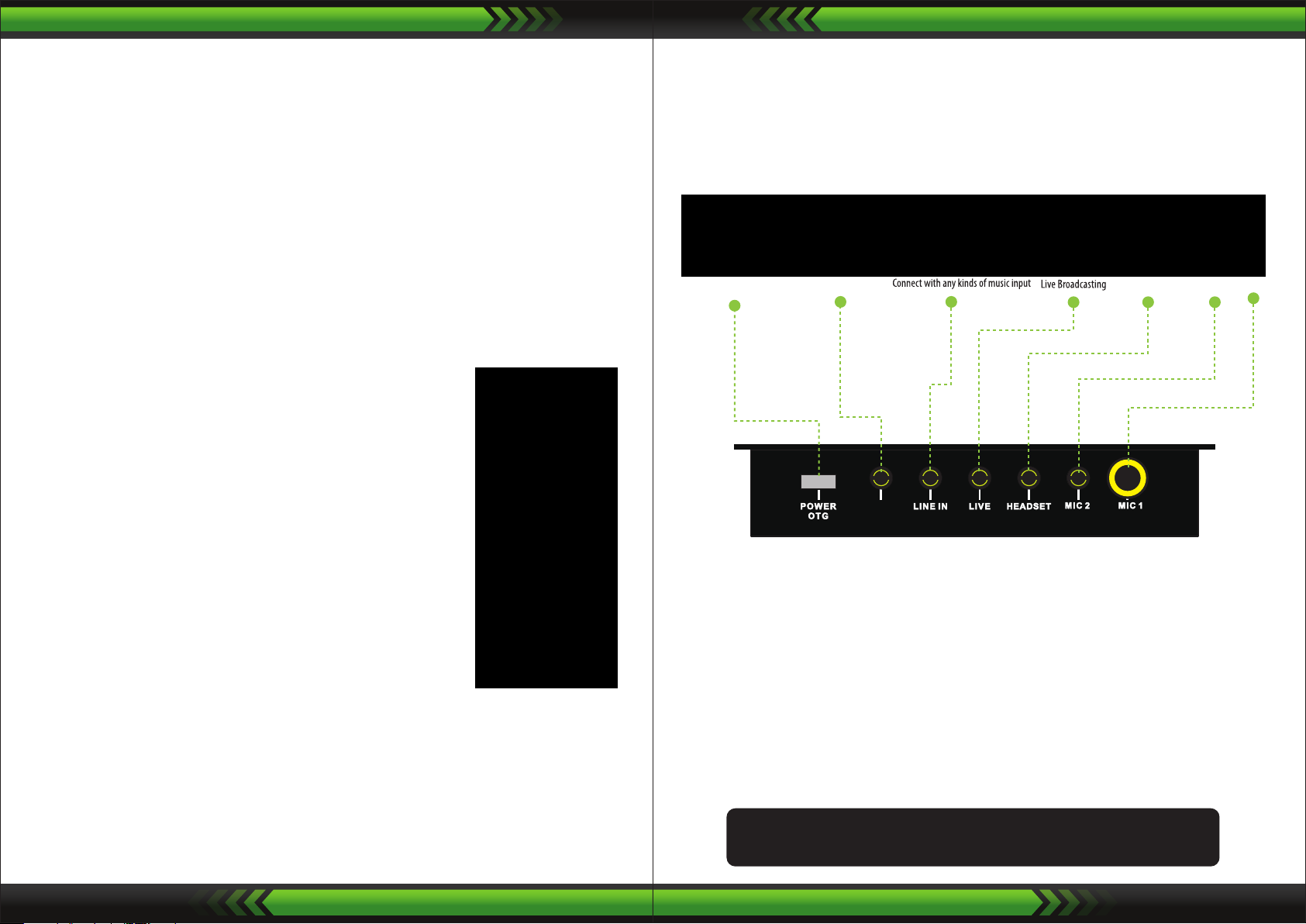
CONNECTIONS
AUX
Notice:
When you use PC for live broadcasting, please use the “Type-C to USB” data cable to
connect PC with “POWER OTG” jack only. “POWER OTG” also can be used for smart
phone live broadcasting too.
How to install and use of the condenser microphone?
1. Screw the microphone holder to the tripod stand.
2. Screw the condenser microphone to the microphone holder.
Stand up the microphone as picture.
3. Plug the XLR connector of cable to the bottom XLR of the microphone.
4. Plug the 3.5mm connector to the “MIC 2” input jack of sound card PKSCRD308.
5. Put the wind screen sponge on the head of microphone.
Then the microphone is ready be used. You could adjust the angle of the stand.
www.PyleUSA.com
4
LINE IN:
Connect with any kinds of music input. e.g. MP3, Smartphone, Computer, etc.
When you don't hear any sound from microphone, please check the "VOLUME" if
turned ON or not? Or check "SOLO" if ON or not.
You will not hear sound from your microphone when the "SOLO" is ON.
Before using your Compact Pro Live Broadcast Sound Card,
it's best to fully charge the battery rst.
www.PyleUSA.com
5
Page 4

Features:
• External Sound Card with Full Metal Housing
• Double DSP Noise Reduction Chips Provide with Excellent Sound Quality
• Wireless BT Streaming
• PC and Smart Phone Live Broadcasting, Solo
• 8 Sound Eects: Voice, Dodging, Denoise, Repeat, Electric, Pitch Bend, KTV,
Original Voice
• 12 Ambient Music: Bass, Rock, Mystic, Drum, Piano, Danger, Dynamic, Fresh, Joyful,
Tense, Fail, Arise
• 8 Characters Sound: KO, Happy, Laugh, Cheer, Yeah, Coin, Knock, Wow
• 8 Control Knobs for Treble, Alto, Bass, Microphone Volume, ECHO, BT/ACMP,
Live Broadcast, PC/OTG.
• 1 Monitor Control Fader
• Signal Flash Lights
• Battery Power Indicator Lights, Button Lights
• Compatible with Smartphone, PC and Laptop, and Supports Major Mainstream
Live Broadcast Software, such as Tiktok, Instagram, Twitch, Youtube, etc.
Condenser Microphone Features:
• Ideal for Studio Vocals to Streaming, Podcasting, Broadcasting, Desktop or Radio
Recording and Voice-Overs
• Convenient Adjustable Angle Placement
• Large Diaphragm Design
• With Good Heart-shaped Pointing Pickup with High Sensitivity Output
• Low Noise and Wide Dynamic Range
• Crisp Voice Clarity
• Lab Tested Recording Quality Performance
• Crisp Voice Clarity Audio Sound Pick-up
• 2.5 meters Aux (3.5mm) to XLR Cable
• Rugged & Durable Zinc Alloy Metal Housing
This product can expose you to a chemical or group of chemicals, which may include
“Nickel Carbonate” which is known in the state of California to cause cancer, birth defects,
or other reproductive harm. For more info, go to https://www.p65warnings.ca.gov/.
Condenser Microphone Specs:
• Material: Zinc Alloy Metal
• Element: 16mm diaphragm condenser
• Polar Pattern: Uni-directional
• Frequency Response: 50Hz-20 KHz
• Sensitivity: -34dB ± 3dB (0dB=1V/Pa at 1 KHz)
• Output Impedance: 2.2KΩ (f= 1 KHz)
• Max. SPL: 120dB (at 1 KHz 1% T.H.D)
• S/N Ratio: 66dB
• Cable: 2.5 meters Aux (3.5mm) to XLR Cable
What's in the Box:
• Sound Card
• (2) Audio Cables (3.5mm to 3.5mm)
• USB Charging Cable
• Wired Condenser Microphone
• Tripod Stand with Holder
• Aux (3.5mm) to XLR cable
• Microphone Wind Screen Sponge
Technical Specs:
• Power/OTG Jack, 3.5mm AUX Output Jack, 3.5mm LIVE IN Jack, 3.5mm
Headset (Headphone with Mic) Jack, 3.5mm Condenser Mic & 6.35mm
Dynamic Mic Input
• Construction Material: Metal
• Working voltage: 3.3V to 4.2V
• Charging voltage: 5V + 5%
• Charging current: 500mA MAX
• Working current: 50mA
• Output power: 500mW
• Signal to Noise Ratio: 90db
• Frequency Response:20Hz~20KHz±3db
• Power Supply: Built-in Rechargeable, 500mA Lithium Battery
• Working Time: 5 hours
• Product Dimensions: 5.9” x 4.25” x 1.77” -inches
www.PyleUSA.com
6
www.PyleUSA.com
7
 Loading...