

Page 1

PHST96
Page 2

TableofContents
PackageContents
1
1
2
2
3
4
4
4
5
5
5
5
5
6
7
7
7
8
1.Owner'smanual
2.Remotecontrol
3.ACadapter
4.Mainunit
TableofContents
PackageContents
SafetyInformation
LCDDisplaySystem
OperationInstructions
HowtoOpentheSystem
HowtoPlayStereoAudio
HowtoUseSleepMode
(1)OperationsoftheRemoteControl
Multi-FunctionControlArea
FMControlArea
iPod/iPone/iPadControlArea
(2)OperationsofTouchKeyControlSystem
HowtoSetupClockandAlarm
HowtoPlayFMTuner
InstallingBatteryintheRemoteControl
NotesabouttheRemoteControl
TroubleShooting
Caution
Specifications
SystemConnection
RemoteControl
TouchKeyControlSystem
PHST96
Page 3

L/R(150Wx1),Subwoofer(300Wx1)
190mmx290mmx970mm
Specifications
DearCustomer:
Thankyouforpurchasing2.1channelmusiccentersystem.Westrongly
recommendthatyoucarefullystudytheoperatinginstructionsbefore
attemptingtooperatetheunitandthatyounotethelistedsafetyinformation.
SafetyInformation
Thisunitcanbeusedonlywherethepowersupplyisinaccordancewith
thenotesontherearpanelofthespeakersystem.Itcan'tbeused
elsewhere.
Toreducetheriskoffireorelectricshock,donotexposethisunittorain
ormoisture.
Whentheunitisnotbeingused,turntheunitoff.
Donotopencoversandrepairbyyourself.Referallservicingtoqualified
personnel.
Afterturningofftheunit,ifyoudon'tstarttheunitagainin24hours,the
timewouldreturntothefactoryreset.Whentheunitison,youcanadjust
thetime,pleasetaketheoperationinstructionintheowner'smanualfor
reference.
RemoteControlBattery:
Thebuttonbatteryhasbeeninstalledintheremotecontrol.Whenusingit
forthefirsttime,justpullouttheinsulationlayerandtheremotecontrol
willbereadytouse.
1.
2.
3.
4.
5.
6.
Page 4
PHST96
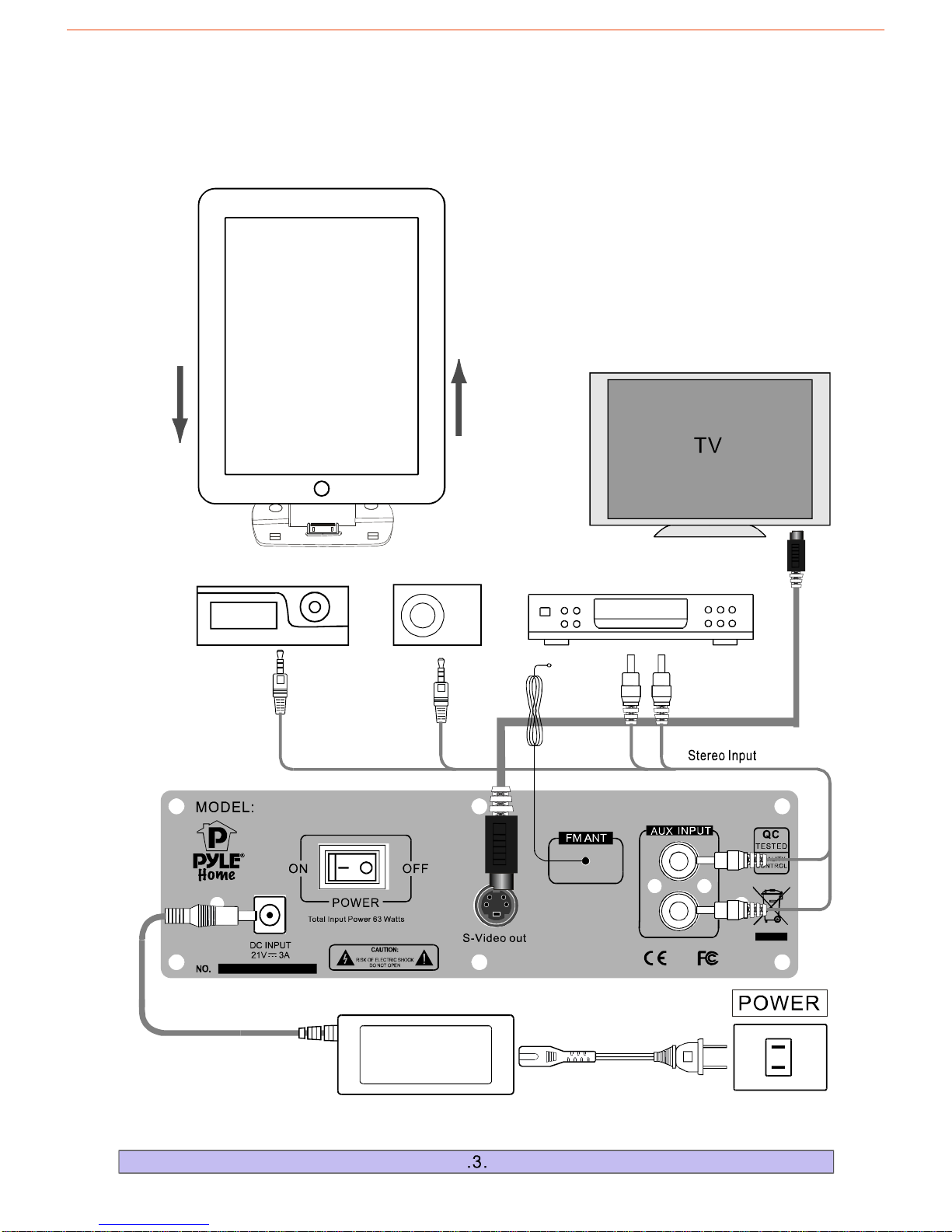
SystemConnection
Page 5
VideoOut
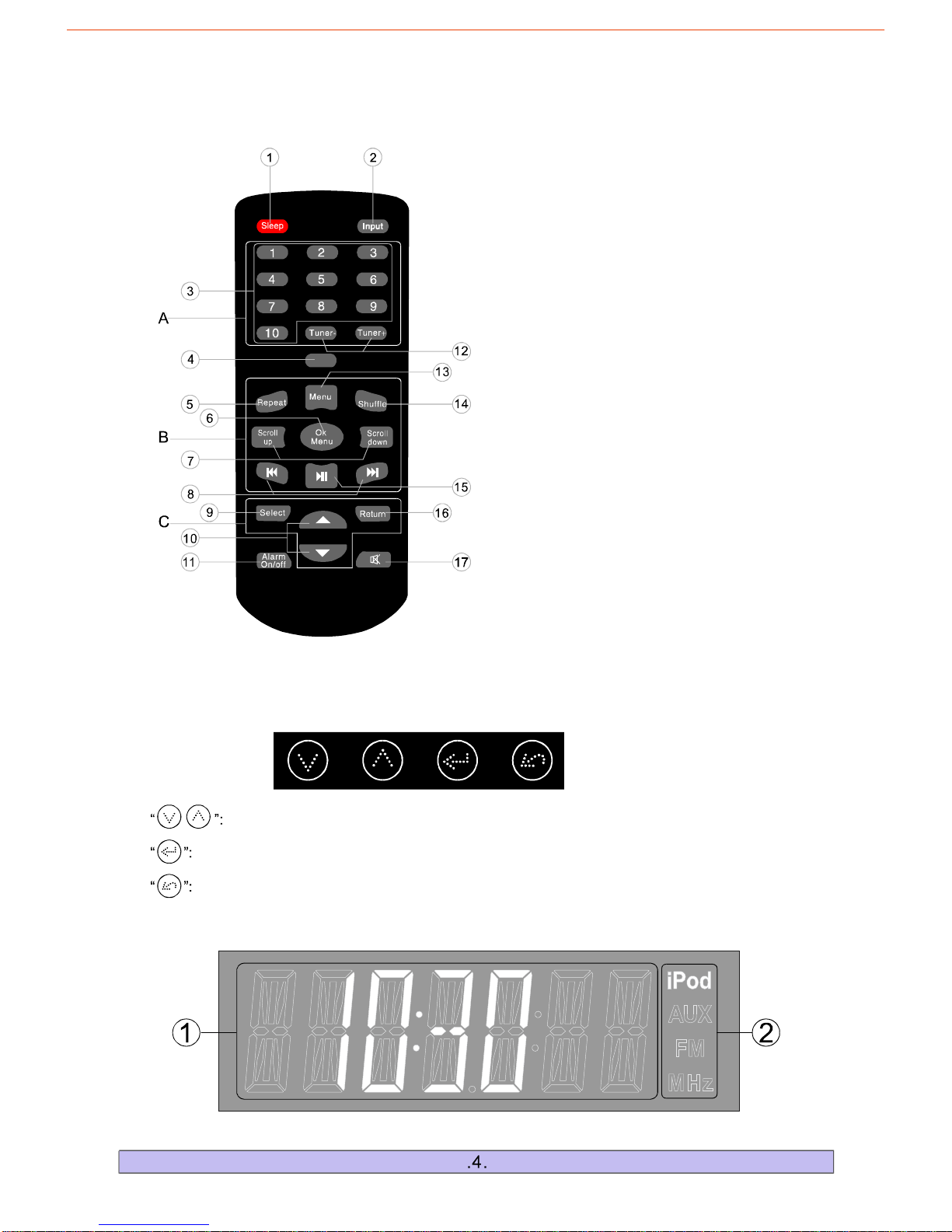
Scrollupordowntodifferentfunctioninterfaces.
1.Multi-FunctionDisplayArea 2.CurrentInputDisplayArea
RemoteControl
TouchKeyControlSystem
A:FMControlArea
B:iPod/iPone/iPadControlArea
C:Multi-functionControlArea
LCDDisplaySystem
Returntothepreviousmenu.
Entertothemenuandtheoperationkeyofthesubmenu.
1."Sleepmode"controlselector
2.Selecttheinputsource
(iPod.AUX.FM.)
3.Tunernumberselector
4.iPadvideooutselector
5.iPod/iPhone/iPad-togglerepeatselector
6.iPod/iPhone/iPad-okmenuselector
7.iPod/iPhone/iPad-scrollup/downselector
8.iPod/iPhone/iPad-skipselector
9.Selectcontrolselector
10.Adjustincrease/decreaseselector
11.Alarmon/offcontrolselector
12.Tunerbandcontrolselector
13.iPod/iPhone/iPad-menuselector
14.iPod/iPhone/iPad-toggleshuffleselector
15.iPod/iPhone/iPadplay/pauseselector
16.Returntothepreviousmenu
17."Mutemode"controlselector
Page 6
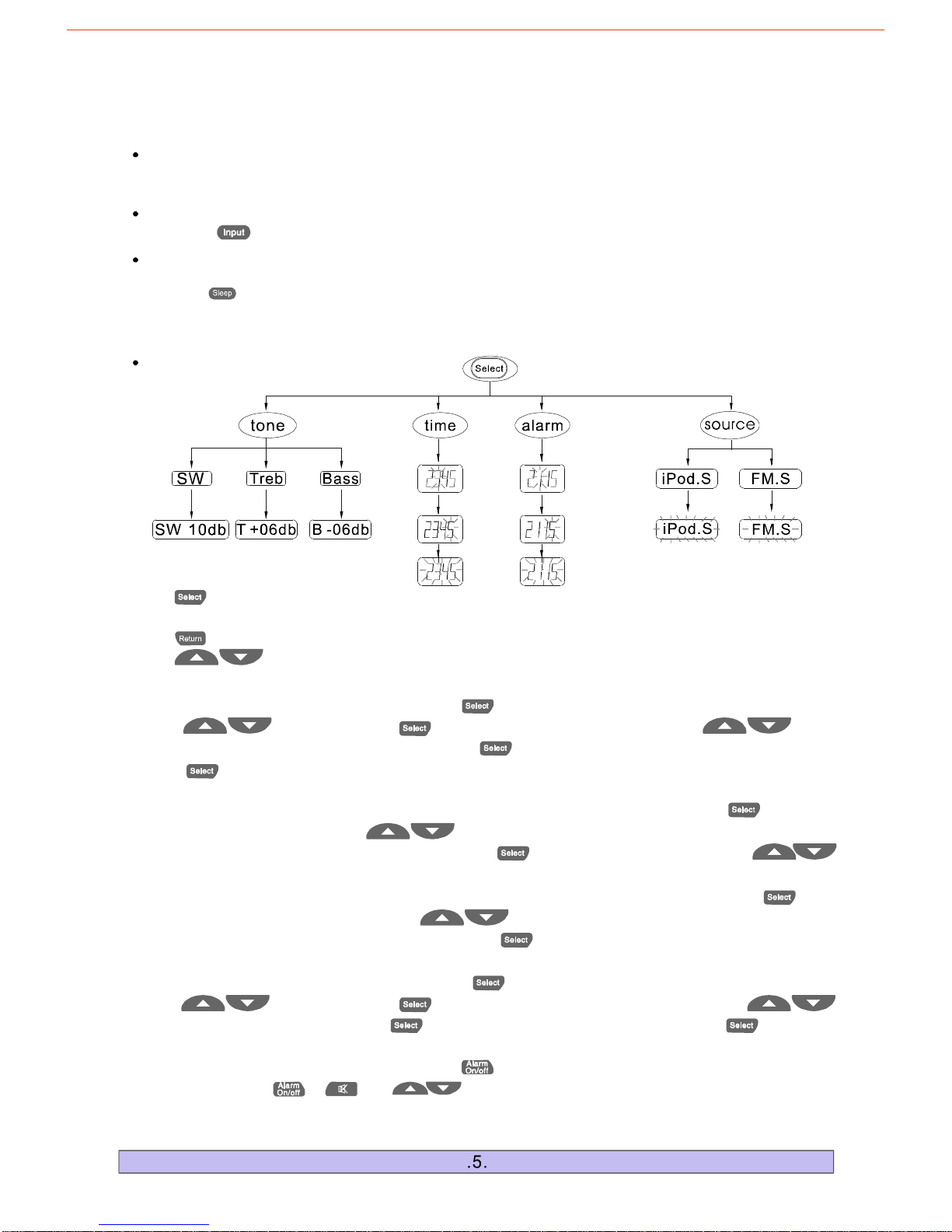
Pressthe""keyontheremotecontroltochoosetheinputmode"iPod,AUX,FM".
HowtoPlayStereoAudio
HowtoOpentheSystem
OperationInstructions
(1)OperationsoftheRemoteControl
Whenthe"WELCOME"willappearontheLCD,whenitdisappears,
itsuggeststhesystemhasopened.
"POWER"inthebackpanelison,
Multi-functionControlArea
1.:Selectthefollowingfoursubmenu:<tone>,<time>,<alarm>,<source>.Orentertothe
nextmenu.
2."":Returntothepreviousmenu.
3.:Adjustsettings.
""
""
Forexample:
a.Whenyouwantto
toresetthefiguresofhours,thenpressthekeytosettheminutes,afterresetit,press
keyagain,thetimeonthescreenwillflickercontinuouslyto
setup.
setthetime,pressthe""keyandscrolltothe<time>menubypress
"",followedbythe""keytoentertimesettingmode.Press""
""
""confirmsuccessfultime
b.Whenyouwanttoandpresstoenter
themenu.threeoptions:<SW>,<treb>,
<bass>.Ifyouwanttoadjustthe<SW>,presstoentertheSWmenuress
toadjustthe<SW>volume.
changethetonesettings,scrolltothe<tone>menu""
"tone"Pressthe""keytoscrollthroughthe
"""",p""
d.
tohours,thenpresskeytoPresskey
thetimeonthescreenwillflicker
alarmsetup.Aftersettingalarm,pressthekeytoturnthealarmon.Whenalarmison,
pressthekeytoturnoffthealarm,s>alarm
soundmodule,thesystemwillturntoFMinputmode;s>alarmsoundmodule,
thesystemwillturntoiPodinputmode.
Whenyouwanttosetthealarm,pressthe""keyandscrolltothe<alarm>menubypress
"",followedbythe""keytoenteralarmsettingmode.ThenPress""
adjustthe""toggletotheminutessetting.""after
adjustingtheminutessetting,momentarilytoconfirmsuccessful
""you
can"";""or""ifyouchoose<FM.
ifyouchoose<iPod.
c.Whenyouwanttosetandpressto
enterthemenu.twooptions:<iPod.s>,
<FM.s>.Ifyouwanttochoose<iPod.s>,press
<FM.s>
thealarmsoundmodule,scrolltothe<source>menu""
"source"Pressthe""keytoscrollthroughthe
""thentheLCDflicker,itsuggestthisfunction
hasfinished.Theotheroptionshavethesameoperation.
2.Wakeupthesystembypressinganykeywhenthesysteminthesleepmode.
Sleepmodeletsyousleeptoyoursystemattheselectedtime.
1.Press""toselectanamountoftimebeforethesystemshutsoff:5,15,30minutes,SleeponorSleepoff.
HowtoUseSleepMode
Page 7
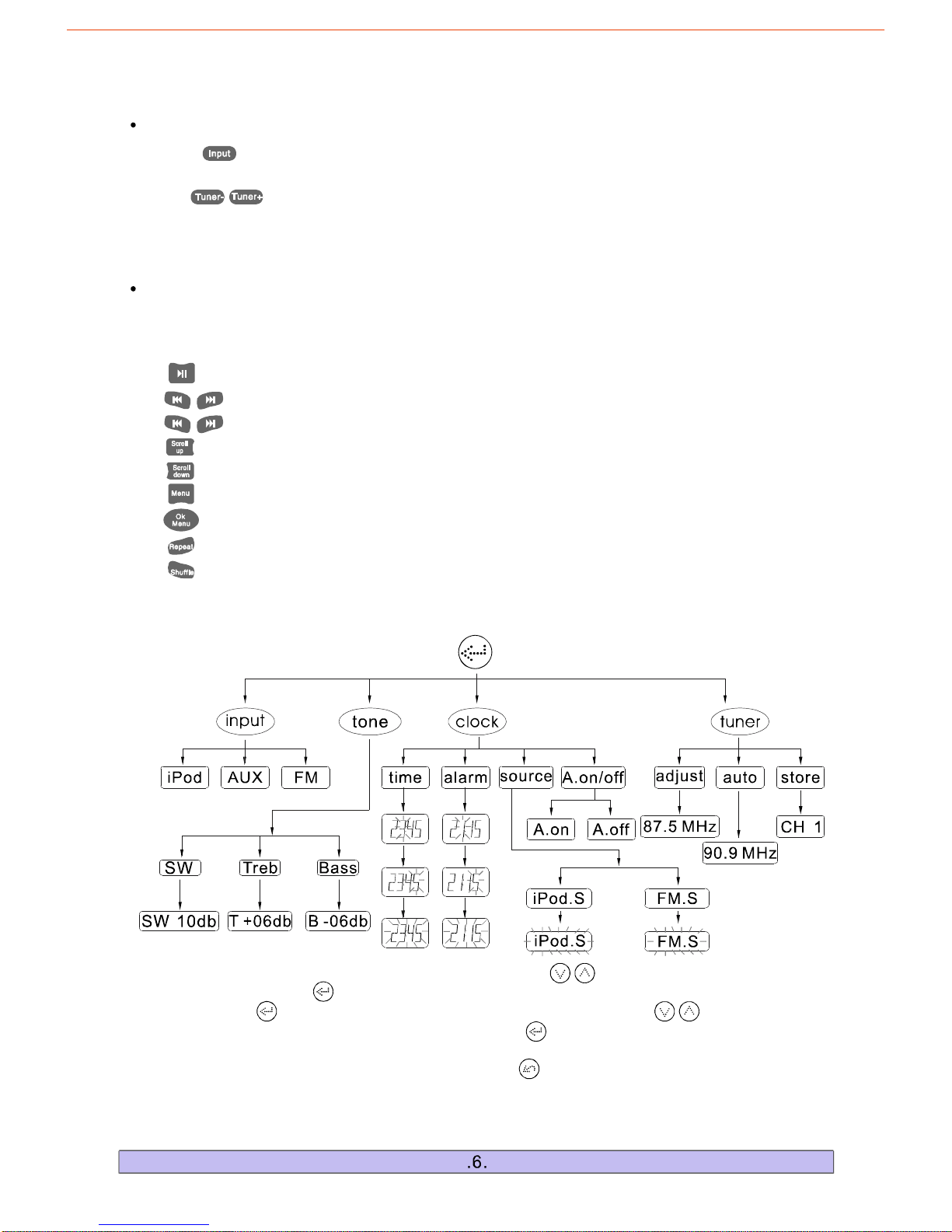
1.Themaininterfaceofthissystemshowstheclock.Touch","keystoincreaseordecreasethe
mastervolume.Touch""keytoenterthefirstlevelsubpage:<input>,<tone>,<tuner>,<clock>.Then
youcantouch""keyagaintoenterthesecondlevelsubpageortouch","keysforthe
switchofdifferententranceoption.Also,youcantouch""keytoenterthethirdlevelsubpageto
choosethefunctionyouneed.
2.Ifyouwanttoreturntotheprevioussubpageusethe""key.Ifnooperationisdone,thesystem
willreturntothemaininterfacein5seconds.
"":ControlstheplayandpausefunctionoftheiPod/iPone/iPadplayer.
",":Pressandholdfor2secondstoFastForwardorFastReverse.
",":ControlstheiPod/iPone/iPadplayertoplaythepreviousorthenextsong.
"":SelectsthepreviousfileoftheiPod/iPone/iPadplayer.
"":SelectsthenextfileoftheiPod/iPone/iPadPlayer.
"":SelectstheiPod/iPone/iPadplayertoreturntotheprevioussubmenu.
"":ControlstheiPod/iPone/iPadplayertoenternextsubmenu.
"":SelectstherepeatmodeontheiPod/iPone/iPad.
"":SelectstherandommodeontheiPod/iPone/iPad.
a.PlacetheiPod/iPone/iPadontotheiPodsocketoftheunit.ThesystemwillturntotheiPod
b.Themiddleareaoftheremotecontrol(B)isespeciallydesignedforiPod/iPone/iPadplayer.
""input
modeautomatically.
iPod/iPone/iPadControlArea
a.Press""andselectFMmode,theLCDwilldisplaythelasttunedchannel,forexample:
87.50MHz.
b.Use","toadjustradiofrequency.
c.Thenumberkeys(1-10)areusedtosaveupto10channels.TunetoyourdesiredFMchannel
andholdoneofthenumberkeysfor2secondstoassignthatnumberkeytothatchannel.Anytime
youwanttolistentothesavedchannel,justpressontheassignedkeynumber.
FMControlArea
(2)OperationsofTouchKeyControlSystem
Page 8
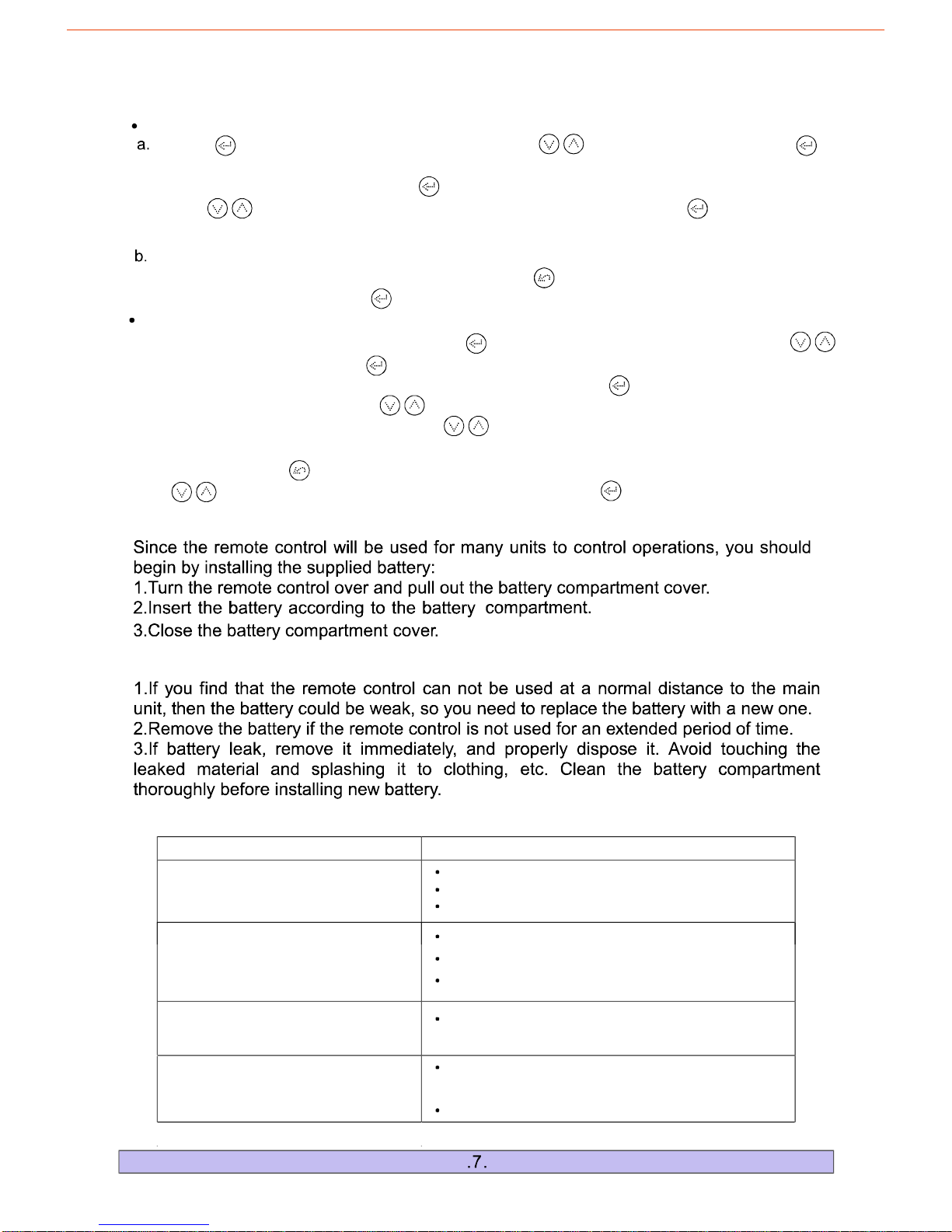
HowtoSetupClockandAlarmbyTouchKeyControlSystem
Touchentertothefirstlevelsubpage,thentouch
toenterthethird-levelsubpage.Atthismoment,youcan
touchtoadjustthefiguresofhourorminute.Afteradjustment,touchagain,theclock
iconontheLCDwillflickercontinuouslytoshowthesuccessoftimesetup.
""","tochoose<clock>,andtouch""
entertheoptionsinterfaceof<time>,<alarm>,<source>,<A.on/off>,whichisthesecondlevelsubpage.
Then,choosethe<time>icon,touch""
","""
Whensetupalarm,choose<alarm>optiononthesecond-levelsubpage,theoperationissimilarto
the<time>setup.Afterfinishthe<alarm>setup,touch
touch
""keytoreturnthesecond-levelsubpage,
choose<A.on/off>icon,""toturnonoroffalarm.
HowtoPlayFMTunerbyTouchKeyControlSystem
WhenyouselecttheFMinputmode,Touchentertothefirstlevelsubpage,thentouch
toenterthethird-levelsubpage.
Atthismoment,youcantouchtodownortoupandthetunerwillsearchmanually;choose
andenter<auto>status,andthentouchtodownortouponce(toup,theFMfrequency
willdecrease,otherwiseopposite),thetunerwillsearchautomatically.Ifyouneedtostoptheautomatic
search,plstouch
""","
tochoose<tuner>,andtouch""entertheoptionsinterfaceof<adjust>,<auto>,<store>,whichis
thesecondlevelsubpage.Then,choosethe<adjust>icon,touch""
","
","
"".Whenyouwanttosavetheprogram,justenterthe<store>status,thentouch
","tochoosethechannelyouwanttosave.Atlast,touch""onceagain.
InstallingBatteryintheRemoteControl
Problem PossibleReasons/solutions
Thesystemhasnopower.
Nosoundatall.
Eitherofthemainchannelshas
nosound.
LCDscreendisplaysabnormally.
Theplugisnotinsertedproperly.
Thesockethasnopower.
POWERbuttonhasnotbeenpressed.""
Incorrectselectionofinputsignal.
Ifmutestateisturnedon.
Soundsourcemachineisnotpowered.
Thesignalplugisconnectedincorrectlyor
linesareshort-circuited.
Itmaybeeffectedbyexteriorstrongdisturbance,
turnofffirstandthenturnonagain.
Avoiddirectsunlight/heat.
NotesabouttheRemoteControl
TroubleShooting
Page 9
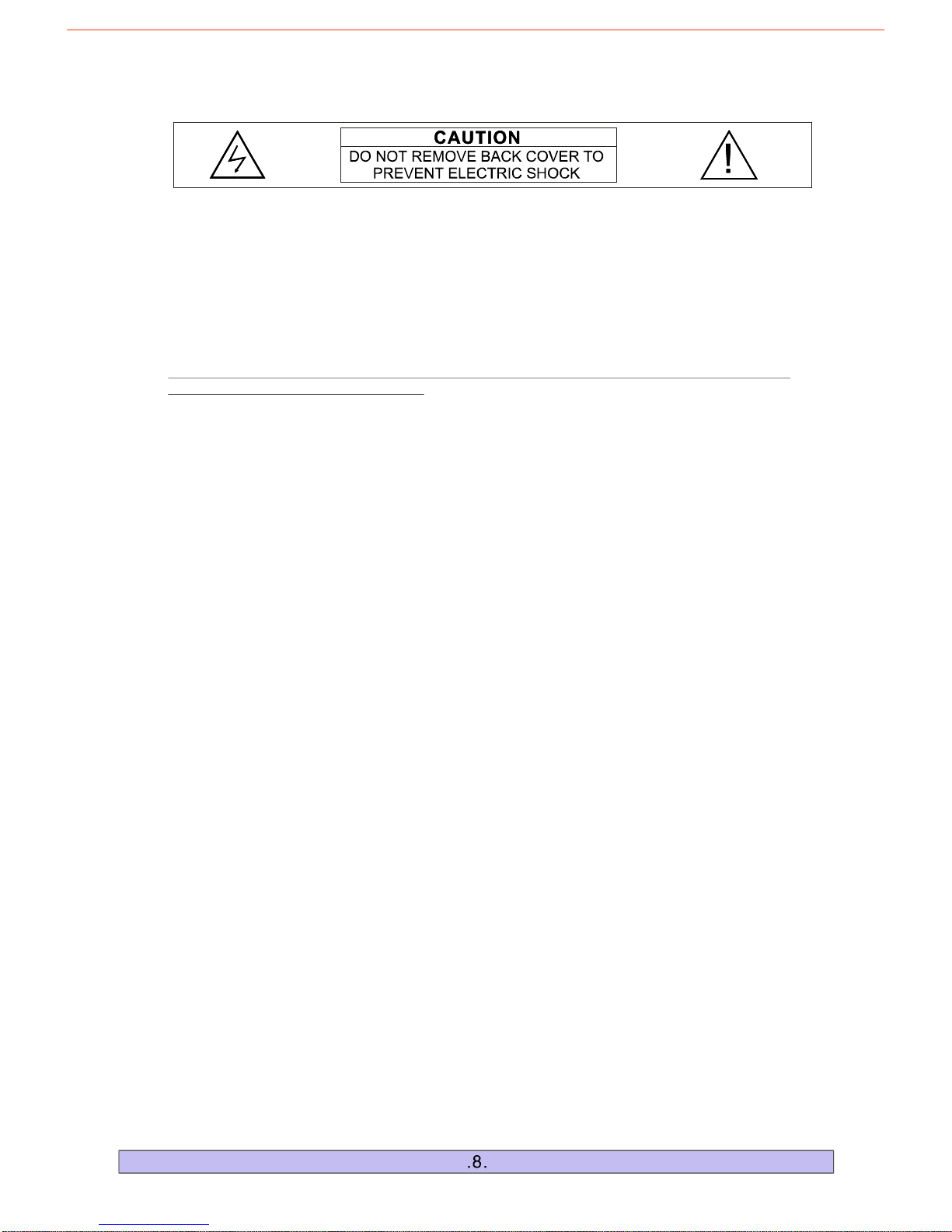
CAUTION:DONOTREMOVEBACKCOVEROFUNITDUETOTHEPOSSIBILITYOF
ELECTRICALSHOCK.THEREARENOSERVICEABLEPARTSINSIDETHISSECTION.
PLEASEREFERSERVICINGTOQUALIFIEDSERVICEPERSONNEL.
Thelightningflashwithanequilateraltriangle,DangerousVoltage,isintendedtoalerttheusertothe
presenceofuninsulatedparts'
""
withintheproductsenclosurethatmaybeofsufficientmagnitudetoconstitute
riskofelectricshocktopersons.
Theexclamationpointwithinanequilateraltriangleisintendedtoalerttheusertothepresenceofimportant
operatingandmaintenance(servicing)instructionsintheliteratureaccompanyingtheappliance.
WARNING:TOREDUCETHERISKOFFIREORELECTRICSHOCKDONOTEXPOSETHIS
APPLIANCETORAINORMOISTURE
1.-Allsafetyandoperatinginstructionsshouldbereadbeforetheapplianceis
operated.
2.-Safetyandoperatinginstructionsshouldberetainedforfuturereference.
3.-Allwarningsontheapplianceandintheoperatinginstructionsshouldbefollowed.
4.-Alloperatinganduserinstructionsshouldbefollowed.
5.-Theapplianceshouldnotbeusednearwater;e.g.,bathtubs,kitchensinks,
laundrytubs,dampbasements,swimmingpools,etc.
6.-Donotplacethisproductonanunstablecart,stand,tripod,bracket,table,etc.
7.-Theapplianceshouldbesituatedsothatitslocationandpositiondoesnotinterferewith
properventilation.Theapplianceshouldnotbesituatedonabed,sofa,rug,oranysurfacethatmay
obstructcabinetopenings.
8.-Theapplianceshouldbesituatedawayfromheatsourcessuchasradiators,heatregisters,
stovesorotherdevices(includingamplifiers)thatproduceheat.
9.-Theapplianceshouldbeconnectedonlytoapowersupplyofthetypedescribed
intheoperatinginstructionsorontheappliance.Donotoverloadwalloutlets,extensioncords,or
integralconvenienceoutletsasthiscanresultinariskoffireorelectricshock.
10.-Powersupplycordsshouldberoutedsothattheyarenotlikelytobe
walkeduponorpinchedbyitemsplaceduponoragainstthem,payingparticularattentiontocordsat
plugs,conveniencereceptacles,andthepointwheretheyexitfromtheappliance.
11.-Theapplianceshouldbecleanedonlywithglasscleaner.Donotusechemicalcleaners.
12.-Thepowercordshouldbeunpluggedfromtheoutlet
duringlightningstormsorduringlongperiodsofnon-use.
13.-Careshouldbetakenthatobjectsdonotfallontoandliquidsarenot
spilledontheamplifierorspeaker.
14.-Theapplianceshouldbeservicedbyqualifiedservicepersonnel
when:
READINSTRUCTIONS
RETAININSTRUCTIONS
NOTEWARNINGS
FOLLOWINSTRUCTIONS
WATERANDMOISTURE
CARTSANDSTANDS
VENTILATION
HEAT
POWERSOURCES
POWERCORDPROTECTION
CLEANING
LIGHTNINGSTORMS&NOUSEPERIODS
OBJECTANDLIQUIDENTRY
DAMAGEREQUIRINGSERVICE
A.Thepowersupplycordorplughasbeendamagedor
B.Objectshavefallenonorliquidhasbeenspilledintotheappliance;or
C.Theappliancehasbeenexposedtorain;or
D.Theappliancedoesnotappeartooperatenormallyorexhibitsamarkedchangeinperformance;or
E.Theappliancehasbeendroppedortheenclosuredamaged.
;
15.-Theusershouldnotattempttoservicetheappliance.Ifpartsarereplacedduringservice,
besurethepartsmeetfactoryspecification.Inappropriatesubstitutioncanresultinfireorariskofelectric
shock.Uponcompletionofservice,askthetechniciantoperformsafetychecksontheproduct.Forservice
andwarrantyinformationpleasecheckWarrantyCard.
SERVICING
Page 10

 Loading...