

Page 1

Doc 1.01
INST048
CAPS™
(Capacitor Actuated Portable Starter)
User Guide
Page 2
1
P: 479.419.4800 │ F: 479.419.4801 │ www.purkeys.net
CAPS
USER GUIDE
CAPS
(Capacitor Actuated Portable Starter)
User Guide
CONTENTS
General Information...............................................................................................2
Description......................................................................................................2
Safety Requirements ......................................................................................2
CAPS Diagram ......................................................................................................3
Operating Instructions ...........................................................................................4
Charging CAPS .....................................................................................................5
Troubleshooting ....................................................................................................6
CAPS Internal Diagram ..................................................................................6
Conditions Indicated by Lights ........................................................................7
Other Conditions .............................................................................................8
Quick Reference Guide .........................................................................................9
Light Indications .................................................................................................. 10
Parts List ............................................................................................................. 11
Limited Commercial Warranty Policy................................................................... 12
Page 3

2
P: 479.419.4800 │ F: 479.419.4801 │ www.purkeys.net
CAPS
USER GUIDE
GENERAL INFORMATION
DESCRIPTION
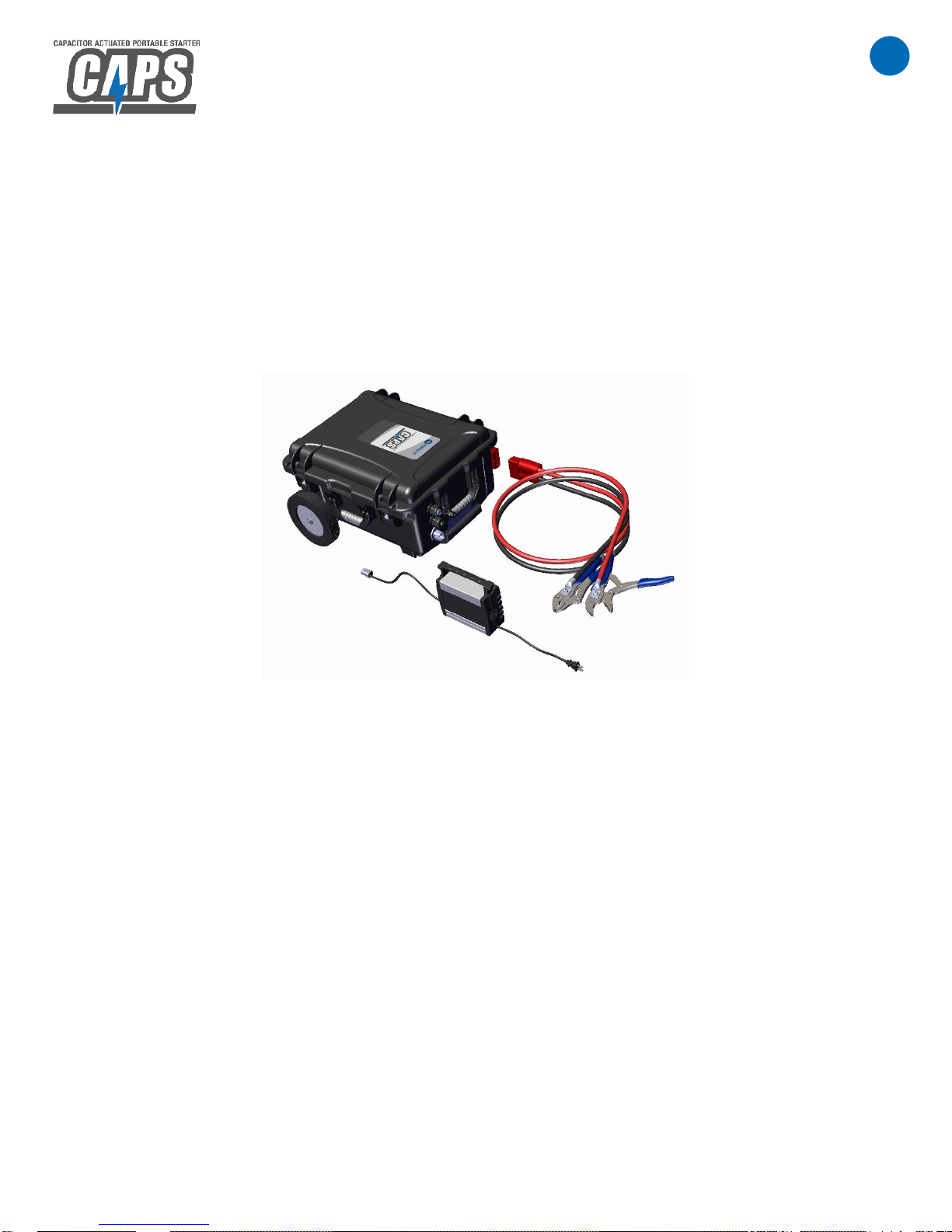
The Purkeys CAPS™ (Capacitor Actuated Portable Starter) jumpstart machine is a
powerful, portable, and versatile solution that can be used to jumpstart all 12 V vehicles
from heavy to light duty.
The CAPS uses a capacitor to provide the power needed for the jumpstart. This allows
the unit to store a lot of energy, charge rapidly, and provide the necessary energy to the
vehicle being started. Use of this energy is regulated by Purkeys control module that
allows the unit’s internal battery to charge the capacitor and operates the magnetic
switches that discharge the capacitor and complete the jumpstart.
SAFETY REQUIREMENTS
Wear appropriate protective equipment as required by your company policy.
Set the parking brake.
Use proper lock-out tag-out procedures.
Chock front and rear wheels.
Remove all rings, watches, and any metal wear that could possibly create an
electrical pathway and cause serious injury.
Page 4
3
P: 479.419.4800 │ F: 479.419.4801 │ www.purkeys.net
CAPS
USER GUIDE
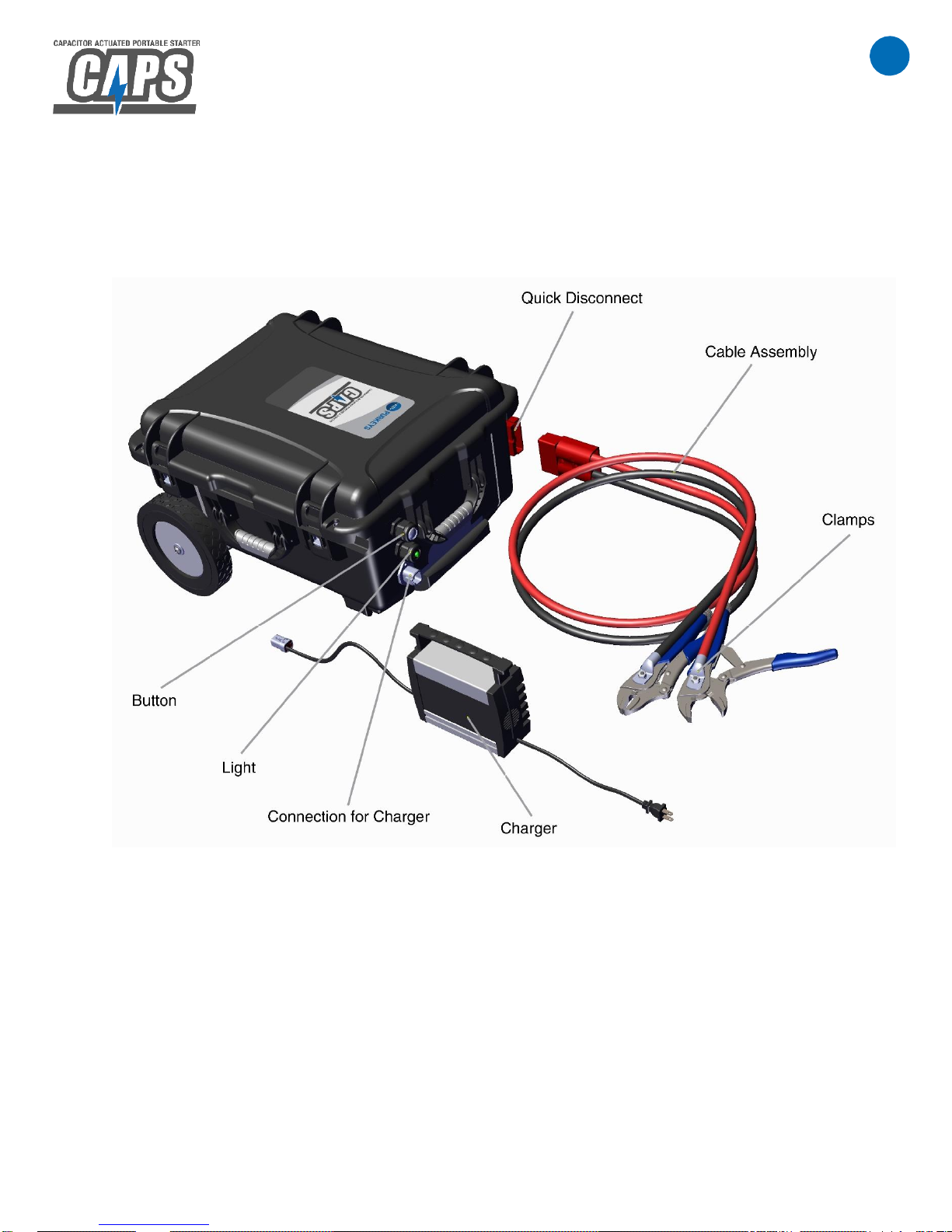
CAPS DIAGRAM
Page 5

4
P: 479.419.4800 │ F: 479.419.4801 │ www.purkeys.net
CAPS
USER GUIDE
OPERATING INSTRUCTIONS
1. Connect the positive and negative clamps to the vehicle battery, observe polarity.
(Keep clamps clean and in good condition.)
2. Press and release the CAPS button, the light should turn green and the buzzer
should sound, indicating the unit is armed and ready.
If the light flashes, refer to troubleshooting on page 6. DO NOT
DISCONNECT THE CLAMPS WHILE THE BUZZER IS SOUNDING.
3. Make sure ALL vehicle loads are turned off (lights, windshield wipers, radio, etc.).
Turn the key switch to ON. Wait for the vehicle’s gauges to cycle.
4. Attempt to start the vehicle. If the vehicle starts, continue to step 5.
If the vehicle does not start within 10 seconds of cranking, turn the key
switch to the “OFF” position, wait for several minutes, and repeat steps 2
through 4. (The CAPS will not allow more than 30 seconds of continuous
cranking.)
If the light flashes red, see troubleshooting on page 6.
5. Once the vehicle has been jumpstarted, the light on the CAPS will blink yellow,
indicating that the CAPS is recharging from the vehicle’s charging system (allow
the CAPS to replenish its charge for 3-5 minutes).
6. Once the CAPS has been allowed to charge for several minutes, complete the
following disconnect procedures:
Press the button to disarm it before disconnecting the clamps.
If the CAPS needs to be disconnected before it has charged, press the
button to disarm it before disconnecting the clamps.
Disconnect the clamps from the batteries.
NOTE: IF THE BUZZER IS SOUNDING, DO NOT DISCONNECT THE CLAMPS.
PRESS AND RELEASE THE BUTTON TO RESET THE CAPS. IF THE BUZZER IS
NOT SOUNDING, IT IS SAFE TO DISCONNECT THE CLAMPS.
Page 6

5
P: 479.419.4800 │ F: 479.419.4801 │ www.purkeys.net
CAPS
USER GUIDE
CHARGING CAPS
To Charge the CAPS:
From Outlet: Plug the charger into an AC outlet and connect the charger to
CAPS. Once CAPS is charged, the light will be a slow-flashing green. Leave unit
connected to AC outlet to maintain charge.
From Vehicle: Connect jumpstart clamps to running vehicle and press button.
Light will flash yellow and buzzer will sound while charging. CAPS will be
sufficiently charged to perform multiple jumpstarts within 3-5 minutes. If the
CAPS needs to be disconnected before it is fully charged, press the button to
disarm it before removing the clamps.
NOTE: IF THE BUZZER IS SOUNDING, DO NOT DISCONNECT THE CLAMPS.
PRESS AND RELEASE THE BUTTON TO RESET THE CAPS. IF THE BUZZER IS
NOT SOUNDING, IT IS SAFE TO DISCONNECT THE CLAMPS.
KEEP CAPS CHARGING FROM AC OUTLET WHEN NOT IN USE.
Page 7
6
P: 479.419.4800 │ F: 479.419.4801 │ www.purkeys.net
CAPS
USER GUIDE
TROUBLESHOOTING
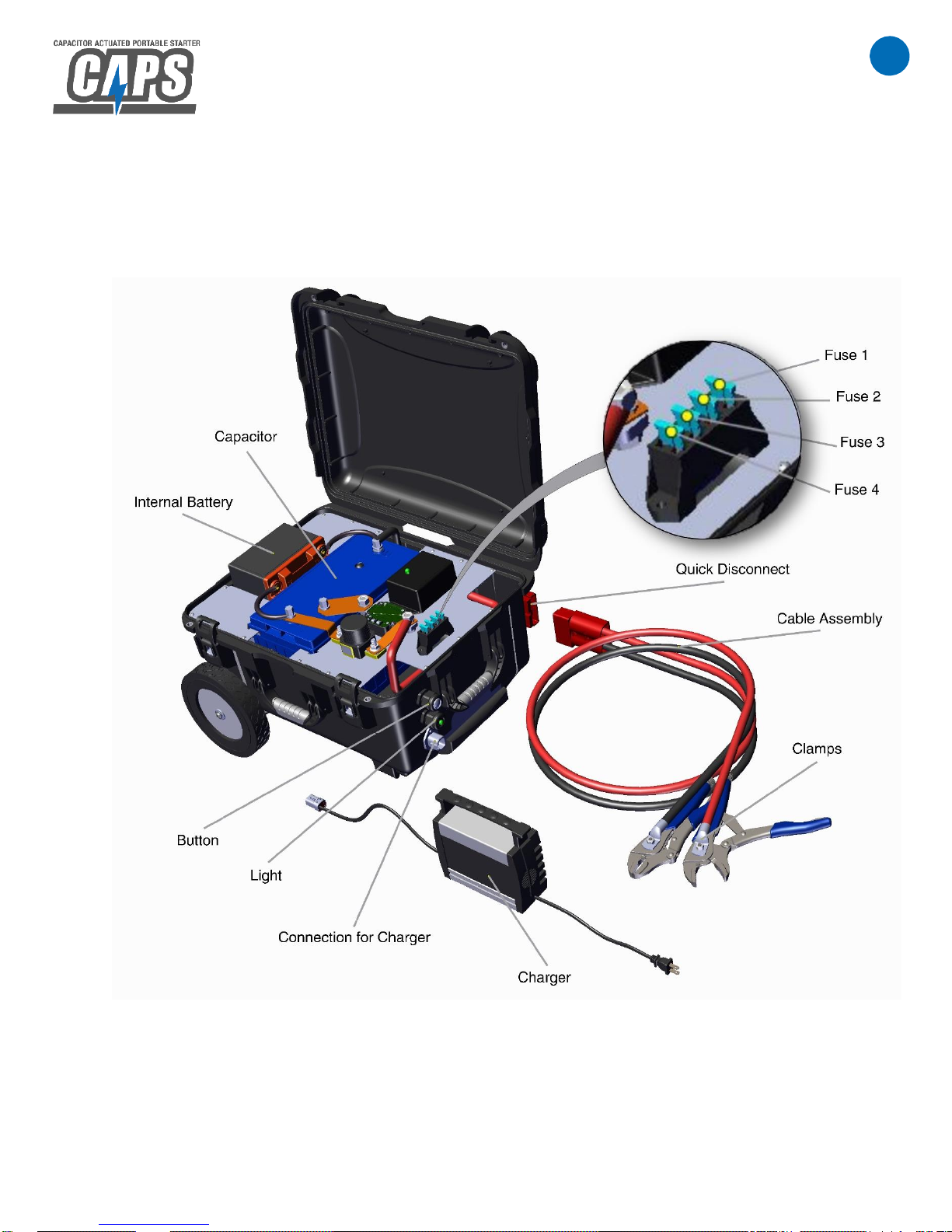
CAPS INTERNAL DIAGRAM:
Page 8
7
P: 479.419.4800 │ F: 479.419.4801 │ www.purkeys.net
CAPS
USER GUIDE
TROUBLESHOOTING
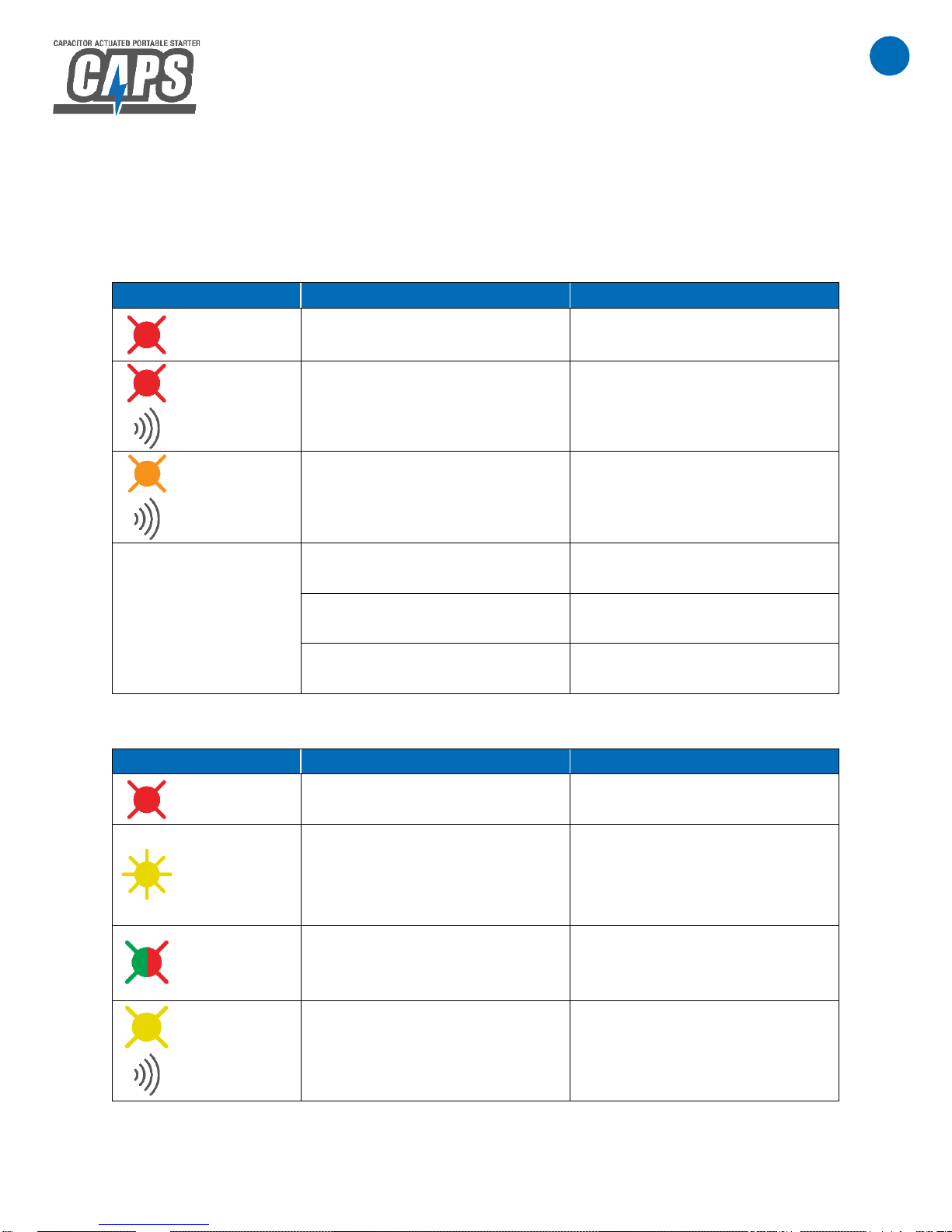
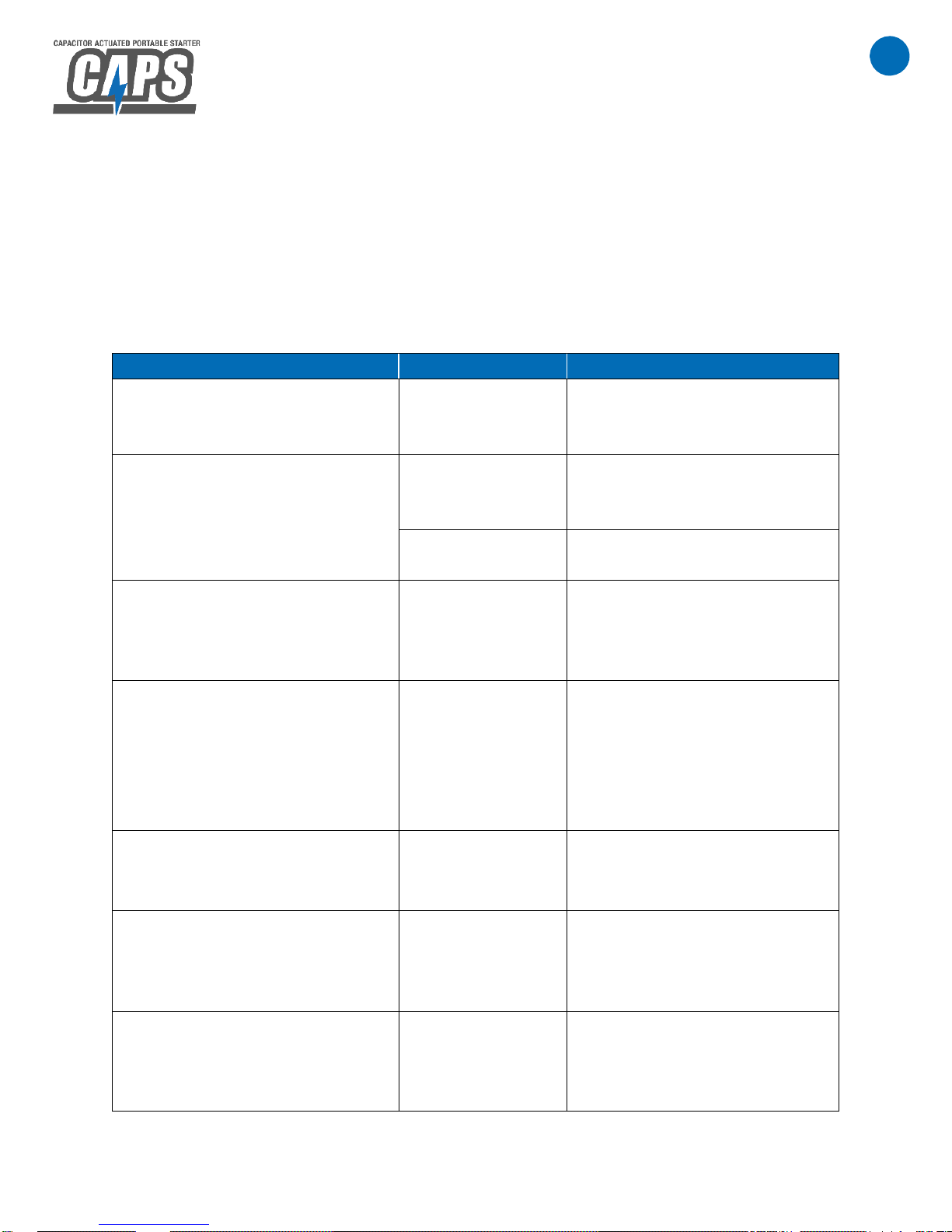
CONDITIONS INDICATED BY LIGHTS:
Before Pressing Button:
Light Status
Condition
Action Needed
Flashing
Red
Internal battery at low state of
charge.
Charge CAPS.
Flashing
Red and
Buzzing
Internal battery at very low
state of charge. (CAPS will
not enter jumpstart mode.)
Charge CAPS.
Flashing
Orange and
Buzzing
Internal battery is being
overcharged.
If condition persists for more
than 5 minutes, disconnect
charger.
No Light
Internal battery at extremely
low state of charge.
Charge CAPS.
Multiple blown fuses.
Check all fuses. Replace as
necessary.
Defective controller, wire
harness, battery, or capacitor.
Contact Purkeys Customer
Service.
After Pressing Button:
Light Status
Condition
Action Needed
Flashing
Red
Reverse polarity or clamps not
connected or clamps shorted.
Assure that clamps are
properly connected.
FastFlashing
Yellow
Internal battery is charging
capacitor. (CAPS is not ready
to jumpstart.)
Wait until capacitor has
charged. Buzzer will sound
once when charge is
complete.
Flashing
Green and
Red
Internal battery at very low
state of charge. (CAPS will
not enter jumpstart mode.)
Charge CAPS.
Flashing
Yellow and
Buzzing
Vehicle is charging CAPS
capacitor and internal battery.
Allow CAPS to charge for
several minutes. Press button
before disconnecting from
vehicle.
Page 9
8
P: 479.419.4800 │ F: 479.419.4801 │ www.purkeys.net
CAPS
USER GUIDE
TROUBLESHOOTING
OTHER CONDITIONS:
NOTE: Challenges may be experienced during jumpstart attempts due to many factors
such as: vehicle batteries being severely discharged, cold temperatures, etc. Multiple
jumpstart attempts may be necessary to achieve a successful crank.
Symptom
Condition
Action Needed
While attempting a jumpstart,
CAPS shuts off abruptly and
then resets.
Blown fuse.
Check fuse 1. See diagram on
page 6. Replace as
necessary.
AC charger is connected to
CAPS, but will not charge
(charge indicator light on
charger not on).
Blown fuse.
Check fuse 2. See diagram on
page 6. Replace as
necessary.
Defective
charger.
Contact Purkeys Customer
Service.
After typical capacitor recharge
time, capacitor is still not
charged. (Yellow light flashes
after pressing button.)
Blown fuse.
Check fuse 3. See diagram on
page 6. Replace as
necessary.
Weak crank during jumpstart
attempt. Before typical capacitor
recharge time has elapsed,
pressing the button arms CAPS.
(Green light and buzzer
sounds.)
Blown fuse.
Check fuse 4. See diagram on
page 6. Replace as
necessary.
Visual inspection of cable
assembly shows dirty or worn
condition.
Dirty or worn
cable assembly.
Maintain cable assembly clean
and in good condition.
Replace as necessary.
Fewer jumpstarts can be
performed on a single charge.
Jumpstart attempts may seem
weaker.
Internal battery is
close to end of
life.
Remove the CAPS internal
battery and perform a BCI test.
Replace battery as necessary.
Leads are “live” before pressing
button. After pressing button,
with leads not connected, light is
green and buzzer sounds.
An internal mag
switch is shorted.
Disconnect leads at the quick
disconnect and contact
Purkeys Customer Service.
Page 10
9
P: 479.419.4800 │ F: 479.419.4801 │ www.purkeys.net
CAPS
USER GUIDE
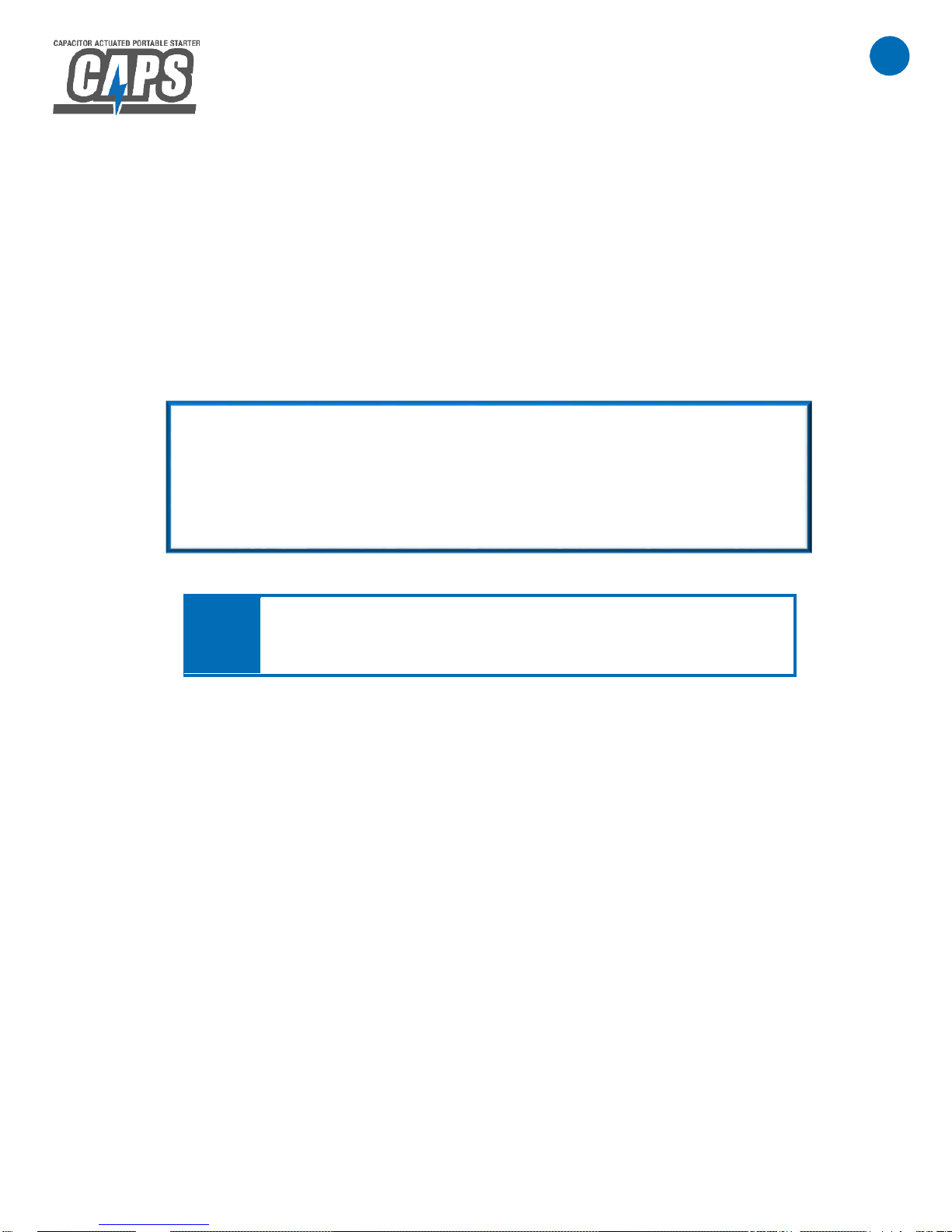
QUICK REFERENCE GUIDE
1. Connect positive and negative clamps to vehicle, observe polarity.
2. Press and release the CAPS button, the light should turn green and the buzzer
should sound. If the light flashes, refer to the light indications guide on page 10.
3. Make sure ALL vehicle loads are turned off. Turn the key switch to ON. Wait for
the vehicle’s gauges to cycle.
4. Attempt to start the vehicle.
KEEP CAPS CHARGING FROM AC OUTLET WHEN NOT IN USE.
If the vehicle does not start within a few seconds of cranking, wait for
the capacitor inside the CAPS to recharge and repeat steps 2 – 4.
If the vehicle starts, allow CAPS to recharge from the vehicle’s
charging system for a few minutes. Then press and release the CAPS
button and disconnect the clamps.
NOTE:
If the CAPS buzzer is sounding, press and release the button
before disconnecting the clamps.
Page 11
10
P: 479.419.4800 │ F: 479.419.4801 │ www.purkeys.net
CAPS
USER GUIDE
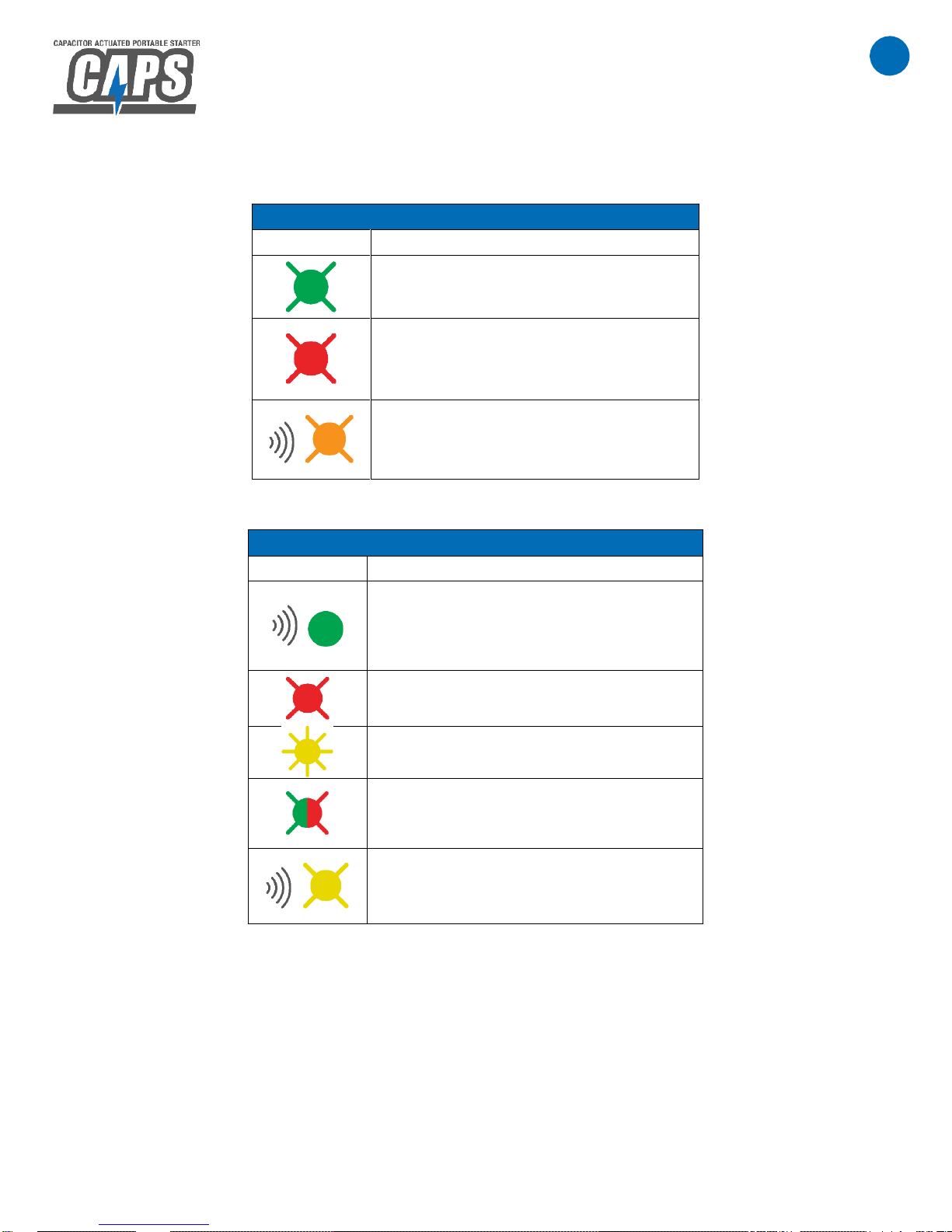
LIGHT INDICATIONS
BEFORE PRESSING BUTTON
Light
Status
Internal battery at good state of
charge
Internal battery at low state of charge
Overcharging internal battery
AFTER PRESSING BUTTON
Light
Status
Unit is armed and ready
Reverse polarity or clamps not
connected or clamps shorted
Capacitor is charging
Internal battery is too low to function
Internal CAPS battery is charging,
press button before disconnecting
from vehicle
Page 12
11
P: 479.419.4800 │ F: 479.419.4801 │ www.purkeys.net
CAPS
USER GUIDE
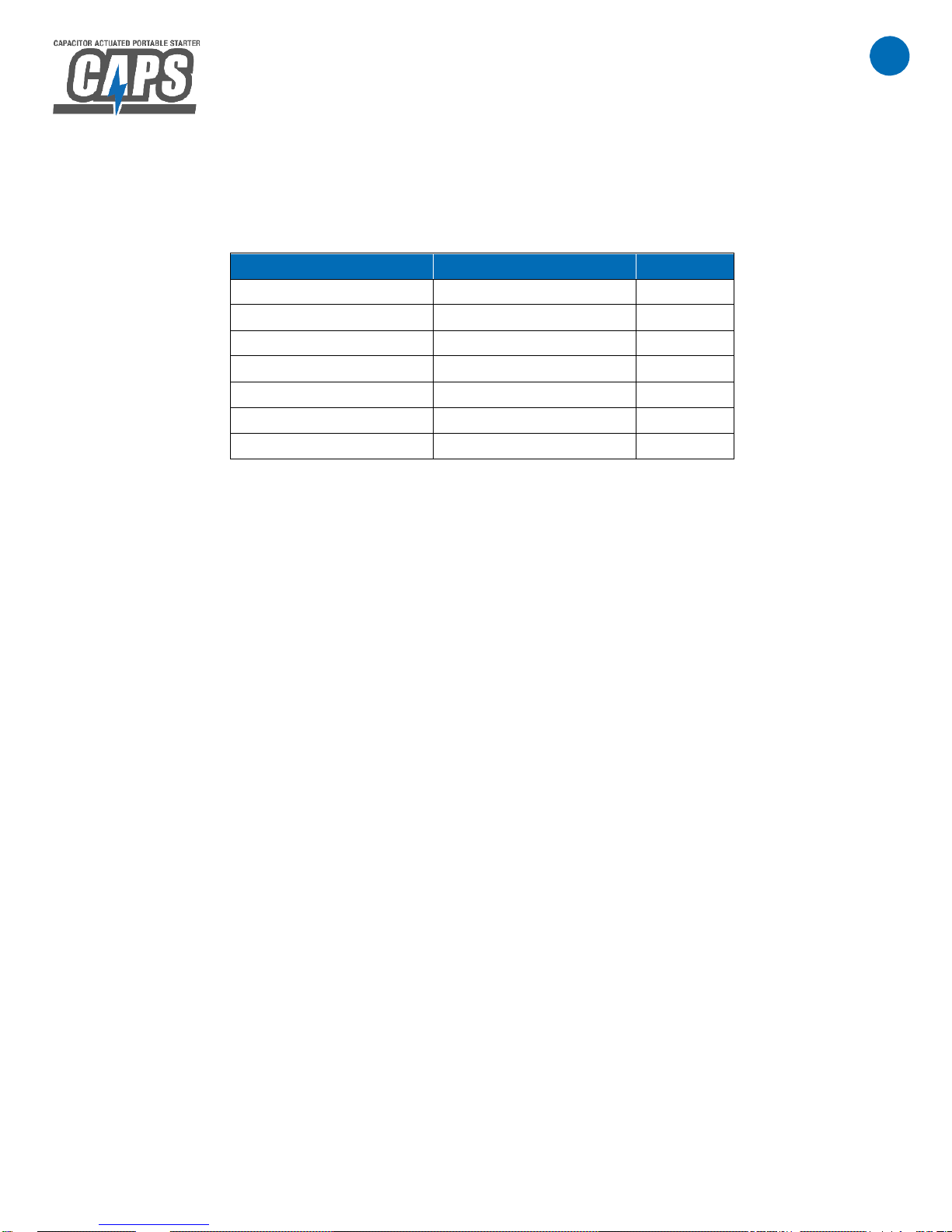
PARTS LIST
Refer to CAPS Internal Diagram on page 6 for details.
Description
Part Number
Quantity
CAPS
PJM-100
1
Cable Assembly
CA00126
1
Charger
CHRG-010
1
Internal Battery
PC925
1
5 amp ATC fuses
F00005
2
10 amp ATC fuses
F00007
2
User Guide
INST048
1
Page 13

12
P: 479.419.4800 │ F: 479.419.4801 │ www.purkeys.net
CAPS
USER GUIDE
LIMITED COMMERCIAL WARRANTY POLICY
Purkeys Fleet Electric, Inc. (hereafter “Purkeys”), warrants each product to be free of
defects in material or workmanship under normal use and service. This warranty is for
the benefit of Original Equipment Manufacturers, Dealers, Warehouse Distributors,
Fleets, or other End Users (hereafter “Customers”) and covers products manufactured
by Purkeys and sold new to Customers either directly by Purkeys or by its authorized
dealers, distributors, or agents. The length of the Warranty Period is 24 months.
The warranty period commences on the in-service or install date and is not transferable.
Failure to provide the in-service or install date on the warranty claim form will cause the
warranty period to begin on the date the part was manufactured or date of sale recorded
on the original sales invoice, whichever is earlier.
A completed warranty claim form should accompany all parts submitted to Purkeys for
consideration for repair or replacement under warranty. The submitted claim form
should contain all of the information required. Lack of a properly or fully completed claim
form will result in delay or denial of warranty claim. Claims must be submitted no later
than 30 days after part is removed.
This warranty does not apply if, in sole judgement of Purkeys, the product has been
damaged or subjected to accident, faulty repair, improper adjustment, improper
installation or wiring, neglect, misuse, or alteration or if the product failure is caused by
defects in peripheral vehicle components or components attached to the Product or
failure of a part not manufactured by Purkeys.
This warranty shall not apply if any Purkeys product is used for a purpose for which it is
not designed or is in any way altered without the specific prior written consent of
Purkeys. ANY Product alleged by a Customer to be defective must be inspected by
Purkeys as a part of the warranty claims process in order to confirm that the part has
failed as a result of a defect in material or workmanship.
Transportation for products and parts submitted to Purkeys for warranty consideration
must be prepaid by Customer. Repaired or replaced products and or components will
be returned to Customer pre-paid by Customer or “freight collect” to the address
provided by Customer in the warranty claim form. No charge will be made for labor or
material in effecting such repairs.
Page 14

13
P: 479.419.4800 │ F: 479.419.4801 │ www.purkeys.net
CAPS
USER GUIDE
The Warranty provided by Purkeys hereunder is specifically limited to repair or
replacement of the Product as Purkeys deems most appropriate in its sole discretion.
Purkeys neither assumes nor authorizes any other person to assume on its behalf any
other warranty or liabilities in connection with Purkeys products. The Warranty does not
apply to fuses or other “consumable” or maintenance items which are or may be a part
of any Purkeys product.
THIS WARRANTY DOES NOT APPLY TO LOSS OF VEHICLE OR EQUIPMENT,
LOSS OF TIME, INCONVENIENCE, OR OTHER INCIDENTAL OR CONSEQUENTIAL
DAMAGES. PURKEYS SPECIFICALLY DISCLAIMS AND SHALL NOT BE LIABLE
FOR INCIDENTAL OR CONSEQUENTIAL DAMAGES arising out of or from the use of
Purkeys products by the Customer.
THIS LIMITED WARRANTY IS IN LIEU OF ALL OTHER WARRANTIES, INCLUDING
COMMON LAW WARRANTIES OF FITNESS FOR A PARTICULAR PURPOSE,
MERCHANTABILITY, AND ANY OTHER EXPRESS OR IMPLIED WARRANTIES.
ALL OTHER SUCH WARRANTIES ARE SPECIFICALLY DISCLAIMED.
This Limited Commercial Warranty supersedes all previous Warranty Policies issued by
Purkeys and any of its suppliers.
 Loading...