

Page 1

AWARE™
INSTALLATION GUIDE
INST163 Doc 1.00
Page 2

Page 3

1
P: 479.419.4800 | F: 479.419.4801 | www.purkeys.net
CONTENTS
General Information ........................................................................2
AWARE Installation .........................................................................3
Enabling the Wireless Connection .....................................4
Pairing with the AWARE ......................................................5
Setting the Sound Settings .................................................6
Limited Commercial Warranty Policy ............................................8
Page 4

2
The AWARE™ is an audio interface management system
that integrates with the speaker system of a truck and routes
messages from a telematics alert system, a cell phone, or other
device with wireless connectivity, through the speakers.
The AWARE also allows for optional microphone connection for
hands-free use (mic sold separately).
GENERAL INFORMATION
Note: The images included in this guide are general examples
only; your specific device may vary slightly.
Page 5

3
P: 479.419.4800 | F: 479.419.4801 | www.purkeys.net
AWARE INSTALLATION GUIDE
AWARE INSTALLATION
Step 1: Turn the truck off. This device is best installed in a powered-
down environment.
Step 3: Unplug the truck wiring
harness from the radio.
Step 4: Plug the AWARE
harness into the radio.
Step 5: Plug the truck wiring
harness into the back of the
AWARE.
Step 2: Remove the radio, following your truck manufacturer’s
recommended procedure.
Page 6
4
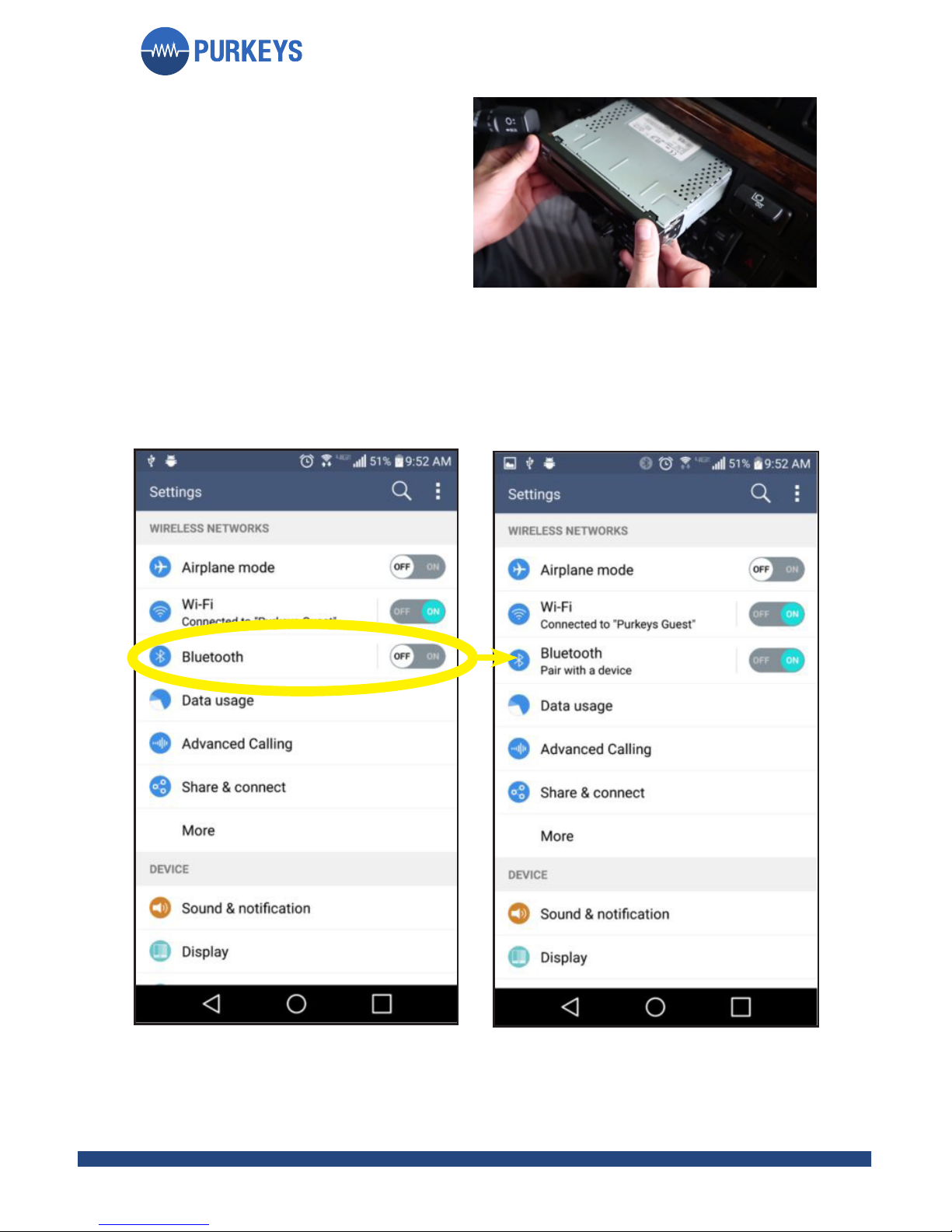
Step 1: Go to the telematic tablet settings and turn on the
Bluetooth setting.
Enabling the Wireless Connection
Step 6: Slide the radio back into
place with the AWARE behind
it.
Page 7
5
P: 479.419.4800 | F: 479.419.4801 | www.purkeys.net
AWARE INSTALLATION GUIDE
Pairing with the AWARE
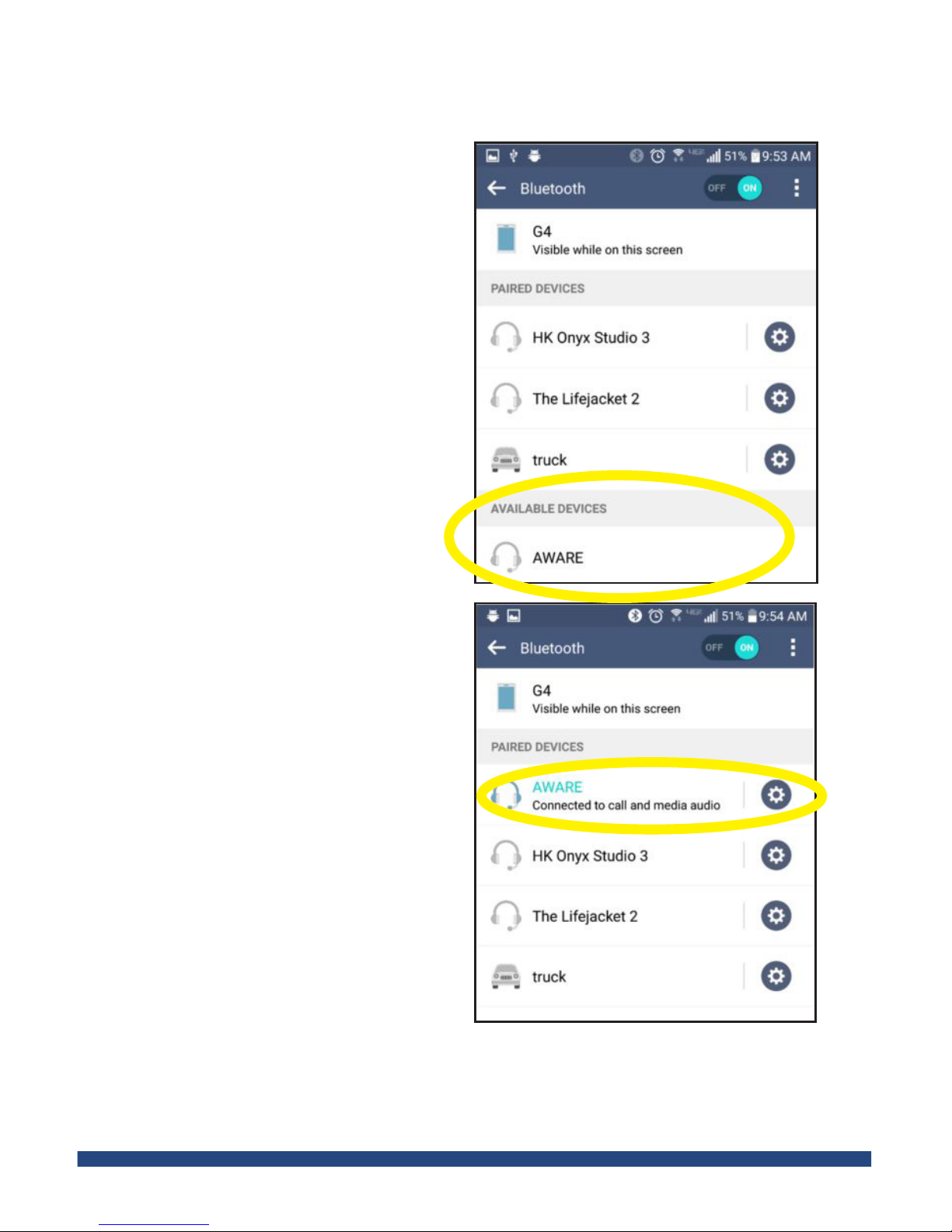
Step 1: A list of all bluetooth
paired devices will appear
when you turn on the
Bluetooth setting.
The AWARE will show up in
“Available Devices.” Touch the
AWARE icon and the device
will pair with the AWARE.
Step 2: Once connected, your
AWARE will appear in the
paired devices list and should
read “Connected to call and
media audio.”
Page 8

6
Setting the Sound Settings
Step 1: Go to settings, sound and notifications, sound effects.
Step 2: Turn off all unnecessary sounds, as they will come through
the truck speakers (though vibrate will not) and may become
irritating.
Purkeys recommends that all sound effects be turned off.
Step 3: Go to the telematic device’s Bluetooth volume settings. Set
the volume to maximum.
Page 9

7
P: 479.419.4800 | F: 479.419.4801 | www.purkeys.net
AWARE INSTALLATION GUIDE
NOTES
Page 10

8
LIMITED COMMERCIAL WARRANTY POLICY
Purkeys Fleet Electric, Inc. (hereafter “Purkeys”), warrants each product to be free of
defects in material or workmanship under normal use and service. This warranty is for
the benefit of Original Equipment Manufacturers, Dealers, Warehouse Distributors,
Fleets, or other End Users (hereafter “Customers”) and covers products manufactured
by Purkeys and sold new to Customers either directly by Purkeys or by its authorized
dealers, distributors, or agents. The length of the Warranty Period is 24 months.
The warranty period commences on the in-service or install date and is not
transferable. Failure to provide the in-service or install date on the warranty claim form
will cause the warranty period to begin on the date the part was manufactured or date
of sale recorded on the original sales invoice, whichever is earlier.
A completed warranty claim form should accompany all parts submitted to Purkeys
for consideration for repair or replacement under warranty. The submitted claim form
should contain all of the information required. Lack of a properly or fully completed
claim form will result in delay or denial of warranty claim. Claims must be submitted no
later than 30 days after part is removed.
This warranty does not apply if, in sole judgement of Purkeys, the product has been
damaged or subjected to accident, faulty repair, improper adjustment, improper
installation or wiring, neglect, misuse, or alteration or if the product failure is caused
by defects in peripheral vehicle components or components attached to the Product
or failure of a part not manufactured by Purkeys.
This warranty shall not apply if any Purkeys product is used for a purpose for which
it is not designed or is in any way altered without the specific prior written consent of
Purkeys. ANY Product alleged by a Customer to be defective must be inspected by
Purkeys as a part of the warranty claims process in order to confirm that the part has
failed as a result of a defect in material or workmanship.
Transportation for products and parts submitted to Purkeys for warranty consideration
must be prepaid by Customer. Repaired or replaced products and or components
will be returned to Customer pre-paid by Customer or “freight collect” to the address
provided by Customer in the warranty claim form. No charge will be made for labor or
material in effecting such repairs.
The Warranty provided by Purkeys hereunder is specifically limited to repair or
replacement of the Product as Purkeys deems most appropriate in its sole discretion.
Purkeys neither assumes nor authorizes any other person to assume on its behalf any
other warranty or liabilities in connection with Purkeys products. The Warranty does
not apply to fuses or other “consumable” or maintenance items which are or may be a
part of any Purkeys product.
THIS WARRANTY DOES NOT APPLY TO LOSS OF VEHICLE OR EQUIPMENT,
LOSS OF TIME, INCONVENIENCE, OR OTHER INCIDENTAL OR
CONSEQUENTIAL DAMAGES. PURKEYS SPECIFICALLY DISCLAIMS AND SHALL
NOT BE LIABLE FOR INCIDENTAL OR CONSEQUENTIAL DAMAGES arising out of
or from the use of Purkeys products by the Customer.
THIS LIMITED WARRANTY IS IN LIEU OF ALL OTHER WARRANTIES, INCLUDING
COMMON LAW WARRANTIES OF FITNESS FOR A PARTICULAR PURPOSE,
MERCHANTABILITY, AND ANY OTHER EXPRESS OR IMPLIED WARRANTIES.
ALL OTHER SUCH WARRANTIES ARE SPECIFICALLY DISCLAIMED.
This Limited Commercial Warranty supersedes all previous Warranty Policies issued
by Purkeys and any of its suppliers.
Page 11

9
P: 479.419.4800 | F: 479.419.4801 | www.purkeys.net
AWARE INSTALLATION GUIDE
Page 12

 Loading...