

Page 1
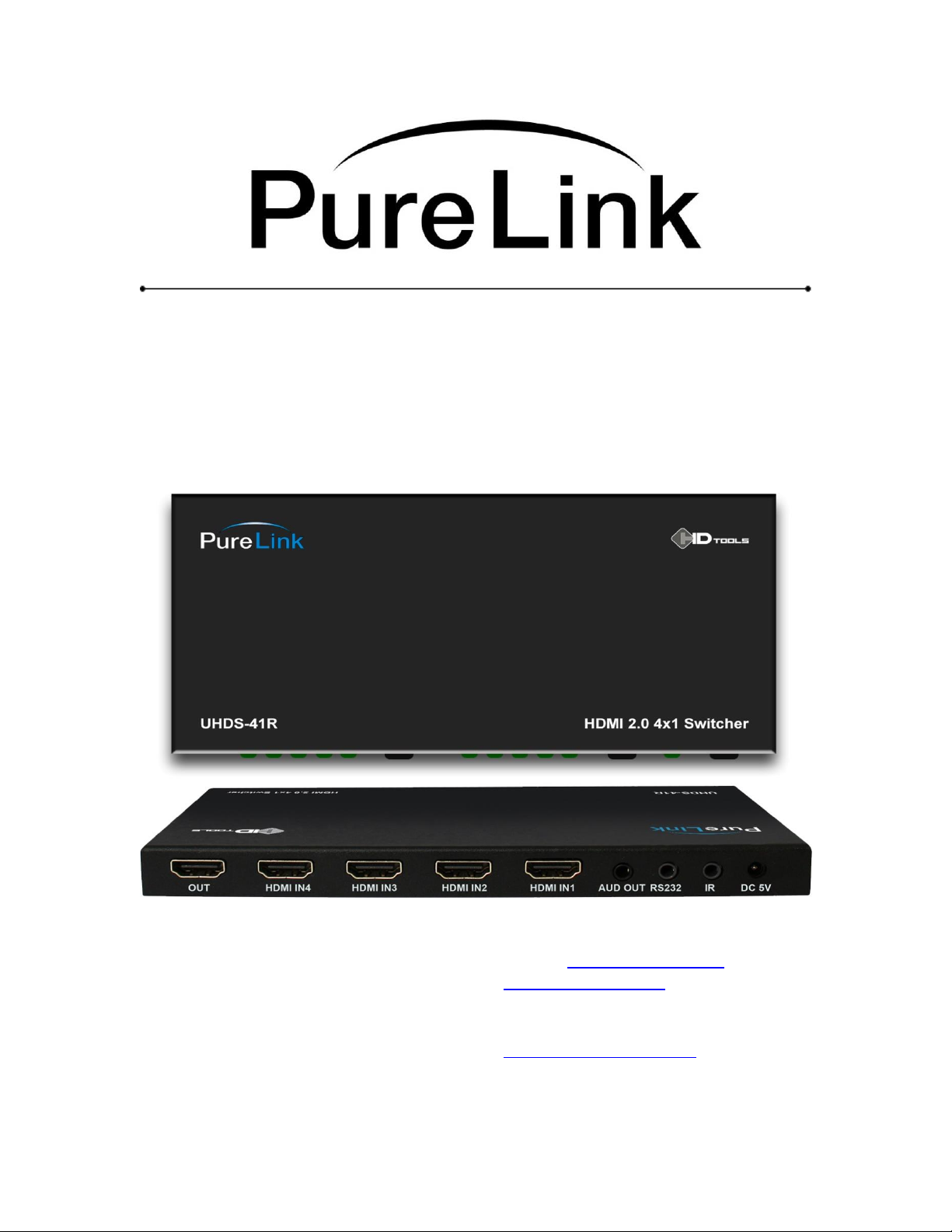
UHDS-41R Owner’s Manual
4 x 1 HDMI 2.0 Ultra HD/4K HDR Switch
PURELINK
535 E CRECENT AVE
RAMSEY, NJ, 07446
Tel: 201.488.3232
Fax: 201.621.6118
E MAIL : [email protected]
www.purelinkav.com
For technical support, contact:
Page 2

Manual version
Release date
1.1
5/05/2017
Package Contents
Please make sure all of the following items are included in the package:
1) 1 x UHDS-41R
2) 1 x 5V/1A Power Adapter
3) 1 x 38KHz IR Rx cable
4) 1 x Optical Converter Header (for SPDIF audio output)
5) 1 x IR remote
6) 1 x Owner’s manual
Page 3

PureLink by Dtrovision
Model
UHDS-41R
Input Signal
HDMI single link, 4 ports
Output Signal
HDMI single link
Bandwidth
18 Gbps
Supporting Display
Resolutions
Resolution up to Ultra HD 4K
4096 x 2160 @50/60Hz (RGB 4:4:4 YCbCr 4:4:4, 4:2:2, 4:2:0)
Connector Type
4 x HDMI inputs
1 x HDMI output
1 x IR
1 x RS232
1 x Analog audio out
1 x DC power jack
HDCP Support
HDCP 2.2
ESD Protection
Human Body Model
± 8kV (air-gap discharge)
± 4kV (contact discharge)
Conformations
HDMI version 2.0
DVI version 1.0
Power Rating
DC +5V , 1A
Power Consumption
Max 2.5W
Dimension (WxDxH)
7.1’’ x 3.3’’x 0.5”/ 180 x 85 x 11.6 (mm)
Weight
0.6 Lbs(0.3Kg)
General Specification
PureLink’s UHDS-41R HDMI switch allows up to four (4) HDMI 2.0 digital video sources
(with audio) to share one video display (with audio).
Our unique switch allows easy switching between different digital video sources (with
audio) with auto switching by input signal detection, remote control unit, with a manual
toggle button in front and/or via RS232 port.
It is perfect for home theater systems and commercial application as well. No more
hassles of manually plugging in different HDMI connectors to view different video
sources (e.g., Blu ray, Satellite receiver, Computer, TiVo, etc)
3
Page 4

PureLink by Dtrovision
Operation and Reliability Specification
1. Operating Environment
Temperature : 32F ~ 104F (0℃~ 40℃)
Humidity : 10% ~ 80%
Altitude : 3,000m Max.
2. Transit Environment
Temperature : -13F ~ 140F (-25℃~ 60℃)
Humidity : 5% ~ 95%
Altitude : 15,000m Max.
3. Storage Environment
Temperature : -4F ~ -140F (-20℃~ 60℃)
Humidity : 5% ~ 95%
Altitude : 3,000m Max.
4. Reliability
MTBF: 90% at over 50,000 hours aging test
In compliance with LCD Monitor reliability test standard
4
Page 5

PureLink by Dtrovision
Main Features
1. Ultra HD/4K resolution support up to 4K60Hz (4:4:4 pixel format)
2. HDMI 2.0 & HDCP v2.2 support
3. High Dynamic Range (HDR) 10 bits support
4. BT2020 color representation
5. Auto-switching
- Automatic input switching by signal detection
6. ARC – Audio Return Channel
- Allows ARC-enabled TVs to transmit audio back to an AV receiver
7. Easy control methods
- Manual toggle button
- IR remote
- RS232C
- Auto switching by input signal detection
8. Full 3D compatibility (up to 1080p)
9. Supports Dolby TrueHD, Dolby Digital Plus and DTS-HD Master audio, LPCM
10. Auto EDID management
11. DVI and Displayport support via HDMI ports with adapters (sold separately)
12. Compact and Robust Module Design
5
Page 6

PureLink by Dtrovision
Installation and Connection Instructions
1. Connect your video source’s HDMI output port to the HDMI switch’s HDMI
input port using standard HDMI cables (not included). Make sure all your HDMI
sources and the display is turned off before connecting the cables.
2. Connect your HDMI display’s HDMI input port to HDMI switch’s HDMI output
port. Make sure your HDMI display is turned off before connecting the cables.
3. Plug the 5V power supply into the switch’s power input port.
4. Plug the 5V wall mount power supply into the wall outlet.
5. Turn on your display.
6. Turn on your video sources.
7. Use your remote control unit to switch channels. Or use the select button on the
front panel of the switch to change channels.
6
Page 7
PureLink by Dtrovision
UHDS-41R Specification
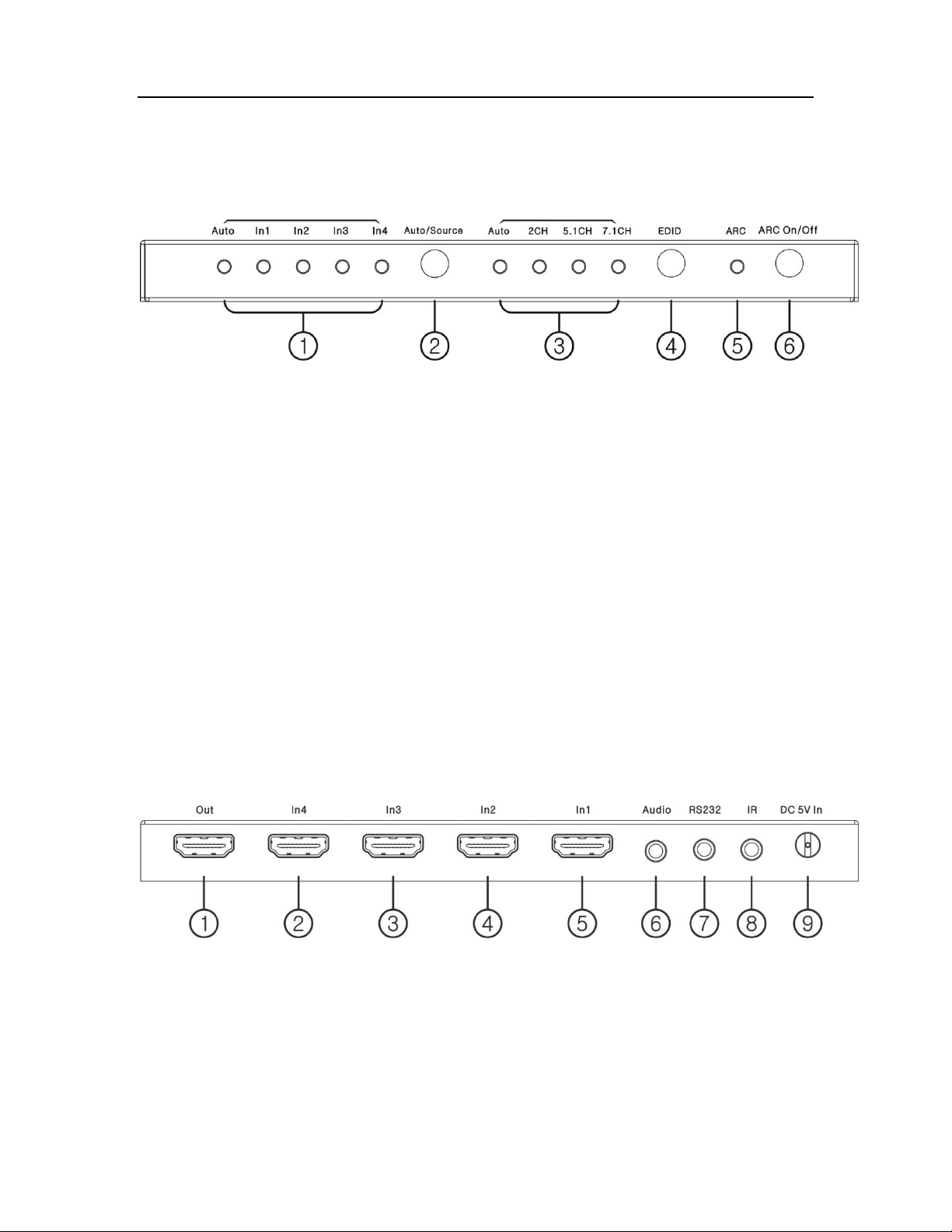
Front Panel
① Input switching status LED indicator
② Input Select button
- Press and hold for two (2) seconds to select between auto switching mode and
manual switching mode
When it’s on manual switching mode, press to switch inputs
③ EDID mode status
- Auto: communicate EDID from the display that is connected on the output
2 CH : Video EDID from the display connected the output + 2 Ch audio
5.1 CH: Video EDID from the display connected the output + 5.1 Ch audio
7.1 CH: Video EDID from the display connected the output + 7.1 Ch audio
④ EDID select button
- Press to select between EDID mode
⑤ ARC status LED
⑥ ARC function on/off button
Rear Panel
① HDMI output
②③④⑤ HDMI inputs
⑥ Audio output (De-embedding)
⑦ RS232 port
7
Page 8
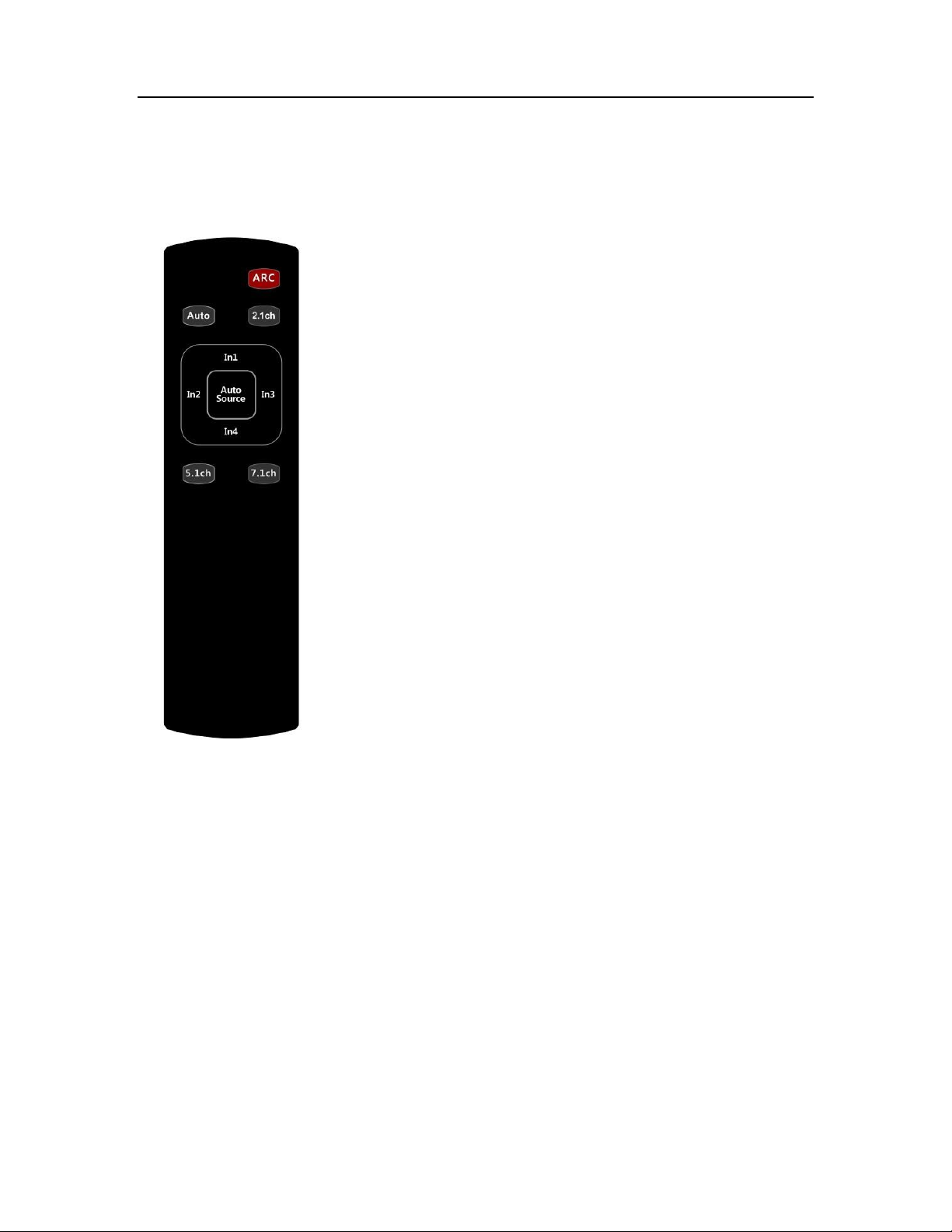
⑧ IR extension port
ARC: Press to enable/disable ARC function
Auto/2.1ch/5.1ch/7.1ch: Press these buttons to select EDID
mode
Auto Source: Press to select between auto switching mode
and manual switching mode
In1/In2/In3/In4: Press to select inputs
⑨ DC 5V input port
IR remote
PureLink by Dtrovision
RS232
Communication Setting
Baud rate: 19200
Data bits: 8
Parity : None
Stop bits : 1
Flow control : None
8
Page 9
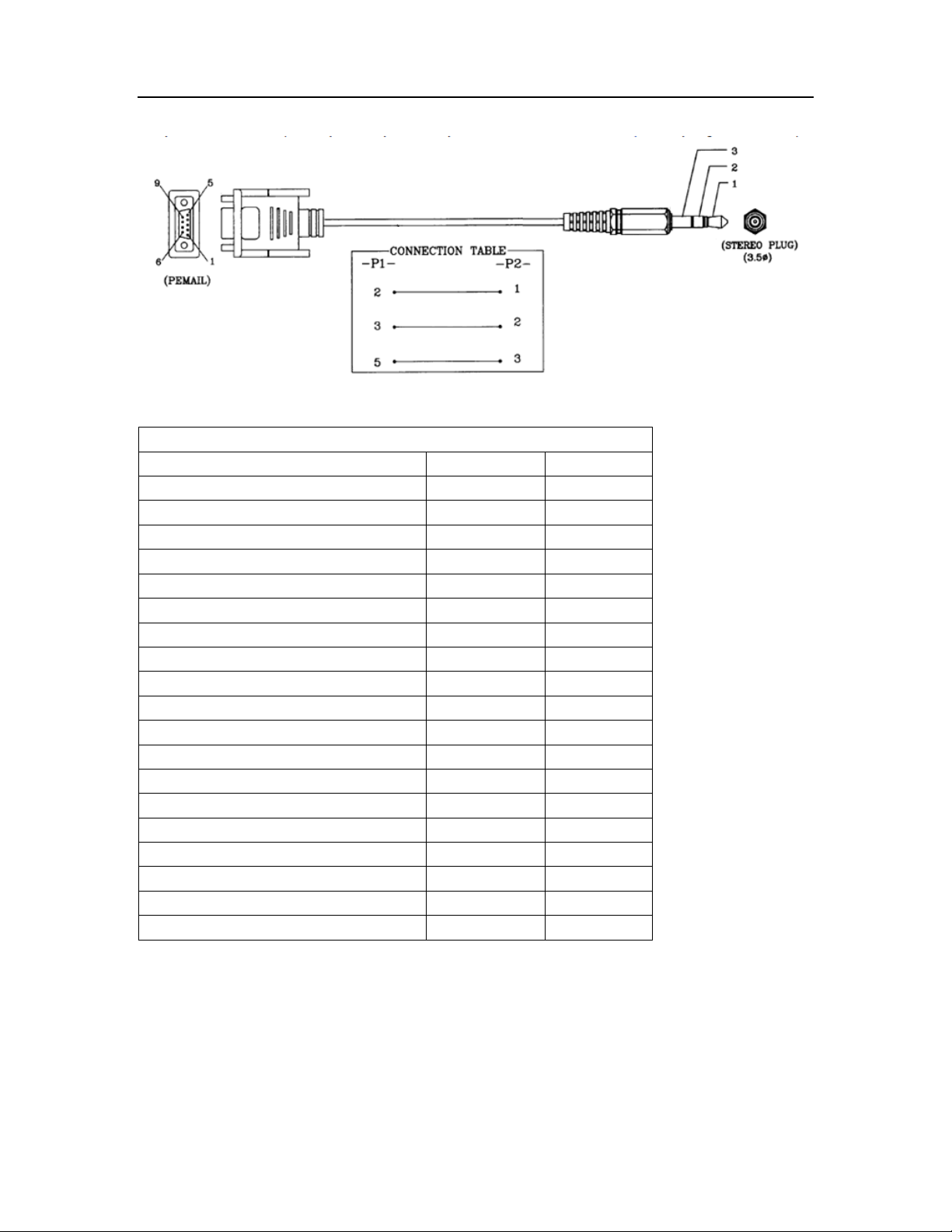
Cable pinout
Command Protocols
Command
Feedback
Input switching command
Input 1
IN1!
OK
Input 2
IN2!
OK
Input 3
IN3!
OK
Input 4
IN4!
OK Input Auto switching
On
ONAUTO!
OK
Off
OFFAUTO!
OK Audio EDID switch
Audio auto
A1!
OK
Stereo Audio 2.0
A2!
OK
Dolby/DTS 5.1
A3!
OK
HD Audio 7.1
A4!
OK ARC
On
ONARC!
OK
Off
OFFARC!
OK
Command protocols
PureLink by Dtrovision
9
Page 10

HDMI port
Pin No.
Description
Remarks
HDMI 19pin
1
TMDS DATA 2P
2 TMDS DATA 2 Shield
3 TMDS DATA 2M
4
TMDS DATA 1P
5
TMDS DATA 1 Shield
6 TMDS DATA 1M
7 TMDS DATA 0P
8 TMDS DATA 0 Shield
9 TMDS DATA 0M
10
TMDS Clock P
11
TMDS Clock Shield
12
TMDS Clock M
13
CEC
14
RESERVED
15
DDC Clock
16
DDC DATA
17
GND
18
+5v
19
Hot Plug Detect
HDMI Connector Pin Assignments
PureLink by Dtrovision
10
Page 11

PureLink by Dtrovision
Warranty
Manufacturer’s Warranty (3-Years)
PureLink warrants this UHDS-41R switch to be free from defects in workmanship and
materials, under normal use and service, for a period of three (3) year from the date of
purchase from PureLink or its authorized resellers.
If the product does not operate as warranted during the applicable warranty period, PureLink
shall, at its option and expense, execute one of the following as necessary:
1. Repair the defective product or part
2. Deliver to customer and equivalent product or part to replace the defective item
3. Refund to customer the purchase price paid for the defective product
All products that are replaced become the property of PureLink. Replacement products may
be new or reconditioned. Repaired or replacement products or parts come with a 90-day
warranty or the remainder of the warranty period. Dtrovision shall not be responsible for any
software, firmware, information, or memory data loss of contained in, stored on, or integrated
with any products returned to Dtrovision for repair under warranty.
3.1 Customer Service
Any customer service inquiries can be submitted electronically through the Q&A form on our
website ( www.purelinkav.com ).
For immediate assistance please contact us at (201) 488-3232 to reach our customer care or
tech support team.
11
 Loading...