

Page 1
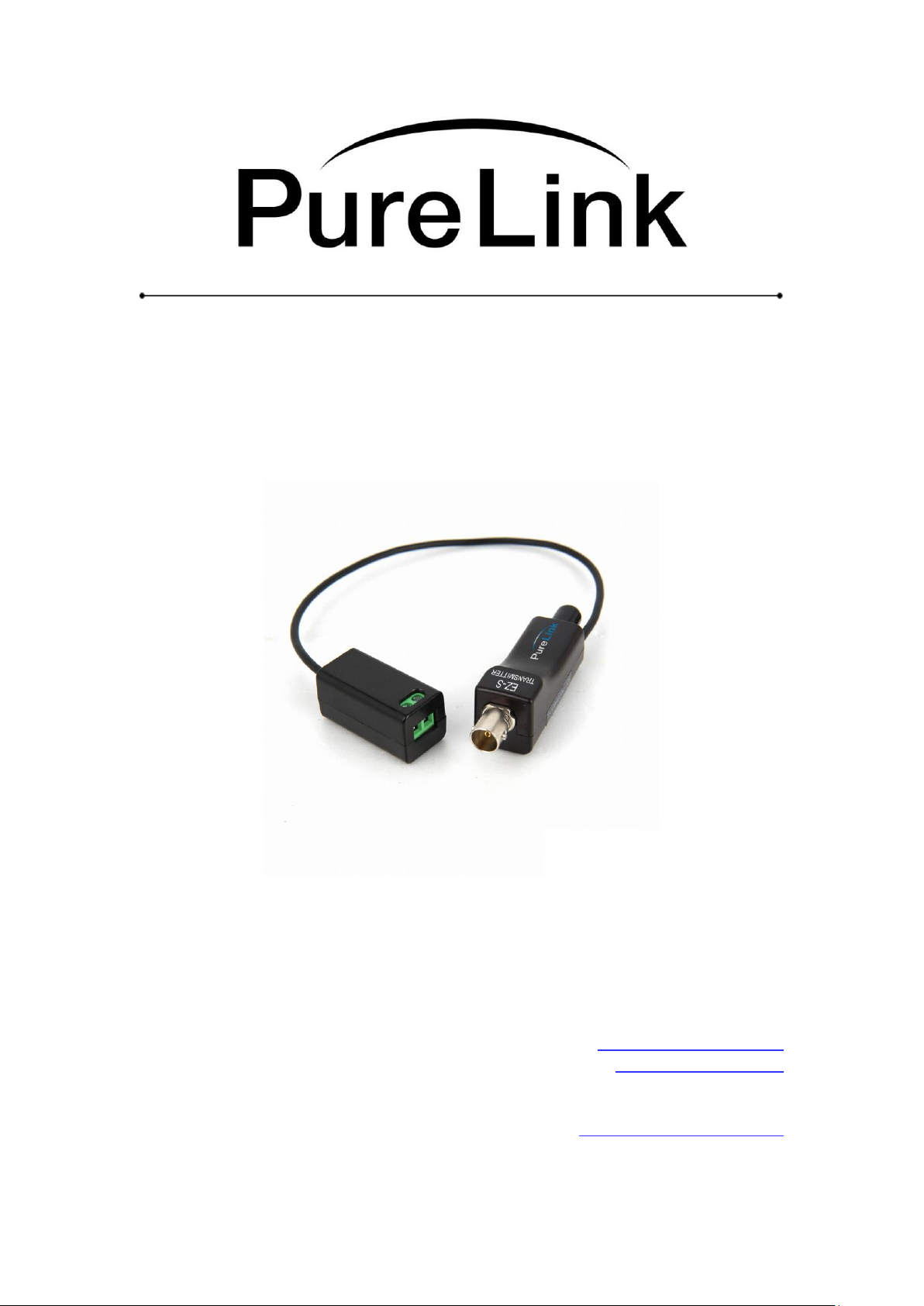
EZ-S Owner’s Manual
3G-SDI Over Fiber Extension System
PureLinkTM
535 East Crescent Avenue
Ramsey, NJ 07446
USA
Tel: +1.201.488.3232
Fax: +1.201.621.6118
E-mail: [email protected]
www.purelinkav.com
For order support, please contact your local dealer.
For technical support, please contact us at [email protected]
Page 2

PureLink by Dtrovision
TABLE OF CONTENTS
Chapter 1. Product Overview
1.1 Safety Precautions --------------------------------------------------------------- 3
1.2 Product Description --------------------------------------------------------------- 4
1.3 Product Features --------------------------------------------------------------- 4
Chapter 2. Product Specifications
2.1 Characteristics --------------------------------------------------------------- 5
2.2 EZ-S Specification --------------------------------------------------------------- 7
2.3 Functional Block Diagram ------------------------------------------------------------ 7
2.4 Outline Drawing --------------------------------------------------------------- 8
2.5 Block Diagram --------------------------------------------------------------- 9
2.6 Troubleshooting --------------------------------------------------------------- 10
2.7 Maintenance --------------------------------------------------------------- 10
Chapter 3. Additional Information
3.1 Manufacturer’s Warranty (2-Year) ------------------------------------------------- 11
3.2 Customer Service ------------------------------------------------------------------- 11
2
Page 3

PureLink by Dtrovision
Chapter 1. Product Overview
1.1 Safety Precautions
All safety instructions should be read and understood before the unit is operated.
The owner’s manual and safety instructions should be retained for future reference.
Unplug this unit from the AV devices before cleaning. Do not use liquid or aerosol cleaners. Use a
damp cloth only.
Keep away from wet, magnetic, and flammable surfaces or substances.
Do not place any heavy objects or equipment on top of the unit.
If you experience any malfunctioning of product or have any question as to operation of the
product, please contact our customer service center.
PureLinkTM
Tel: 201.488.3232
Email: [email protected]
3
Page 4

PureLink by Dtrovision
1.2 Product Description
The TOTALWIRE™ EZ-S offers 3G-SDI extender increases transmission length of 3G-SDI signaling using 1Channel optical cable. Electrical-to-optical and optical-to-electrical conversion technology enables
transmission length extending without any bulky cable and repeater. Transmission length is up to 600m for 3GSDI.
1.3 Product Features
Reliable 850nm VCSEL and GaAs PIN PD technology.
Transmission length: up to 600m us -SDI Signal
Supports video pathological pattern transmission.
Supported data rate: 3G-SDI(2.970Gbps), HD-SDI(SMPTE-292M) and SD-SDI(SMPTE-259M)
transmission is also available by option.
BNC connector for electrical in-out.
ST connector for optical in-out.
Power supply : DC 5V only (USB)
DC 12V&AC24V
DC 12V only
Common Application
Broadcast video applications
Digital Video Records (DVR)
Surveillance / CCTV cameras
Digital video displays
4
Page 5
PureLink by Dtrovision
parameters
Symbol
Min
Max
Unit
Storage temperature
T
sto
-30
+80
°
C
Supply voltage
@ DC 5V type
V
CC_DC
-0.5
6
V
@ DC 12V
&AC24V type
V
CC_DC
-43
43
V
V
CC_AC
0
30
V
Operating temperature range
Top
-20*
+70
°
C
parameters
Symbol
Min
Typ
Max
Unit
Supply voltage
@ DC 5V type
V
CC_DC
4.5 5 5.5
V
@ DC 12V
&AC24V type
V
CC_DC
10
12
40
V
V
CC_AC
20
24
28
V
parameters
Symbol
Min
Typ
Max
Unit
Input signal
SMPTE 424M/292M/259M
Supply current of USM-3GFC
@ DC12V input
IccT
62
69
76
mA
Single-ended voltage swing
VIN
700
800
1,200
mV
P-P
Single-ended input impedance
RIN 75
Ohm
Average optical output power
Po
-8
-5
-4
dBm
Optical output extinction ratio
ER 4
dB
Optical rise/fall time
t
riseT/tfallT
200
ps
Optical output wavelength
OUT
830
850
860
nm
parameters
Symbol
Min
Typ
Max
Unit
Output signal
SMPTE 424M/292M/259M
Supply current of USM-3GFC
@ DC12V
input
IccR
62
69
76
mA
Single-ended voltage swing
V
OUT
740
800
860
mV
P-P
Data output rise/fall time
t
riseR/tfallR
200
ps
Total jitter
TR
jitter
0.2
0.3
UI
Single-ended output impedance
R
OUT
75
Ohm
Receiving optical power
Pin
-12 0
dBm
Chapter 2. Product Specifications
2.1 Characteristics
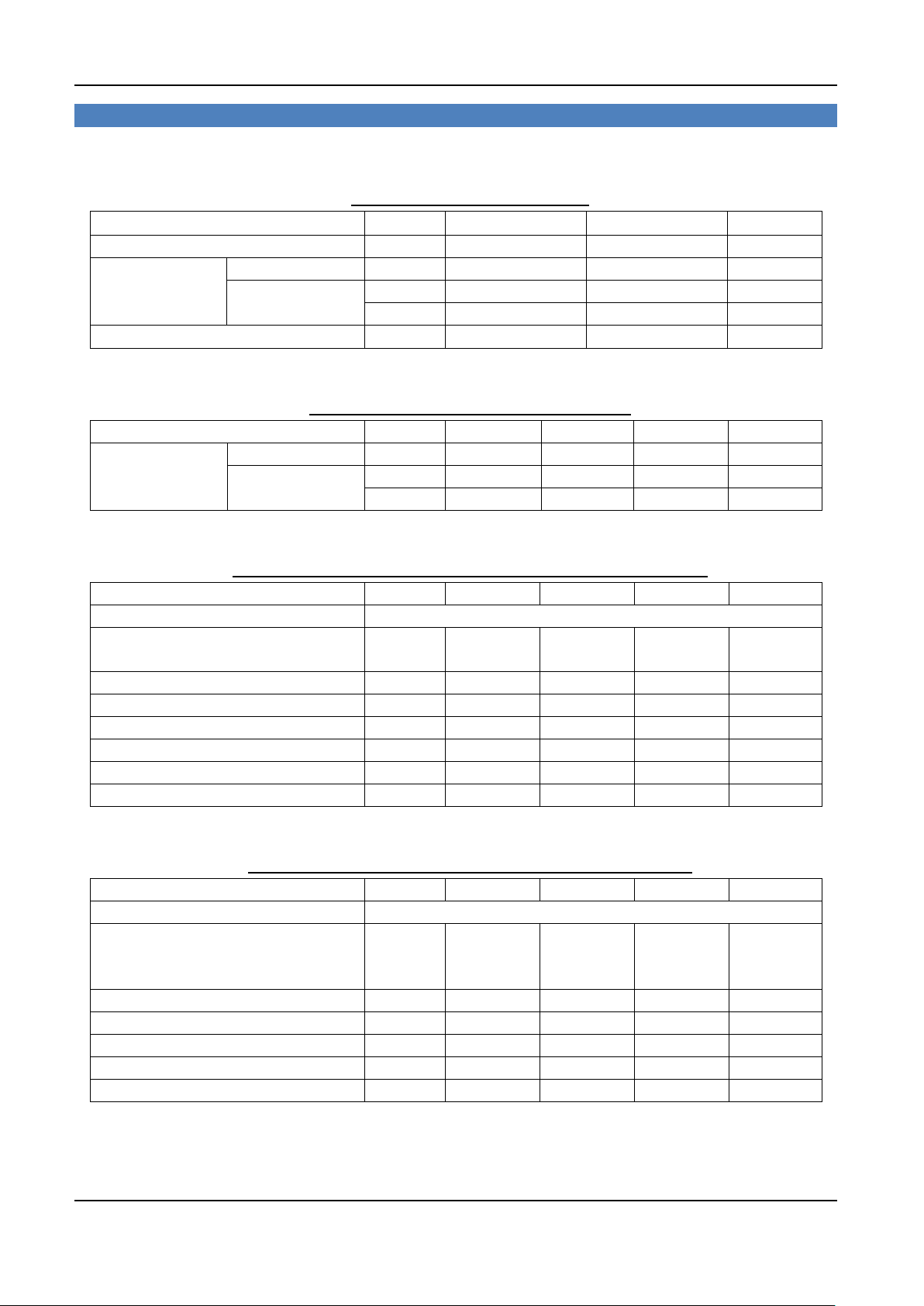
ABSOLUTE MAXIMUM RATINGS
RECOMMENDED OPERATING CONDITIONS
TRANSMITTER ELECTRICAL AND OPTICAL CHARACTERISTICS
RECEIVER ELECTRICAL AND OPTICAL CHARACTERISTICS
5
Page 6
PureLink by Dtrovision
parameters
Conditions
Specifications
Fiber type
Glass Multi-mode Fiber
50/125 m OM3
Effective modal bandwidth
nm
2000MHz·km
Fiber cable attenuation
nm
<2.5dB/km
No. of cable
ST/PC connector
Single Link
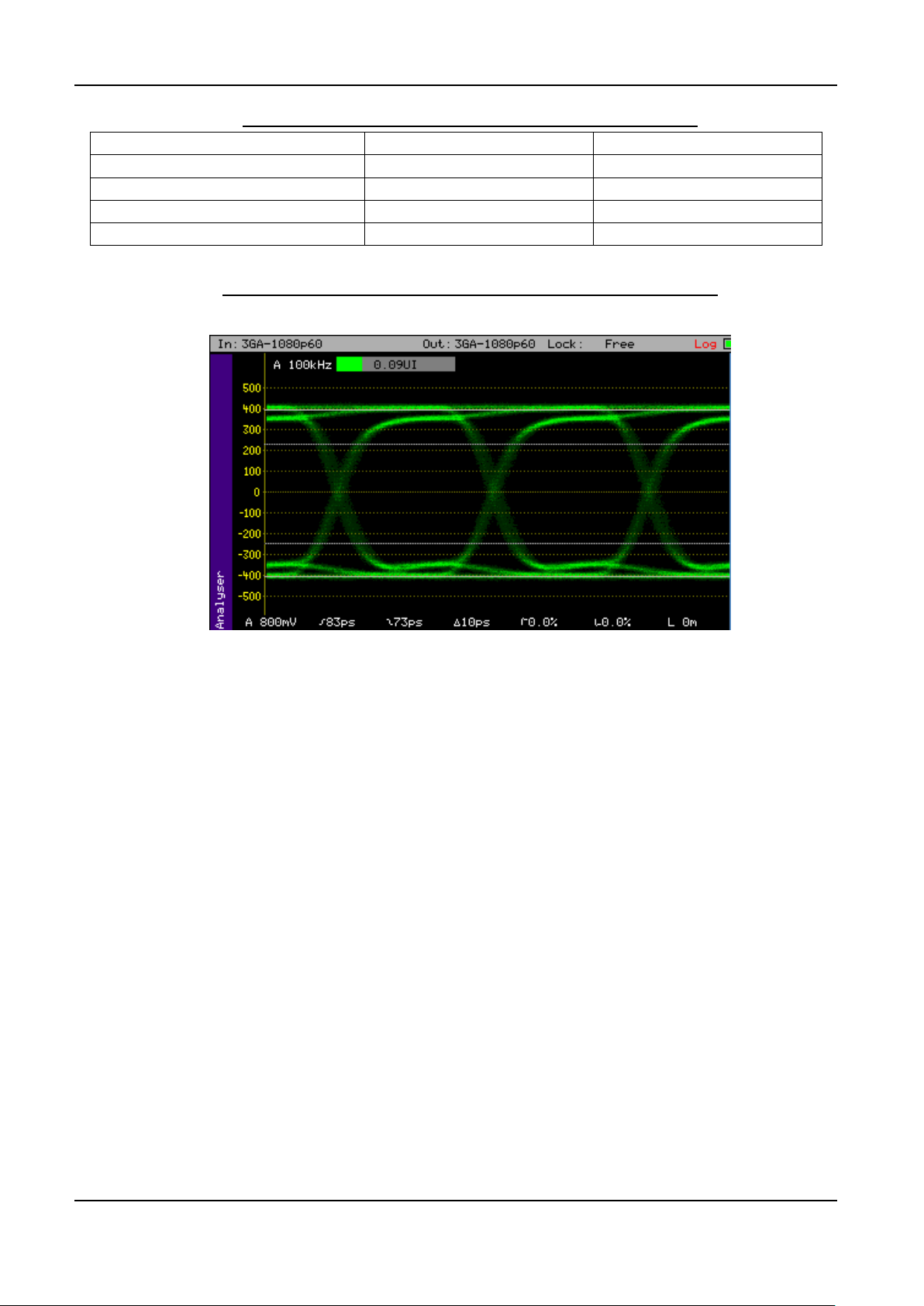
RECOMMENDED SPECIFICATIONS OF FIBER-OPTIC CABLES
TYPICAL ELECTRICAL EYE DIAGRAM OF THE RECEIVER OUTPUT
3G-SDI electrical output
Input data pattern: pathological pattern
6
Page 7
2.2 EZ-S Specification
Item
Description
Model
EZ-S
Input type
HD-SDI 1 port
Output type
HD-SDI 1 port
Video Format
SD/HD/3G-SDI
Voltage
DC5V only
DC12V only
DC12V & AC24V
Operating temperature
-20˚ ~ 70˚C
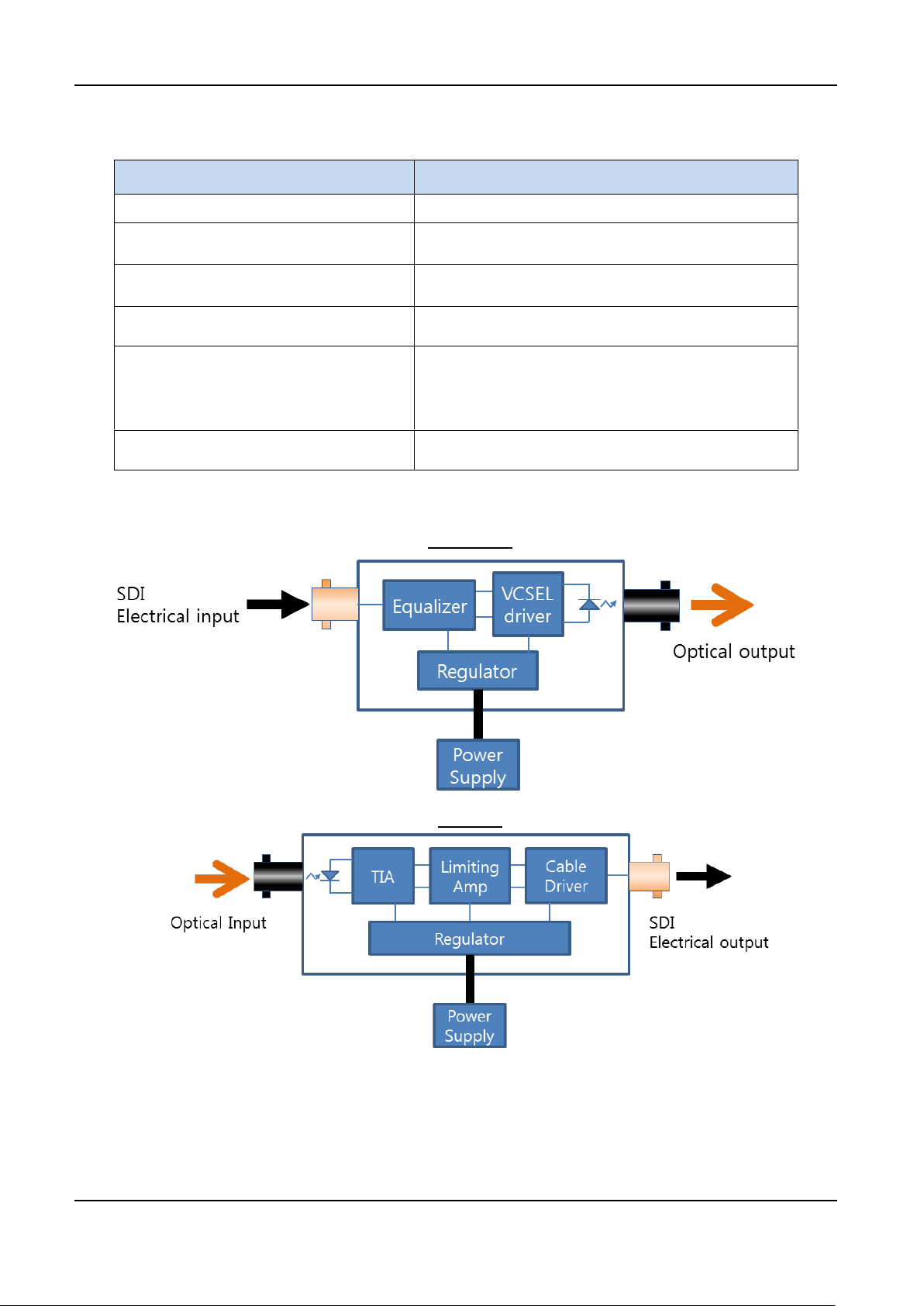
2.3 Functional Block Diagram
PureLink by Dtrovision
Transmitter
Receiver
7
Page 8
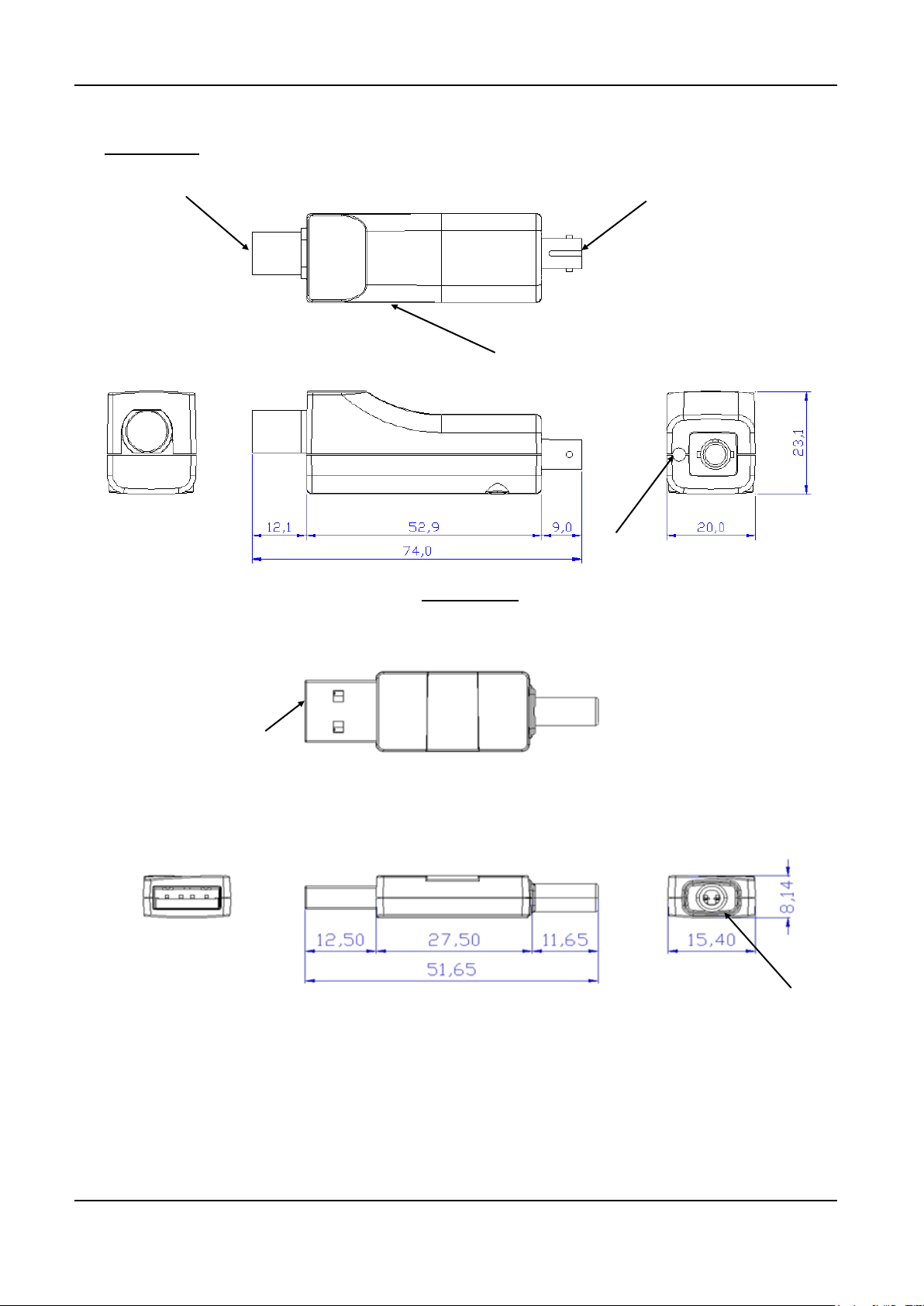
2.4 Outline Drawing
VCSEL driver failure indicator
BNC receptacle for electrical input/output
ST receptacle for optical output/input
Power cable port
USB A type plug for power input
Cable port
Main Module
PureLink by Dtrovision
5V DC Power
8
Page 9
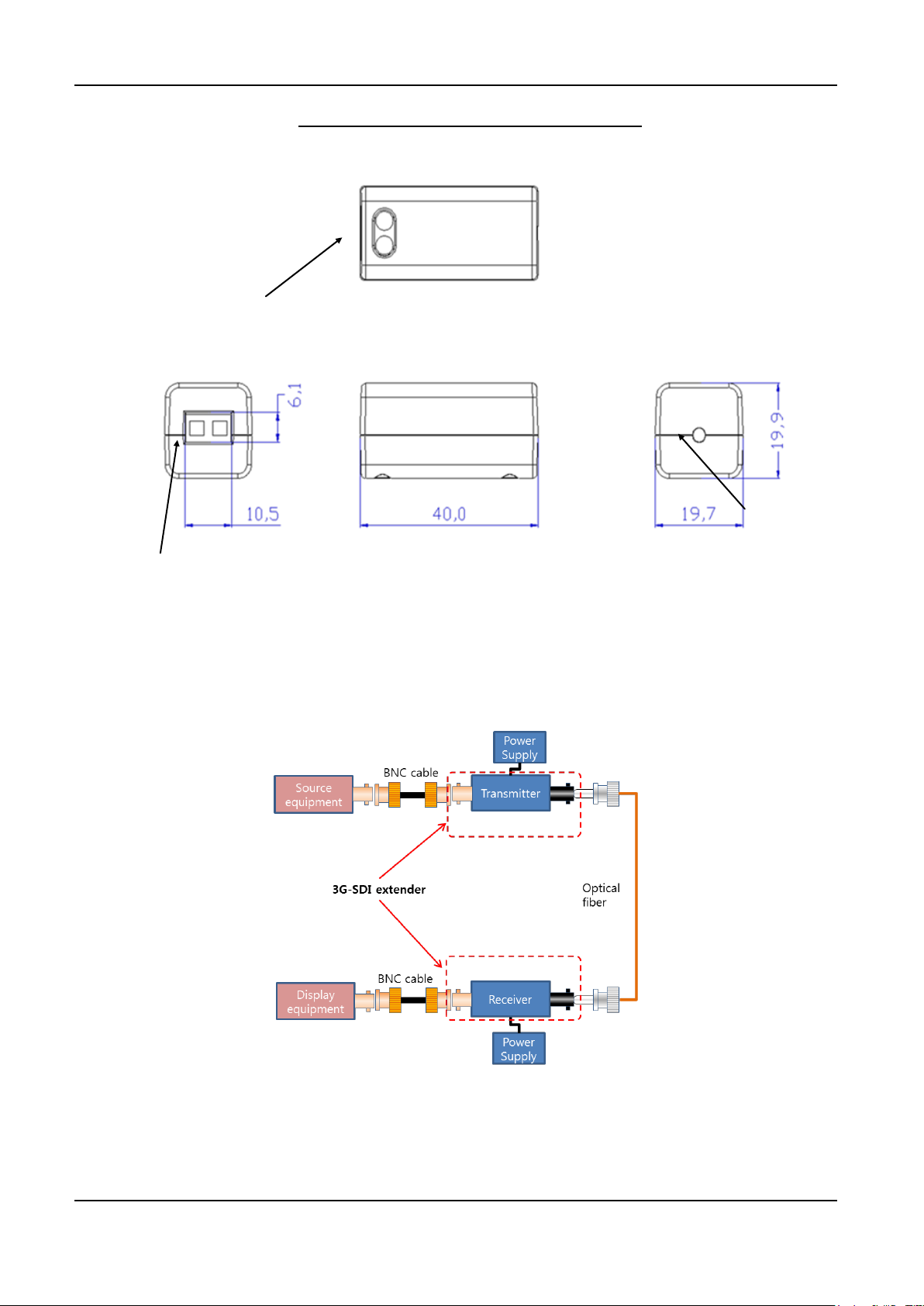
PureLink by Dtrovision
Terminal block for power input
Cable port
Terminal block screw
DC 12V & AC 24V Power or DC 12V only Power
2.5 Block Diagram
Connection example
9
Page 10

PureLink by Dtrovision
2.6 Troubleshooting
The display shows only black screen.
- Ensure that the HDMI ports are firmly plugged in to the source and display.
- Ensure that the Video source (Tx) is connected to the video source and Display (Rx) is connected to the
display.
- Check if the source and display are powered on and properly booted.
- Re-boot up the system while connecting the optical HDMI extension module.
Screen is distorted or displays noises.
- Check if the graphic resolution is properly set for the sources. For PCs, go to the display properties of
Windows and tap the settings. For other AV video source, refer to the owner’s manual to adjust video
resolution.
- Reboot the system. Disconnect the optical HDMI cables if necessary.
2.7 Maintenance
No special maintenance is required for the EZ-S 3G-SDI Over Fiber Extension System. Ensure that the
EZ-S unit is stored or used in a benign environment free from liquid or dirt contamination. There are no user
serviceable parts. Refer all service and repair issues to PureLink.
10
Page 11

PureLink by Dtrovision
Chapter 3. Additional Information
3.1 Manufacturer’s Warranty (2-Year)
PureLink warrants this EZ-S 3G-SDI Over Fiber Extension System to be free from defects in
workmanship and materials, under normal use and service, for a period of two (2) year from the date of
purchase from PureLink or its authorized resellers.
If the product does not operate as warranted during the applicable warranty period, PureLink shall, at its
option and expense, execute one of the following as necessary:
1. Repair the defective product or part
2. Deliver to customer and equivalent product or part to replace the defective item
3. Refund to customer the purchase price paid for the defective product
All products that are replaced become the property of PureLink. Replacement products may be new or
reconditioned. Repaired or replacement products or parts come with a 90-day warranty or the remainder of
the warranty period. PureLink shall not be responsible for any software, firmware, information, or memory
data loss of contained in, stored on, or integrated with any products returned to PureLink for repair under
warranty.
3.2 Customer Service
Any customer service inquiries can be submitted electronically through the Q&A form on our website
( www.purelinkav.com ).
For immediate assistance please contact us at (201) 488-3232 to reach our customer care or tech support
team.
11
 Loading...