

Page 1

PT520
Weighing Scale
User Manual
Rev. 8.10.29
Innovative Measurement Electronics
Page 2

Thank you for purchasing a PT Electronic Digital Scale. In order to use the
scale properly, please read this Manual carefully before use. If you have a
problem concerning the scale, please contact your supplier.
PT regularly updates and issues new information regarding products, the
most up-to-date information and additional detailed information is located on
the PT web site.
www.pt-global.com
Page 3

PT520 User Manual Rev 8.10.29
1. TABLE OF CONTENTS
1. TABLE OF CONTENTS ............................................................................................................... 1
2. PREPARATION ........................................................................................................................... 2
2.1.Before using the scale ....................................................................................................... 2
2.2.Preparing the scale for use ............................................................................................... 2
3. FEATURES AND SPECIFICATIONS ........................................................................................... 3
3.1.Features ............................................................................................................................ 3
3.2.Specifications .................................................................................................................... 3
3.3.Product Package ............................................................................................................... 3
3.4.Selectable Weight Unit ...................................................................................................... 3
3.5.Error Messages ................................................................................................................. 3
4. DISPLAY AND KEYBOARD FUNCTIONS .................................................................................. 4
4.1.Basic Operation ................................................................................................................. 4
4.1.1.Switching the scale on / Re-zeroing ................................................................... 4
4.1.2.Selecting the desired unit ................................................................................... 4
4.1.3.Using TARE to deduct the weight of the container ............................................. 5
4.1.4.Net / Gross displayed weight switching ............................................................... 5
4.1.5. Simple counting Function .................................................................................. 5
5. ADVANCED FUNCTIONS ........................................................................................................... 6
5.1.Calibration ......................................................................................................................... 6
Page 1
Page 4

PT520 User Manual Rev 8.10.29
2. Preparation
2.1. Before using the scale
1. Please keep the scale in a cool and dry place. Do not store at high temperatures.
2. Do not allow any liquids to come into or contact with the scale. If this has happened, wipe
the scale dry with a cloth.
3. Avoid objects impacting with the scale. Do not drop loads onto the scale or subject the
weigh pan to any strong shock loads. Do not leave loads on the scale for extended periods.
4. The load placed on the platform must not exceed the maximum weighing capacity of the
scale. The LCD display will blank if the scale is overloaded.
5. If the scale is not going to be used for some time, please clean it and store it in a plastic
bag in dry conditions. A desiccant sachet may be included to prevent moisture build up.
2.2. Preparing the scale for use
1. Unpack the scale carefully and place it on a firm surface. Turn the scale over and remove
the single transit locking screw located underneath if it is present.
2. For accurate weight readings locate the scale on a firm level surface free from vibrations
and adjusted to be level with the adjusting feet. The installer can use a builders level or
similar on top of the platform. The bubble should be inside the black marks.
3. Install the indicator (display) in a convenient position by laying it flat or unhinging the stand
recessed into the back of the display for desk mounting. It is possible to disconnect the AC
adapter and operate the scale on the internal battery so that the PT520 becomes truly
portable.
4. Avoid operating the scale in direct sunlight or drafts of any kind.
5. Remove any weight that might be on the platform before the scale is switched on and avoid
leaving weight on the platform for long periods of time.
6. Once the scale has been switched on, it will go through a LCD display test and then rezero to be ready for use.
7. For best accuracy switch the scale on for 1~2 minutes before use.
8. Please note that if the battery is flat the indicator will power off and the battery needs to be
changed or the mains adapter used.
9. All goods weighed should be placed in the centre of the platform for accurate weighing.
The overall dimensions of the goods being weighed should not exceed the size of the
weigh pan.
10. The acceleration due to gravity varies around the world. The force on the scale is a product
of the gravity value and the mass placed on the scale to weigh. As the gravity value can
vary with different world locations so can the weight displayed for the same mass. The
Scales have been calibrated for a gravity value (acceleration due to gravity) of g=9.799 m/
s2. Discrepancies in readings at the location of installation could be due to a different
gravity value and adjustment of the scale calibration or gravity value may be needed.
Page 2
Page 5
PT520 User Manual Rev 8.10.29
3. FEATURES AND SPECIFICATIONS
3.1. Features
●
Multi-function operation: Fast weighing operation; 50% tare range; Net / Gross
weight display; Auto power-off.
●
Dual-weighing units: kilogram (kg) pound (lb). Simple Counting.
●
User-friendly design: Simple calibration; Large LCD display (57mm x 20mm).
●
Dual-power source: The power source can either be from AC / DC or 9V internal
battery.
●
Remote indicator with desk stand and 1m of connecting cable.
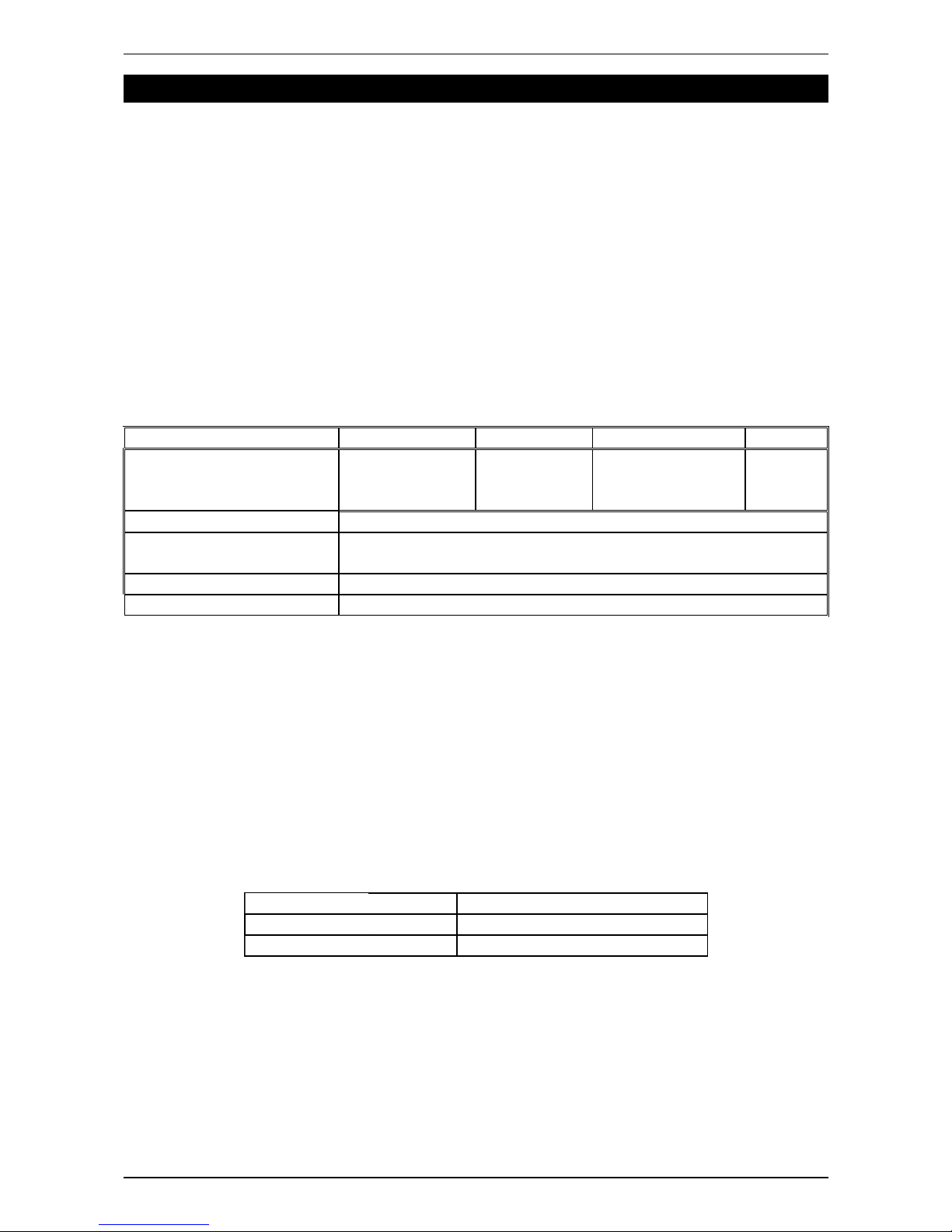
3.2. Specifications
Model Capacity Division Resolution Min. Cap.
PT520-50 50kg (110 lb) 10g (0.02 lb) 1/5000 (1/5500 lb) 200g
PT520-100 100kg (220 lb) 20g (0.05 lb) 1/5000 (1/4400 lb) 400g
PT520-150 150kg (330 lb) 50g (0.10 lb) 1/3000 (1/3300 lb) 1000g
Operating Temperature 0°C ~ 40°C (32°F ~ 104°F)
Power Source DC 9V battery (PP3) or AC adaptor (9V 500mA, 2.5x5mm
centre negative polarity)
Indicator 140mm H x 92mm W x 25mm Thick, 5 digit LCD
Weigh pan Size 300 x 300 mm x 80mm H
3.3. Product Package
●
Scale 1 off
●
User manual 1 off
●
AC adapter 1 off
●
9V alkaline battery 1 off
●
Please contact to your supplier, if any of the items described above are missing.
3.4. Selectable Weight Unit
Kilogram (kg) 1 kg = 1000 g
Pound (lb) 1 lb = 453.59237 g
PCS 10, 20, 50, 100
3.5. Error Messages
There are no error messages. The scale will blank the display if it goes over range.
Remove the load for the display to show the weight again.
The scale will also blank the display if the TARE/ZERO key is pressed while the reading is
unstable. Remove the load or wait for the load to become stable for the display to show
the weight again.
Page 3
Page 6
PT520 User Manual Rev 8.10.29
4. DISPLAY and KEYBOARD FUNCTIONS
: The key to switch the scale off.
: ON/UNIT key. When the scale is off, press the key to switch it on. When the scale
is switched on, press this key to change the units from kg >lb, lb >PCS, PCS > kg
: TARE/ZERO key. Press the key to deduct the weight of the container. The tare key
is not functional when the weight value shown on the display is negative or over the
full scale capacity. The scale is in gross mode when it is first turned on and the tare
key is functional. Once the tare key has been pressed the TARE annunciator will be
displayed.
:NET/GROSS weight key. The gross weight = Tare weight + Net weight
(The key is ONLY functional if a tare weight has been stored with the tare key and it
will change between Net and Gross weight display with each press.)
4.1. Basic Operation
4.1.1.Switching the scale on / Re-zeroing
1. When the scale is off, press the key to turn the scale on.
2. When the scale is on and without any object placed on the weigh pan, press the
key to obtain a zero reading. The ”▼” indication points to the word ZERO
in the right hand side of the display. If the weight is equal or above one division the
indicator will tare and the ”▼” indication points to the words ZERO and NET
otherwise the display will show the ”▼” indication pointing to the word ZERO. To
zero out one division or more turn the scale off and back on again.
4.1.2.Selecting the desired unit
1. Press the
key while the scale is on to select kilogram (kg) or pound (lb)
units, the ” ▼” indication will point to the selected unit in the left hand side of the
display.
2. If counting function is required please see section 4.1.5.
3. After power off, the active units will reset to kg. When the scale is powered on
again, select lb if required.
Page 4
OFF
ON
UNIT
TARE
ZERO
NET
GROSS
ON
UNIT
TARE
ZERO
ON
UNIT
Page 7
PT520 User Manual Rev 8.10.29
4.1.3.Using TARE to deduct the weight of the container
1. Place the container on the weigh pan. After the reading stabilizes, press
key to deduct the weight value of the container. The ”▼” indication points to the
words ZERO and NET.
2. Place the object/liquid to weigh in the container, the scale will show the net weight
value of the object.
3. Remove the container and weighing object, and the display shows the negative
weight value of the container. Press the key to clear the weight value of
the container, and the first ”▼” indication points to the words ZERO.
4. Tare continuously (Press key, when weight is added or deducted on the
weigh pan so the next amount added or removed can be weighed).
5. Tare value = 50% capacity (The scale can be continuously up to 50% of capacity)
4.1.4.Net / Gross displayed weight switching
1. In the tare mode, the display shows the ”▼” indication pointing to the words NET
and ZERO. Press key to show the gross weight value, and the ”▼”
indication pointing to the words NET and ZERO goes off. You may need to hold the
key until the display changes.
2. Press key again, the display shows the net weight value and the ”▼”
indication pointing to the words NET and ZERO shows again.
3. The key is ONLY functional in the tare mode (when a tare action has been
performed).
4.1.5. Simple counting Function
For best results the suggested unit weight of the item to be counted should be heavier
than the division of the scale. The larger the sample quantity the better the accuracy.
1. With the scale on and in the weighing mode, place the sample quantity to be
counted on the scale.
2. Press key until the display shows -PCS- then it will display 0 (Zero)
3. Press and hold the key until display shows S = 10 and then press
again to select quantity sample to be weighed. Options are 10, 20, 50, &100 .
4. Press key and wait until the display shows the sample quantity chosen.
5. The scale is now ready to count.
6. Press to return to weighing mode.
Page 5
TARE
ZERO
TARE
ZERO
TARE
ZERO
NET
GROSS
NET
GROSS
NET
GROSS
NET
GROSS
NET
GROSS
NET
GROSS
ON
UNIT
ON
UNIT
ON
UNIT
Page 8
PT520 User Manual Rev 8.10.29
5. ADVANCED FUNCTIONS
5.1. Calibration
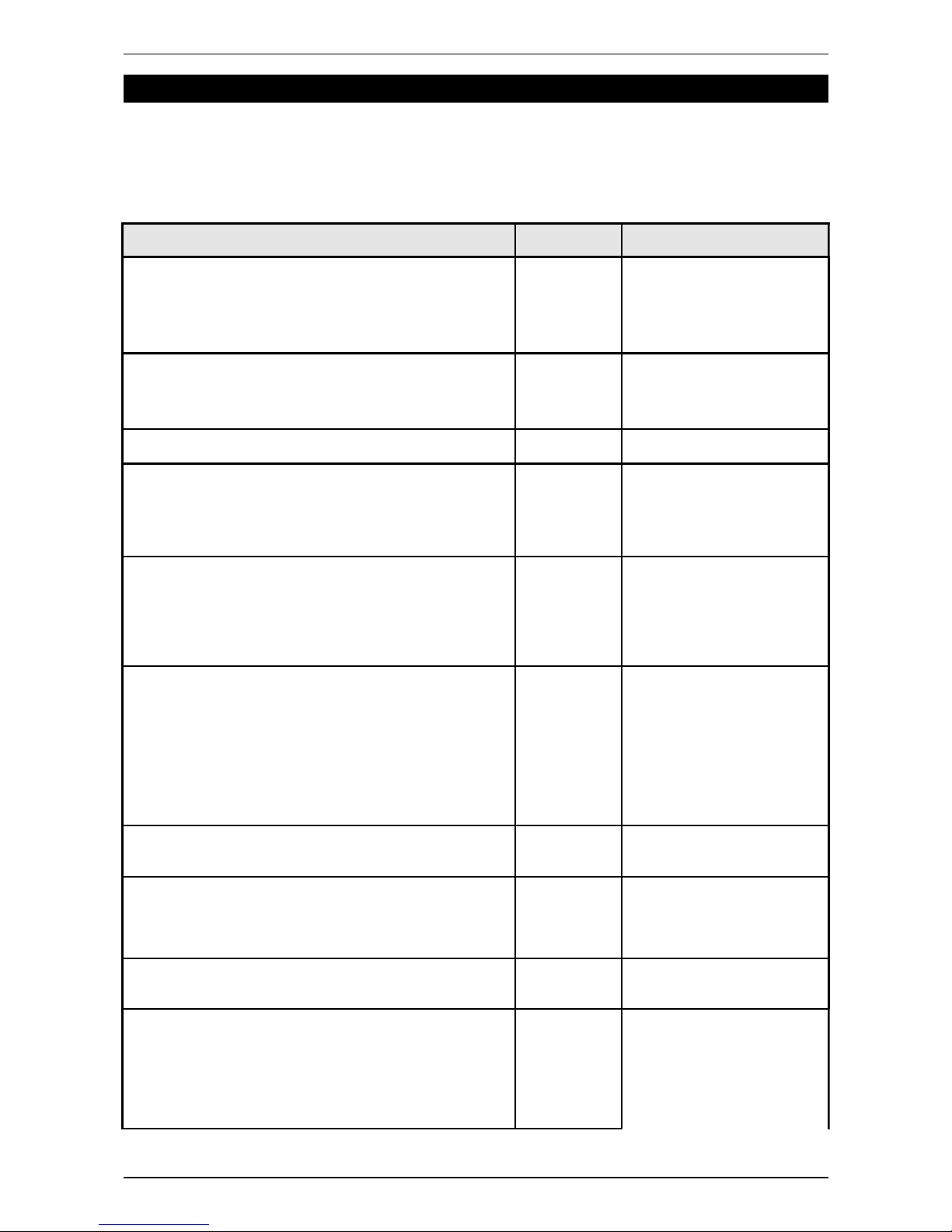
The PT520 is calibrated when it leaves PT but due to gravity varying in between localities
it may be necessary to re-calibrate the scale for your location. Please follow the procedure
below to achieve this.
Instructions Display Description
1. Press the [NET/GROSS] key and switch the scale
on at the same time. Do not release your finger
from the [NET/GROSS] key until the LCD shows
the firmware version of the scale.
6.3
6.36.3
6.3
Version of the firmware
2. Press the [TARE/ZERO] key and do not release
your finger from the [TARE/ZERO] key until the
LCD shows
SEtUP
SEtUPSEtUP
SEtUP
SEtUP
SEtUPSEtUP
SEtUP
3. Press the [ON/UNIT] key once to select
0000
.
0000
4. Press the [ON/UNIT] key and do not release your
finger from the [ON/UNIT] key until the LCD flashes
CAL - 1
CAL - 1CAL - 1
CAL - 1
and then shows
000.00
000.00000.00
000.00
CAL - 1
CAL - 1CAL - 1
CAL - 1
↓
000.00
000.00000.00
000.00
5. Press the [TARE/ZERO] key to shift the flashing
digit to the position required.
00
0000
000000.0
.0.0
.0
0000
↓
0000
0000
0.00
0.000.00
0.00
6. Press the [ON/UNIT] key to set the value of the
digit for the standard weight that will be used to
calibrate the scale. This should ideally be 75-90%
of the scale capacity.
0000
0000
0.00
0.000.00
0.00
↓
0000
3333
0.00
0.000.00
0.00
If you use a 30kg standard
weight to calibrate:
●
Press the
[TARE/ZERO] key to
select 0000
0000
0.00
0.000.00
0.00
●
Press the [ON/UNIT]
key to set the value
to 0000
3333
0.00
0.000.00
0.00
7. Press the [NET/GROSS] key to confirm. The LCD
will show an internal zero OFFSET value.
XXXXX
8. Please wait until the internal OFFSET value is
stable, and then press the [NET/GROSS] key once.
The LCD will show
00000
0000000000
00000
.
00000
0000000000
00000
9. Put the standard weight (set in step 6) on the
platter. The LCD will show an internal SPAN value.
XXXXX
10. Please wait till SPAN value is stable, and then
press the [NET/GROSS] key once. The LCD will
flash
Good
oodood
ood
twice, and then the scale will re-boot
automatically.
Good
GoodGood
Good
↓
re-boot
automatically
!!
Note:
Please take the standard
weight off the scale after
the LCD flashes
“Good
GoodGood
Good”
twice
Page 6
 Loading...