

Page 1
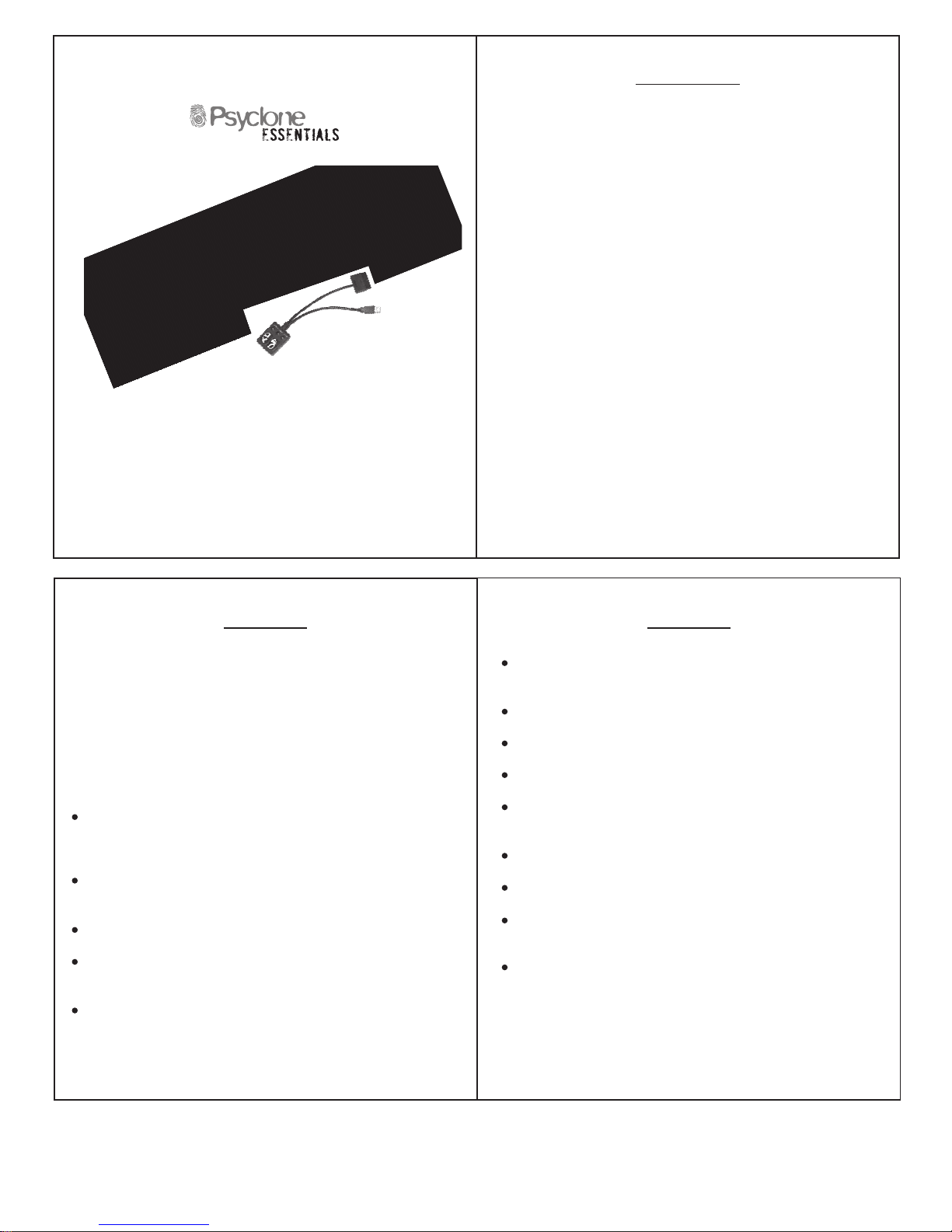
For PS2TM and PS3
TM
3
When not in use, make sure the Wireless Guitar is removed from
playing area and properly stored.
Excessive use of the whammy bar can cause it to break.
Never get the Wireless Guitar wet.
Never stand on the Wireless Guitar.
Use a dry cloth to clean the Wireless Guitar. Never use chemicals to
clean the product.
Do not mix old and new batteries.
Always make sure the batteries are inserted correctly.(+ / -)
Remove batteries from guitar when it is stored or not used for long
periods of time.
Remove the Whammy Bar Safety Tab before Playing.
2
Precautions Precautions
Some medical studies have suggested that long periods of repetitive
motion, coupled with poor habits may be linked to certain types of
physical discomfort or injuries. It is important to take frequent breaks
during game play, and if you feel aching, numbness, or tingling in your
arms, wrists, or hands, consult a qualified health professional.
If you have heart, respiratory, or other physical impairments that limit your
physical activity, do not use the Wireless Guitar. If you have any doubts,
consult with a physician before using the Wireless Guitar.
The Wireless Guitar must be used with care to avoid injury. Psyclone
will not be liable for injuries resulting from improper use of the Wireless
Guitar.
The Wireless Guitar is for indoor use only and should be kept away from
open flames or other heat sources.
Do not leave the Wireless Guitar in a dusty or humid place.
Small children should be monitored at all times when using the Wireless
Guitar.
Do not modify or disassemble the Wireless Guitar under any
circumstances.
1
Table of Contents
---------------------------------------------------------------------------------
2
Precautions
Features
Directions
------------------------------------------------------------------------------
4
-------------------------------------------------------------------
5
Warranty
-------------------------------------------------------------------
12
Kingmaker 4-in-1 Wireless Guitar
TM
www.psyclonegamer.com
PSE3302
Page 2
Features
4
6
7
Designed for use with Guitar HeroTM and Rock BandTM games for PS3
TM
and PS2TM.
Working whammy bar adds an extra touch of realism.
Five fret buttons and a responsive strum bar.
Looks and feels like a real guitar for the ultimate rock 'n 'roll experience.
Uses 2 AA batteries (not included).
Works up to 50 feet away.
Auto and manual scan modes.
5
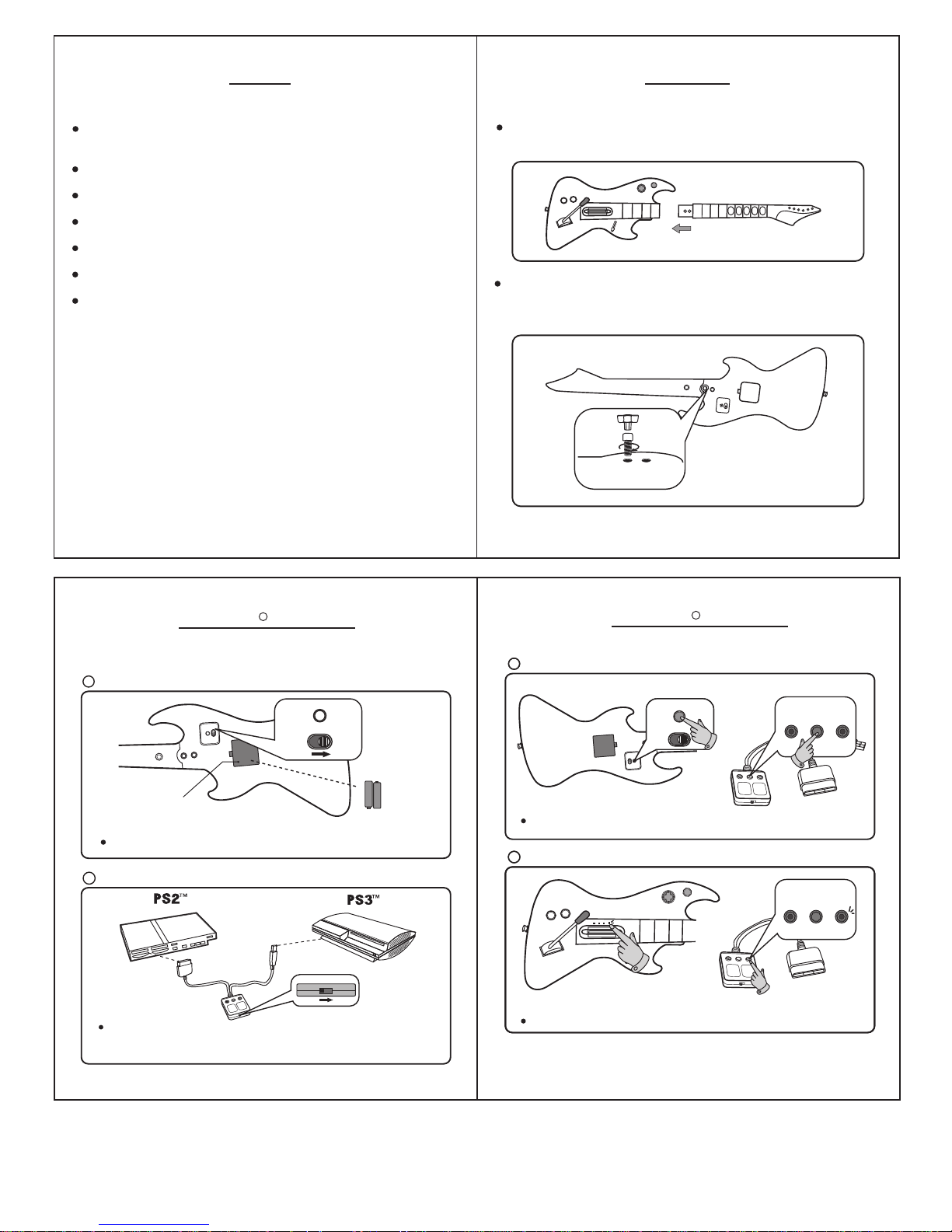
Guitar neck slides into guitar body as seen below. Make sure nothing
is caught between the neck and body while assembling.
CONN
E
C
T
OFF
ON
Use supplied wrench to tighten the screws into the guitar body. To
remove, simply remove the screws, and pull the neck and body apart
from each other.
Place the 2 AA batteries, and change the power switch to ON.
USB
DONGLE
1
On the receiver, move the switch to GH. For the PS2, insert the PS2
plug into your system. For the PS3 insert the USB plug into the system.
Note: Do not connect both systems at the same time.
Power the guitar On
2
CONNECT
OFF
ON
Guitar Back
Battery Door
(2 X AA Batteries
Not Included)
CONNECT
ONOFF
POWER
Instructions
ST
AR
T
SEL
ECT
2XScrews / Wrench
Game/System selection
3
4
To connect the guitar and receiver, press the Connect Button on both at
the same time.
CONNECT
OFF
ON
CONNECT
ONOFF
POWER
ST
AR
T
SELECT
For Guitar Hero Games
3
4
Connection
CONNECT
ONOFF
POWER
When connected the lights on both the guitar and receiver will be on.
Connection Status
NOTE: If blinking and not connected - please redo the previous steps.
GHRB
CONNECT
POWER
LED
LINK
LED
CONNECT
POWER
LED
LINK
LED
Guitar Hero Instructions
R
Guitar Hero Instructions
R
Page 3
8
10
11
9
ST
AR
T
SELECT
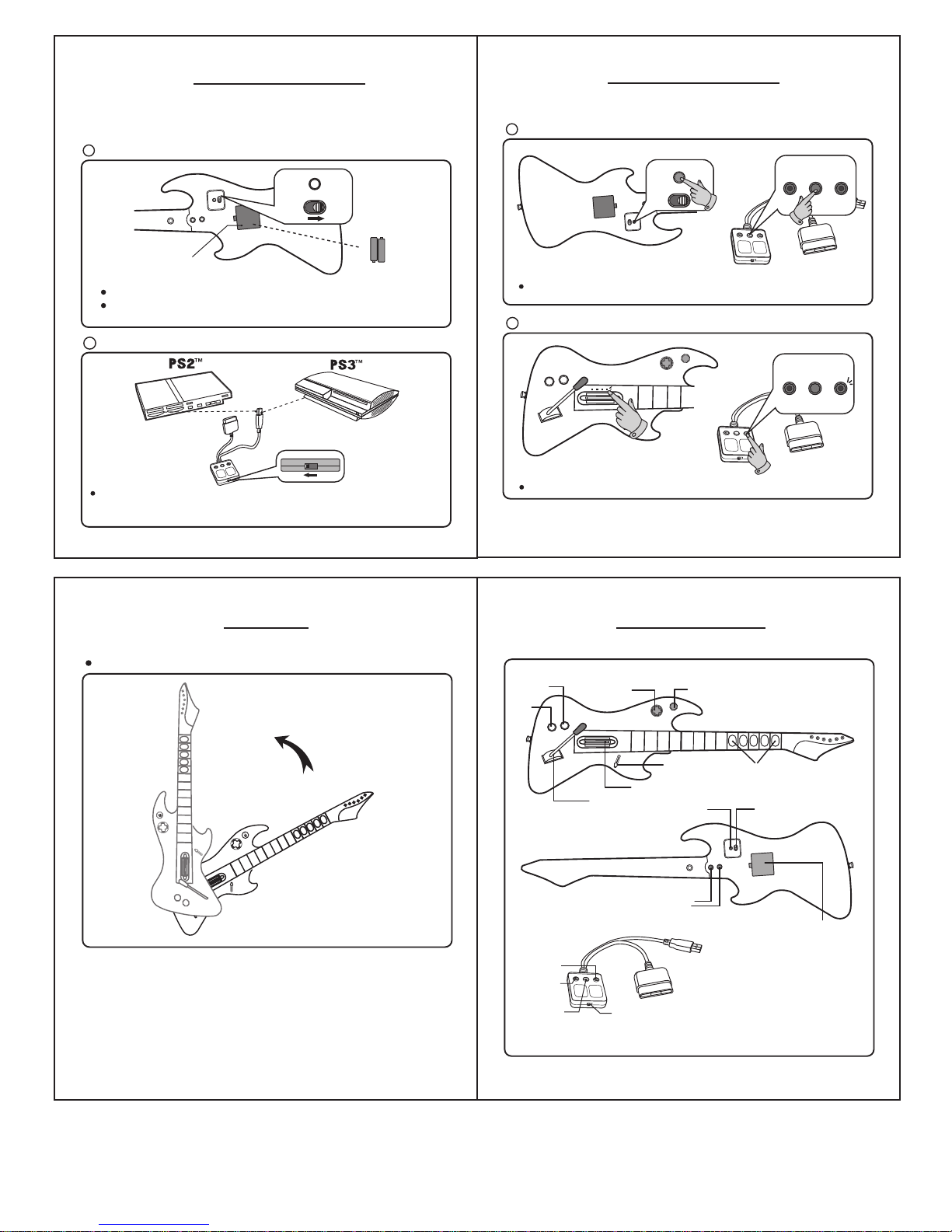
Fret Buttons
PS Button
Strum Bar
Effects
Switch
Start
Whammy Bar
Connect
Button
Receiver
Power LED
GH/RB
Switch
Link LED
Guitar Front
On/Off
Switch
Connect
Button
Guitar Back
Detachable Neck
Screw System
Battery Door
(2 X AA Batteries
Not Included)
CO
NNECT
OFF
ON
D-Pad
Select
Power the guitar On
Game/System selection
For Rock Band Games
USB
DONGLE
Note: Do not connect both systems at the same time.
2
GHRB
If switching between GH & RB, you must power off both the systems
and the guitars.
1
Place the 2 AA batteries, and change the power switch to ON.
CONNECT
OFF
ON
Guitar Back
Battery Door
CONNECT
ONOFF
POWER
(2 X AA Batteries
Not Included)
Connection
When connected the lights on both the guitar and receiver will be on
Connection Status
NOTE: If blinking and not connected - please redo the previous steps.
3
4
To connect the guitar and receiver, press the Connect Button on both at
the same time.
CONNECT
OFF
ON
CONNECT
ONOFF
POWER
ST
AR
T
SELECT
On the receiver, move the switch to RB. For both PS2 and PS3, insert the
USB plug into the system.
CONNECT
POWER
LED
LINK
LED
CONNECT
POWER
LED
LINK
LED
S
T
A
RT
SE
LEC
T
Activate Star Power
S
T
A
RT
SELEC
T
Button Configuration
Rock BandTM Instructions
Instructions
Rock BandTM Instructions
Page 4

12
Warranty
TM
Some states do not allow limitations on how long an implied warranty lasts or exclusion
or limitation of incidental/consequential damages, so the above limitation may not apply
to you. This warranty gives you specific legal rights, and you may also have other legal
rights which vary from state to state.
Psyclone warrants to the original purchaser of this product that it will be free from
defects in materials and/or workmanship for a period of 5 years from the date of
purchase. If a defect covered by this warranty is discovered within the 5 years, please
have your original sales receipt handy and contact our customer service representatives.
Repair or replacement as provided under this warranty is Psyclone's exclusive preroga
-tive. Any applicable implied warranties, including warranties of merchantability and
fitness for a particular purpose, are hereby limited to 5 years from the date of purchase
and are subject to the conditions set forth in this limited warranty. In no event shall
Psyclone or its affiliates be liable for consequential or incidental damages resulting
from the breach of any express or implied warranties.
This warranty is limited to the internal works of this product and the external housing.
It will not apply if your Psyclone product has been damaged by abuse, misuse,
negligence, accident, modification, tampering, or by any other causes unrelated to
defective materials and / or workmanship. Compensation or restoration of data loss
and software are not covered. Psyclone is not liable for loss of revenue or loss of use
of equipment.
1-800-315-0795
C/O Psyclone Gamer
PO Box 300555
Minneapolis, MN
55403
Customer Service information:
This device complies with Part 15 of the FCC Rules. Operation is subject to the following
two conditions: (1) this device may not cause harmful interference, and (2)this device
must accept any interference received ,including interference that may cause undesired
operation.
Warning: Changes or modifications to this unit not expressly approved by the party
responsible for compliance could void the user's authority to operate the equipment.
Note: This equipment has been tested and found to comply with the limits for a Class B
digital device, pursuant to part 15 of the FCC Rules. These limits are designed to provide
reasonable protection against harmful interference in a residential installation. This
equipment generates, uses and can radiate radio frequency energy and, if not installed
and used in accordance with the instructions, may cause harmful interference to radio
communications. However, there is no guarantee that interference will not occur in a
particular installation. If this equipment does cause harmful interference to radio or
television reception, which can be determined by turning the equipment off and on, the
user is encouraged to try to correct the interference by one or more of the following
measures:
-Reorient or relocate the receiving antenna.
-Increase the separation between the equipment and receiver.
-Connect the equipment into an outlet on a circuit different from that to which the receiver
is connected.
-Consult the dealer or an experienced radio/TV technician for help.
FCC Information
 Loading...