

Page 1

Intelligent Battery Charger
MT5000 USER MANUAL
Page 2
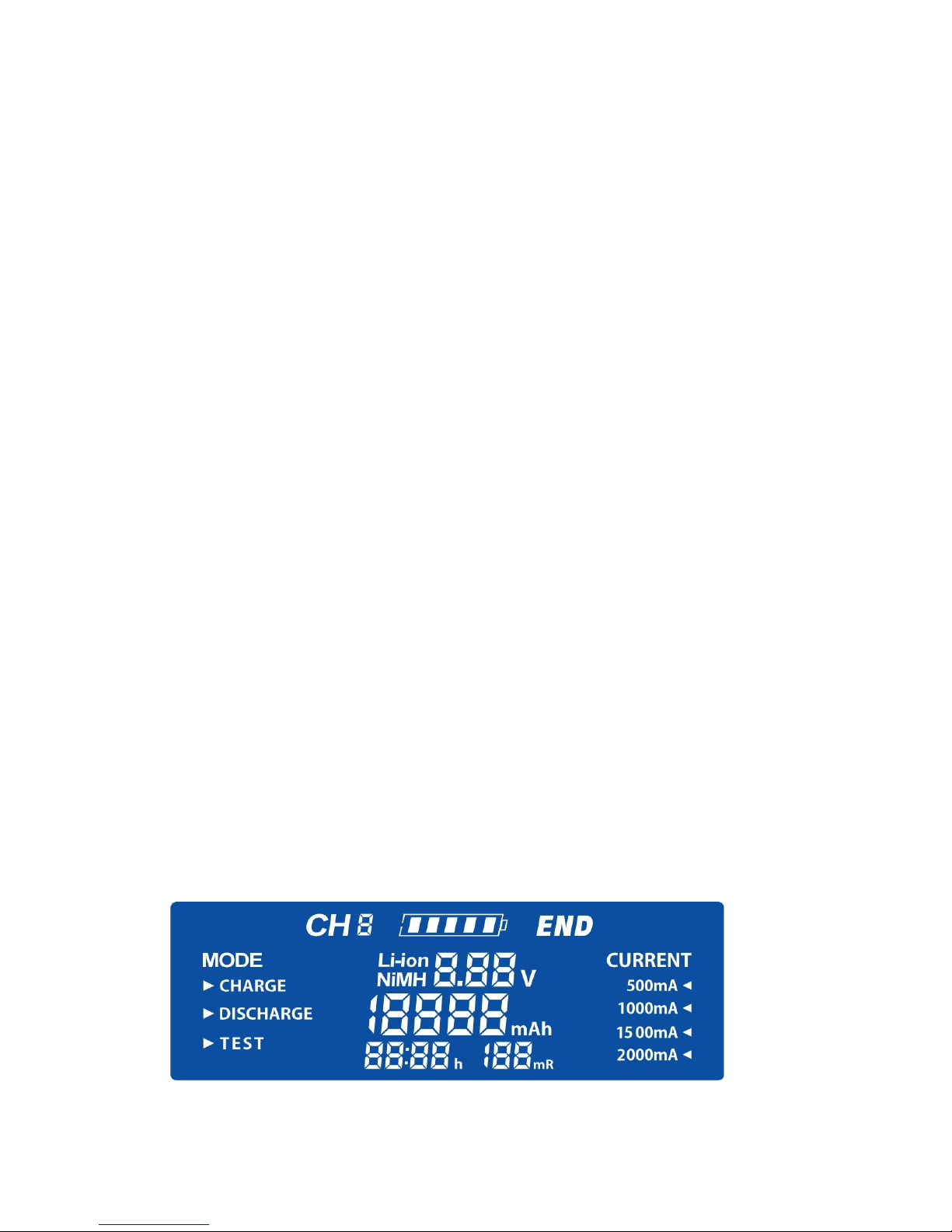
1 Requirements and Functions:
1) With DC input 12V/3A ,Every slot can be charged independently and
Controlled by microcomputer
2) Four charging currents: 500mA/ 1000mA/ 1500mA/ 2000mA.
3) Intelligent function include: capacity test function; discharge function, inner resistance test
function, intelligent charge function; Power bank function.
4) Battery Types :Ni-MH /Ni-Cd 1.2V、Li-ion-3.7V(Li-ion: 18650, 18490,18350, 17670, 17500,
16340, 14500, 10440, Ni-MH/Ni-Cd: AA/AAA/C/SC/D size batteries.
5) With: over-charge, over-discharge,short-circuit protection, bad battery detection and
reverse charging protection.
6) Automatically Identifies USB output 5V/1000 mA~2100mA as Power Bank function.( must
disconnect the power and put Li-ion battery on the charger when this function working)
7) Unique LCD display to show current(mA)/ capacity(mAh)/ voltage(V)/ time(h)/ inner
resistance (mR) at one time.
8) independent Control and independent operation for when charge/discharge/test.
9) smart detection for different type battery. The C, SC and D size battery only can be
charged in channel i# and channel 4#.
10.Input and output:( the max charge current is 1000mA when charging four batteries at the
same time; the max charge current is 1500mA when charging three batteries at the same time;
the max charge current is 2000mA when charging one or two batteries at the same time;
11.PWM control technology, -△V,0△V detection technology, safe and reliable charging performance;
2. Description of button, LCD display and function
2.1 Description: of button:
It have three buttons (MODE,DISPLAY, CURRENT),easy to use;
● Button(MODE):it is used to operate the “Charge、Discharge、Test” three working mode;
● Button(CURRENT):it is used to select the charge current;
● Query& channel button (DISPLAY):it is used to shift the charge channel, mode function,
charge current and kinds of data and working condition.
Page 3

2.2 Description of working operation:
● Charge Mode:
When charger connected to the power supply, all characters will be showed on the LCD screen for 3
seconds. 3 seconds later, the charger will detect the battery condition, if there is no battery in charger or
bad battery is put in charger, it will shows” Null “. Detect there is rechargeable battery in the charger, the
corresponding mode and current cursor will blink, press the “CURRENT” key to select charging current.
After 8 seconds, the selected charging current is working into the charging status, if we do not choose
charge current ,after 8 seconds, the charger will charging battery by 500 mA current charging as default
current ;The battery symbol will be to "monkey" monkey way from left to right, after the ending of FULL
charge, charge capacity parameters will be showed on the LCD display.
Attention: advise to choose 500mA or 1000mA to charge battery if there is no need
quick charge, it is the safest and better for battery when charging.
● Discharge Mode:
When charger connected to the power supply, all characters will be showed on the LCD screen for
2 seconds. 2 seconds later, the charger will detect the battery condition , if there is no battery in
charger or bad battery is put in charger, it will shows” Null “. Detect there is rechargeable battery in
the charger, the corresponding mode and current cursor will blink, press the “Mode” key to select
“Discharge” mode (500 mA current charging as default current). After 8 seconds, the selected
discharge function will be fixed and working, ;The battery symbol will be to "monkey" monkey
way from left to right, after the ending of discharge function, “END” and charge capacity
parameters will be showed on the LCD display.
● TEST Mode:
When charger connected to the power supply, all characters will be showed on the LCD screen for 3
seconds. 3 seconds later, the charger will detect the battery condition , if there is no battery in charger or
bad battery is put in charger, it will shows” Null “. Detect there is rechargeable battery in the charger, the
corresponding mode and current cursor will blink, press the “Mode” key to select “Test” mode (500 mA
current charging as default current). After 8 seconds, the selected function will be fixed and working; The
test model have three work process : charge--discharge-- re-charge ,details as below:
—Press “MODE” button to select “TSET” Mode;
—Press “CURRENT” button to select current from 500mA /1000mA/
1500mA /2000mA to charge battery. IC system will fix the function and
parameters. If there is no any operation within 8 seconds, the IC system will fix the 500mA to
charge battery automatically.
Page 4
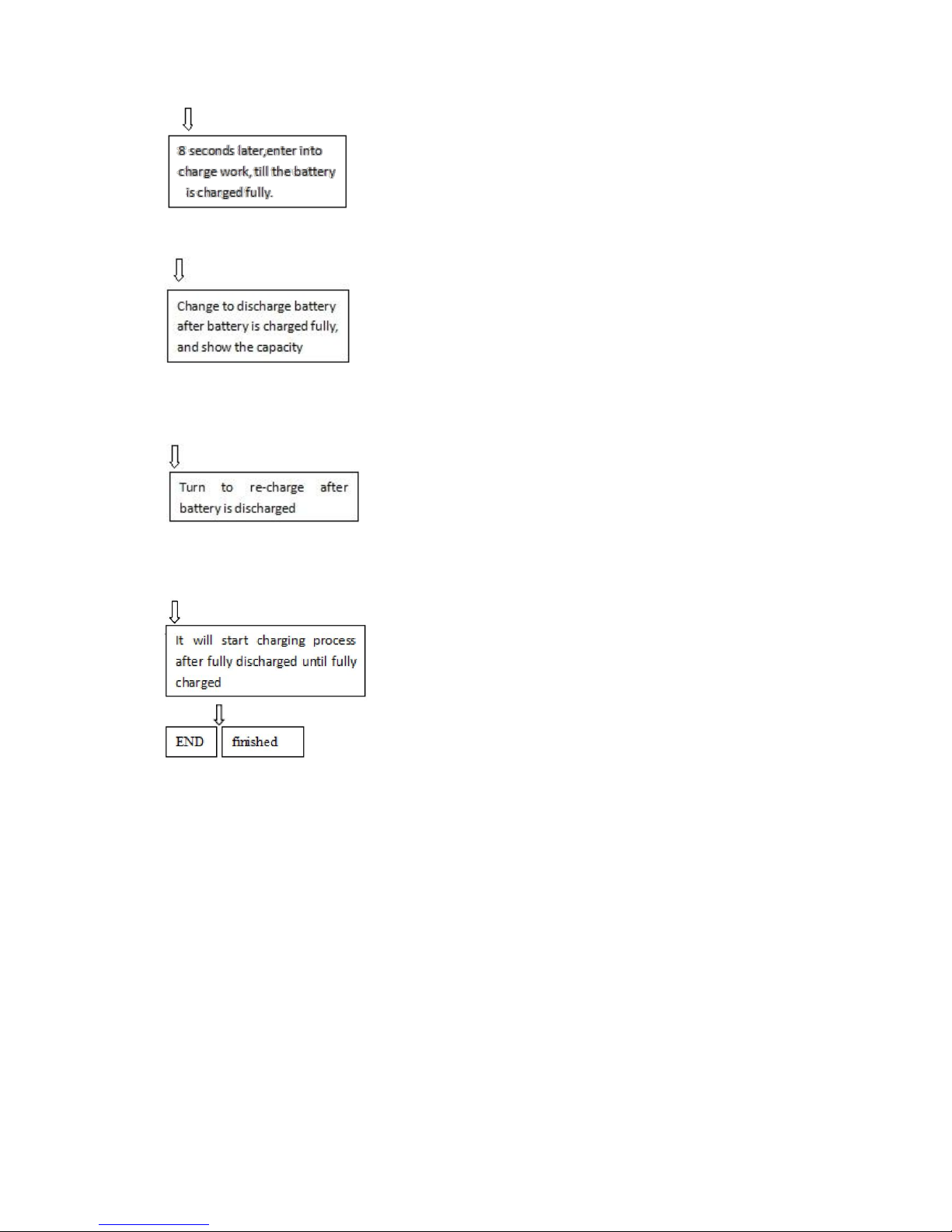
—when battery is charging by default current, select other
charge current after 8 seconds, LCD display will show charging current, voltage, time and
tested capacity (the third process during test mode) till the battery is charged fully.
---It will automatically transfer into discharging after fully charged,
then it will start discharging with 500mA current and record discharged capacity until batteries
are fully discharged. LCD display will show discharging current, voltage, time, inner resistance
and capacity(discharging process in Test mode).
--- It will automatically transfer into charging mode after fully
discharged until fully charged. The charging current is previous set current. LCD display show
charging currents (charging process in test mode). The LCD display will show “Full”, “End” and
Full condition of battery logo.
Attention: After the charger was chosen model and currents, you must press “MODE” button for
3 seconds if you want to re-choose; It will reduce the lightness without any operation within 15
seconds, but it won’t go out completely, it will arouse once press button.
2.3 Description of charge protection:
● intelligent detect the bad or non-rechargeable battery (include voltage of Ni-Mh/Cd cell
below 0.3V,can not be charged) , the LCD display will show “NULL”.
● The highest protection voltage for Li-ion cells is 4.20V±0.05V, when the voltage of battery
is 1.6V-2.2V will be detected as bad battery. , the LCD display will show “NULL”.
● The highest protection voltage for Ni-Mh/Cd cells is 1.55V±0.05V, when the voltage of
battery below 0.3V will be detected as bad battery. , the LCD display will show “NULL”.
Page 5
● Temperature protection: when the temperature inside the charger is detected by TDS and up to
60 ℃,stop to charge.
● It have over-charge, over-voltage, lower voltage, short-circuit and reverse charging
protection. it will not damage the battery and charger.
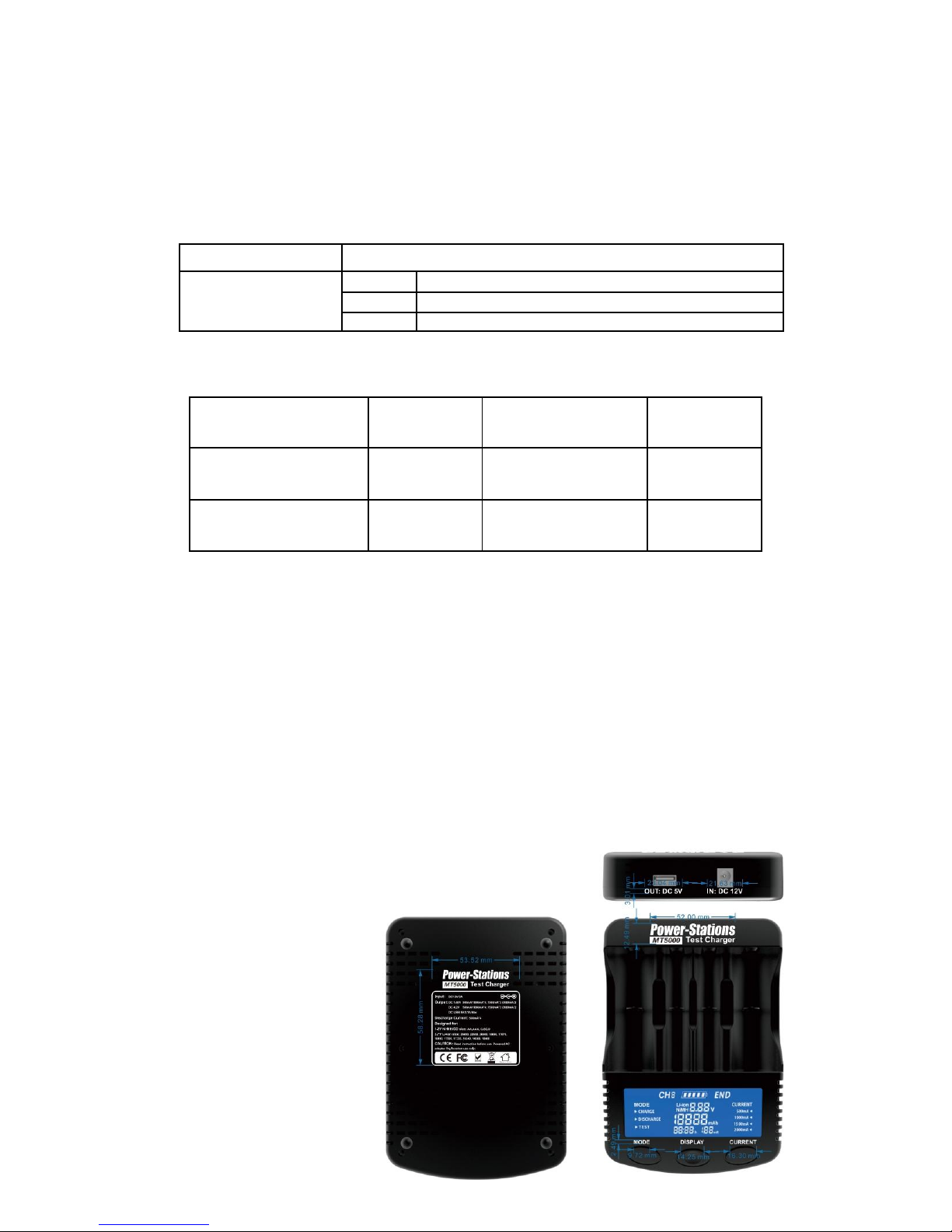
3. Input and output parameters:
Input:
DC 12V/3.0A
Output
Ni-MH
1.48V
500mA*4、1000mA*4 、1500mA*3、2000mA*2
Li-ion
4.20V
500mA*4、1000mA*4 、1500mA*3、2000mA*2
USB
5V/2.1A Max
4. Use and storage environment and indoor use
Operating Temperature
0℃—35
℃
Storage Temperature
0℃—40
℃
Operating Humidity
35%—95%
Storage Humidity
45%—85%
Testing Temperature
25℃±10℃
Atmospheric Pressure
70—106Mpa
5. Matters needing attention
● Before use, please refer to the instructions carefully, pay attention to the recommendations
of the rechargeable battery charging current, do not exceed recommended charging current.
● This charger can charge cylindrical lithium-ion battery and nickel metal hydride
rechargeable batteries only, Li-FePo4 can not be charged by this model.
● When the charger to charge and discharge may be fever, belongs to the normal
phenomenon, be careful not to burn.
● Please use specially equipped with power adaptor .
● When to stop using, please unplug the power and pull out the battery.
● his product testing data are for reference only, actual situation, please refer to the
professional instrument.
● limit of indoor use.
6.Product Picture:
 Loading...