

Page 1

Intelli gent Battery Charger
MT4000
USER’S M ANUAL
www.power-charger.net
Page 2

1
CONTENTS
1. Intended Use ............................................................................................ 2
2. Delivery content ....................................................................................... 3
3. Safety Instru cti o ns .................................................................................... 3
3.1 Product Safety .................................................................................... 3
3.2 Battery safety ..................................................................................... 3
3.3 Miscellan eo us .................................................................................... 4
4. Operating Elements ................................................................................. 4
5. Power Supply ........................................................................................... 4
6. Operation .................................................................................................. 4
6.1 Mode Selection .................................................................................. 5
6.2 Current selection ................................................................................ 5
7. Operation Modes and Display .................................................................. 5
7.1 Operation Mod e ................................................................................. 5
7.2 Display................................................................................................ 7
8. Maintenance. ............................................................................................ 7
9. Disposal .................................................................................................... 7
9.1 Disposal of w aste ............................................................................... 7
9.2 Used batteries/rechargeable batteries disposal ................................ 7
9.3 The chemical symbols........................................................................ 7
Page 3
2
Intelligent Charger MT4000
MT4000 i s a battery charger for 1.2v NI-MH/CD batte ry size: AA/AAA/A/ SC/C and
3.7V Li-ion batteries: LIR26650, 22650, 26500, 18650, 17670, 18490, 17500, 17335,
16340(123A), 14500, 10440.
Device MT4000 can charge and test batteries.
The presence of back light LCD allows you to see a basic condition of a
battery-voltage, process time, charge/ discharge current, mode, capacity and inner
resistance.
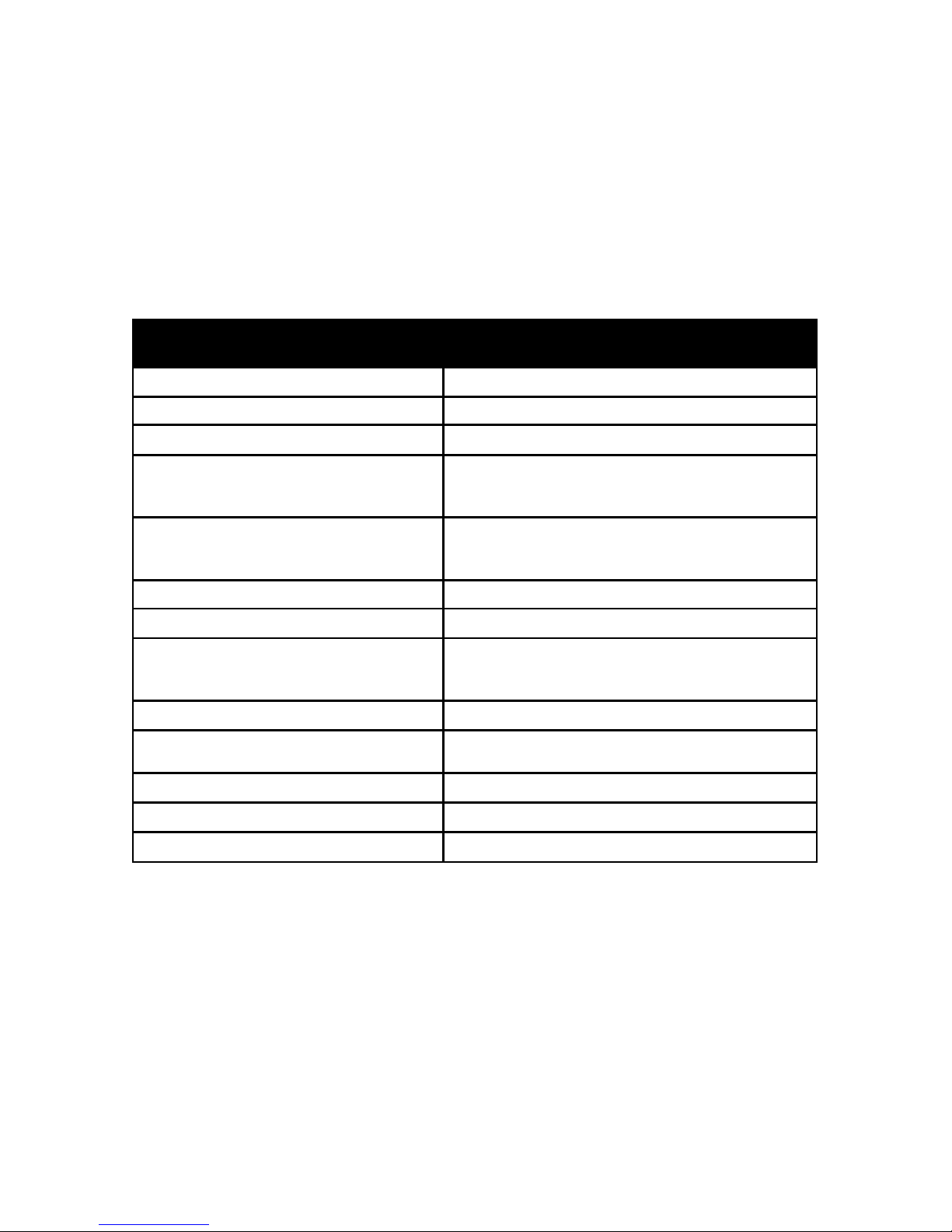
Parameter Value
Supply voltage 12V DC
Power consumption 18W-max
Type of the battery NiCd, NiMH, Li-ion
Channels count of charge
4(AA,AAA,A,SC,C,
26650,22650,26500,18650,17670,18490,175
00,17335,16340(123A),14500,10440))
Charge current:
independently for each compartment
Channel 1-4,for 1-4 elem ent s
300mA,500mA,700mA,1000mA
Control method of charging -dV
Battery discharge function +
Discharge current:
independently for each compartment
Channel 1-4,for 1-4 elem ent s
250 mA, 500mA
LCD +
Device operation modes
Independently control for each compartment;
charging; testing
Battery restore function +
Battery test function +
Back light +
Please carefully read instructions before use.
OPERATING INSTRUCTIONS. Bat tery Charger MT4000
1. Int e nde d Use
The product is intended to charge and discharge NiCd, NiMH or Li-ion rechargeable
batteries. It provides four independent charging slots for AA/ AAA/ A/ SC/ C/ 26650/
22650/ 26500/ 18650/ 17670/ 18490/ 17500/ 17335/ 16340(123A)/ 14500/ 10440)
rechargeable batteries. The charger can also optimize and test the maximum capacity of
the rechargeable batteries. Each charging slot has its own display to show various
information, such as, charging current, battery voltage, charged capacity, inner
Page 4

3
resistance and used charging time.
The charging current can be selected from 300, 500, 700 and 1000 mA.
The charger can charge batteries of different type and size and with different
capacity at the same time. It also integrates th e m inus delt a voltage (-AV ) funct ion, which
monitors the voltage over the charging cycle. The charger can only be powered by the
specially designed power supply. Operate and store it in dry indoor environment only.
This product fulfills European and national requirements related to electromagnetic
compatibility (EMC). CE conformity has been verified and the relevant statements are
available upon request. Unauthorized conversion and/or modification of device are
inadmissible because of safety and approval reasons (CE). Any usage other than
described above is not permitted and can damage the product and lead to associated
risks such as short-circuit, fire, electric shock, etc. Please read the operating instructions
thoroughly and keep them for future reference.
2. Del iv er y cont e nt
Battery Charger MT4000 1 pcs
Power Adapter 1 pcs
Operation Instructions 1 pcs
3. Safety Instructions
We do not assume liability for resulting damages to property or personal injury if the
product has been abused in any way or damaged by improper use or failure to observe
these operating instructions. The warranty will then expire!
3.1 Product Safety
The product must not be exposed to substantial mechanical strain or strong
vibrations.
The product must be protected against electromagnetic files, static electrical fields,
extreme temperatures, direct sunlight and moisture.
The manufacturer’s instruction for the respect i ve batter ies m us t be observed, before
they are charged.
The product should not be connected immediately after it has been brought from an
area of cold temperature to an area of warm temperature. Condensed water might
destroy the product. Wait until the p roduct ada pt s t o the new ambient temperature b efore
use.
Sufficient ventilation is essential when operating the charger .Never cover the
ventilating slots of the charger.
3.2 Battery safety
Correct polarity must be observed while inserting the batteries.
Non-rechargeable batteries, rechargeable alkaline batteries (RAM), lead acid
batteries and lithium batteries must not be charged with this product. There is danger of
explosion!
Page 5
4
Batteries should be removed from the device if it is not used f o r a long per iod of time
to avoid damage through leaking. Leaking or damaged batteries might cause acid burns
when in contact with skin, therefore use suitable protective gloves to handle corrupted
batteries.
Batteries mus t be kept out of reach of children . D o not leav e the b attery ly ing around,
as there is risk, that children or pets swallow it. Batteries must not be dismantled,
short-circuited or thrown into fire. Never recharge non-rech arge ab le batteries. There is a
risk of explosion!
3.3 Miscellaneous
Repair works must only be carried out by a specialist/ specialist workshop.
If you have queries about handling the device, which are not answered in this
operating instruction, please check with the distributor for further help.
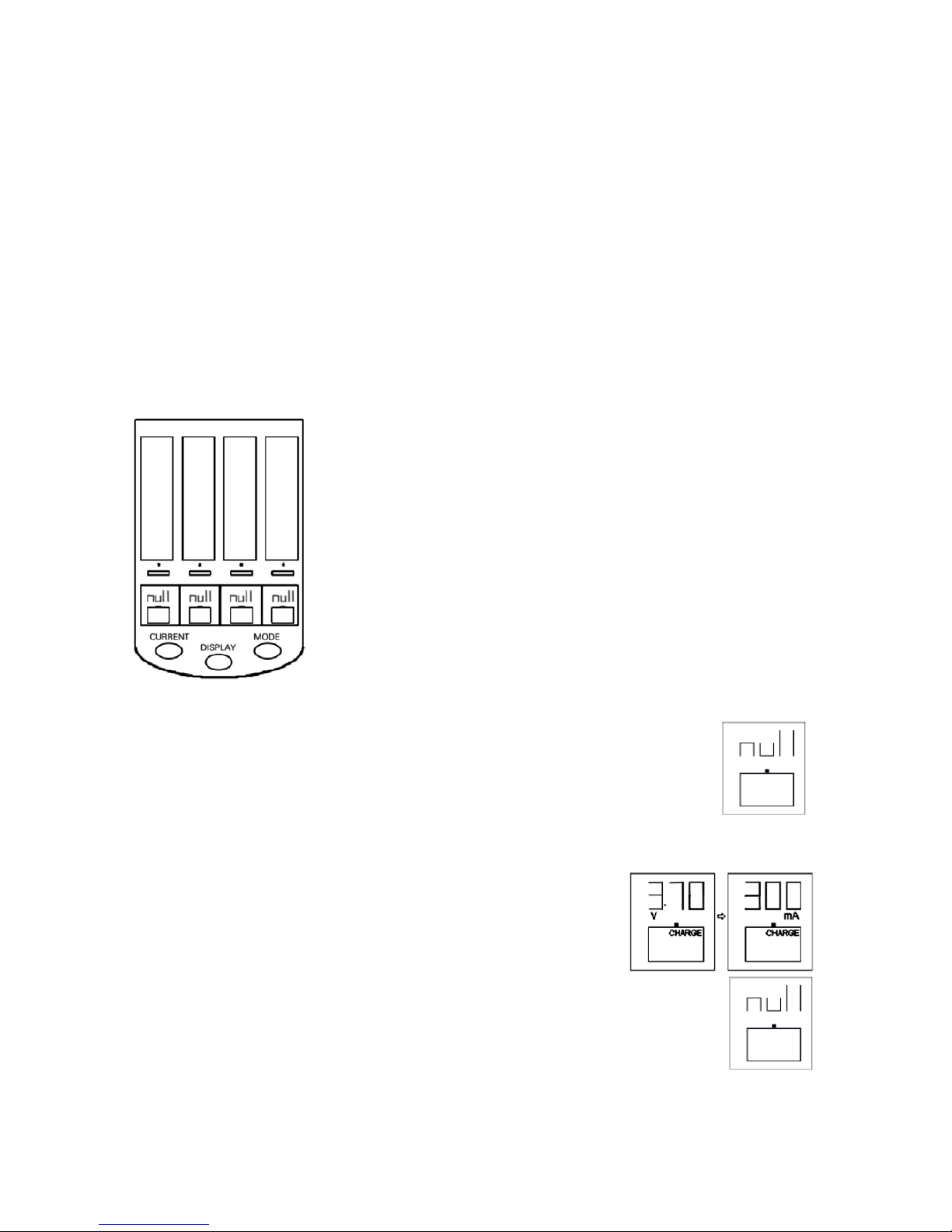
4. Operating Elements
1,2,3,4 -Select a battery compartment to customize
<<MODE>> and/or <<CURRENT>>.
MODE-Select mode: charging, testing. The button should
be held down for more than one second to activate mode. To
customize a single compartment-first press 1-4.
DISPL AY-selection of displayed information: current;
process time, voltage, capacity and inner resist ance.
CURRENT -selection of the ch arge / discharge current va lue.
Button Works in the first eight seconds after inserting batteries,
or after activation of mode selection.
5. Powe r S upply
Only the shipped power adapter is allowed to be used for this charger!
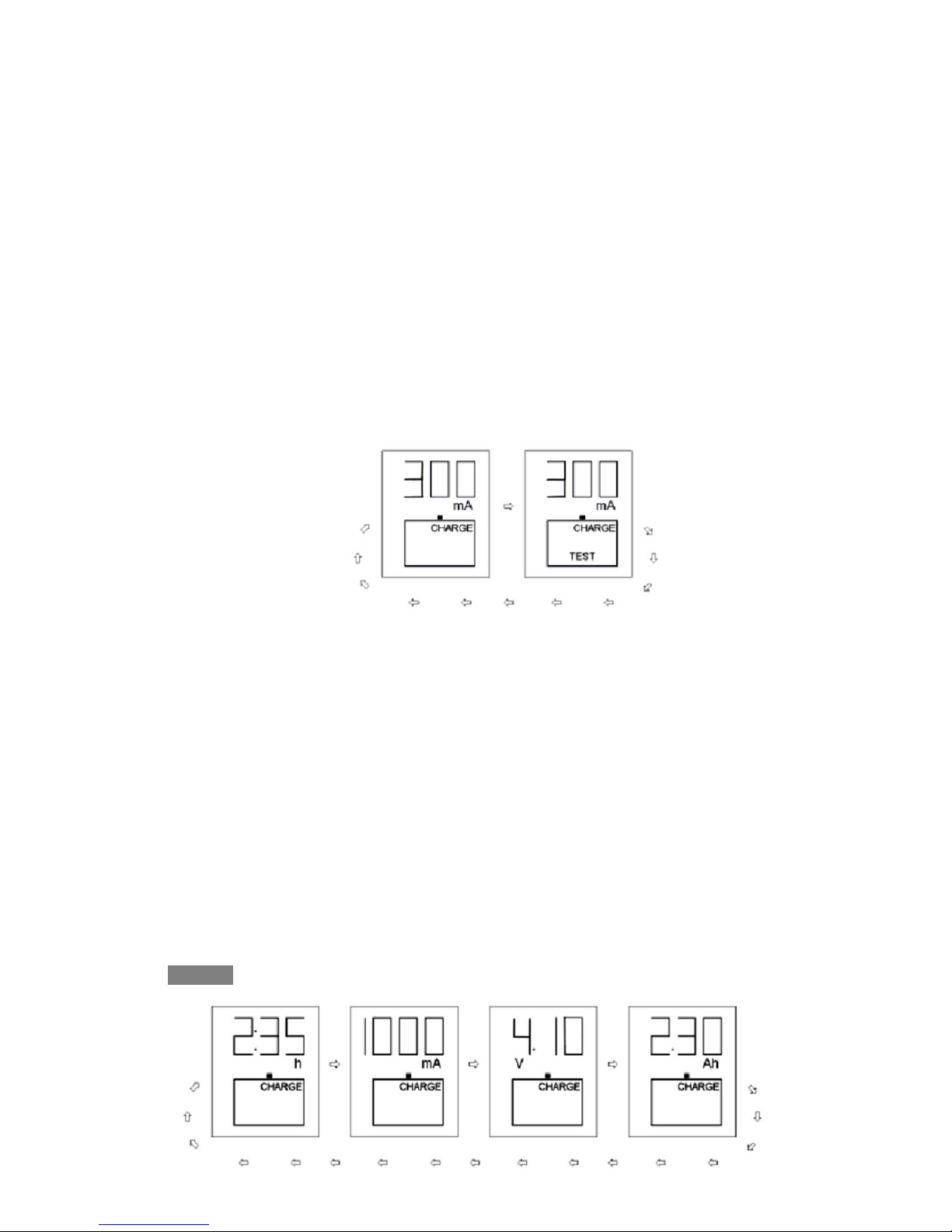
When the charger is powered up, all LCD segments will light up
momentarily. Th e “null” icon wi ll be shown un til any b atter ies are inserted.
6. Operation
Once a rechargeable battery is inserted, its present
voltage (for example,”3.7v”) will be displayed for 4 seconds,
then “300mA Charge” will be shown on display for another 4
seconds as the default charging current. If MODE or
CURRENT button is not pressed during these 8 seconds, the
Charging process will start. After that charging current and/or
mode can be changed by activation <<MODE>> or by pressing 1-4 and
editing appropriate compartment. Discharged or defective batteries may
not be able to charge, and the display will show “zero” icons. Sometimes,
for fully discharged batteries “slow” charger will be more effective
Afterwards, the charging current can no longer be changed without
reinserting the rechargeable batteries or re-power up the charger. If completely empty or
defective batteries are inserted into the charger, the “null” icon will be displayed on the
display and the charger will refuse to Charge them. Sometimes those completely empty
Page 6
5
batteries ate still usable because they are not used for a long time and the internal
leakage current emptied the battery by itself. To avoid this refusal by the charger, we
suggest charging then with a normal 3v battery pack for a few seconds before insert into
the charger.
6.1 Mode Selection
Press and hold the “MODE” for 1 seconds to change the operating mode for all
charging slots.
Press the: “MODE” button subsequently to toggle among the “Charge”, “Test”
mode.
After selecting the mode you can change the charging/discharging current
pressing <CURRENT>.
Mode selection can be activated by pressing 1,2,3,4 -separately for specific
battery compartment.
6.2 Current selection
Within the first 8 seconds after insert the battery, press the “CURRENT” button to
select desired char ge cu rrent of 30 0, 500, 700 or 1000m A for slots ins erted w ith batt er ies.
After expiration of 8 seconds the charger will go into setting mode. After that, the
charging current and / or mode can be changed by activation <MODE> or by pressing
1-4 and editing of appropriate compartment.
During or after the work mode complete, press the “DISPLAY” button to toggle
among the display more for voltage, current, capacity, inner resistance and work time.
7. Operation Modes and Display
7.1 Operation Mode
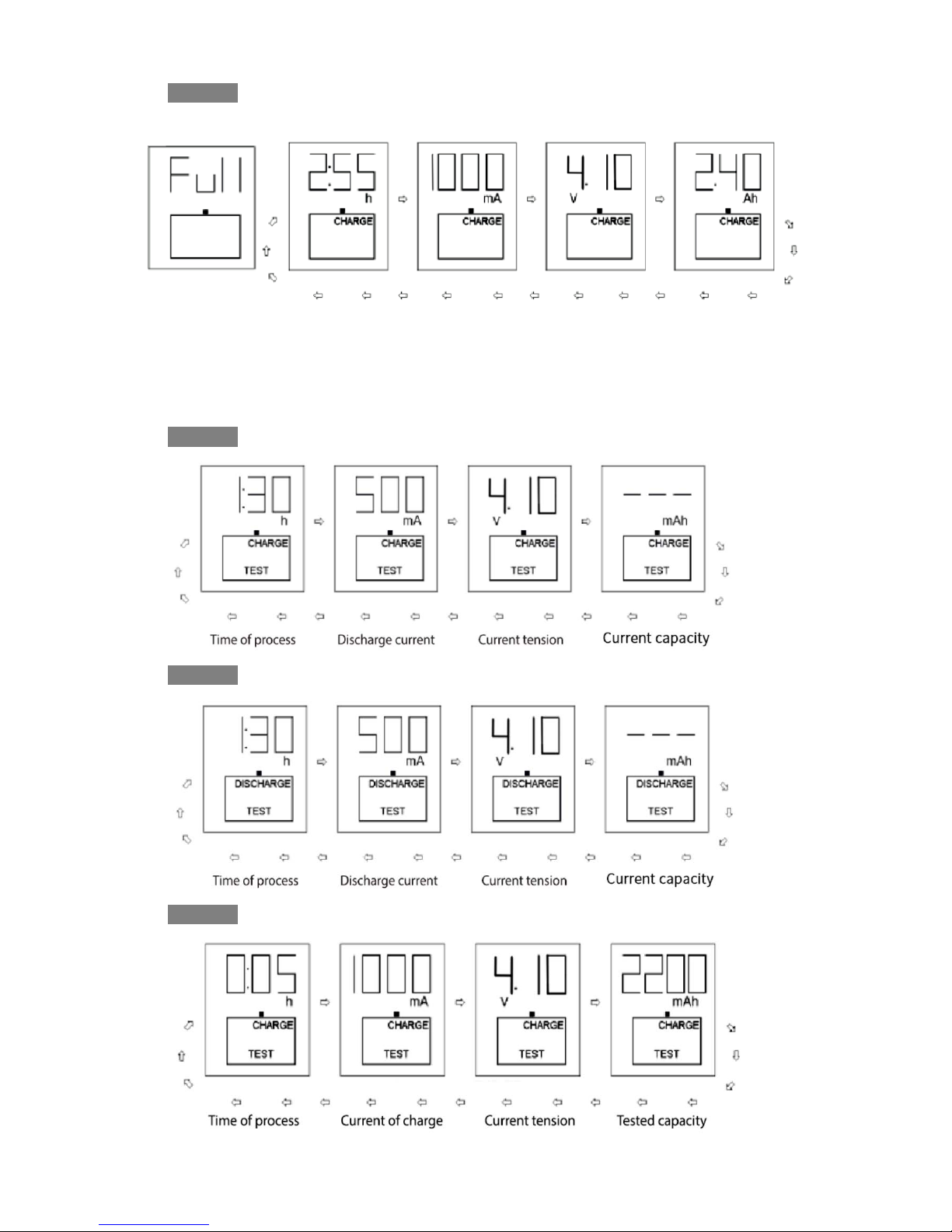
Charge Mode: The rechargeable battery is charged up to its maximum capacity.
Stage1 Charge.
Page 7
6
Stage 2 Charge over
Test mode: Checks the present capacity of a rechargeable battery. The maximum
capacity is determined by discharging the rechargeable battery after it was fully charged.
If the maximum capacity is much lower than the rated capacity then it may reach the end
of its l if e tim e .
Stage 1 Charge.
Stage 2 Discharge.
Stage 3 Discharge over, the second charge current selected.
Page 8
7
Stage 4 The testing process is over.
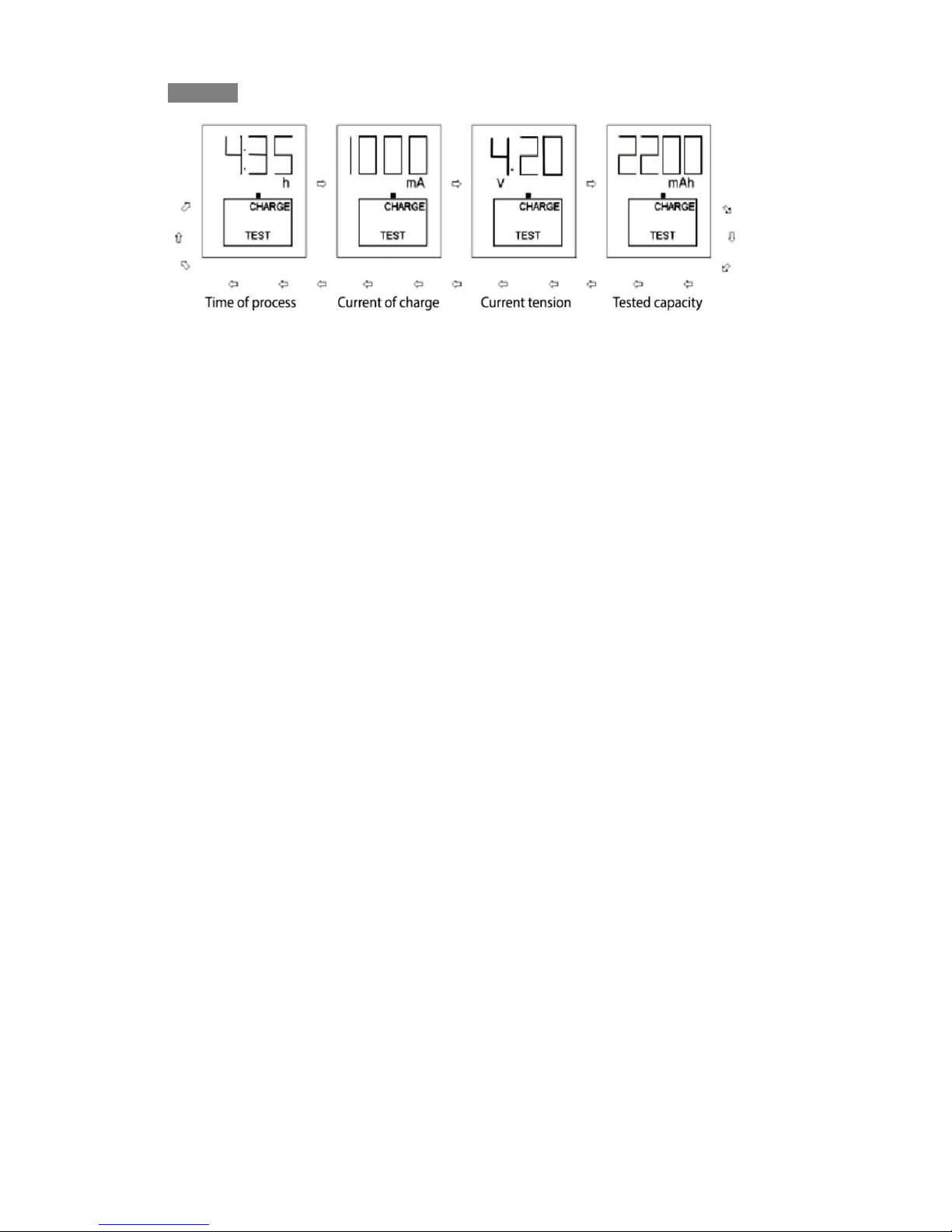
7.2 Display
Charge/Discharge current: the instantaneous current is displayed
Tim e Elapsed: The charging/discharging time of the last cycle is displayed.
Accumulated capacity: The accumulated battery capacity is displayed in mAh or
Ah.
Charge voltage: The instantaneous battery voltage is displayed.
*The timer will resume and count from 0:00 again after the time elapsed is longer
than 20hours. For example: 1:45 will be shown if the time elapsed is 21 hours 45
minutes.
8. Maintenance.
The device is maintenance-free but should be clean ed occas iona lly. When cleaning,
the device must be removed from any power source. Only use dry and soft cloth to clear
housing of the charger. Do not use abrasive or solvents.
9. Disposal
9.1 Disposal of waste electrical and electronic equipment in order to preserve,
protect and improve the quality of environment, protect human health a nd u til iz e na tur al
resources prudently and rationally, the user should return unserviceable product to
relevant facilities in accordance with statutory regulations.
The crossed-out wheeled bin indicated the product needs to be disposed separately
and not as municipal waste.
9.2 Used batter i es/recharg ea bl e bat t er ies di sp osal
The user is legally obliged (battery regulation) to return used batteries and
rechargeable batteries. Disposing used batteries in the household waste is prohibited!
Batteries/rechargeable batteries containing hazardous substances are marked with the
crossed-out wheeled bin. The symbol indicates that the product is forbidden to be
disposed via the domestic refuse.
9.3 The chemical symbols for the respective hazardous substances are
Cd=Cadmium, Hu=Mercury, Pb=Lead. You can return used batteries/rechargeable
batteries free of charge to any collecting point of your local authority.
 Loading...