

Page 1
User Manual For MT2000
Brief introduction
Tha nk yo u fo r p urc has ing o ur p ro duct MT 2000 -- T his is a multifunctional and intellig ent charger. This product uses
the microcomputer control technology. Before using this product, please carefully read the follow ing instructions.
Product Features
This product uses t he microcomputer control, it can charge, disc harge, or test any combinatio n of any size, any
capacity Ni-Mh / Ni-Cd / Cylindrical lithium battery.
This product has many special functions: a dual-channel independe nt charging / bat tery capacity detection / batt ery
internal resistance detection / anti-rev erse / short circuit protection / overcharge pr otection / and other functio ns, and
can monitor the batter y voltag e, current and other paramet ers automatically and timely. Suitable Battery:
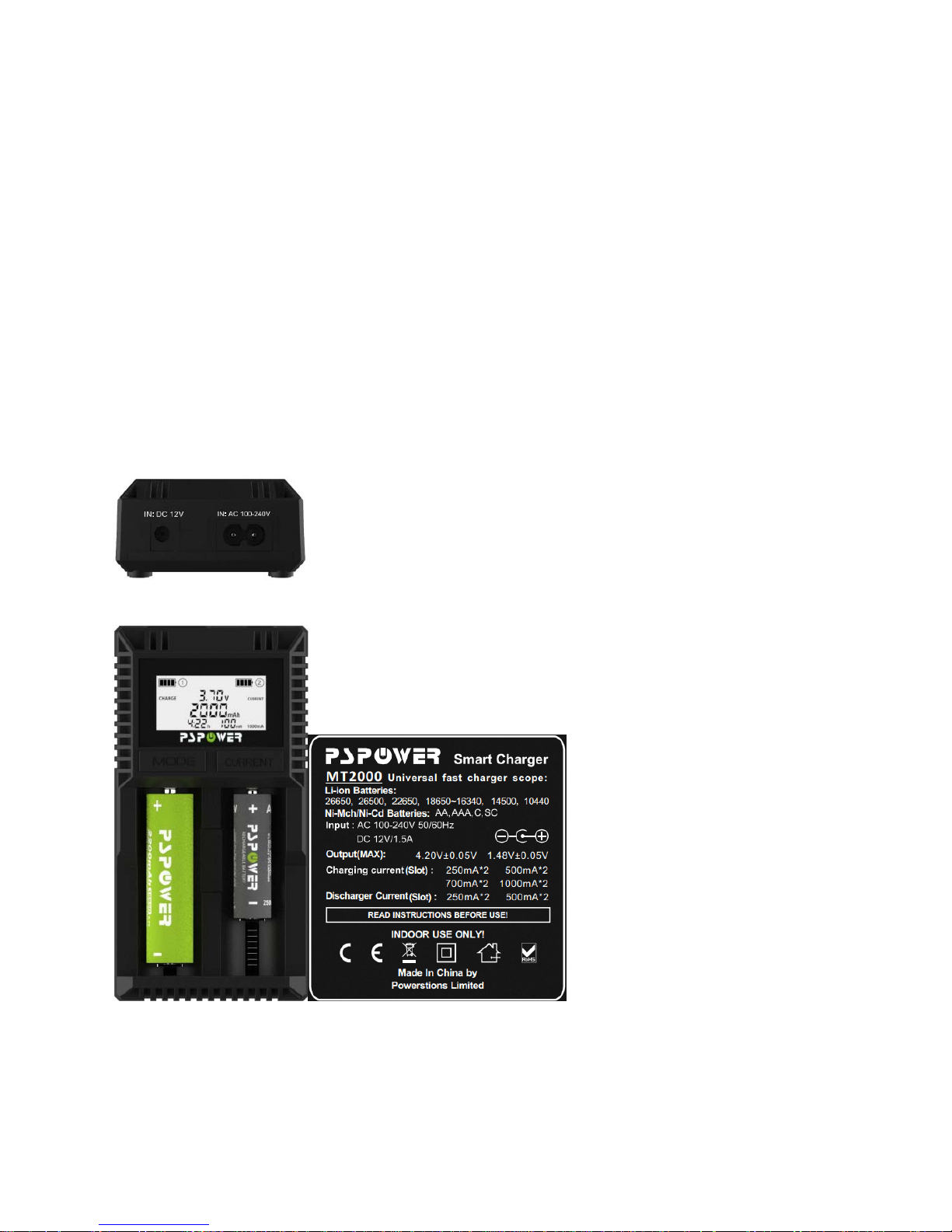
Li-ion batteries:26650、26500、22650、18650~16340、14500、10440
Ni-Mh/Ni-Cd batteries: AA、AAA、C、SC
Specifications
I. Input parameters
AC 100-240V 50/60Hz;or DC12V/1.5A(It is recommended to use a dedicated power adapter)
II. Output
characteristics
1.
DC li-ion batteries:
4.20V/250mA×2、500mA×2、700mA×2、1000mA×2
2.DC Ni-MH/CD batteries: 1.48V/250mA×2、500mA×2、700mA×2、1000mA×2
3.The highest voltage of Ni-MH and Ni-CD:
1.55V±0.05V;
4.The highest voltage of li-ion batteries:
4.25V±0.05V
5.Resistance test range:
0~99mR
6.
Discharging voltage and current:
Ni-MH and Ni-CD battery discharging c ut-off voltage:
0.9V±0.05V
L
i-ion battery di scharg ing cut-off voltage:
2.8V±0.05V
Discharging model Discharging rate:250mA and 500mA
Test model Discharging rat e:250mA (when charging current is 250mA and 500mA) a nd 500mA
(when charging current is 700mA and 1000m A )
III. Use and storage environment Pls indoor use
Operating Temperature
0℃ —35℃
Storage Temperature
0℃ —40℃
Operati ng Humidit y
35%—95%
Storage Humidity
45%—85%
Testing Temperature
25℃ ±10℃
Atmospheric Pressure
70—106Mpa
Page 2

Feature
1.Four kinds of charging c urrent could be ajusted(250m A /500mA/700mA /1000mA);
2.It can intelligent recc ognize many kinds of batt eries and charge, discharg e, or test any combination of any size,
any capacity Ni-Mh / Ni-Cd / Cylindric al lithium battery.
3.Eevery battery has a s eparate LCD display to show charging or discharging parameters and test param eters,
inc luding current (mA)/ capacity(mAh)/ voltage(V)/ time(h)/ inner resistance(mR);
4.Under charging m odel, you can charge batt eries with different charging current. After full charging it will show the
parameters of full charging. +“FULL”+“End”;
5.Under discharging model, you can discharge batteries with different disc harging current. After full discharging it
will show the parameters of full discharging.
6.Test model:Firstly, full c harge the batt eries-- turn to discharg e automatically, after full discharge it c an test the
battery capacity and then turn to charge again--it will show FULL after full charging;
7.Line 2 battery slot Charger、Discharger、TEST three models can be divided into groove independence at the same
time;
Button (MODE) description
The charger has two functio n keys (MODE, CURRENT) use simple and convenient;
Function keys :
1. mode key(MODE)Mode
Conversion Setti ngs function in the work state: short press Option slot "MODE" -℃ trough, "CURRENT" -℃ slot
button, enter t he desired slot batt ery sett ings; pr ess 3S press "m ode" or "CU RRENT" button to ac cess the function
setting status. Then press the function "mode" button, you can switch Charger, Discharger, TEST three modes;
2.Current key(CURRENT)
2.1 In worki ng condit ion by s hort elec tion groove "MODE" -℃ trough, "CURRENT" -℃ slot button, enter the
desired battery status query slots;
2.2 When you enter Set up mode Press "CURRENT" key. For regulating the funct ions of the charge current:
250mA, 500mA, 700mA, 1000mA or discharging current size: 250mA, 500mA;
operational mode
1 Charge Mode(charging mode)
1.1 W hen the charger is powered on, the LCD screen all the characters in the charger was full three seconds, 3
seconds will check whether t he battery charger connect ed, if there is no battery in the display Null, if the batt ery is
placed too bad will display Null, if rechargeable batt eries into default after 8 seconds to 250mA charge current; in
charge default screen mode and display the working s tatus of charging the battery;
1.2 When the battery charger placed in three seconds the system automatically enters the charging current selection
mode, the screen displa ys the current default "250m A", in which eight sec onds to select the period by CURRENT
250mA / 500mA / 700mA / 1000mA current charging system 8 seconds after locking your current selection to
recharge the batt ery, if wit hin 8 seconds, did not make t he set, then the system automatically 250mA current to
charge the battery, and the battery symbol will be "Happy" Happy way from left to righ t . A t this curre nt will n o t b e a b l e
to change, to change, you need t o reset the battery mode;
1.3 During c harging, you can short pres s the Mode butto n (MODE) or current key (CURRENT) See the grooves
voltage (mV) / c urrent (mA) / capacity (mAh) / t ime (h) / resistance (mR) /, after the battery is fully charged, the
charge will show the complet e data, also shows charge + end (end of charge) and a battery symbol full grid;
Remark:
Users should pay attenti o n to the rechargeable battery maximum charging current, if not rapid charging, we
recommend chargi n g 250mA, t his is the safest and most beneficial to the battery;
Page 3
进入 TEST
选定 Charge Cuurent
8 secs later the LCD
shows TEST and full
charge the battery
放完电后转充电充满
antomatically t urn to
discharge after full
charge
tur n to charge after f ull y
discharge
2 Discharge Mode(discharging mode)
2.1 W hen the charger is powered, the battery into the press "MODE" key to enter Set charger function selection
mode, select "Disc harge" into the discharge mode, then press "CURRENT" select t he discharge current "250mA" /
"500mA", the syst em will after eight sec onds to loc k your choice of current a nd dischar ge functio n to disc harge the
batteries (if withi n 8 seconds, did not make the set, then the system automatic ally defaults to 250mA current to the
battery discharg e) and the battery symbol will be "Happy "Happy the way from right to left. In this cas e the disc harge
current will not be able to change, to change, long press 3 seconds "MODE" reset function mode;
2.2 In the discharge process, you can press "MODE" -℃ trough, "CURRENT" -℃ groove check the battery discharge
parameters for each slot, fully discharged after, no charge, discharge data after screen while displaying "DisCharge +
End "(end of charge) and a batt ery symbol spaces;
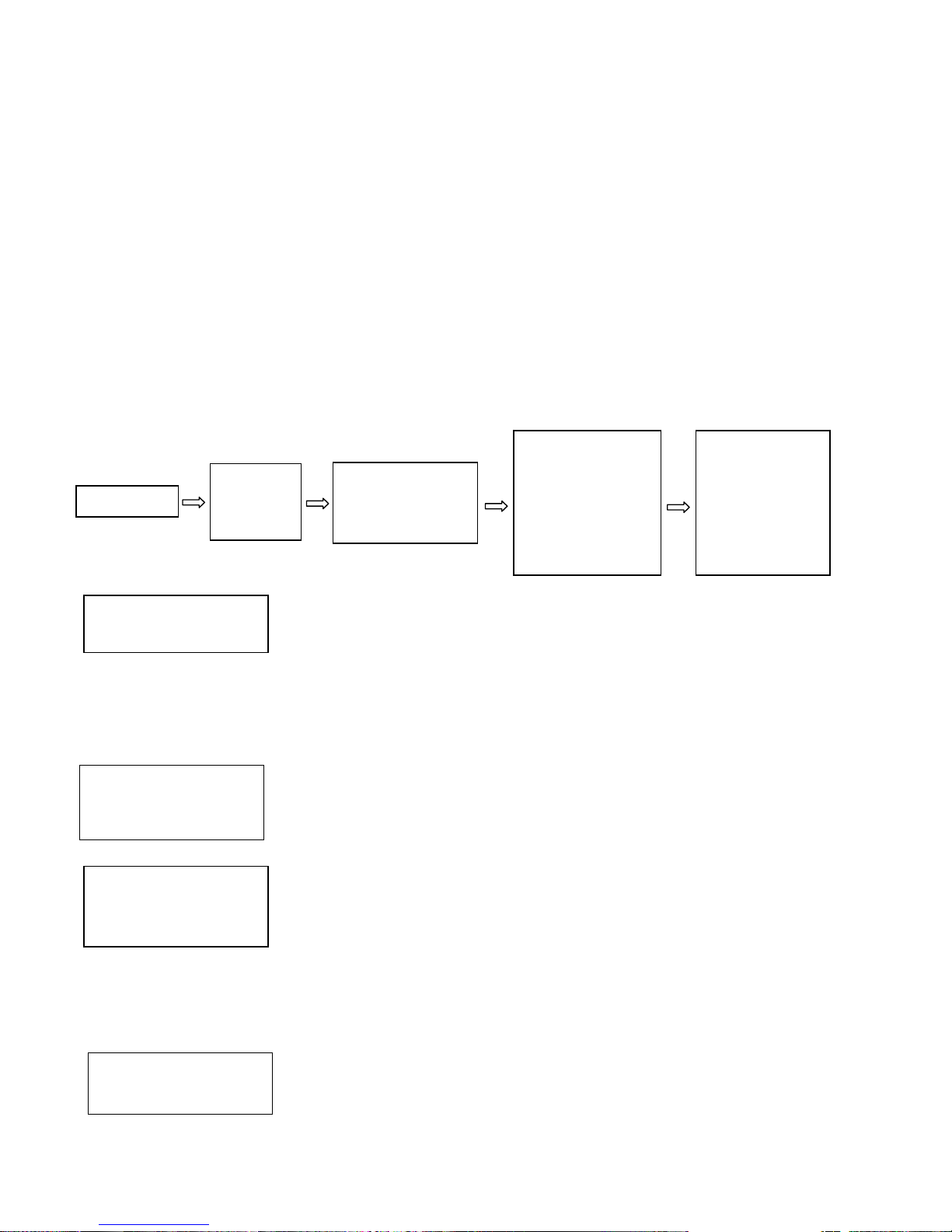
3.1 TSET Mode is the firs t battery is full, and t hen to 250mA (250mA or 500mA charging current defa ult value) or
500mA (500mA or 1000mA charging current default value) of the current discharge of the battery charge and
discharge records to calculate the battery capacity, then after the battery is f ull y automatic;
3.2 TEST MODE
When the power is turned on and the battery is put into for the first time, press t he
"MODE" button to select "TSET" to enter the test mode functi on. I n 8 sec onds , pre ss
the “CURRENT” button to select current of 250mA / 500mA / 700mA / 1000mA to
charge the battery. The system will be locked with functions and parameters of your
choice 8 seconds later. If you did not make the set within 8 seconds, then t he s yst em
will automatic ally lock 250mA current to charge the battery (the selected curr ent is the
system current to charge the battery);
After 8 seconds the current is loc ked, the LCD screen displays charge curre
nt, voltage, resistance, time and capacity TEST (test mode with charge state) the
battery is fully charged.
The battery will automatically turn to discharge after fully charged. And then the battery
will be discharged with 250mA or 500mA of current and record the batter y discharge
status. The LCD screen displays discharg ing current / voltage / t ime / resistance and
capacity. TEST (test mode in discharged state) the batter y will be discharged until the
battery is fully discharged. (If set the charging current to 250mA or 500mA, the
discharging current is 250mA. If set the charge current to 500mA or 1000mA, the
discharging current is 500mA.)
After the battery is fully discharged the system will autom atically turn to charge, the
charging current value is the current value set before. The LCD screen displays the
charge current value and other data. TEST (test mode state of charge) after the
battery is fully charged, the LCD screen displays "Full" + "end" + "battery symbol" f ull
grid (end of charge) .
Enter TEST
Select
charging
current
8 seconds later,
LCD screen show
TEST and FULL
turn to discharge
automatically after
full charge, LDC
screen show
TEST and
DISCHARGE
Turn to charge
automatically
after full
discharge, LCD
shows TEST
and CHARRGE
Enter TEST
Select Charge Cuurent
Page 4
Warning
1.1 This char ger can only charge cylindrical lithium-ion batteries/ NI-MH/ NI-CD batteries, can’t charge LiFePo4
batteries;
1.2 Befor e using, please r ef er t o the instr uctio ns c arefully. Pay attention to the recom mendation of t he rec harg eable
battery charging c urrent, do not exceed the rec ommended charging current;
1.3 Pls don’t use other power supply adapter
1.4 When charging or discharging it would leads to heat, be careful to the heat
1.5 When stop using, pls unplug the power supply, removing the battery;
1.6 It can only be used in normal room.
1.7 W hen testing the lithi um-ion battery capacity, in the process of turning to the discharging the battery surface
temperature may reac h to 60 degrees Celsius, please do not touch.
1.8 The product testing data for reference only, please refer to the professional equipm ent for
actual situation.
 Loading...