

Page 1

USER MANUAL FOR EC100
一 Charger’s requirements and Func tio ns:
1.1 With MiNi 5P USB DC 5V input, the single slot independent charging and microcomputer
management system.
1.2 Two charging current 500mA/1000mA are available.
1.3 LED indicator function: LED can indicate battery capacity (25%, 50%, 75%, 100%), charging
currents, charging condition.
1.4 suitable for rechargeable batteries: Ni-MH/Ni-Cd 1.2V, Li-Fe 3.2V, Li-ion 3.7V, EGO(Li-ion) Ecigar ette 3.7V, and Li-ion 3.85V(Li-ion: 18650, 18490, 18350, 17670, 17500, 14500, 10440)
1.5 Automatically identify Li-ion battery and NI-MH battery, and choose LiFePO4 battery and Li-ion
3.85V battery by hand.
1.6 Protection design including over-charge, over-discharge, short-circuit protection, bad battery
detection and reverse charging protection (Remark: the charger will not work for short circuit, bad
battery and reverse battery, LED indicators will not be on ).
1.7 Automatically indentify the output 5V/(0mA~1000mA) function.
1.8 with independent controlled charging circuit for E-cigarette and universal port.
二 Butto n, LED ind i c at or s ’ function an d des cr i p ti on.
2.1 description for “SELECT” Button
2.1.1 When inserting batteries and plug in, press “SELECT” button for 2 seconds to change the
charging current 500mA/1000mA;
2.1.2 W hen charg er is work ing, you can choos e 500m A/1000mA chargi ng current by p ress button
for 2 seconds.
2.1.3 When charger is working, press the Button to see the selected battery type.
2.1.4 After battery inserted, i f the charger identif y NIMH/ CD battery, you can’t chang e the battery
type to be charged(you can choose LiFepO4 3.2V and Li-ion 3.85V for Li-ion cells)
2.1.5 When it’s used to be power bank, press the Button to see battery’s current capacity.
2.2. LED indicators description
The charger has 4pcs Blue LEDs and 2pcs yellow LEDs; 4pcs blue LEDs indicate charging or
discharging capacity and condition as well as battery type.
2.2.1 If LEDs show flash from 25% to 100%, it shows charging condition.
2.
2.2 During c harg i ng proces s , pr ess the But ton yo u c an know battery type: 25% LED indic ate 1.2V
NIMH/CD battery, 50% LED indicates 3. 7V Li -i on b attery, 75% LED indi c ates 3.2V Li FeP o4 b attery,
100%LED indicates 3.85V Li-ion battery.
2.2.3 W hen using USB f unction, pres s the button can know curr ent capacity: 25%, 50%, 75% and
100%
which you can know through LED indicators.
2.3 The 0.5A LED indicator function
2.3.1 power supply indication: When po wered supply, no batteries, it show power system is ok.
2.3.2 charging current indication: During charging condition, it means 0.5A charging current.
2.3.3 E-c
igarett e charging indication: W hen inserting E-cigarette, t he LED indicator flash, it m eans
under charging condition, when charging process is finished, the LED will be on.
Page 2
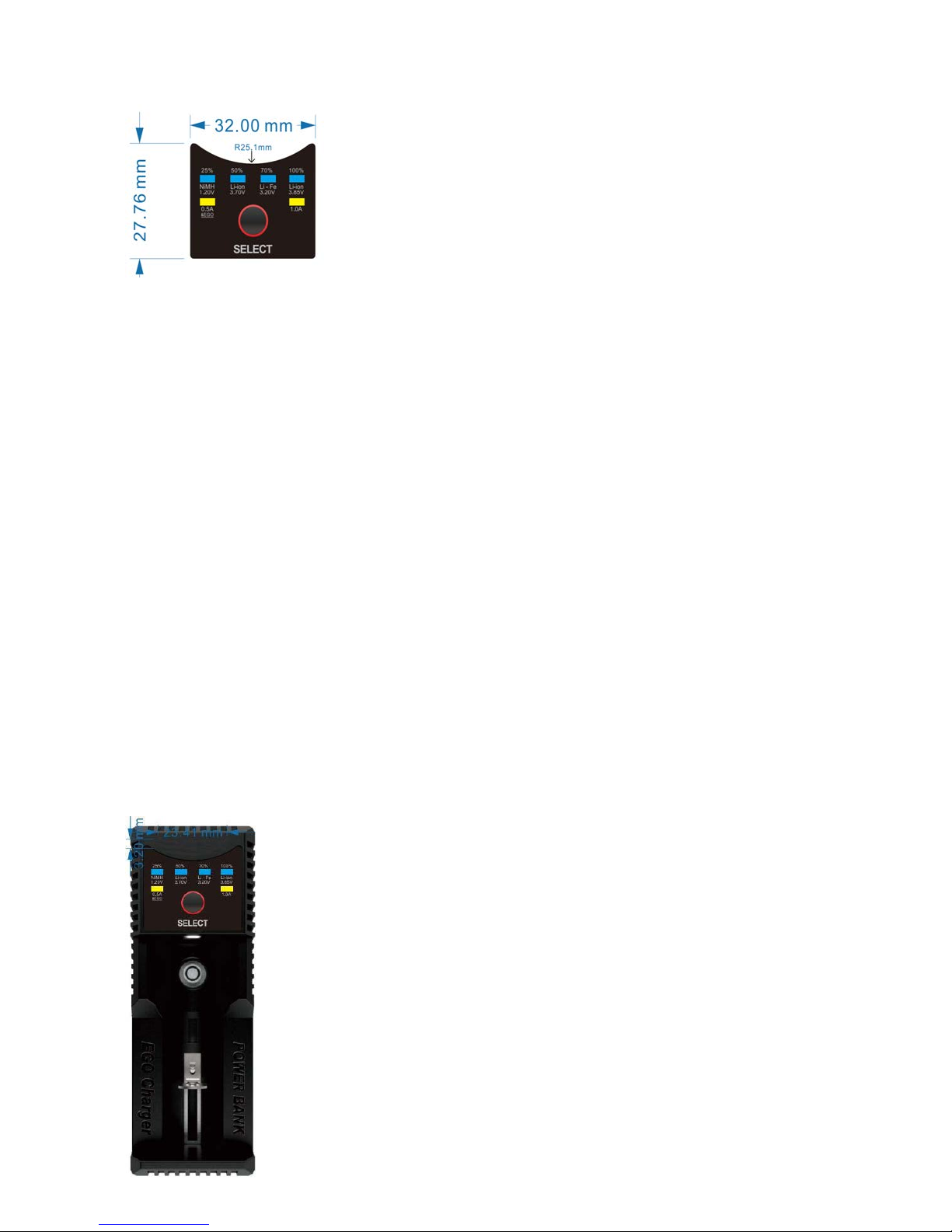
Attention: 1 .0A LED onl y means chargi ng current
2.4 LED indicators(Please in kind prevail)
三 Electrical Technical Data:
3.1 Input: Micro USB DC 5V/1A
3.2 Output:
1.2V NIMH/CD 1.48V: 500mA/ 1000mA
3.2V Li-Fe 3.75V: 500mA/ 1000mA
3.7V Li-ion 4.2V: 500mA/ 1000mA
3.85V Li-ion 4.35V: 500mA/ 1000mA
3.7V EGO 4.2V: 500mA MAX
四 USB Output function:
4.1 Output no- load voltage for USB port:4.90-5.30V
4.2 Output parameters: 4.75V-5.25V/0A~1A
4.3 Over-discharging protection voltage:3.0±0.1V
USB output function is only for Li-ion batteries, it’s not workable for NIMH/CD batteries.
五 charger surface picture:
5.1 Dimension: 120mm*43 mm*29.5mm (L*W*H)
5.2 N.W:60g
 Loading...