

Page 1

PowerPack 1500 UPS Quick Start Guide
IN THE BOX:
1 each PowerPack 1500 UPS unit
1 each AC power cord
1 each IEC-IEC power cable for connection to PowerPlay IPC-8000 or IPC-9000
1 each data communication cable for connection to PowerPlay IPC-8000 or IPC-9000
1 each Quick Start Guide
SETUP and PLACEMENT:
Mount the PowerPack 1500 in a clean, dry place and within reach for the connection
cables to go to the PowerPlay unit. Make certain there is plenty of clearance for air
circulation behind the unit.
You will need to connect the batteries before operation. Before you do this, make sure the
unit is NOT connected to any power source. To connect the batteries, hold the PowerPack
faceplate with two hands and pull forward to unsnap it from the chassis. Carefully let it
hang by the attached wires. Remove the two Phillips head screws from the battery tray,
slide it out and connect the ONE detached lead to the ONE unconnected battery terminal.
Slide the tray back in, replace the two screws and carefully snap the faceplate back onto
the unit.
CONNECTIONS:
First, make sure the PowerPack 1500 and PowerPlay units are powered off and
disconnected from the AC power source.
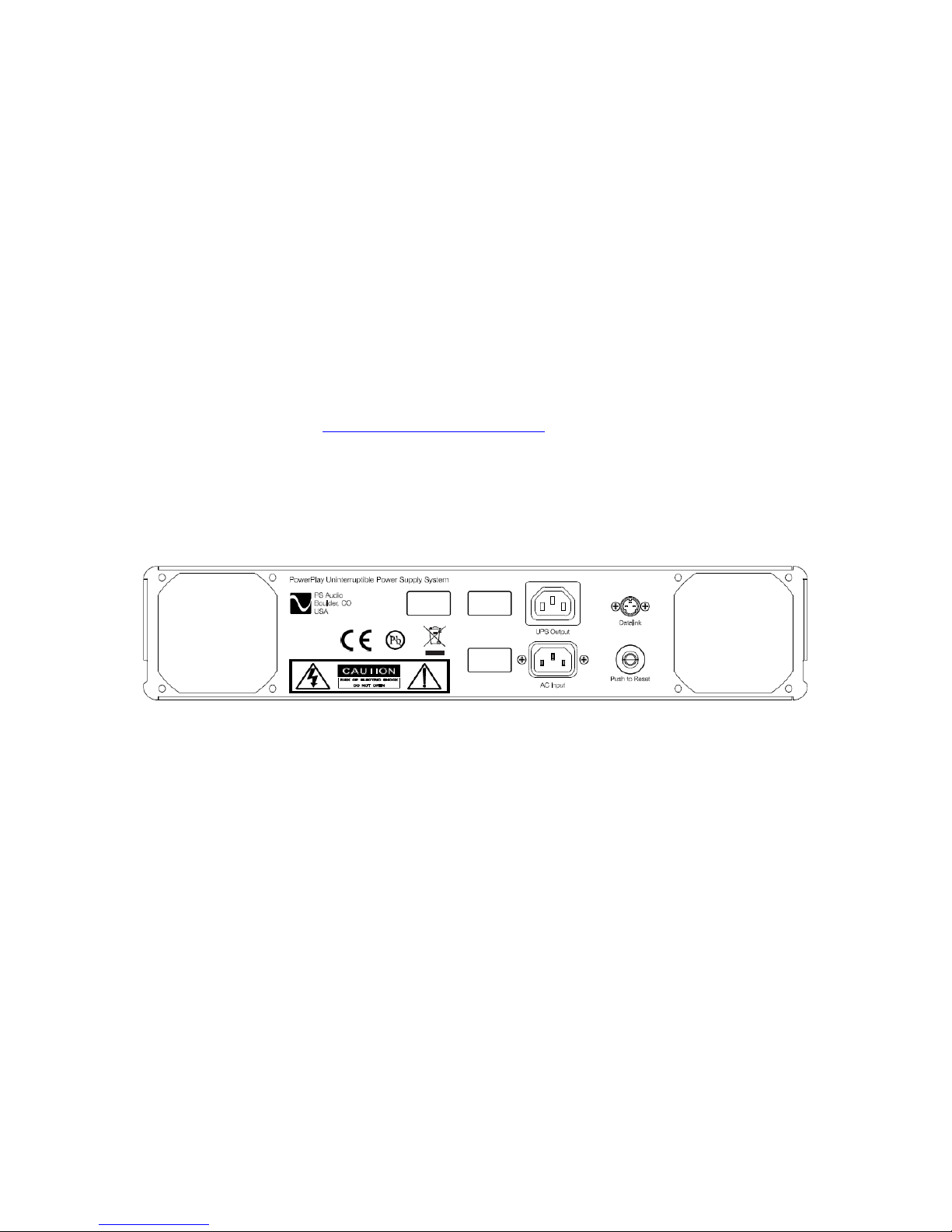
Second, connect the data cable to the small round Datalink socket on the back of the
PowerPack 1500 UPS and then to the Datalink socket on the PowerPlay unit.
Third, connect the IEC–IEC power cable from the PowerPack’s UPS Output socket to the
PowerPlay’s AC Input socket. Then connect the AC power cord from the wall to the
PowerPack’s AC Input.
OPERATION:
Press and hold the center PS logo button for 2-3 seconds until the unit powers on. You
can then turn the connected PowerPlay unit on.
While powered on, the icons on the left side of the display show whether the incoming
voltage needs boosting, is normal or needs trimming by the PowerPack.
Page 2
The bars in the center of the display show the relative load connected to the PowerPlay
when it is on ‘live’ AC. When running on batteries, it displays approximate battery
capacity.
The icons on the right side of the display show if there is a fault with the unit, if it is
running on batteries and if the batteries need to be replaced.
To change the display intensity, press the DIM or BRIGHT button.
To turn the PowerPack off, press and hold the OFF button at the bottom of the display for
2-3 seconds.
When the PowerPack and PowerPlay units are both ON, you can set up UPS operation
through your account at http://powerplay.psaudio.com
PowerPack Back Panel:
 Loading...