

Page 1
®
Owner's Reference
Instructions for Use
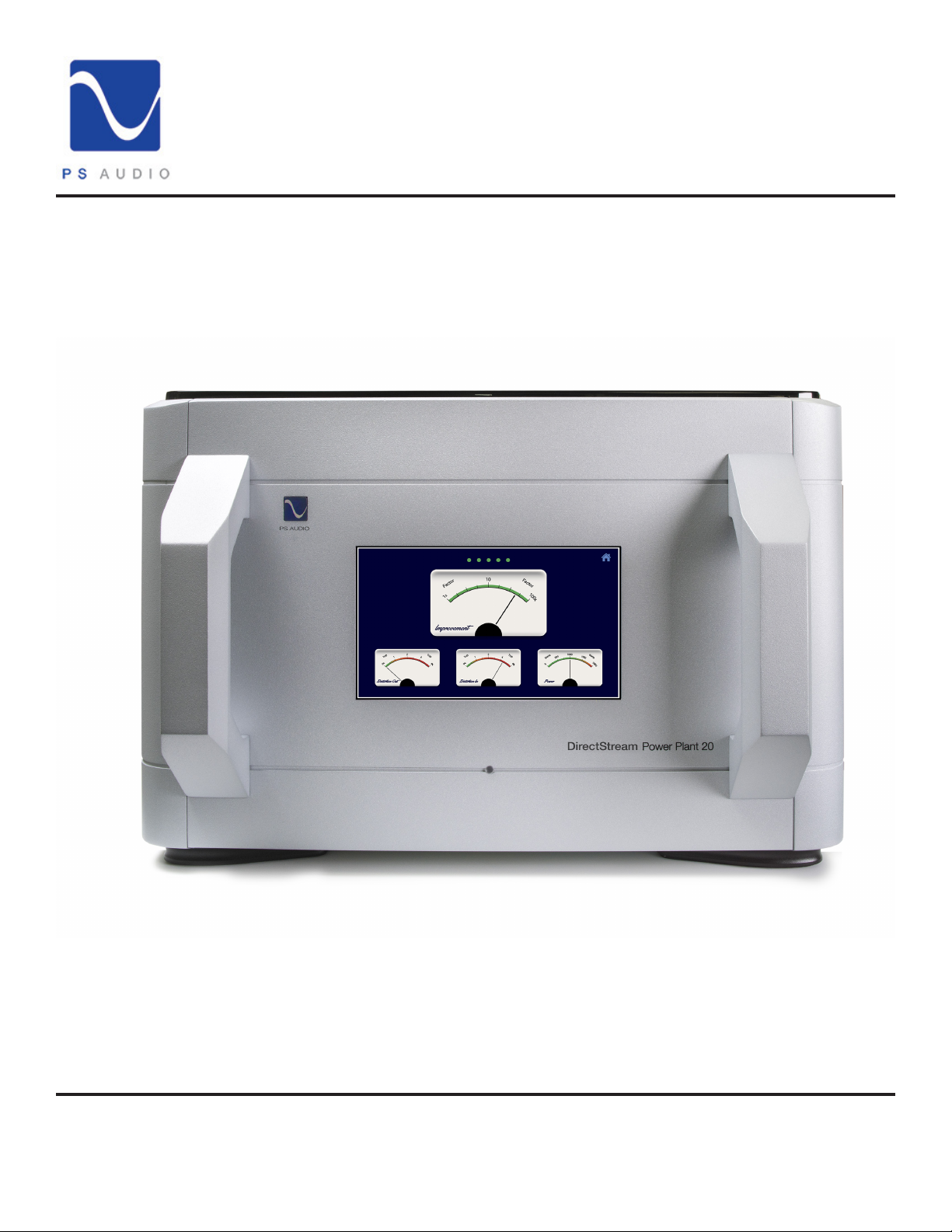
DirectStream PowerPlant 20
4865 Sterling Drive, Boulder, CO 80301
PH: 1 (800) PSAUDIO
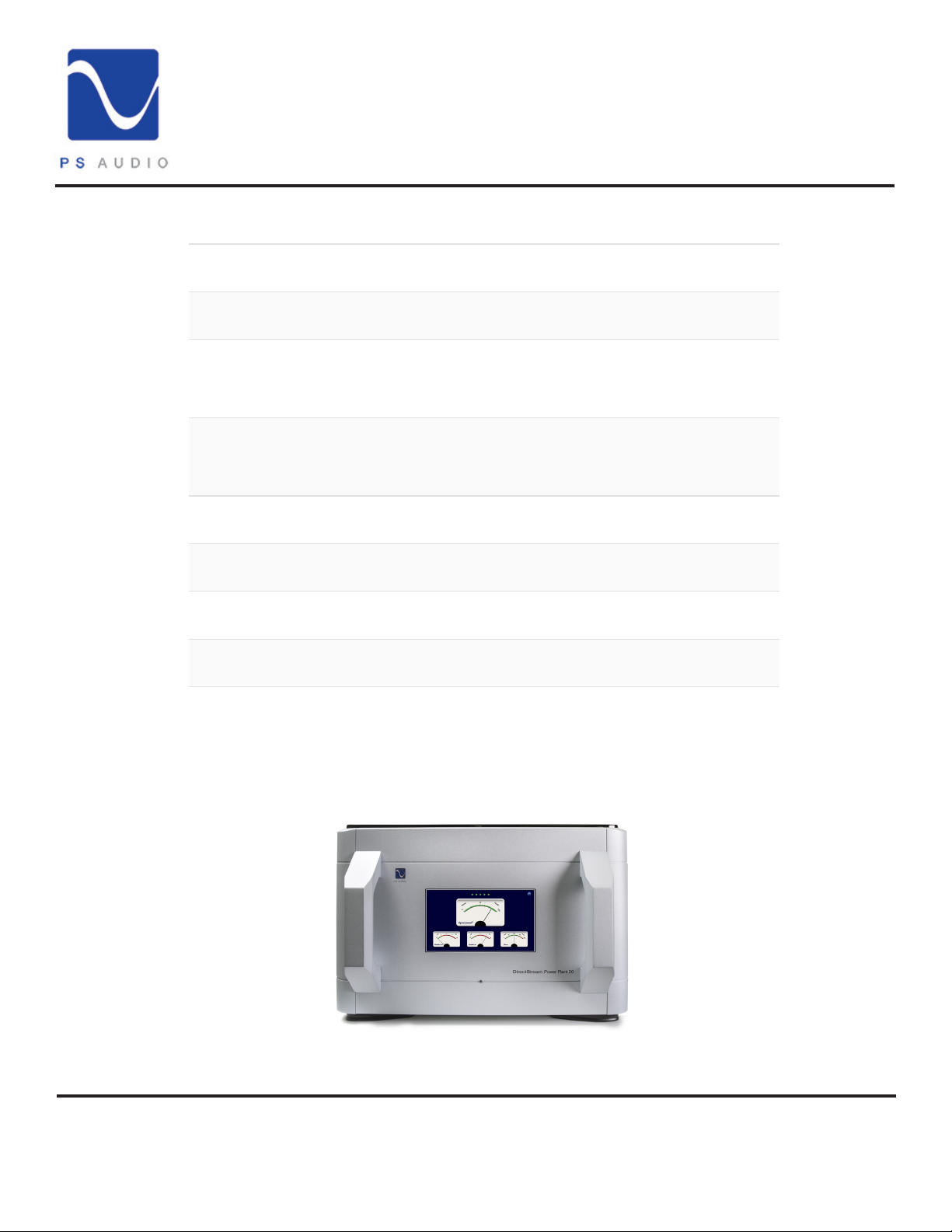
DirectStream Power Plant 20
www.psaudio.com
©2021 PS Audio Inc. All rights reserved.
15-084-01-1
Rev D
Page 2

®
Introduction
DirectStream PowerPlant 20
Important Safety
Instructions
Heed all warnings
Follow all instructions
WARNING. TO REDUCE THE RISK OF FIRE OR ELECTRICAL SHOCK, DO NOT EXPOSE THIS
APPARATUS TO RAIN OR MOISTURE.
Clean only with a dry cloth.
Do not place ammable material on top of or beneath the component.
The PS Audio Power Plant 20 is a passively cooled component that requires adequate ventilation at
all times during operation.
Do not remove or bypass the ground pin on the end of the AC cord. All PS products ship with
a grounding-type plug. If the provided plug does not t into your outlet, consult an electrician for
replacement of the obsolete outlet.
Protect the power cord from being walked on or pinched particularly at plugs, convenience
receptacles, and the point where they exit from the apparatus. Unplug this apparatus during lightning
storms.
When making connections to this or any other component, make sure all components are powered
o. Turn o the system’s power before connecting the PS Audio component to any other component.
Make sure all cable terminations are of the highest quality.
Read these instructions
THERE ARE NO USER-SERVICEABLE PARTS INSIDE THIS PS AUDIO PRODUCT. REFER ALL
SERVICE NEEDS TO QUALIFIED SERVICE PERSONNEL.
Please contact your authorized dealer, your distributor, or PS Audio directly if you have any questions
or concerns that are not addressed in this reference manual.
PS Audio®, the sinewave logo, and PerfectWave® are registered trademarks of PS Audio, Inc., and
are restricted for use by PS Audio, Inc., its subsidiaries, and authorized agents. DirectStream™ and
Power Plant™ are trademarks of PS Audio, Inc.
4865 Sterling Drive, Boulder, CO 80301
PH: 1 (800) PSAUDIO
www.psaudio.com
15-084-01-1
Rev D
1
©2021 PS Audio Inc. All rights reserved.
Page 3

®
Introduction
DirectStream PowerPlant 20
Warnings
Symbols Found on
the P20
WARNING: TO REDUCE THE RISK OF ELECTRICAL SHOCK, DO NOT EXPOSE THIS APPARATUS
TO DRIPPING OR SPLASHING AND NO OBJECTS FILLED WITH LIQUIDS, SUCH AS VASES,
SHALL BE PLACED ON THE APPARATUS.
WARNING: TO REDUCE THE RISK OF ELECTRICAL SHOCK, THIS APPLIANCE MUST BE
CONNECTED TO A MAINS SOCKET OUTLET WITH A PROTECTIVE EARTH CONNECTION.
The European Union has harmonized the Mains Supply Voltage at 230V~50Hz. Previously, this
nominal voltage was 220V~ for continental Europe and 240V~ for the United Kingdom. Since the
output receptacles are Nationally Approved Mains Socket-Outlets, we have to restrict the Operator
set Output Voltage Range to 220-240V~.
Unit is shipped with the Mains Output Socket-Receptacles applicable to the country of installation as
specied by the customer. Please verify the marked Mains Supply ratings of the powered equipment
before making any AC connections. If there is a mix of marked Voltages (e.g. 220V, 230V and
240V), please set the output voltage to 230V.
Explanation of Symbols found on the DirectStream Power Plant 20
Indicates compliance with European Union Legislation for relevant safety (Low Voltage Directive
2014/35/EU) and EMC (EMC Directive 2014/30/EU) requirements.
Is intended to tell the user that parts inside the product are a risk of electric shock to persons.
Is intended to tell the user that important operating and servicing instructions are in the papers with
the appliance.
Signies that the instrument complies with European Union Waste Electrical and Electronic
Equipment Directive.
Indicates that the unit is in compliance with the European Union Reduction of Hazardous
Substances Directive.
Indicates the connector location for Ethernet connection to the network.
4865 Sterling Drive, Boulder, CO 80301
15-084-01-1
PH: 1 (800) PSAUDIO
www.psaudio.com
©2021 PS Audio Inc. All rights reserved.
Rev D
2
Page 4
®
Getting Started
DirectStream PowerPlant 20
Thank You!
Welcome
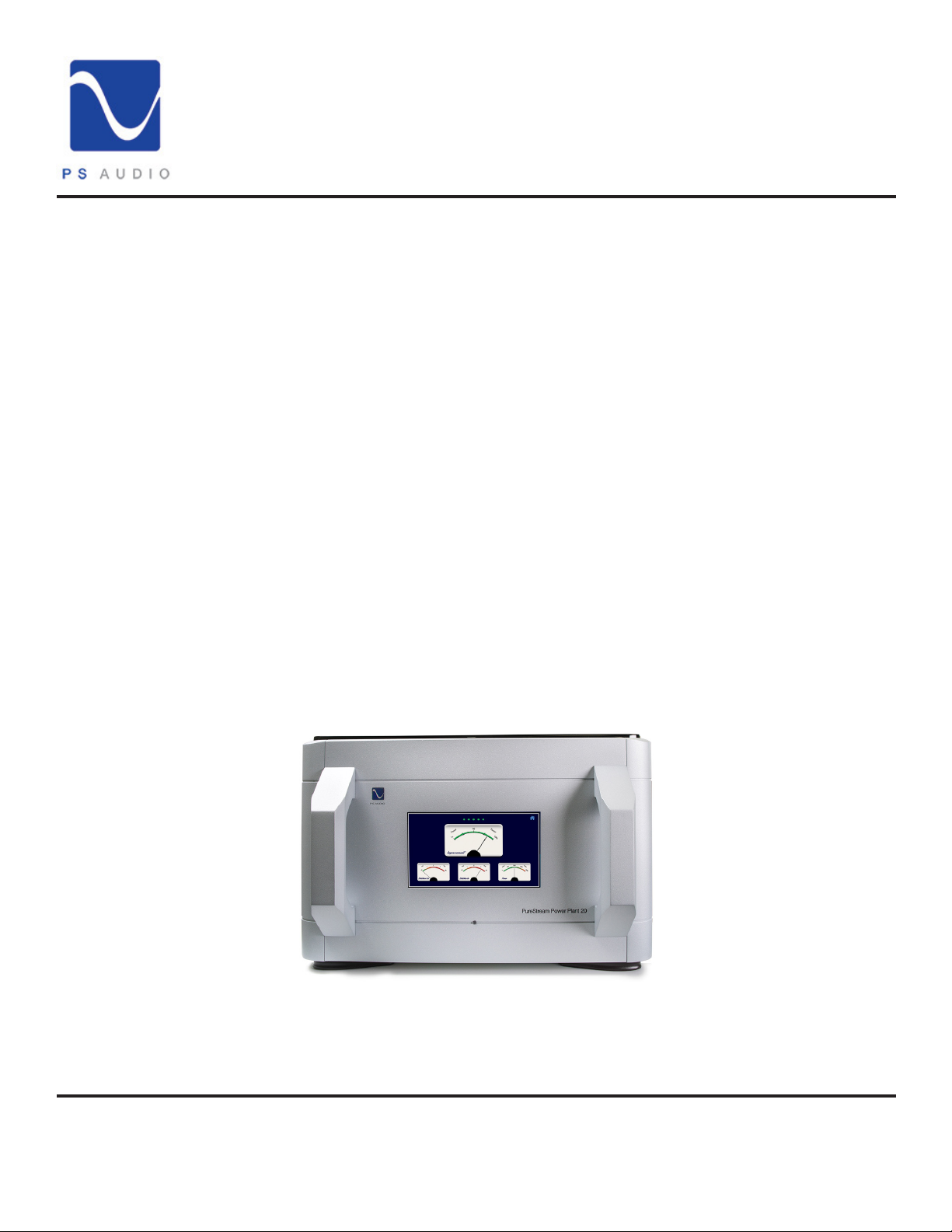
Thank you for purchasing PS Audio's DirectStream Power Plant 20 AC Regenerator. This is your
comprehensive Operator's Guide. This guide is intended to provide a full overview of the P20's
functions and capabilities. It is our intention to provide full details about the P20 and to answer any
and all questions you may have. If there is something that you feel was not covered in this guide or
additional questions for us you are welcome to reach out to us at:
1 (800) PSAUDIO
We'll be happy to assist you.
The Power Plant 20, also known as the P20, will provide regulated AC power regardless of the
condition of your home’s power. Clean, regulated AC is essential to optimize the performance of your
connected equipment.
The P20 removes the miles of power cables between your home and the power station. The P20 is
the world’s rst device that is the equivalent of moving your home to within 50 feet of the city power
station.
4865 Sterling Drive, Boulder, CO 80301
PH: 1 (800) PSAUDIO
www.psaudio.com
©2021 PS Audio Inc. All rights reserved.
15-084-01-1
Rev D
3
Page 5

®
Getting Started
DirectStream PowerPlant 20
Installation
Considerations
Dual Power
Inputs
Location
Once your new Power Plant 20 is unpacked, you’ll need to nd a convenient place to set it.
Mounting
The Power Plant 20 should be placed with consideration of providing air circulation to the unit. If
wishing to install the P20 into your component rack, the purchase of an aftermarket, customdesigned shelf may be necessary.
If your equipment is located a long distance from the Power Plant 20, it is preferable to use a long,
heavy gauge shielded power cable between the AC receptacle in the wall and the Power Plant. This
is better than long individual power cables between the connected components and the Power Plant
20.
Conditioners
We discourage the use of any other power conditioning equipment before or after the P20 without
considerable evaluation. A critical determination will have to be made as to whether there are any
sonic or visual shortcomings. The P20 has a signicant input & output passive lter design, and
adding extra power cables to its input or additional ltering to its output may, in fact, be undesirable.
The P20 is capable of delivering up to 2000 VA of pure, clean power. All of the 230V models will
deliver this power using the normal 230 volt 10 amp supply cable. However in North America, the
electrical building codes will only allow 1440 VA to be drawn from a standard receptacle. When
using the standard (15 amp IEC C14) AC cable supplied with the P20, the maximum output power
is limited to 1200 VA. You will still receive all the performance benets of the P20 regenerator, but if
your system actually draws more than 1200 VA, the Power Plant will shut down the outputs in order
to avoid overloading the supply from your wall.
*NOTE*
If your system needs to utilize the full 2000 VA capability of your P20, it will be necessary
to have an electrician install a dedicated 20A, 120V circuit to feed your Power Plant. In
order to comply with North American electrical codes, this circuit should have one single
(not duplex) receptacle and cannot be connected to any other devices. To connect your
P20 to this dedicated circuit, rst disconnect the standard 15A power cable. Slide the door
covering the 20A inlet to the left. Now the 15A inlet is safely covered and the 20A inlet is
available for powering your unit. You will need to purchase a power cord with a 20A (Nema
5-20) plug to match your dedicated receptacle and a 20A (IEC C19) connector to match
your P20. The P20 will automatically detect the position of the door and enable the full
power capabilities of your Power Plant.
4865 Sterling Drive, Boulder, CO 80301
PH: 1 (800) PSAUDIO
www.psaudio.com
©2021 PS Audio Inc. All rights reserved.
15-084-01-1
Rev D
4
Page 6
®
Getting Started
DirectStream PowerPlant 20
Included with the
P20
The Remote
Accessories:
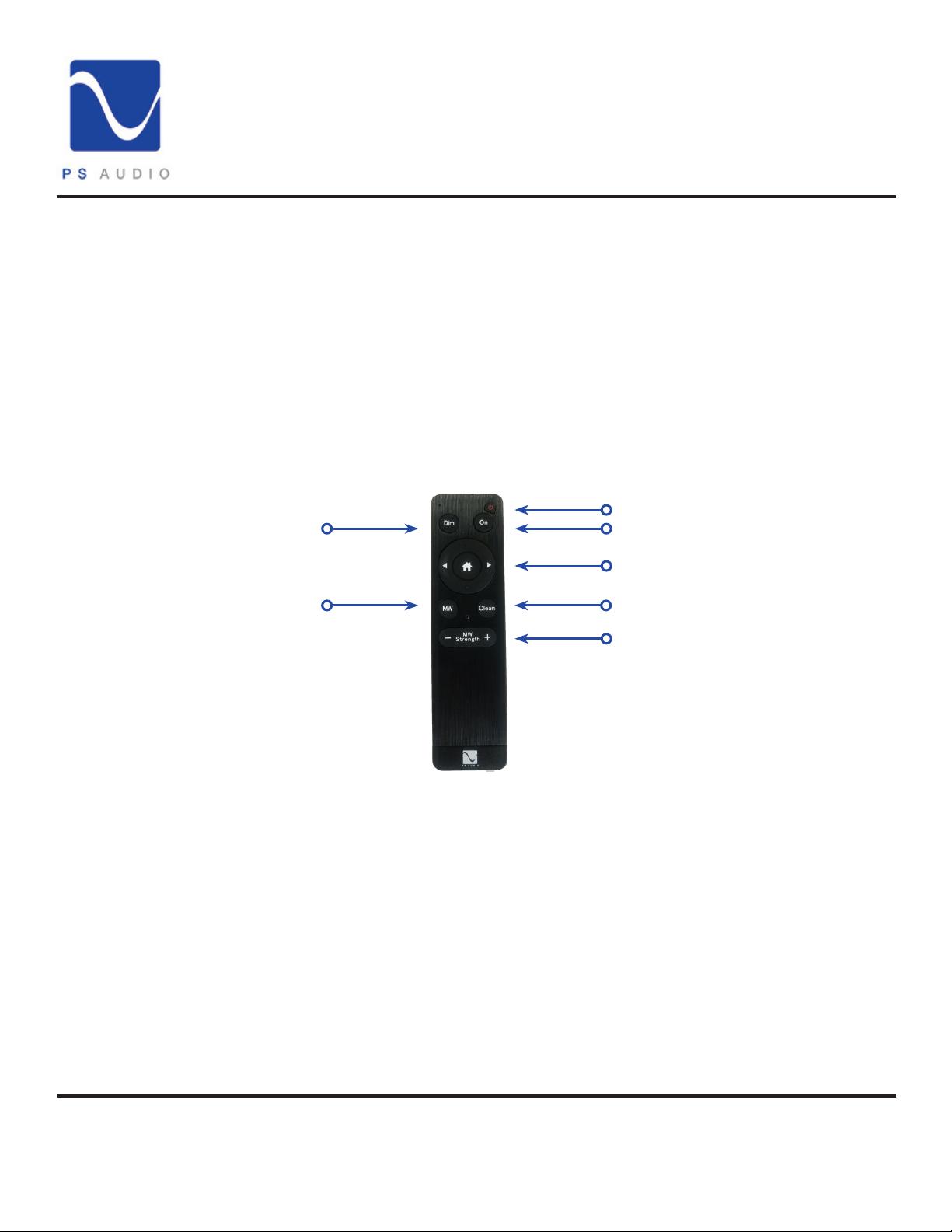
• Remote Control
• Power Cable: 6ft
• Owner’s Reference
•SD Card
•Ferrite noise suppressor
1.
2.
3.
4.
5.
6.
7.
1.
The Dim button turns the P20's display on and o.
2.
Multi Wave toggle button turns the Multi Wave on and o.
3.
The power button puts the P20 into standby.
4.
The On button turns the unit on and brings the screen back on if dimmed.
5.
The home button and arrows allow you to navigate the on-screen menu.
6.
Clean engages the Clean Wave feature.
7.
MW Strength +/- increases and decreases the Multi Wave level in the setup menu.
4865 Sterling Drive, Boulder, CO 80301
PH: 1 (800) PSAUDIO
www.psaudio.com
©2021 PS Audio Inc. All rights reserved.
15-084-01-1
Rev D
5
Page 7
®
Getting Started
DirectStream PowerPlant 20
Powering the P20
On
Home Screen
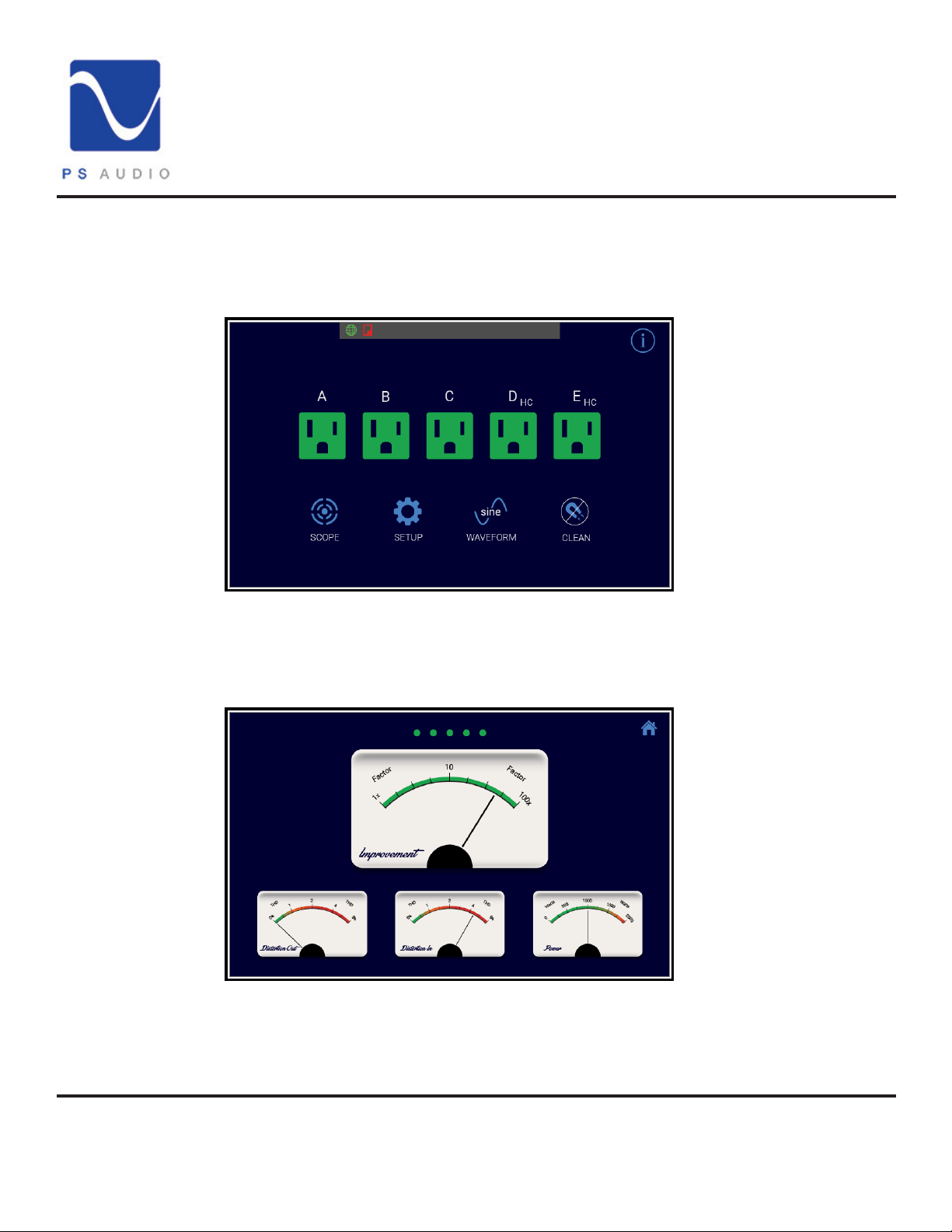
Once connected to power simply ip the rear power switch to the on position and allow the unit to
initialize. Once complete the unit will present the Main Screen:
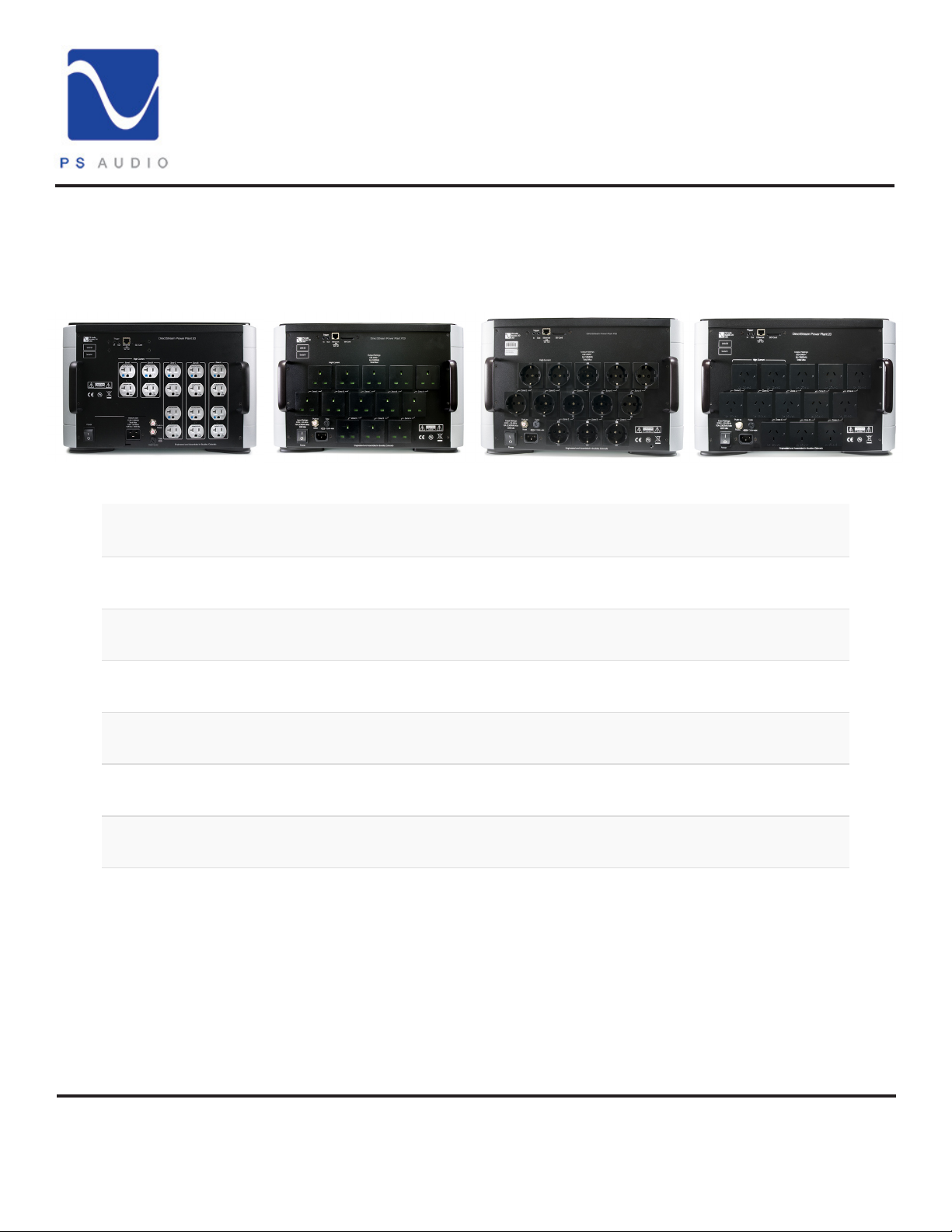
This image features outlet images of the US socket type. Units in dierent regions will have dierent
outlet images. Pressing the green image will make it red and turn o the correlated zone.
This screen will present for 30 seconds then it will change to the default Metering Screen:
Meter Screen
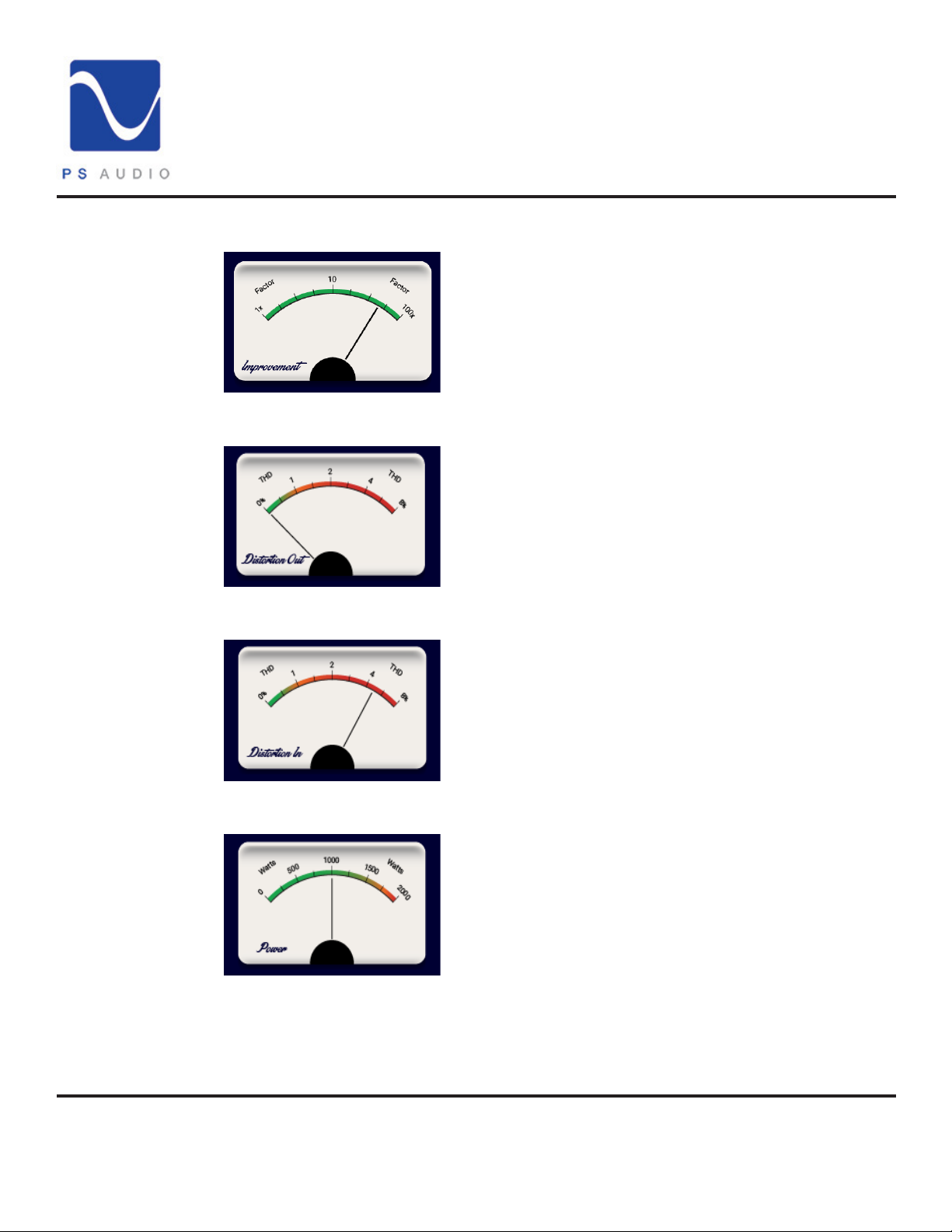
Pressing any of the lower meter images will bring them to the top. This is an extremely handy display
as it gives a continuous status indication for the P20.
4865 Sterling Drive, Boulder, CO 80301
15-084-01-1
PH: 1 (800) PSAUDIO
www.psaudio.com
©2021 PS Audio Inc. All rights reserved.
Rev D
6
Page 8
®
Getting Started
DirectStream PowerPlant 20
Improvement
Factor
Distortion Out
Distortion In
The Improvement Factor is an
average of the Voltage Output
and the THD output. It gives you a
factor of how much the AC power is
improved by the P20.
The Distortion Out is a measure of
the THD (Total Harmonic Distortion)
present in your AC Output voltage.
The Distortion In is a measure of
the THD (Total Harmonic Distortion)
present in your AC input voltage.
Power
4865 Sterling Drive, Boulder, CO 80301
PH: 1 (800) PSAUDIO
The Power Meter shows the total
wattage output from the P20.
*NOTE*
Overloading the P20 will result
in shutdown. More than an 80%
continuous load reduces the
overhead for potential peaks in
the power requirements from your
audio system. The P20 can operate
continuously at full power but you
simply won't have any extra room for
potential spikes in power draw.
www.psaudio.com
©2021 PS Audio Inc. All rights reserved.
15-084-01-1
Rev D
7
Page 9
®
Operation Guide
DirectStream PowerPlant 20
Scope
Status
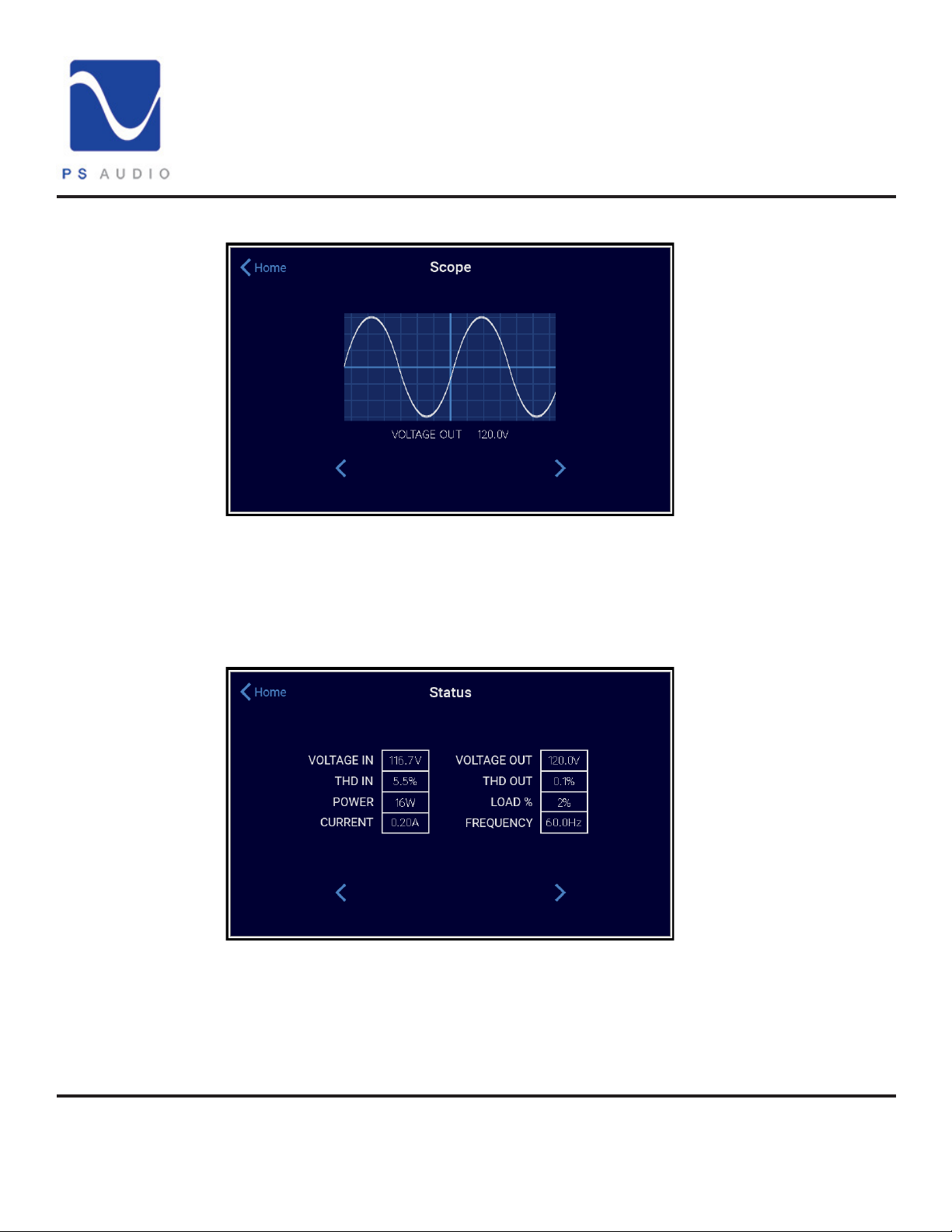
From the home screen press the Scope button to open the Scope window.
This is a fully functional oscilloscope that you can use to view the incoming AC waveform. Pressing
either of the arrow buttons will scroll through the voltage in, voltage out, and the dierence windows.
In this way, you can see the degree to which the P20's output waveform is superior to the incoming
AC sinewave.
Pressing the right arrow three times brings us to the Status window.
Here you can see the P20's overall performance data. Note how in the above image the THD output
is signicantly reduced and the output voltage is a stable 120 Volts. Press the Home button to return
to the Home screen.
4865 Sterling Drive, Boulder, CO 80301
PH: 1 (800) PSAUDIO
www.psaudio.com
©2021 PS Audio Inc. All rights reserved.
15-084-01-1
Rev D
8
Page 10
®
Operation Guide
DirectStream PowerPlant 20
Setup
Voltage
MW Strength
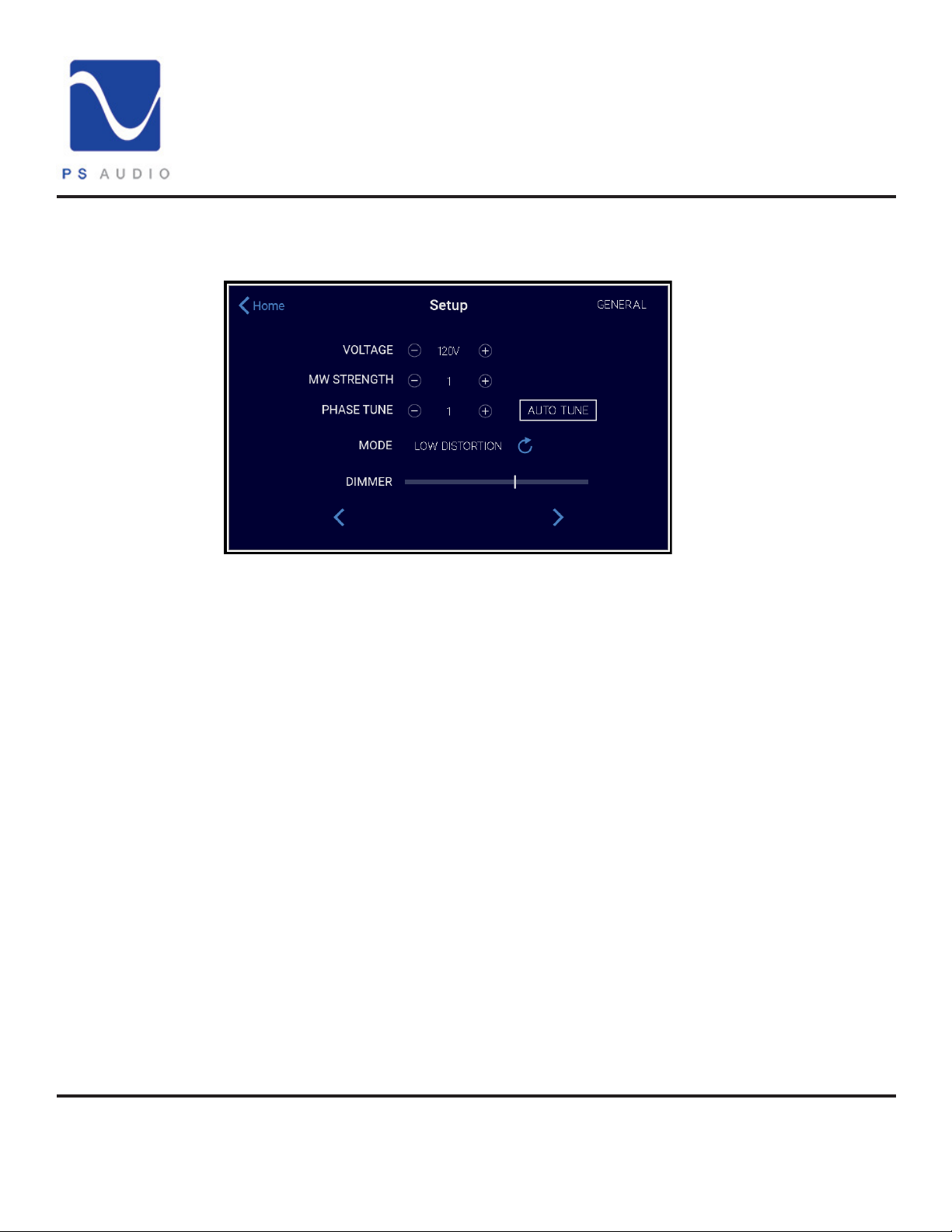
Pressing the Setup button on the Home screen brings you to the Setup screen:
Here you can globally adjust the output voltage for the P20. Bear in mind that the P20 will output the
same voltage from all zones. They are not individually adjustable.
Variable MultiWave Strength adjustment is available here. This feature can be enabled by pressing
the MultiWave button on the Home screen. Variable MultiWave empowers users to vary the strength
of the MultiWave output according to the needs of the equipment and the resulting performance
benets. To toggle this feature on and o simply press the Waveform Button in the Main screen.
Phase Tuning
Auto Tune
Mode
Dimmer
4865 Sterling Drive, Boulder, CO 80301
PH: 1 (800) PSAUDIO
Phase tuning is the next adjustment. Increasing or decreasing this will move the point at which the
P20 detects the incoming waveform as the wave crosses the 0 Voltage point. In places where the
AC power is especially poor making small adjustments to this setting can potentially lower the THD
output. The best recommendation would be to keep this at zero unless you are seeing THD output
higher than 1-2%.
Pressing the Auto-Tune button will calibrate the phase setting to the optimum setting for your input
power. This only needs to be performed whenever the unit is moved to a new area to maintain
optimal performance.
The Mode setting gives you the choice of High Regulation or Low Distortion. High Regulation is
the default mode and ensures that the P20 will output the voltage very precisely at the expense of
potentially higher distortion (THD). Low distortion mode ensures that the P20 will output the lowest
possible distortion at the expense of more uctuations in the output voltage. Choose the option that
best suits your needs.
The Dimmer slider allows you to manually adjust the brightness of the screen. Simply move the slider
left or right to choose the brightness setting that is suitable for you.
www.psaudio.com
©2021 PS Audio Inc. All rights reserved.
15-084-01-1
Rev D
9
Page 11
®
Operation Guide
DirectStream PowerPlant 20
Setup
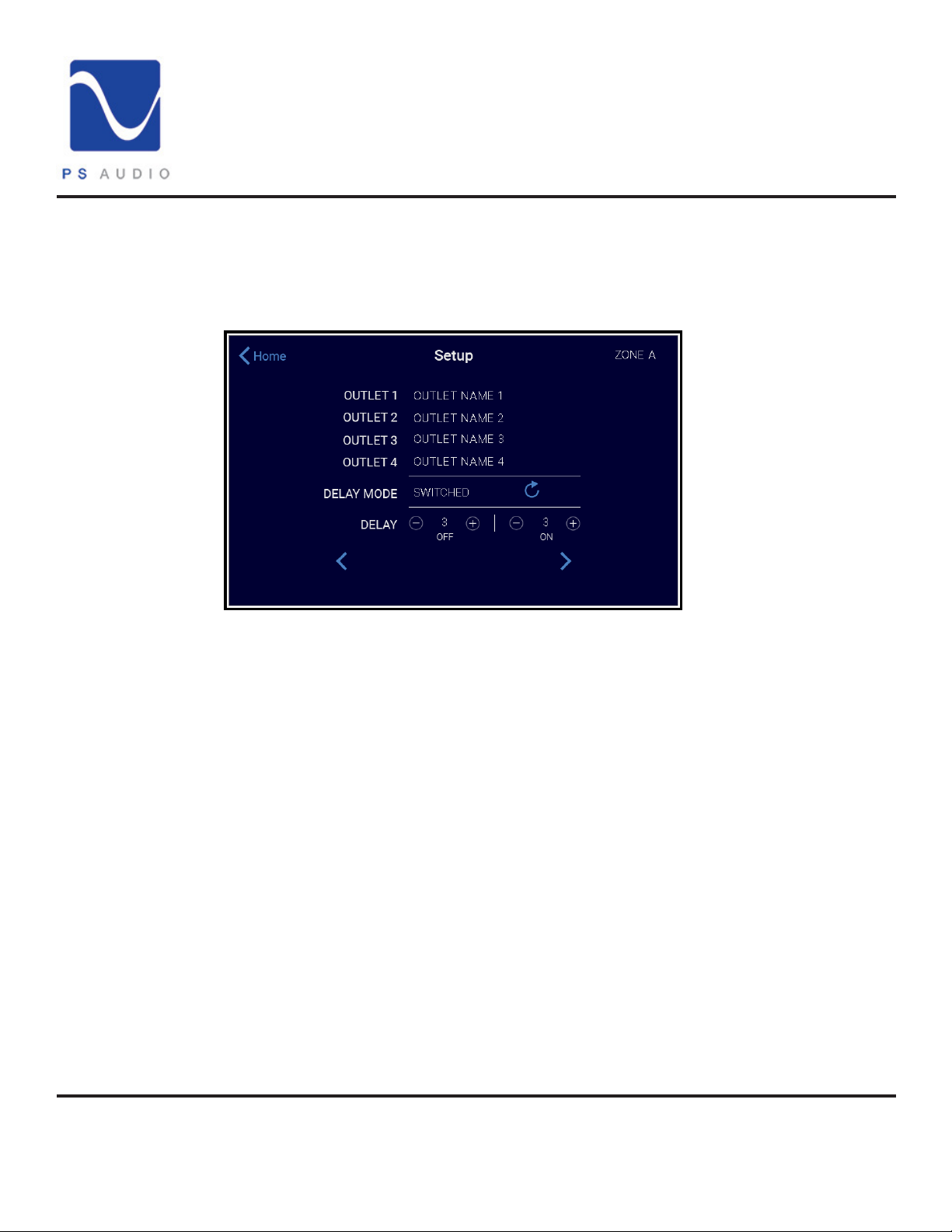
Pressing the right arrow pulls up the next menu of the Setup section.
Outlets
Delay Mode
4865 Sterling Drive, Boulder, CO 80301
The P20 has a lot of outlets. 16 total in the US version, (other regions will have dierent amounts as
outlet sizes vary). The outlets are grouped into Zones that can be personalized to t your specic
system requirements.
The Power Plant 20 allows for six dierent power sequencing options. The default
setting for all zones is SWITCHED. All of these selections are only activated by the front-panel
power button.
1. SWITCHED: As the front-panel power button is engaged, any zone set to SWITCHED will
power up with no delay, and power down with a three-second delay.
2. DELAYED: As the front-panel power button is engaged, any zone set to DELAYED will
power up with a three-second delay, and power down with a zero-second delay.
3. PROGRAMMED: As the front-panel power button is engaged, any zone set to
PROGRAMMED will power up with a delay in the number of seconds desired, as well as
power down with a delay in the number of seconds desired.
4. REBOOT: As the front-panel power button is powered down, any zone set to REBOOT
will power down accordingly, and will, after a three-second delay, power back on. This mode is
independent of the front power button.
15-084-01-1
PH: 1 (800) PSAUDIO
www.psaudio.com
©2021 PS Audio Inc. All rights reserved.
Rev D
10
Page 12
®
Operation Guide
DirectStream PowerPlant 20
Delay Mode
Continued
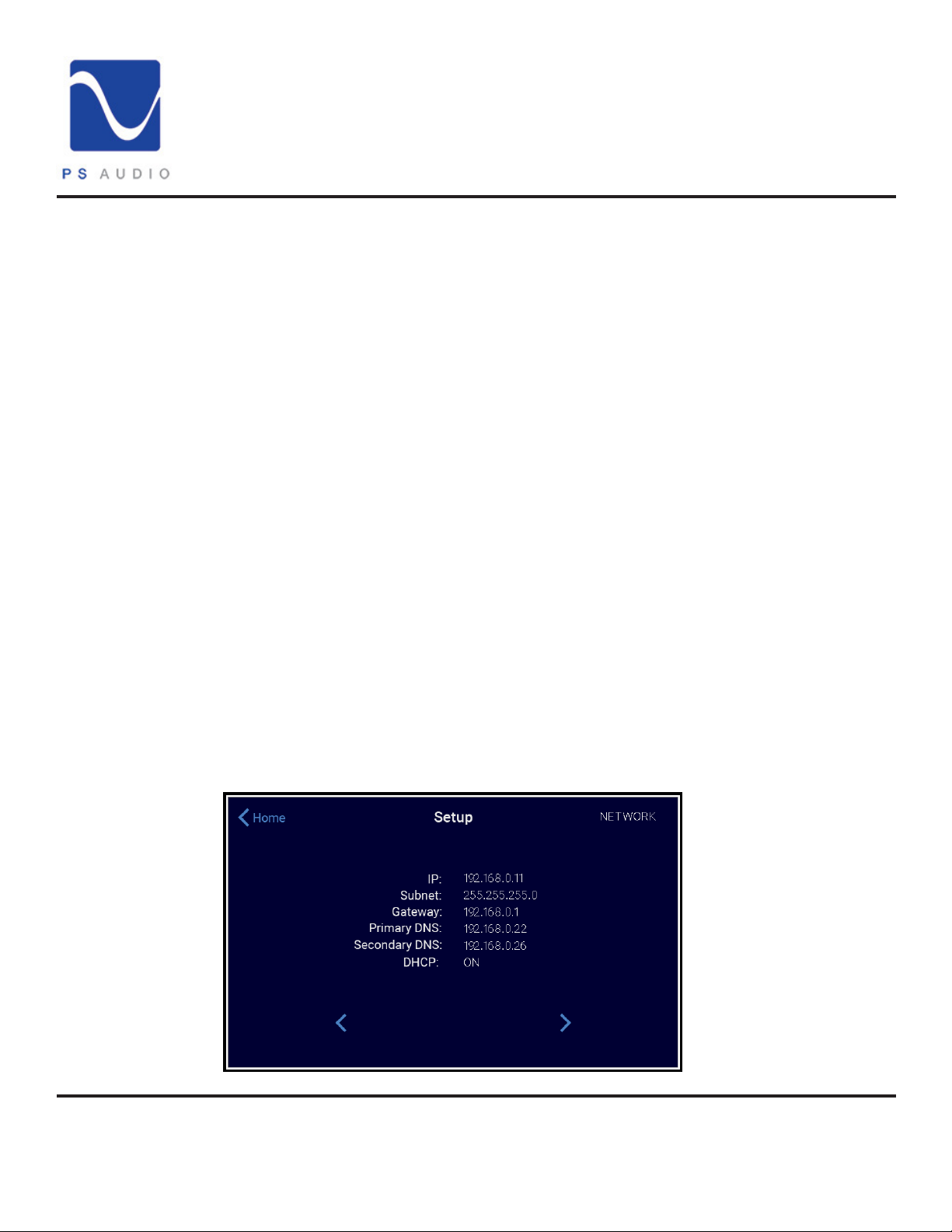
Network Screen
5. AUTO-REBOOT: If your Power Plant 20 is connected to the network, and if the network’s
router is being powered by the Power Plant 20, you may want to set that zone to AUTO-REBOOT.
At this setting, the Power Plant 20 will use the router and the network to ping the PS Audio Server,
essentially saying “hello, I’m an active network device and the router is working.” If the ping does
not reach our server after several tries, the Power Plant 20 will assume that the router has frozen up,
and will automatically reboot that zone, thereby resetting the router and restoring connectivity. One
may wish to power the network’s modem on this zone as well, for the same reason. This mode is
independent of the front power button.
6. ALWAYS ON: In this setting, the P20 will output power from this zone regardless of
whether the front-panel power button is engaged. As long as the Power Plant 20 is
plugged in and the back-panel power switch is set to on, any zone set to ALWAYS ON will
output regulated, regenerated AC power.
*Note*
Pressing the right or left arrow buttons will take you from control parameters for Zone A
to the parameters for Zone B, C, D, and E respectively. All Zone settings can be made with
the same instructions and suggestions as described above for Zone A.
The nal screen in this section is the Network Screen. Here you can see the P20 IP address and
other network information. Connecting your Power Plant 20 to the network is an option that provides
extended functionality benets. It is recommended that the Power Plant 20 be connected to the router
via hard-wire connection. In addition, in order to make sure your Power Plant is fully compliant with
international regulations, please install the included ferrite noise suppressor onto the Ethernet cable close
to the unit.
4865 Sterling Drive, Boulder, CO 80301
PH: 1 (800) PSAUDIO
www.psaudio.com
©2021 PS Audio Inc. All rights reserved.
15-084-01-1
Rev D
11
Page 13
®
Operation Guide
DirectStream PowerPlant 20
Network Screen
Continued
Firmware Screen
If a network connection is not available for the Power Plant 20 it will in no way aect the P20’s
performance in your system in terms of the quality of regenerated, regulated AC. Connecting your
P20 to the network allows functionality benets only, not performance based benets.
The online interface is user friendly and can be accessed by registering one’s P20 at the following
link: powerplay.psaudio.com. You will nd a multitude of usability features including:
• P20 consumption records and performance tracking.
• Individualized zone control.
• System alerts and notications.
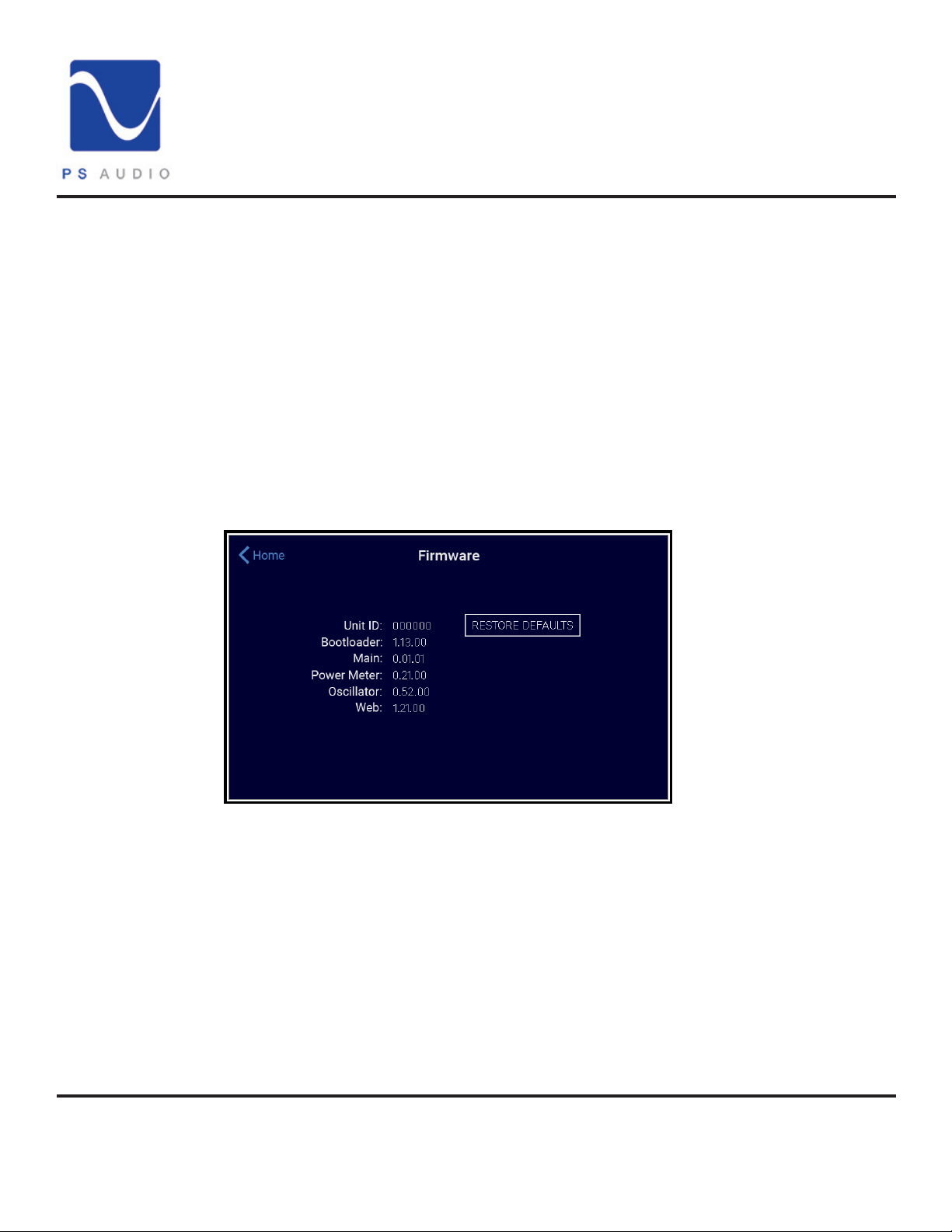
From the Main screen press the settings button in the upper right corner.
This will open the Firmware screen:
*NOTE*
Your rmware screen may dier from the above image as rmware releases come out. Make sure
you visit our downloads page to verify that your P20 rmware is up to date:
http://www.psaudio.com/support/downloads/
Unit ID
The unit ID is the unique, numeric identier for the P20. It is the last 6 digits of the serial number and
it is used to allow our online resource PowerPlay to track and collate the P20's performance data.
For more information on this go to:
http://powerplay.psaudio.com/
4865 Sterling Drive, Boulder, CO 80301
PH: 1 (800) PSAUDIO
www.psaudio.com
©2021 PS Audio Inc. All rights reserved.
15-084-01-1
Rev D
12
Page 14

®
Operation Guide
DirectStream PowerPlant 20
Firmware Screen
Restore Defaults
CleanWave
The Bootloader / Firmware / Power Meter / Oscillator / Web versions are listed next. On occasion
PS Audio will release rmware updates for the P20. It is important that you keep your P20 fully up to
date. Look for rmware releases in our Newsletter or at:
http://www.psaudio.com/support/downloads/
The restore defaults button resets the user dened settings back to the factory settings.
By selecting the icon labeled CLEAN the Power Plant 20 will activate the CleanWave function and
the display of the P20 will begin to countdown the time left as the P20 is applying the CleanWave
signal. CleanWave injects a series of higher frequencies that ride on the main sine wave to help
“degauss” connected magnetics.
To ensure that CleanWave is eective, make sure all connected equipment is on and functioning.
CleanWave can be used between CD’s, movies, and vinyl. It is not recommended to activate
CleanWave while you are listening as it may not sound correct until the CleanWave cycle has
nished. The option exists for a 5 second or a 60 CleanWave cycle by touching the Add Time
button.
4865 Sterling Drive, Boulder, CO 80301
PH: 1 (800) PSAUDIO
www.psaudio.com
©2021 PS Audio Inc. All rights reserved.
15-084-01-1
Rev D
13
Page 15
EEnnvviirroonnmmeenntt SSppeecciiffiiccaattiioonn
UUSS//JJPP
EEuurrooppee//AAssiiaa
Location
Indoor use only
Indoor use only
Duty Cycle
Suitable for continuous operation
Suitable for continuous operation
Moisture Sensitivity
Not sealed against moisture
Not sealed against moisture
Operating Humidity
<80%rh
<80%rh
Storage Temperature
-40C to +40C
-40C to +40C
Operating Temperature
0C to 40C
0C to 40C
Electrical Supply Nominal Rating
US - 120V 15A 60Hz
JP - 100V 15A 50/60Hz
230V 10A 50 / 60Hz
®
Specications of the P20 per country.
Specications
DirectStream PowerPlant 20
4865 Sterling Drive, Boulder, CO 80301
PH: 1 (800) PSAUDIO
www.psaudio.com
©2021 PS Audio Inc. All rights reserved.
15-084-01-1
Rev D
14
Page 16

IInnssttrruummeenntt
JJPP//UUSS
EEuurrooppee // AAssiiaa
Unit Weight
96 lbs ( 43.5kg)
96 lbs ( 43.5kg)
Shipping Weight
105 lbs (47kg)
105 lbs (47kg)
Maximum Continuous
US - 2000 VA w/20A supply
2000VA
Maximum Peak Load
3600VA
3600VA
Voltage Regulation
Output Distortion
<0.5%
<0.5%
Output Impedance
<0.005 ohm
<0.005 ohm
Efficiency @1500 VA
>85%
>85%
®
Specications
DirectStream PowerPlant 20
Specification
Unit Dimensions 17” W x 14” D x 11” H (43cm W x
Shipping Dimensions 23” x 22” x 17” ( 58cm x 55.8cm x
Nominal Input Voltage US - 95 – 145 VAC
Load
36cm D x 27.9 cm H)
43 cm)
JP - 75 – 120 VAC
US - 1500 VA w/15A supply
JP - 1700 VA w/20A supply
JP - 1200 VA w/15A supply
17” W x 14” D x 11” H (43cm W x
36cm D x 27.9 cm H)
23” x 22” x 17” ( 58cm x 55.8cm x
43cm)
200 –285 VAC
Output Distortion
(Resistive Load)
(Reactive Load)
4865 Sterling Drive, Boulder, CO 80301
PH: 1 (800) PSAUDIO
<1V
<0.5%
<1V
<0.5%
www.psaudio.com
©2021 PS Audio Inc. All rights reserved.
15-084-01-1
Rev D
15
Page 17
Standby power consumption
35 Watts
45 Watts
Input Frequency
45 – 65 Hz
45 – 65 Hz
Under Voltage Limit
US-90 Volts
JP-75 Volts
175 Volts
Over Voltage Limit
US-144 Volts
JP-120 Volts
275 Volts
Energy Dissipation
2040J
5040J
Peak Current Surge
180,000A
180,000A
Clamp Level
340V
775V
DC Trigger Configuration
Tip Positive
Tip Positive
DC Trigger Voltage
5 – 15Vdc
5 – 15Vdc
®
Specications
DirectStream PowerPlant 20
4865 Sterling Drive, Boulder, CO 80301
PH: 1 (800) PSAUDIO
www.psaudio.com
©2021 PS Audio Inc. All rights reserved.
15-084-01-1
Rev D
16
Page 18

®
Warranty
DirectStream PowerPlant 20
Limited Three Year Warranty
Registering
Coverage
Should I Register My Product?
• Registering your product validates the warranty start date.
• If you do not register your product within 30 days of service, a copy of your purchase
receipt. from an authorized PS Audio dealer may be used as a proof of purchase to
establish the warranty start date.
• If no proof of purchase from an authorized PS Audio dealer or registration is provided, the
production date of the product will be used to determine the warranty start date.
• Registration can be completed online, by phone, by mail, or by email.
What Does this Warranty Cover?
This warranty covers defects in material and workmanship for products purchased from PS Audio or
its authorized dealers and agents.
What Will PS Audio Do to Correct the Problem?
In the event your product fails your sole remedy under this limited warranty shall be to return the
product to PS Audio or an authorized PS Audio repair center. The product will be repaired without
charge for parts or labor, replaced, or the purchase price refunded through the original point of
purchase, at the option of PS Audio.
What is the Period of Coverage?
This limited warranty is in eect for 3 years from the date the unit was rst purchased from PS Audio
or its dealers and agents.
Shipping
4865 Sterling Drive, Boulder, CO 80301
PH: 1 (800) PSAUDIO
Who Pays for Shipping?
You are responsible to pay for the safe and proper shipment of the warrantied product to PS Audio
or its authorized repair center.
The PS Audio authorized repair center will pay the cost of returning the repaired or replacement
product to you under this warranty.
www.psaudio.com
©2021 PS Audio Inc. All rights reserved.
15-084-01-1
Rev D
17
Page 19

®
Warranty
DirectStream PowerPlant 20
Not Covered
Limitations
What Does this Warranty Not Cover?
This warranty does not cover damage due to:
• Accidents, carelessness, improper transportation, misuse, neglect, or abuse.
• Failure to follow the operating instructions that are provided by PS Audio in the owner’s
manuals (available for download at psaudio.com).
• Use in any manner inconsistent with PS Audio’s operating instructions (available for
download at psaudio.com).
• Lack of routine maintenance.
• Connection to an improper voltage supply.
• Alterations or modications to the unit.
• Improper or unauthorized repair, including repairs not authorized by PS Audio or a PS Audio
authorized repair center.
• Fire, lightning, ood, “acts of God,” or other contingencies beyond the control of PS Audio.
• Products purchased through an unauthorized source (if you have questions as to whether or
not a dealer is authorized, please contact customer support at psaudio.com).
• Products with a factory-applied serial number that has in any way been altered, defaced, or
removed .
Limitations on PS Audio’s Obligations Under this Warranty
• In no event will PS Audio’s liability to you exceed the original purchase price of the unit.
• This warranty does not cover the cost of custom installation, customer instruction, setup
adjustments, or signal reception problems.
• This warranty does not cover consequential and incidental damages. Some states do
not allow the exclusion or limitation of incidental or consequential damages, so the above
limitation or exclusion may not apply to you.
• In the event your warrantied product cannot be repaired, PS Audio will replace or refund
the unit. We reserve the right to replace any out-of-stock, discontinued, or limited edition
products with a comparable product. Discontinued products may not be available for
warranty replacement.
Warranty Transfer
4865 Sterling Drive, Boulder, CO 80301
PH: 1 (800) PSAUDIO
How Can the Warranty be Transferred?
This warranty is for the benet of the original purchaser of the product. The warranty may be
transferred to a subsequent purchaser during the 3 year warranty period. To do this, you must
contact PS Audio directly to set up transfer of registration.
www.psaudio.com
©2021 PS Audio Inc. All rights reserved.
15-084-01-1
Rev D
18
Page 20

®
Service
DirectStream PowerPlant 20
If you require
service in North
America
Obtain an RMA
number
Use original
packing
State law
How Do I Get Warranty Service?
To locate an authorized PS Audio repair center, for service assistance, or for help with the operation
of a product or just for information, please contact PS Audio customer support.
Warranty Service Within the US
• You must rst obtain a Return Merchandise Authorization Number (RMA#) to receive
warranty service and prior to returning any item. Contact PS Audio or an authorized PS
Audio repair center to receive an RMA#.
• You must put the RMA# on all returns. If it is not clearly marked, PS Audio will return the
package back to you, freight collect.
• Original packaging should be used for the safe transit of your PS Audio unit to the
repair center. If you do not have the original packing, PS Audio can sell and ship to you
replacement packaging.
• You are responsible for the cost of shipping the product to a PS Audio authorized repair
center. You should insure the product for its full retail cost in the event it gets lost or
damaged in transit. PS Audio is not responsible for damage incurred during the transit of
products sent to us.
• Shipping your product in non-PS Audio packaging may void this warranty. PS Audio
reserves the right to charge you for new factory packaging to return your product after a
repair.
How State Law Applies
This warranty gives you specic legal rights, and you may also have other rights which vary from
state to state.
If you are outside
the US
4865 Sterling Drive, Boulder, CO 80301
PH: 1 (800) PSAUDIO
Warranty Service Outside of the US
PS Audio has authorized distribution in many countries of the world. In each country, the authorized
importing distributor has accepted the responsibility for warranty of products sold by that distributor.
Warranty service should be obtained where the product was purchased.
www.psaudio.com
15-084-01-1
Rev D
19
©2021 PS Audio Inc. All rights reserved.
Page 21

®
Service
DirectStream PowerPlant 20
Changes to Our Products
PS Audio reserves the right to modify the design of any product without obligation to purchasers
of previously manufactured products and to change the prices or specications of any products
without notice or obligation to any person.
Your Serial
Number
Your Purchase
Information
Date of Purchase
4865 Sterling Drive, Boulder, CO 80301
PH: 1 (800) PSAUDIO
www.psaudio.com
©2021 PS Audio Inc. All rights reserved.
15-084-01-1
Rev D
20
Page 22

®
Notes
DirectStream PowerPlant 20
4865 Sterling Drive, Boulder, CO 80301
PH: 1 (800) PSAUDIO
www.psaudio.com
©2021 PS Audio Inc. All rights reserved.
15-084-01-1
Rev D
21
Page 23

®
Notes
DirectStream PowerPlant 20
4865 Sterling Drive, Boulder, CO 80301
PH: 1 (800) PSAUDIO
www.psaudio.com
©2021 PS Audio Inc. All rights reserved.
15-084-01-1
Rev D
22
Page 24

 Loading...