

Page 1
If other user shares DP-106 door
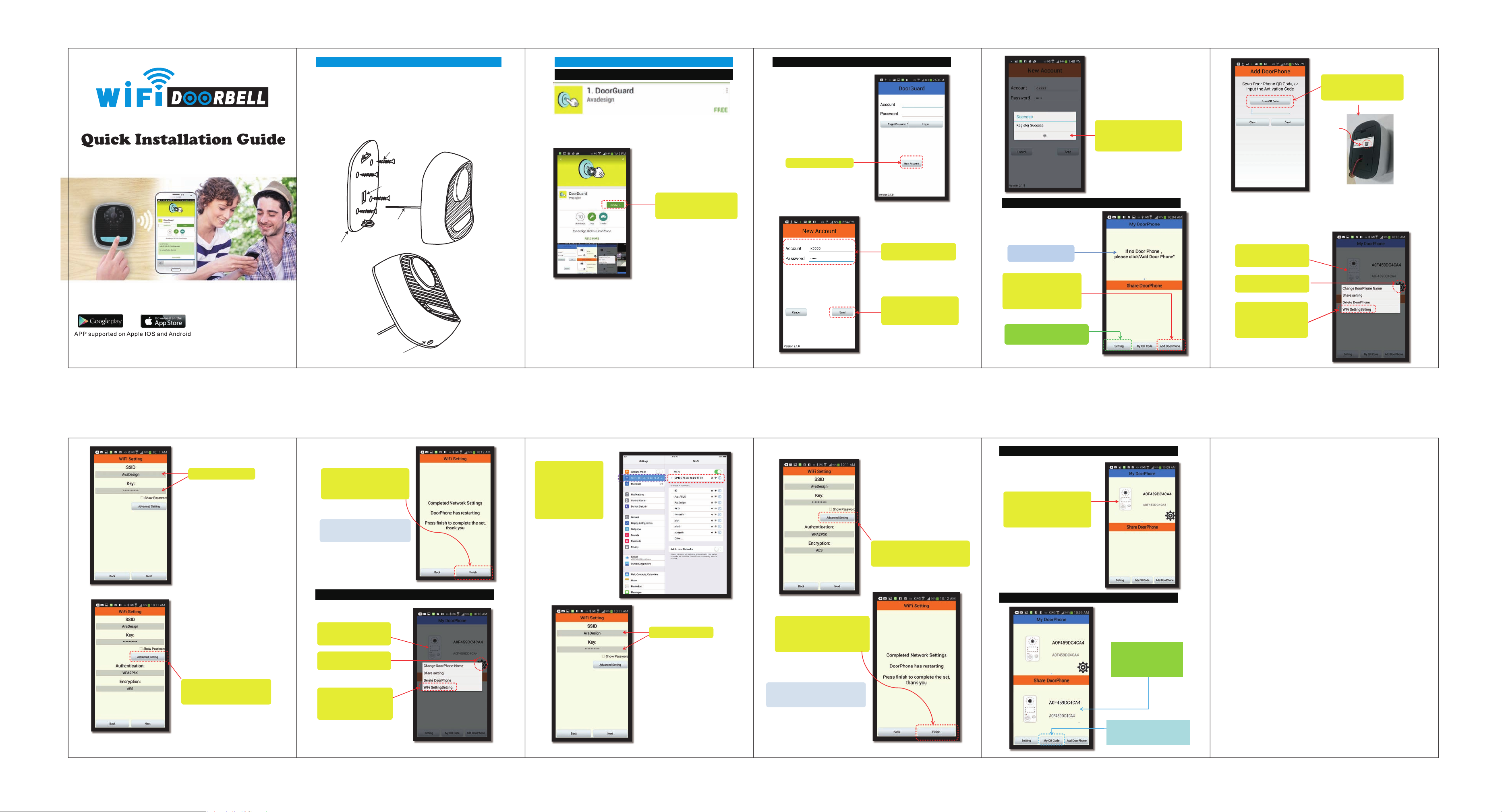
Part1. Unit installation Part2. APP operating guide
Step1. To drillfour holes for the plastic wall plug in place, and then put the plastic wall
plug into hole.
Step2.Put the fixed panel in place and (inside the house) connecting cable go through
middle hole (for connecting the unit electricwire nest step). Use the four screws
fixed the panel.
Step3.The unit have red (positive pole) and blue (negative pole)two wire line. Ensure
correct connect to the inside house wire. And then buckle the unit on the panel.
Screw fixed it in the bottom positon.
Screw
1.Download “Door Guard” APP form Apple store or Google Play store.
And install it on yoursmatphone
2.. Ruing Door guard Application and Create a New Account
Step 2: Create a new account
Step 5: Then you will see the success
message of a new account
registration on the screen.And
click “Ok” bar here.
Step 7: Click the “Scan QR Code”
to Scan the QR code which
stick on the unit
QR code
E18-000008
Mid hole for
connecting cable
Electricwire
Fixed panel
In the bottom position for screw hole
Step 1: Please click “INSTAL” Lbutton
on the screen of your
smartphone.
Step 3: Input your account name
and password
Step 4: When you have finished
the input data, please click
on “Send” button.
3. Add your New Door Phone
Then you will see the screen was shown at
right side:
No any door phone shows on
the screen now.
Step 6: You need to add your new
door phone. Please click
”Add DoorPhone”button
at the bottom of screen.
If you do NOT want to receiver any
call from door phone, p
“Setting” button.
lease click
DP-106 SIP IPvideodoor phone
Then you will see the successful information after scanning. Please press “ok”bar.
At the same time, you will see the active codeof your door phone display on the
screen.
4-a Wi-Fi setting for Android
Step 8: Congratulation! The
DP-106 door phone is
added successful.
Step 9: Click this gear icon for
setting Wi-Fi network.
Step 10: The setting window is
jumping on the screen.
Then please select
“Wi-Fi Setting” item.
Step 11: Input SSID and Key.
SSID (Service Set Identifier) is the name of
wireless network and should not be
confused with the host name of the wireless
access point. The name is set by the
network administrator who configures the
router.All wireless devices on a WLAN
must employ the same SSID in order to
communicate with each other.
The SSID is a sequence of alphanumeric
characters (letters or numbers) and have a
maximum length of 32 characters.
WPA2PSK(Wi-Fi Protected Access 2,
Pre-Shared Key) is a more powerful security
technology for Wi-Fi networks. WPA2PSK is
basically an authentication mechanism in
which users provide some form of
credentials to verify that they should be
allowed access to a network.
The AES (Advanced Encryption Standard) is
a specification for the encryption of
electronic data.
Step 12: You also can do advanced setting to
add authentication and encryption
mechanism.
Step 13: You will see the completed
informationdisplay on the
screen. Then click “Finish”
button to complete the setting.
Finishing the Wi-Fi setting, the DP-106 SIP
IP video door phone will restart automatically.
4-b Wi-Fi Setting for IOS
Step 14: Congratulation! The
DP-106 doorphone
isadded successful.
Step 15: Click this gear icon for
setting Wi-Fi network.
Step 15: The setting window is
jumping on the screen.
Then please select
“Wi-Fi Setting” item.
After step 15, you have
to go to settingfunction
of your iPhone or iPad.
Then select DP-106 in
Wi-Fi display zonethat
shown as right side.
Go back DoorGuardagain
Step 16: Input SSID and Key.
SSID (Service Set Identifier) is the name of
wireless network and should not be
confused with the host name of the wireless
access point. The name is set by the
network administrator who configures the
router.All wireless devices on a WLAN
must employ the same SSID in order to
communicate with each other.
The SSID is a sequence of alphanumeric
characters (letters or numbers) and have a
maximum length of 32 characters.
Step 18: You will see the completed
information display on the screen.
Then click “Finish” button to
complete the setting.
Finishing the Wi-Fi setting, the DP-106 SIP
IP video door phone will restart automatically.
WPA2PSK(Wi-Fi ProtectedAccess 2,
Pre-Shared Key) is a more powerful security
technology for Wi-Fi networks. WPA2PSK is
basically an authentication mechanism in
which users provide some form of
credentials to verify that they should be
allowed access to a network.
The AES (Advanced Encryption Standard) is
a specification for the encryption of
electronic data.
Step 17: You also can do advanced setting
to add authentication and encryption
mechanism.
5. Click and view the video of Door Phone on your smart phone.
Step 19: The installation is successful.
Please click on this area to
view the real time image of
door phone and talk to the
person who at your door.
6.Share setting
phone with you, the door phone
picture will appear in the area of
“Share DoorPhone”.
Youcan provide your QR code to other
user who will share the DP-106 door
phone with you.
Page 2
You can help protect the environment!
Please remember to respect the local regulations:
hand in the non-working electrical equipments to an
appropriate waste disposal centrer.
Hereby, PRO TV DEVELOPMENT INC., declares that this Wifi camera is
In compliance with the essential requirements and other relevant provisions of Directive
1999/5/EC.
Environment friendly disposal
0700
FCC Warning:
This device complies with part 15 of the FCC Rules. Operation is subject to the following two
conditions: (1) This device may not cause harmful interference, and (2) this device must accept
any interference received, including interference that may cause undesired operation.
Any Changes or modifications not expressly approved by the party responsible for compliance
could void the user's authority to operate the equipment.
Note: This equipment has been tested and found to comply with the limits for a Class B digital
device, pursuant to part 15 of the FCC Rules. These limits are designed to provide reasonable
protection against harmful interference in a residential installation. This equipment generates uses
and can radiate radio frequency energy and, if not installed and used in accordance with the
instructions, may cause harmful interference to radio communications. However, there is no
guarantee that interference will not occur in a particular installation. If this equipment does cause
harmful interference to radio or television reception, which can be determined by turning the
equipment off and on, the user is encouraged to try to correct the interference by one or more of
the following measures:
-Reorient or relocate the receiving antenna.
-Increase the separation between the equipment and receiver.
-Connect the equipment into an outlet on a circuit different from that to which the receiver is
connected.
-Consult the dealer or an experienced radio/TV technician for help.
The device has been evaluated to meet general RF exposure requirement.
 Loading...