

Page 1
Protegus SK130LED – User‘s Quick Reference guide
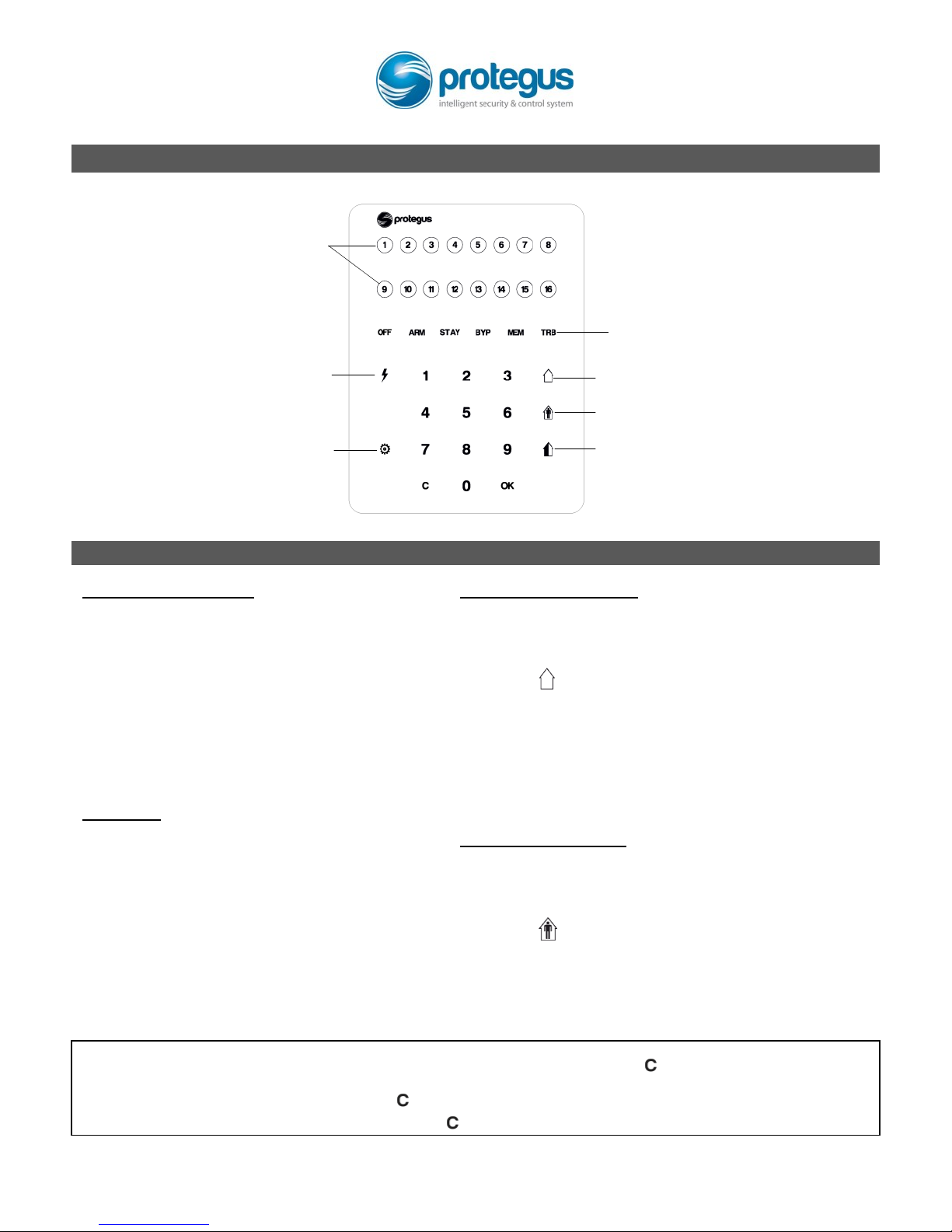
Touchpad Overview
SLEEP mode touch key
STAY mode touch key
BYPASS function touch key
Power supply indication /
Function touch key
Zone status indication.
Indicators [1]–[16] correspond to zones 1–16.
ON – zone not ready to arm
OFF – zone is ready to arm
Flashing – zone/user chosen
Flashing frequently – zone was alarmed
System status indication.
OFF On – system is disarmed
ARM On – armed in ARM
STAY flashing – armed in SLEEP
ARM On + STAY flashing – armed in STAY
BYP On + zone indicator On – particular
zone is bypassed
MEM On – system was alarmed
TRB On – system fault
Setting of brightness and
volume of indication
Arming and Disarming
Arming in ARM mode:
1. Make sure all zones are closed (all zone
indicator lights must be off).
2. Enter your User code.
3. Leave the premises during Exit Delay
countdown.
After entering User code, indicator ARM will
flash during time countdown.
Arming in SLEEP mode:
(Perimeter is protected only. Roaming inside is
allowed. Entering the premises will cause instant
system alarm):
1. Press [ ].
2. Enter your User code.
3. Do not open exit doors.
When system arms in SLEEP mode, indicator ARM will
light up, while indicator STAY will start flashing.
Arming in STAY mode:
(Perimeter is protected only. Roaming inside is
allowed. Entering the premises will cause Enter Delay
countdown for entering User code to disarm):
1. Press [ ].
2. Enter your User code.
When system arms in STAY mode, ARM and STAY
indicators will light up.
To Disarm:
Enter your User code.
When system disarms, indicator OFF will turn
on whereas indicators of all arming modes will
turn off.
To delete entered symbols or command, press [ ].
To delete event history, hold down [ ] for 3 seconds. When indicator MEM will start flashing,
press [ ] once more.
Page 2
Panic alarms
2-wire fire (smoke) detectors
To send a panic alarm signal to your security
company:
Panic – hold down [1] for 3 seconds.
Medic – hold down [4] for 3 seconds.
Fire – hold down [7] for 3 seconds.
To reset 2-wire fire (smoke) detectors:
Hold down [ ] for 3 seconds.
Note. After registering fire alarm, 2-wire fire
detectors do not reset automaticaly. This must
be done manually.
Adjusting keypad brightness and sound
notification level
Zone bypass
To set keypad brightness and sound
notification levels:
1. Hold down [ ] for 3 seconds.
2. Select the brightness for upper indication
(red) with keys [1] and [4].
3. Select the brightness for lower keypad
(blue) with keys [2] and [5].
4. Select the level of sound notifications with
keys [3] and [6].
5. When set, press [ ].
To BYPASS a zone:
1. Press [ ].
2. Enter your User code. Indicator [BYP] will
start flashing.
3. Enter 2 digit number of the zone you want
to bypass. If you want to bypass more than
one zone, just enter the 2 digit numbers of
the zones you want to bypass.
4. Press [ ]. Indicator [BYP] will light up.
To disable BYPASS function:
Repeat the same actions as bypassing a zone.
Entering/changing Master or User codes
Deleting User codes
To enter a new or change existing User code:
1. Press [ ].
2. Enter the Master code, default is 1234.
Zone indicators, that display serial
numbers of allready entered User codes,
will light up.
3. Enter a 2-digit serial number of the User
code you want to enter/change. For
example, [02].
Note. Serial number for Master code is [01].
4. Enter new 4-digit User code twice.
5. Press [ ] and then press [ ] twice.
To delete a User code:
1. Press [ ].
2. Enter the Master code. Zone indicators, that
display serial numbers of already entered
User codes, will light up.
3. Enter a 2-digit serial number of the User
code you want to delete. For example, [02].
4. Press [ ]. The indicator, showing the serial
number of the User code being deleted, will
turn off.
5. Press [ ] twice.
 Loading...