

Page 1
1
WaterAlarm Plus
Model WA-5000
Thank you for p urchasing the WaterAlarm Plu s . We are confident this product
will provide you with the peace of mind and protection you expect. If you
should ever have any questi ons or concern s about this product, feel free to
contact us. Our phone number, web sites an d email addresse s are listed at the
back of this instruction manual.
GENERAL DESCRIPTION
The WaterAlarm Plus is designed to alert you by telephone if water is detected
by the water s ensor. The produ ct consists of two c om p onents conn ected
together by six feet (1.8m) of wire.
1) The Dialer – This component connects to your existing telephone line to
make continuous phone calls every 15 minutes (or 2 hours) if water is detected.
When the Wa terAlarm calls you, the person answering the call will hear a prerecorded water alarm m es sage.
2) The Wat er Sensor – This comp onent is what detects the wat er an d sou nds an
85 dec ibel alarm. The s e nsor can s i t directly on the groun d, or the se nsor can be
detached and extended up to six feet from the audible alarm part with the
included sensor wire. You can add additional wired water sensors to cover
multiple locations within a home, cabin or business.
FEATURES
• Automatically dials to one telephone number when water is detected by the
wired wat er s ensor. The Water Al ar m can call any telep hone number
including a cell phone, calling card number, or international number.
• Plays a pre-recorded voice alarm messa g e in English. The messag e is “This
is your water alarm. Water has been detected at your monitored location.
Please check conditions at your monitored location.” The WaterAlarm will
repeat the message for one minute, all owing it to be recorded on an
answering machine or voice mail if desired.
• Continues to call your programmed telephone number until the alarm call
out is canceled by callin g back to the Water Al ar m from any phone in the
world.
• Enter an d ch ange the “call- to” telephone number easily. Special memory
keeps the phone number st ored forever even if the battery goes dead or is
removed.
• Call-to telephone number can be up to 40 digits long including the “*” key
if required.
• Dialin g indicator light
• Option to add addition al wired sensor s (part number WA-20)
• Operates on Touch Tone™ telephone lines only.
• FCC Approved
2
TABLE OF CONTENTS:
General Description & Features.....................................................................1
Installation & Programming.......................................................................... 2
Initial Setup...........................................................................................3
Programming or Changing the “Call-To” phone number......................... 4
Positioning the Water Sensor..................................................................6
Extending the Wires of the Various Components....................................6
Testing your WaterAlarm..............................................................................6
Operation
During an alarm.....................................................................................7
Canceling the Alarm Call-Out................................................................7
Resetting your WaterAlarm....................................................................8
Checking Alarm Condition at Monitored Location.................................. 8
Use with Answering Machines and Voice Mail.......................................8
Troubleshooting............................................................................................9
Commonly Asked Questions.......................................................................10
Contacting for Sales or Technical Support...................................................11
Specifications .............................................................................................12
FCC Statement............................................................................................12
Warranty Statement.....................................................................................13
INSTALLATION & PROGRAMMING
IMPORTANT!
• Read the war ranty information on page 13 and the FCC stat ement on
page 12 before using this product.
• The perfor mance of local and long distan ce telephone lines vary from
location to location and may affect operation of the WaterAlarm.
Therefore, it is important that the WaterAlarm be fully tested after
installation to confirm telephone compatibility. Please see the Testing
your WaterAlarm on page 6 for further instructions.
• Caution - To ensure proper operation, this equipment must be installed
according to the enclosed installation instructions. To ver ify that the
equipm en t is operating properly and can successfully report an alar m,
this equipment must be tested immediately after installation, and
period ically thereafter, accord ing to the encl osed test instructions.
• Caution – This equipment cannot report an alarm when other
equipm en t ( telephone, an s wer ing system, com p uter modem, etc.)
connect ed to the same phon e line is in use.
• Important – Do not program emergency phone numbers for th e p olice,
fire or other emergency personnel or depart ments un less you h ave
specific approval from such agenci es . This model of WaterA larm does
not identify the location that is cal ling and therefore cannot pr ovi d e an
audibl e n otification of what address th is phone call or iginated fr om .
Page 2
3
A. What You Will Need:
1. Two 9-volt alkaline batteries are in cluded. The wat er s en s or bat tery is
located inside the battery compar tment of the water s en s or . The other 9
volt batter y should be i ncluded with the rest of t he packaging.
2. Phillips screwdriver (not included)
3. A single line telephone jack. This does not need to be a dedicated
phone jack; a phone can share the jack with the WaterAlarm through
the use of a t elephone lin e spl itter (not in clu ded). These are ava ilable
at mos t hardware, el e c tronics or discount st ores. You must have
Touch- Tone® teleph one s ervice for the WaterAlarm to properly
operat e. Th e WaterAlarm will not work on puls e or rotary dialing
telephone systems.
B. Installation:
1. On the Dial er component, r emove the four scr ews from the back cover.
2. Insta ll the 9-volt battery in the batt ery compartm en t by attaching the
battery clips.
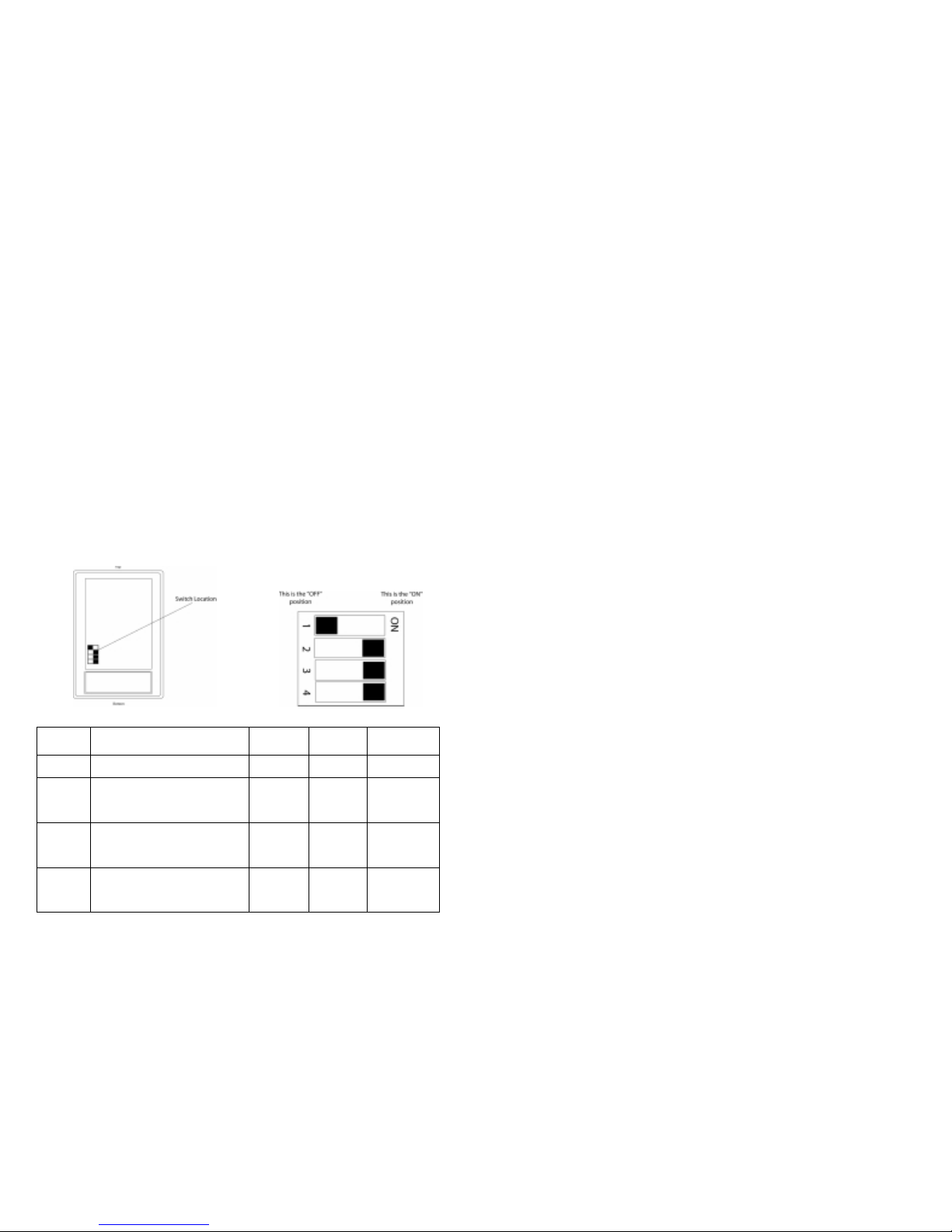
3. With the cover still removed, locate the four little “dip” switches on the
circuit board.
What the swi tches are used for:
Switch
#
What it does OFF
Position
ON
Position
Default
Position
1 FACTORY USE ONLY – Do not
change
NA NA OFF
2 Pick Up Ring Co unt. When you call
your moni tored location, sh ou ld the
WaterAlarm pic k up af t er 5 rings or
10 rings?
10 rings 5 rings ON for 5 rings
3 Call out fr equency dur ing an alarm .
How often should the WaterAlarm
call the pre-programmed t el ephone
number?
Every 15
minutes
Every 2
hours
ON for every 2
hours
4 Normally Open or Normally Closed
Alarm Input Positi on. The water
sensors connected to the Dialer
require the Normally Open position.
Normally
Closed
Position
Normally
Open
Position
ON for the
Normally
Open Position
4
Switch Explanation:
Switch #1: Factory set to OFF. Do not change the setting of this
switch.
Switch #2: Pick Up Ring Count: This is the number of rings at which
your WaterAlarm will answer so you can cancel the alarm call out.
The default setting is to answer after five rings. If you have an
answering machine or voice mail, you want to be sure th e answering
machine or voice mail an swers on less ring s th an what you have this set
for. For more information on this feature, see the section titled
Answering Machines/Voice Mail at Monitored Location under t he
OPERATION section.
Switch #3: Call out Frequency: Your WaterAlarm can call your
programmed telephone number ever y 15 minutes or ever y 2 h ours. The
default setting is to call out every 2 hours during an alarm.
Switch #4: The Dialer has the capability of dialing out if the sensors
either close an alarm con tact or open an alarm contact. For the
WaterAl ar m, the included s ensor is normal l y open and will close when
water is detected. Therefore, this switch must be left in the “ON”
position, or Normally Open position.
4. Replace the back cover. Be careful to en sure the cover goes on the
correct wa y as the telephone jack on the Dia ler and the batt ery may not
sit correctly if repla ced incorrect ly.
5. Plug one end of the supplied telephone cord into the Dialer. Plug the
other en d of the telephone cord into the wal l jack of your single line
telephone. CAUTION: The Dialer requires a s ingle line tel ephone, but
does not require this line to be dedicated for the Dialer use only. The
Dialer may not be compatible with some PBX or other multi-line
business telephone systems. Conn ecting the Dial er t o a com mercial
telephone system may cause internal damage to both systems. The
Dialer can sh are a wal l teleph one jack wi t h a telephone. A du al plug
adapter or “splitter” (not included), is required and is available at most
hardware or electronics stores. The adapter allows both the Dialer and
the tel ephone to share th e s ame wall phone jack . If you need addi tional
length to a telephone jack, you can add up to 1,000’ (304m) of
additional telephone wire.
6. On the WaterAlarm component, remove the battery compartment cover
on the sid e of the alarm and remove the battery and battery cl ip inside
the compartment. Snap the battery to the battery clip and put back into
the battery compartm en t and replace th e battery compartment cover.
C. Programming or Changing the “Call - To” Telephone Number :
The Call-To telephone number is the number you want your WaterAlarm to
call if water is detected in your remotely monitored location. Once you
program the phone number, it is stored indefinitely. It will not be lost even
Page 3
5
if you disconnect the battery and the phone l ine. The m aximum nu mber of
digits in the telephone number is 40. Eligible digits include any of the
number keys and the “star” (*) key. All digits and the star (*) k ey are part
of the 40 digit total.
You will be using the (#), (*) and number keys in the
programming and testing of your WaterAlar m.
Before progr amming, make s ure your phone line is
connected to the WaterAlarm and the other end is plugged into your
telephone wall jack.
1. Pres s a nd hold the poun d (#) key on the keypad .
2. While CO NTINUING TO HOLD the (#) key, use th e k eypa d to enter
the telephone number of the location you want the Water Al ar m to call.
Remember! Keep holding down the (#) key until the entire phone
number is entered! Enter the telephone number exactly as you would
if you were to dial that location on the telephone. In other words, enter
a “1” and/ or the area code if req uired. Release the (#) key after
entering all the digits of the “call-to” telephone number.
3. Users can enter a five secon d p ause in the phon e n um ber by pressin g
the “star” (*) key twice. This will count as two digits of the total phone
number. F or every two star keys entered, th er e wi ll be a five second
pause. If three star keys are entered in succession, the first two will be
noted as the 5 second pause and the third star key will be the actual (*)
key played a s part of the phone n um ber. If four star (* ) k eys are
entered, the WaterAlarm would pause the dialing sequence for 10
seconds.
4. Don’t forget to enter a “1” or your area code if required. Area codes
change regularly so make sure you remember to change your “call to”
telephone number if your area code has changed.
5. To ch ange the program med phone number, simply re-program a
number u sing the steps above. It will overwrite the previous number
programmed.
____________________________________________________________
IMPORTANT TIPS ON ENTERING CALL-TO PHONE NUMBER
• LONG DISTANCE: Make s ure you enter th e phone number exactly
like you would if you were to pick up the phone and call that person. Use
a “1” and/ or the proper area code if requir ed.
• AREA CODES: Don’t forget to change your “call-to” telephone number
if the ar ea cod e changes. Your Wa terAlarm will continue to cal l-out to
an incorrect phone number and you may incur a great deal of long
distance charges if you do not change ar ea cod es appropriately.
• DIALING “9”: Some phone systems require that you dial a “9” before
the rest of the telephone number in order to get an outside line. Simply
includ e the “9” at the beginn ing of the phone number. You may need to
add a paus e aft er the “9” so the WaterAlarm can wa it for a dial tone.
6
• Do not program phone numbe rs of emergency fire, police or ambula nce
services into the WaterAlarm. There is no audible notification of the
location that is calling so the agency will not be able to identify the
address of the proble m.
• TEST YOUR WATERALARM: It is critical that you te s t your “ca ll-
to” number as indicated in the section, “T es ting your WaterAlarm” on
page 6.
D. Positioning the Water Sensor:
The Wat er Sensor can be pl aced di rectl y on th e floor or the sens or can be
detach ed fr om the Wa ter Alarm compon ent vi a th e 6’ wir e an d pla ced in a
sump hole or in another location. Hardware that is included with the
WaterAlarm allows the sensor to be mounted on a wall if desired so the
alarm can be more easily hea rd and then pla cing the water sensor in the
desired location. If a longer length is required, you can splice in additional
two conductor wire (28 AWG or larger) up to 1,000’ (304m) from the alarm
portion of the sensor.
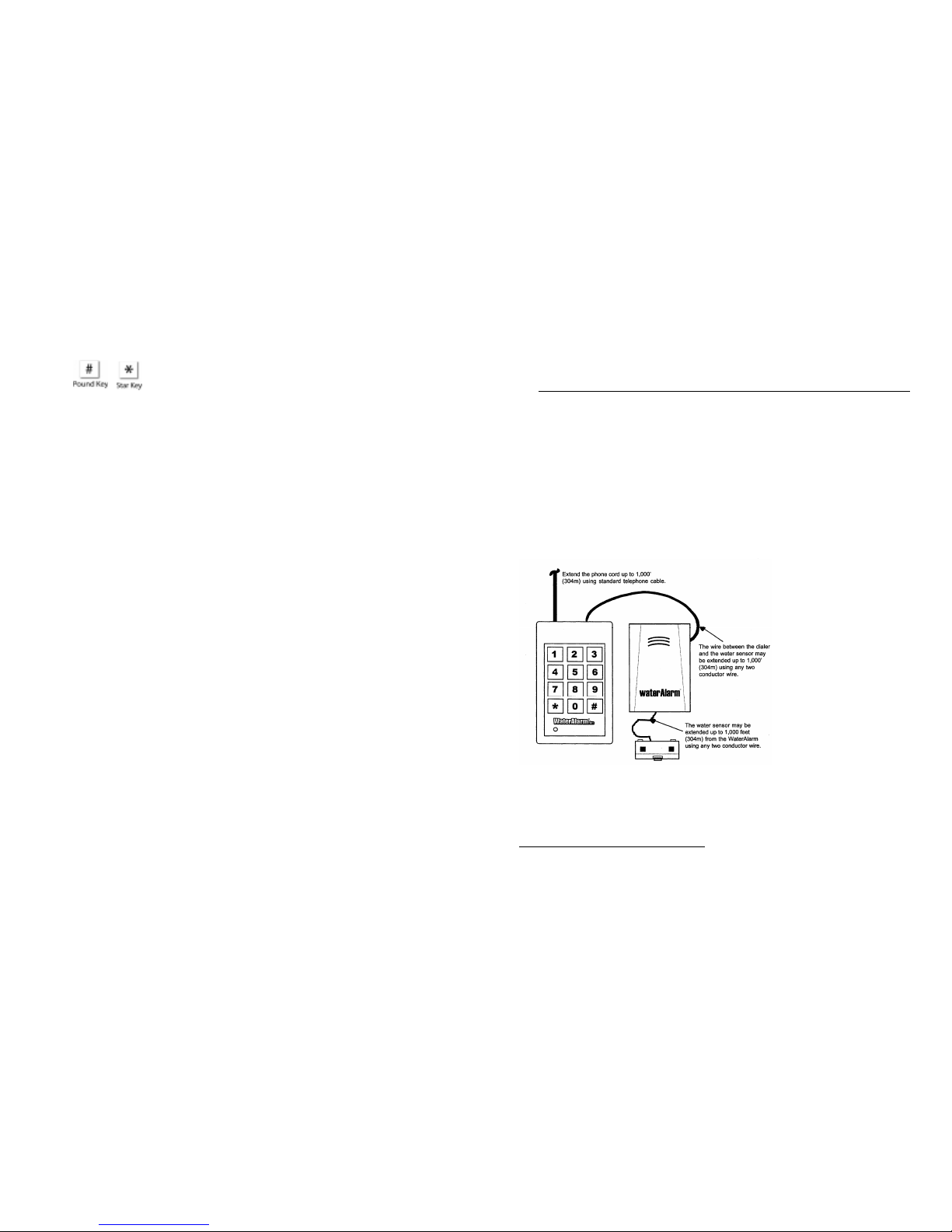
E. Extending the Wires of the Components:
The diagram to the left
shows how long each
wire can be exten ded. If
going through walls or
near elect rical appl iances
or conduit, it is
recommended you use
shielded wire. In some
cases, the WaterAlarm
may not work properly or
you may receive false
alarms at any length of
wire extension. In such
situations, look for
alternate wire routes or
shorten the length of wire
until the WaterAlarm works properly. To extend the telephone wire,
purchase telephone wire and telephone wire couplers to make get the
desired length.
TESTING YOUR WATERALARM
There ar e two tes ts you can perform to ensur e your WaterAlar m is operating
properly. It is importan t that a person be a t the “call-to” location to r ecei ve the
test call from the WaterAlarm. Both tests assume the WaterAlarm has batteries
instal led, the phon e line is connected an d a “call-to” ph on e number has been
programmed per the instructions.
Page 4

7
A. Testing if the phone number was programmed correctly. Press the star
(*) key once until you see the red indicat or light up and then r elease the star
key. The WaterAlarm will call this number and play our pre-recoded water
alarm m ess age for 1 minute to either the person or answer in g ma chine at the
call-to location an d then hang up. You do not n eed to cancel the alarm call
out for this test procedure as this function should only call the programmed
number once and then complete the test.
B. Testing Alarm Call-Out if Water Is Detected. Moisten a paper towel and
pla ce i t over both of the s m all met al pads on the water sensor until you hear
the audi bl e alarm go off. If th e au d ible alarm fai ls to sound, your battery
may be old or dead, the paper towel may not be moist enough or the water
sensor may be damaged.
If you do hear the audible alar m, within 10 seconds, th e red light on the
Dialer shou ld light up indic ating it is making a phone c all. When you test
the WaterAlarm in this fashion, you do need to call back to the monitored
location and cancel the alarm call-out via the proced u re outlined in the
Operation section below.
C. If either test fails. If either tes t fails, try r eprogramming the phone number
and repeat the test(s). Check to see the wir e bet w een the water s en s or and
the dialer is not damaged or disconnected. If it continues to not operate
properly, refer to the Troubleshooting section on page 9.
OPERATION
A. During an Alarm:
If water is detected by the sensor at the monitored location, the water sensor
will sound an audible alarm and your WaterAlarm will begin to call out to
the t e lephone number you programmed and pla y the WaterAlarm’s preprogrammed alarm message. The WaterAlarm will call your programm ed
phone number every 15 minutes or every 2 hours, depending upon the
position of switch #3 (see Installation in Step A). The WaterAlarm will
contin u e to call until the alarm call out is canceled.
The message the receiving party will hear is: “This is your water alarm .
Water has been detected at your monitored location. Please check
conditions at your monitored location.”
B. Canceling the Alarm Call out:
1. After you have received an alarm call, call the monitored location
where the WaterAlarm is located and let the phone ring 5 or 10 times
(the number of rings is determined by the position of switch #2 for the
“Call-In Ring Count”). After 5 or 10 rings, the WaterAlarm will
automatically answer and begin pla ying the pre-r ecorded water alarm
8
message that you heard when it called you with an alarm. By simply
calling your WaterAlarm and listening to the alarm message, you have
successfu lly cancel ed the alarm call out. You will not receive any more
calls for this particular water alarm emergency. If water continues to
be detected b y the water sen s or, the WaterAlarm unit will r emain in
“alarm” mode, but it will not continue to call if the alarm call-out has
been can celed.
2. If the water around the sensor recedes and th e s en s or no longer detects
water, the Dialer will continue to ca ll you to let you know th ere was a
water problem recent ly.
C. Resetting Your WaterAlarm:
The WaterAlarm automatically resets to normal monitoring mode as soon
as the water has receded away from the sen sor ( or s ensor is pulled ou t of t he
water) and the alarm call-out has been canceled.
Note: It is possible for ANYONE to accidentall y cancel the alarm call-out
simply by calling your monitored location while the WaterAlarm is in an
alarm condition. To help avoid this, you should either set the incoming ring
count selection to 10 rin g s ( s ee Installati on section) or ha ve an answering
machine or voice mail ta ke incoming call s first making it di ff icult for an y
person t o a ccidentall y cancel the alarm call-out.
D. Checking Alarm Conditions at the Monitored Location:
The WaterAlarm provides a simple method of determining if a water
emergency exists at your monitored location. If the WaterAlarm has
detected water and is in alarm mode, and you have cancelled the alarm ca llout, you can call your FreezeAlarm and after 8 rings, the WaterAlarm will
answer and play the alarm mes s age. If you call an d the WaterAlarm d oes
not answer after 8 rings, this means the water has receded and the
WaterAlarm has reset. This only works if the alarm call-out was cancelled
prior to this call.
E. Answering Machines/Voice Mail at Monitored Location:
If you have an answering ma ch ine or voice mai l at the monitored location
where your WaterAlarm is loca ted, there is an ea sy way for you to sti ll
utilize your answering machine or voi ce mail and access the WaterAlar m
durin g an alarm condition to cancel th e alarm call out.
The Wat er A lar m has a built-in feature whereas the unit can count incomin g
rings over multiple calls to the WaterAlarm. This allows most incoming
calls to go to the user’s an s wering machin e or voi ce m ail service prior to the
WaterAlarm answering. All calls to the unit must be made within a 3
minute time period that starts from the moment the WaterAlarm hears the
first ring.
Page 5

9
10
How This Works (an example):
1. Your WaterAlarm was set up in the Installation Section to answer on
either fi ve (5) or ten (10) rings. You need to set u p your answering
machine or voice mail to answer on a number of rings less than what
your WaterAlarm is set to answer at. For examp le, if your WaterAlarm
is set to an s wer on 5 rings, set your answering system to answer on four
rings or less.
2. When your monitored locat ion receives an incoming call , it will go to
the ans wer ing system fir st because that is set to answer on four or less
rings while your WaterAlarm is set to answer on five rings.
3. If you wish to call your WaterAlarm to either check the alarm condition
or to cancel the alarm call out, you will need to place two calls to your
monitored location .
a. On the first call, let the phone rin g two or three times and then
hang up befor e your answer ing system answers. The
WaterAlarm will remember those first two or three rings in
memory for the next three minutes.
b. On your second call , let the phone ring another two or three
times. Your WaterAlarm will answer first because it
remembered the first t wo or th ree rings and with the second
set of rings, it accumulated a total of five rings and now
answers before your a nswering mach i ne or voice mail. If you
have your WaterAlarm set to answer on ten rings, you may
need to place more calls to get the WaterA larm to eventua lly
answer.
4. Note that with every call to your monitored location, the three minute
timer resets. This means that if y our monitore d location receives a
number of ca lls in quick succession, it is p ossible for an y person to
accidentally cancel the alarm call out. If you know your loca tion will
receive a large number of calls regularly, you may wish t o set your
incoming ring count on your WaterAlarm to 10 rings.
F. Answering Machines & Voice Mail at the Call-To Location:
If you have an answering ma ch ine or voice mai l message system at the call-
to location, the alarm message can be recorded by such systems. This will
not can cel the alarm call -out and the WaterAlarm will con tinue to leave
messages until the alarm call-out is canceled. Some answering machines
and voice mail systems, h owev er, are not com patible with our alarm
message and for some reason do not allow the message to be recorded.
TROUBLESHOOTING
1. Your WaterAl arm does not call out during a test call out or during an
alarm call-out.
Check to make sure the battery is installed properly or if the battery is low
on power. Check if phone service is working properly. Ch eck phone cord
Page 6

11
connect ions. Re-progr am making sure the telephone cord is connected t o
the wall - jack. Also, note i f you programmed the correct phone number
using th e ap propriate area codes or “1” for long distan ce. If you are using a
phone ca lling card, ch eck to see that the cal ling sequence includes pauses as
may be required. Check to see that the switches are properly set on
Water Alar m. Make sure you ar e u sing the WaterAl ar m on on ly a single
phone line. The WaterAlar m may not operate on a PBX or digital phone
line or phone system. You can verify this by plugging a standard, single
line telephone into the wall jack and picking up the handset. If you get a
dial tone, your WaterAlarm should work as well. If you don’t get a dial
tone, your WaterAlarm may not work on that telephone jack or there may
be a pr oblem wit h your phone service.
2. Cannot cancel the alarm call out.
Verify you h ave dialed th e cor rect number of the monitored loca tion. Ther e
could al s o be trouble with the phone service in the area that is not allowing
your phone call to go through to the monitored location. Check with your
phone comp any if you suspect this problem .
3. Receiving False Alarms
The Wat er A lar m’s water sens or requires that water must make contact
across the two little metal pads on the bottom of the sensor. It is possible a
damp floor during periods of high humidity could cause the sensor to false
alarm. If this is not the case, then check th e wire to the sensor. If it is worn
in any place that could cau s e it to short, this would also caus e a false alarm.
The audi ble alarm would also go off as well if this were the ca s e. The third
problem cou ld be in the wir e bet ween the Dialer and the Water Sen s or. If
this wir e ha s bec ome worn or shorted out, the Dialer would see that as a
“closed” alarm condition and begin to call out, even though no water is
present. Check this wire or replace if you sus p ect this is the cau s e o f the
problem.
4. The alarm call-out has been canceled, but the WaterAlarm continues to
call.
It is possi bl e the water temporarily reced ed causing th e water alarm to reset,
but then water returned an d the unit went back into alarm mode and began
to call again.
COMMONLY ASKED QUESTIONS
1. The WaterAlarm is not cal ling the correct “call-to” loca tion. Why?
This may be due to entering an incorrect “call to” telephone number or
a dead battery. Check or replace the battery and double check the
“call to” telephone number. Did you enter a “1” before a long
distance phone number? Check to see if your area code has changed
and re-program the “call to” number with the correct area code.
12
2. If I unplug the WaterAlarm or take out the battery, will I have to re-enter
the “call-to” telephone number?
Once your WaterAlarm is programmed, the “call-to” number will be
retained in memory indefinitely whether the WaterAlarm is plugged in
or not or if the battery goes dead or is taken out. You can always
program a new “call-to” telephone number at any time.
3. Do I need a dedicated telephone line for my Wat erAlarm?
No. The WaterAlarm uses any existing single line telephone line. In
some cases, if you have two phone lines coming into a home, the
WaterAlarm may work on any of those telephone jacks as well. The
WaterAlarm can also share a telephone line with a telephone, modem
or fax machine, provided you purchase a dual plug adapter or a line
splitter. Those are available at most stores or directly from Control
Products.
4. Can I chang e the alarm messa g e th at is played dur ing a water alarm?
No. The alarm message is pre-recorded at our factory and cannot be
changed.
5. Will the WaterAlarm work on multi-lin e bus iness phone s ystems, PBX
systems or digital telephon e systems?
No. The WaterAlarm is designed to work only with a single telephone
line, found in most residential homes. Sharing a phone line with a
telephone, fax machine, or computer modem is acceptable as long as
they are sharing a single telephone line. Some PBX systems simply
require a “9” to be dialed before calling the regular call-to number.
The WaterAlarm should be able to dial the “9” and the rest of the
number. You may need to enter a pause after the 9 to wait for the dial
tone before the rest of the number is dialed by the Dialer.
CONTACTING US – SALES & TECHNICAL SUPPORT:
For Sales or Technical Support, contact Customer Service:
Protected Home, a Divisio n of Control Products , Inc.
1724 Lake Drive West
Chanhassen, MN 55317
952-448-2217
Fax 952-361-9420
[email protected]
www.protectedhome.com
When calling or writi ng for cu sto m er su pport or service, it is a good idea to have the follo win g
information readily available. Please write this information down in the space provided below for
fut ure reference.
Model Number Information:
The actual model number of your unit can be found on the back of the WaterAlarm.
WA-5000
Additional Sensors: WA-20
DATE CODE/MO# from the back of your WaterAlarm: ___________________________________
Where unit was purchased__________________________ Date of purchase:________________
Page 7

13
Custom Design and Modificat ions:
Since 1985, Co ntrol Products , Inc. has been desig ning and manufact uring unique, exciting and
technologica lly ad van c ed el e ctron ic contr ol ci rcuits for both commercial a n d consumer use. We can
modify on e o f ou r ma n y s tandard products or our in-house en gineering staff and state-of-t h e -a rt
manufacturing can build a project from the ground up.
Please c o nt a c t ou r cu st omer service department to arrange a per s onal visit fr om one of our
representa tives, posted in facilities through the United States, or visit our website at
www.controlproductsinc.com.
SPECIFICATIONS
Power Requirements : Two 9-volt alkaline or lithium batteries
MAKE SURE YOU REPLACE BATTERIES ANNUALLY OR REMOVE WHEN THE
UNIT IS NOT IN USE!
Operating Ambient Temperature Range: 20° to 140°F (-7° to 60°C)
Humidity: 90% non-condensing
REN (Ring Equivalence Number): 0.1B
FCC Statement:
This equipment complies with Part 68 of the FCC rules and t he requirements adop ted by
the ACTA. On the back of your WaterAlarm is a label that contains, among other
information the FCC registration n u mber fo r this pro duct. If requested, this number must
be provided to the telephone company.
A plug and jack used to connect th is equipment to the premises wiring and telephone
netwo rk must c o mply with the applicable FCC P art 68 ru le s and requirements adopted by
the ACTA. A compliant telephone cord and modular plug is provided with this product.
It is designed to be connected to a compatible modular jack that is also compliant. See
installation instr uct io n s for detai ls .
The REN is used to determine the number of devices that may be connected to a
telephone line. Excessive RE N ’s on a telephone line may result in the devices not
ringing in response to an incoming call. In most but not all areas, the sum of REN ’s
should not exceed five (5.0). To be certain of the number of devices that may be
connected to a line, as determined by the total REN’s, cont act your local telephone
company. The REN fo r this product is shown above and is also identified as part of the
FCC product identifier sho w n on the label on t he ba ck of your WaterAlar m. The REN
for other devices will b e ide ntifi ed o n a lab el on the pro duc t in the FCC product identifier
or lis ted separately. If there is a pr o duct identif ier number, it w ill be in a format as
US:AAAEQ##TXXXX. The ## is the REN number shown without a decimal point (e.g.,
03 is a REN of 0.3).
If this WaterAla rm causes harm to the telephon e net work , th e tele p hon e compa n y will
notify you in advance that temporary discontinuance of service may be required. But if
advance notice isn’ t pra ctical, the telephone co mpa ny will notify the customer as soon as
possible. Also, you will b e adv i sed o f your ri ght to fil e a co mpla int with th e FCC if you
believe it is necessary.
The telephone company may make changes in its faci liti e s, equipment, operation s or
procedures t hat could affect the operation of th e e quipment. If this happens, the telephone
company will provide advance notice in order for you to make necessary modifications to
maintain uninterrupted service.
If trouble is experienc ed wi th your Wate rAlarm, for repair or warranty information,
please contact Control Products at 952-448-2217. Other contact numbers and information
can be found at the end of this instruction manual. If the equipment is causing harm to
the telephone network, the telephone company m ay request that you disconnect the
equipment until the problem is resolved.
14
If your home has specially wired alarm equipment connected to the telephone line ensure
the installation of you r Wa ter Ala r m doe s not disable your alarm equipment . I f you have
questions about what will disable alarm equipment, consult your telephone company or a
qualified installer.
WARRANTY
Warrantor: Dealer, Distributor, Retailer, Manufacturer
Warrant y and Remedy:
We believe the Water Alarm is a superior product. Althoug h we take extr e m e prid e in producing and
testin g a product tha t will function properly, w e ca n not guara ntee that th ere will never be a def e ctive
unit or that a unit will function on all the thousands of phone lines and communication equipment in
existence. For this reason, it must be clear that the Warrantors are not insuring yo u r premises or
guaranteeing that there will not be damage to your person or property if you use this Product. If you
are not comfortable with our Limited Warranty, or completely satisfied with the Product, we
encourage you to return the unused Product for a full refund within 30 days of purchase. Thank you
for your understanding.
One Year Limited Warranty - Control Products, Inc. warrants its product to be free from defects in
material and wo rkmanship under normal use for one year, and is not responsible for consequential
damages or installa tio n co st s of any natu re . In the ev ent that th e Pr oduct does not conform to thi s
Warranty at any time during the period of one year from original purchase date, Warrantor will
repair the defect and return it to you at no charge. IMP ORTANT: Th e Warranty is limited to
replacement of the Product ONLY. Secondly, because every phone line differs, we strongly
encourage yo u to fully test this Product in its actu al application . This sh ould include a f u ll tes t,
involving the Product actu ally di a ling to its desi g nated locations and som eone verifying the proper
response.
This Warrant y shall terminate an d be of no further effect at the time the Products is 1) damaged by
extran e o u s causes suc h a s fire, water , power surge or spik e, l ightening, etc., or no t ma intaine d a s
reasonable and necessary; 2) modified; 3) improperly installed; 4) repaired by someone other than
the Warrantor; 5) use d in a manner or purpose for whic h the Product was not intended.
WARRANTORS ’ OBLIGATION UNDER THIS WARRANTY IS LIMITED TO REPAIR OR
REPLACEMENT OF THE PRODUCT ONLY. THIS WARRANTY DOES NOT COVER
PAYMENT OR PROVIDE FOR THE REIMBURSEMENT OF PAYMENT FOR INCIDENTAL
OR CONSEQUENTIAL DAMAGES.
It must be clear that the Warrantors are n ot i n su r ing your pr emises or gu a r a nteeing t ha t there will n o t
be damage to your person or proper ty is you use this Product. The Warrantors shall not be liable
under any circumstances for damage to your person or property or some other person or that
person’s property by reason of the sale or use of this Product, or its f ailure to operate in the m anner
in which it is designed. The Warr ant or s’ lia bility, if any, shall be limited to the ori gi nal cos t o f the
Product only. Use of this product is at your own risk.
Procedures for Obt ai ni ng Performance for Wa rranty:
In the event that the Product does not conform to this Warranty, the Product should be shipped or
delivered freight prepaid to Warrantor with evidence of original purchase. If in any way you’re not
comfortable with this product or its Limited Warranty, we encourage you to return it, unused within
30 days of original purchase date with evidence of the purchase date.
To return a product to Control Products, Inc.:
All products being re tu rn ed to Co ntr ol Pro du ct s, Inc. mus t hav e a vali d Retu rn ed Goo d s
Authorization Number (R GA #) from Control Products, Inc., reg ardless of why the product is being
returned. Warranty returns w il l be honored only w it h a RGA #. Ship warranty return products
prepaid to Control Products, Inc., 1724 Lake Driv e West, Chanhassen, MN 55317. Control
Products, Inc. will , at it s opti on, eit h er re pair or replace the product free of charg e a nd retu rn the
Page 8

15
repaired uni t o r replacement unit at the lower cost shipping prepaid. Products returned for credit are
subject to a 25% re s tocking charge. Returns resulting from errors by the se ll er are not subject to this
charge. All returns must include evidence of original purchase, showing purchase date. The RGA #
should be clearly marked on the outside of the package containing the product.
To request an RGA #, call Control Pro ducts, Inc. at 952-448-2217 and ask fo r Customer Service.
Failure to have an RGA # may result in lost product or significant del a ys in handling yo ur return.
Products without an RGA # clearly marked on the outside of the package are not the responsibility
of Control Products, Inc.
16
This page intentionally blank
Page 9

17
© 2005, Control Products, Inc.
This manual may not be reproduced, modified
or distri bu ted withou t permissi on from Contro l Pr o ducts, Inc.
Document # 42420026A, Revised 10-3-05
 Loading...