

Page 1
Data Rescue PC4 User Guide
Contents
Chapter 1. What can Data Rescue PC do for you?
1.1. Program Capabilities
1.2. Why choose Data Rescue PC?
Chapter 2. Purchase, Registration, and Technical Support
2.1. Purchase
2.2. Registration
2.3. Technical Support
2.4. Data Recovery Services
Chapter 3. Computer Set-up
3.1. System Requirements
3.2. Languages
3.3. BIOS Settings and Booting from USB
3.4. Installation
3.5. Updates
Chapter 4. Running Data Rescue PC
4.1. Launch the Program
4.1.1. Booting from USB
4.1.2. Running from Windows®
4.2. Select Source Drive
4.3. Advanced Options
4.3.1. Network Drives (Applies only when booting the Recovery USB)
4.3.2. Software Drivers
4.4. Scan Source Drive
4.5. Select Partition
4.6. Raw Sector Recovery - Found Files
4.7. Recovering Files and Folders
4.7.1. Filter Files by Status
4.8. Accessing the Recovered Data
Page 2

4.8.1. Destination Drive Options
4.9. Cloning a Hard Drive
4.9.1. Cloning to a Destination Drive
4.9.2. Cloning to File
4.9.3. Scanning a Clone
4.10. Preferences
Chapter 5. Basics of Data Recovery
5.1. Recovery Tips
5.2. Basic Recovery Scenarios
Chapter 6. Frequently Asked Questions (FAQ)
6.1. Common FAQs
6.2. Advanced FAQs
Data Recovery Services
About Prosoft Engineering, Inc.
Glossary
PROSOFT Engineering, Inc. End User Software License
Chapter 1. What can Data Rescue PC do for you?
1.1. Program Capabilities
Data Rescue PC recovers files when a file or file system has been altered, deleted, lost or damaged. Undelete Software cannot recover files when the file
system has been altered, deleted, lost or damaged by Windows®, a virus, or another utility.
Unlike Windows® dependent data recovery software, Data Rescue PC does NOT require the Windows operating system to run. This means, NO software
installation, computer disassembly or boot diskettes are required to set-up and run Data Rescue PC. Data Rescue PC can be run directly from the bootable
Recovery USB without any installation.
Data Rescue PC may also be installed on a Windows® operating system to help recover data from a corrupt or failing external hard drive. Data Rescue PC
helps provide immediate access to USB/Firewire connected devices without having to boot from USB.
Data Rescue PC guides you to scan the problem media, select the files to recover, and recover the files to an external USB/Firewire/eSATA device (or hard
disk drive).
1.2. Why choose Data Rescue PC?
Recover deleted, lost and damaged files:
Word, My Documents, Excel, etc.
Pictures, videos, and music
Formatted drives, even after installing Windows
Virus attacks, software crashes, power failure
Recover files from partition / file system problems:
Lost or deleted partition: FDISK, etc.
Damaged Partitions: MBR, MFT, Root, etc.
Clone - extracts raw data from mechanically failing drives on any media or operating system, keeping drives out of the clean room. It also creates
sector-by-sector copy to another media or network location for back up protection.
Expanded Features:
Quick Scan for faster use
Preview files before recovering
Find specific files, filter files and file systems to refine results
View file system information / changes
Create file recovery reports
Show detailed file system component changes
Plug-n-Play: Recover to USB / Firewire without hard drive installation
Raw Sector Scan now gives an option to rebuild files according to their file types
Supports:
NTFS, FAT32, FAT16, and FAT12 file systems.
Hard drives: (IDE, EIDE, SCSI, ATA, SATA), Zip / Jaz drives, Floppy diskettes, Firewire / USB / eSATA devices: Compact Flash, Microdrive, Smart
Media, Multimedia, Secure Digital, Memory Sticks, XD-Picture Cards.
Chapter 2. Purchase, Registration, and Technical Support
Page 3

2.1. Purchase
Purchase Data Rescue PC online: Data Rescue PC For Windows PCs Web Page
2.2. Registration
Online Registration: a serial number is sent via e-mail after your purchase.
Phone Registration: 1-877-477-6763 (if you only have one computer).
Registration Hours: Monday - Friday 8:00 A.M. - 5:00 P.M. (P.S.T.)
2.3. Technical Support
Support is available before and after you purchase any of our products. Visit our website for the most current Downloads, Manuals, and Frequently Asked
Questions:
Website: http://www.prosofteng.com/support
Frequently Asked Questions (FAQ) - See Chapter 6.
Phone: 1-925-426-6306
Technical Support Hours: Monday - Friday 7:00 A.M. - 5:00 P.M. (P.S.T.).
2.4. Data Recovery Services
If Data Rescue PC cannot access or recover your data, your media has severe file corruption or is mechanically failing (software will not solve your problem
at this point). This means your hard drive needs to be evaluated by professional data recovery personnel. Prosoft Engineering recommends contacting our
Data Rescue Center for In-Lab Data Recovery Services. Please call or visit the website for more details:
Phone: 1-877-501-4949
Website: www.TheDataRescueCenter.com
Chapter 3. Computer Set-up
3.1. System Requirements
Bootable USB Requirements:
PC with USB port
1024MB of RAM
Intel or AMD Processor 500MHz or greater
Monitor resolution 1024x768
Application Requirements:
Windows® 10, Windows® 8, or Windows® 7 when running in a Windows environment.
Firewire, USB, eSATA, secondary internal drive, or mapped network location to recover data to.
3.2. Languages
English is the standard interface language in Data Rescue PC.
Data Rescue PC may also run in German or Japanese. If you purchased the software in the German or Japanese markets, then the program will default to
German or Japanese.
3.3. BIOS Settings and Booting from USB
Data Rescue PC’s emergency boot USB is designed to help recover data from a hard drive that is failing to boot, corrupted by a virus, or accidentally had
data erased.
The computer BIOS must be set to boot from USB so that Data Rescue USB will be run. If you have problems setting the BIOS refer to your computer
manual.
Once the BIOS settings are changed to boot from USB, insert the Data Rescue PC USB into a USB port and restart the machine to boot into the Data
Rescue PC program.
Page 4
3.4. Installation
If you have accidentally deleted files from your computer, and do not already have Data Rescue PC installed, boot from the emergency boot USB to help you
recover your data (this will avoid any possible additional overwriting of your deleted data).
Data Rescue PC does not need to be installed to scan a hard drive for data. Installing Data Rescue PC is ideal to help in recovering data from a corrupt
secondary or external hard drive (such as an external USB connected hard drive).
If you want to install Data Rescue PC on your hard drive, you can download it online or from your order email.
3.5. Updates
Updates for Data Rescue PC are available on Prosoft Engineering’s website. Please visit the following link to acquire the latest version of Data Rescue PC:
http://www.prosofteng.com/products/data_rescue_pc_update.php
Chapter 4. Running Data Rescue PC
4.1. Launch the Program
Data Rescue PC can be launched by booting from the emergency boot USB or opening the installed application from the Windows® operating system. Each
method has its own advantages to recover your data. Read chapters 4.1.1 and 4.1.2 to determine which launch process will help you recover your data.
4.1.1. Booting from USB
Running Data Rescue PC from the USB
Booting from the Data Rescue PC USB helps recover from hard drives that fail to boot properly, have been affected by a virus, or have accidentally deleted
files on the boot hard drive. The emergency boot USB loads the Data Rescue PC program without using the Windows® operating system to recover your
data.
Insert the Data Rescue PC USB, and change your BIOS settings to boot from USB (If the computer has already been booted, insert the Data Rescue PC
USB and then reboot the computer).
Having problems booting into Data Rescue PC? (See FAQ):
1. What do you mean by setting the BIOS to boot from the USB Drive?
2. If I have a problem, is there technical support?
It is recommended you use the Clone feature if your drive is mechanically failing. (See Chapter 4.9.)
4.1.2. Running from Windows®
Page 5
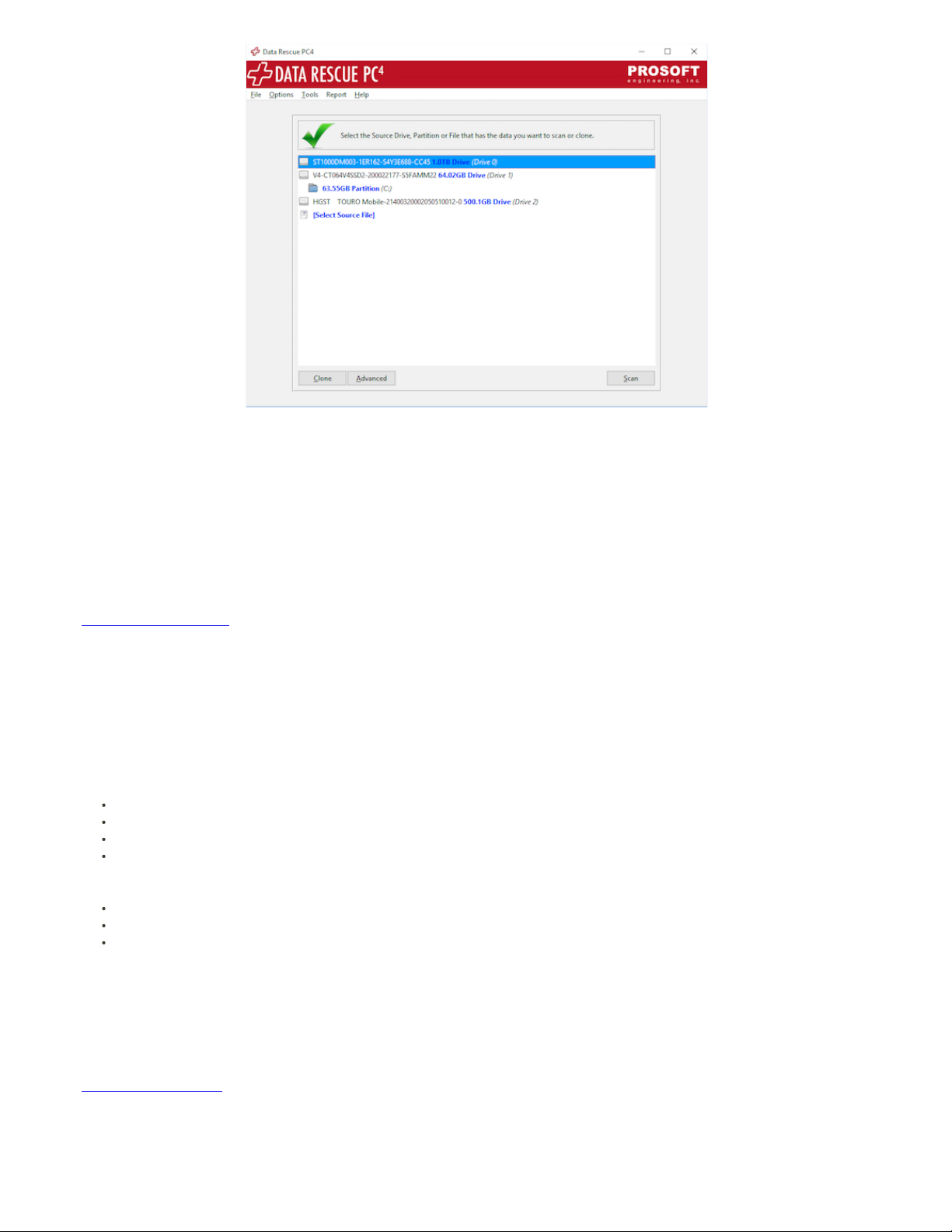
Running Data Rescue PC from Windows
Data Rescue PC can be installed on the Windows® operating system to help scan for deleted files on the internal hard drive, or recover data from an
external hard drive or media card.
After installing Data Rescue PC on your Windows® operating system, click on the Start Menu, then browse your programs to locate “Data Rescue PC4”.
Warning: Quit all other programs before starting the recovery process. Any further writing done to the hard drive that is missing data may overwrite the
data you are looking to recover. Do not use any other applications until Data Rescue PC is done recovering your data.
Warning: Disable System Standby/Hibernation before starting the recovery process. Allowing the system to be put on standby during the recovery
process may cause the recovery to be interrupted.
4.2. Select Source Drive
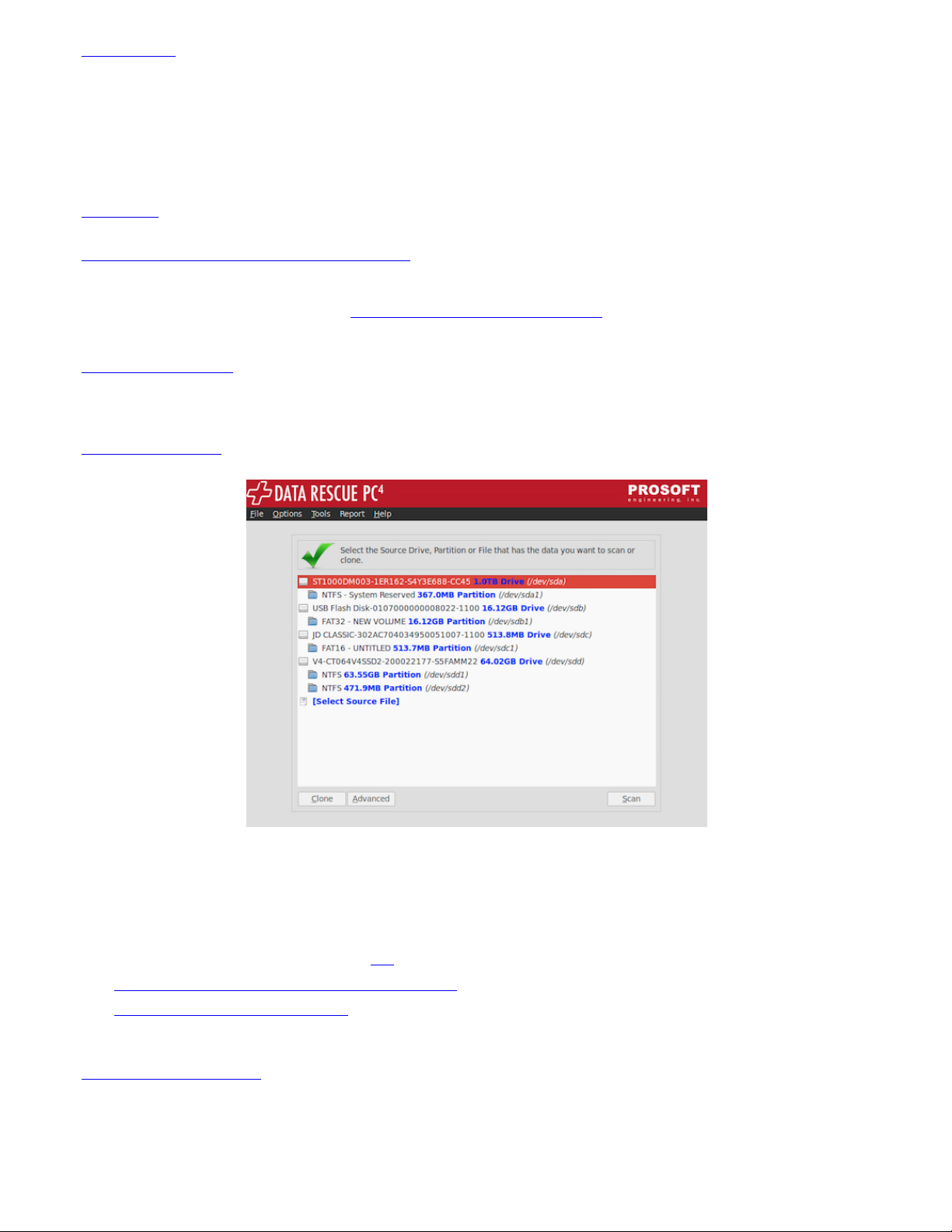
Choosing Hard Drive or Partition
By default, the first available hard drive is selected as the Source Drive (the problem Drive). If the first available hard drive is not the Source Drive, click on
the appropriate hard drive.
If your hard drive contains multiple partitions, you may consider scanning an individual partition instead of the whole hard drive. To select a partition, select
the indented partition under the drive. Selecting a Partition gives the option to select optional scan modes, like [Quick Scan] or [Deep Scan] of the Partition,
which could reduce the amount of time needed to recover data (See Chapter 4.4.). If the results of a Partition Scan are not what you expect, restart the [>
Wizard], and select the entire Source Drive to scan (not just the Partition).
Select the partition level if your hard drive:
Does not boot
Was hit by a virus
Contains accidentally deleted files
Is experiencing hardware problems
Select the hard drive level if your hard drive:
Was accidentally formatted
Was incorrectly repartitioned
Does not show a partition
Note: Select a Partition only if you know that the data being recovered lies within that Partition. Otherwise, select the entire Source Drive to scan.
If the Source Drive is not recognized, but is attached to the computer.
Check the Source Drive connections to make sure it is attached properly and then restart the program. If the Source Drive is still not recognized, contact
Technical Support [Help -> Software Support].
4.3. Advanced Options
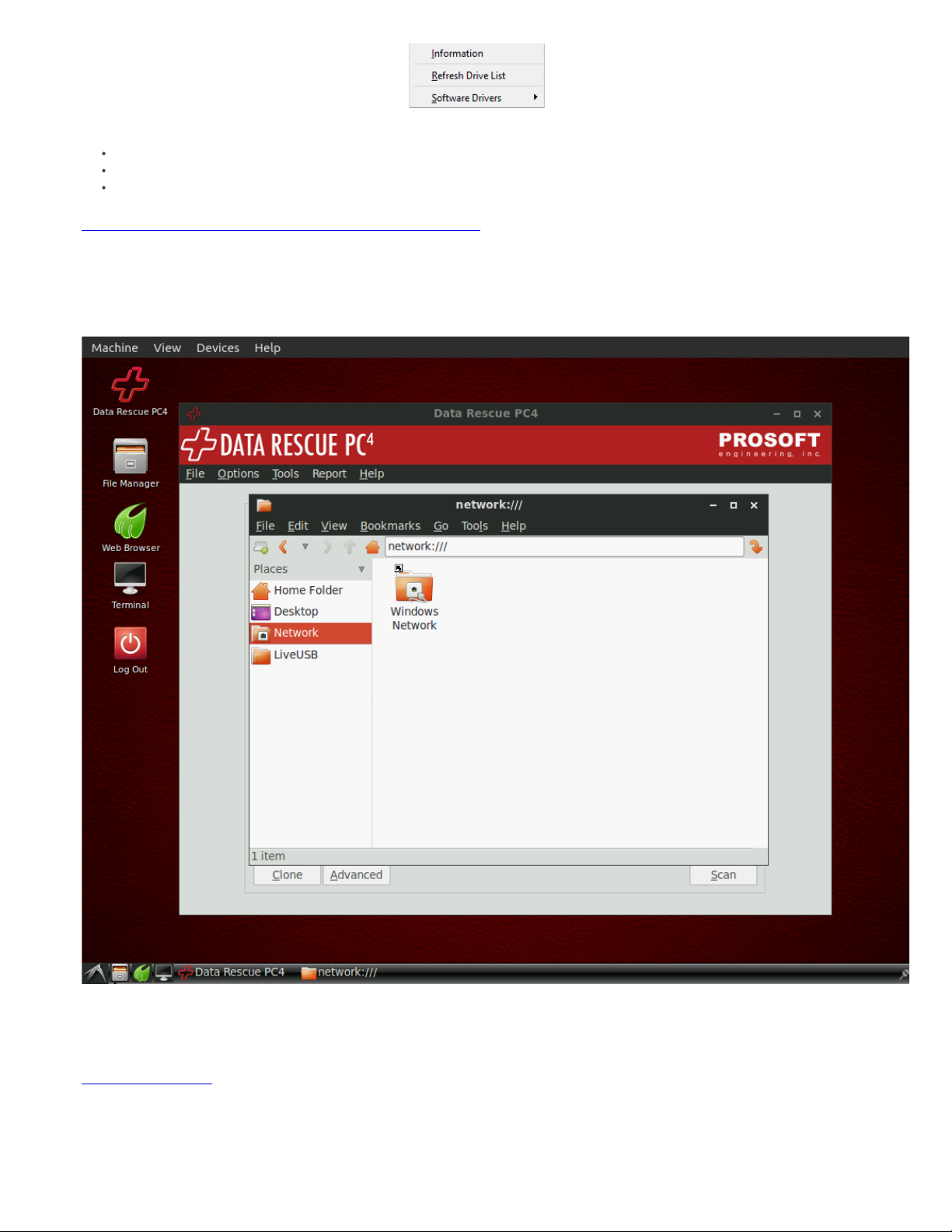
The [Advanced] button is available in the Select Source/Destination window to provide a variety of additional options.
Page 6
Advanced Options
Information - View general Information on a selected file or partition.
Refresh Drive List - Update the device list with any newly attached devices, such as USB or Firewire hard drives.
Software Drivers - Rebuild a damaged RAID configuration. (See Chapter 4.3.2.).
4.3.1. Network Drives (Applies only when booting the Recovery USB)
Under Windows any mapped network drives are automatically made available for Data Rescue to use. However when you boot the Recovery USB to use a
network drive you must first “map it”.
To mount/map a network drive share, click “File Manager” icon on the Desktop or Taskbar (move the cursor near the bottom of the screen to get the Taskbar
to appear).
Desktop
Select Network and browse to the server/drive that you wish to map/mount. Once the drive of interest is mounted it will show up in the left-hand column
(Places). The drive is then accessible to Data Rescue.
4.3.2. Software Drivers
This feature is intended for advanced users familiar with their hard drives’ RAID configurations. In the case of a damaged RAID configuration, the Software
Drivers window can help you simulate any connected individual hard drives as a RAID to help scan and recover files.
Page 7
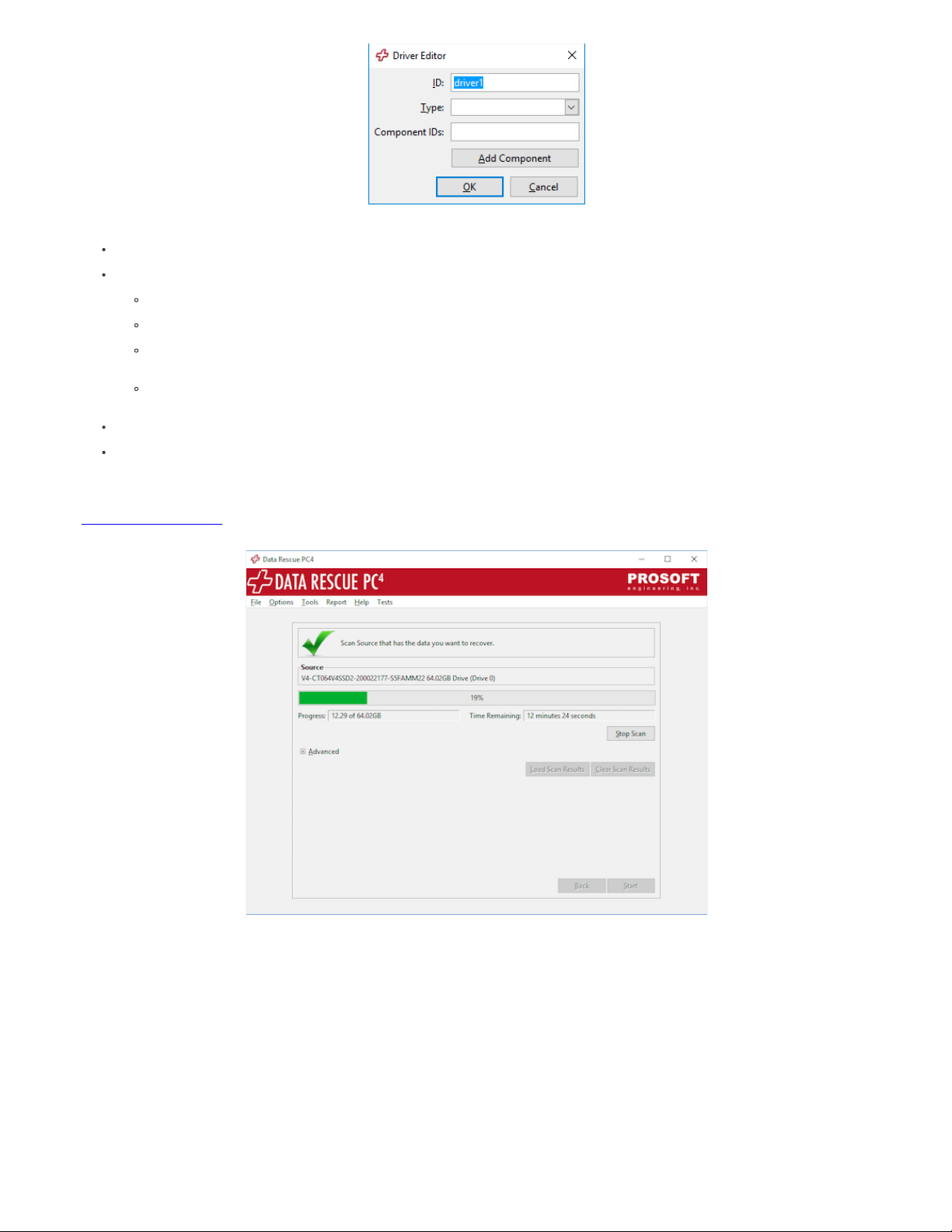
Drive Editor helps simulate RAID configurations
ID - Title of the configuration to display on the Source/Destination drive list.
Type - Selections for the type of RAID configuration. Supported configurations include:
Range - Select a specific area of a drive with an “Offset” and “Size”. Requires Offset and Size information.
JBOD - “Just a Bunch Of Drives” concatenates components as a single device.
RAID0 - “Striped Set” recreates a structure that has data evenly split across multiple disks without parity information redundancy. Requires
block size information for the RAID configuration.
RAID5 - Recreates block-level striping with parity data distributed across multiple disks. Requires block size information for the RAID
configuration.
Component IDs - Lists any hard drives added for the software driver.
Add Component - Select any hard drives to add as part of RAID configuration. Only one hard drive can be selected at a time. Repeat add process as
necessary to add multiple hard drives.
4.4. Scan Source Drive
Scan the chosen Source Drive that has the data you want to recover
To recover data, a Drive or Partition must be scanned. The purpose of the scan is to find and rebuild the components within a file system, so that the data
can be recovered and used again.
The Source Drive (the problem Drive) is the Drive or Partition you have chosen to scan.
The Advanced section allows you to specify a starting point on the hard drive where the scan will begin, and the number of sectors to scan for data. This is
helpful to skip bad sectors on a hard drive.
If you have chosen the wrong Source or Destination Drive, use the [< Back] button to return to the appropriate screen and change your selections.
Load Scan button
Page 8
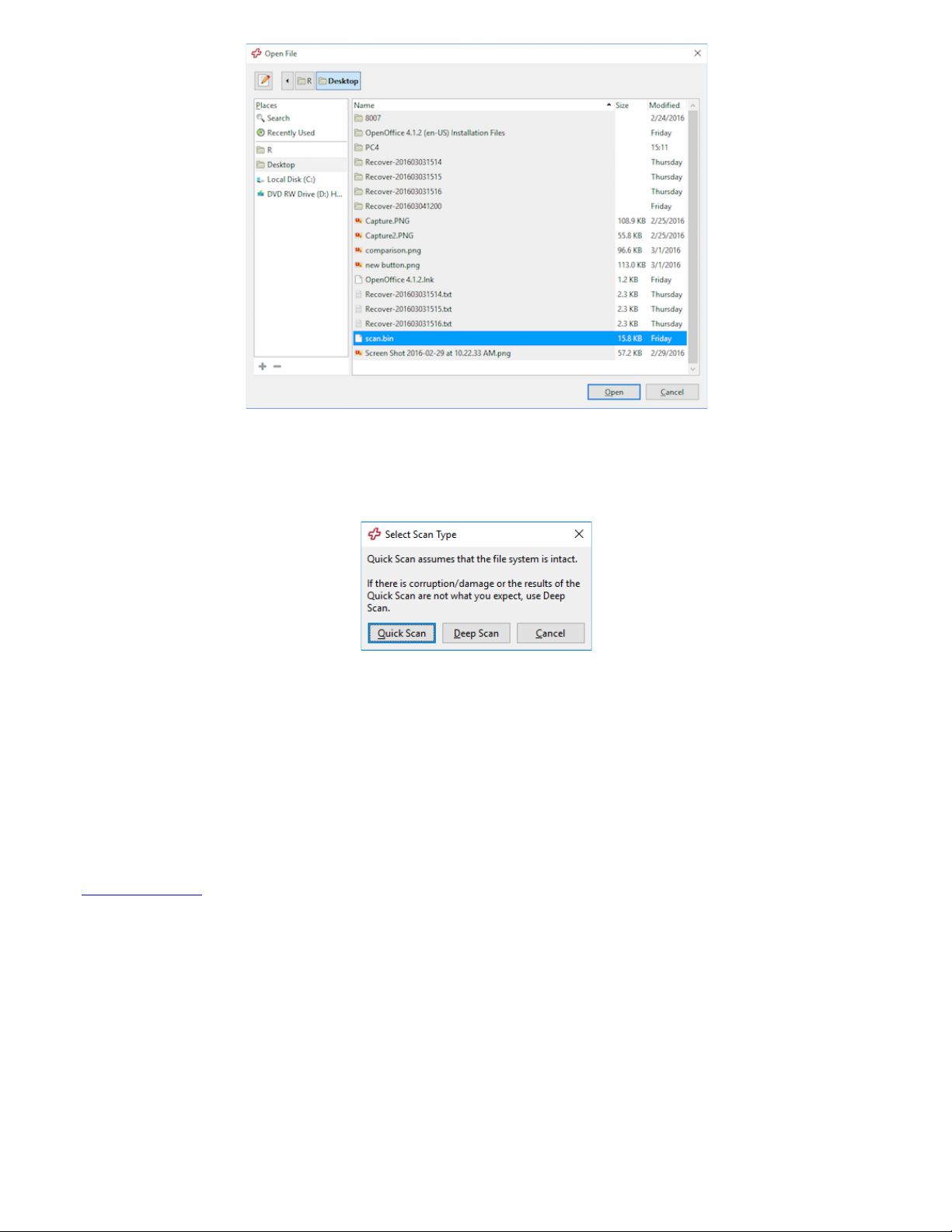
Loading a scan.bin file
If you would like to use a saved scan of the Source Drive click the [Load Scan] button, and then select the appropriate saved scan file. Note: If you have
saved a Partition Scan and the results are not what you expected DO NOT [Load Scan]. Select the entire Source Drive to scan (not just the Partition).
Select Scan Type
Select Scan Type is only available when selecting a partition as the Source
If you have selected a partition to scan, you will have the choice to select a [Quick Scan] or [Deep Scan].
A [Quick Scan] will provide results from boot sector and backup boot sector to rebuild the file system and access your files. This scan is ideal for a hard drive
that is failing to boot to an operating system or has been corrupted by a virus.
A [Deep Scan] will scan the entire partition to recover any files it recognizes from the raw sectors. This will provide the most comprehensive results from a
partition or hard drive. This scan is ideal for a hard drive that has been reformatted. If a hard drive has been selected, a [Deep Scan] will be automatically
selected and will then list any partitions that are found.
It is recommended to attempt a [Quick Scan] first for the fastest results of the files on the hard drive. If a [Quick Scan] fails to rebuild the file system, the
[Deep Scan] will scan the entire drive and provide more detailed results for any remaining files on the hard drive. The [Quick Scan] may take several minutes
to process, whereas the [Deep Scan] may take several hours to finish.
4.5. Select Partition
Page 9
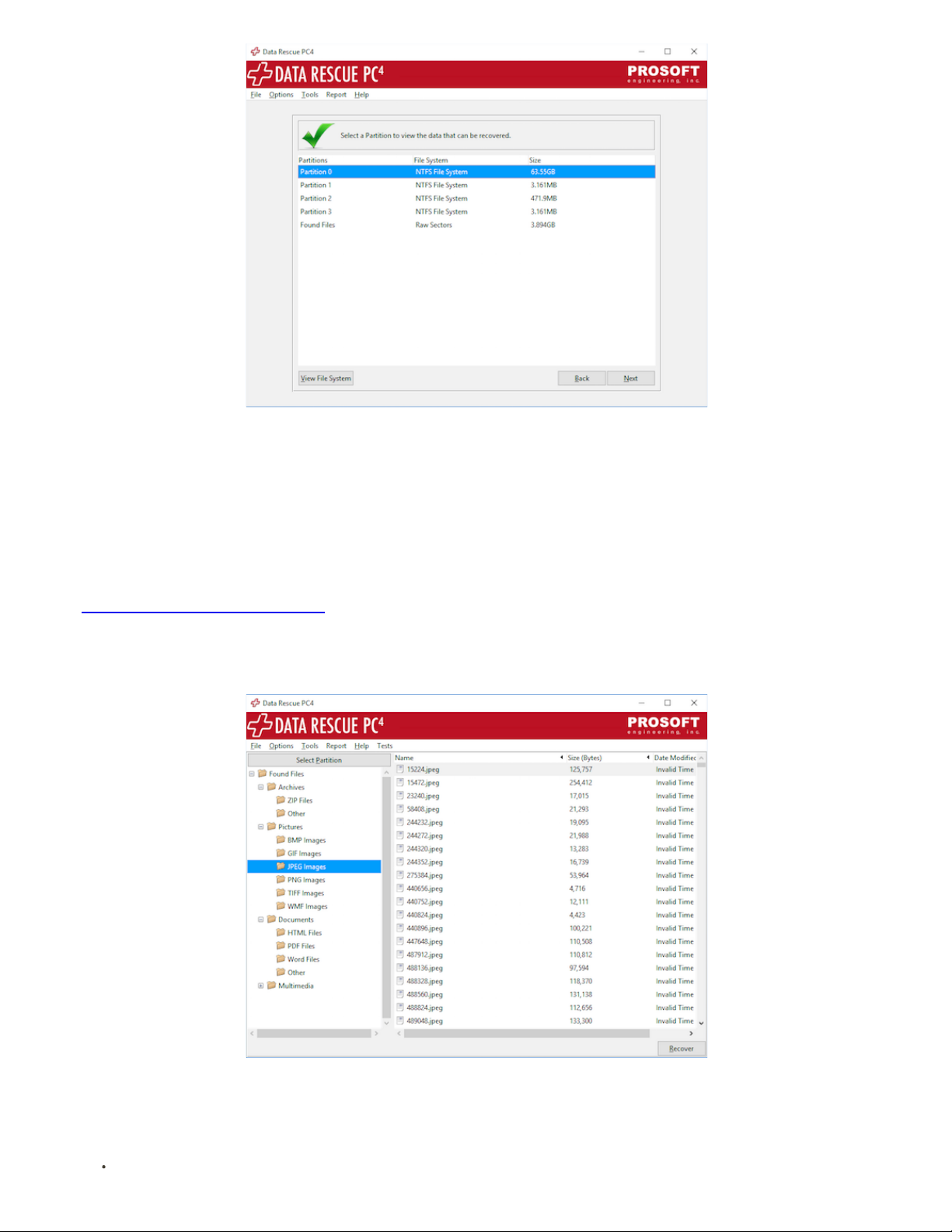
Select a Partition to view the data that can be recovered
Select a Partition
To view the recovered data within a Partition, select the appropriate Partition. If you are not sure which Partition has the data you want to recover, select one
Partition at a time to view the data.
View File System
To view technical information about your hard drive or partition click on the [View File System] button. The [View File System] will report a variety of statistics
about your hard drive to help you identify if a partition appears to be corrupt.
4.6. Raw Sector Recovery - Found Files
Data Rescue PC gives you the option to rebuild files according to their file types (ie. DOC, XLS, MP3, etc). There will be times when the damage to the hard
drive’s file system is so severe that files that you are looking for will not show up in one of the partitions that you select to rebuild. If this is the case you may
find the file by selecting “Found Files - Raw Sectors”.
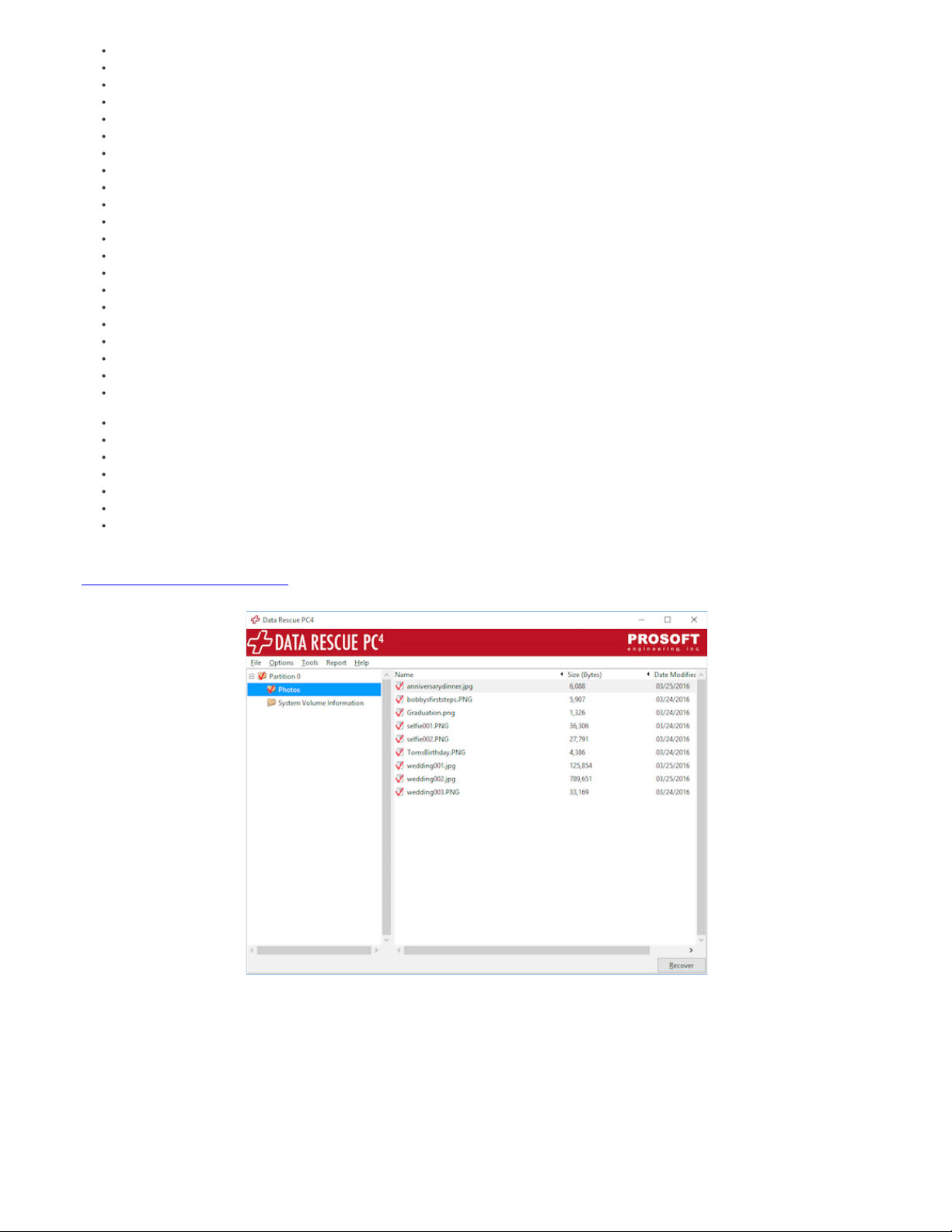
Folder structure of Raw Sectors results
Please note that while the “Found Files - Raw Sectors” selection will find more files than selecting the “Partition”, the validity of the files is not as strong and
sound as selecting the “Partition”. So we suggest that you choose the “Partition” first before trying the “Found Files - Raw Sectors” option.
The following is a list of the file types that the “Found Files - Raw Sectors” option will find and where they will be seen after rebuilding:
Archives/ARJ Files: arj
Page 10
Archives/ZIP Files: zip
Archives/RAR Files: rar
Archives/Other Files: 7z ace bz2 cab cazip cru dz gz hap hqx j6i jar lza lzh marc sit sqx sqz stf ufa zoo
Pictures/BMP Images: bmp
Pictures/GIF Images: gif
Pictures/JPEG Images: jpeg
Pictures/PNG Images: png
Pictures/PSD Images: psd
Pictures/TIFF Images: tiff
Pictures/WMF Images: wmf
Pictures/Other Images: arw cam cpt cr2 crw dcr dng dpx fp5 k25 kdc mos mpo mrw msp nef orf pcd pcx pef raf rgb sr2 srf tif x3f
Mail/EML Files: eml
Mail/Other Files: dbx pst wab snm db
Documents/HTML Files: html
Documents/Excel Files: xls
Documents/Power Point Files: ppt
Documents/PDF Files: pdf
Documents/Quicken Files: qsd qdf
Documents/QuickBooks Files: qbw
Documents/Word Files: doc
Documents/Other Files: adx chm eps fla fm3 fmt hlp mdb mny mpp nsf ole pm5 ps pub pwl qxd rpt rtf suo text vsd vsmacros wk1 wk3 wk4 wpd wri
xml
Multimedia/AVI Files: avi
Multimedia/MOV Files: mov
Multimedia/MP3 Files: mp3
Multimedia/WAV Files: wav
Multimedia/WMA Files: wma
Multimedia/WMV Files: wmv
Multimedia/Other Files: ani asf dvm m1v m2v mid mp4 mpeg mpg mts mxf ogg ra riff rm rmi
4.7. Recovering Files and Folders
Results window lists files and directories found
The selection of files to recover is broken down into 5 steps:
Step 1: Finding a specific file:
To find a specific file select [Tools > Find File] from the Menu Bar.
Filtering files by “Status” allows you to refine the results of the file and folder listings. To find files by status, select [Tools > Filter files by Status].
Page 11
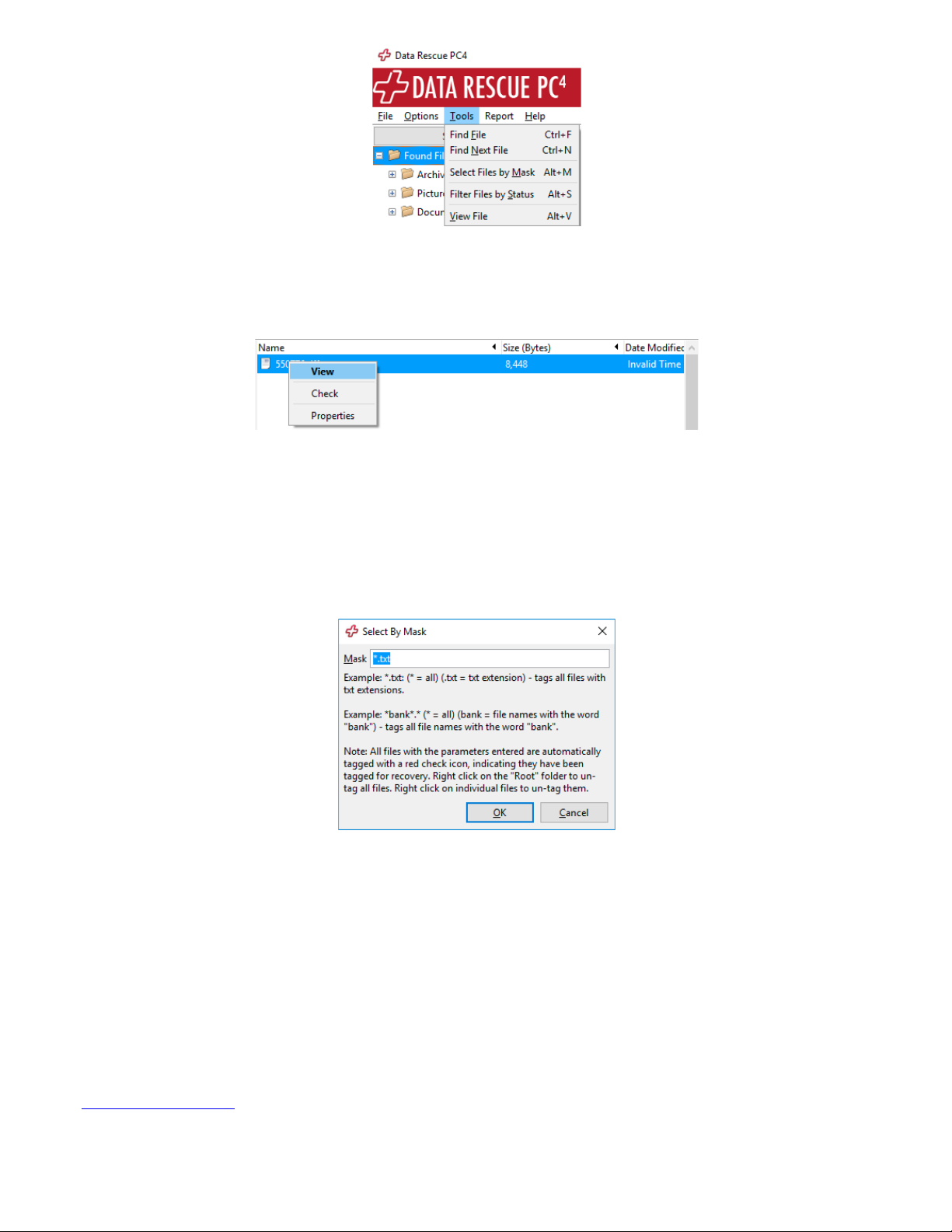
Tools dropdown to select Find File and Filter Files
Step 2: Previewing Files:
Right click on the item you wish to preview and select “View”. Data Rescue PC will attempt to preview the file using the installed system program registered
for this file type. If the application is not available the file preview will not be shown.
Right click to preview files
Step 3: Selecting files and folders to recover:
A. To recover individual files, right-click on the file or highlight the file and press space bar. A red checkmark will appear, indicating the file has been tagged
for recovery. Then, press the [Recover] button from the Menu Bar to start the recovery process.
B. To recover all files and folders, right-click on the “Root” folder (top left-hand column of folder listings). A red checkmark will appear, indicating all files have
been tagged for recovery. Then, click the [Recover] button from the Menu Bar to start the recovery process. Note: If a file cannot be located, try searching in
another Partition, if available (See Step 5).
C. To recover files by mask (to recover specific file types, like .txt files), select [Options > Select by Mask] from the Menu Bar and refer to the example.
Recover files by mask
Step 4: Selecting a Destination Drive to recover files and folders:
This program requires a Network Mapped Drive or a FAT/NTFS Partition on the Local Destination Drive (the Drive to save the scan of the problem Drive and
the recovered data). By default, the program selects the first available Partition as the Destination Drive. If the first available Drive is not the Destination
Drive, click on the appropriate Drive.
After selecting the files you want to recover, click on the [Recover] button.
If you are running Data Rescue PC from the Windows® operating system, a new window will appear to ask you to select where to recover your files. By
default, Data Rescue PC will create a folder named “Recover-YYYYMMDDHHmm” to represent the year, month, date, hour, and minute the recovery took
place. You may select a new directory and create a new folder where you want your files to transfer.
Step 5: Selecting a different partition to build a new file and folder listing:
To select a different partition from the Select Partition Window to build a new file and folder listing, click [Select Partition] button or select [Options > Select
Partition] from the Menu Bar.
4.7.1. Filter Files by Status
Filtering files by “Status” allows you to refine the results of the file and folder listing. By default, Invalid Files and Sector Error files are hidden, because they
are most likely unrecoverable. A blank field indicates a field that is shown.
Page 12
A common search is “Only Deleted Files”, which shows only deleted files. Another popular search is “Only Valid Files”. You could also search for “Only
Deleted Files” and “Only Valid Files” simultaneously by leaving these two fields blank and hiding all other search parameters. Try various combinations to
view the possibilities.
4.8. Accessing the Recovered Data
To view and use the recovered data, the Destination Drive should be attached to a working Windows® computer system.
Warning: Access and test the validity of the recovered data, before either discarding the source drive or continue writing on it.
4.8.1. Destination Drive Options
You can scan the Source Drive (the problem Drive) to view what data can be recovered without having a Destination Drive to recover to. However, to save
the scan of the Source Drive, or to recover data, you will need one of the following options:
USB / Firewire Drive Options: An existing external (USB or Firewire) Destination Drive (that has a FAT/NTFS Partition) with sufficient space. This can be
attached at any time during the scan process to save the scan file of the Source Drive or to recover data to, without having to start over.
Internal Hard Drive Options: An attached internal Drive (IDE, EIDE, SCSI, ATA, SATA) as the Destination Drive (that has a FAT/NTFS Partition). If the
internal drive is not attached, exit the program and shutdown the computer system. Then, attach the internal Drive (IDE, EIDE, SCSI, ATA, SATA) to use as a
Destination Drive (that has a FAT/NTFS Partition) and restart the program.
Network Drive: An existing mapped network drive with sufficient space
4.9. Cloning a Hard Drive
Cloning is a powerful expert feature. Cloning allows you to make an exact byte-by-byte copy of your hard drive to an additional drive. Cloning is
recommended when you have a drive that has begun to electronically or mechanically fail and is losing increasing amounts of data with every read/write
access. Cloning makes a rapid, single end-to-end read pass on the drive and copies the data to an additional drive of the same or greater capacity.
The cloning process greatly minimizes the risk of additional data loss. Cloning makes an exact copy of the drive, copying any good, corrupt, and erased files
and directories as-is. The clone process does not perform any data recovery processes on your damaged drive. Once the clone is created, you can
disconnect your damaged drive, set it aside, and then begin the data recovery process on the freshly copied hard drive for professional-level data recovery
results.
Warning: When Cloning, all data on the Destination Drive will be overwritten and destroyed.
4.9.1. Cloning to a Destination Drive
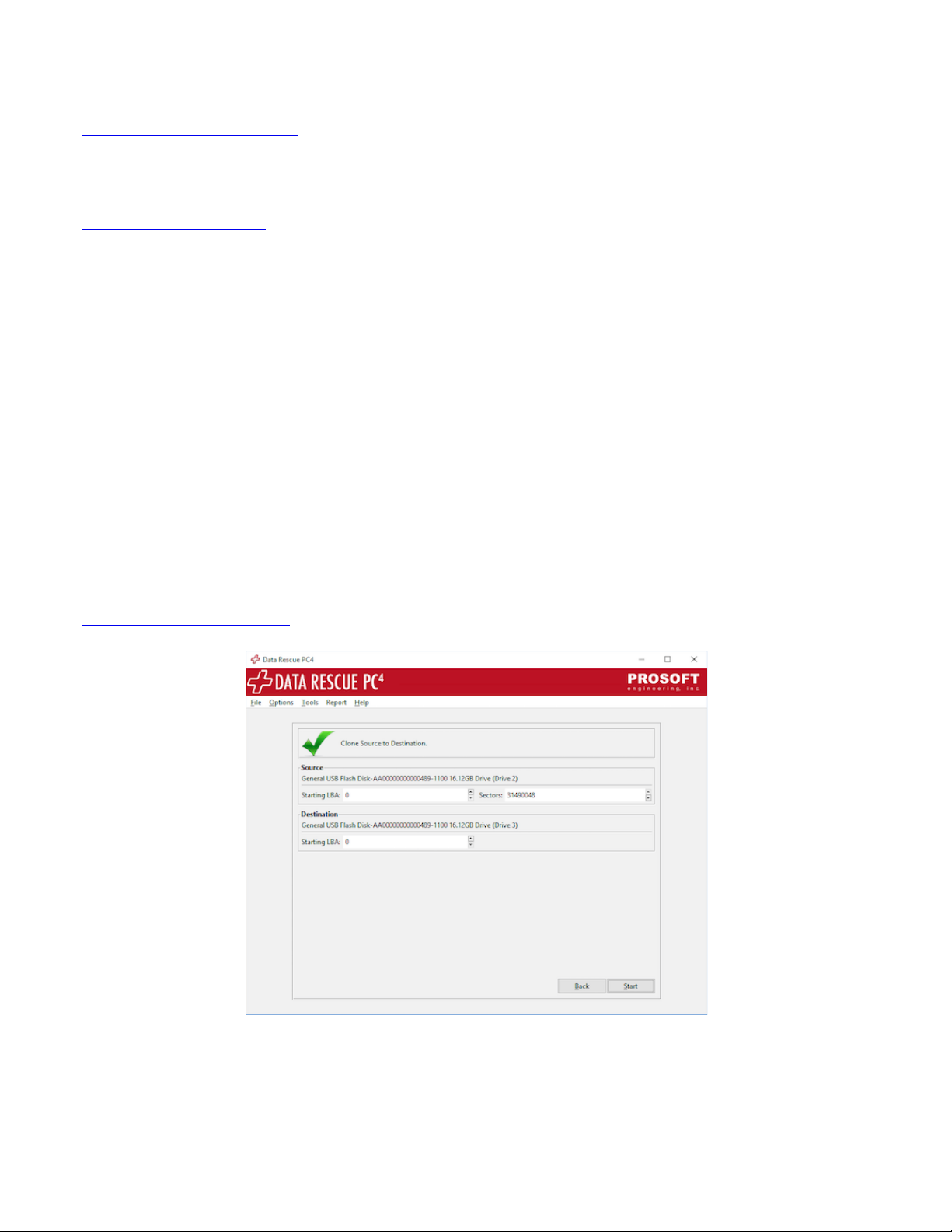
Clone source and destination
Here you see the Source Drive and the Destination Drive. When you continue with this process it will write everything at a sector level from the Source Drive
to the Destination Drive. To clone to a destination drive:
A. To access the Clone feature, select the source drive you would like to clone, and then click the Clone button in the bottom left of the source drive window.
B. Now select the destination drive you would like to clone to, and click Next.
C. Press Start to begin the Clone process.
Note: Cloning an internal drive is not recommended while running under Windows.
Page 13
1. The clone may not have integrity as other processes may write to the media being cloned.
2. If you want to clone an internal drive, boot from the Recovery USB to start the cloning process.
Note: The Destination Drive must be the same size or larger when using Clone. If it is not, only a partial clone will be made. Using the Clone feature will
overwrite any data that exists on the Destination Drive. If necessary, ensure you have a backup of the information on your Destination Drive.
4.9.2. Cloning to File
Data Rescue PC allows you to clone a hard drive to a file. This file can be scanned instead of the original hard drive to help recover the data.
A. To access the Clone to File feature, select the source drive you would like to clone, and then click the Clone button in the bottom left of the source drive
window.
B. In the Select Destination screen, click on Select Destination File and press Next.
C. Then enter the desired destination location and filename to be used and click Open. The cloning process will then proceed.
4.9.3. Scanning a Clone
Scanning a cloned hard drive helps alleviate any physical problems such as slow scans due to bad sectors or a malfunctioning circuit board. Scanning the
cloned hard drive yields the same results as the original hard drive.
A. Select the hard drive that you have cloned from the Source selection window.
B. Select the hard drive to recover to in the Destination window. Ensure that you are not selecting the original source drive that you cloned from.
C. Click [Next] to proceed with the scan.
Scanning a Clone from File: When the clone completes, you may select the created file to scan it individually for any files that can be recovered.
On the “Select Source” screen activate [Select Source File], click on the [Next] and select the file you have cloned to proceed with the scan process.
4.10. Preferences
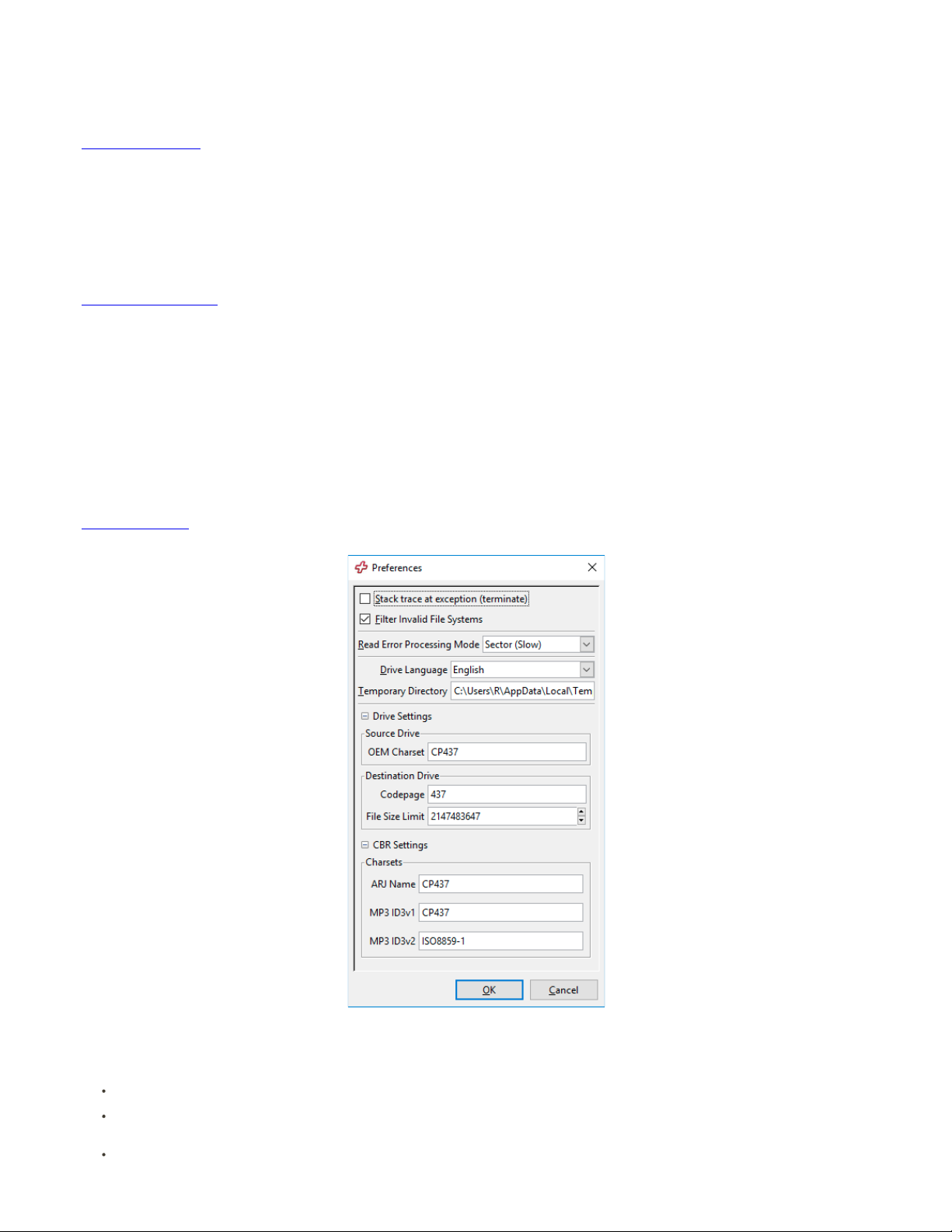
Preferences
This window is designed for advanced users and Technical Support. Typically, you will only need to be in this window when technical support indicates that it
is necessary. You can access the Preferences window by going to the [File > Preferences] menu.
Stack trace at exception: for use by Technical Support.
Filter Invalid File Systems: by default this is selected. This will prevent any “garbage” file systems from displaying. If you want to see everything that
was found from scanning the Source Drive, then click to remove the checkmark in the box.
Read Error Processing Mode: by default the program will run in a more exhaustive and highly reliable reading mode [Sector (slow)]. It will attempt to
read every single sector of the Source Drive. The other alternative is to run the program in [Block (fast)] mode, but this is much less reliable. The
[Block (fast)] mode is an option that can be used in cases where speed is more of a concern than reliability.
Page 14

Drive Language: by default the program scans the Source Drive for English based file and folder names. Use the dropdown box to choose a different
language character set to look for (i.e.English, European, Japanese, Russian, Chinese).
Temporary directory: this is where the program creates temporary files for preview.
Drive Settings: Contact Tech Support to determine if needed.
Drive Settings->Source Drive->OEM Charset: this is charset for file names found on source drive (“convert from” parameter).
Drive Settings->Destination->Drive->Codepage: this is codepage file names on destination drive (“convert to” parameter).
Drive Settings->Destination->Drive->File Size Limit: this specifies the largest file size a recovered file can be. By default, this value is set as 2GB
to support recovery onto FAT32 formatted hard drives and various network servers. Files larger than 2GB will be split into 2GB chunks. The value may
be set to “0” to have an unlimited file size for a recovered file. Recovering files larger than 2GB is only supported when recovering onto an NTFS
formatted hard drive.
CBR Settings / Charsets: charsets of filenames found inside ARJ and MP3 files.
Chapter 5. Basics of Data Recovery
5.1. Recovery Tips
Prevent writing to the hard drive. Further writing to the hard drive may overwrite data that you are trying to recover. This includes creating new documents,
browsing the Internet, or running disk repair utilities to attempt to fix the drive. The moment you are aware you have lost your data, shut down your machine
to prevent any new data being written to the hard drive and run Data Rescue PC to search for your data.
Evaluate the situation. Every data recovery scenario is different and may require different approaches to recover the data. Read “Basic Recovery
Scenarios” in Chapter 5.2 to determine the best method for recovering data in your situation.
A second hard drive with adequate space is necessary to recover data. If you have a second internal hard drive or external USB/Firewire hard drive
attached to your computer, you may use it as a destination for your recovered files. Make sure you have enough free space on the destination hard drive to
hold the data you wish to recover. For example, if you need to recover 25GB of data from the bad hard drive, you will need at least 25GB of free space on
the destination hard drive to in order to recover and store all the data.
Consider acquiring a replacement hard drive. If you do not have a second hard drive to recover to, you may want to acquire a new hard drive. If your
hard drive is physically failing, a replacement hard drive will be necessary to maintain your data. Not only will the new hard drive help you with your recovery
immediately, but the new hard drive may also be used as a backup hard drive in the future when your recovery is complete.
Be patient while scanning your hard drive. The average scan time is 5 minutes per Gigabyte. Healthy drives tend to scan faster. Bad blocks on the hard
drive may slow down Data Rescue PC’s progress momentarily. Once Data Rescue PC has overcome the bad blocks, the scan time will speed up to
complete the scan.
Use the Tools File Menu to search for specific files. When viewing the list of files to recover, use “Find File” if you know the name of the files. “Select By
Mask” will help select multiple files of any file types you are looking for in particular, such as docs or JPEG files. Use “Filter Files by Status” to help narrow
down the results, by either showing only Deleted or Good files.
Review the recovered files before taking action on the damaged hard drive. Depending on how the hard drive is damaged, the files may not be
recovered properly on the first attempt. Review the files to ensure they have been recovered properly. If the recovered files open properly, you may proceed
with reformatting or reinstalling the operating system on the hard drive. In the case the recovered files do not open, you still have the opportunity to rescan
the hard drive and attempt the recovery again.
5.2. Basic Recovery Scenarios
This section lists basic scenarios to recover data from and the steps to help with the recovery process with Data Rescue PC.
Operating system fails to boot or virus infected boot hard drive.
Boot from the Data Rescue PC USB.
Select the Partition of the hard drive.
Select your secondary hard drive as the destination.
Select “Quick Scan” to search the partition.
When scan completes, select “Partition 0”. This will provide a list of all the files that currently exist on the hard drive.
Alternative: Rescan using “Deep Scan” for more results.
Accidentally deleted files on internal hard drive.
Boot from the Data Rescue PC USB.
Select the Partition of the hard drive.
Select the secondary hard drive as the destination.
Select “Deep Scan” to search the partition.
When scan completes, select “Partition 0”. This will provide a list of all the files that are on the hard drive.
Change the “Filter Files by Status” to “Only Deleted Files”.
Alternative: Go to options and click on “Select Partition”. Choose “Raw Sectors” and recover the category of files you are interested in.
Note: If the Data Rescue PC program is installed on the hard drive before the files were deleted, you may run the Data Rescue PC program directly from the
Operating system to scan for files. Ensure you are recovering the files onto a second hard drive to prevent overwriting any lost data from the internal hard
drive.
Page 15

External hard drive is not recognized by operating system.
Install Data Rescue PC on the Windows® operating system.
Select the external hard drive device.
Select “Next” to begin scan.
When scan completes, select “Partition 0”. This will provide a list of all the files that currently exist on the hard drive.
Alternative: Go to options and click on “Select Partition”. Choose “Raw Sectors” and recover the category of files you are interested in. Original file
names are not available.
External hard drive was accidentally reformatted.
Install Data Rescue PC on the Windows® operating system.
Select the external hard drive device.
Select “Next” to begin scan.
When scan completes, select “Raw Sectors”.
Recover the category of files you are interested in. Original file names are not available.
Accidentally deleted files from external hard drive.
Install Data Rescue PC on the Windows® operating system.
Select the external hard drive device.
Select “Next” to begin scan.
When scan completes, select “Partition 0”. This will provide a list of all the files that are on the hard drive.
Change the “Filter Files by Status” to “Only Deleted Files”.
Alternative: Go to options and click on “Select Partition”. Choose “Raw Sectors” and recover the category of files you are interested in.
Chapter 6. Frequently Asked Questions (FAQ)
6.1. Common FAQs
A. Will Data Rescue PC recover my Word documents? Excel? (Microsoft® Office)?
If you recently lost the file and it has not been over-written or damaged by other data, Data Rescue PC can recover it.
B. Can Data Rescue PC recover my digital pictures/music/videos?
If you recently formatted the media or deleted the pictures (music, and videos), and they have not been over-written or damaged by other data, Data Rescue
PC can recover them.
C. I accidentally deleted a file.
If you recently deleted the file and it has not been over-written or damaged by other data, Data Rescue PC can recover it.
D. If I have a problem, is there Technical Support?
Yes. Support is available before and after you purchase any of our products. Visit our website for the most current Downloads, Manuals, and Frequently
Asked Questions:
Website: http://www.prosofteng.com/support
Phone: 1-925-426-6306.
Technical Support Hours: Monday - Friday 8:00 A.M. - 5:00 P.M. (P.S.T.).
E. How do I create a bootable USB?
To create the bootable USB, you will need a Windows® 10, Windows® 8, or Windows® 7 machine with a USB port and an empty USB drive. Please follow
these steps to create the latest boot USB:
1. Download the latest USB update from Prosoft Engineering: http://www.prosofteng.com/products/data_rescue_pc_update.php
2. Insert an empty USB drive into a USB port.
3. Double-click on the downloaded executable file.
4. In the main window, the default selections are prepared to help you create the USB. Click on “OK” to proceed with creating the USB.
5. Allow up to 5 minutes for the USB writer to create the boot USB.
6. Your boot USB is now ready to be used.
F. What do you mean by setting the BIOS to boot from the USB Drive?
All computers have a BIOS to help computer software communicate with computer hardware. The computer BIOS must be set to boot from the USB Drive
so that Data Rescue PC can communicate with the computer hardware. If you have problems setting the BIOS contact Technical Support.
G. How do I know that Data Rescue PC will recover my data?
Each file is given a specific “Status” which determines the rate of recovery. Most users can easily follow the color-coded “Status”, while Advanced Users may
want to read the “Technical Information”.
Page 16

H. How do I purchase Data Rescue PC?
Data Rescue PC can be purchased online: Data Rescue PC For Windows PCs Web Page
I. How do I register Data Rescue PC?
The reseller version of Data Rescue PC contains the serial number in the USB case. If you have downloaded Data Rescue PC, but need to register the
product immediately, the following registration options are available: * Online Registration: a Registration Key is sent via e-mail after your purchase. * Phone
Registration: 1-877-477-6763 (if you only have one computer). * Registration Hours: Monday - Friday 8:00 A.M. - 5:00 P.M. (P.S.T.)
J. Why can’t I recover data to my problem Drive?
Data cannot be recovered to the problem drive, because the data being recovered will over-write data that still needs to be recovered. Doing this can also
cause corruption to the file system, making your data permanently unrecoverable.
K. When I try to open a file, the content looks distorted.
If the content of a file shows distorted, call Technical Support for additional options. The cause could be over-written data, fragmentation, viruses, etc.
L. I see dots instead of filenames.
If the media you are trying to recover files from was used in a different language environment then it is possible you may need to specify a different language
character set for the Data Rescue program to use while scanning your drive. Please contact Technical Support about setting the OEM Charset option in
Preferences->Drive Settings.
6.2. Advanced FAQs
A. I accidentally formatted my hard drive.
A Windows Quick Format can be recovered if the data has not been over-written or damaged. A Windows Full Format low-level formats every sector.
Therefore, all data most likely will be destroyed (Exception: Windows 95, 98, and ME format function acts as a Quick Format. Therefore, it can be recovered
if the data has not otherwise been over-written or damaged). See Chapter 5.2 for tips to recover from a reformatted hard drive.
B. I used FDISK and can’t access my data.
FDISK resets the partition and boot sectors, but does not affect the data. Therefore, Data Rescue PC can recover the data.
C. I deleted a Partition using FDISK (Partition Magic®, etc.).
FDISK (and other partitioning utilities) resets the partition and boot sectors, but does not affect the data. Therefore, Data Rescue PC can recover the data.
D. I re-installed Windows and can’t access my data.
If the data has not been over-written or damaged by re-installing Windows®, Data Rescue PC can recover it.
E. I used Ghost and my data is gone.
If the data has not been over-written or damaged by restoring the hard drive image, Data Rescue PC can recover it.
F. I got hit by a virus.
If the virus has not physically damaged the file, Data Rescue PC can recover it.
If you have one of these error messages when booting: “INVALID DRIVE SPECIFICATION” or “MISSING OPERATING SYSTEM”, A virus has probably
infected the Boot Sector and/or Partition Table, while leaving the rest of your file system intact. Therefore, Data Rescue PC can recover the data. See
Chapter 5.2 for tips to recover from a virus infected hard drive.
G. BIOS does not recognize my drive.
If Data Rescue PC cannot access or recover your data, your media has severe file corruption or is mechanically failing (software will not solve your problem
at this point). This means that professional data recovery personnel should evaluate your drive. Prosoft Engineering recommends contacting our Data
Rescue Center for In-Lab Data Recovery Services. Please call or visit the website for more details:
Phone: 1-877-501-4949
Website: www.TheDataRescueCenter.com
H. What types of media are supported?
Data Rescue PC supports Firewire and USB Devices (Compact Flash Type I, II, Microdrives, Smart Media, Secure Digital Cards, Memory Sticks, XD-Picture
Cards, etc.), Zip, Jaz, Floppy Diskettes, and hard disk drives (IDE, EIDE, SCSI, ATA, SATA).
I. Can I recover over a network?
Yes, Data Rescue PC4 can recover over a network. Running under Windows Data Rescue can use a network drive which is “mapped” as a Destination
Drive. When booting from the Recovery USB, Data Rescue will also work with any mapped drives (See Network Drives).
J. Data Rescue PC splits big files in 2GB chunks/volumes. What do I do?
Data Rescue PC sets the default maximum file size as 2GB to properly support recovery onto FAT32 formatted hard drives and various network servers. Any
files larger than 2GB will be split into 2GB chunks.
You may adjust this default value in “Preferences->Drive Settings->Destination Drive-> File Size Limit”. You may set the value to “0” to have an unlimited file
size for a recovered file. Recovering files larger than 2GB is only supported when recovering onto an NTFS formatted hard drive.
K. I am receiving an error “Windows - No Disk”. What does this mean?
Page 17

The error “Windows - No Disk” is a non-critical error by the Windows Operating System, which means there is a removable media slot that is currently empty
(such as Compact Flash, SD, XD, Memory Stick, etc.). This error occurs when selecting a source or destination while running the installed Data Rescue PC
application on Windows. This error may repeat multiple times for each empty media slot you have available. Clicking on “Continue” in the error message will
proceed past this message.
L. Data Rescue PC is not booting on my computer. What do I do?
If the text “Cannot find file …” is displayed while booting, this most likely means the USB is bad (downloaded with errors).
You may consider:
1. Downloading and recreating the Data Rescue PC bootable USB
2. Try booting the USB from a different USB port to diagnose if the problem is with your system or the USB.
If you do get the above error message but still have problems booting the Rescue USB:
Data Rescue has additional options you can select. When the system first starts booting the USB, the Data Rescue USB will display count down timer (10, 9,
8, …). If you press a key while the Data Rescue USB is counting down, a list of boot options will be presented. The most common alternate to the normal
boot process is “Boot in verbose mode”. Technical Support can assist you with the use of these options.
Data Recovery Services
If Data Rescue PC cannot access or recover your data, your media may have severe file corruption or be mechanically failing (software will not solve your
problem at this point). This means your hard drive needs to be evaluated by professional data recovery personnel. Drives fail for a variety of reasons shock, electrical failure, mechanical ware or failure. A professional service can help determine if the problem is correctable and the data recoverable.
Prosoft Engineering’s Data Recovery Center provides In-Lab Data Recovery Services. Please call or visit the website for more details:
Phone: 1-877-501-4949
Website: www.TheDataRescueCenter.com
About Prosoft Engineering, Inc.
Established in 1985, Prosoft Engineering, Inc. specializes in creating professional quality software utility products designed to be easily used by both novice
and expert users. Prosoft Engineering, Inc. is headquartered in Livermore, CA. Please visit the website at http://www.prosofteng.com/.
Glossary
ATA (PATA) - Acronym for AT Attachment. An interface standard for connecting devices, such as hard drives and CD-ROM drives.
Basic Input/Output System (BIOS) - A system used that allows the software to interact with the hardware. You may need to adjust the BIOS settings in
order to choose which drive you want to start the computer from.
Booting - A process that starts loading an operating system when the computer is turned on.
Byte - File sizes are represented in basic units of measurements known as Bytes. Common prefixes Kilo- (K), Mega- (M), Giga- (G), and Tera- (T) will
represent the size value. The following are value conversions for Byte sizes: (These common place size representations are used in lieu of the correct
technical values.)
1000 Bytes = 1 KB
1000 KB = 1 MB
1000 MB = 1 GB
1000 GB = 1 TB
Clone - The process of copying a hard drive sector by sector onto another hard drive. The clone will copy the partition structure, file system format, files and
free space of the original hard drive to another device.
Deep Scan - A scan method of Data Rescue PC that searches for any and all possible files on the hard drive. Results include any found partitions/file
systems and Raw Sector results. Deep Scans may be done on the hard drive or the individual partition.
Destination Drive - The location where the data is being transferred. The destination drive should not be the same as the source drive to prevent
overwriting data.
FAT32 - A common file system for Windows® formatted hard drives. Commonly used on external hard drives and memory cards. Supports file sizes up to
4GB (Gigabytes).
FDISK - A command-line utility used for disk partitioning. The FDISK command resets the partitions and boot sectors.
File System - The method in which data is stored or organized on a partition. Data Rescue PC supports FAT12, FAT16, FAT32, and NTFS file systems.
FireWire (IEEE1394) - A high-speed device interface commonly used for hard drives.
Format - The process of preparing a hard drive for use by setting up an empty file system.
NTFS - A common file system for Windows® formatted hard drives. Commonly used on internal hard drives. Allows storage of files greater than 4GB.
Page 18

OS - Acronym for Operating System.
Partition - A Partition divides storage space on any media into isolated sections, like cubicles isolate working sections within an office. A hard drive can
have more than one partition.
Quick Scan - A scan method of Data Rescue PC that searches for any data existing on an available file system. Results will include the original file names,
directory structure, and date created/modified information for any files existing on the file system.
RAID - Acronym for Redundant Array of Inexpensive Disks. A configuration for hard drives to divide or replicate data across multiple hard drives.
Raw Sector Scan - A scan process that is a part of the Deep Scan Method to rebuild files based on file patterns. Results will be listed by category with
generic filenames to reconstruct data. This process is ideal for recovering files that have been deleted or hard drives that have been reformatted.
SATA - Serial ATA computer bus is a standard high-speed hard drive interface.
Source Drive - The location where the files are missing.
USB (Universal Serial Bus) - A serial bus standard to connect various devices to a computer, including external hard drives.
PROSOFT Engineering, Inc. End User Software License
PROSOFT Engineering, Inc. End User Software License including PERSONAL LICENSE, PROFESSIONAL LICENSE and ENTERPRISE LICENSE.
PLEASE READ THIS SOFTWARE LICENSE AGREEMENT "LICENSE" CAREFULLY BEFORE USING THE SOFTWARE. BY USING THE SOFTWARE, YOU ARE
AGREEING TO BE BOUND BY THE TERMS OF THIS LICENSE.
1. License. The software and any fonts accompanying this License whether on disk, in read only memory, or on any other media
(the "Prosoft Software") are licensed, not sold, to you by Prosoft Engineering, Inc. ("Prosoft"). You own the media on which
the Prosoft Software is recorded but Prosoft and/or Prosoft's licensor(s) retain title to the Prosoft Software. The Prosoft
Software in this package and any copies which this License authorizes you to make are subject to this License.
2. Permitted Uses and Restrictions. This software is available in multiple license types including PERSONAL LICENSE,
PROFESSIONAL LICENSE and ENTERPRISE LICENSE. These licenses hold separate restrictions based on product type. Please refer
to the product type of the LICENSE:
PERSONAL LICENSE:
This License is only applicable for the home user who purchased the software and cannot be used within or for any
organization. This License is to only be used by the home user on up to 5 drives or storage devices that are owned by the
home user within one household and immediate family. It is not to be used as part of a business, in support of a business,
nor any other type of compensated endeavor. The home user may make one copy of the Prosoft Software in machine-readable form
for backup purposes only. The backup copy must include all copyright information contained on the original. Except as
permitted by applicable law and this License, you may not decompile, reverse engineer, disassemble, modify, rent, lease,
loan, distribute, sublicense, create derivative works from the Prosoft Software or transmit the Prosoft Software over a
network. The home user may, however, transfer their rights under this License provided all related documentation is
transferred, this License and a copy of the Prosoft Software to a party who agrees to accept the terms of this License and
destroy any other copies of the Prosoft Software in the home user's possession. The home user's rights under this License
will terminate automatically without notice from Prosoft if the home user fails to comply with any term(s) of this License.
ANNUAL PROFESSIONAL LICENSE:
This Annual License allows a single professional user to install and use the Prosoft Software on any and all computers that
the IT professional/company purchasing this software owns (at a single Location) as well as any client/coworker/partner/student/company-owned computer or drive (located at the same site). This license is required by any type of
business or organization in order to legally use the software. The user may make one copy of the Prosoft Software in
machine-readable form for backup purposes only. The backup copy must include all copyright information contained on the
original. Except as permitted by applicable law and this License, the user may not decompile, reverse engineer, disassemble,
modify, rent, lease, loan, distribute, sublicense, create derivative works from the Prosoft Software or transmit the Prosoft
Software over a network. The user may, however, transfer their rights under this License provided all related documentation
is transferred, this License and a copy of the Prosoft Software to a party who agrees to accept the terms of this License
and destroy any other copies of the Prosoft Software in the user's possession. Furthermore, as an IT professional user, the
user may use this software (but not install the software) on client's computers as needed to perform your professional
duties. The user will receive free support and free upgrades on the purchased software within the annual time frame. The
user's rights under this agreement terminate automatically on the 1-year anniversary of original purchase order.
Furthermore, your rights under this License will terminate automatically without notice from Prosoft if you fail to comply
with any term(s) of this License.
ANNUAL ENTERPRISE LICENSE:
This Annual License is required within any type of business organization whom requires the deployment to employees. This
License allows any employee of the ENTERPRISE (worldwide, including wholly-owned subsidiaries), for the duration of the
contract, to install and use the Prosoft Software on any and all computers that the ENTERPRISE owns. The user may freely
make copies of the software for distribution to employees within the ENTERPRISE provided the copies include all copyright
and licensing information contained on the original. Except as permitted by applicable law and this License, the user may
not decompile, reverse engineer, disassemble, modify, rent, lease, loan, distribute, sublicense, create derivative works
from the Prosoft Software or transmit the Prosoft Software over a network. This license is non-transferrable. You will
receive free support and free upgrades on the purchased software within the annual time frame. Your rights under this
agreement terminate automatically on the 1-year anniversary of original purchase order. Furthermore, your rights under this
License will terminate automatically without notice from Prosoft if you fail to comply with any term(s) of this License.
2.5 Update and Upgrade Policy. Your license entitles you to any minor updates and enhancements that are made to the product
from time-to-time. These updates will normally be in the form of version numbers who's whole number is unchanged (i.e. 2.0-
2.99). However, any major upgrades to the product will be made available to you at an additional cost. These upgrade will
normally be in the form of version numbers who's whole number is changed (i.e. 2.xx-3.0). Frequency, availability and cost
of all updates and upgrades are determined at the sole discretion of Prosoft Engineering, Inc. However, timed licenses (such
as the ANNUAL PROFESSIONAL and ANNUAL ENTERPRISE LICENSE) entitles you to both updates and upgrades throughout the duration
of the license agreement.
3. Limited Warranty on Media. Prosoft warrants the media on which the Prosoft Software is recorded to be free from defects
Page 19

in materials and workmanship under normal use for a period of ninety (90) days from the date of original retail purchase.
Your exclusive remedy under this paragraph shall be, at Prosoft's option, a refund of the purchase price of the product
containing the Prosoft Software or replacement of the Prosoft Software, which is returned to Prosoft or a Prosoft authorized
representative with a copy of the receipt. THIS LIMITED WARRANTY AND ANY IMPLIED WARRANTIES AND/OR CONDITIONS ON THE MEDIA
INCLUDING THE IMPLIED WARRANTIES AND/OR CONDITIONS OF MERCHANTABILITY OR SATISFACTORY QUALITY AND FITNESS FOR A PARTICULAR
PURPOSE ARE LIMITED IN DURATION TO NINETY (90) DAYS FROM THE DATE OF ORIGINAL RETAIL PURCHASE. SOME JURISDICTIONS DO NOT
ALLOW LIMITATIONS ON HOW LONG AN IMPLIED WARRANTY LASTS, SO THIS LIMITATION MAY NOT APPLY TO YOU. THE LIMITED WARRANTY SET
FORTH HEREIN IS EXCLUSIVE AND IN LIEU OF ALL OTHERS, WHETHER ORAL OR WRITTEN, EXPRESS OR IMPLIED. PROSOFT SPECIFICALLY
DISCLAIMS ALL OTHER WARRANTIES. THIS LIMITED WARRANTY GIVES YOU SPECIFIC LEGAL RIGHTS, AND YOU MAY ALSO HAVE OTHER RIGHTS
WHICH VARY BY JURISDICTION.
4. Disclaimer of Warranty on Prosoft Software. You expressly acknowledge and agree that use of the Prosoft Software is at
your sole risk. The Prosoft Software is provided "AS IS" and without warranty of any kind and Prosoft and Prosoft's
licensor(s) (for the purposes of provisions 4 and 5, Prosoft and Prosoft's licensor(s) shall be collectively referred to as
"Prosoft") EXPRESSLY DISCLAIM ALL WARRANTIES, EXPRESS OR IMPLIED, INCLUDING, BUT NOT LIMITED TO, THE IMPLIED WARRANTIES OF
MERCHANTABILITY AND FITNESS FOR A PARTICULAR PURPOSE. PROSOFT DOES NOT WARRANT THAT THE FUNCTIONS CONTAINED IN THE PROSOFT
SOFTWARE WILL MEET YOUR REQUIREMENTS, OR THAT THE OPERATION OF THE PROSOFT SOFTWARE WILL BE UNINTERRUPTED OR ERROR-FREE, OR
THAT DEFECTS IN THE PROSOFT SOFTWARE WILL BE CORRECTED. FURTHERMORE, PROSOFT DOES NOT WARRANT OR MAKE ANY REPRESENTATIONS
REGARDING THE USE OR THE RESULTS OF THE USE OF THE PROSOFT SOFTWARE OR RELATED DOCUMENTATION IN TERMS OF THEIR CORRECTNESS,
ACCURACY, RELIABILITY, OR OTHERWISE. NO ORAL OR WRITTEN INFORMATION OR ADVICE GIVEN BY PROSOFT OR A PROSOFT AUTHORIZED
REPRESENTATIVE SHALL CREATE A WARRANTY OR IN ANY WAY INCREASE THE SCOPE OF THIS WARRANTY. SHOULD THE PROSOFT SOFTWARE PROVE
DEFECTIVE, YOU (AND NOT PROSOFT OR A PROSOFT AUTHORIZED REPRESENTATIVE) ASSUME THE ENTIRE COST OF ALL NECESSARY SERVICING,
REPAIR OR CORRECTION. SOME JURISDICTIONS DO NOT ALLOW THE EXCLUSION OF IMPLIED WARRANTIES, SO THE ABOVE EXCLUSION MAY NOT
APPLY TO YOU.
5. Limitation of Liability. UNDER NO CIRCUMSTANCES, INCLUDING NEGLIGENCE, SHALL PROSOFT BE LIABLE FOR ANY INCIDENTAL,
SPECIAL, INDIRECT OR CONSEQUENTIAL DAMAGES ARISING OUT OF OR RELATING TO THIS LICENSE. SOME JURISDICTIONS DO NOT ALLOW THE
LIMITATION OF INCIDENTAL OR CONSEQUENTIAL DAMAGES SO THIS LIMITATION MAY NOT APPLY TO YOU. Prosoft Engineering is not liable
for any damages or loss that may occur during the use of Prosoft's software including, but not limited to, user error or
hardware failure. In no event shall Prosoft's total liability to you for all damages exceed the amount paid for this License
to the Prosoft Software.
6. Export Law Assurances. You may not use or otherwise export or reexport the Prosoft Software except as authorized by
United States law and the laws of the jurisdiction in which the Prosoft Software was obtained. In particular, but without
limitation, none of the Prosoft Software may be used or otherwise exported or reexported (i) into (or to a national or
resident of) a United States embargoed country or (ii) to anyone on the U.S. Treasury Department's list of Specially
Designated Nationals or the U.S. Department of Commerce's Table of Denial Orders. By using the Prosoft Software, you
represent and warrant that you are not located in, under control of, or a national or resident of any such country or on any
such list.
7. Government End Users. If the Prosoft Software is supplied to the United States Government, the Prosoft Software is
classified as "restricted computer software" as defined in clause 52.227-19 of the FAR. The United States Government's
rights to the Prosoft Software are as provided in clause 52.227-19 of the FAR.
8. Controlling Law and Severability. This License shall be governed by the laws of the United States and the State of
California. If for any reason a court of competent jurisdiction finds any provision, or portion thereof, to be
unenforceable, the remainder of this License shall continue in full force and effect.
Any litigation claims must be filled through the Alameda County Court System.
9. Complete Agreement. This License constitutes the entire agreement between the parties with respect to the use of the
Prosoft Software and supersedes all prior or contemporaneous understandings regarding such subject matter. Prosoft
Engineering reserves the right, at any time and from time to time, to update, revise, supplement, and otherwise modify this
Agreement and to impose new or additional rules, policies, terms, or conditions on your use of the Service. Such updates,
revisions, supplements, modifications, and additional rules, policies, terms, and conditions will be effective immediately
and incorporated into this Agreement. Your continued use of our software will be deemed to constitute your acceptance of any
and all such Additional Terms. All Additional Terms are hereby incorporated into this Agreement by this reference.
 Loading...