

Page 1
Multi-Network
Cable Tester
3PK-NT007
AT&T 258A.
TOKEN RING
EIA/TIA568
MULTI-NETWORK
CABLE TESTER
BNC Indicator
<Press To Test BNC
Green-good
GND
ON
OFF
ON
OFF
Red-Bad
Ounlit-Open
C
A
B
L
E
T
E
S
T
E
R
M
U
L
T
I
-
N
E
T
W
O
R
K
Network
Cable
Terminator
1&2
3&6
4&5
7&8
-GND
Good Pe
Mix or No
Light-Fauity pt
108aset
Token
Ring
258A
EIA
TIA
568
USER'S MANUAL
1
2
3
4
5
6
7
8
G
B
CABLE
TESTER
MASTER
OFF ON S
MT-7051
RJ45 + RJ11
TESTER-RED-7051
Page 2

INDEX
Thank you for purchasing
the multi-network cable tester
The multi-network cable is widely use for network testing.
The multi-network cable tester can automatically check for
continuity, shorted, open and crossed wire pairs.
Before use the multi-network cable tester, please read the
following instructions completely.
MT-7051
MULTI- MODULAR CABLE TESTER.............................3
1
Page 3
INTRODUCTION
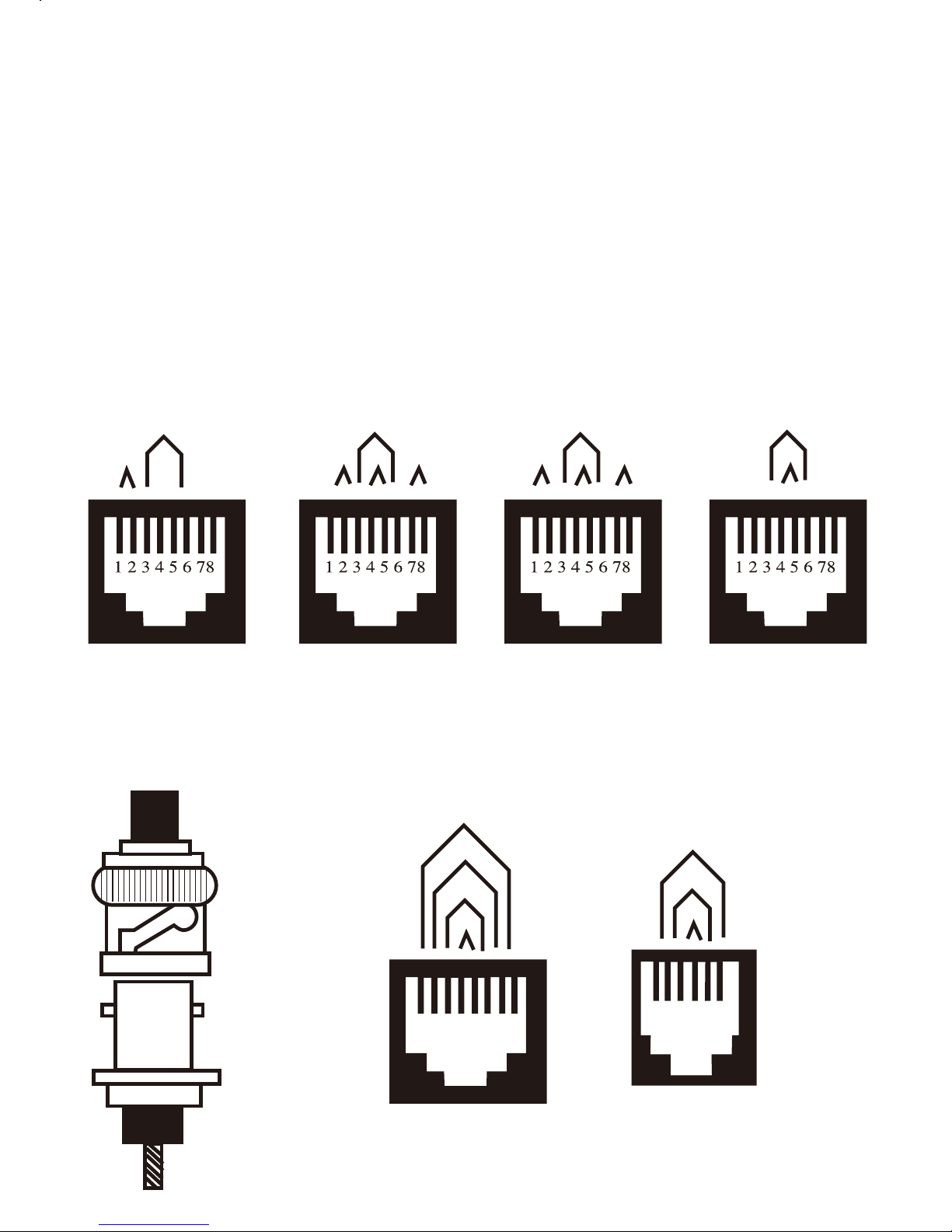
These cable testers are specialized to quickly test by auto scanning for
wires continuity, misswiring and polarization of thin Ethernet
(BNC/TNC), 10-Base-T (UTP/STP), AT&T 258A, TIA568A/B,
Token Ring and USOC4/6/8 modular cable. By using the attached
remote terminator, you can easily test a cable whatever before or after
the cables are installed. Easy access and quick check up.
PR1
PR2
Ethernet
10Base-T
PR2
PR3
PR4
PR1
EIA/TIA-568A
PR3
PR2
PR4
PR1
EIA/TIA-568B
AT & T 258A
PR2
PR1
8-position
Token Ring
BNC
Plug
BNC
Jack
1 2 3 4 5 6 78
PR3
PR2
PR1
USOC 8
1 2 3 4 5 6
PR3
PR2
PR1
USOC 4 (Prs. 1 &2)
USOC 6 (Prs 1,2 &3 )
2
Page 4
1
2
3
4
5
6
7
8
G
B
CABLE
TESTER
MASTER
OFF ON S
MT-7051
RJ45 + RJ11
1
2
3
4
5
6
7
8
G
REMOTE
MT-7051
RJ11 + RJ45
Remote
Terminator
Remote
Terminator
Master
MT-7051
3
Page 5

Remarks:
Please make sure-a 9-volt alkaline battery has been installed in the
battery compartment.
Caution:
Don't connect cable tester to the live circuits as it may be
damaged by over voltage.
MT-7051
MULTI-MODULAR CABLE TESTER
Warning:
1. For protect and safety reasons, please don't use MT-7051 test AC
power.
2. Turn on MT-7051, the power light is dark or not light. Please
replace new 9V battery.
How to Use MT-7051:
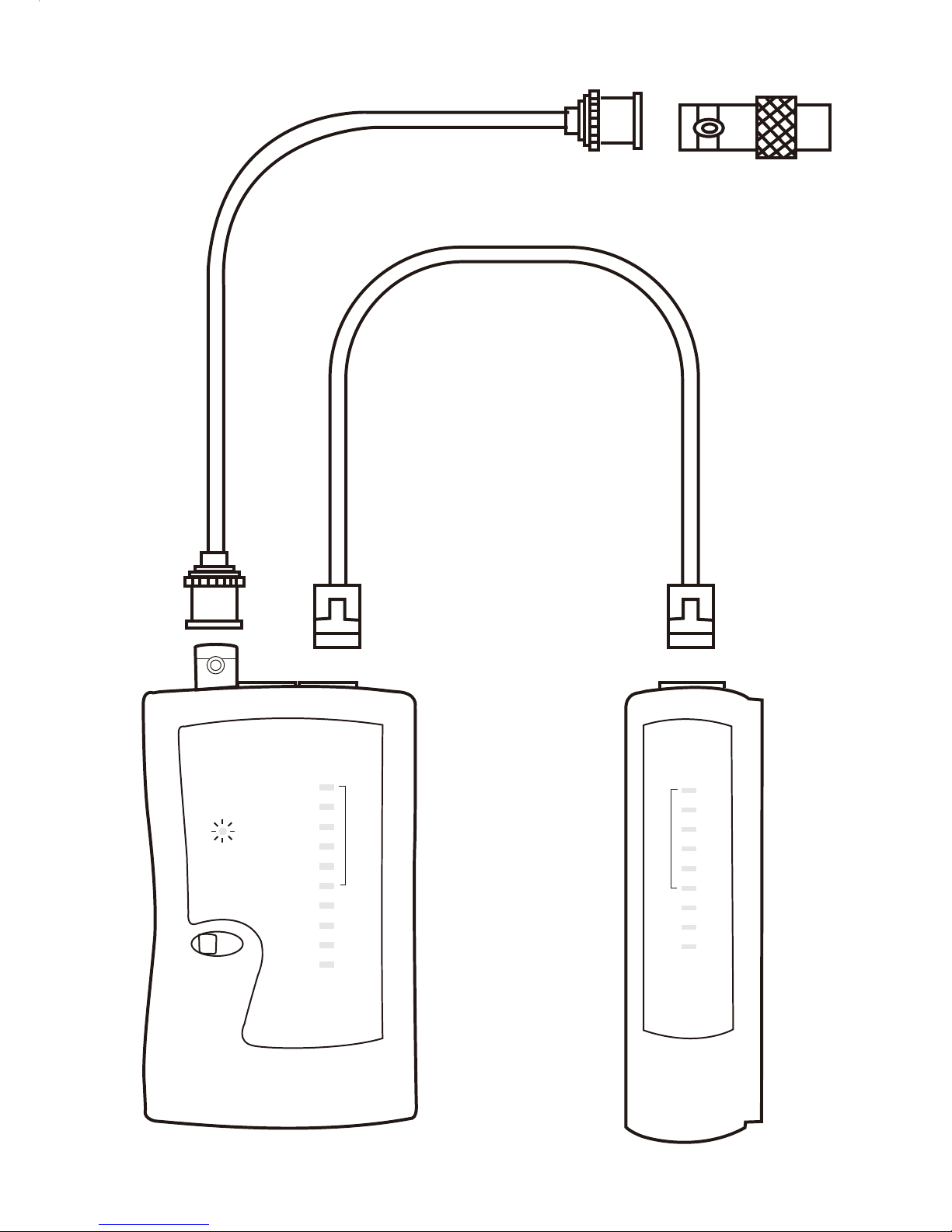
1. Turn on power switch, the power light will be flash.( "S" for low
speed test )
2. To test twist pair cable, one side contect to the master unit and
the other side contect to remote unit.
3. On main unit indicator light from No.1 to 8. If the cable is
normal, the indicator light will be light from No.1 to 8.
4. To test coaxial cable, connect one end of the coaxial cable to the
connector on the main unit and connect a terminator to the other
end of the cable. If the cable is good, the MT-7051 indicator light
"B" on the main unit shines green. If the light does not shine, the
cable has an open connection or short.
4
 Loading...