

Page 1
PS-WiFi2 Module
Quick Start Guide
NOTICE: Refer to the full PS-WiFi2
manual for all WARNINGS and CAUTIONS
https://www.stopflooding.com/
ps-wifi2-resources/
Model PS-WiFi2
What you need:
— Wi-Fi network name
— Wi-Fi network password
— Wi-Fi-capable device (computer, tablet, or smartphone)
— Good Wi-Fi signal to the area where the WiFi module is located
Step 1
Download the Pro Series Pumps CONNECT®
app from the App Store or Google Play.
Plug the WiFi module into your Pro Series
Pumps system as shown on the installation
diagram. (See diagram on reverse side.)
a. ‘RED’ and ‘GREEN’ lights
should be alternating.
Step 2
Scan QR code to see full
PS-WiFi2 manual and resources
Getting set up and connected is simple
1. Download the Pro Series Pumps
CONNECT® app.
2. Plug the WiFi module into your Pro Series
system.
3. Mount the WiFi module.
4. Connect to your Wi-Fi network.
5. Register your product online.
Step 3
Mount your module using the included
Velcro or mounting screws.
Connect to your Wi-Fi network
a. Open up your WiFi settings menu
and connect to the GLENTRON
network.* If the WiFi Module Setup
page does not open up automatically,
launch a web browser and type
192.168.1.1 into the URL field.
* NOTE: You may get a popup screen
saying Internet connection is not
available. It is okay to proceed and
connect to the GLENTRON network.
b. The WiFi Module Setup window will
appear.
• Scroll down to User Information.
c. Fill out the user information.
• Click ‘save’.
When you see, “User configuration
data complete,” click OK.
Step 4
d. Scroll down, click on Available
Networks button.
e. Select your network from the
dropdown menu.
f. A Network Switch box will appear.
• Confirm your network, click OK.
A Secure Network box will appear.
g.
•
Enter your network password, click OK.
h. The ‘RED’ and ‘GREEN’ lights will
stop alternating if the connection is
successful.
•
This may take 1-2 minutes.
•
If lights do not stop alternating, reset
your WiFi module by holding the reset
button with a paper clip until both red
lights are on. Then repeat all of Step 4.
Step 5
Register your module
a. You will receive an email from GlentronicsConnect.com at the email address you provided.
Check your junk/spam folder in case the email was sent there instead.
b. Click on the link and complete the registration. (Note: this link will expire in 24 hours; if link expires
before you complete Step 5, reset the WiFi module [see letter h. above] then repeat all parts of Step 4.)
• 15 minutes after registration, the module will conduct a request for an over-the-air software update.
If an update is required, the module will automatically update. This may take a few minutes; during
this time the unit may be unresponsive.
c. Launch the app to familiarize yourself with the interface. You can open the app to check on the status
of your system from anywhere, 24/7.
Note: We recommend you test the setup by
disconnecting power to the pump system
connected to the WiFi module.
You should receive an email, text or in-app
notification within a few minutes. Once you
have tested the setup and the WiFi module is
functioning, make sure to plug your sump
pump system back in.
Page 2
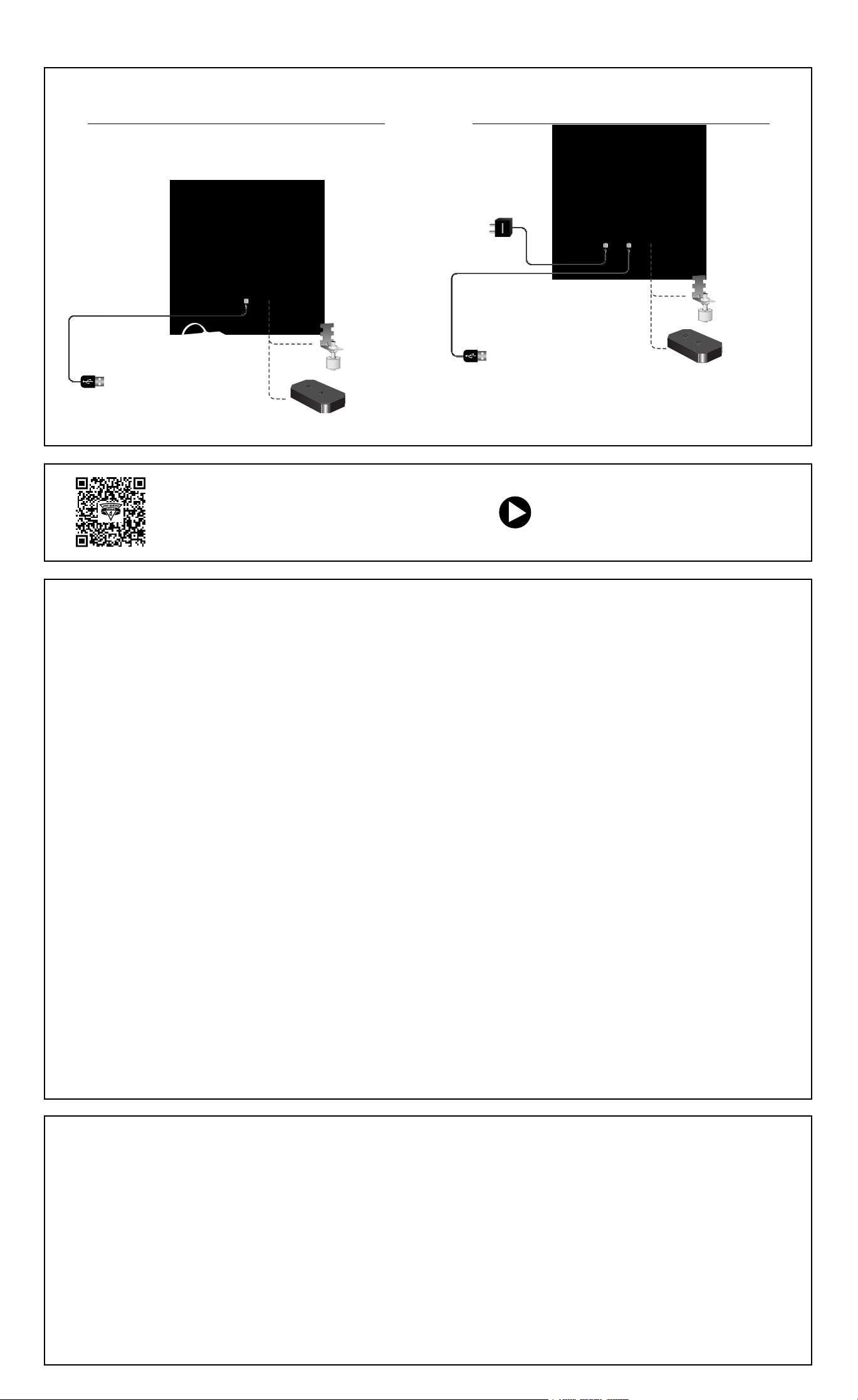
Installation Guidelines
USB data port connection to compatible
Pro Series CONNECT™ backup or combination system
Connection with the USB data port enables
homeowners to receive a text, email or in-app
notification informing them of which alarm is
occurring or what maintenance is needed.
USB data port connection
to compatible CONNECT™
backup or combo system
i
t
l
o
n
a
p
O
e
c
c
A
Water Sensor
or 360 Sensor
Water Sensor
(Model PS-WS)
or
360° Sensor
(Model PS-WS360)
USB data port connection to compatible
Pro Series CONNECT™ C2 controller
i
t
l
o
n
a
p
O
A
Water Sensor
or 360 Sensor
i
:
r
s
s
s
o
e
Water Sensor
(Model PS-WS)
360° Sensor
(Model PS-WS360)
i
:
r
s
s
e
c
s
c
o
e
or
Scan the QR code to discover all the
resources for the PS-WiFi 2.0 Module
LIMITED WARRANTY
By opening this package and using this GLENTRONICS, INC. product, you are agreeing to be
bound by the terms of the GLENTRONICS, INC. limited warranty (“warranty”) as set out
below. Do not use your product until you have read the terms of the warranty. If you do not
agree to the terms of the warranty, do not use the product and return it within the return
period stated on your purchase receipt from the retail store or authorized distributor where
you purchased it for a refund.
To the extent permitted by law, this warranty and the remedies set forth are exclusive and in
lieu of all other warranties, remedies and conditions, whether oral, written, statutory,
express or implied. GLENTRONICS, INC. disclaims all statutory and implied warranties,
including without limitation, warranties of merchantability and fitness for a particular
purpose and warranties against hidden or latent defects, to the extent permitted by law.
GLENTRONICS, INC. will not be liable for any incidental, special or consequential damages
for breach of any express or implied warranties on this product. In so far as such
warranties cannot be disclaimed, GLENTRONICS, INC. limits the duration and remedies of
such warranties to the duration of this express warranty and, AT GLENTRONICS, INC.’s
option, the repair or replacement services described below. Some states (countries and
provinces) do not allow limitations on how long an implied warranty (or condition) may last,
so the limitation described above may not apply to you.
Any and all causes of action arising from, filed as a result of or in reference to, this
warranty or the products described under this warranty shall be governed by and construed
under the laws of the State of Illinois. Any cause of action arising from, filed as a result of
or in reference to, this warranty or the products described under this warranty shall be filed
only in the Circuit Court of the 18th Judicial District, Lake County, Waukegan, Illinois, or in
the Northern District of Illinois if filed in Federal Court. The maximum liability for any
product described in this warranty shall be the cost of product replacement only.
If any term is held to be illegal or unenforceable, the legality or enforceability of the
remaining terms shall not be affected or impaired.
What is covered by this warranty?
GLENTRONICS, INC. warrants to the end purchaser that its pumps, switch, control unit
products and accessories are free from defective materials and workmanship for the
periods indicated below:
All parts and labor (excluding installation) for a period of:
• 1 year from the date of installation
The defective product must be returned directly to the factory, postage prepaid with the
original bill of sale or receipt to the address listed below. GLENTRONICS, INC., at its option,
will either repair or replace the product and return it postage prepaid.
View the installation video at
StopFlooding.com/videos
What is NOT covered by this warranty?
This warranty does not cover the cost or value of damaged property, including expressly
any property that has been affected by water overflow, seepage or flooding. If GLENTRONICS, INC. determines that a product is deemed defective under this warranty agreement, it
will repair or replace the PRODUCT ONLY. GLENTRONICS, INC. will not cover the cost to
reinstall the product, nor will GLENTRONICS, INC. pay the cost of having a plumber or
contractor repair or replace the product.
GLENTRONICS, INC. will not repair or replace a product that was installed incorrectly. A
product shall be considered “installed incorrectly” when it deviates in any way from the
instructions described in this manual.
This warranty does not cover product problems resulting from user abuse; misuse, neglect,
improper maintenance, improper connection or installation, damages caused by lightning
strikes; excessive surges in AC line voltage; water damage to the controller; other acts of
nature, or failure to operate in accordance with the enclosed written instructions.
How to Obtain Warranty Service
Within thirty (30) days of the product’s defective performance, the unit must be shipped,
freight prepaid, or delivered to GLENTRONICS, INC. to provide the services described
hereunder in either its original carton and inserts, or a similar package affording an equal
degree of protection. Products not received by GLENTRONICS, INC. at the address
indicated below within thirty (30) days of the product’s defective performance will not be
considered for warranty service. Products received after one (1) year from the date of
installation, fall outside of the timeframe for warranty service and will not be eligible for
warranty service. The product must be returned to GLENTRONICS, INC. for inspection in
order to be considered for warranty service. If the product is not returned to GLENTRONICS,
INC. or the product is inspected by any person, plumber, contractor or business other than
GLENTRONICS, INC., this warranty shall no longer be valid. Prior to defective operation, the
unit must not have been previously altered, repaired or serviced by anyone other than
GLENTRONICS, INC., or its agent; the serial number on the unit must not have been altered
or removed; the unit must not have been subject to accident, misuse, abuse or operated
contrary to the instructions contained in the accompanying manual. The dealer’s dated bill
of sale, or installer’s invoice must be retained as evidence of the date of purchase and to
establish warranty eligibility.
Where are Products Sent for Warranty Service?
Glentronics, Inc., 645 Heathrow Drive, Lincolnshire, IL 60069
How Can I Obtain More Information?
Visit our website at www.StopFlooding.com or by calling us at 1-800-991-0466.
FCC Guidelines
NOTE: This equipment has been tested and found to comply with the limits for a Class B
digital device, pursuant to part 15 of the FCC Rules. These limits are designed to provide
reasonable protection against harmful interference in a residential installation. This
equipment generates, uses and can radiate radio frequency energy and, if not installed and
used in accordance with the instructions, may cause harmful interference to radio
communications. However, there is no guarantee that interference will not occur in a
particular installation. If this equipment does cause harmful interference to radio or
television reception, which can be determined by turning the equipment off and on, the user
is encouraged to try to correct the interference by one or more of the following measures:
— Reorient or relocate the receiving antenna.
— Increase the separation between the equipment and receiver.
— Connect the equipment into an outlet on a circuit different from that to which the
receiver is connected.
— Consult the dealer or an experienced radio/TV technician for help.
• Contains FCC ID: 2AC7Z-ESP32WROOM32E
• To satisfy FCC RF Exposure requirements for mobile and base station transmission
devices, a separation distance of 20 cm or more should be maintained between the
antenna of this device and persons during operation. To ensure compliance, operation at
closer than this distance is not recommended. The antenna(s) used for this transmitter
must not be co-located or operating in conjunction with any other antenna or transmitter.
Additionally, For Canada:
• This device complies with Industry Canada license- exempt RSS standard(s). Operation
is subject to the following two conditions: (1) this device may not cause interference,
and (2) this device must accept any interference, including interference that may cause
undesired operation of the device.
• Le présent appareil est conforme aux CNR d’Industrie Canada applicables aux appareils
radio exempts de licence. L’exploitation est autorisée aux deux conditions suivantes: (1)
l’appareil ne doit pas produire de brouillage, et (2) l’utilisateur de l’appareil doit accepter
tout brouillage radioélectrique subi, même si le brouillage est susceptible d’en
compromettre le fonctionnement.
• Contains transmitter module IC: ESP32-WROOM-32E
1806174 08/23
 Loading...