

Page 1
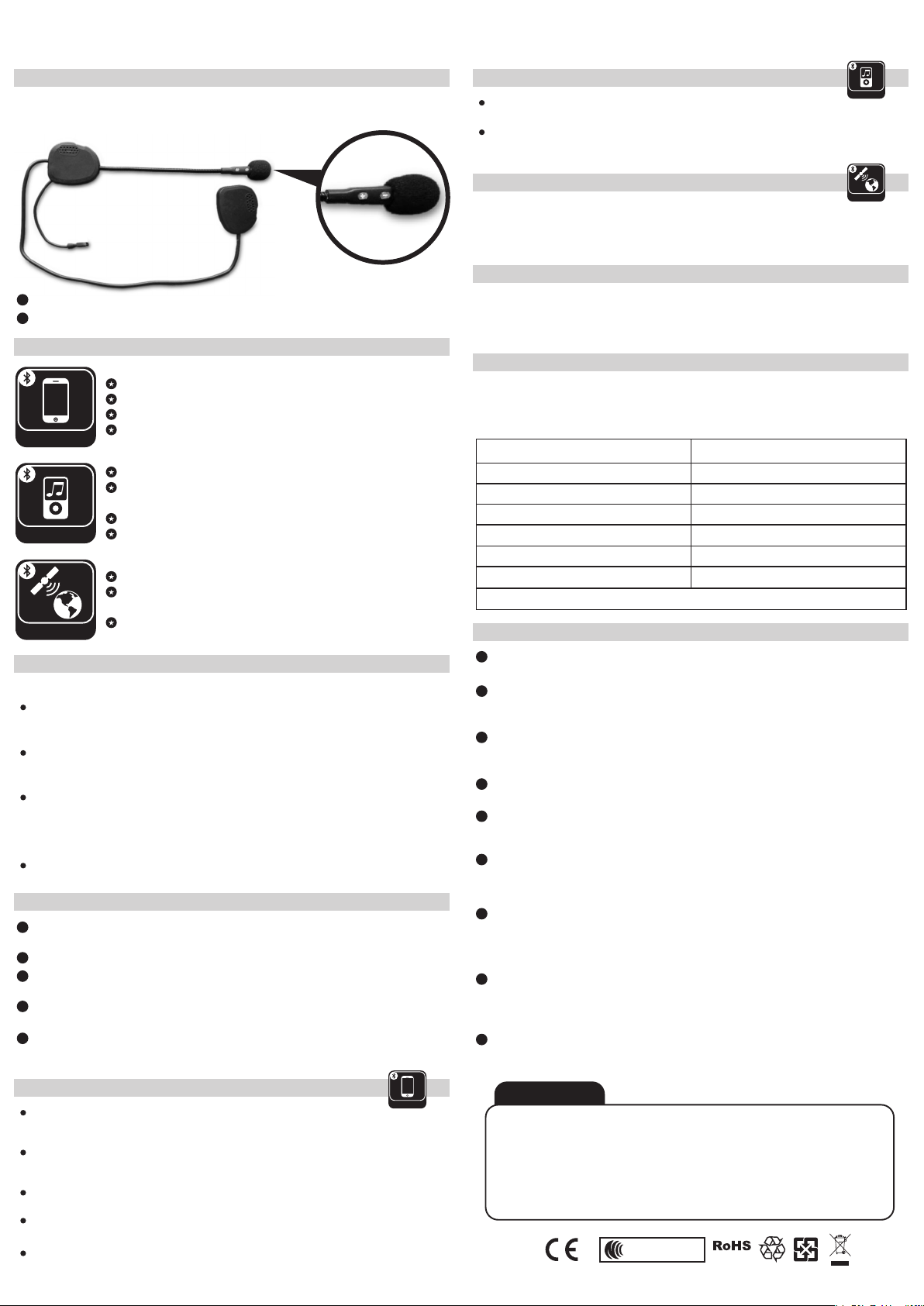
PP 02 Bluetooth Headset User Manual
Product Description
PP 02 Bluetooth Headset,while driving motorcycle or cycling to connect with your
mobile phone for safety, comfortable purpose and listen to HI-FI Stereo A2DP Music.
1
Volume +(Power/Last call redial/Volume up/BLUE LED)
2
Volume -(Voice dial/Audio transfer/Volume down/RED LED)
1 2
Main Features
Bluetooth® Hands-free / Enjoy Music from Mobile phone
Last call redial
Voice phone pick up/Manual answer call/Reject a call
Phone
Manual control for mobile phone volume
Bluetooth® A2DP music play
Enjoy Hi-Fi stereo music from Mobile phone or other A2DP
music source
Remote control music play with AVRCP
Music/A2DP
Independent music volume control
Support to connect GPS navigator device
Audio guide information from Bluetooth® GPS navigator
by A2DP function
GPS
Control the voice of GPS navigator
Operation
Power On and Off
Power On
In power off state, press Volume + button and hold it for 3 seconds, until hear a “ Di ” tone, Blue
indicator will flash to indicate power on successfully.
Power Off
In power on state, press Volume + button and hold it for 6 seconds, until hear a “ Di ” tone, the Blue
indicator will be shut off to indicate the headset is powered off.
Paring Mode
While the headset is on power off condition, press Volume + button and hold it for 6 seconds, until hear
a “ Di Di ” 2 tones and RED/BLUE lights flashes alternately. Now your headset is on “ Paring Mode ”
(Only Bluetooth headset is on the condition of paring mode, then can be found & paired with other
Bluetooth device )
Auto Off
When PP 02 is not in use or paired with any devices, it will automatically turn off in 10 minutes.
PP 02 Headset paired with mobile phone
1
The distance between headset and mobile phone should be within 1 meter or visible
position as well.
2
Make sure the headset is power off state.
3
Press Volume + for 6 seconds, then hear “ Dou Dou ” 2 tones and when red/blue
LED lights will be flashed alternately and then release the button.
4
Turn on the Bluetooth function from mobile phone and search for the PP 02 headset
device.
5
Search for headset with “ PP 02 ” and then start pairing. Insert the code “ 0000 ”,
then the Blue LED light will be flashed regularly and you will hear a “ Di ” tone later.
The paring of headset with mobile phone is successfully.
PP-02 Mobile phone operation
Answering incoming all
While there is an incoming call, press Volume + or Volume -, can receive the phone call. Or can use the
mobile phone to get the incoming call.
Phone
Voice phone pick up
While there is an incoming call, give a voice or sound “HELLO” to the microphone, then can receive the
phone call.
Reject a call
Once hear the ring tone, double click Volume +, then the incoming call is rejected.
End the phone call
Press the Volume + for 2 seconds or normally use the mobile phone to end the phone call.
Last call redial
Double click Volume +, then the mobile phone will dial out the latest call number.
Stereo Functions
Track Forward
Click & Press Volume – for 2 seconds to select next music.
Music/A2DP
Pause/Play
Click & Press Volume + for 2 seconds to pause/play music.
(Notes: the above function requires the mobile phone supports Bluetooth® A2DP and ACVRCP.)
Connect to GPS Functions
Please pair GPS devices and please refers to the GPS navigator User Manual first. Share
GPS
audio information from GPS to A2DP. The incoming call and Telecom is the most priority
than GPS voice navigator. Without any incoming call, the GPS voice navigator can reach
the PP 02 Bluetooth® headset.
Volume control
While during a phone call, short press on Volume + or Volume – to turn up or turn down
the volume. When reaching the maximum/minimum volume, a “ Di ” tone will be played.
(Important: Adjust the right volume during riding and make sure the volume do not interfere with warning honk from
other vehicle)
Priority Switching:
PP 02 Bluetooth® headset – Priority order: Telecom -> A2DP Music
(Notes: After ending the phone call, it takes around 6 seconds to retrieve the A2DP music status)
PP 02 LED LIGHT INDICATOR
LED Indicator Type
All LED indicators off
Blue light short flashing every 3 secs
Blue light long flashing every 3 secs
Red/Blue light flashing alternately
Solid Red light
Solid Blue light
RE: Charging the PP 02 Bluetooth headset, the system will be reset. If continue to re-use, please turn on PP-02
Power off
Standby state
Connected state
Pairing mode
Headset is being charged
Headset is completely charged
Indicated State
Trouble Shooting
1
Not working
It could be a flat battery, charge it for 3 hours.
2
No sounds
Physically check out whether the speakers and microphone have been connected right? Have you
turned down the volume too low?
3
Whistling of the speakers
If the microphone is too closed a speaker, the speaker will make a whistling. Take the microphone away
from speaker and it will be OK.
4
Lost connection with mobile phone
Please check out whether the battery is too low.
5
Cannot pair with your mobile phone
Please clean all the pairing records and put the Bluetooth headset and mobile phone altogether within 1
meter distance. Then restart the pairing and confirm to insert the code “ 0000 ” again.
6
Cannot connect with your mobile phone
Please confirm and try to connect with your mobile phone before purchasing. We don’t undertake that it
can connect with all types of mobile phone since some mobile phone may not take the standard
Bluetooth profile.
7
Cannot connect with your mobile phone automatically
Please cancel all Bluetooth devices on your mobile phone, then turn off. Take out your mobile phone
battery for a few seconds and then put back the battery, turn on your mobile phone, restart the
Bluetooth function and search the Bluetooth device. Now you can reconnect with your Bluetooth
helmet headset.
8
Reset
In some regions of high RF strength or near high power TV transmitters, GSM station or Airport radars,
then can overwhelm the headset and make it system halted, please just charged the unit and then it will
be reset and normally work again.
9
Please turn the headset back to After-sales Service Department if you can not
resolve the problem with the help of clause 1-8.
WARNINGS
Brand: PROPOINT
Model: PP 02
FCC ID: N26PPVPP02
ComplywithDirective
2006/95/EC&99/5/EC
The changes or modifications not expressly approved by the party responsible for
compliance could void the user’s authority to operate the equipment.
To comply with the FCC RF exposure compliance requirements, this device and its
antenna must not be co-located or operating to conjunction with any other antenna
or transmitter.
This device complies with Part 15 of the FCC Rules. Operation is subject to the
following two conditions:
(1) this device may not cause harmful interference.
(2) this device must accept any interference received, including interference that
may cause undesired operation.
CCAB12LP1200T6
COMPLIANT
 Loading...