

Page 1
Page 1
User Instructions for GMT-4
Metronome-Tuner
METRONOME FUNCTION (please see overleaf for Tuner Function)
1
2
3
4
5
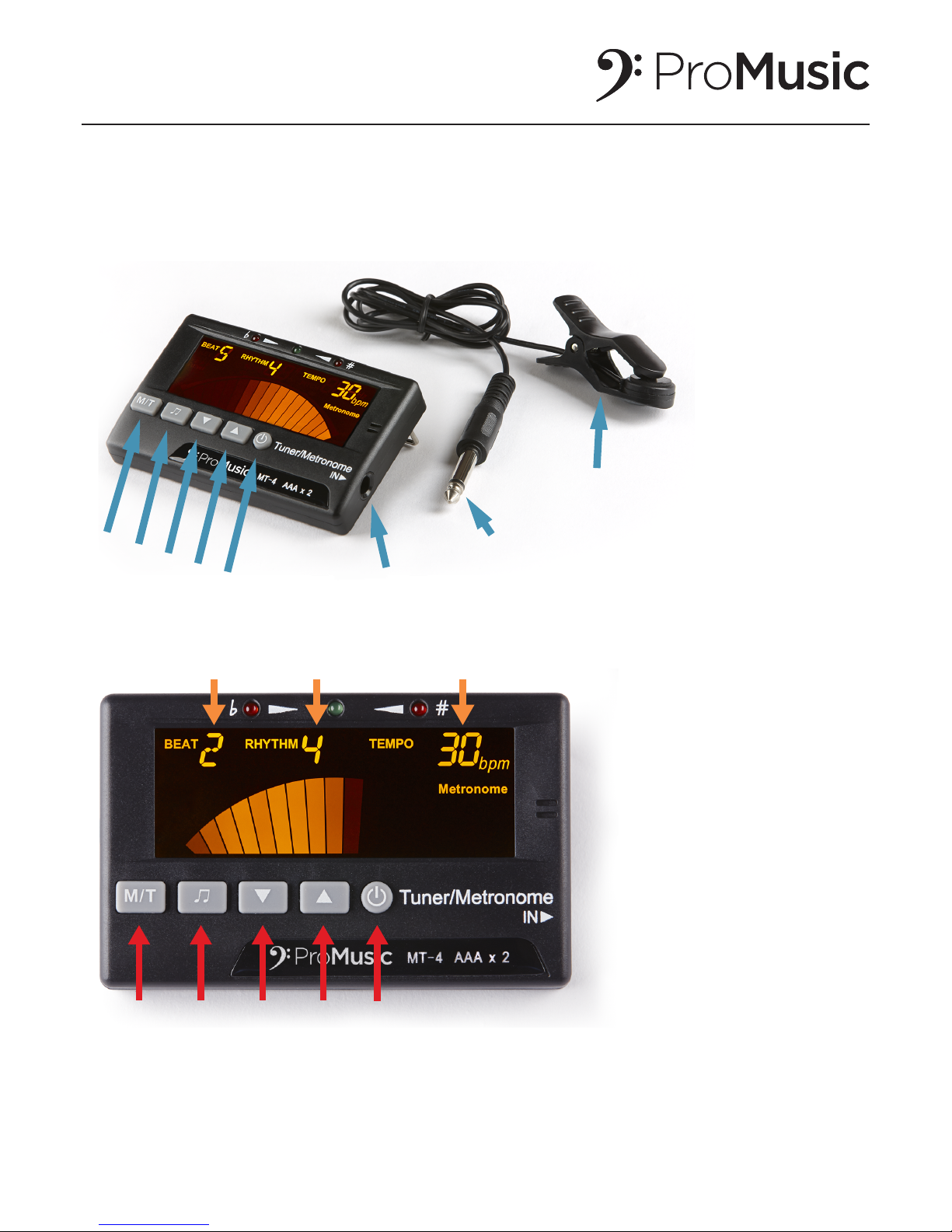
Tuning clip socket
Tuning clip plug
Tuning clip
OVERVIEW OF YOUR METRONOME-TUNER
Thank you for buying your Pro Music Kit GMT-4 Metronome-Tuner. Below is a picture of your product.
To use the product as a Metronome, see instructions below.
To use the product as a Tuner, please see overleaf.
1 2 3 4 5
1. Press & hold ON BUTTON (5) until display lights.
2. To change to Metronome mode, press and Hold M/T BUTTON (1)
3. To sound on or off, press ON BUTTON (5) briefly
4. To Increase Tempo (Faster), press UP BUTTON (4)
5. To Decrease Tempo (Slower), press DOWN BUTTON (3)
6. To change Beat, briefly Press M/T BUTTON (1)
7. To change Rhythm, Press NOTES BUTTON (2)
Page 2
Page 2
For further details including help videos, visit
www.promusickit.com/userhelp
TO TUNE YOUR INSTRUMENT
1. To move between the different string instrument tuning modes, Press briefly the M/T BUTTON (1). There are 4
tuning modes for 4 different string instrument types: Violin (V), Guitar (G), Ukulele (U) & Electric or String Bass
(B). The instrument mode is displayed in the top left of the display
2. Insert Tuning Clip PLUG into Tuning Clip SOCKET (see overleaf for picture)
3. Clip TUNING CLIP to the body of your instrument
4. Play the first string of your instrument. The tuner automatically picks up the pitch and shows whether it is flat
(top left red LED b indicator lights), in tune (Green LED top centre lights) or Sharp (top right red LED # indicator
lights)
5. If tuner shows sharp, tune your string flatter until Green LED lights
6. If tuner shows flat, tune your string sharper until Green LED lights
7. Repeat steps 4 to 7 for the remaining strings on your instrument
1. To move between Tuner/Tone Generator & Metronome Functions, press & Hold M/T BUTTON (1)
2. To turn on or off the Tone Generator (Sound/mute), press briefly the ON BUTTON (5)
3. to move between the different string instrument tuning modes, Press briefly the M/T BUTTON (1). There are 4
tuning modes for 4 different string instrument types: Violin (V), Guitar (G), Ukulele (U) & Electric or String Bass
(B). The instrument mode is displayed in the top left of the display.
4. To move between different Strings (in Guitar, Violin or Ukulele mode), Press briefly the UP BUTTON (3) or
DOWN BUTTON (4). The number of the string is shown next to the correct pitch of that string at the top centre
of the display. For example, in Ukulele mode (U), pressing the down arrow gives 1A>2A>3C>4G
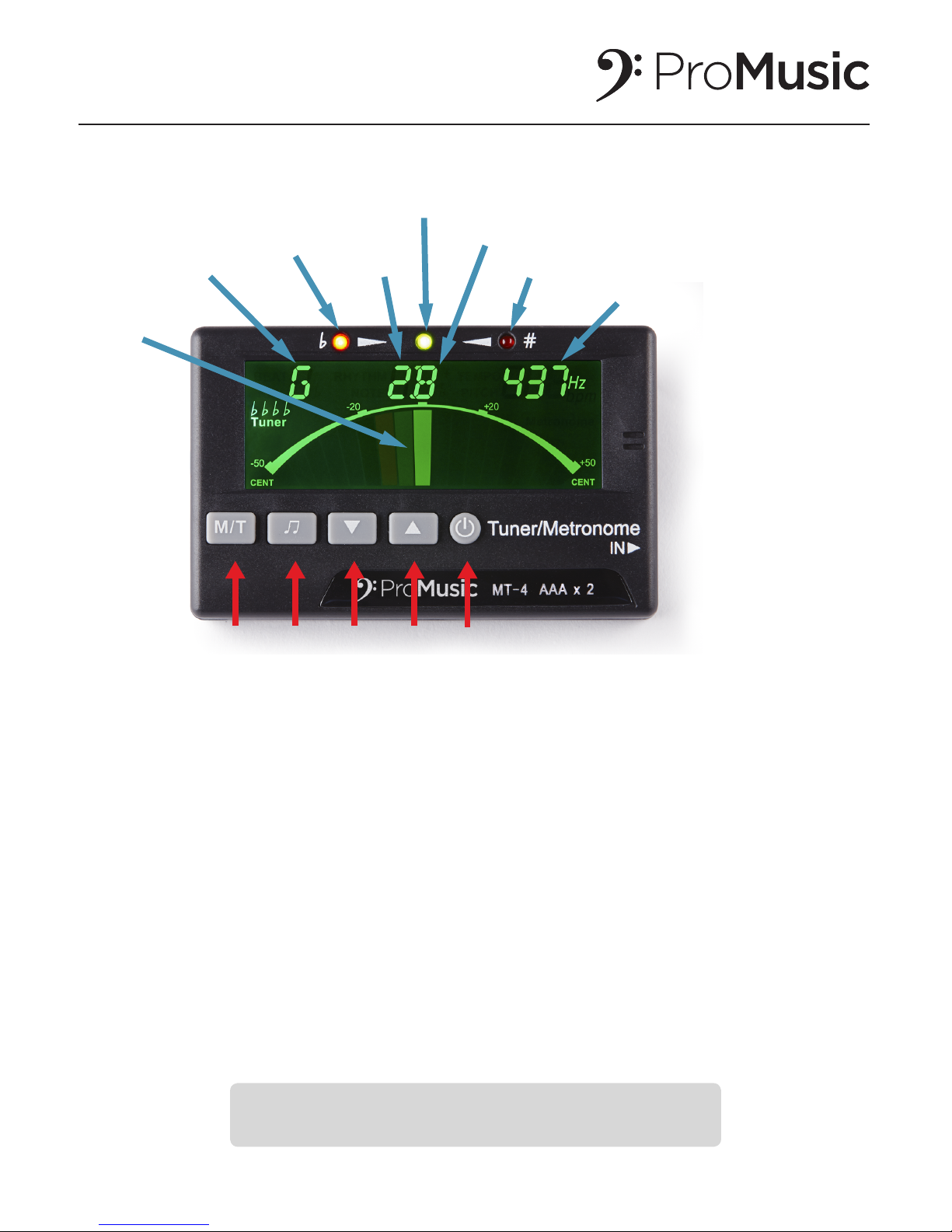
1 2 3 4 5
Tuning
needle
Instrumental
mode G=guitar
Note=flat
String
number
Note=in tune
String pitch
Note=sharp
Concert pitch
TONE GENERATOR FUNCTION INSTRUCTIONS
User Instructions for GMT-4
Metronome-Tuner continued
 Loading...