

Page 1

timeBase-2
Multi-Function Stereo Wireless Speaker and Charging Station
LED Radio Clock • FM Radio • Wireless Charger
Page 2

Free yourself from wires with TimeBase-1. No more fumbling with charging cables late at night or knocking
things off your bedside table. TimeBase-1 features a Qi standard wireless charger to effortlessly recharge your
phone simply by placing your phone on the induction charging surface. The multi-function LED alarm clock
has incredibly robust sound from the dual 10 Watt speaker. Connect your phone via Bluetooth to stream your
favourite music or plug in a music player using the auxiliary line-in. Charge 2 USB chargeable devices
simultaneously via the Dual USB charging ports.
Introduction
• TimeBase-1
• User Guide
Packaging Contents
Features
•
Intuitive Alarm Clock:
Basic and easy to use, this single-day alarm features a gentle ramping tone
and has a snooze function.
• Powerful Speaker:
A multi-function 10watt speaker that takes your music listening experience on
to the next level
• Easy Music Navigation:
Easy navigation through your playlist with the help of a soft touch control
panel
• Flexible Charging Area:
Built-in adjustable coil offers you flexible charging area and more
unlimited wireless charging experience.
• Dual USB Charging Port:
Charge two devices at optimum speeds at the same time
• Adaptive Charging Technology:
the power output adapts to your devices to provide the safest
maximum charging output per port.
• Universal Connectivity:
Compatible with all Qi compatible and USB chargeable devices.
• Safe:
Features a smart circuit which ensures protection from overheating, over-current &
short-circuit
Specifications
• Bluetooth Version: BK 3.0
• Bluetooth Chipset: BoTong BK
• Bluetooth Frequency: 2.4G~2.48G
• Bluetooth Profile: A2DP, AVRCP and HSP
• Power Input:5V 3A
• Speaker Output:5Wx2
• Impedance: 4 Ω
• Operating Distance:8 meters
Page 3

Please read all safety instructions and warnings thoroughly before using this product. Improper use
of this product may result in damage to this or attached products.
1. Do not disassemble the product or attempt to fix it.
2. Kindly use an original charging cable provided to charge the product.
3. Do not attempt to replace any part of this product or battery inside.
4. Do not crush, puncture, dispose of in fire, short the contacts or expose the product to water or
other liquids.
5. Do not store or use the product in a high-temperature environment, including intense sunlight or
heat.
6. Avoid drops, bumps, abrasions and impacts.
7. If there is any reason to believe that there is damage to the product, discontinue use immediately.
8. If you find that the product is too hot, is emitting an odour, or is deformed, punctured or exhibits
any suspicious or abnormal behaviour, discontinue use immediately and contact our customer
service.
Precautions:
TimeBase-1 is compatible with Qi Wireless Chargeable Devices
Compatibility
Page 4
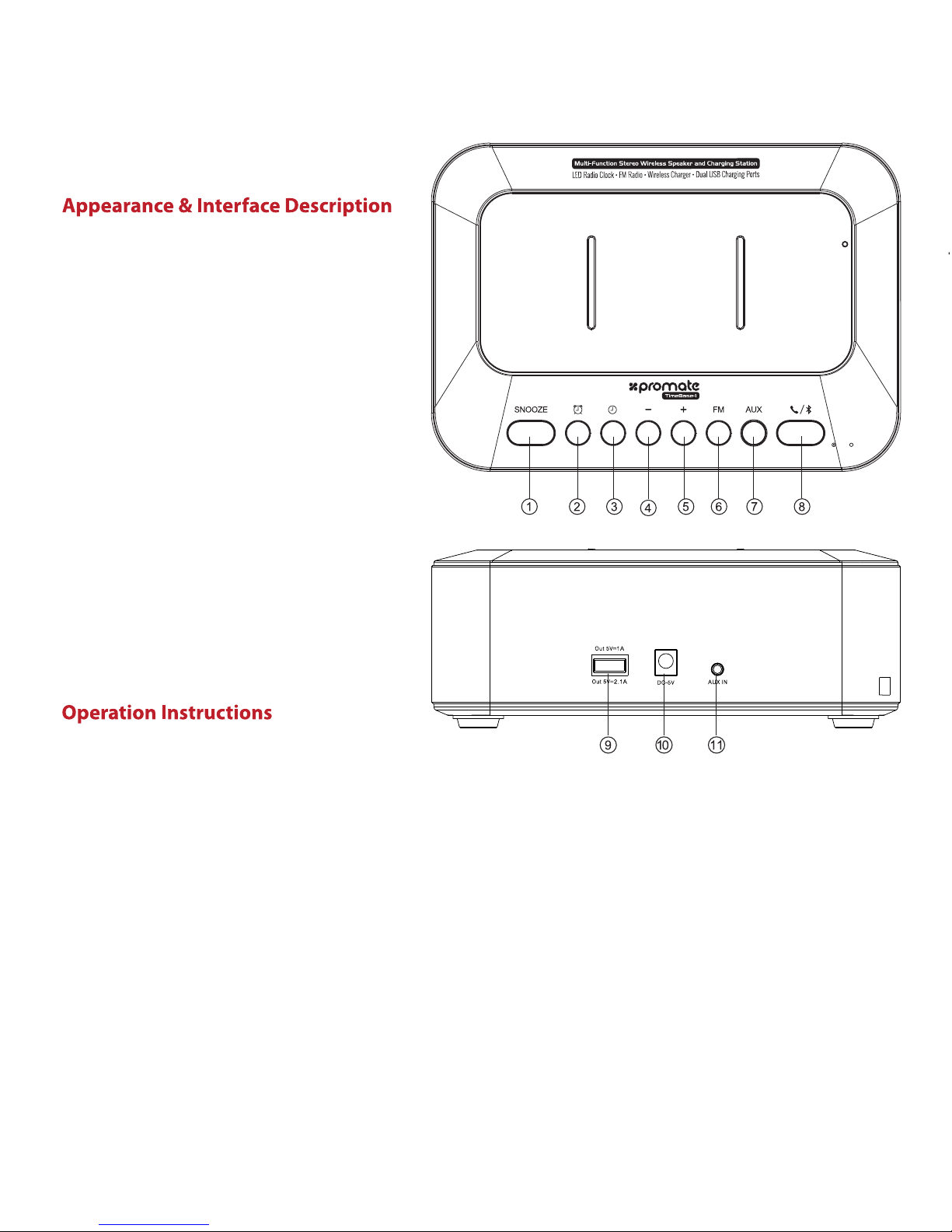
1. Snooze Button
2. Alarm Button
3. Time Button
4. – Button
5. + Button
6. FM Button
7. AUX Button
8. Multifunction Button
9. USB Charging Ports
10. Charge In Port
11. AUX Port
1. Set The Time:
• Short press the Time button to make the hour digits blink.
• Set hour by pressing – or + button.
• Short press Time button again to make the minute digits blink.
• Set minute by pressing – or + button.
• Short press Time button or wait 15 seconds to show current time.
2. Set an Alarm:
• Short press Alarm button to make the hour blink.
• Set hour by pressing – or + button.
• Short press Alarm button again to make the minute blink.
• Set minute by pressing – or + button.
• Short press Alarm button or wait 15 seconds to exit alarm set up and return to current time.
TimeBase ﻰﻠﻋ ﺔﯿﺳﺎﺳﻷا NFC رﺎﻌﺸﺘﺳا ﺔﻘﻄﻨﻣ ﺪﻳﺪﺤﺘﻟ ﺎﮭﺴﻤﻟاو NFC ﺔﻔﯿظو ﻞﯿﻐﺸﺘﺑ ﻢﻗ •
Page 5

3. SNOOZE
• Press the Snooze button to snooze for 9 minutes.
• When the alarm sounds, press Alarm to cancel snooze.
4. Turn on/off alarm
• To turn on the alarm, press and hold the Alarm button for a few seconds until the Alarm icon
turns on
• To turn off the alarm, press and hold the Alarm button for a few seconds until the Alarm icon
turns on
5. AUX FUNCTION
• Press AUX button to enter AUX mode
• Insert Line-in cable to AUX socket in the back of speaker to connect external player device or
computer.
6. Control music Playback
• Press Multifunction button to play/pause the music
• Press – to select decrease volume
• Press + to select increase volume
7. Call Management
• While in Bluetooth mode, press Multifunction button to accept a call.
• Press Multifunction icon again to hang up the call.
• You only can reject call from your device, not from the speaker.
8. NFC Pairing:
• Turn On the NFC function of your device and touch it to TimeBase’s NFC Sensing Area.
• Your device will ask for permission to pair with TimeBase.
• Choose ‘YES’ to complete pairing.
• After successful pairing, the indicator will change to solid Blue.
Control track playback and volume from your connected device
FM RADIO MODE
• Press FM button to enter FM mode.
• Press and hold FM Button for 3 seconds to search and store the FM Stations
• Press – or + to choose radio station
• Press and hold – or + to change volume.
• Press FM Button one more time to exit FM mode.
Page 6

 Loading...