

Page 1

Symphony
Hi-Fi On-Ear Wireless Stereo Headset with Passive Noise Cancellation
Lightweight • Padded Headband • Extended Playtime
User Guide
Page 2

English
Introduction
Experience a remarkable musical fiesta with Symphony. Connect Symphony to your devices
wirelessly and through traditional wires. Symphony includes all the must have specs needed for
an excellent pair of headphones. Symphony is embedded with passive noise cancellation
technology along with advanced protein leather ear cushion to provide optimum comfort fit. Its
classic, simple metal and leather design will never fail to make a style statement wherever you go.
With music play time of up to 5hrs, take Symphony practically everywhere (including long flights)
and listen to non-stop music. Symphony also supports in-line music function and built-in mic
function, thus, pick up calls whilst listening to music. This power packed wireless headset is the
ultimate set for all music fanatics.
Packaging Contents
• Symphony
• Charging Cable
• User Guide
Specifications
• Bluetooth Version: v4.0
• Bluetooth Profile: HSP, HFP, A2DP, AVRCP
• Bluetooth Chipset: JL
• Input: 5.1V
• Output: 30mA
• Impedance: 32Ω
• Speaker Frequency: 20Hz-20,000Hz
• Charging Time: 2 hours
• Playing Time: 5 hours
• Standby Time: 180Hours
• Battery Capacity:250mAh
• Battery Type: Li-Polymer
• Operating Distance: 10m
1
Page 3

Features
• Experience a new kind of sound: Experience a remarkable musical fiesta with
Symphony. Symphony has more dynamic sound drivers, which in turn provide
better sound fidelity.
• Luxurious Comfort: Created for comfort. The premium quality adjustable
headband, provides a custom-fit feeling and the padded ear cups help minimize
sound leakage
• Live wirelessly or wired! Its your choice: Whether you’re on the train, in your living
room, or at your desk, you won’t have to worry about getting tangled up in cords.
Plus, if you run out of power, plug in for unlimited wired listening.
• Portability at its best: Symphony Wireless headphone’s compact, design makes it
the ultimate portable accessory
• Handsfree Function: Take calls from your speaker with the touch of a button -
crystal clear thanks to the ultra-sensitive built-in dual mic allows you to use
Symphony as a hands-free device
• Mute out the noise: Symphony features advanced protein leather ear cushion &
provides passive noise cancellation
• Battery that goes on and on: Symphony's powerful 250mAh rechargeable battery
provides a music playtime of up to 5 hours, standby time of up to 180 hours & talk
time of up to 5hours
Compatibility
Symphony
can be paired to any Bluetooth enabled device.
Precautions
Please read all safety instructions and warnings thoroughly before using this product.
Improper use of this product may result in damage to this or attached products.
1. Do not disassemble the product or attempt to fix it.
2. Kindly use an original charging cable provided to charge the product.
3. Do not attempt to replace any part of this product or battery inside.
4. Do not crush, puncture, dispose of in fire, short the contacts or expose the product
to water or other liquids.
5. Do not store or use the product in a high temperature environment, including
intense sunlight or heat.
6. Avoid drops, bumps, abrasions and impacts.
7. If there is any reason to believe that there is damage to the product, discontinue
use immediately.
8. If you find that the product is too hot, is emitting an odor, or is deformed,
punctured or exhibits any suspicious or abnormal behavior, discontinue use
immediately and contact our customer service.
9. Always charge this product before extended storage.
English
2
Page 4
English
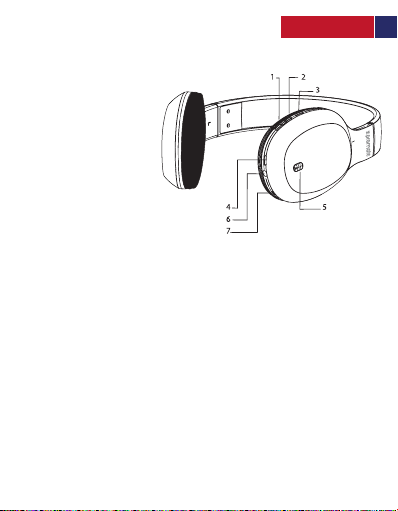
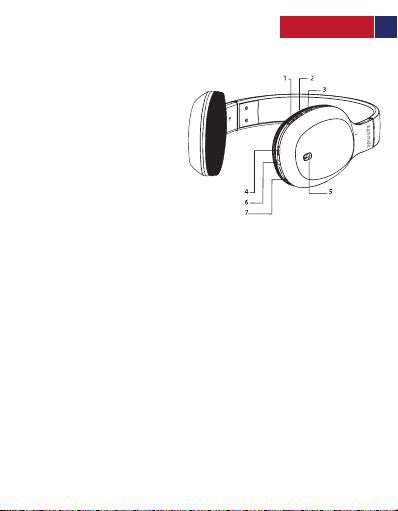
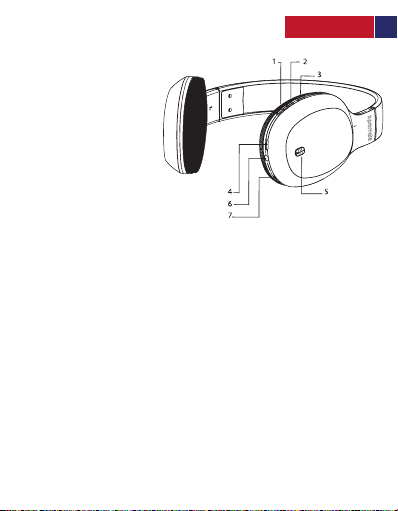
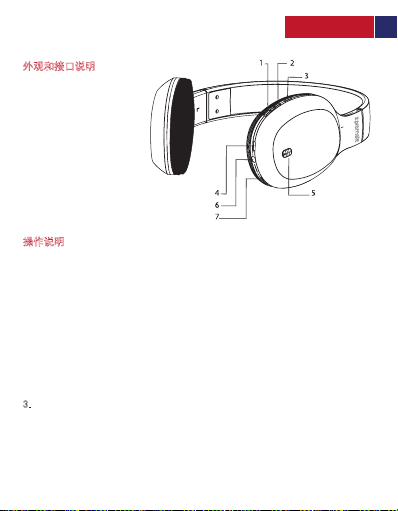
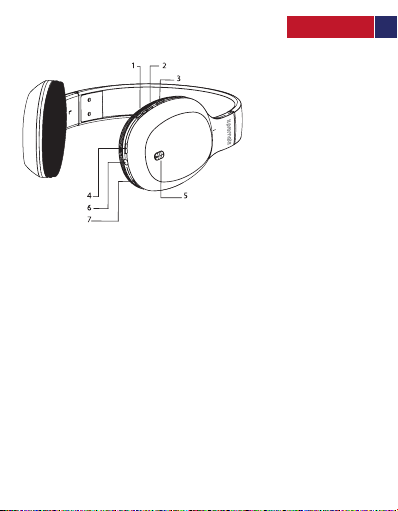
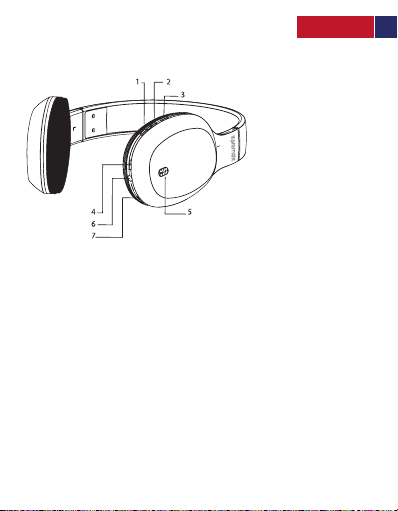
Appearance & Interface Description
1. Previous Track / Volume -
2. Next Track / Volume +
3. Multifunction Button
4. USB Charging Port
5. Power Button
6. Line-In Port
7. Microphone
Operation Instructions
1. Switching Symphony On/Off
• To turn on Symphony, press and hold the Power Button for about 5 seconds
until the LED starts flashing.
• To turn off Symphony, again, press and hold the Power Button for about 5 seconds.
2. Pairing Symphony
• Before connecting Symphony to your device, make sure that Symphony is in
pairing mode. In order to enter pairing mode, press and hold the Multi-Function
Button for 6 seconds, until Red and Blue LED start flashing alternatively.
• Turn on the Bluetooth function of the device you wish to connect and search
for “Symphony”. From the list of found devices, select “Symphony”.
• Symphony is now connected to your device.
3. Call Function
• Answering a Call: Press the Multi-Function Button once to answer an incoming call.
• Ending a Call: Press the Multi-Function Button once to end an ongoing call.
• Redial Function: Under standby mode, press and hold the Multi-Function Button
for 4 seconds to redial the last dialed call.
• Reject Call: Press and hold the Multi-Function Button for 2 seconds to reject an
incoming call.
Symphony
3 4 5
Page 5

English
4. Adjusting Volume and Controlling Music Playback
• Volume Control: Press the Volume “+” button to increase the volume. Press and hold the
Volume “-“button to decrease the volume.
• Music Play/Pause: During standby mode, press the Play/Pause Button once to Play music.
Again, press the Play/Pause Button to Pause the ongoing track.
• Navigating Through Tracks: While playing music, press and hold the Volume “+” button once
to skip to the next track. Press and hold the Volume “-“button once to skip to the previous
track.
5. Using the Wired Mode
• Plug in the 3.5mm cable into Symphony, and the other end into your Line-Out port of your
device
• The headset will automatically start playing in Wired media mode
6. Charging Symphony
• Plug one end of the charging cable into Symphony charging input and the other end into a
USB Power Adapter or a Laptop/Desktop.
• The Red LED turns on to indicate that your headset is charging.
• Once completely charged the LED will turn off.
• For your safety, it is recommended that you refrain from using the headset while it is
charging.
4 5
Page 6
English
Correct disposal of this Product
(Waste Electrical & Electronic Equipment (WEEE)
Your product is designed and manufactured with high quality materials and components
which can be recycled and reused.
This symbol means that electrical and electronic equipment, at their end of-life should be
disposed of separately from your household waste.
Please dispose of this equipment at your local community waste
collection/recycling center.
This product complies with European safety and electrical interference directives
This product does not contain environmentally hazardous materials (lead, mercury,
cadmium, hexavalent chromium and brominated flammable agents: PBB and PBDE).
5
Page 7
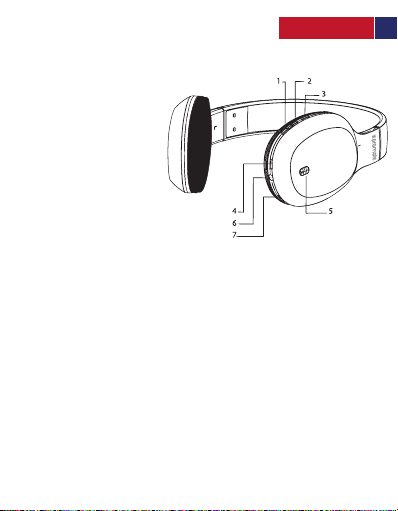
Descripción del aspecto e interfaz
1. Siguiente pista/botón para bajar el volumen
2. Pista anterior/botón para subir el volumen
3. Botón multifuncional
4. Puerto de carga USB
5. Botón de encendido
6. Puerto de entrada de línea
7. Micrófono
Instrucciones de operación
1. Encender/Apagar Symphony
• Para encender Symphony, mantenga presionado el botón de encendido por 5 segundos
hasta que el LED comience a parpadear.
• Para apagar Symphony, nuevamente, mantenga presionado el botón de encendido
por 5 segundos
2. Emparejamiento con Symphony
• Antes de conectar Symphony a su dispositivo, asegúrese de que esté en modo de
emparejamiento. Para ingresar al modo de emparejamiento, mantenga presionado el
botón multifunción durante 6 segundos, hasta que el LED rojo y azul comiencen a parpadear
lternativamente.
• Encienda la función Bluetooth del dispositivo que desea conectar y busque "Symphony".
Seleccione "Symphony" entre los dispositivos encontrados
• Symphony ahora está conectado a su dispositivo.
3. Función de llamada
• Contestar una llamada: presione el botón multifunción una vez para contestar una llamada
entrante.
• Finalización de una llamada: Para finalizar una llamada en curso, presione una vez el botón
multifunción.
• Función de rediscado: En modo de espera, durante 4 segundos, presione y mantenga
presionado el botón multifunción para volver a marcar la última llamada realizada.
• Rechazar llamada: Para rechazar una llamada entrante mantenga presionado el botón
multifunción durante 2 segundos.
Spanish
Symphony
6 7 8 9 10 11
Page 8

Spanish
4. Ajuste del volumen y control de la reproducción de música
• Control de volumen: Presione el botón de volumen "+" para aumentar el volumen. Para
disminuir el volumen mantenga presionado el botón Volumen "-".
• Reproducción/pausa de música: Durante el modo de espera, presione una vez el botón
Reproducir/Pausa (Play/Pause) para Reproducir la música. Nuevamente, presione
Reproducir/Pausa para pausar la pista en curso.
• Navegar por las pistas: Mientras reproduce música, mantenga presionado el botón de
volumen "+" (subir volumen) una vez para saltar a la siguiente pista. Para saltar a la pista
anterior, mantenga presionado una vez el botón Volumen "-" (bajar volumen).
5. Uso del modo por cable
• Conecte el cable de 3,5 mm a Symphony y el otro extremo a su puerto “Line-Out” (salida
de línea) de su dispositivo
• Los auriculares comenzarán a reproducir automáticamente en modo de conexión por
cable
6. Cargando Symphony
• Conecte un extremo del cable de carga en la entrada de Symphony y el otro extremo en
un adaptador de alimentación USB o una computadora portátil / computadora de
escritorio.
• El LED rojo se enciende para indicar que su auricular se está cargando.
• Una vez que esté completamente cargado, el LED se apagará.
• Para su seguridad, se recomienda no utilizar los auriculares mientras se estén cargando.
7 8 9 10 11
Page 9
French
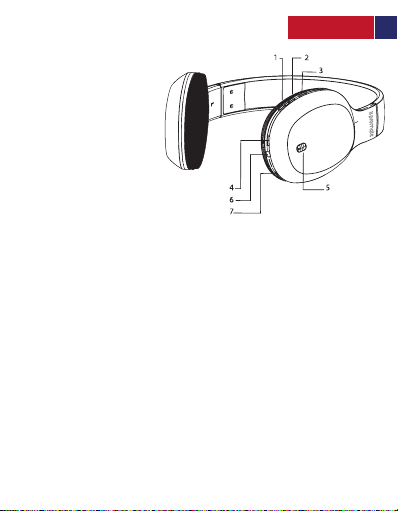
Aspect & Description Interface
1. Piste Précédente / Volume -
2. Piste Suivante / Volume +
3. Bouton Multifonction
4. Port de Charge USB
5. Bouton de Mise en Marche
6. Port Entrée En Ligne
7. Microphone
Mode d’Emploi
1. Allumer et Eteindre le Symphony
• Pour allumer le Symphony, appuyez pendant 5 secondes sur le Bouton de Mise en Marche
jusqu’à ce que les voyants LED se mettent à clignoter.
• Pour éteindre le Symphony, appuyez à nouveau pendant 5 secondes sur le Bouton
de Mise en Marche.
2. Appairage du Symphony
• Avant de connecter le Symphony à votre appareil, assurez-vous qu'il est en mode appairage.
Pour passer en mode appairage, appuyez pendant 6 secondes sur le Bouton Multifonction
jusqu'à ce que les voyants LED Rouge et Bleu se mettent à clignoter alternativement.
• Activez la fonction Bluetooth de l’appareil que vous souhaitez connecter, recherchez
« Symphony » sur la liste des périphériques détectés et sélectionnez « Symphony ».
• Le Symphony est maintenant connecté à votre appareil.
3. Fonction Appel
• Répondre à un Appel : Appuyez une fois sur le Bouton Multifonction pour répondre à un appel entrant.
• Terminer un Appel :
• Fonction de Rappel : En mode veille, appuyez pendant 4 secondes sur le Bouton Multifonction
pour recomposer le dernier appel composé.
• Rejeter un Appel : Appuyez pendant 2 secondes sur le Bouton Multifonction pour rejeter
un appel entrant.
Appuyez une fois sur le Bouton Multifonction pour terminer un appel en cours.
Symphony
8 9 10 11
Page 10

French
4. Ajustement du Volume et Contrôle de la Lecture de la Musique
• Contrôle du Volume : Appuyez sur le bouton Volume “+” pour augmenter le son. Appuyez
sur le bouton Volume “-“ pour baisser le son.
• Play/Pause : En mode veille, appuyez une fois sur le Bouton Play/Pause pour Reproduire la
musique. Appuyez à nouveau sur ce même bouton pour faire Pause sur la piste en cours.
• Navigation à travers les pistes : pendant la lecture de la musique, appuyez une fois sur le
bouton Volume « + » pour passer à la piste suivante. Appuyez une fois sur le bouton
Volume «-" pour passer à la piste précédente.
5. Utilisation du Mode Câblé
• Branchez le câble de 3,5 mm sur le Symphony et l’autre extrémité sur le port de sortie de
votre appareil.
• Le casque commencera automatiquement à fonctionner en Mode Câblé.
6. Chargement du Symphony
• Branchez une extrémité du câble de charge sur le port d’entrée du Symphony et l’autre
extrémité sur un adaptateur USB ou un ordinateur portable/de bureau.
• Le voyant LED Rouge s’allume pour indiquer que le casque est en train de s’allumer.
• Une fois le casque complètement chargé, le voyant LED s’éteindra.
• Pour votre sécurité, nous vous conseillons d’éviter d’utiliser le casque pendant qu’il est en
train de se charger.
9 10 11
Page 11
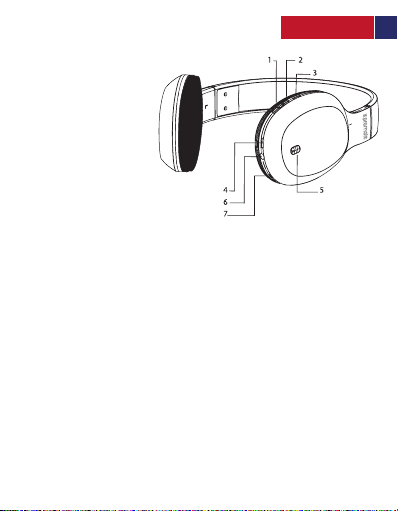
German
Beschreibung von Aussehen und Interface
1. Voriges Lied / Lautstärke -
2. Nächstes Lied / Lautstärke +
3. Multifunktionstaste
4. USB Ladeport
5. Power-Taste
6. Line-In Port
7. Mikrofon
Bedienungsanleitung
1. Symphony ein- und ausschalten
• Halten Sie die Power-Taste für ca. 5 Sekunden gedrückt, um Symphony
einzuschalten. Das LED-Licht beginnt zu blinken.
• Drücken und halten Sie die Power-Taste erneut für ca. 5 Sekunden, um Symphony
wieder auszuschalten.
2. Symphony koppeln
• Bevor Sie Symphony mit Ihrem Gerät koppeln, stellen Sie bitte sicher, dass sich
Symphony im Kopplungsmodus befindet. Um den Kopplungsmodus einzustellen,
drücken und halten Sie die Multifunktionstaste für 6 Sekunden, bis die blaue und
die rote LED abwechselnd blinken.
• Schalten Sie die Bluetooth-Funktion des Geräts, das Sie verbinden möchten ein
und suchen Sie nach „Symphony“. Wählen Sie aus der Liste der gefundenen
Geräte „Symphony“.
• Symphony ist nun mit Ihrem Gerät gekoppelt.
3. Anruffunktion:
• Einen Anruf annehmen: Drücken Sie die Multifunktionstaste einmal, um
eingehende Anrufe anzunehmen.
• Einen Anruf beenden: Drücken Sie die Multifunktionstaste einmal, um einen
laufenden Anruf zu beenden.
• Wiederwahlfunktion: Drücken und halten Sie die Multifunktionstaste für 4
Sekunden im Standby-Modus, um die letzte gewählte Nummer erneut zu wählen.
• Einen Anruf zurückweisen: Drücken und halten Sie die Multifunktionstaste für 2
Sekunden, um einen eingehenden Anruf zurückzuweisen.
Symphony
10 11
Page 12

German
4. Lautstärke einstellen und Musikwiedergabe steuern
• Lautstärkeregelung: Drücken Sie die Taste „+“ um die Lautstärke zu erhöhen. Drücken
Sie die Taste „-“ um die Lautstärke zu verringern.
• Musik Play/Pause: Drücken Sie die Play/Pause-Taste einmal, um die Musikwiedergabe
zu starten. Drücken Sie die Play/Pause-Taste erneut, um die laufende Musik zu
pausieren.
• Navigation durch Ihre Musik: Drücken und halten Sie während der Musikwiedergabe
die Taste „+“ einmal, um zum nächsten Lied zu springen. Drücken und halten Sie die
Taste „-“ einmal, um zum vorigen Lied zu springen.
5. Verwendung des Kabelmodus
• Stecken Sie das 3.5mm-Kabel am Symphony und das andere Ende am
Line-Out-Anschluss Ihres Geräts an.
• Die Kopfhörer beginnen im Kabelmodus automatisch die Wiedergabe der Musik.
6. Symphony aufladen
• Schließen Sie ein Ende des Ladekabels an Symphony an und verbinden Sie das andere
Ende mit einem Desktop/Laptop oder einem USB-Ladegerät.
• Die rote LED geht an, um anzuzeigen, dass die Kopfhörer geladen werden.
• Wenn sie voll aufgeladen sind, geht die LED wieder aus.
• Zu Ihrer Sicherheit empfehlen wir, die Kopfhörer nicht zu verwenden, während sie
geladen werden.
11
Page 13
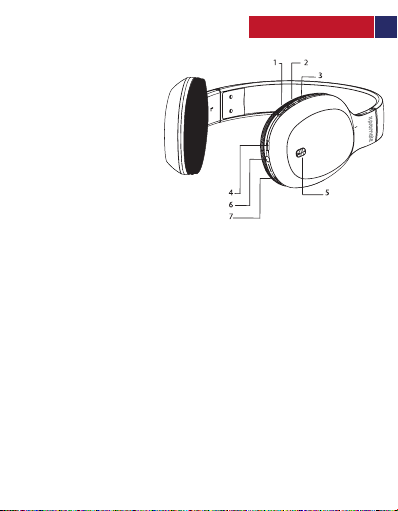
Aparência e descrição do interface
Portuguese
1. Faixa anterior / - Volume
2. Próxima faixa / + Volume
3. Botão Multifunções
4. Porta de carregamento USB
5. Botão ligar/desligar
6. Porta de entrada de linha
7. Microfone
Instruções de funcionamento
1. Ligar/desligar os Symphony
• Para ligar os Symphony, pressione e segure o botão ligar/desligar durante 5
segundos até que o LED comece a piscar.
• Para desligar os Symphony, pressione, novamente, e segure o botão
ligar/desligar durante 5 segundos .
2. Emparelhar os Symphony
• Antes de ligar os Symphony ao seu dispositivo, certifique-se de que os
Symphony estão em modo de emparelhamento. Para entrar no modo de
emparelhamento, pressione e segure o botão multifunções durante 6
segundos até o LED azul e vermelho começarem a piscar alternadamente.
• Ligue a função Bluetooth do do dispositivo que pretende ligar e procure por
“Symphony”. Na lista de dispositivos encontrados, selecione “Symphony”.
• Os Symphony estão agora ligados ao seu dispositivo.
3. Função de chamada
• Atender uma chamada: Pressione o botão multifunções uma vez para
atender uma chamada.
• Terminar uma chamada: Pressione o botão multifunções uma vez para
terminar uma chamada.
• Função de rediscagem: No modo de espera, pressione e segure o botão
multifunções durante 4 segundos para rediscar a última chamada discada.
• Rejeitar uma chamada: Pressione e segure o botão multifunções durante 2
segundos para rejeitar uma chamada recebida.
Symphony
12 13 14 15 16 17
Page 14

Portuguese
4. Ajustar o volume e controlar a reprodução de música
• Controle de volume : Pressione o botão “+” do volume para aumentar o
volume. Pressione e segure o botão “-” do volume para diminuir o volume.
• Reproduzir/Pausar música: Durante o modo de espera, pressione uma vez o
botão Tocar/Pausar para reproduzir música. Para pausar uma música em
reprodução pressione novamente o botão Tocar/Pausar.
• Percorrer as faixas: Durante a reprodução de música, pressione e segure o
botão “+” do volume uma vez para saltar para a próxima faixa. Pressione e
segure o botão “-” do volume uma vez o botão para saltar para a faixa anterior.
5. Utilizar o modo com fio
• Conecte o cabo de 3,5 mm aos Symphony e a outra extremidade à porta de
saída de linha do seu dispositivo.
• Os auscultadores irão começar a tocar automaticamente no modo de mídia com fio
6. Carregar os Symphony
• Ligue uma extremidade do cabo de carregamento à entrada de carregamento
dos Symphony e a outra extremidade a um adaptador de alimentação USB ou
um computador portátil/de escritório.
• O LED vermelho acende para indicar que os auscultadores estão a carregar.
• Uma vez completamente carregados o LED se apaga.
• Para sua segurança, é recomendável que você se abstenha de usar os
auscultadores enquanto está carregando.
13 14 15 16 17
Page 15
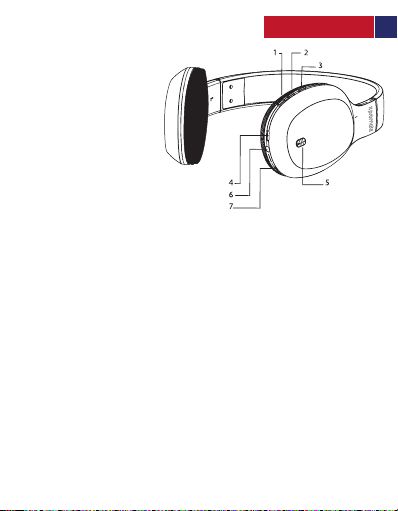
Descriere Aspect și Interfață
Romanian
1. Melodia Anterioară / Volum -
2. Melodia Următoare / Volum +
3. Buton Multifuncțional
4. Port USB de Încărcare
5. Butonul de Alimentare
6. Port Line-In
7. Microfon
Instrucțiuni de Operare
1.Activare/Dezactivare Symphony
• Pentru a porni Symphony, apăsați și țineți apăsat Butonul de Alimentare timp
de aproximativ 5 secunde până când LED-ul începe să clipească.
• Pentru a opri Symphony, apăsați și mențineți apăsat Butonul de Alimentare
pentru aproximativ 5 secunde.
2. Asocierea Symphony
• Înainte de a conecta Symphony la aparatul dvs., asigurați-vă că Symphony
este în mod de asociere. Pentru a intra în modul de asociere, apăsați și țineți
apăsat Butonul Multifuncțional timp de 6 secunde, până când LED-ul roșu și
albastru încep să clipească alternativ.
• Porniți funcția Bluetooth a dispozitivului pe care doriți să îl conectați și
căutați "Symphony". Din lista dispozitivelor găsite, selectați "Symphony".
• Symphony este conectat acum la dispozitiv.
3. Funcţia de Apelare
• Răspuns la un apel: Apăsați o dată Butonul Multifuncțional pentru a
răspunde la un apel primit.
• Terminarea unui apel: Apăsați Butonul Multifuncțional o dată pentru a
încheia un apel în curs.
• Funcția de reapelare: În modul de așteptare, țineți apăsat Butonul
Multifuncțional timp de 4 secunde pentru a reapela ultimul apel format.
• Respingerea unui apel: Apăsați și țineți apăsat Butonul Multifuncțional timp
de 2 secunde pentru a respinge un apel primit.
Symphony
14 15 16 17
Page 16

Romanian
4.Reglarea Volumului și Controlarea Redării Muzicii
• Controlul Volumului: Apăsați butonul Volum "+" pentru a mări volumul.
Apăsați și țineți apăsat butonul Volum "-" pentru a reduce volumul.
• Muzică Pauză/Redare: În timpul modului de așteptare, apăsați o dată butonul
Redare/Pauză pentru a Reda muzica. Din nou, apăsați butonul Redare/Pauză
pentru a întrerupe melodia în curs.
• Navigare Prin Melodii: În timpul redării muzicii, apăsați și țineți apăsată o dată
butonul Volum "+" pentru a trece la următoarea melodie. Apăsați și țineți
apăsat butonul Volum "-" o dată pentru a trece la melodia anterioară.
5.Utilizarea Modului Prin Fir
• Conectați cablul de 3,5 mm la Symphony și celălalt capăt în portul Line-Out al
aparatului dvs.
• Casca va porni automat în modul media prin fir
6.Încărcarea Symphony
• Conectați un capăt al cablului de încărcare la Symphony și celălalt capăt
într-un adaptor de alimentare USB sau un Laptop/Desktop.
• LED-ul roșu se aprinde pentru a indica faptul că casca dvs. se încarcă.
• După încărcarea completă LED-ul se va stinge.
• Pentru siguranța dvs., este recomandat să nu utilizați casca în timpul
încărcării.
15 16 17
Page 17
Romanian
16 17
Page 18
Russian
Внешний вид и описание интерфейса
Symphony
Инструкция по эксплуатации
1. Включение/выключение Symphony
• Чтобы включить Symphony, нажмите и удерживайте кнопку Питания примерно в течение
5 секунд до тех пор, пока не начнет мигать светодиод.
• Чтобы выключить Symphony, нажмите и удерживайте кнопку Питания примерно в
течение 5 секунд.
2. Сопряжение Symphony
• Прежде чем подключать Symphony к своему устройству убедитесь, что Symphony
находится в режиме сопряжения. Для входа в режим сопряжения нажмите и
удерживайте многофункциональную кнопку в течение 6 секунд, до тех пор пока
попеременно не станут мигать красный и голубой светодиоды.
• Включите функцию Bluetooth на устройстве, к которому хотите подключиться, и
выполните поиск “Symphony”. Из списка обнаруженных устройств выберите “Symphony”.
• Теперь Symphony подключено к вашему устройству.
3. Функция вызова
• Ответ на вызов: Нажмите многофункциональную кнопку однократно, чтобы ответить на
входящий вызов.
• Окончание вызова: Нажмите многофункциональную кнопку однократно, чтобы
закончить текущий вызов.
• Функция повторного набора: В режиме ожидания нажмите и удерживайте
многофункциональную кнопку в течение 4 секунд, чтобы повторно набрать последний
набранный номер.
• Отклонить вызов: Нажмите и удерживайте многофункциональную кнопку в течение 2
секунд, чтобы отклонить входящий вызов.
17
Page 19

Russian
4. Регулировка громкости и управление воспроизведением музыки
• Регулировка громкости: Нажмите кнопку Громкость “+”, чтобы увеличить громкость.
Нажмите и удерживайте кнопку Громкость “-“, чтобы уменьшить громкость.
• Воспроизведение музыки/Пауза: В режиме ожидания однократно нажмите кнопку
Воспроизведение/Пауза для воспроизведения музыки. Еще раз нажмите кнопку
Воспроизведение/Пауза, чтобы поставить текущую дорожку на паузу.
• Навигация по дорожкам: В процессе воспроизведения музыки нажмите на кнопку
Громкость “+” однократно, чтобы пропустить и перейти к следующей дорожке.
Однократно нажмите кнопку Громкость “-“, чтобы пропустить и перейти к предыдущей
дорожке.
5. Использование в режиме подключения по проводу
• Вставьте 3,5 мм кабель в Symphony, а другой конец в порт линейного выхода на своем
устройстве
• Наушники начнут автоматическое воспроизведение в режиме подключения мультимедиа
по проводу
6. Зарядка Symphony
• Вставьте один конец зарядного кабеля во входное гнездо для зарядки Symphony, а другой
конец в зарядное устройство USB или настольный/переносной компьютер.
• Загорится красный свет, который укажет, что ваши наушники заряжаются.
• По достижении полной зарядки светодиод погаснет.
• Для вашей безопасности рекомендуется воздержаться от использования гарнитуры в
процессе зарядки.
18 19 20 21 22 23
Page 20
Turkish
Dış Görünüm & Arayüz Tanımları
1. Önceki Parça / Ses -
2. Sonraki Parça / Ses +
3. Çoklu Fonksiyon Tuşu
4. USB Şarj Yuvası
5. Güç Düğmesi
6. Line-In Yuvası
7. Mikrofon
Kullanım Talimatları
1. Symphony Açma/Kapama
• Symphony açmak için, Güç Düğmesine kırmızı LED yanıp sönmeye başlayana kadar yaklaşık 5
sn basılı tutun.
• Symphony kapatmak için, Güç Düğmesine yaklaşık 5 sn basılı tutun.
2. Symphony Eşleştirme
• Symphony’i cihazınıza bağlamadan önce Symphony’nin eşleştirme modunda olduğundan
emin olun. Eşleştirme moduna girmek için Çoklu-Fonksiyon tuşuna Kırmızı ve Mavi LED
sırasıyla y anıp sönmeye başlayana kadar 6 sn kadar basaılı tutun.
• Bağlamak istediğiniz cihazın Bluetooth fonksiyonunu açın ve “Symphony” aratın. Bulunan
cihazlar listesinden “Symphony” seçin.
• Symphony artık cihazınıza bağlandı.
3. Çağrı Fonksiyonu
• Çağrı Cevaplama: Gelen çağrıyı yanıtlamak için Çoklu-Fonksiyon tuşuna 1 kez basın.
• Çağrı Sonlandırma: Devam eden bir çağrıyı sonlandırmak için Çoklu-Fonksiyon tuşuna 1 kez
basın.
• Tekrar Arama Fonksiyonu: Bekleme modundayken son görüşülen numarayı tekrar aramak
için Çoklu-Fonksiyon tuşuna 4 sn basılı tutun.
• Çağrı Reddetme: Gelen çağrıyı reddetmek için Çoklu-Fonksiyon tuşuna 2 sn basılı tutun.
Symphony
19 20 21 22 23
Page 21

Turkish
4. Ses Ayarlama ve Müzik Oynatmayı Kontrol Etme
• Ses Kontrol: Sesi arttırmak için Ses “+” tuşuna basın. Sesi azaltmak için Ses “-“ tuşuna
basılı tutun.
• Müzik Oynat/Durdur: Standby modundayken, Oynat/Durdur Tuşuna 1 kez basarak
müziği oynatın. Çalan parçayı durdurmak için yine Oynt/Durdur tuşuna 1 kez basın.
• Parçalar Arasında Gezinme: Müzik çalıyorken Ses “+” tuşuna basılı tutarak sonraki
parçaya geçin. Ses “-“ tuşuna basılı tutarak önceki parçaya geçin.
5. Kablolu Modu Kullanma
• 3.5mm kabloyu Symphony’e takın, diğer ucunu da cihazınızın Line-Out yuvasına takın.
• Kablolu medya modunda kulaklık otomatik olarak şarkı çalmaya başlayacaktır.
6. Symphony Şarj Etme
• Şarj Kablosunun bir ucunu Symphony’nin şarj girişine diğer ucunu da bir USB Güç
Adaptörüne veya bir Dizüstü/Masaüstüne takın.
• Kulaklığın şarj olduğunu gösteren kırmızı LED yanacaktır.
• Tam şarj olduğunda LED sönecektir.
• Güvenliğiniz için, şarj olurken kulaklığınızı kullanmaktan sakının.
20 21 22 23
Page 22
外观和接口说明
Chinese
1. 上一首/音量 -
2. 下一首/音量+
3. 多功能按钮
4. USB充电端口
5. 电源按钮
6. 线路输入端口
7. 麦克风
操作说明
1.打开/关闭Symphony
• 要打开Symphony,请按住电源按钮约5秒,直到LED灯开始闪烁。
• 要关闭Symphony,再次按住电源按钮约5秒。
2.Symphony的配对
• 在将Symphony连接到设备之前,请确保Symphony处于配对模式。要进入配对模式,
请按住多功能按钮6秒,直到红色和蓝色LED灯开始交替闪烁。
• 打开要连接的设备的蓝牙功能并搜索“Symphony”。从找到的设备列表中选择“
Symphony”。
• Symphony现在就已连接到您的设备了。
通话功能
3.
• 接听电话:按一次多功能按钮接听来电。
• 结束通话:按一次多功能按钮结束正在进行的通话。
• 重拨功能:在待机状态下,按住多功能按钮4秒可重拨最后一次拨打的电话。
• 拒绝呼叫:按住多功能按钮2秒以拒绝来电。
Symphony
21 22 23
Page 23

Chinese
4.调整音量和控制音乐播放
• 音量控制:按音量“+”按钮增加音量。按住音量“ - ”按钮减小音量。
• 音乐播放/暂停:在待机状态下,按一次播放/暂停按钮即可播放音乐。
再次按下播放/暂停按钮即可暂停正在播放的歌曲。
• 在歌曲间导航:播放音乐时,按住音量“+”按钮一次以跳到下一首。
按住一次音量“ - ”按钮以跳到上一首。
使用有线模式
5.
• 将3.5毫米数据线插入Symphony,另一端插入设备的线路输出端口
• 耳机将在有线媒体模式下自动开始播放
给Symphony充电
6.
• 将充电数据线的一端插入Symphony充电输入端,
另一端插入USB电源适配器或笔记本电脑/台式电脑。
• 红色LED灯亮起表示您的耳机正在充电。
• 充满电后,LED将熄灭。
• 为了您的安全,建议您在充电时不要使用耳机。
22 23
Page 24

Persian
"-" ﻪﻤﮐد اﺪﺻ ﺶھﺎﮐ یاﺮﺑ .ﺪﯿھد رﺎﺸﻓ ار "+" ﻪﻤﮐد اﺪﺻ ﺶﯾاﺰﻓا یاﺮﺑ :اﺪﺻ لﺮﺘﻨﮐ •
ﺚﮑﻣ/ﺶﺨﭘ ﻪﻤﮐد ﯽﻘﯿﺳﻮﻣ ﺶﺨﭘ یاﺮﺑ ،رﺎﮐ ﻪﺑ هدﺎﻣآ ﺖﻟﺎﺣ رد :ﯽﻘﯿﺳﻮﻣ ﺚﮑﻣ/ﺶﺨﭘ •
ﻪﻤﮐد ﺪﺷﺎﺑ ﯽﻣ نﺪﺷ ﺶﺨﭘ لﺎﺣ رد ﻪﮐ ﯽﮕﻨھآ ﺶﺨﭘ رد ﻪﻔﻗو دﺎﺠﯾا یاﺮﺑ .ﺪﯿھد رﺎﺸﻓ رﺎﺒﮑﯾ ار
رﺎﺸﻓ رﺎﺑ ﮏﯾ ار "+" ﻪﻤﮐد ،ﺪﺷﺎﺑ ﯽﻣ ﺶﺨﭘ لﺎﺣ رد ﯽﻘﯿﺳﻮﻣ ﻪﮐ ﯽﻣﺎﮕﻨھ :ﺎھ ﮓﻨھآ ندﺮﮐ اﺪﯿﭘ •
.ﺪﯾراد ﻪﮕﻧ و هداد رﺎﺸﻓ رﺎﺑ ﮏﯾ ار "-" ﻪﻤﮐد ﯽﻠ ﺒﻗ ﮓﻨھآ ﻪﺑ ﻦﺘﻓر یاﺮﺑ .ﺪﯾوﺮﺑ یﺪﻌﺑ ﮓﻨھآ ﻪﺑ ﺎﺗ ﺪﯾراد ﻪﮕﻧ و هداد
ﻪﺑ ار نآ ﺮﮕﯾد ﺮﺳ و هدﺮﮐ ﻞﺻو Symphony ﻪﺑ ار یﺮﺘﻣ ﯽﻠﯿﻣ 3.5 ﻞﺑﺎﮐ ﺮﺳ ﮏﯾ •
.ﺪﻨﮐ ﯽﻣ ﺶﺨﭘ ﻪﺑ عوﺮﺷ ﻢﯿﺳ ﺎﺑ یا ﻪﻧﺎﺳر ﺖﻟﺎﺣ رد رﺎﮐدﻮﺧ رﻮط ﻪﺑ ﺖﺳﺪھ •
ی USB قﺮﺑ رﻮﺘﭘادآ ﮏﯾ ﻪﺑ ار نآ ﺮﮕﯾد ﺮﺳ و Symphony ژرﺎﺷ یدورو ﻪﺑ ار ژرﺎﺷ ﻞﺑﺎﮐ ﺮﺳ ﮏﯾ •
رد ﺎﻤﺷ ﺖﺳﺪھ ﻪﮐ ﺪھد ﯽﻣ نﺎﺸﻧ ﻦﯾا ﻪﮐ دﻮﺷ ﯽﻣ ﻦﺷور ﺰﻣﺮﻗ ﮓﻧر ﻪﺑ LED غاﺮﭼ •
.ﺪﺷ ﺪھاﻮﺧ شﻮﻣﺎﺧ LED غاﺮﭼ ،ﺪﺷ ژرﺎﺷ ﻞﻣﺎﮐ رﻮط ﻪﺑ Symphony ﻪﮐ ﯽﻣﺎﮕﻨھ •
هدﺎﻔﺘﺳا زا ﺖﺳﺪھ نﺪﺷ ژرﺎﺷ مﺎﮕﻨھ رد ﻪﮐ دﻮﺷ ﯽﻣ ﻪﯿﺻﻮﺗ ،دﻮﺧ ﯽﻨﻤﯾا یاﺮﺑ •
ﯽﻘﯿﺳﻮﻣ ﺶﺨﭘ لﺮﺘﻨﮐ و اﺪﺻ ﻢﯿﻈﻨﺗ .4
.ﺪﯿھد رﺎﺸﻓ ار
.ﺪﯿھد رﺎﺸﻓ ﺮﮕﯾد رﺎﺒﮑﯾ ار ﺚﮑﻣ/ﺶﺨ ﭘ
ﻢﯿﺳ ﺎﺑ ﺖﻟﺎﺣ زا هدﺎﻔﺘﺳا Using the Wired Mode . 5
.ﺪﯿﻨﮐ ﻞﺻو دﻮﺧ هﺎﮕﺘﺳد Line-Out ترﻮﭘ
Symphony ندﺮﮐ ژرﺎﺷ .6
.ﺪﯿﻨﮐ ﻞﺻو پﺎﺗ ﮏﺳد/پﺎﺗ ﭗﻟ ﮏﯾ ا
.ﺪﺷﺎﺑ ﯽﻣ نﺪﺷ ژرﺎﺷ لﺎﺣ
.ﺪﯿﻨﮐ یراددﻮﺧ نآ زا
23
Page 25
Persian
یﺮﺑرﺎﮐ ﻂﺑار و یﺮھﺎظ ﻞﮑﺷ ﻒﯿﺻﻮﺗ
اﺪﺻ ندﺮﮐ دﺎﯾز / یﺪﻌﺑ ﮓﻨھآ .1
اﺪﺻ ندﺮﮐ ﻢﮐ / ﯽﻠﺒﻗ ﮓﻨھآ .2
Symphony
هﺎﮕﺘﺳد ﺎﺑ رﺎﮐ هﻮﺤﻧ ﻞﻤﻌﻟارﻮﺘﺳد
یاﺮﺑ ار هﺎﮕﺘﺳد ندﺮﮐ شﻮﻣﺎﺧ و ﻦﺷور صﻮﺼﺨﻣ ﻪﻤﮐد ، Symphonyندﺮﮐ ﻦﺷور یاﺮﺑ •
هﺎﮕﺘﺳد ندﺮﮐ شﻮﻣﺎﺧ و ﻦﺷور صﻮﺼﺨﻣ ﻪﻤﮐد هرﺎﺑود ،Symphony ندﺮﮐ شﻮﻣﺎﺧ یاﺮﺑ •
هداد رﺎﺸﻓ ﻪﯿﻧﺎﺛ 6 یاﺮﺑ ار هرﻮﻈﻨﻣ ﺪﻨﭼ ﻪﻤﮐد ،نﺪﺷ ﺖﻔﺟ ﺖﻟﺎﺣ ﻪﺑ دورو یاﺮﺑ .ﺖﺳا نﺪﺷ
.ﺪﻨﮐ ندز ﮏﻤﺸﭼ ﻪﺑ عوﺮﺷ ﯽﺑآ و ﺰﻣﺮﻗ یﺎھ ﮓﻧر ﻪﺑ بوﺎﻨﺘﻣ رﻮﻄﺑ LED غاﺮﭼ ﺎﺗ ،ﺪﯾراد ﻪﮕﻧ و
.ﺪﯿ ھد رﺎﺸ ﻓ رﺎﺒ ﮑﯾ ار هرﻮﻈﻨ ﻣ ﺪﻨ ﭼ ﻪﻤﮐد مﺎ ﺠﻧا لﺎﺣ رد سﺎﻤﺗ ﮏﯾ ﻪ ﺑ نداد ﻪﻤ ﺗﺎﺧ یاﺮﺑ :سﺎﻤﺗ ﮏﯾ ﻪﺑ نداد نﺎﯾﺎﭘ •
سﺎﻤﺗ ﻦﯾﺮﺧآ ﺎﺗ ﺪﯿھد رﺎﺸﻓ رﺎﺑود ار هرﻮﻈﻨﻣ ﺪﻨﭼ ﻪﻤﮐد ،رﺎﮐ ﻪﺑ هدﺎﻣآ ﺖﻟﺎﺣ رد : دﺪﺠﻣ یﺮﯿﮔ هرﺎﻤﺷ •
.ﺪﻨﮐ ندز ﮏﻤﺸﭼ ﻪﺑ عوﺮﺷ LED ﺎﺗ ﺪﯾراد ﻪﮕﻧ و هداد رﺎﺸﻓ ﻪﯿﻧﺎﺛ 5 دوﺪﺣ
ﺖﻔﺟ ﺖﻟﺎﺣ رد Symphony ﻪﮐ ﺪﯾﻮﺷ ﻦﺌﻤﻄﻣ ،دﻮﺧ هﺎﮕﺘﺳد ﻪﺑ Symphony لﺎﺼﺗا زا ﻞﺒﻗ •
هدﺮﮐ لﺎﻌﻓ ار دﻮﺷ ﻞﺻو نآ ﻪﺑ Symphony ﺪﯿھاﻮﺧ ﯽﻣ ﻪﮐ ﯽھﺎﮕﺘﺳد ثﻮﺗﻮﻠﺑ دﺮﮑﻠﻤﻋ •
"Symphony" ،هﺪﺷ ﺖﻓﺎﯾ یﺎھ هﺎﮕﺘﺳد ﺖﺴﯿﻟ زا .ﺪﯿﻨﮐ ﻮﺠﺘﺴﺟ ار “Symphony” و
هرﻮﻈﻨﻣ ﺪﻨﭼ ﻪﻤﮐد هدراو سﺎﻤﺗ ﮏﯾ ﻪﺑ نداد ﺦﺳﺎﭘ یاﺮﺑ : سﺎﻤﺗ ﮏﯾ ﻪﺑ نداد ﺦﺳﺎﭘ •
.ﺪﯾراد ﻪﮕﻧ و هداد رﺎﺸﻓ ﻪﯿﻧﺎ ﺛ 2 یاﺮﺑ ار هرﻮﻈﻨﻣ ﺪﻨﭼ ﻪﻤﮐد ،هدراو سﺎﻤﺗ ﮏﯾ در یاﺮﺑ :سﺎﻤﺗ ﮏﯾ در •
Symphony ندﺮﮐ شﻮﻣﺎﺧ و ﻦﺷور .1
.ﺪﯾراد ﻪﮕﻧ و هداد رﺎﺸﻓ ﻪﯿﻧﺎﺛ 5 دوﺪﺣ یاﺮﺑ ار
.ﺖﺳا هﺪﺷ ﻞﺼﺘﻣ ﺎﻤﺷ هﺎﮕﺘﺳد ﻪﺑ Symphony لﺎﺣ •
ﯽﻨﻔﻠﺗ تﺎﻤﻟﺎﮑﻣ صﻮﺼﺨﻣ یﺎھدﺮﮑﻠﻤﻋ .3
.دﻮﺷ یﺮﯿﮔ هرﺎﻤﺷ ادﺪﺠﻣ هﺪﺷ یﺮﯿﮔ هرﺎﻤﺷ
هرﻮﻈﻨﻣ ﺪﻨﭼ ﻪﻤﮐد .3
USB ژرﺎﺷ ترﻮﭘ .4
شﻮﻣﺎﺧ صﻮﺼﺨﻣ ﻪﻤﮐد .5
هﺎﮕﺘﺳد ندﺮﮐ ﻦﺷور و
Line-In ترﻮﭘ .6
ﻦﻓوﺮﮑﯿﻣ .7
Symphony ندﺮﮐ ﺖﻔﺟ .2
.ﺪﯿﻨﮐ بﺎﺨﺘﻧا ار
.ﺪﯿھد رﺎﺸﻓ رﺎﺒﮑﯾ ار
24 25 26 27 28 29
Page 26

Arabic
ﻂﻐﺿا .تﻮﺼﻟا ىﻮﺘﺴﻣ ﻊﻓﺮﻟ "+" رز ﻰﻠﻋ ﺔﻠﻳﻮط ﺔﻄﻐﺿ ﻂﻐﺿا :تﻮﺼﻟا ىﻮﺘﺴﻣ ﻂﺒﺿ •
ﺖﻗﺆﻤﻟا فﺎﻘﻳﻹا/ﻞﯿﻐﺸﺘﻟا رز ﻂﻐﺿا رﺎﻈﺘﻧﻻا ﻊﺿو ﻲﻓ :ًﺎﺘﻗﺆﻣ ﻰﻘﯿﺳﻮﻤﻟا فﺎﻘﻳإ/ﻞﯿﻐﺸﺗ •
فﺎﻘﻳﻹ ﺖﻗﺆﻤﻟا فﺎﻘﻳﻹا/ﻞﯿﻐﺸﺘﻟا رز ىﺮﺧأ ةﺮﻣ ﻂﻐﺿا .ﻰﻘﯿﺳﻮﻤﻟا ﻞﯿﻐﺸﺘﻟ ةﺪﺣاو ةﺮﻣ
ىﻮﺘﺴﻣ ﻊﻓر ر ز ﻰﻠﻋ ﺔﻠﻳﻮط ﺔﻄﻐﺿ ﻂﻐﺿا ﻰﻘﯿﺳﻮﻤﻟا ﻞﯿﻐﺸﺗ ءﺎﻨﺛأ :ﻲﻧﺎﻏﻷا ﺮﺒﻋ ﻞﻘﻨﺘﻟا •
ىﻮﺘﺴﻣ ﺾﻔﺧ رز ﻰﻠﻋ ﺔﻠﻳﻮط ﺔﻄﻐﺿ ﻂﻐﺿا .ﺔﯿﻟﺎﺘﻟا ﺔﯿﻨﻏﻸﻟ لﺎﻘﺘﻧﻼﻟ ةﺪﺣاو ةﺮﻣ "+" تﻮﺼﻟا
كزﺎﮭﺟ ﻲﻓ Line-Out ﺬﻔﻨﻤﺑ ﺮﺧﻵا فﺮﻄﻟا ﻞﯿﺻﻮﺗو ،Symphony زﺎﮭﺠﺑ ﻢﻣ 3.5 ﻞﺑﺎﻜﻟا ﻞﯿﺻﻮﺘﺑ ﻢﻗ •
ﻞﯿﺻﻮﺗو Symphonyز ﺎﮭﺟ ﻲﻓ ﻦﺤﺸﻟا ﺬﻔﻨﻣ ﻲﻓ ﻦﺤﺸﻟا ﻞﺑﺎﻛ ﻲﻓﺮط ﺪﺣأ ﻞﯿﺻﻮﺘﺑ ﻢﻗ •
ﻰﻘﯿﺳﻮﻤﻟا ﻞﯿﻐﺸﺗ ﻲﻓ ﻢﻜﺤﺘﻟاو تﻮﺼﻟا ىﻮﺘﺴﻣ ﻂﺒﺿ .4
.تﻮﺼﻟا ىﻮﺘﺴﻣ ﺾﻔﺨﻟ "-" رز ﺔﻠﻋ ﺔﻠﻳﻮط ﺔﻄﻐﺿ
.ًﺎﺘﻗﺆﻣ ﺔﯿﻟﺎﺤﻟا ﻰﻘﯿﺳﻮﻤﻟا
.ﺔﻘﺑﺎﺴﻟا ﺔﯿﻨﻏﻸﻟ لﺎﻘﺘﻧﻼﻟ ةﺪﺣاو ةﺮﻣ "-" تﻮﺼﻟا
ﻲﻜﻠﺴﻟا ﻊﺿﻮﻟا ماﺪﺨﺘﺳا .5
كﻼﺳﻷا ﻞﯿﺻﻮﺗ ﻊﺿو ﻲﻓ ًﺎﯿﺋﺎﻘﻠﺗ ﻞﻤﻌﻟا ﻲﻓ سأﺮﻟا ﺔﻋﺎﻤﺳ أﺪﺒﺗ فﻮﺳ •
Symphony زﺎﮭﺟ ﻦﺤﺷ .6
.ﻦﺤﺸﻟا ﺪﯿﻗ ﺔﻋﺎﻤﺴﻟا نأ ﻰﻠﻋ ﺔﻟﻻﺪﻠﻟ ﺮﻤﺣﻷا LED ﺮﺷﺆﻣ ﺾﻣﻮﻳ فﻮﺳ •
.ﻦﺤﺸﻟا ءﺎﻨﺛأ سأﺮﻟا ﺔﻋﺎﻤﺳ ماﺪﺨﺘﺳ ا ﻦﻋ عﺎﻨﺘﻣﻻﺎﺑ ﻚﺤﺼﻨﻧ ،ﻚﺘﻣﻼﺴﻟ •
.ﻲﺒﺘﻜﻤﻟا ﺮﺗﻮﯿﺒﻤﻜﻟا/ب ﻮﺘﺑﻼﻟا وأ USB لﻮﺤﻤﺑ ﺮﺧﻵا فﺮﻄﻟا
.LED ﺮﺷﺆﻣ ﺊﻔﻄﻨﻳ فﻮﺳ ًﺎﻣﺎﻤﺗ ﻦﺤﺸﻟا ﺔﯿﻠﻤﻋ لﺎﻤﺘﻛا دﺮﺠﻤﺑ •
25 26 27 28 29
Page 27
Arabic
ﺔﮭﺟاﻮﻟاو ﻞﻜﺸﻟا ﻒﺻو
- تﻮﺼﻟا ىﻮﺘﺴﻣ ﺾﻔﺧ / ﺔﻘﺑﺎﺴﻟا ﺔﯿﻨﻏﻷا.1
+ تﻮﺼﻟا ىﻮﺘﺴﻣ ﻊﻓر / ﺔﯿﻟﺎﺘﻟا ﺔﯿﻨﻏﻷا .2
Symphony
ﻒﺋﺎظﻮﻟا دﺪﻌﺘﻣ رز .3
USB ﻦﺤﺷ ﺬﻔﻨﻣ .4
ﻞﯿﻐﺸﺘﻟا رز .5
Line-In ﺬﻔﻨﻣ .6
نﻮﻓو ﺮﻜﯿﻣ .7
ﻲﻟاﻮﺣ ةﺪﻤﻟ ﻞﯿﻐﺸﺘﻟا رز ﻰﻠﻋ ﺔﻠﻳﻮط ﺔﻄﻐﺿ ﻂﻐﺿا ،Symphony زﺎﮭﺟ ﻞﯿﻐﺸﺘﻟ •
.ﻲﻧاﻮﺛ 5 ﻲﻟاﻮﺣ ةﺪﻤﻟ ﻞﯿﻐﺸﺘﻟا رز ﻰﻠﻋ ﺔﻠﻳﻮط ﺔﻄﻐﺿ ىﺮﺧأ ةﺮﻣ ﻂﻐﺿا ،Symphony زﺎﮭﺟ فﺎﻘﻳﻹ •
ﻲﻓ لﻮﺧﺪﻠﻟ .ناﺮﺘﻗﻻا ﻊﺿو ﻲﻓ Symphony زﺎﮭﺟ نأ ﺪﻛﺄﺗ ،كزﺎﮭﺠﺑ Symphony زﺎﮭﺟ ﻞﯿﺻﻮﺗ ﻞﺒﻗ •
ﺮﺷﺆﻣ أﺪﺒﻳ ﻰﺘﺣ ،ﻲﻧاﻮﺛ 6 ﻲﻟاﻮﺣ ةﺪﻤﻟ ﻒﺋﺎظﻮﻟا دﺪﻌﺘﻣ رﺰﻟا ﻰﻠﻋ ﺔﻠﻳﻮط ﺔﻄﻐﺿ ﻂﻐﺿا ناﺮﺘﻗﻻا ﻊﺿو
زﺎﮭﺟ ﻦﻋ ﺚﺤﺒﻟاو ﻪﺑ ناﺮﺘﻗﻻا ﻲﻓ ﺐﻏﺮﺗ يﺬﻟا زﺎﮭﺠﻟا ﻲﻓ ثﻮﺗﻮﻠﺒﻟا ﺔﯿﺻﺎﺧ ﻞﯿﻐﺸﺘﺑ ﻢﻗ •
.ﺎﮭﯿﻠﻋ رﻮﺜﻌﻟا ﻢﺗ ﻲﺘﻟا ةﺰﮭﺟﻷا ﺔﻤﺋﺎﻗ ﻦﻣ "Symphony " ﺮﺘﺧا ."Symphony "
.دراﻮﻟا تﺎﻤﻟﺎﻜﻤﻟا ﻰﻠﻋ دﺮﻠﻟ ةﺪﺣاو ةﺮﻣ ﻒﺋﺎظﻮﻟا دﺪﻌﺘﻣ رﺰﻟا ﻂﻐﺿا :تﺎﻤﻟﺎﻜﻤﻟا ﻰﻠﻋ دﺮﻟا •
.ةدراﻮﻟا ﺔﻤﻟﺎﻜﻤﻟا ءﺎﮭﻧﻹ ةﺪﺣاو ةﺮﻣ ﻒﺋﺎظﻮﻟا دﺪﻌﺘﻣ رﺰﻟا ﻂﻐﺿا :ﺔﻤﻟﺎﻜﻤﻟا ءﺎﮭﻧإ •
ﻒﺋﺎظﻮﻟا دﺪﻌﺘﻣ رﺰﻟا ﻰﻠﻋ ﺔﻠﻳﻮط ﺔﻄﻐﺿ ﻂﻐﺿا ،داﺪﻌﺘﺳﻻا ﻊﺿو ﻲﻓ :لﺎﺼﺗﻻا ةدﺎﻋإ ﺔﯿﺻﺎﺧ •
.ةدراﻮﻟا ﺔﻤﻟﺎﻜﻤﻟا ﺾﻓﺮﻟ ﻦﯿﺘﯿﻧﺎﺛ ةﺪﻤﻟ ﻒﺋﺎظﻮﻟا دﺪﻌﺘﻣ رﺰﻟا ﻰﻠﻋ ﺔﻠﻳﻮط ﺔﻄﻐﺿ ﻂﻐﺿا :تﺎﻤﻟﺎ ﻜﻤﻟا ﺾﻓر •
Symphony زﺎﮭﺟ فﺎﻘﻳإ/ﻞﯿﻐﺸﺗ .1
.ﺾﯿﻣﻮﻟا ﻲﻓ LED ﺮﺷﺆﻣ أﺪﺒﻳ ﻰﺘﺣ ﻲﻧاﻮﺛ 5
.لدﺎﺒﺘﻟﺎﺑ ﺾﯿﻣﻮﻟا ﻲﻓ ﺮﻤﺣﻷاو قرزﻷا LED
.كزﺎﮭﺠﺑ نﻵا ﻞﺼﺘﻣ Symphony زﺎﮭﺟ ﺢﺒﺻأ •
.ﻪﺑ لﺎﺼﺗﻻا ﻢﺗ ﻢﻗر ﺮﺧﺂﺑ لﺎﺼﺗﻻا ةدﺎﻋﻹ ﻲﻧاﻮﺛ 4 ةﺪﻤﻟ
ﻞﯿﻐﺸﺘﻟا تﺎﻤﯿﻠﻌﺗ
Symphony زﺎﮭﺟ ناﺮﺘﻗا .2
لﺎﺼﺗﻻا ﺔﯿﺻﺎﺧ .3
26 27 28 29
Page 28

27 28 29
 Loading...