

Page 1
Provolta-21
20800mAh Portable High Capacity Power Bank With 3.1A Output
3 USB Charging Ports • LED Flash Light • For Smartphones & Tablets
Page 2

1
Charge your device on-the-go with this powerful 20800mAh lithium ion power bank: proVolta-21. It
features 3 ultra-fast USB charging ports to charge any USB chargeable device. proVolta-21 also includes
Automatic Voltage Regulation i.e. it provides an optimum output based on the device connected.
proVolta-21 is compatible with all smartphones & tablets.
Introduction
• proVolta-21 back-up battery
• USB Charging Cable
• User Guide
Packaging Contents
• Battery Capacity: 20800mAh
• Battery Type: Lithium Ion
• Input: 5V, 1.3A
• Output: 5V, 3.1A (max)
• Charging Time: 18 hours
Specifications
Features
• Powerful Battery: proVolta-21 features a powerful 20800mAh li-Ion power bank
• 4 Ultra-Fast USB Ports: Charge your devices via any of the 3 ultra-fast USB charging port
• Lightweight & Portable: proVolta-21 compact and easy to carry around
• Automatic Voltage Regulation: proVolta-21 features Automatic Voltage Regulation i.e. it
provides an optimum output based on the device connected.
• Charge Three Devices: With proVolta-21, charge three devices simultaneously
• Compatibility: proVolta-21 is compatible with all devices supporting USB charging
• Safe & Reliable: proVolta-21 features short-circuit & over-charging protection
English
Page 3

2
English
Precautions:
Please read all safety instructions and warnings thoroughly before using this product. Improper use
of this product may result in damage to this or attached products.
1. Do not disassemble the back-up battery or attempt to fix it.
2. Kindly use an original charging cable provided to charge the product.
3. Do not attempt to replace any part of this Back-up battery or battery inside.
4. Do not crush, puncture, dispose of in fire, short the contacts or expose the battery to water or
other liquids.
5. Do not connect input and output in reverse.
6. Do not store or use the battery in a high temperature environment, including intense sunlight or
heat.
7. Avoid drops, bumps, abrasions and impacts.
8. If there is any reason to believe that there is damage to the battery, discontinue use
immediately.
9. If you find that the battery is too hot, or is emitting an odor, or is deformed, punctured or
exhibits any suspicious or abnormal behavior, discontinue use immediately and contact our
customer service.
10. Always charge this product before extended storage.
Page 4
3
English
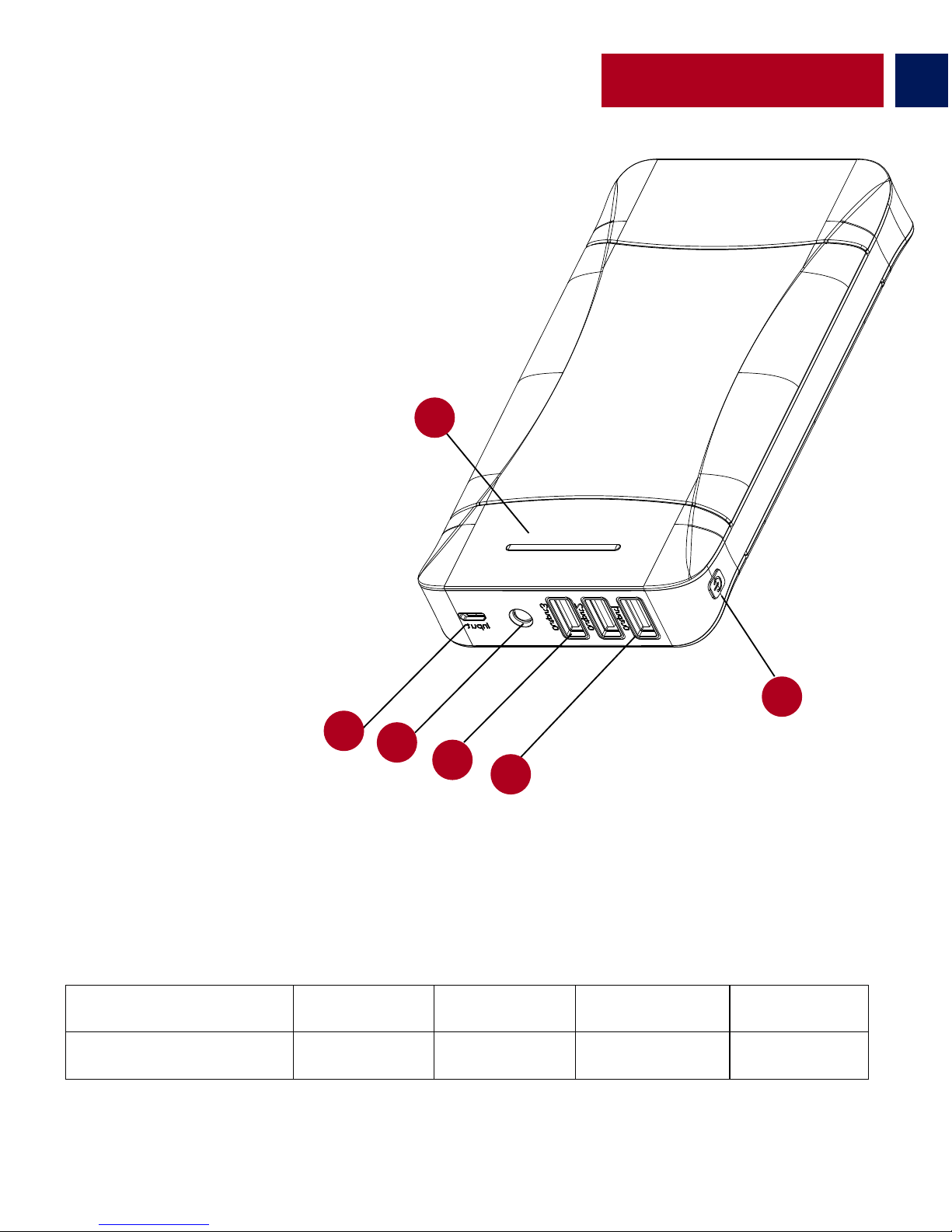
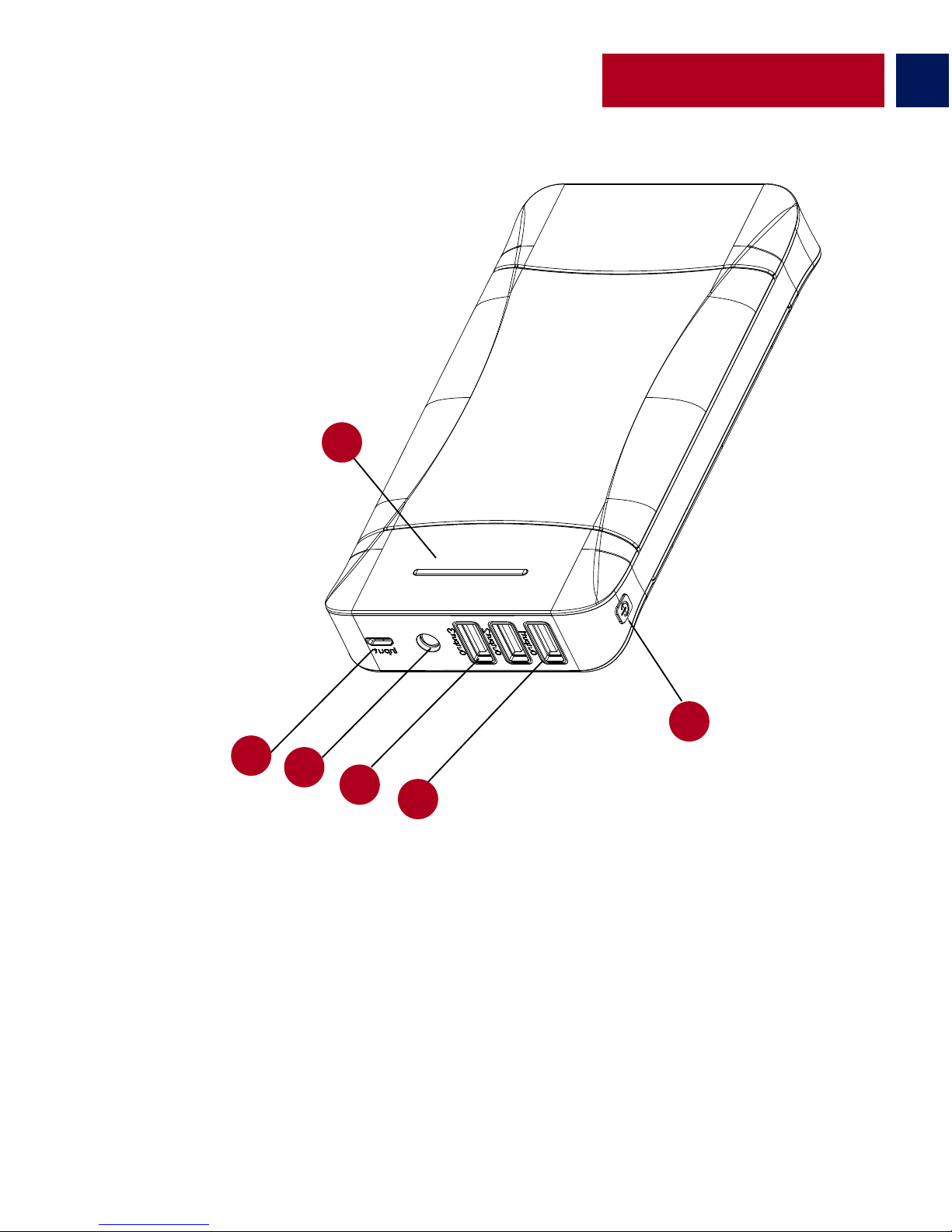
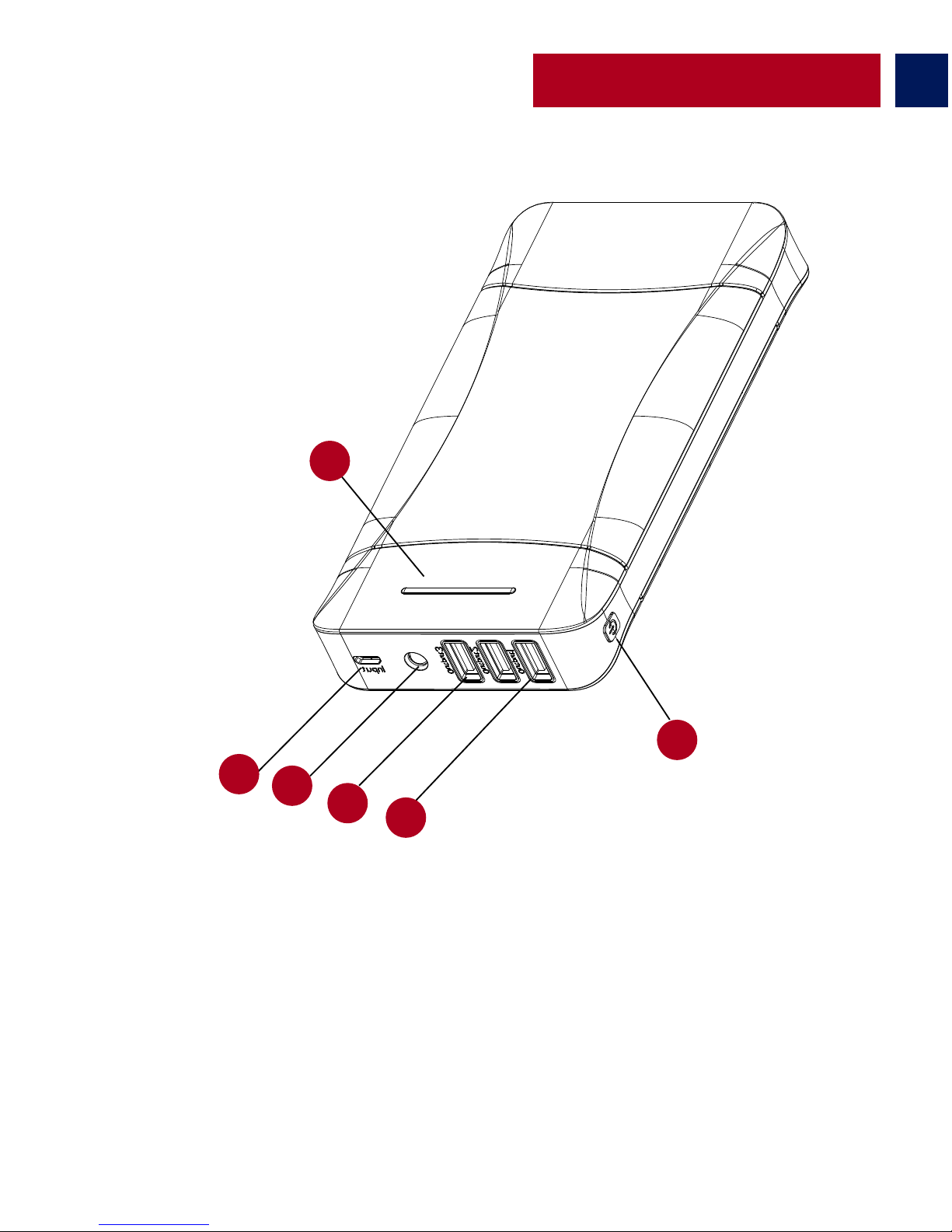
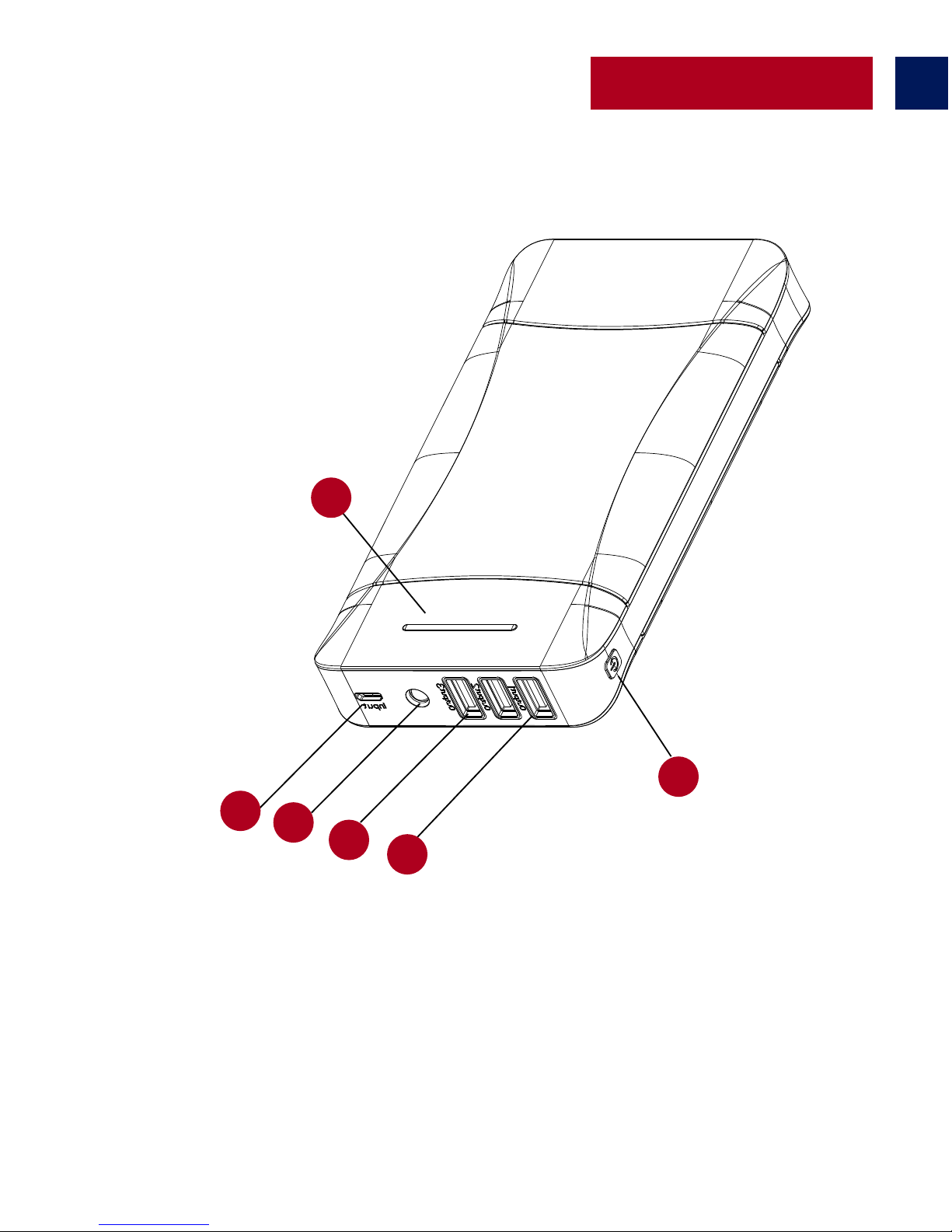
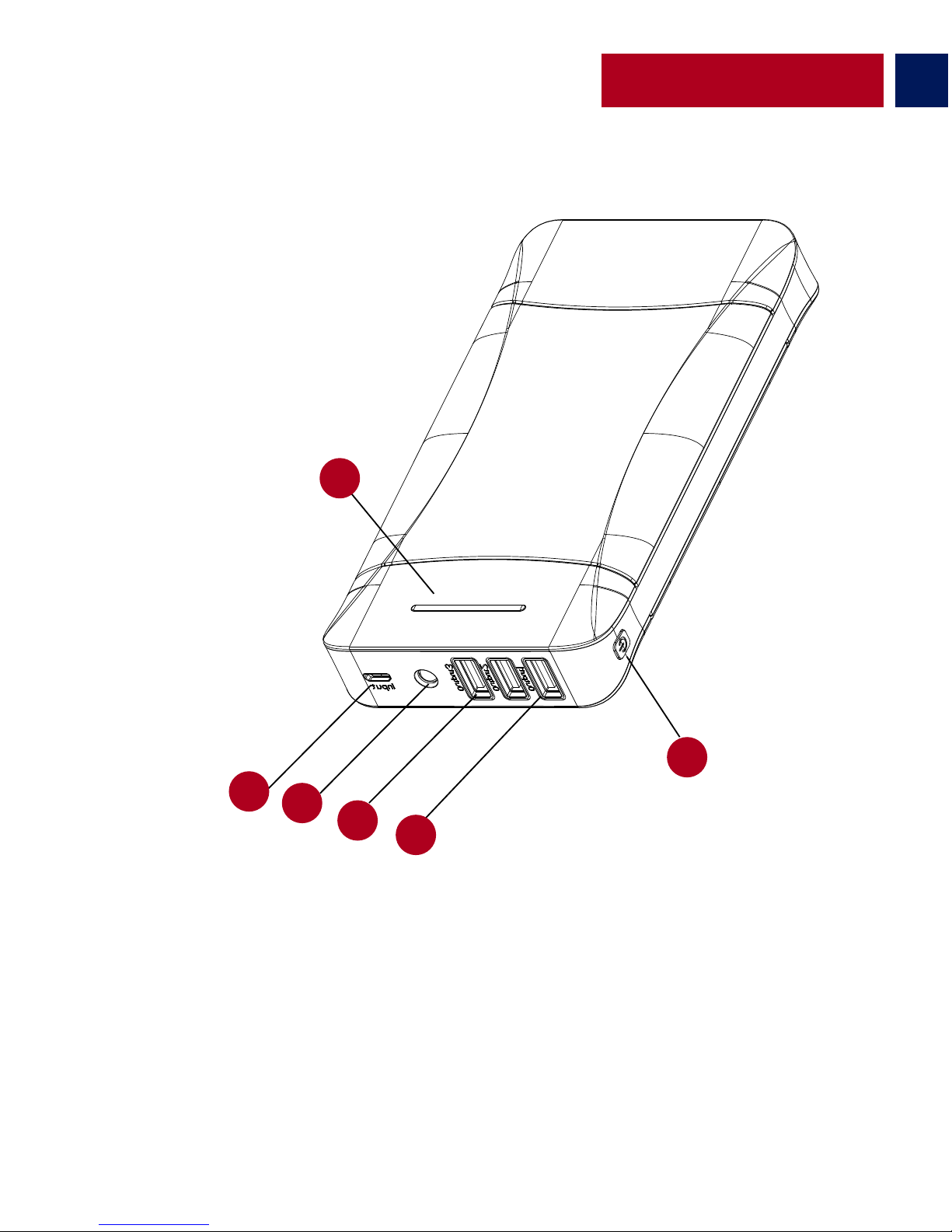
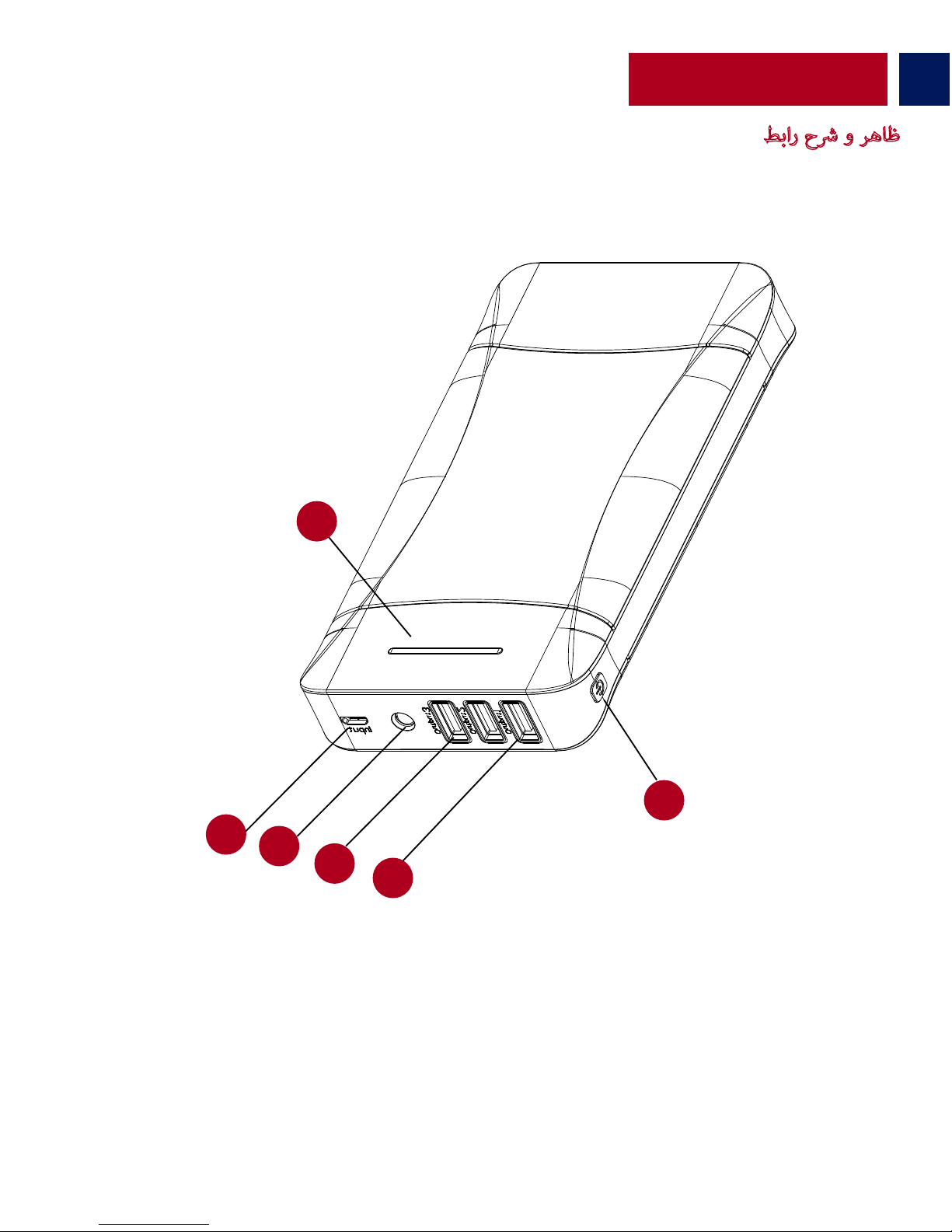
Appearance & Interface Description
1. Battery Level LED Indicator
2. Micro-USB Input Port
3. LED Torch
4. 2.1A USB Output Port
5. 1A USB output Ports
6. Power Button
1
2
3
4
5
6
Checking the remaining power left in ProVolta-21 back-up battery
• In order to view the remaining power left, press the power button once and view the Battery
Level LED Indicator.
Operation Instructions
No of LED’s Active
1
2
3
4
٪ of power remaining
<=25% <=50% <=75%
<=100%
Page 5
English
4
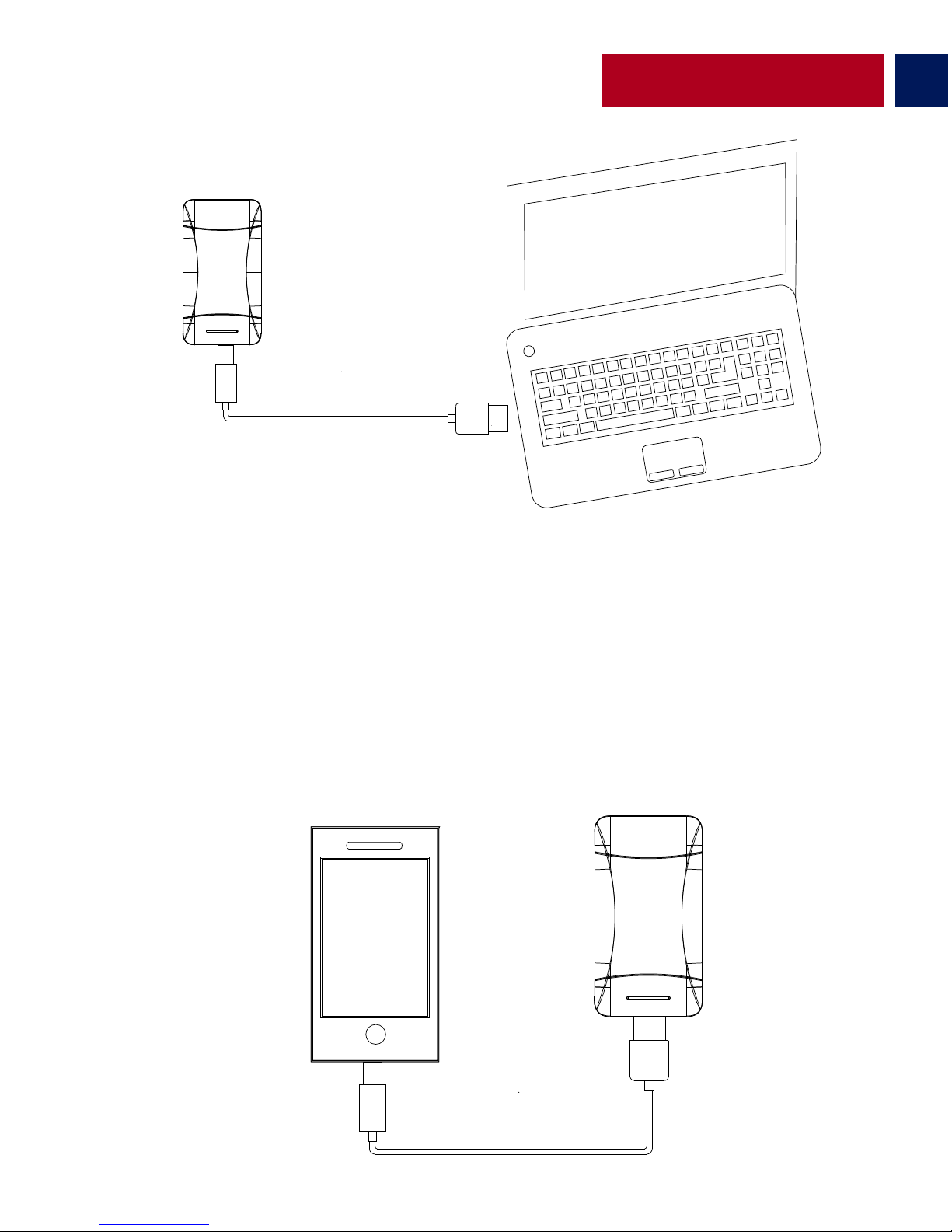
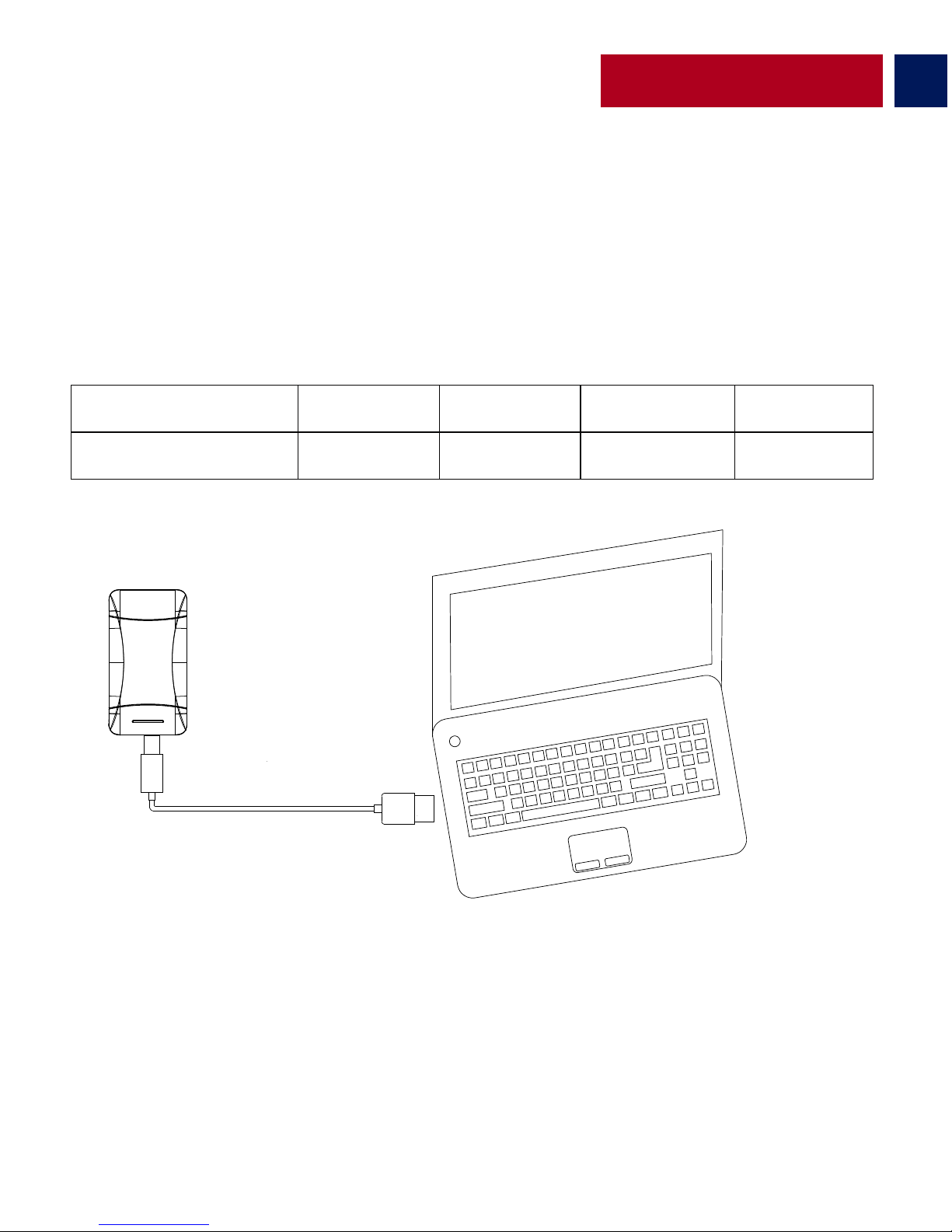
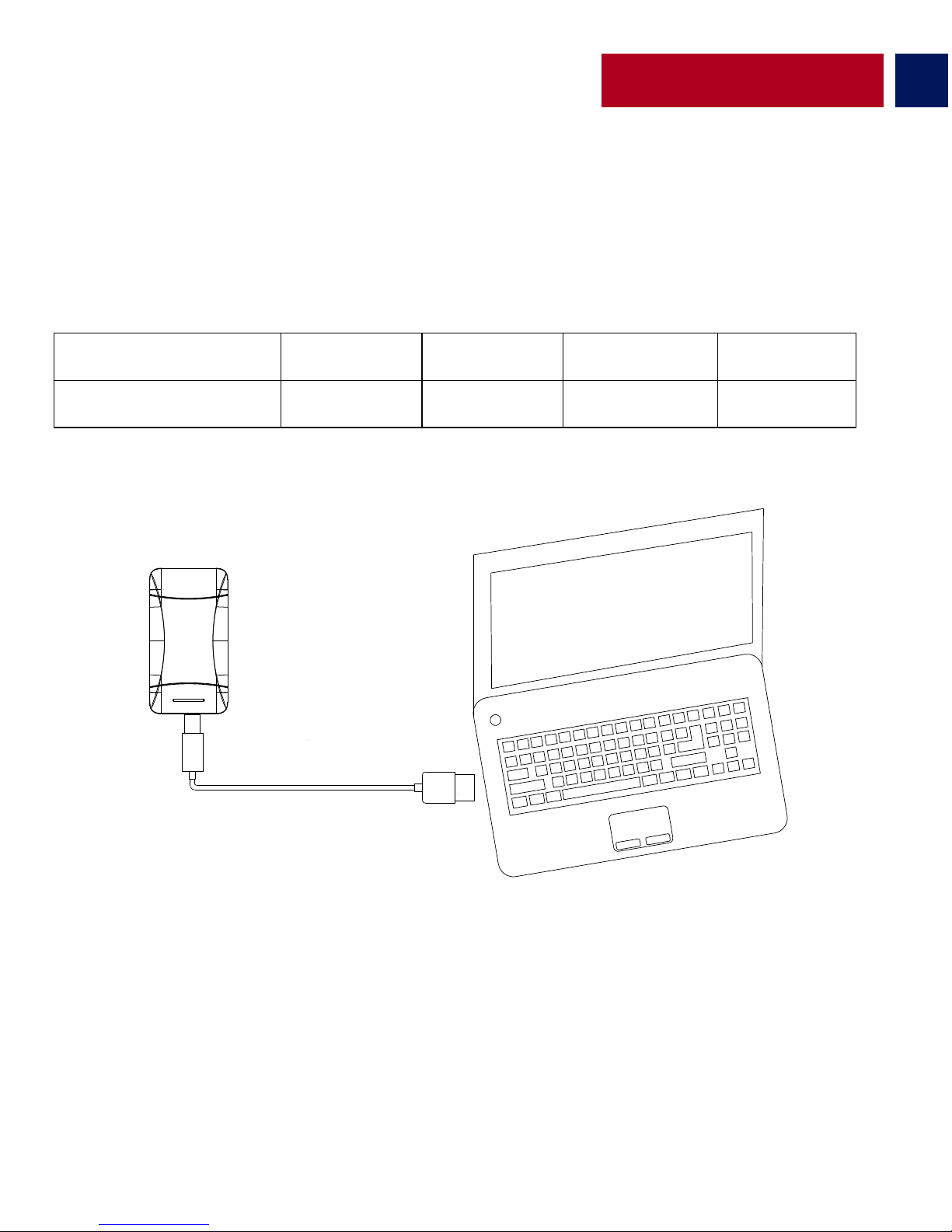
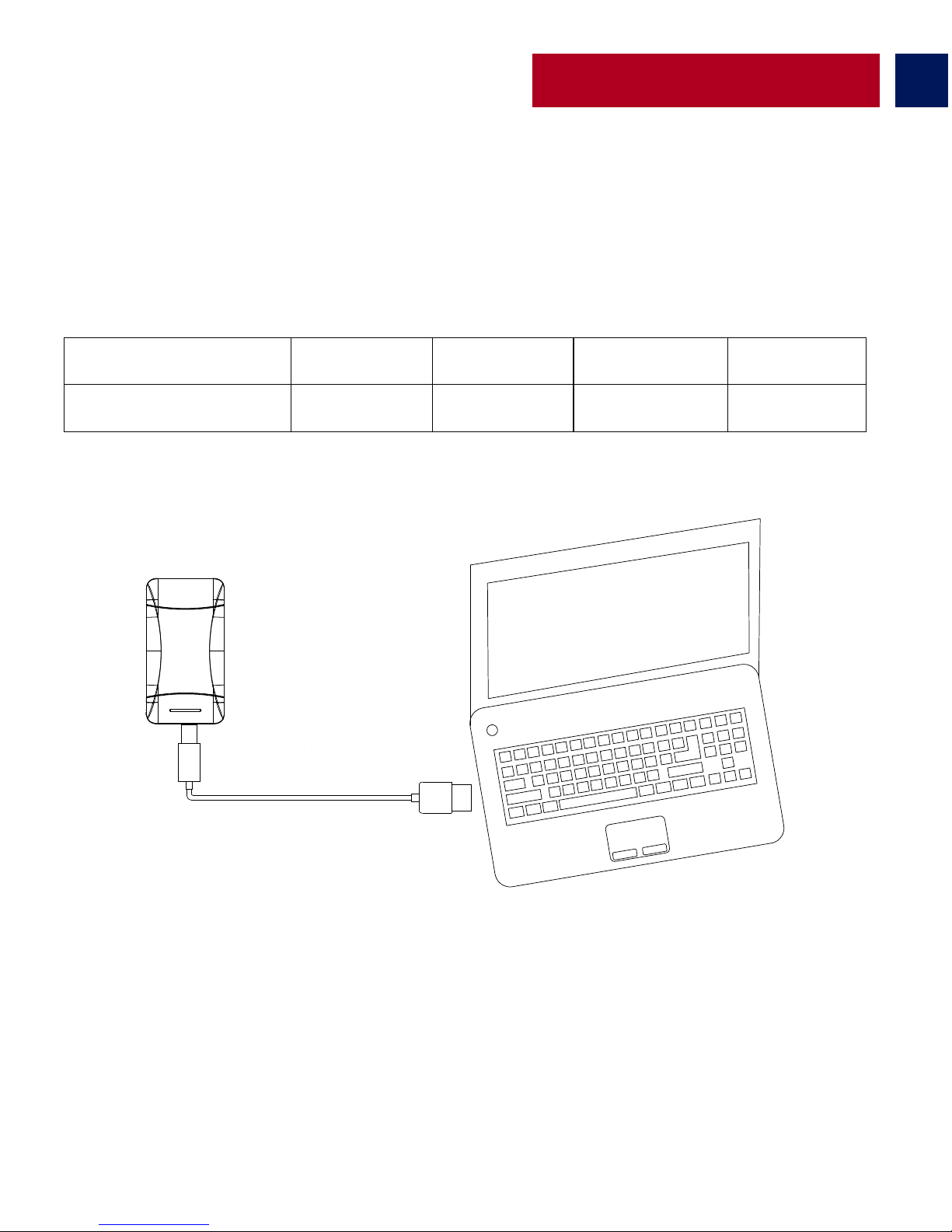
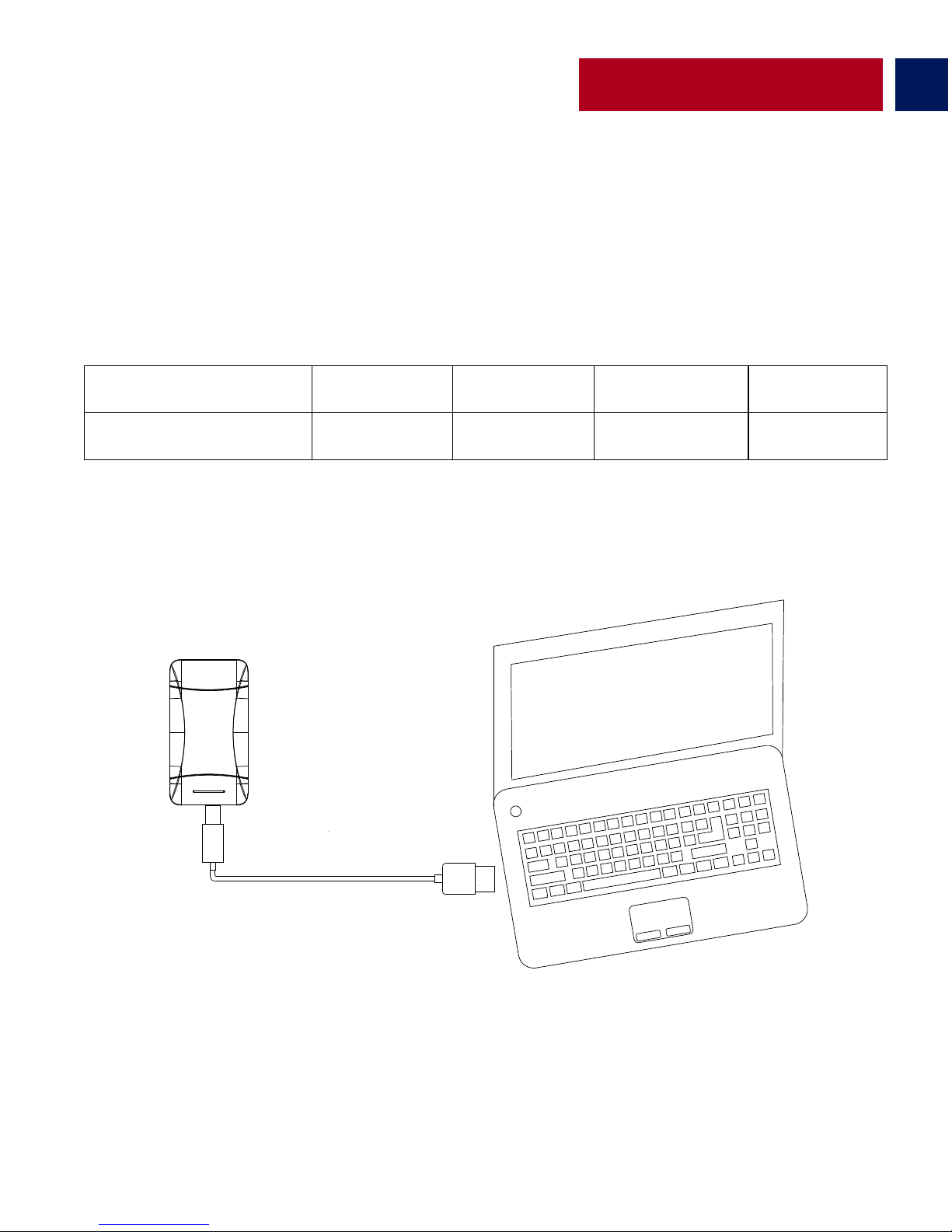
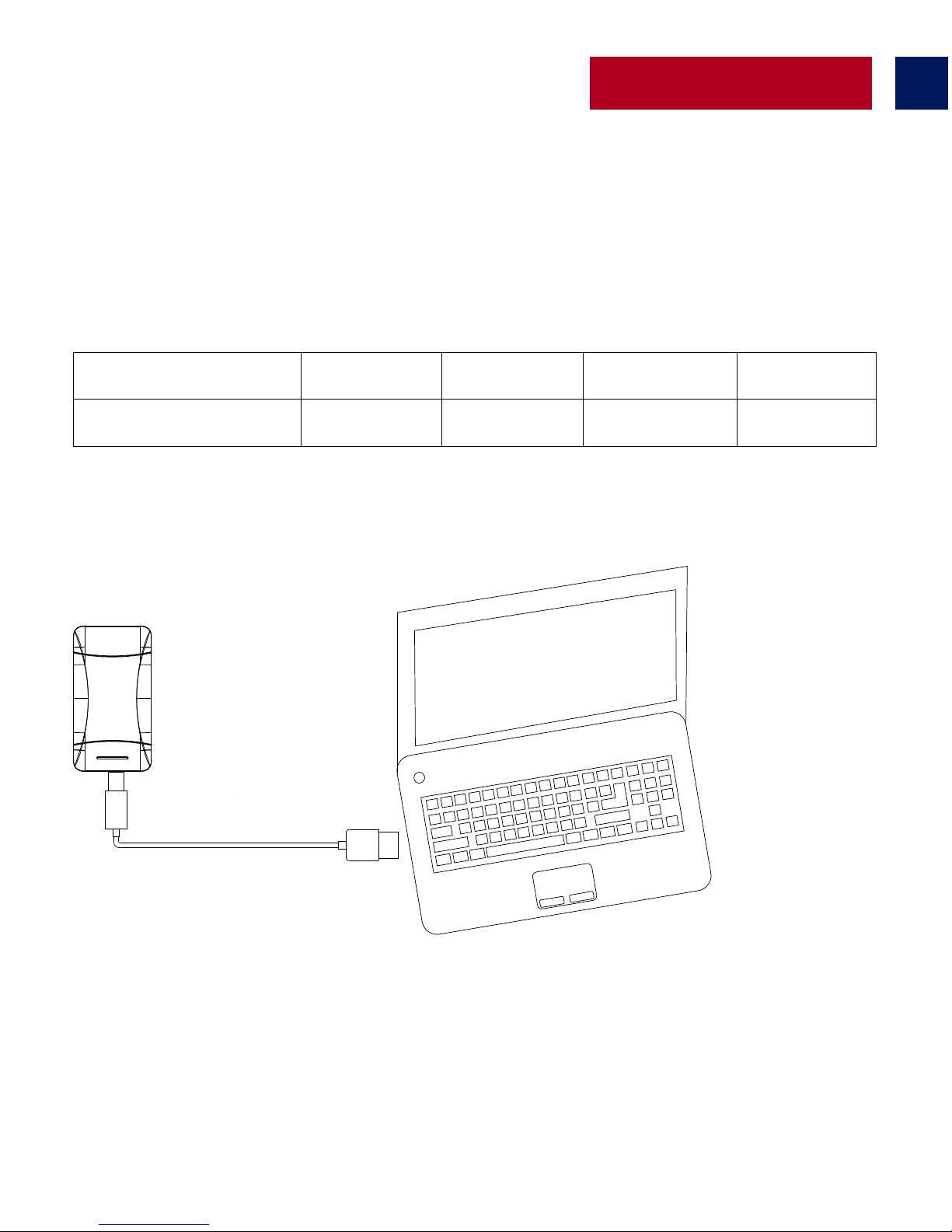
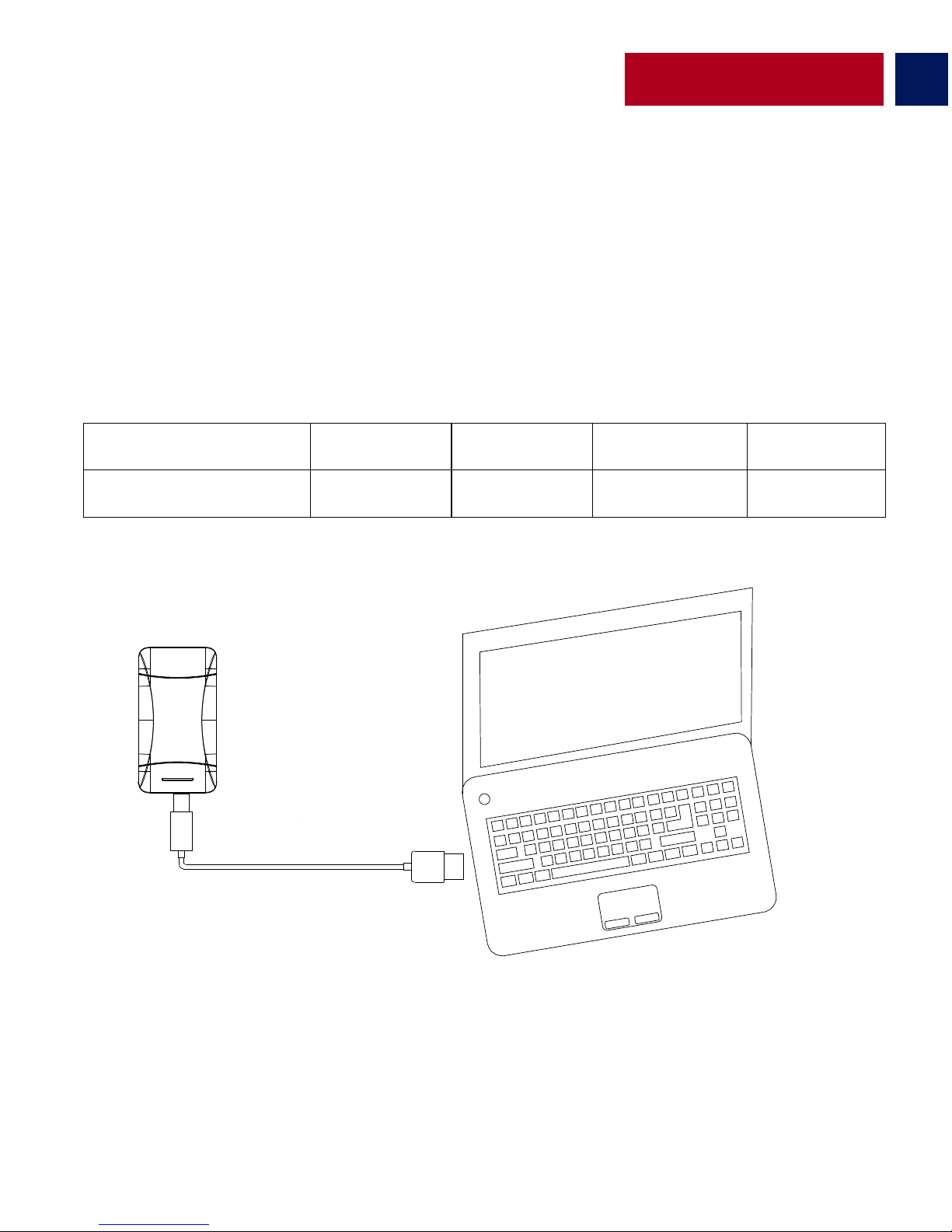
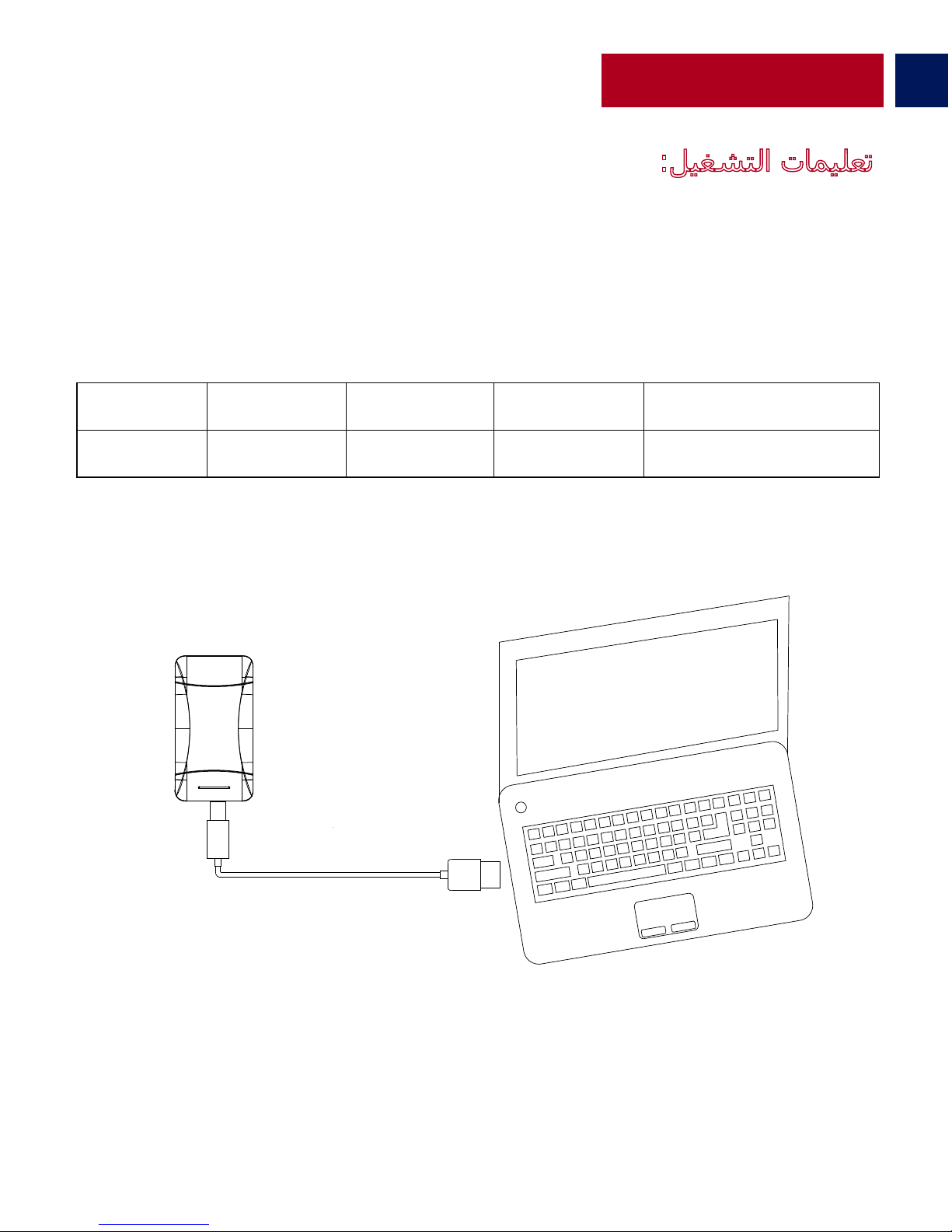
• Connect one end of the Micro-USB Cable to ProVolta-21 and the other end to a
desktop/laptop or a USB Power Adapter. The Battery Level LED Indicator’s will light up indicating
that the back-up battery is charging normally.
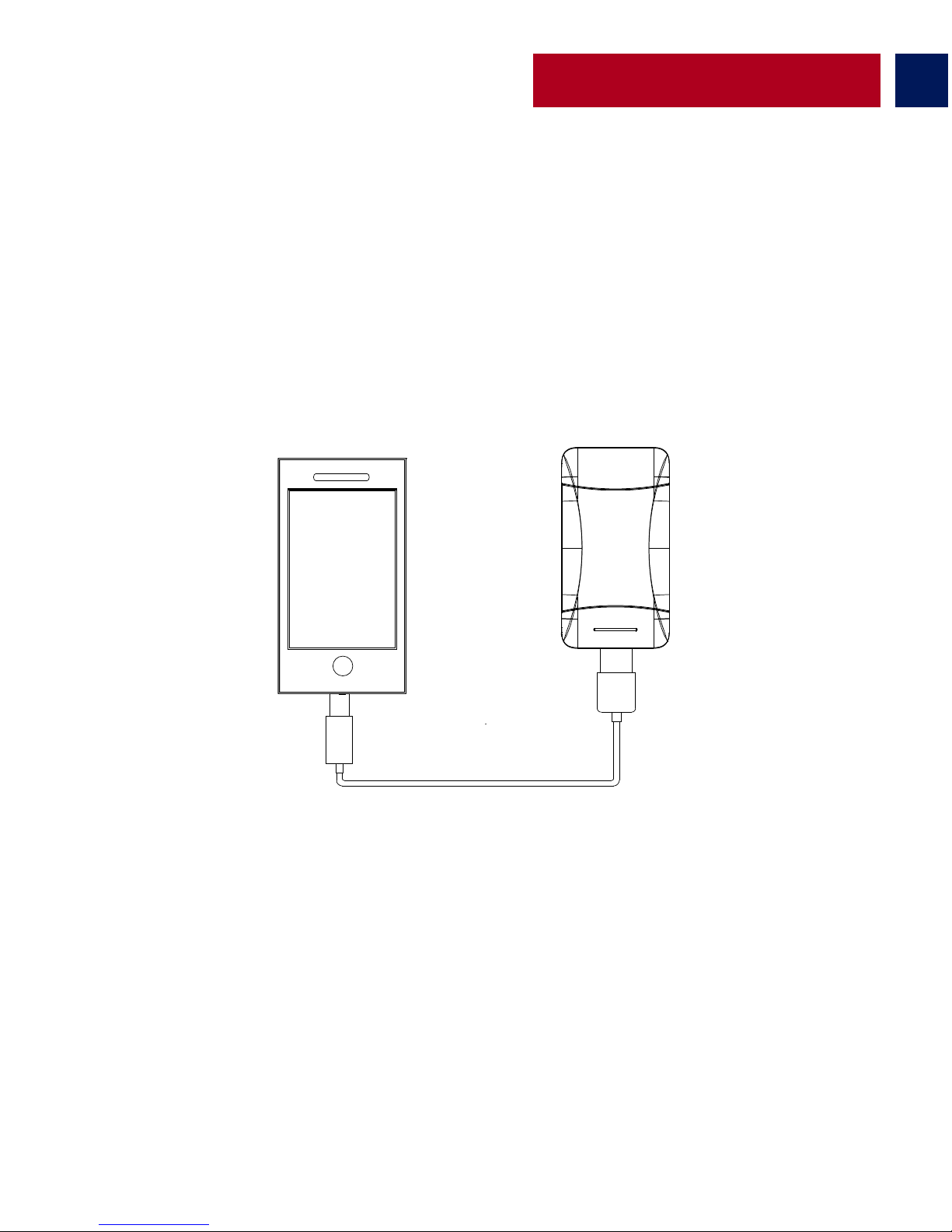
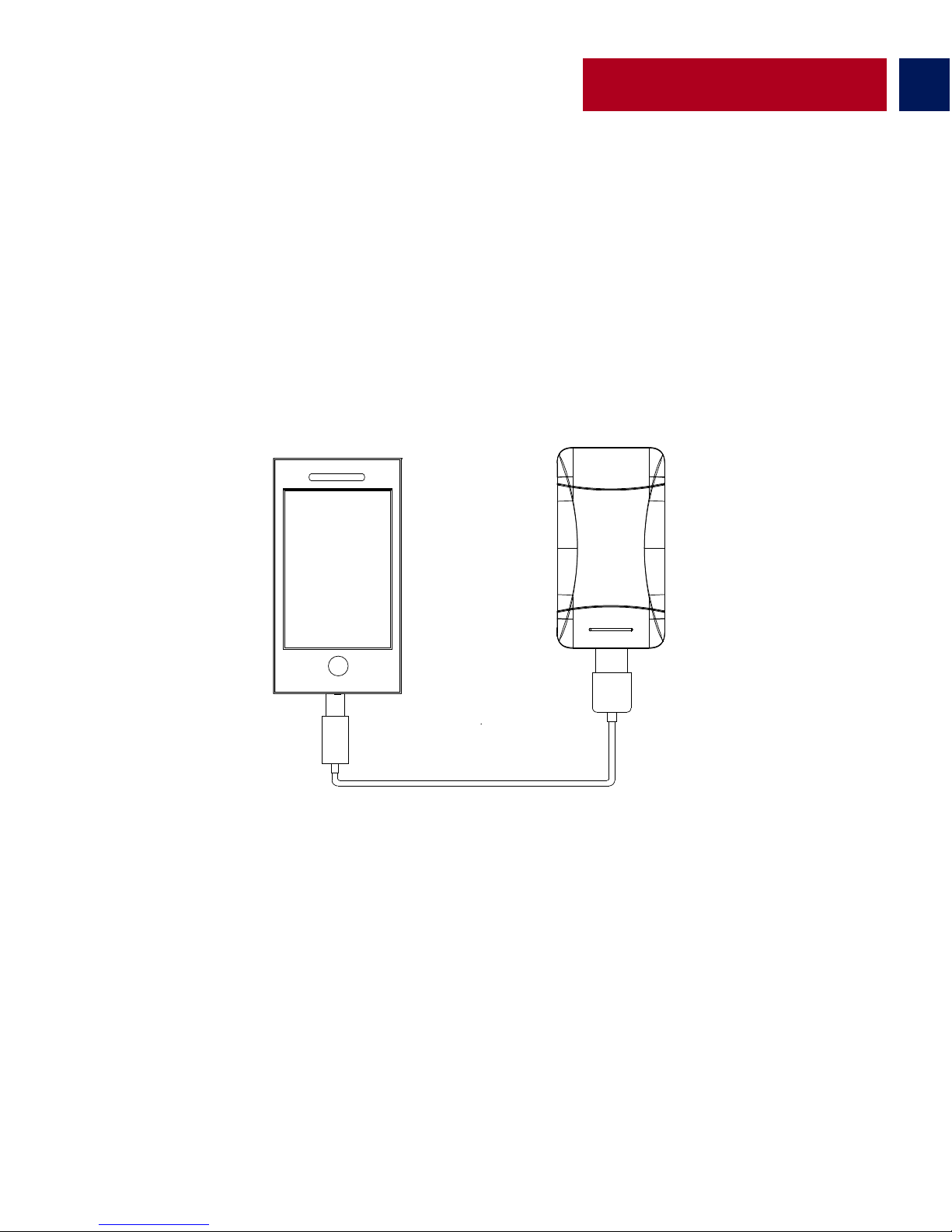
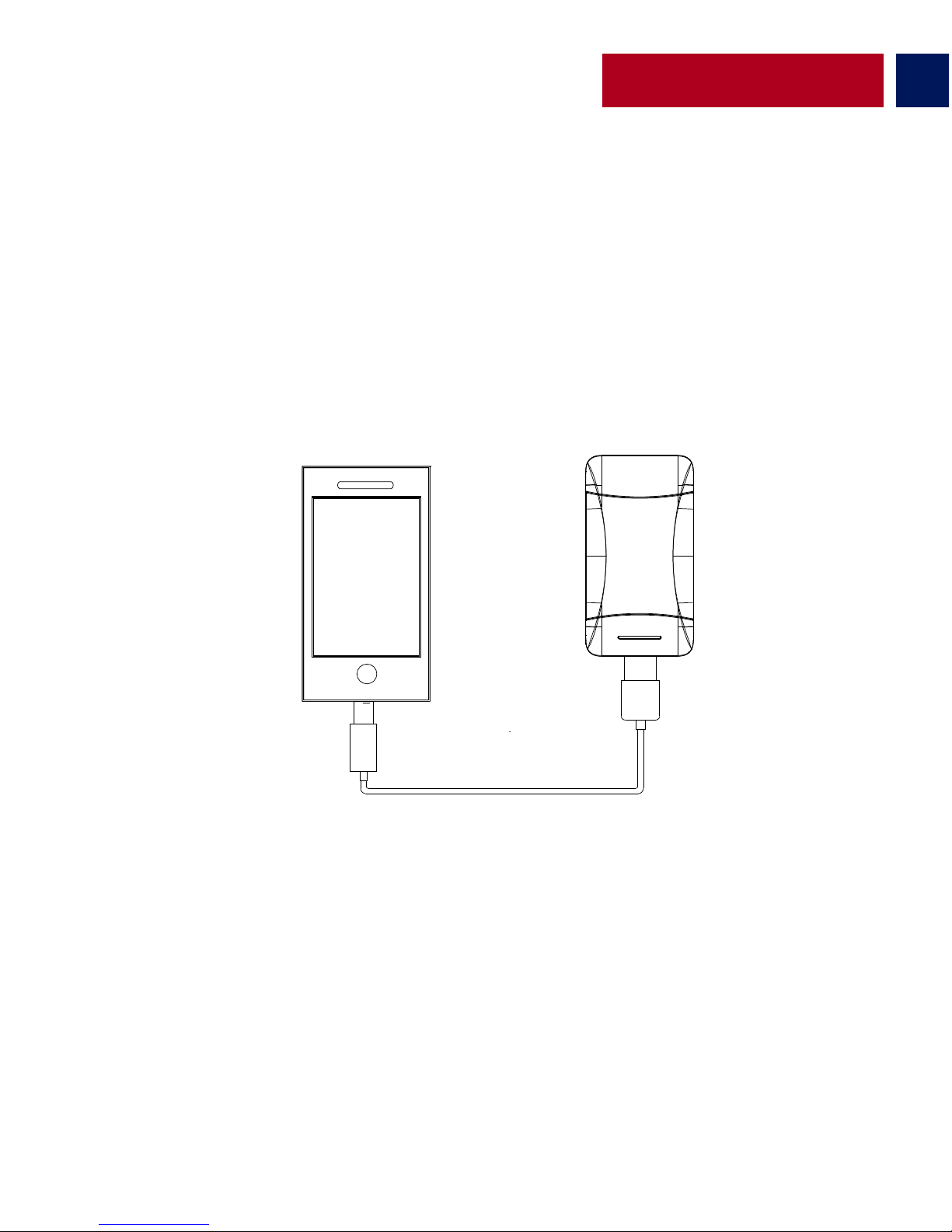
Charging USB chargeable devices using ProVolta-21
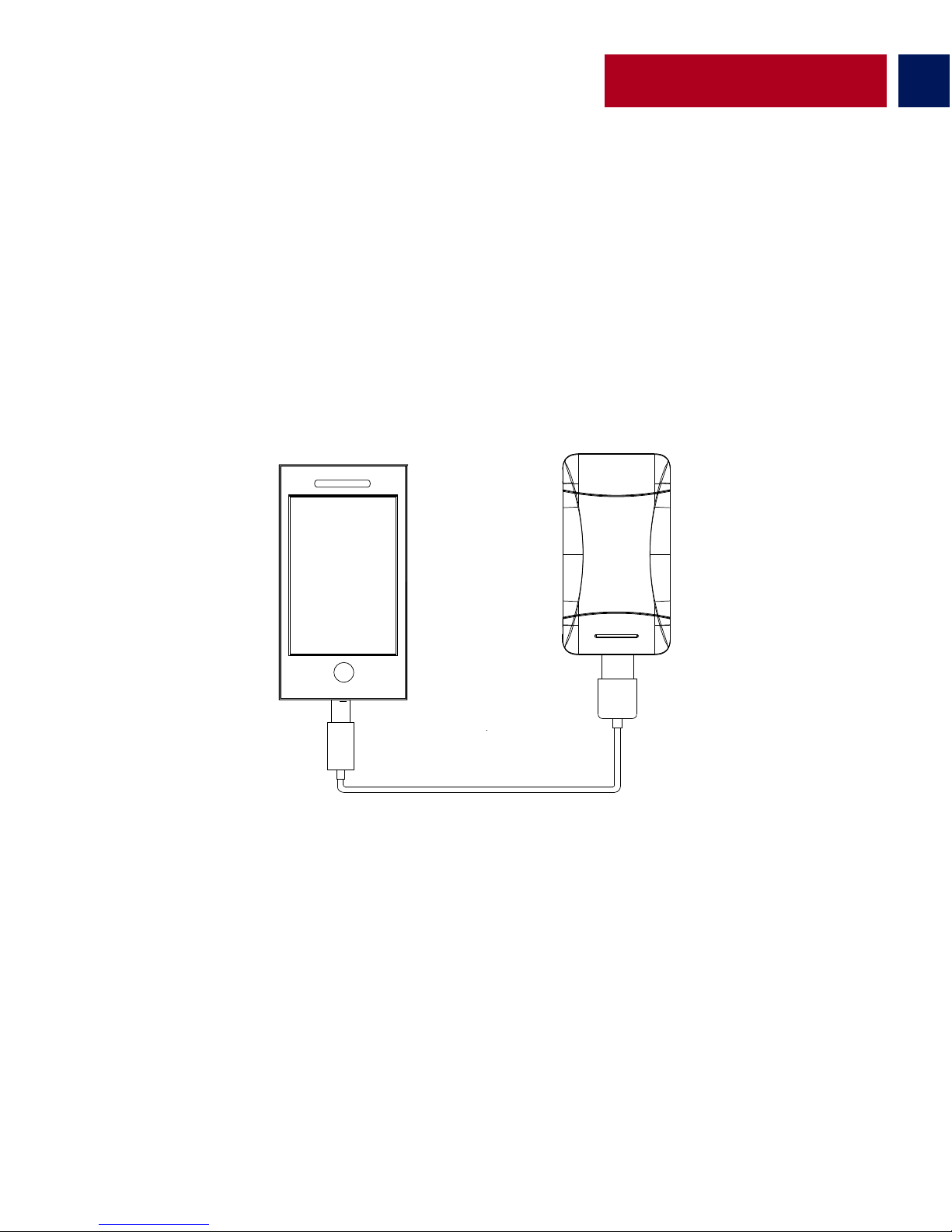
• There are 3 USB ports available on ProVolta-21. Use the 1A output ports to charge
smartphones and the 2.1A output port to charge small tablets. Plug the USB cable into the
required USB output port on ProVolta-21 back-up battery and the other end into the device.
Press power button once to begin charging your device.
Charging ProVolta-21 back-up battery
Page 6
5
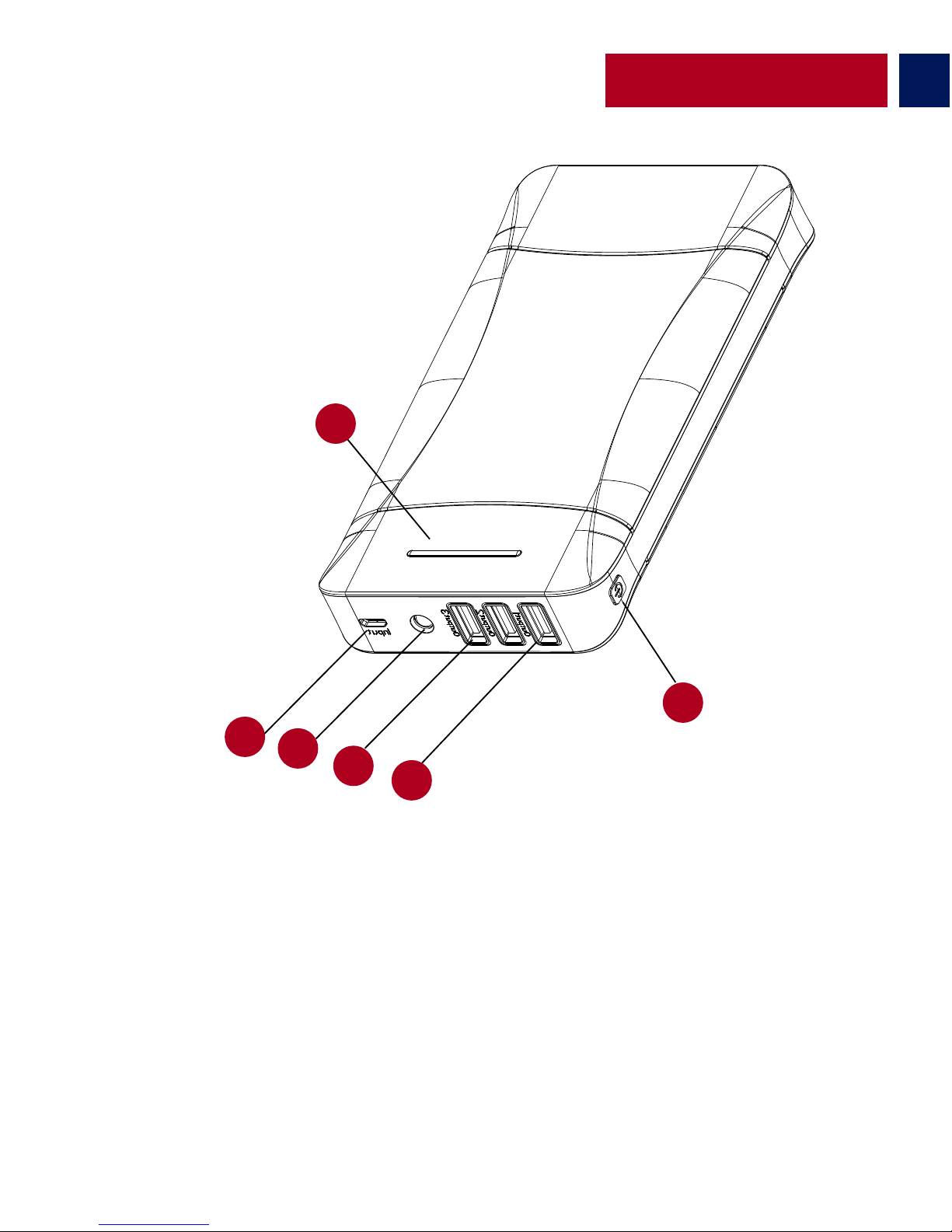
Apariencia y descripción de la interface
1. Indicador LED de nivel de batería
2. Puerto de entrada de Micro-USB
3. Linterna LED
4. Puerto de salida de 2.1A USB
5. Puertos de salida de 1A USB
6. Botón de encendido
Spanish
1
2
3
4
5
6
Page 7
Instrucciones de operación:
6
Spanish
• Para ver la carga remanente, presione el botón de encendido una vez y mire el Indicador LED
de nivel de batería.
• Conecte un extremo del Cable Micro-USB a ProVolta-21 y el otro extremo a un ordenador de
escritorio/portátil o a un Adaptador de corriente USB. El Indicador LED de nivel de batería se
encenderá indicando que la batería de reserva se está cargando normalmente.
Verificación de carga remanente en la batería de reserva ProVolta-21
Carga de la batería de reserva ProVolta-21
Can�dad de LEDs ac�vos
1 2 3 4
٪ de energía remanente
<=25%
<=%50
<=%75
<=%100
Page 8
7
Spanish
• Hay 3 puertos USB disponibles en ProVolta-21. Use los Puertos de salida 1A para cargar
smartphones y el Puerto de salida 2.1A para cargar las tabletas chicas. Conecte el cable USB al
Puerto de salida USB que se requiera en la batería de reserva ProVolta-21 y el otro extremo del
cable al dispositivo. Presione una vez el botón de encendido para iniciar la cara de su dispositivo.
Carga de dispositivos recargables mediante USB usando ProVolta-21
Page 9
8
Apparence et Description d’Interface
1. Indicateur LED de Niveau de Batterie
2. Port Intrant Micro-USB
3. Lampe Torche LED
4. Port de Sortie 2.1A USB
5. Ports de Sortie 1A USB
6. Bouton d’Alimentation
French
1
2
3
4
5
6
Page 10
Instructions d’Utilisation:
9
French
Vérification de la puissance restante dans la batterie de réserve de ProVolta-21
• Afin de visualiser la puissance restante, appuyez sur le bouton d’alimentation une fois et
regardez l’Indicateur LED de Niveau de Batterie.
• Connectez une extrémité du Câble Micro-USB à ProVolta-21 et l’autre extrémité à un
ordinateur de bureau/ordinateur portable ou à un adaptateur d’alimentation USB. L’Indicateur
LED de Niveau de Batterie s’allumera indiquant que la batterie de réserve est en train de charger
normalement.
Chargement de la batterie de réserve ProVolta-21
Nombre de LED Ac�fs
1 2 3
4
٪ de puissance restante
<=%25 <=%50 <=%75
<=%100
Page 11
French
10
Chargement d’appareils chargeables USB en utilisant ProVolta-21
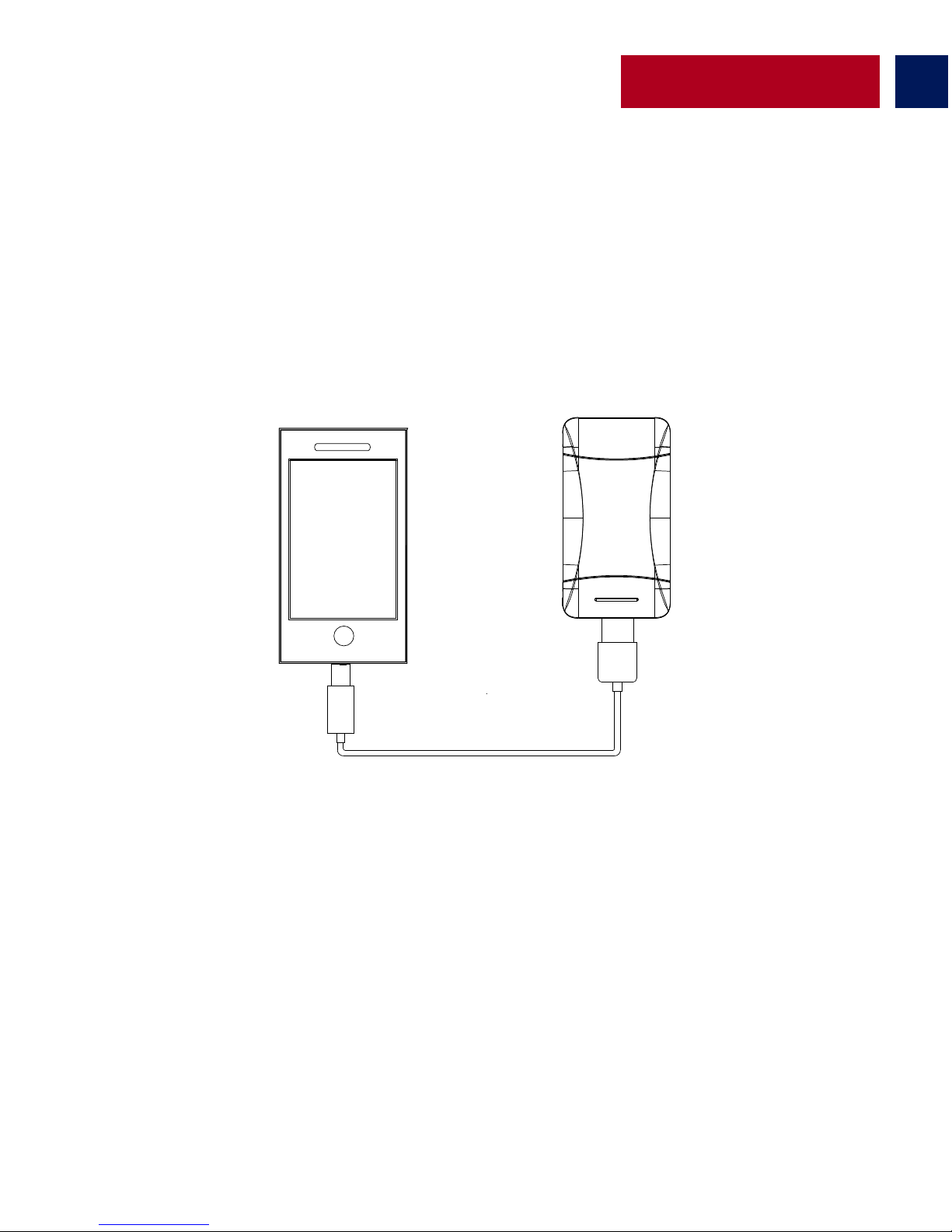
• Il y a trois ports USB disponible sur ProVolta-21. Utilisez les ports de sortie 1A pour charger
les smartphones and le port de sortie 2.1A pour charger les petites tablettes. Branchez le câble
USB dans le port de sortie requis de la batterie de réserve ProVolta-21 et l’autre extrémité dans
l’appareil. Appuyez sur le bouton d’alimentation une fois pour commencer à charger votre
appareil.
Page 12
11
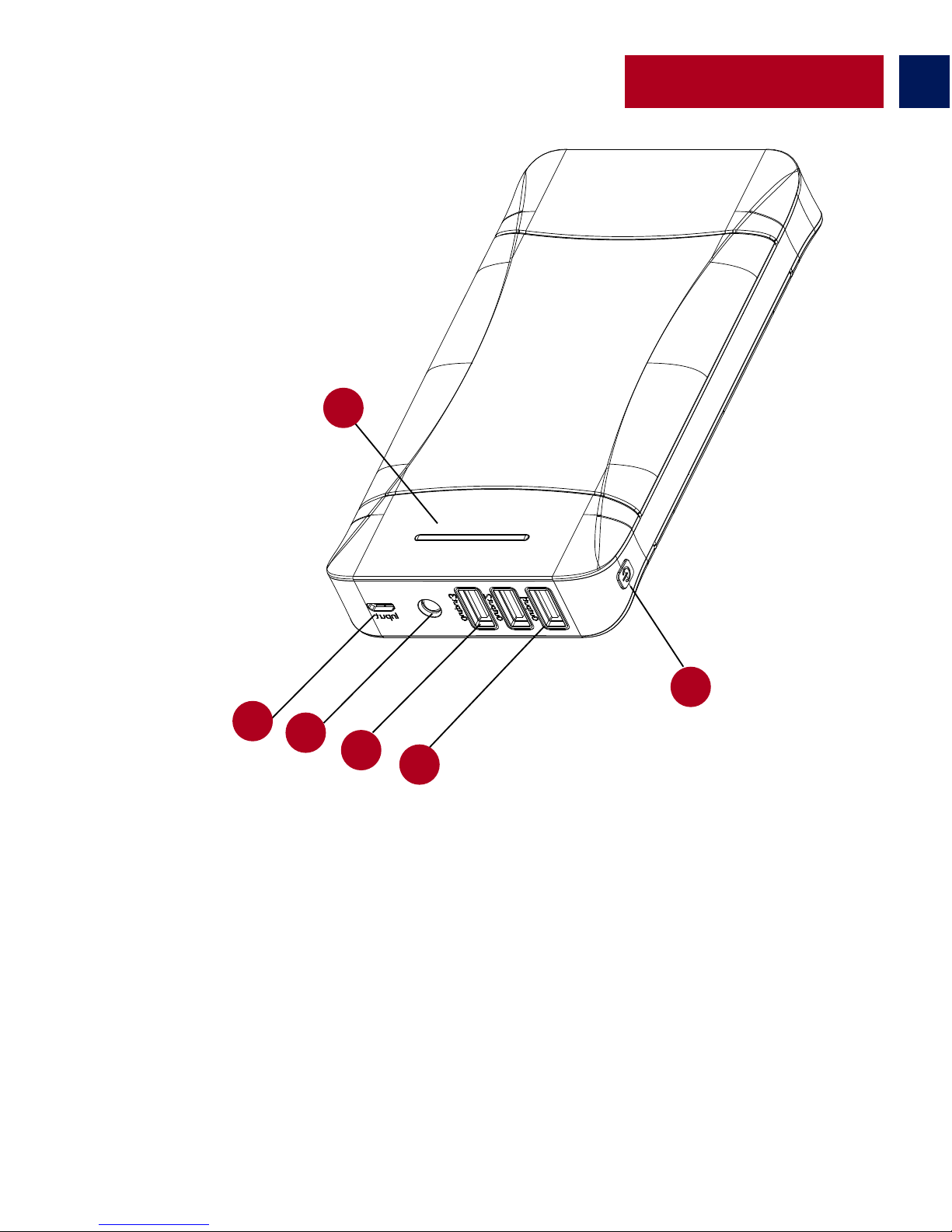
Aussehen & Schnittstellenbeschreibung
1. LED-Anzeige Batteriestand
2. Micro-USB-Eingang
3. LED-Taschenlampe
4. 2.1A USB-Ausgang
5. 1A USB-Ausgänge
6. Einschalttaste
German
1
2
3
4
5
6
Page 13
12
German
Überprüfung der restlichen Leistung der ProVolta-21 Back-Up-Batterie
• Zur Anzeige der restlichen Leistung drücken Sie die Einschalttaste einmal und überprüfen die
LED-Anzeige für den Batteriestand.
Bedienungsanleitung:
Laden der ProVolta-21 Back-Up-Batterie
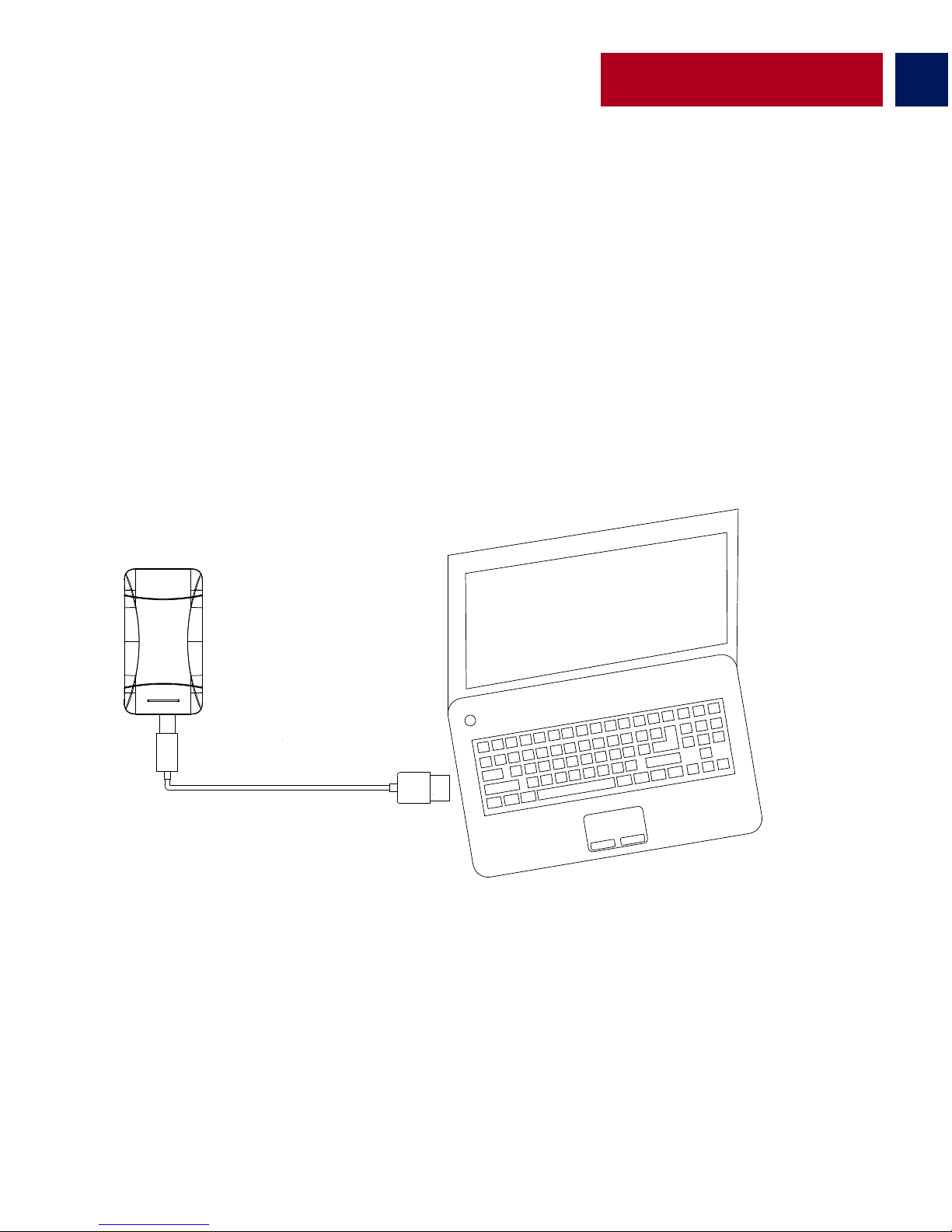
• Verbinden Sie das eine Ende des Micro-USB-Kabels mit der ProVolta-21 und das andere Ende
mit einem Desktop/Laptop order einem USB-Stromadapter. Die LED-Anzeige für den
Batteriestand leuchtet und zeigt an, dass sich die Back-Up-Batterie normal auflädt.
Page 14
13
German
Laden USB-ladefähiger Geräte mithilfe der ProVolta-21
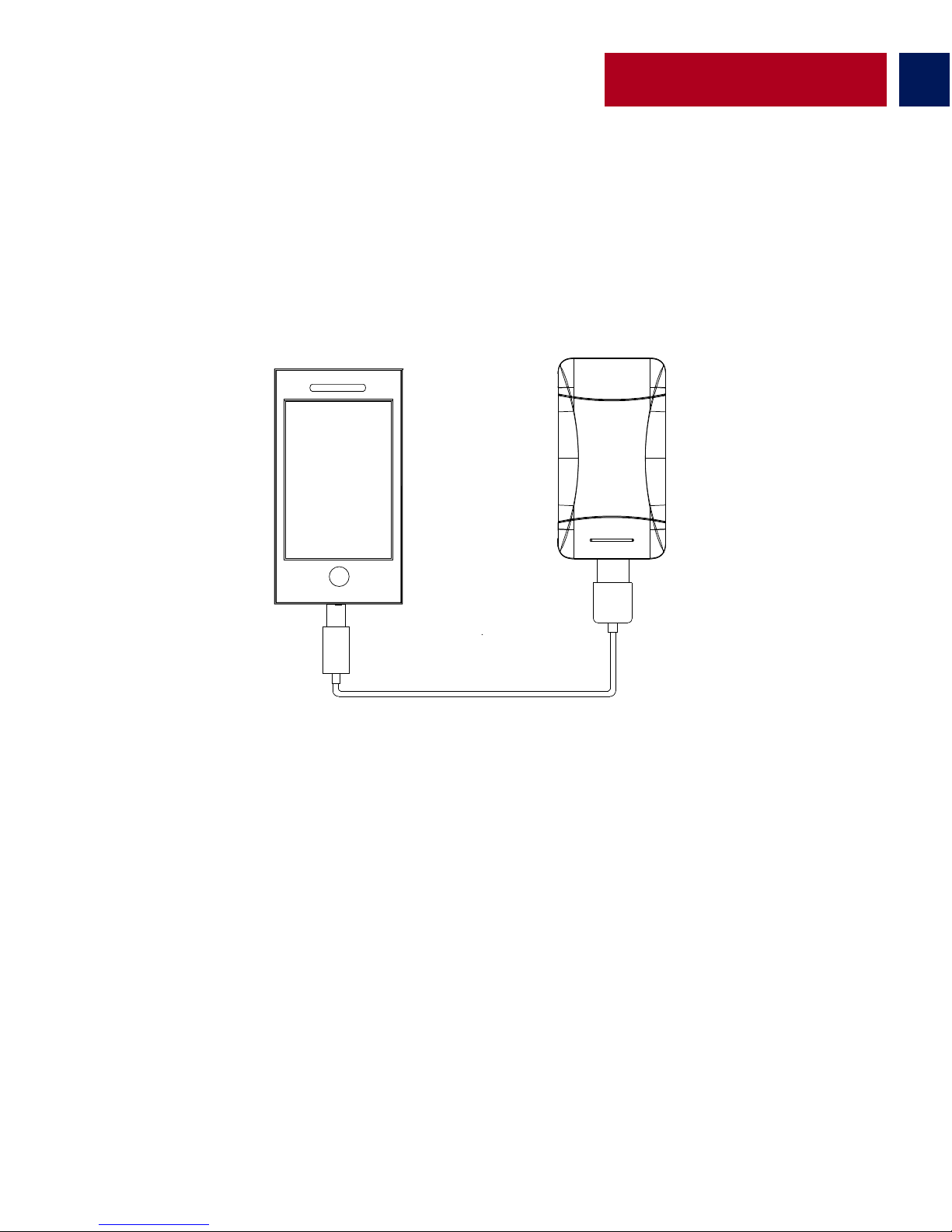
• ProVolta-21 verfügt über 3 USB-Anschlüsse. Verwenden Sie die 1A-Ausgänge, um
Smartphones zu laden und den 2.1A-Ausgang zum Laden von Tablets. Stecken Sie das
USB-Kabel in den erforderlichen USB-Ausgang der ProVolta-21 Back-Up-Batterie und das andere
Ende in das Gerät. Drücken Sie die Einschalttaste einmal, um Ihr Gerät aufzuladen.
Page 15
14
Portuguese
Aparência e Descrição de Interface
1. Indicador de LED de nível da bateria
2. Porta de entrada Micro-USB
3. Lâmpada de LED
4. Porta de saída USB 2.1A
5. Portas de saída USB 1A
6. Botão de alimentação
1
2
3
4
5
6
Page 16
Instruções de uso:
Portuguese
15
Verificando a carga restante da bateria de backup do ProVolta-21
Para visualizar a carga restante, pressione o botão de alimentação uma vez e verifique o
indicador de LED de nível de bateria.
• Conecte uma extremidade do cabo Micro-USB ao ProVolta-21 e a outra extremidade a um
desktop/laptop ou a um adaptador de energia USB. O indicador LED de nível de bateria
acenderá indicado que a bateria de backup está carregando normalmente.
Carregando a bateria de backup do ProVolta-21
Nº de LEDs a�vos
1 2 3 4
٪ de carga restante
<=%25 <=%50 <=%75
<=%100
Page 17
Portuguese
16
Carregar dispositivos de carga USB utilizando o ProVolta-21
• Existem 3 portas USB disponíveis no ProVolta-21. Use as portas de saída 1A para carregar
smartphones e a porta de saída 2.1A para carregar tablets pequenos. Ligue o cabo USB à porta
de saída USB na bateria de backup do ProVolta-21 e a outra extremidade no dispositivo.
Pressione o botão de alimentação uma vez para começar a carregar o dispositivo.
Page 18
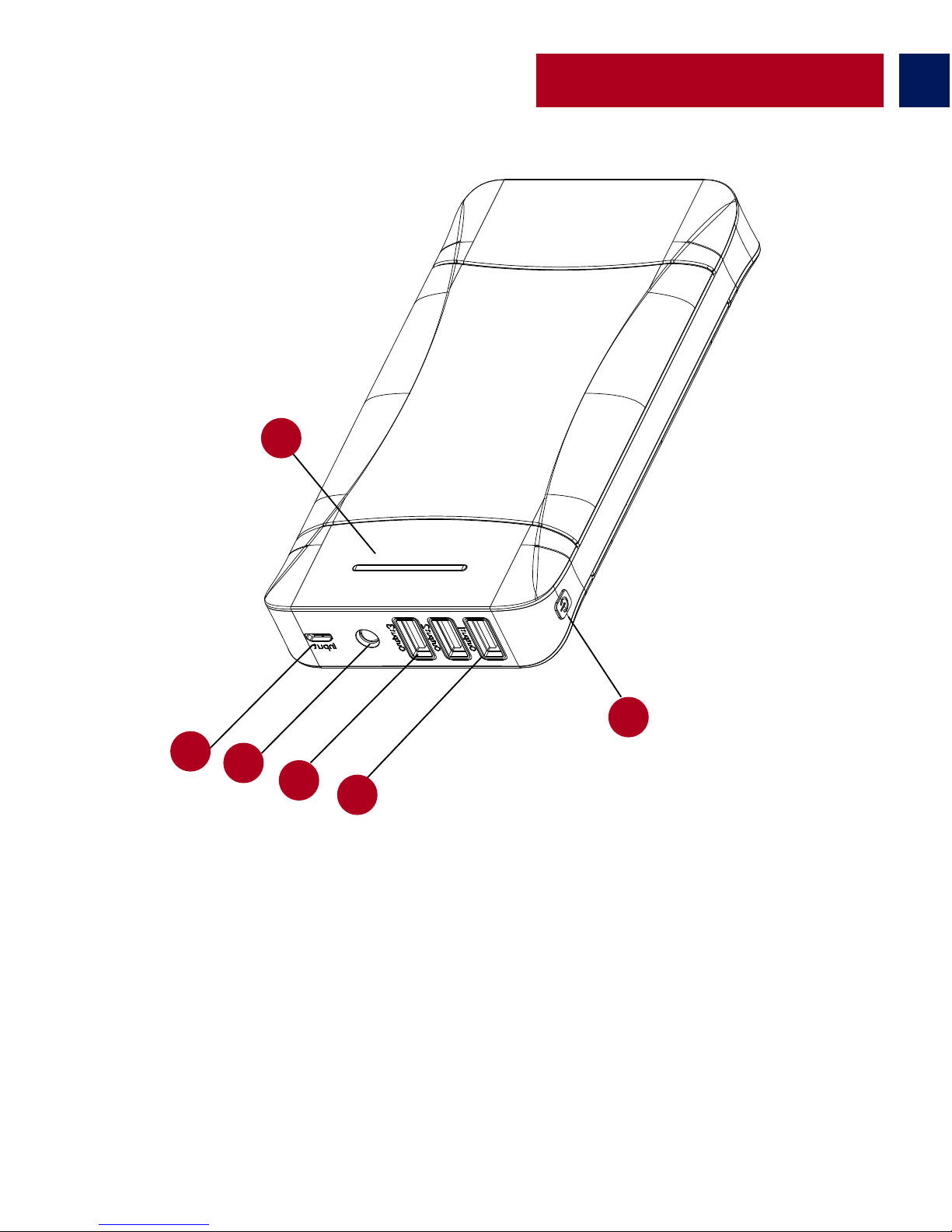
Romanian
1. LED Indicator Nivel Baterie
2. Port de Intrare Micro-USB
3. Lanternă LED
4. Port de Ieșire USB 2.1A
5. Porturi de Ieșire USB 1A
6. Buton de Alimentare
Descriere Aspect și Interfaţă
17
1
2
3
4
5
6
Page 19
Romanian
Instrucţiuni de Operare:
Încărcarea bateriei de rezervă ProVolta-21
18
• Conectaţi un capăt al Cablului Micro-USB la ProVolta-21, iar celălalt capăt la un desktop/laptop
sau un Adaptor de Alimentare USB. LED-ul Indicator al Nivelului de încărcare a Bateriei se va
aprinde, indicând faptul că bateria de rezervă se încarcă normal.
Verificarea alimentării rămase în bateria de rezervă ProVolta-21
• Pentru a vizualiza alimentarea rămasă, apăsaţi butonul de alimentare o dată și vizualizaţi
LED-ul Indicator al Nivelului de Încărcare a Bateriei.
Nr de LED-uri Ac�ve ١ ٢ ٣ ٤
٪ de alimentare rămasă <=٪٢٥ <=٪٥٠ <=٪٧٥ <=٪١٠٠
Page 20
Romanian
19
Încărcarea dispozitivelor USB încărcabile utilizând ProVolta-21
• Sunt 3 porţi disponibile pe ProVolta-21. Utilizaţi porturile de ieșire 1A pentru a încărca
smartphone-uri și portul de ieșire 2.1A pentru a încărca tablete mici. Conectaţi cablul USB în
portul de ieșire USB cerut în bateria de rezervă ProVolta-21, iar celălalt capăt în dispozitiv.
Apăsaţi butonul de alimentare o dată pentru a începe încărcarea dispozitivului dvs.
Page 21
20
Russian
Описание внешнего вида и интерфейса
1. Светодиодный индикатор уровня заряда батареи
2. Входной порт Micro-USB
3. Светодиодный фонарик
4. Выходной порт USB 2,1 А
5. Выходные порты USB 1 А
6. Кнопка питания
1
2
3
4
5
6
Page 22
Инструкция по эксплуатации:
21
Russian
Проверка оставшегося заряда резервной батареи ProVolta-21
• Чтобы просмотреть оставшийся заряд батареи, один раз нажмите на кнопку питания
и посмотрите на светодиодный индикатор уровня заряда батареи.
Зарядка резервной батареи ProVolta-21
• Подключите один конец кабеля Micro-USB к ProVolta-21, а другой - к
ноутбуку/настольному ПК или к адаптеру питания USB. Загорится светодиодный
индикатор уровня заряда батареи, что означает, что выполняется нормальная зарядка
резервной батареи.
Кол-во активных LED
1 2 3
4
оставшийся заряд, в ٪
<=%25 <=%50 <=%75
<=%100
Page 23
22
Russian
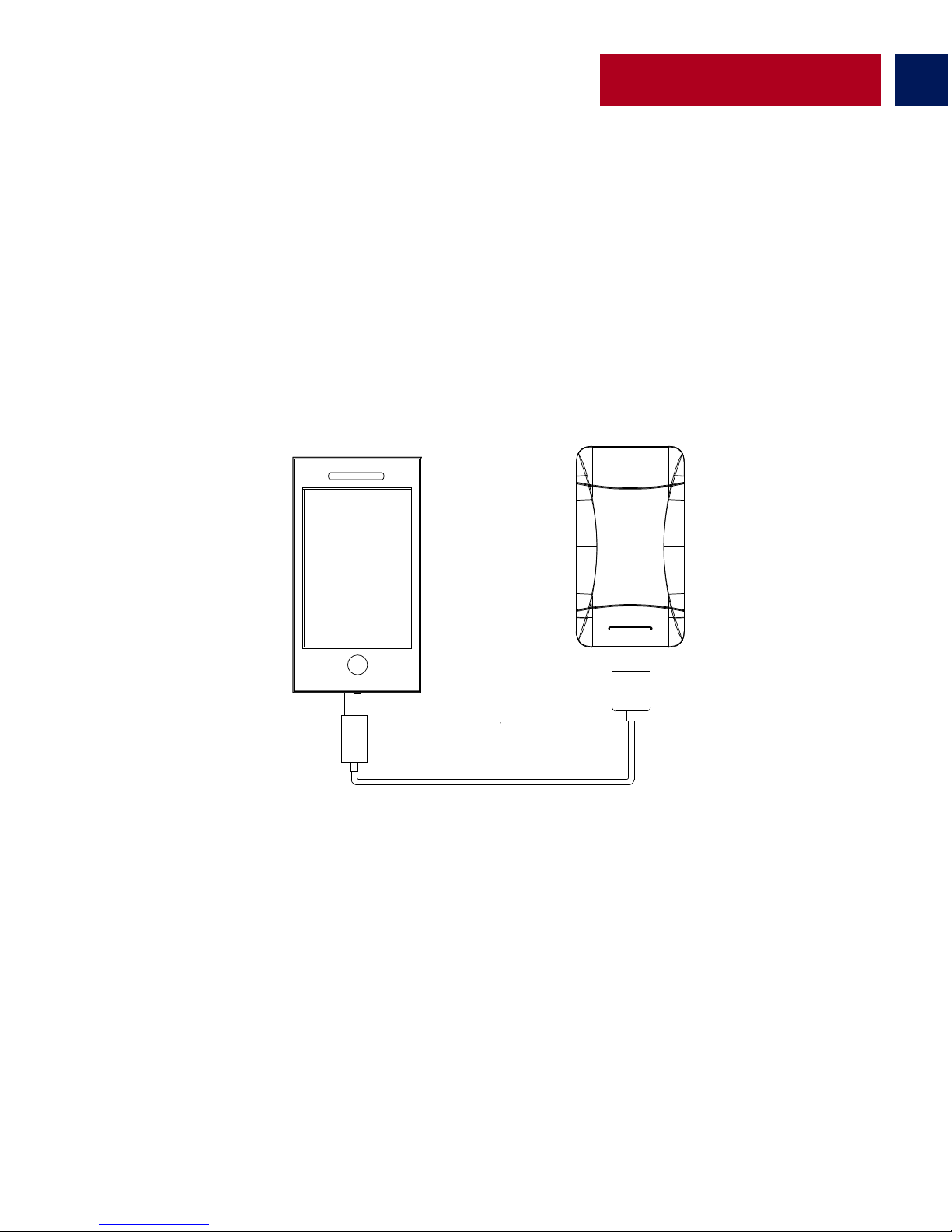
Зарядка устройств, заряжаемых от USB-порта, при помощи ProVolta-21
• На ProVolta-21 имеются три порта USB. Используйте выходные порты 1 А для зарядки
смартфонов, а выходной порт 2,1 А для зарядки небольших планшетов. Вставьте один
конец кабеля USB в соответствующий выходной порт USB на резервной батарее
ProVolta-21, а другой конец – в устройство. Один раз нажмите на кнопку питания, чтобы
начать зарядку устройства.
Page 24
23
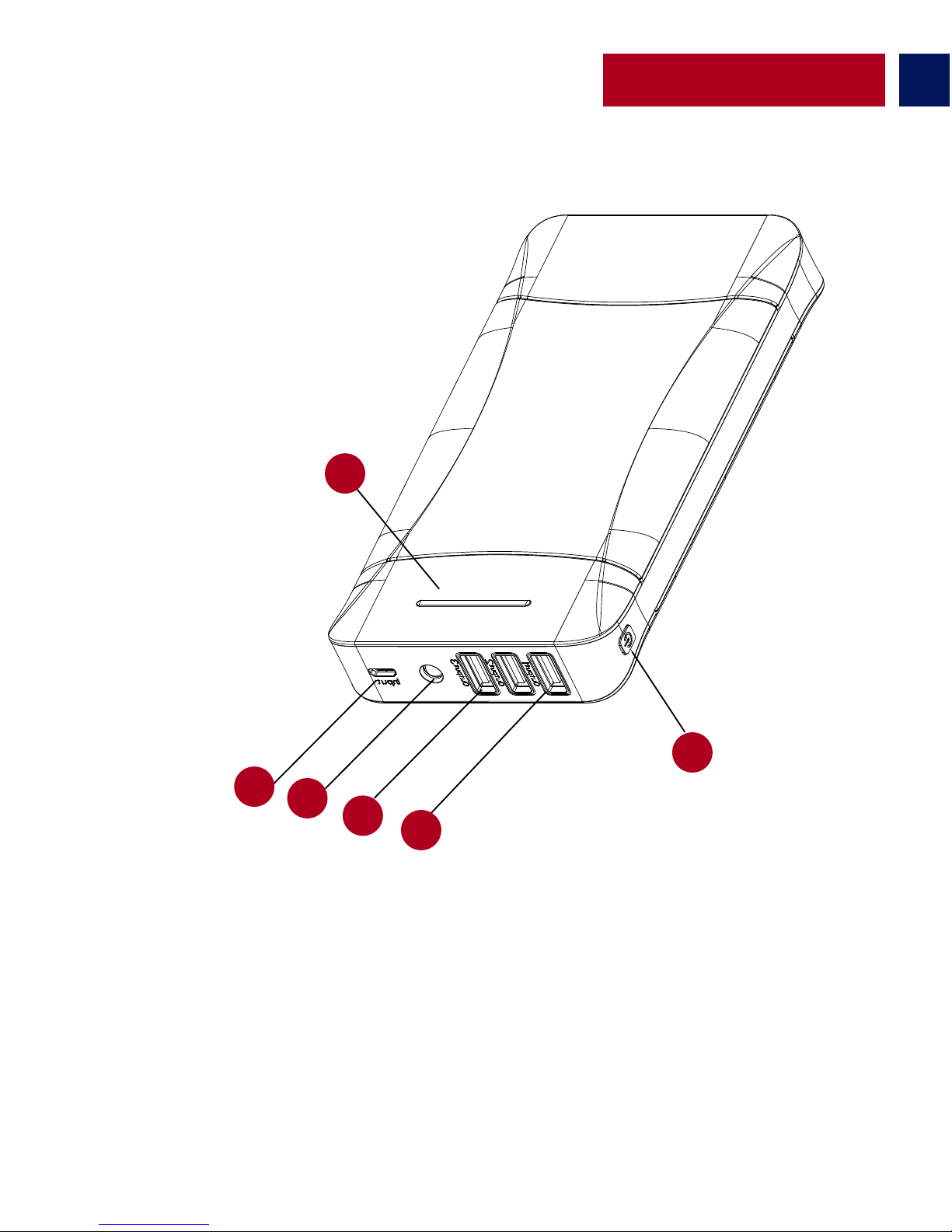
Dış Görünüm & Arayüz Tanımları
1. Pil Düzeyi LED Göstergesi
2. Mikro-USB Giriş Yuvası
3. LED Fener
4. 2.1A USB Çıkış Yuvası
5. 1A USB Çıkış Yuvası
6. Güç Düğmesi
Turkish
1
2
3
4
5
6
Page 25
24
Turkish
Kullanım Talimatları:
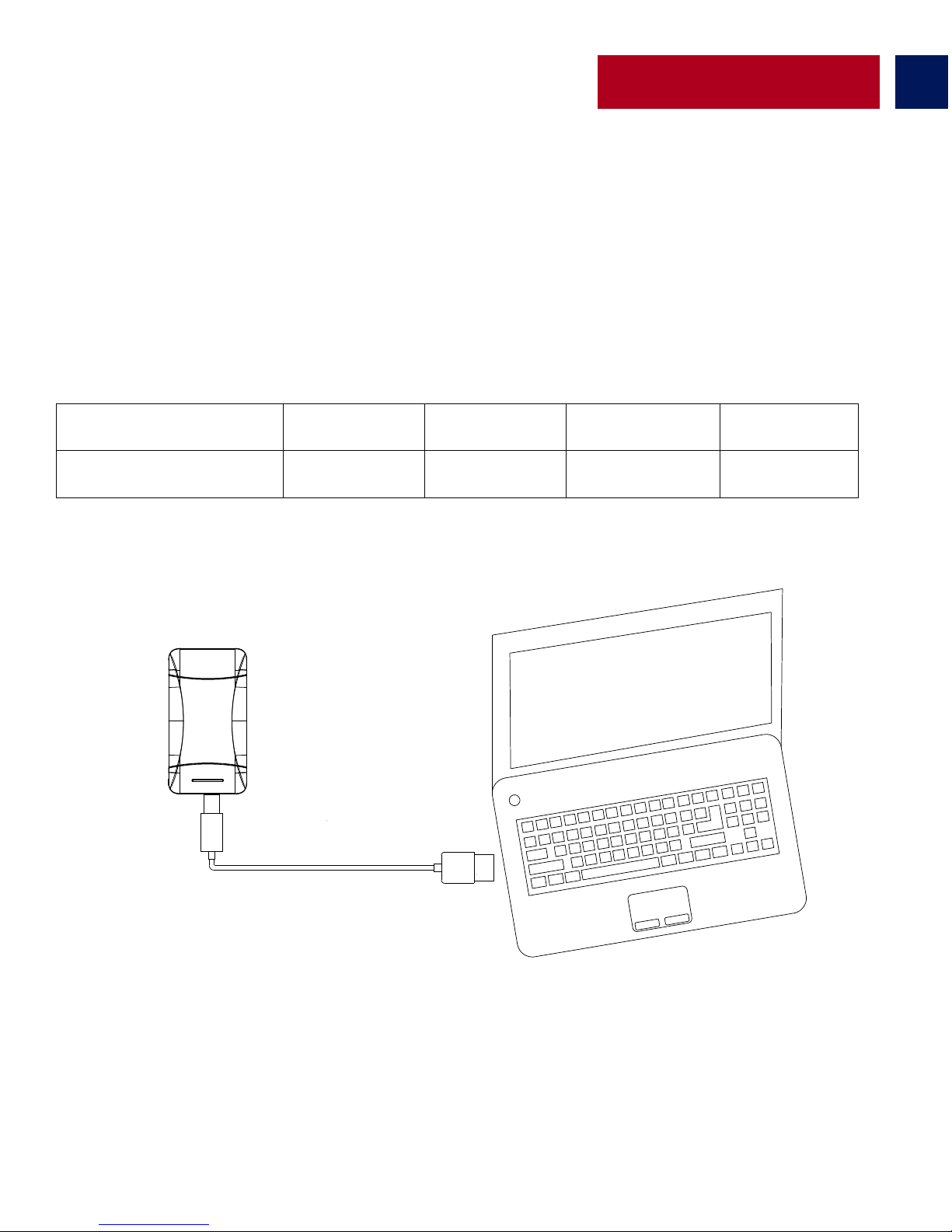
ProVolta-21 yedek pilde kalan pil düzeyini kontrol etme
• Kalan güç miktarını görebilmek için Güç Düğmesine birkez basın ve pil düzeyi LED göstergesini
görün.
• Mikro-USB kablosunun bir ucunu Provolta-21’e diğer ucunu da bir masaüstü/dizüstü
bilgisayara veya bir USB güç adaptörüne takın. Pilin normal şekilde şarj olduğunu gösteren Pil
Düzeyi LED Göstergeleri yanacaktır.
ProVolta-21 Yedek Pili Şarj Etme
Ak�f LED Sayısı
1 2 3 4
Kalan Güç Yüzdesi
<=%25 <=%50 <=%75
<=%100
Page 26
25
Turkish
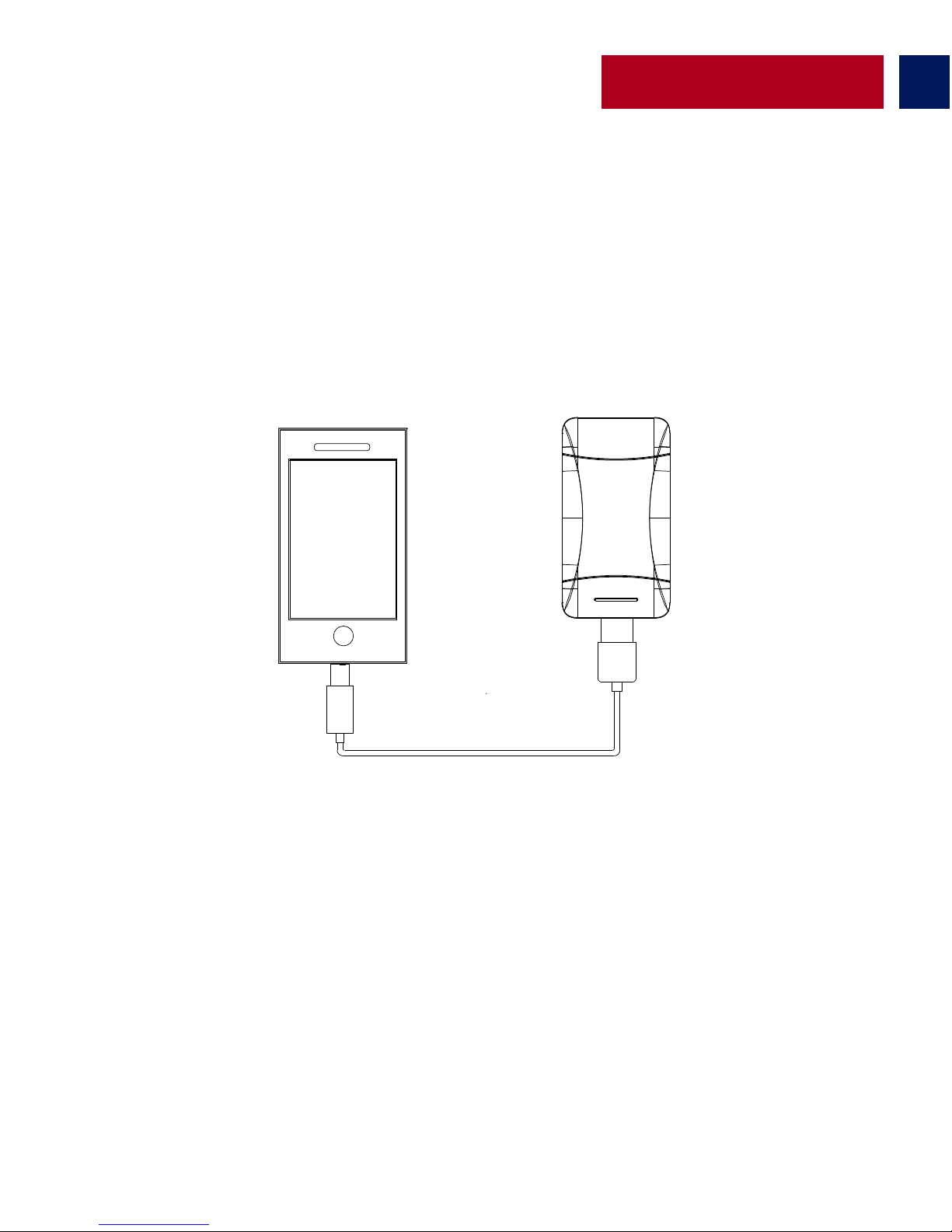
ProVolta-21’i kullanarak USB’den şarj olan cihazları şarj etme
• ProVolta-21’de 3 USB şarj yuvası bulunmaktadır. 1A çıkışını akıllı telefonları ve 2.1A çıkışını
küçük tabletleri şarj etmek için kullanın. USB kablosunu ProVolta-21 üzerindeki uygun USB çıkış
yuvasına takın, diğer ucunu da şarj etmek istediğiniz cihaza takın. Şarj etmeye başlamak için Güç
Düğmesine birkez basın.
Page 27
Chinese
26
外观和接口说明
1. 电池电量LED指示灯
2. Micro-USB输入端口
3. LED 手电筒
4. 2.1A USB输出端口
5. 1A USB 输出端口
6. 电源按钮
1
2
3
4
5
6
Page 28
27
操作说明:
Chinese
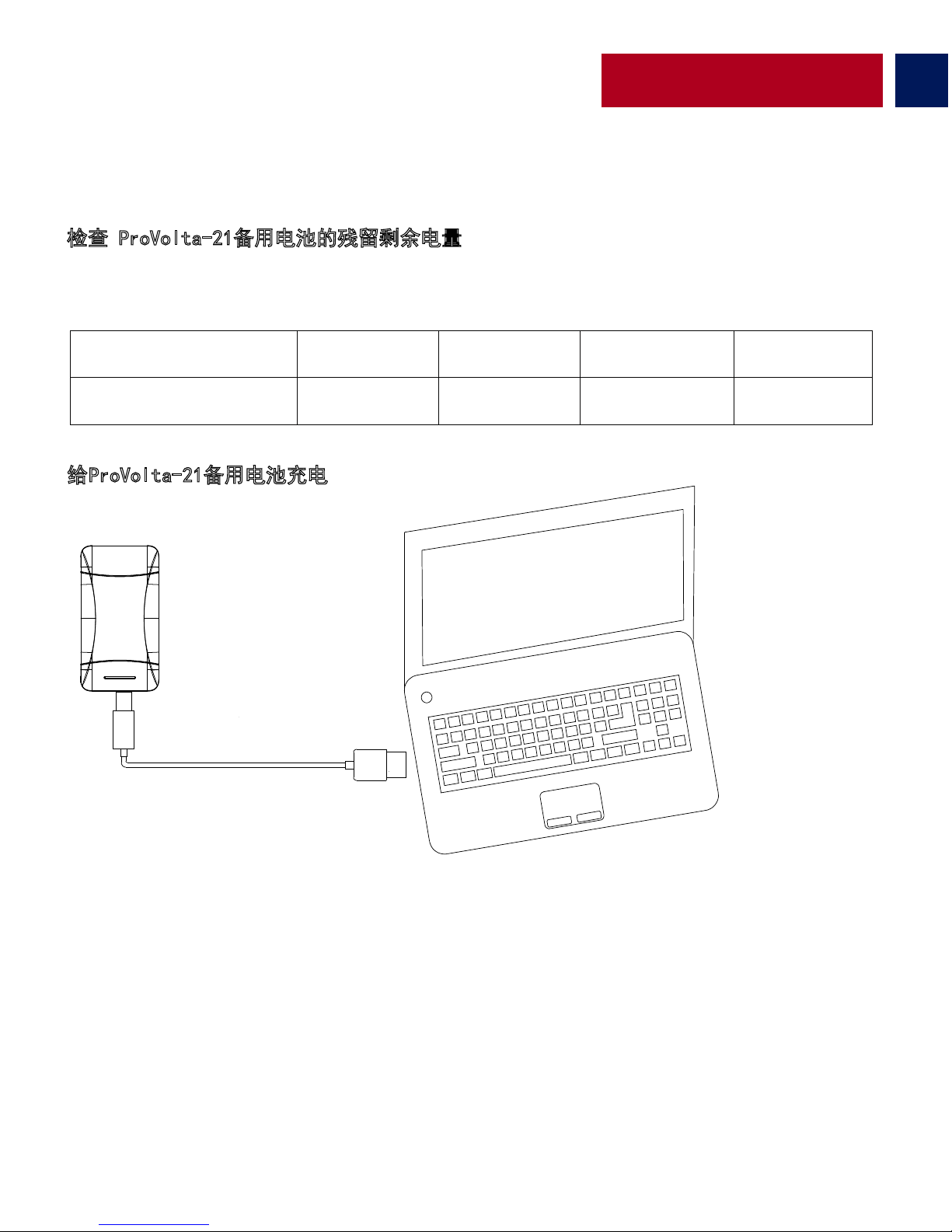
检查 ProVolta-21备用电池的残留剩余电量
•要查看剩余电量,按一次电源按钮,即可查看电池电量LED指示灯。
• 将Micro-USB线的一端连接到ProVolta-21,另一端连接到台式机/笔记本电脑或
USB电源适配器。电池电量LED指示灯将亮起,表明备用电池在正常充电。
给ProVolta-21备用电池充电
亮起的LED灯数量
1 2 3
4
剩余电量
<=%25 <=%50 <=%75
<=%100
Page 29
28
Chinese
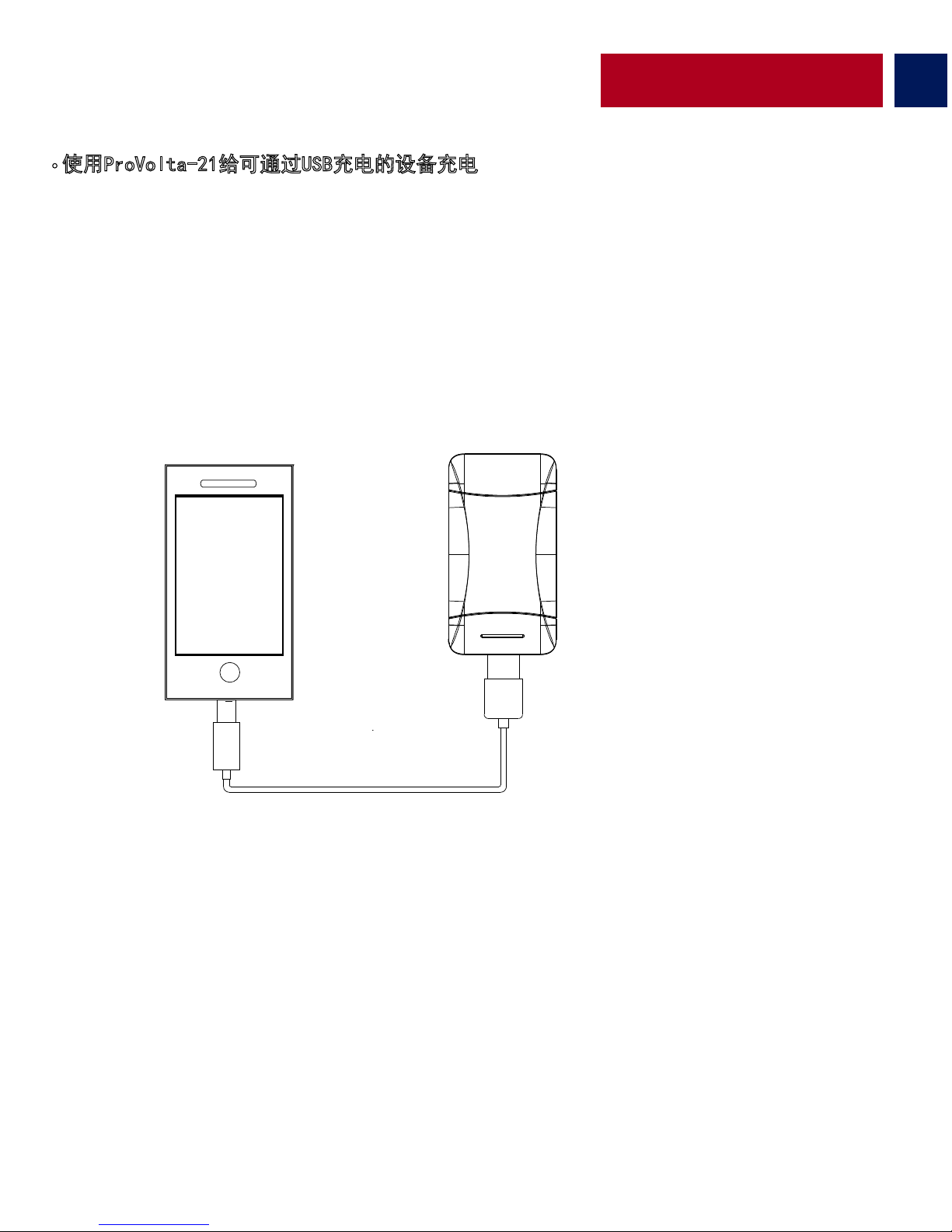
• 使用ProVolta-21给可通过USB充电的设备充电
• ProVolta-21上有3个可用的USB端口。使用1A输出端口给智能手机充电,
使用2.1A输出口给平板电脑充电。将USB线插入ProVolta-21备用电池上所需的USB输出端口,
另一端插入设备。按一次电源按钮,即可开始给设备充电。
Page 30
29
Persian
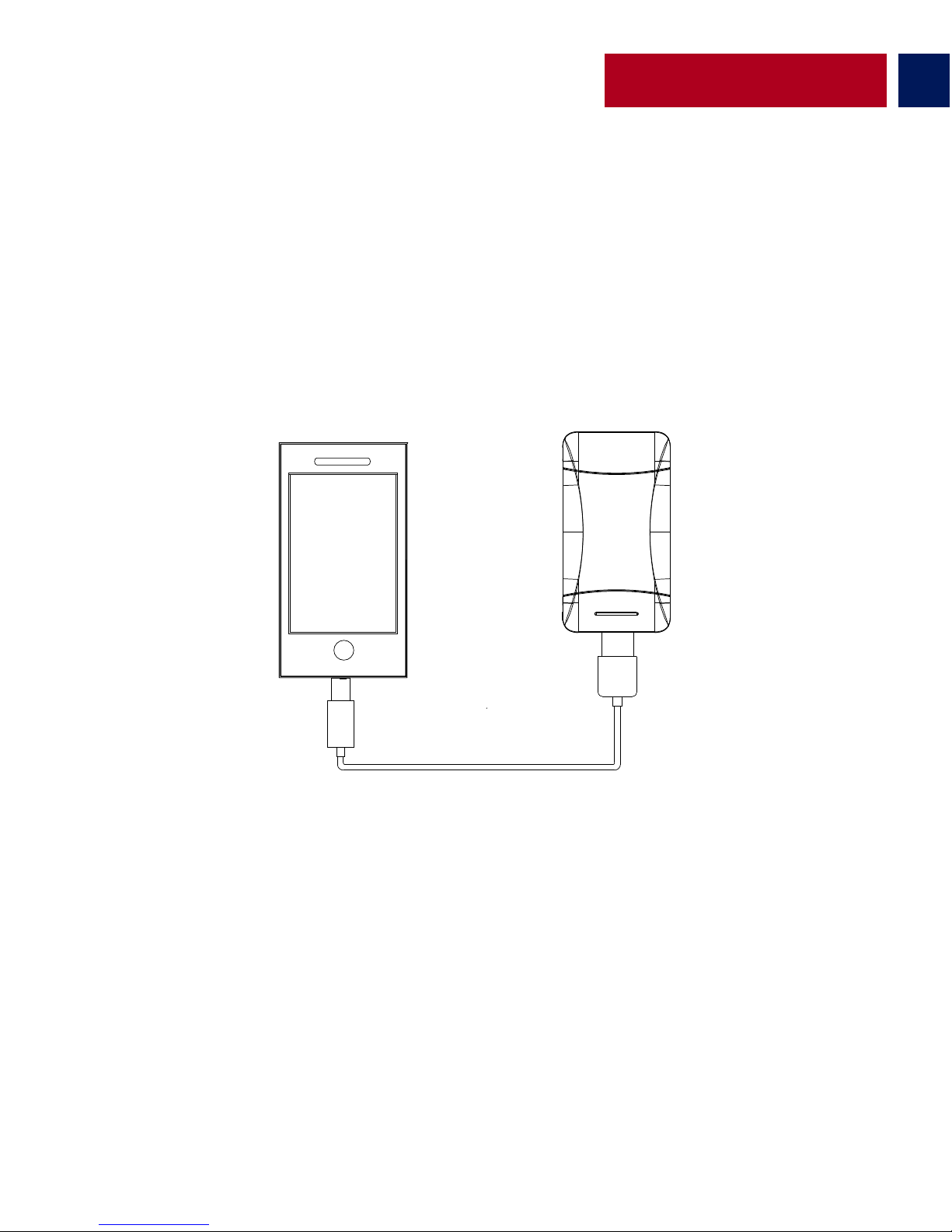
ProVolta-21 زا هدﺎﻔﺘﺳا ﺎﺑ USB ﺎﺑ ژرﺎﺷ ﻞﺑﺎﻗ یﺎھ هﺎﮕﺘﺳد ندﺮﮐ ژرﺎﺷ
ندﺮﮐ ژرﺎﺷ یاﺮﺑ یﺮﭙﻣآ 1 ﯽﺟوﺮﺧ یﺎﮭھﺎﮔرد زا .دراد دﻮﺟو ProVolta-21 یور USB هﺎﮔرد 3 •
.ﺪﯿﻨﮐ هدﺎﻔﺘﺳا ﮏﭼﻮﮐ یﺎﮭﺘﻠﺒﺗ ندﺮﮐ ژرﺎﺷ یاﺮﺑ یﺮﭙﻣآ 2.1 ﯽﺟوﺮﺧ هﺎﮔرد زا و ﺪﻨﻤﺷﻮھ یﺎﮭﻨﻔﻠﺗ
ﻪﺑ ار ﺮﮕﯾد ﺮﺳ و ProVolta-21 نﺎﺒﯿﺘﺸﭘ یﺮﺗﺎﺑ یور ﻪطﻮﺑﺮﻣ USB ﯽﺟوﺮﺧ هﺎﮔرد ﻪﺑ ار USB ﻞﺑﺎﮐ
عوﺮﺷ ﺎﻤﺷ هﺎﮕﺘﺳد نﺪﺷ ژرﺎﺷ ﺎﺗ ﺪﯿھد رﺎﺸﻓ ار شﻮﻣﺎﺧ/ﻦﺷور ﻪﻤﮐد رﺎﺑ ﮏﯾ .ﺪﯿﻨﮐ ﻞﺻو هﺎﮕﺘﺳد
.دﻮﺷ
Page 31
30
:تﺎﯿﻠﻤﻋ یﺎھ ﻞﻤﻌﻟارﻮﺘﺳد
ProVolta-21 نﺎﺒﯿﺘﺸﭘ یﺮﺗﺎﺑ ندﺮﮐ ژرﺎﺷ
Persian
ProVolta-21 نﺎﺒﯿﺘﺸﭘ یﺮﺗﺎﺑ رد هﺪﻧﺎﻤﯿﻗﺎﺑ یوﺮﯿﻧ ﯽﺳرﺮﺑ
LED ﺮﮕﻧﺎﺸﻧ و ﺪﯿھد رﺎﺸﻓ رﺎﺑ ﮏﯾ ار شﻮﻣﺎﺧ/ﻦﺷور ﻪﻤﮐد ،هﺪﻧﺎﻤﯿﻗﺎﺑ یوﺮﯿﻧ هﺪھﺎﺸﻣ رﻮﻈﻨﻣ ﻪﺑ •
.ﺪﯿﻨﮐ هﺪھﺎﺸﻣ ار یﺮﺗﺎﺑ ناﺰﯿﻣ
رﻮﺘﭘادآ ﮏﯾ ﺎﯾ پﺎﺘﭙﻟ/یﺰﯿﻣور ﻪﻧﺎﯾار ﻪﺑ ار ﺮﮕﯾد ﺮﺳ و ProVolta-21 ﻪﺑ ار Micro-USB ﻞﺑﺎﮐ ﺮﺳ ﮏﯾ •
نﺎﺒﯿﺘﺸﭘ یﺮﺗﺎﺑ ﺪھد ﯽﻣ نﺎﺸﻧ ﻪﮐ دﻮﺷ ﯽﻣ ﻦﺷور یﺮﺗﺎﺑ ناﺰﯿﻣ LED ﺮﮕﻧﺎﺸﻧ .ﺪﯿﻨﮐ ﻞﺻو USB قﺮﺑ
.ﺖﺳا یدﺎﻋ ترﻮﺻ ﻪﺑ نﺪﺷ ژرﺎﺷ لﺎﺣ رد
لﺎﻌﻓ یﺎھ LED داﺪﻌﺗ
١ ٢ ٣ ٤
هﺪﻧﺎﻤﯿﻗﺎﺑ یوﺮﯿﻧ ﺪﺻرد
<=٪٢٥ <=٪٥٠ <=٪٧٥ <=٪١٠٠
Page 32
31
Persian
یﺮﺗﺎﺑ ناﺰﯿﻣ LED ﺮﮕﻧﺎﺸﻧ .1
Micro-USB یدورو هﺎﮔرد .2
LED هﻮﻗ غاﺮﭼ .3
ﺮﭙﻣآ USB 2.1 ﯽﺟوﺮﺧ هﺎﮔرد .4
ﺮﭙﻣآ USB 1 ﯽﺟوﺮﺧ یﺎﮭھﺎﮔرد .5
شﻮﻣﺎﺧ/ﻦﺷور ﻪﻤﮐد .6
1
2
3
4
5
6
Page 33
Arabic
32
21-ﺎﺘﻟﻮﻓﻮﺑ ﻖﻳﺮط ﻦﻋ ﻲﺑ سا ﻮﻳ لﻼﺧ ﻦﻣ ﺎﮭﻨﺤﺷ ﻦﻜﻤﻳ ﻲﺘﻟا ةﺰﮭﺟﻷا ﻦﺤﺷ
ﺔﯿﻛﺬﻟا ﻒﺗاﻮﮭﻟا ﻦﺤﺸﻟ ﻪﻳا 1 جرﺎﺨﻣ مﺪﺨﺘﺳا .-21ﺎﺘﻟﻮﻓوﺮﺑ ﻲﻓ ﻲﺑ سا ﻮﻳ ﻞﺧاﺪﻣ 3 ﺪﺟﻮﻳ •
ﻲﻓ بﻮﻠﻄﻤﻟا ﻞﺧﺪﻤﻟا ﻲﻓ ﻲﺑ سا ﻮﯿﻟا ﻚﻠﺳ ﻞﺻو .ةﺮﯿﻐﺼﻟا ﺔﯿﺣﻮﻠﻟا ةﺰﮭﺟﻷا ﻦﺤﺸﻟ ﻪﻳا 2.1 و
.كزﺎﮭﺠﺷ ﻦﺤﺷ ءﺪﺒﻟ ةﺪﺣاو ةﺮﻣ ﺔﻗﺎﻄﻟا رز ﻰﻠﻋ ﻂﻐﺿإ .زﺎﮭﺠﻟا ﻲﻓ ىﺮﺧﻷا ﺔﻳﺎﮭﻨﻟا و -21ﺎﺘﻟﻮﻓوﺮﺑ
Page 34
33
:ﻞﯿﻐﺸﺘﻟا تﺎﻤﯿﻠﻌﺗ
Arabic
21ﺎﺘﻟﻮﻓوﺮﺑ ﺔﻳرﺎﻄﺑ ﻲﻓ ﻲﻘﺒﺘﻤﻟا ﺔﻗﺎﻄﻟا راﺪﻘﻣ ﺔﻓﺮﻌﻣ
ﺮﺷﺆﻣ ضﺮﻌﺘﺳا و ةﺪﺣاو ةﺮﻣ ﺔﻗﺎﻄﻟا رز ﻰﻠﻋ ﻂﻐﺿإ ،ﻲﻘﺒﺘﻤﻟا ﺔﻗﺎﻄﻟا راﺪﻘﻣ ضﺮﻌﻟ •
.ﺔﻳرﺎﻄﺒﻟا ىﻮﺘﺴﻣ ﺪﯿﻟ
ﻲﻓ ىﺮﺧﻷا ﺔﻳﺎﮭﻨﻟا و -21ﺎﺘﻟﻮﻓوﺮﺑ ﻲﻓ ﺮﯿﻐﺻ ﻲﺑ سا ﻮﯿﺑ دوﺰﻤﻟا ﻚﻠﺴﻟا ﺔﻳﺎﮭﻧ ﻞﯿﺻﻮﺘﺑ ﻢﻗ •
ﺔﻗﺎﻄﻟا ىﻮﺘﺴﻤﻟ ﺪﯿﻠﻟا ﺮﺷﺆﻤﻟا ﺊﯿﻀﻳ فﻮﺳ .ﺔﻗﺎﻄﻠﻟ ﻲﺑ سا ﻮﻳ ﻞﺻﻮﻣ وأ بﻮﺘﺑﻻ/ﺮﺗﻮﯿﺒﻤﻜﻟا
.يدﺎﻋ ﻞﻜﺸﺑ ﻦﺤﺸﻟﺎﺑ مﻮﻘﺗ ﺔﻳرﺎﻄﺒﻟا نا ﺎﻨﯿﺒﻣ
21-ﺎﺘﻟﻮﻓوﺮﺑ ﺔﻳرﺎﻄﺑ ﻦﺤﺷX
٤ ٣ ٢ ١
<=٪١٠٠
<=٪٧٥
<=٪٥٠
<=٪٢٥
ﻂﺸﻨﻟا ﻢﻗﺮﻟا
ﻲﻘﺒﺘﻤﻟا ﺔﻗﺎﻄﻟا راﺪﻘﻣ
Page 35
34
Arabic
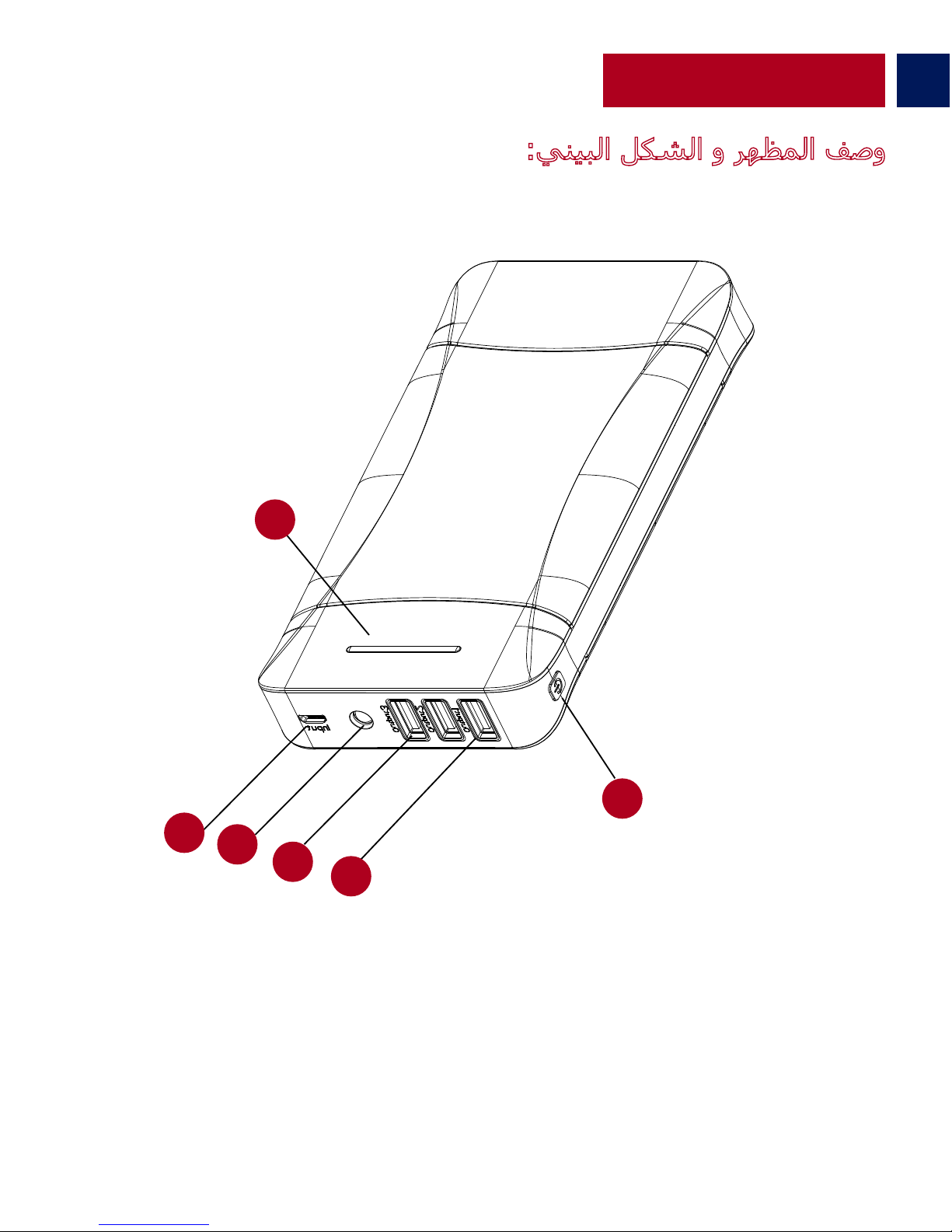
:ﻲﻨﯿﺒﻟا ﻞﻜﺸﻟا و ﺮﮭﻈﻤﻟا ﻒﺻو
ﺔﻳرﺎﻄﺒﻟا ىﻮﺘﺴﻤﻟ ﺪﯿﻟ ﺮﺷﺆﻣ .
1
ﺮﯿﻐﺻ ﻲﺑ سا ﻮﻳ ﻞﺧﺪﻣ .
2
ﺪﯿﻟ فﺎﺸﻛ .
3
ﻪﻳا 2.1 ﻲﺑ سا ﻮﻳ جﺮﺨﻣ .
4
ﻪﻳا 1 ﻲﺑ سا ﻮﻳ جرﺎﺨﻣ .
5
ﺔﻗﺎﻄﻟا رز .
6
1
2
3
4
5
6
Page 36

 Loading...