

Page 1
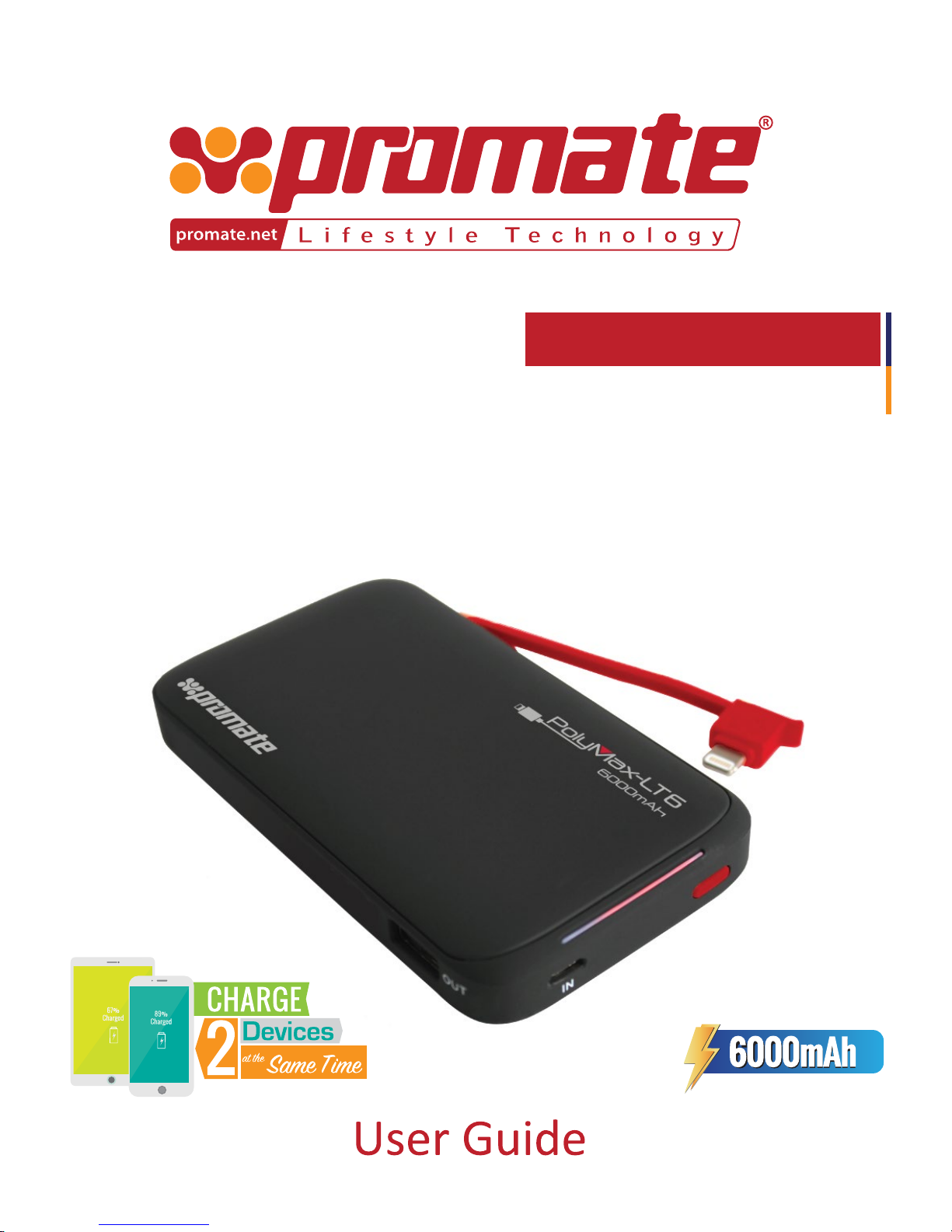
Robust Li-Polymer
Back-up Battery
with Ultra-fast USB Charging Port and
Built-In
Lightning Connector
polyMax -LT6
Page 2

1
English
Charge your device on-the-go with this powerful 6000mAh lithium polymer power bank:
polyMax-LT6. polyMax-LT6 features a built-in Lightning Connector to charge all your devices
supporting Lightning Connector. polyMax-LT6 also features an ultra-fast 2.4A USB Port to charge
other devices. polyMax-LT6 features Automatic Voltage Regulation i.e. it provides an optimum
output based on the device connected. polyMax-LT6 is compatible with all smartphones &
tablets.
Introduction
• polyMax-LT6 Power Bank
• Micro-USB Charging Cable
• User Guide
Packaging Contents
• Battery Capacity: 6000mAh
• Battery Type: Lithium Polymer
• Input: 5V, 2A
• Output: 5V, 3.1A (max)
• Charging Time: 4 hours
Specifications
Features
• Powerful Battery: polyMax-LT6 features a powerful 6000mAh li-polymer power bank
• Built-in Lightning Connector: polyMax-LT6 features a built-in Lightning Connector so that you
can charge your device without any hassle
• Ultra-Fast USB Port: Charge your devices via the ultra-fast 2.4A USB charging port
• Lightweight & Portable: polyMax-LT6 is lightweight and easy to carry around
• Automatic Voltage Regulation: polyMax-LT6 features Automatic Voltage Regulation i.e. it
provides an optimum output based on the device connected.
• Charge Two Devices: With polyMax-LT6, charge two devices simultaneously
• Compatibility: polyMax-LT6 is compatible with all devices supporting Lightning Connector & USB Power
• Safe & Reliable: polyMax-LT6 features short-circuit & over-charging protection
Please read all safety instructions and warnings thoroughly before using this product. Improper
use of this product may result in damage to this or attached products.
1. Do not disassemble the power bank or attempt to fix it.
2. Kindly use an original charging cable provided to charge the product.
3. Do not attempt to replace any part of this power bank or battery inside.
4. Do not crush, puncture, dispose of in fire, short the contacts or expose the battery to water or other liquids.
5. Do not connect input and output in reverse.
6. Do not store or use the battery in a high temperature environment, including intense sunlight or heat.
7. Avoid drops, bumps, abrasions and impacts.
8. If there is any reason to believe that there is damage to the battery, discontinue use immediately.
9. If you find that the battery is too hot, is emitting an odor, or is deformed, punctured or exhibits
any suspicious or abnormal behavior, discontinue use immediately and contact our customer service.
10. Always charge this product before extended storage.
Precautions:
Page 3
2
English
• In order to view the amount of power left in polyMax-LT6, press the Multi-function Button
once. The LED Indicator will light up indicating the amount of battery left in polyMax-LT6.
1. Checking the remaining power left in polyMax-LT6 power bank
• Connect one end of the Micro-USB Cable to polyMax-LT6 and the other end to any
Laptop/Desktop or to any USB Power Adapter, the LED Indicators will light up indicating that
polyMax-LT6 is charging normally. Once all the LED Indicators light up, polyMax-LT6 is fully
charged.
2. Charging polyMax-LT6 power bank
• polyMax-LT6 is compatible with all smartphones & tablets.
• Use the 2.4A USB Output Port to charge USB powered smartphones & tablets. Plug in one
end of the cable into the 2.4A USB Output Port and the other into the device you wish to
charge. Press the Multi-function Button once to start charging your device.
• Use the built-in Lightning Connector to charge Lightning Connector supported devices. Plug
in the Lightning Connector into your device. Press the Multi-function Button once to start
charging your device.
• You can charge two devices simultaneously with polyMax-LT6.
• Press the Multi-function Button for about 3 seconds to turn off polyMax-LT6.
3. Charging devices using polyMax-LT6
Operation Instructions
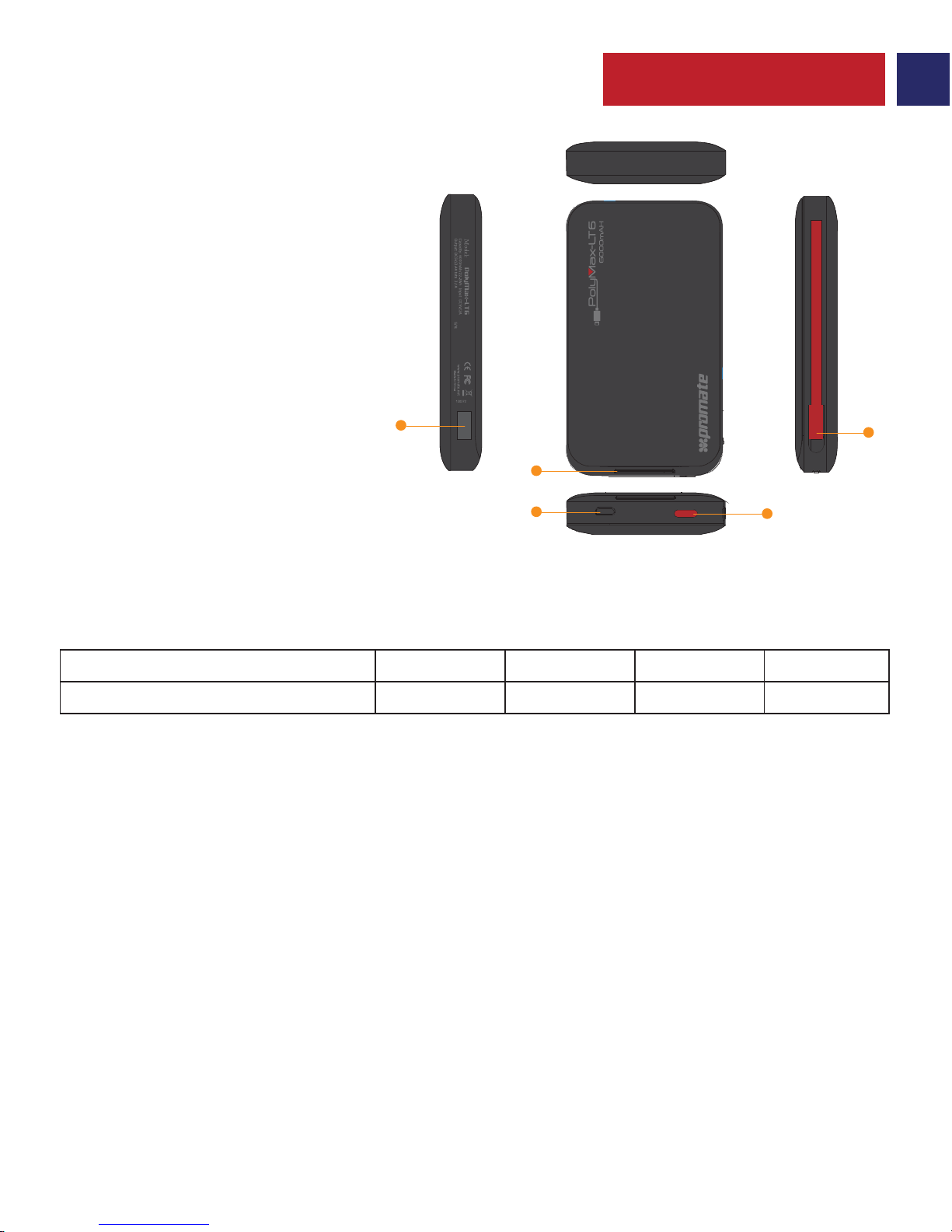
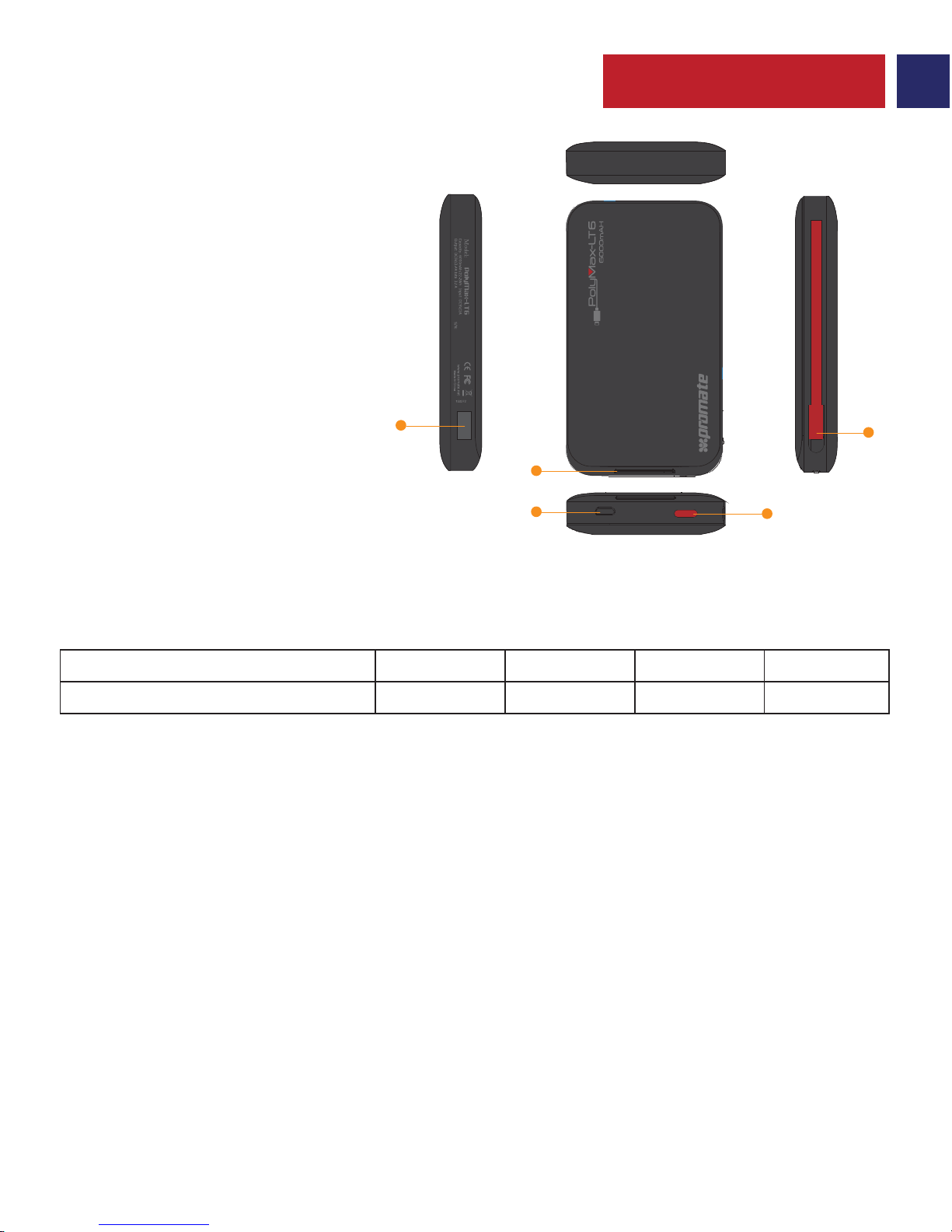
1 2 3 4
0-25% 25-50% 50-75% 75%-100%
No. of LED’s Active
% of power remaining
1. Multi-function Button
2. Lightning Connector
3. Micro-USB Charging Port
4. Battery Level LED Indicators
5. USB Output Port
Appearance & Interface Description
O
UT
IN
1
2
3
5
4
Page 4
3
Spanish
• Para ver la cantidad de energía remanente en polyMax-LT6, presione el botón multifunción una
vez. El indicador LED se encenderá indicando la cantidad de batería remanente en polyMax-LT6.
1. Verificación de la energía remanente en el cargador portátil de baterías polyMax-LT6
• Conecte un extremo del cable micro-USB al polyMax-LT6 y el otro extremo a cualquier
Laptop/ordenador o a cualquier adaptador de carga USB, los indicadores LED se encenderán
indicando que polyMax-LT6 está cargando normalmente. Cuando todos los indicadores se
enciendan, polyMax-LT6 estará completamente cargado.
2. Carga del cargador portátil de baterías polyMax-LT6
• polyMax-LT6 es compatible con todos los smartphones y tabletas.
• Use el Puerto de salida USB 2.4A para cargar smartphones y tabletas energizadas vía USB.
Enchufe un extremo del cable al Puerto de salida USB 2.4A USB y el otro al dispositivo que
desea cargar. Presione el Botón multifunción una vez para comenzar la carga de su dispositivo.
• Use el Lightning Connector incorporado para cargar dispositivos soportados por Lightning
Connector. Enchufe el Lightning Connector a su dispositivo. Presione una vez el Botón
multifunción para comenzar la carga de su dispositivo.
• Puede cargar dos dispositivos simultáneamente con polyMax-LT6.
• Presione el Botón multifunción durante aproximadamente 3 segundos para apagar
polyMax-LT6.
3. Carga de dispositivos usando polyMax-LT6
Instrucciones de operación
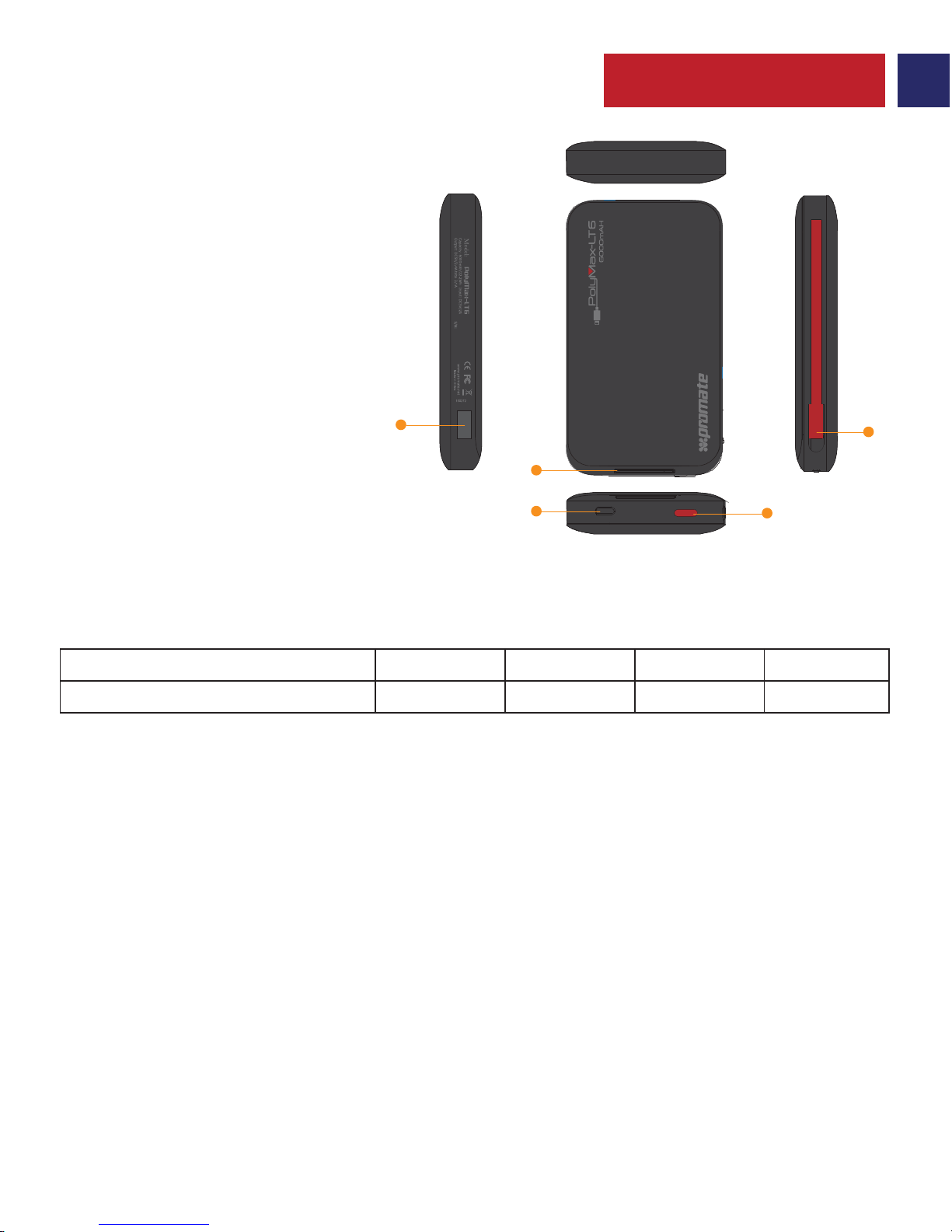
1 2 3 4
0-25% 25-50% 50-75% 75%-100%
Cantidad de LEDs Activos
% de energía remanente
1. Botón multifunción
2. Lightning Connector
3. Puerto de carga micro-USB
4. Indicadores LED de nivel de batería
5. Puerto USB de salida
Apariencia y descripción de la interfaz
O
UT
IN
1
2
3
5
4
Page 5
4
French
• Afin de visualiser la quantité d'énergie restante dans le polyMax-LT6, appuyez une fois sur le Bouton
Multifonction. Le voyant indicateur LED s’allume et indique la quantité d’énergie qui reste sur le PolyMax-LT6.
1. Vérifier l’énergie qui reste dans le Power Bank polyMax-LT6
• Connectez une des extrémités du câble Micro USB au PolyMax-LT6 et l’autre extrémité à un
ordinateur de bureau, un ordinateur portable ou un adaptateur de secteur USB : les voyants
indicateurs LED s’allument et indiquent que le PolyMax-LT6 se recharge normalement. Le
PolyMax-LT6 sera complètement chargé lorsque tous les voyants seront allumés.
2. Charger le Power Bank du PolyMax-LT6
• Le PolyMax-LT6 est compatible avec tous les smartphones & tablettes.
• Utilisez le Port de Sortie 2. 4A USB pour charger les smartphones et tablettes avec USB.
Branchez une extrémité du câble sur le Port de Sortie 2. 4A USB et l'autre sur l'appareil que vous
voulez charger. Appuyez une fois sur le Bouton Multifonction pour commencer à charger votre appareil.
• Utilisez le Lightning Connector intégré pour charger les appareils compatibles. Branchez
l’appareil sur le Lightning Connector. Appuyez une fois sur le Bouton Multifonction pour
commencer le chargement de votre appareil.
• Vous pouvez recharger en même temps deux appareils avec le PolyMax-LT6.
• Appuyez sur le Bouton Multifonction pendant environ 3 secondes pur éteindre le
PolyMax-LT6.
3. Chargement de dispositifs à l’aide du PolyMax-LT6
Mode d’Emploi
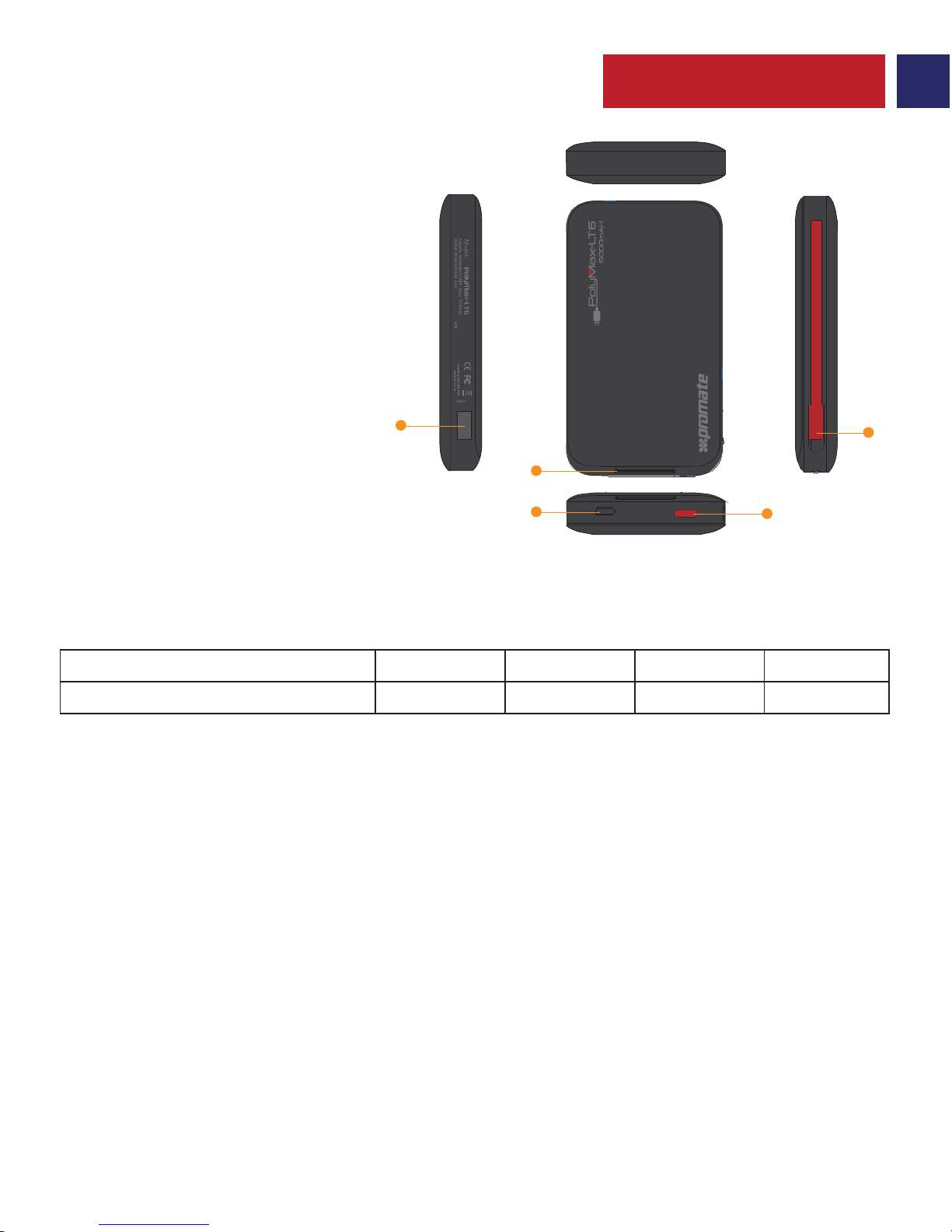
1 2 3 4
0-25% 25-50% 50-75% 75%-100%
No. LED Allumés
% d’énergie restante
1. Bouton Multifonction
2. Lightning Connector
3. Port de Charge Micro-USB
4. Voyant Indicateur du Niveau de Batterie
5. Port de Sortie USB
Aspect & Description de l’Interphase
O
UT
IN
1
2
3
5
4
Page 6
5
German
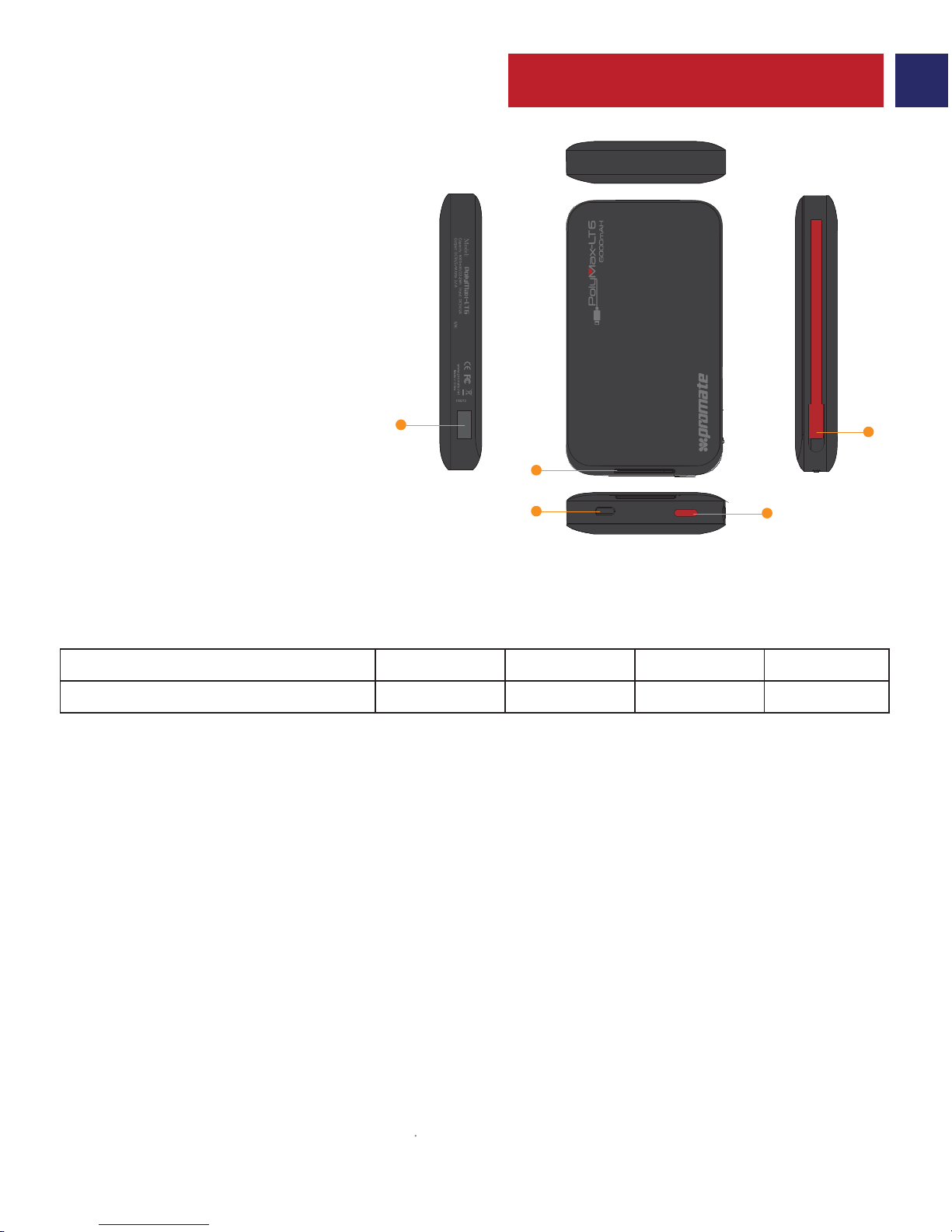
• Um die verbleibende Strommenge in der polyMax-LT6 zu sehen, drücken Sie die Multifunktionstaste
einmal. Die LED-Anzeige leuchtet auf und zeigt die verbleibende Strommenge in der Polymax-LT6 an.
1. Überprüfen der verbleibenden Energie in der polyMax-LT6-Energienbank
• Schließen Sie das eine Ende des Micro-USB-Kabels an die polyMax-LT6 und das andere Ende
an ein Laptop / Desktop oder ein beliebiges USB-Netzteil an; die LED-Anzeigen leuchten auf
und zeigen an, dass die polyMax-LT6 normal lädt. Wenn alle LED-Anzeigen leuchten, ist die
polyMax-LT6 vollständig aufgeladen.
2. Aufladen der polyMax-LT6-Energienbank
• Die polymax-LT6 ist mit allen Smartphones und Tablets kompatibel.
• Sie den 2.4A-USB-Output-Port, um USB-Smartphones & Tablets aufzuladen. Stecken Sie ein
Ende des Kabels in den 2.4A-USB-Output-Port und das andere in das Gerät, das Sie aufladen
möchten. Drücken Sie die Multifunktionstaste einmal, um mit dem Aufladen Ihres Geräts zu
beginnen.
• Verwenden Sie den eingebauten Lightning Connector zum Aufladen von Geräten mit
Lightning Connector. Schließen Sie den Lightning Connector an Ihr Gerät an. Drücken Sie die
Multifunktionstaste einmal, um mit dem Aufladen Ihres Geräts zu beginnen.
• Sie können zwei Geräte gleichzeitig mit der polyMax-LT6 aufladen.
• Drücken Sie die Multifunktionstaste etwa 3 Sekunden lang, um die polyMax-LT6 auszuschalten.
3. Aufladen von Geräten mit der polyMax-LT6
Betriebsanleitung
1. Multifunktionstaste
2. Lightning Connector
3. Micro-USB-Ladeanschluss
4. Batteriestatus-LED-Anzeigen
5. USB-Output-Port
Aussehen und Schnittstellenbeschreibung
1 2 3 4
0-25% 25-50% 50-75% 75%-100%
Anzahl aktive LED
% restliche Energie
Page 7
6
Portuguese
• Para verificar a quantidade de carga restante no polyMax-LT6, prima o botão multifunções
uma vez. Os indicadores LED iluminar-se-ão indicando a carga restante no polyMax-LT6.
1. Verificar a carga restante no powerbank polyMax-LT6
• Ligue uma das fichas do cabo micro-USB ao polyMax-LT6 e a outra a um computador
portátil/desktop ou a um carregador USB, os indicadores LED iluminar-se-ão indicando que o
polyMax-LT6 está a carregar normalmente. Quando todos os indicadores LED estiverem
iluminados, o polyMax-LT6 estará completamente carregado.
2. Carregar o powerbank polyMax-LT6
• O polyMax-LT6 é compatível com todos os smartphones e tablets.
• Use a porta de saída USB de 2,4 A para carregar smartphones e tablets com alimentação por
USB. Ligue o cabo à porta de saída USB de 2,4 A do polyMax-LT6 e ao dispositivo que deseja
carregar. Prima o botão multifunções uma vez para começar a carregar o seu dispositivo.
• Use o Lightning Connector incluído para carregar dispositivos com alimentação por
Lightning Connector. Ligue o Lightning Connector ao seu dispositivo. Prima o botão
multifunções uma vez para começar a carregar o seu dispositivo.
• Pode carregar dois dispositivos simultaneamente com o polyMax-LT6.
• Prima o botão multifunções durante cerca de 3 segundos para desligar o polyMax-LT6.
3. Carregar dispositivos com o polyMax-LT6
Instruções de operação
1 2 3 4
0-25% 25-50% 50-75% 75%-100%
No. de LEDs ativos
% de carga restante
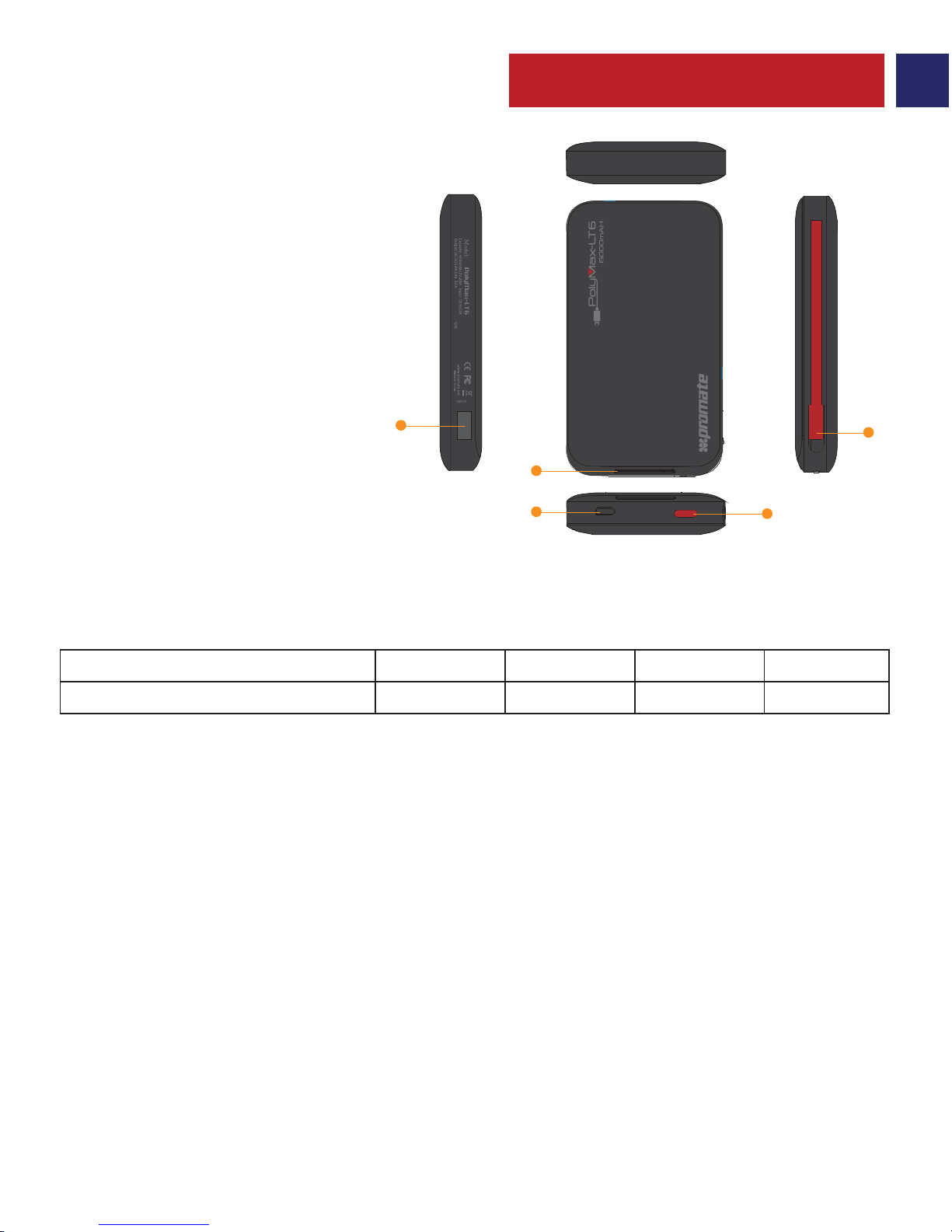
1. Botão multifunções
2. Lightning Connector
3. Porta de carregamento micro-USB
4. Indicadores LED de carga da bateria
5. Porta de saída USB
Aparência e descrição do interface
O
UT
IN
1
2
3
5
4
Page 8
7
Romanian
• Pentru a vedea nivelul bateriei rămase în polyMax-LT6, apăsați butonul multifuncțional o
singură. Indicatorul LED se va ilumina, indicând nivelul bateriei rămase în polyMax-LT6.
1. Verificarea nivelului bateriei rămase în acumulatorul polyMax-LT6
• Conectați un capăt al cablului de încărcare Micro-USB la acumulatorul polyMax-LT6 iar
celălalt capăt al cablului de încărcare Micro-USB la un laptop/ desktop sau alt adaptor USB.
Indicatorul LED se va ilumina, indicând faptul că acumulatorul polyMax-LT6 se încarcă normal.
Când indicatorul LED se aprinde, polyMax-LT6 este complet încărcat.
2. Încărcarea acumulatorului polyMax-LT6
• polyMax-LT6 este compatibil cu toate smartphone-urile & tabletele.
• Folosiți portul USB de ieșire 2.4A pentru a încărca smartphone-uri & tablete prin USB.
Introduceți cablul în portul USB 2.4A iar celălalt capăt în dispozitivul pe care doriți să îl încărcați.
Apăsați butonul multifuncțional odată, pentru a începe încărcarea dispozitivului.
• Folosiți Lightning Connector pentru a încărca dispozitive compatibile cu Lightning
Connector. Introduceți Lightning Connector în dispozitivul dumneavoastră. Apăsați butonul
multifuncțional odată, pentru a începe încărcarea dispozitivului.
• Puteți încărca simultan două dispozitive cu polyMax-LT6.
• Țineți apăsat butonul multifuncțional timp de 3 secunde pentru a opri polyMax-LT6.
3. Încărcarea dispozitivelor folosind polyMax-LT6
Instrucțiuni de utilizare
1 2 3 4
0-25% 25-50% 50-75% 75%-100%
Nr. LEDuri Active
% baterie rămasă
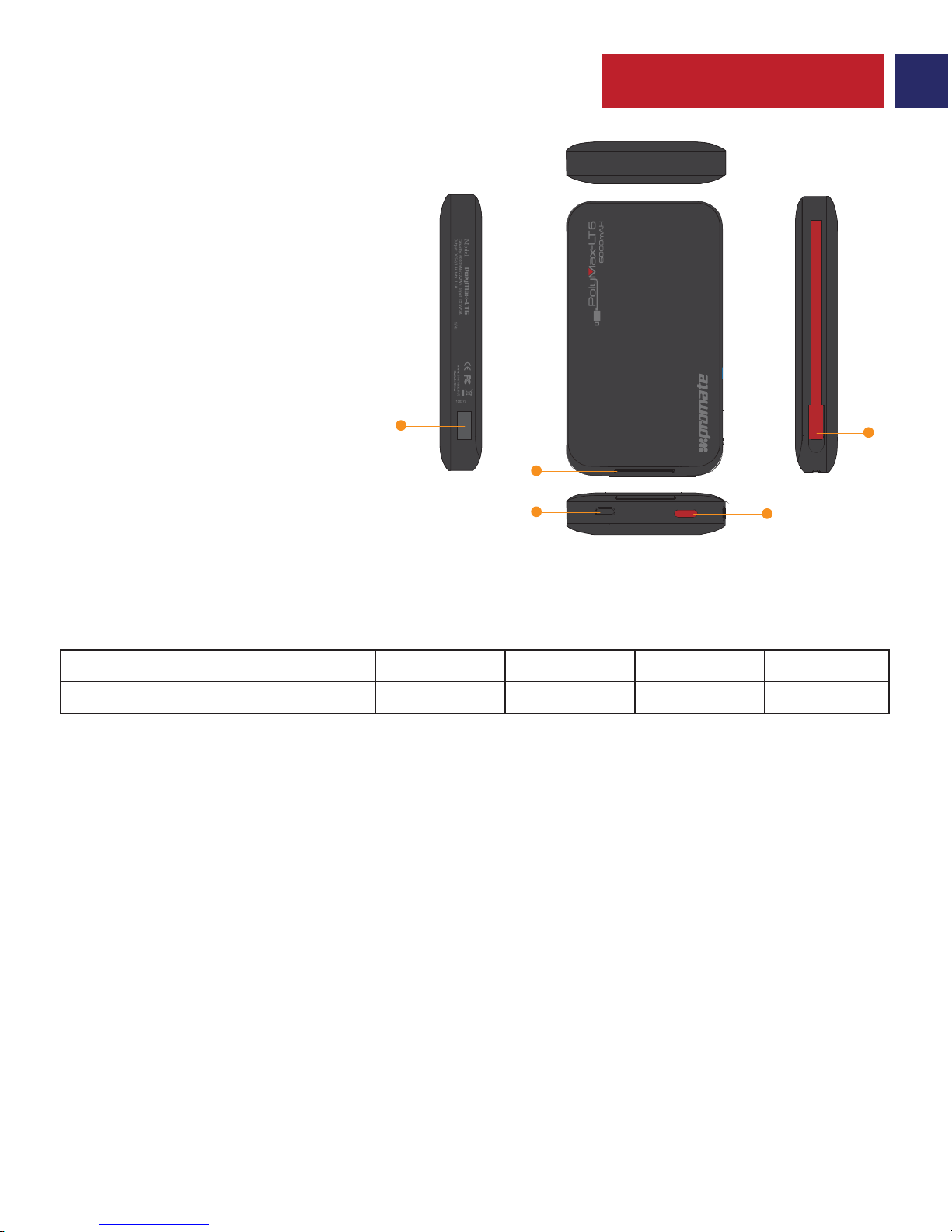
1. Buton multifuncțional
2. Lightning Connector
3. Port încărcare Micro-USB
4. Indicator LED nivel baterie
5. Porturi ieșire USB
Descriere Prezentare & Interfață
O
UT
IN
1
2
3
5
4
Page 9
8
Russian
• Для проверки остаточного заряда polyMax-LT6 нажмите один раз многофункциональную кнопку.
Загорится светодиодный индикатор уровня заряда аккумулятора, показывающий количество заряда,
оставшегося в polyMax-LT6.
1. Проверка остаточного заряда внешнего аккумулятора polyMax-LT6
Инструкция по эксплуатации
• Подключите один конец кабеля Micro-USB к polyMax-LT6, а другой – к персональному
компьютеру/ноутбуку или к USB-адаптеру источника питания. Загорится светодиодный индикатор
уровня заряда аккумулятора показывающий, что polyMax-LT6 заряжается нормально. Внешний
аккумулятор polyMax-LT6 заряжен полностью, если горят все светодиодные индикаторы.
2. Зарядка внешнего аккумулятора polyMax-LT6
• Внешний аккумулятор polyMax-LT6 совместим со всеми смартфонами и планшетами.
• Используйте выходной USB порт c напряжением 2,4А для зарядки смартфонов и
планшетов. Подключите один конец кабеля к выходному USB порту, а другой – к
устройству, которое вы хотите зарядить. Для начала зарядки вашего устройства нажмите
один раз многофункциональную кнопку.
• Используйте встроенный разъем Lightning Connector для зарядки совместимых с этим
разъемом устройств. Подключите Lightning Connector к вашему устройству. Для начала
зарядки вашего устройства нажмите один раз многофункциональную кнопку.
• С помощью polyMax-LT6 вы можете одновременно заряжать два устройства.
• Чтобы выключить polyMax-LT6 нажмите и удерживайте многофункциональную кнопку
приблизительно в течение 3 секунд.
3. Зарядка устройств с применением polyMax-LT6
1 2 3 4
0-25% 25-50% 50-75% 75%-100%
Кол-во активных светодиодов
% остаточного заряда
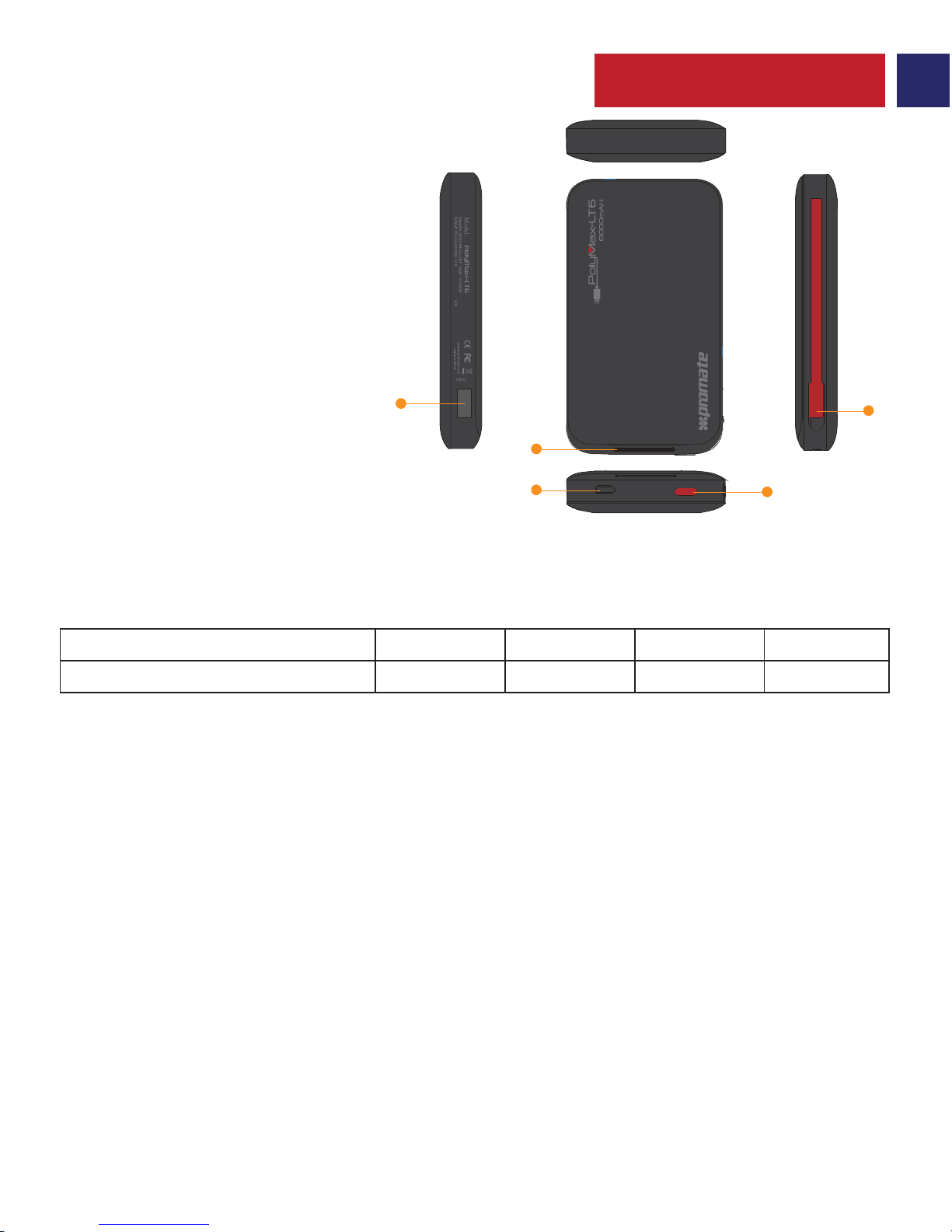
1. Многофункциональная кнопка
2. Lightning Connector
3. Зарядный порт Micro-USB
4. Светодиодный индикатор уровня
заряда аккумулятора
5. Выходной USB порт
Описание внешнего вида и интерфейса
O
UT
IN
1
2
3
5
4
Page 10
9
Turkish
• polyMax-LT6’da kalan güç miktarını görmek için Çoklu-Fonksiyon tuşuna bir kez basın.
polyMax-LT6’da kalan pil miktarını gösteren LED göstergenin ışıkları yanacaktır.
1. polyMax-LT6 güç bankasında kalan güç miktarını kontrol etme
• Mikro-USB kablosunun bir ucunu polyMax-LT6’ya ve diğer ucunu da herhangi bir
Laptop/Masaüstü veya herhangi bir USB Güç adaptörüne bağlayın. polyMax-LT6’nın normal
şekilde şarj olduğunu gösteren LED Göstergenin ışıkları yanacaktır. Tüm LED Göstergeler
yandığında polyMax-LT6 tam şarj olmuş demektir.
2. polyMax-LT6’yı Şarj Etme
• polyMax-LT6 tüm akıllı telefon & tabletler ile uyumludur.
• USB’den güç alan akıllı telefon & tabletler için 2.4A USB Çıkış Yuvasını kullanın. Kablonun bir
ucunu 2.4A USB Çıkış Yuvasına ve diğer ucunu şarj etmek istediğiniz cihaza takın. Cihazınızı şarj
etmek için Çoklu-Fonksiyon tuşuna bir kez basın.
• Lightning connector'ü destekleyen cihazları şarj etmek için bütünleşik Lightning connector
ucunu kullanın. Cihazınızı Lightning connector'a takın. Cihazınızı şarj etmeye başlamak için
Çoklu-Fonksiyon tuşuna bir kez basın.
• polyMax-LT6 ile aynı anda 2 cihazı şarj edebilirsiniz.
• polyMax-LT6’yı kapatmak için Çoklu-Fonksiyon tuşuna 3 saniye süreyle basılı tutun.
3. polyMax-LT6’yı kullanarak Cihazlarınızı Şarj etmek
Kullanım Talimatları
1 2 3 4
0-25% 25-50% 50-75% 75%-100%
Aktif LED Sayısı
Kalan Güç Yüzdesi
1. Çoklu-Fonksiyon Düğmesi
2. Lightning Connector
3. Mikro-USB Şarj Yuvası
4. Pil Seviyesi LED Göstergesi
5. USB Çıkış Yuvası
Görünüm & Arayüz Tanımları
O
UT
IN
1
2
3
5
4
Page 11
10
Chinese
• 要查看电源polyMax-LT6的剩余电量,按一次多功能按钮。LED指示灯将亮起,指示
polyMax-LT6的剩余电量。
1. 检查
polyMax-LT6备用电源的剩余电量
• 将Micro-USB线的一端连接到polyMax-LT6,另一端连接到任何笔记本电脑/台式机或任
何USB电源适配器,LED指示灯会亮起,表明polyMax-LT6在正常充电。一旦所有LED指示
灯亮起,说明polyMax-LT6已经充满电。
2. 给
polyMax-LT6备用电源充电
• polyMax-LT6与所有的智能手机和平板电脑兼容。
• 使用2.4安的USB输出端口给USB供电的智能手机和平板电脑充电。将线的一端插入2.4
安的USB输出端口,另一端插到您想要的充电设备。按一次多功能按钮,开始给设备充电。
• 使用内置的Lightning Connector给支持Lightning Connector的设备充电。将Lightning Connector
插到您的设备。按一次多功能按钮,开始给设备充电。
• 您可以用polyMax-LT6同时给两个设备充电。
• 按多功能按钮约3秒关闭polyMax-LT6。
3. 使用
polyMax-LT6给设备充电
操作说明
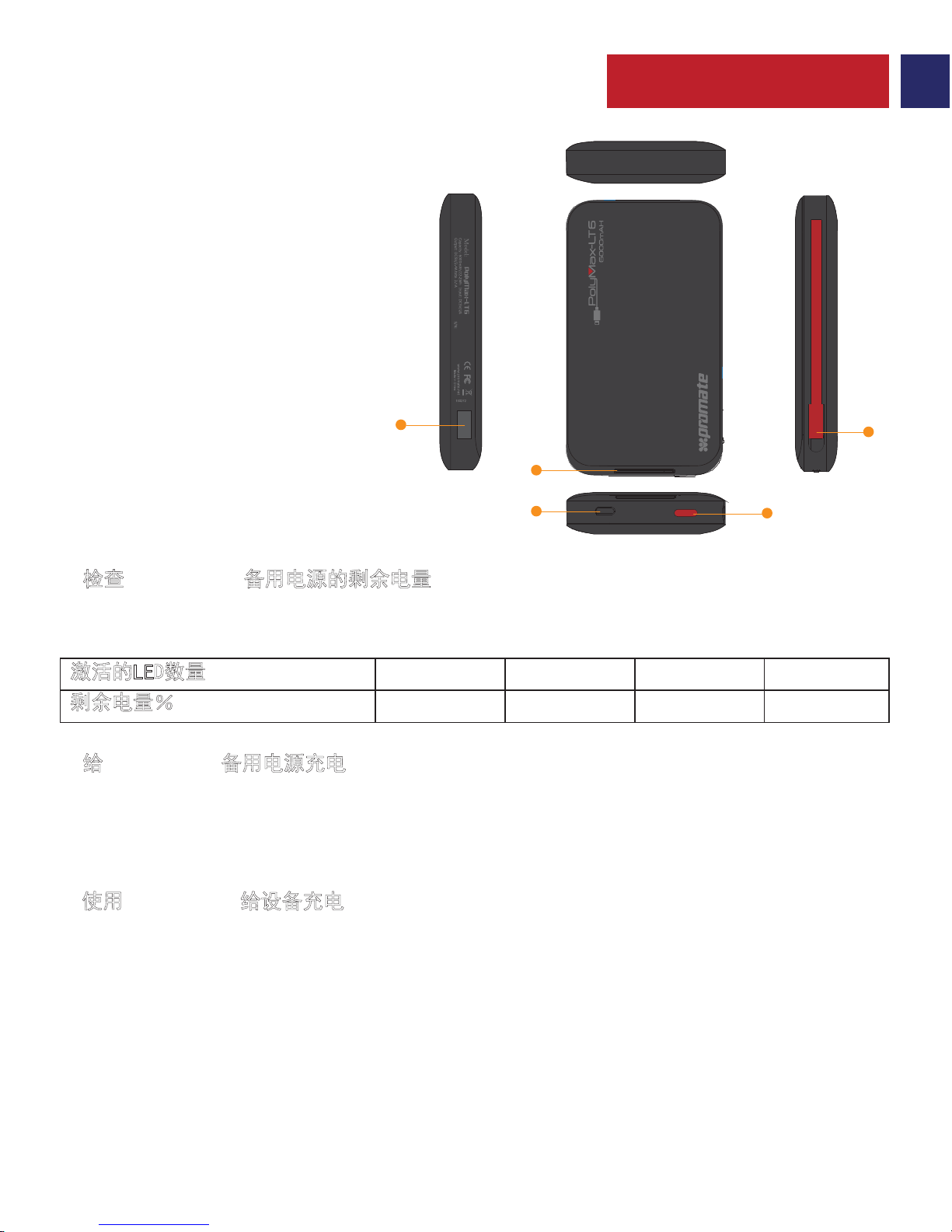
1 2 3 4
0-25% 25-50% 50-75% 75%-100%
激活的LED数量
剩余电量%
1. 多功能按钮
2. Lightning Connector
3. Micro-USB充电端口
4. 电池电量LED指示灯
5. USB输出端口
外观和接口说明
O
UT
IN
1
2
3
5
4
Page 12
Persian
11
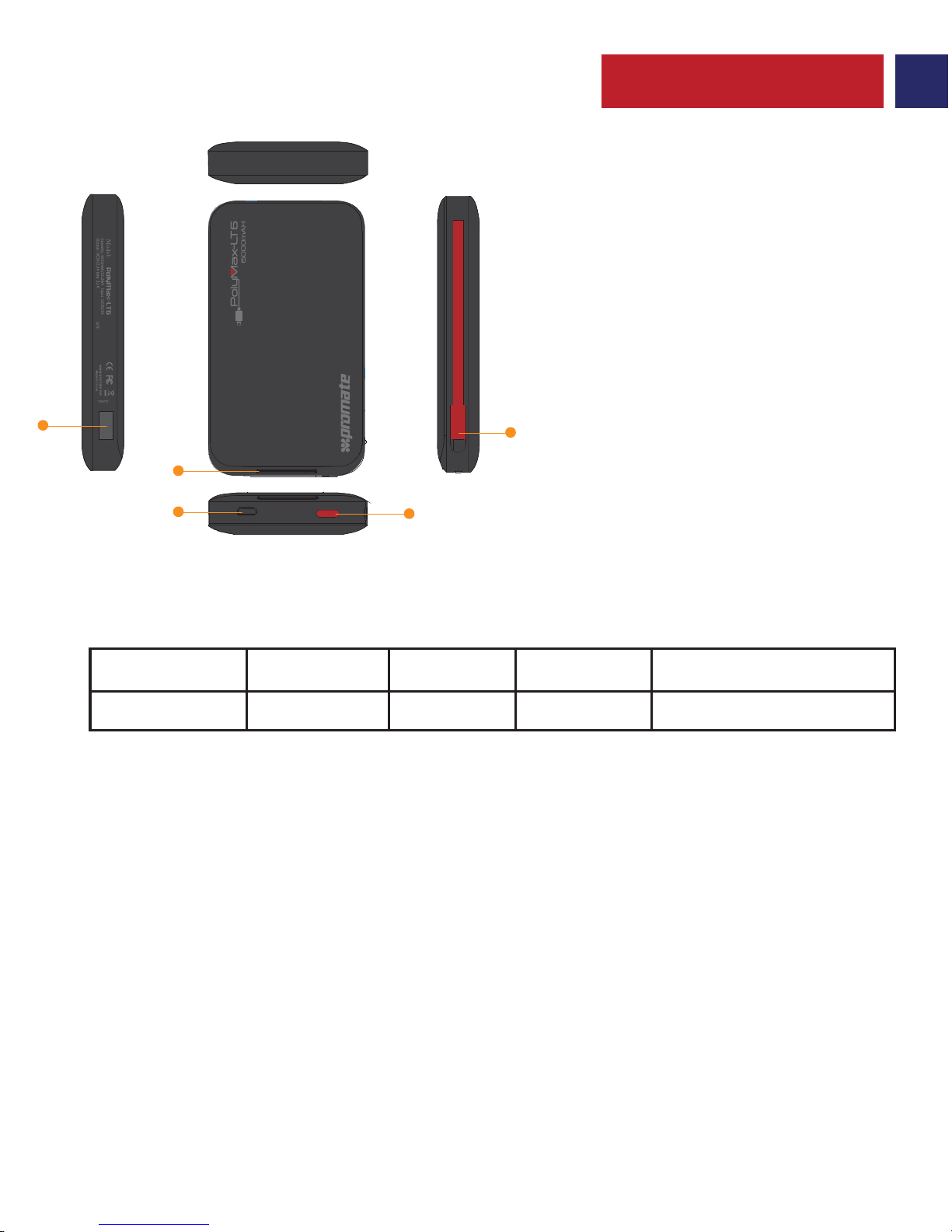
ﻂﺑار حﺮﺷ و ﺮھﺎظ
هرﺎﮐﺪﻨﭼ ﻪﻤﮐد .1
Lightning Connector .2
Micro-USB ژرﺎﺷ هﺎﮔرد .3
یﺮﺗﺎﺑ ناﺰﯿﻣ ید یا لا یﺎھﺮﮕﻧﺎﺸﻧ .4
USB ﯽﺟوﺮﺧ هﺎﮔرد .5
.ﺪﯿھد رﺎﺸﻓ رﺎﺑ ﮏﯾ ار هرﺎﮐﺪﻨﭼ ﻪﻤﮐد ،polyMax-LT6 رد هﺪﻧﺎﻤﯿﻗﺎﺑ یوﺮﯿﻧ ناﺰﯿﻣ هﺪھﺎﺸﻣ رﻮﻈﻨﻣ ﻪﺑ •
.ﺪھد ﯽﻣ نﺎﺸﻧ ار polyMax-LT6 رد هﺪﻧﺎﻤﯿﻗﺎﺑ یﺮﺗﺎﺑ ناﺰﯿﻣ ﻪﮐ دﻮﺷ ﯽﻣ ﻦﺷور ید یا لا ﺮﮕﻧﺎﺸﻧ •
polyMax-LT6 یوﺮﯿﻧ نﺰﺨﻣ رد هﺪﻧﺎﻤﯿﻗﺎﺑ یوﺮﯿﻧ ناﺰﯿﻣ ﯽﺳرﺮﺑ .1
رﻮﺘﭘادآ ﺮھ ﺎﯾ یﺰﯿﻣور ﻪﻧﺎﯾار/پﺎﺘﭙﻟ ﮏﯾ ﻪﺑ ار ﺮﮕﯾد ﺮﺳ و polyMax-LT6 ﻪﺑ ار Micro-USB ﻞﺑﺎﮐ ﺮﺳ ﮏﯾ •
polyMax-LT6 ﺪﻨھد ﯽﻣ نﺎﺸﻧ ﻪﮐ ﺪﻧﻮﺷ ﯽﻣ ﻦﺷور ید یا لا یﺎھﺮﮕﻧﺎﺸﻧ ،ﺪﯿﻨﮐ ﻞﺻو USB قﺮﺑ
ًﻼﻣﺎﮐ polyMax-LT6 ،ﺪﺷ ﻦﺷور ید یا لا یﺎھﺮﮕﻧﺎﺸﻧ ﻪﻤھ ﯽﺘﻗو .ﺖﺳا یدﺎﻋ نﺪﺷ ژرﺎﺷ لﺎﺣ رد
.ﺖﺳا هﺪﺷ ژرﺎﺷ
polyMax-LT6یوﺮﯿﻧ نﺰﺨﻣ ندﺮﮐ ژرﺎﺷ .2
.ﺖﺳا رﺎﮔزﺎﺳ ﺎھ ﺖﻠﺒﺗ و ﺪﻨﻤﺷﻮھ یﺎﮭﻨﻔﻠﺗ ﻪﻤھ ﺎﺑ polyMax-LT6 •
USB ﺎﺑ ﻪﮐ ﯽﯾﺎھ ﺖﻠﺒﺗ و ﺪﻨﻤﺷﻮھ یﺎﮭﻨﻔﻠﺗ ندﺮﮐ ژرﺎﺷ یاﺮﺑ USB یﺮﭙﻣآ 2.4 ﯽﺟوﺮﺧ هﺎﮔرد زا •
ﻪﺑ ار ﺮﮕﯾد ﺮﺳ و USB یﺮﭙﻣآ 2.4 ﯽﺟوﺮﺧ هﺎﮔرد ﻪﺑ ار ﻞﺑﺎﮐ ﺮﺳ ﮏﯾ .ﺪﯿﻨﮐ هدﺎﻔﺘﺳا ﺪﻧﻮﺷ ﯽﻣ ژرﺎﺷ
ار هرﺎﮐﺪﻨﭼ ﻪﻤﮐد دﻮﺧ هﺎﮕﺘﺳد ندﺮﮐ ژرﺎﺷ عوﺮﺷ یاﺮﺑ .ﺪﯿﻧﺰﺑ ﺪﯿﻨﮐ ژرﺎﺷ ﺪﯿھاﻮﺧ ﯽﻣ ﻪﮐ ﯽھﺎﮕﺘﺳد
.ﺪﯿھد رﺎﺸﻓ رﺎﺑ ﮏﯾ
Lightning Connector زا ﻪﮐ ﯽﯾﺎﮭھﺎﮕﺘﺳد ندﺮﮐ ژرﺎﺷ یاﺮﺑ ﯽﻠﺧاد Lightning Connector زا •
ﻪﻤﮐد .ﺪﯿﻨﮐ ﻞﺻو دﻮﺧ هﺎﮕﺘﺳد ﻪﺑ ار Lightning Connector .ﺪﯿﻨﮐ هدﺎﻔﺘﺳا ﺪﻨﻨﮐ ﯽﻣ ﯽﻧﺎﺒﯿﺘﺸﭘ
.ﺪﯿﻨﮐ دﻮﺧ هﺎﮕﺘﺳد ندﺮﮐ ژرﺎﺷ ﻪﺑ عوﺮﺷ ﺎﺗ ﺪﯿھد رﺎﺸﻓ رﺎﺑ ﮏﯾ ار هرﺎﮐﺪﻨﭼ
.ﺪﯿﻨﮐ ژرﺎﺷ polyMax-LT6 ﺎﺑ نﺎﻣﺰﻤھ رﻮط ﻪﺑ ار هﺎﮕﺘﺳد ود ﺪﯿﻧاﻮﺗ ﯽﻣ •
polyMax-LT6 زا هدﺎﻔﺘﺳا ﺎﺑ ﺎﮭھﺎﮕﺘﺳد ندﺮﮐ ژرﺎﺷ .3
لﺎﻌﻓ یﺎھ ید یا لا داﺪﻌﺗ
هﺪﻧﺎﻤﯿﻗﺎﺑ یوﺮﯿﻧ %
0-25%25-50%50-75%75%-100%
1234
:تﺎﯿﻠﻤﻋ یﺎھ ﻞﻤﻌﻟارﻮﺘﺳد
O
UT
IN
1
2
3
5
4
Page 13
12
Arabic
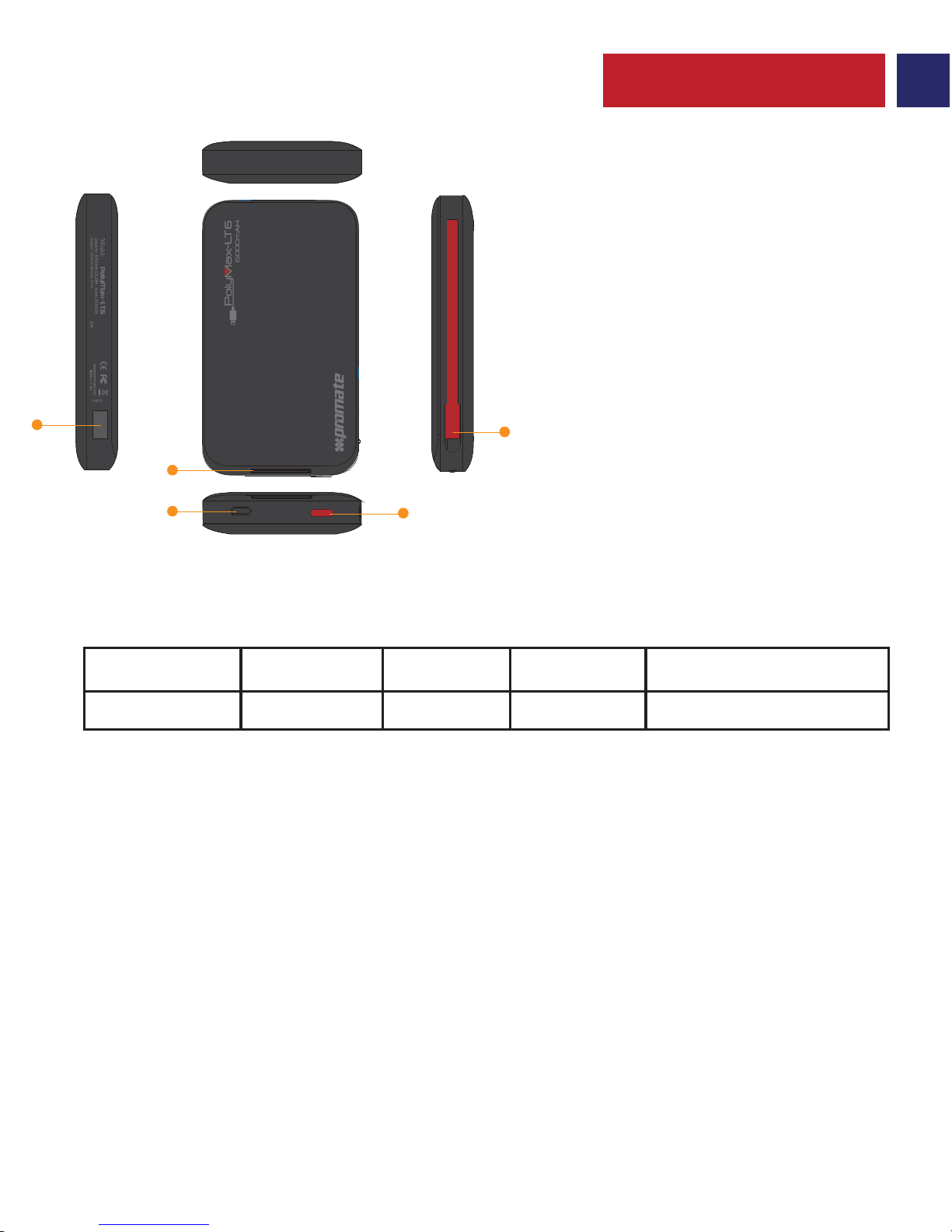
ﺔﮭﺟاﻮﻟا و ﻞﻜﺸﻟا ﻒﺻو
ﻒﺋﺎظﻮﻟا دﺪﻌﺘﻣ رﺰﻟا .1
Lightning Connector .2
USB وﺮﻜﻳﺎﻣ ﻦﺤﺷ ﺬﻔﻨﻣ .3
ﺔﻳرﺎﻄﺒﻟا ىﻮﺘﺴﻣ تاﺮﺷﺆﻣ .4
USB جاﺮﺧإ ﺬﻔﻨﻣ .5
.ةﺪﺣاو ةﺮﻣ ﻒﺋﺎظﻮﻟا دﺪﻌﺘﻣ رﺰﻟا ﻂﻐﺿا ،polyMax-LT6 ﻲﻓ ﺔﯿﻘﺒﺘﻤﻟا ﻦﺤﺸﻟا ﺔﻗﺎط راﺪﻘﻣ ضﺮﻌﻟ •
polyMax-LT6 ﻲﻓ ﺔﯿﻘﺒﺘﻤﻟا ﺔﻨﺤﺸﻟا راﺪﻘﻣ ﻰﻟإ ةﺮﯿﺸﻣ ﺔﻳرﺎﻄﺒﻟا ىﻮﺘﺴﻣ تاﺮﺷﺆﻣ ءﺎﻀﺘﺳ
polyMax-LT6 ﺔﻗﺎط نﺰﺨﻣ ﻲﻓ ﺔﯿﻘﺒﺘﻤﻟا ﻦﺤﺸﻟا ﺔﻗﺎط ﻦﻣ ﻖﻘﺤﺘﻟا .1
وأ USB ﺔﻗﺎط لﻮﺤﻤﺑ ﺮﺧﻵا فﺮﻄﻟا و polyMax-LT6 ﻊﻣ USB وﺮﻜﻳﺎﻤﻟا ﻞﺑﺎﻛ فاﺮطأ ﺪﺣأ ﻞﯿﺻﻮﺘﺑ ﻢﻗ •
ﻦﺤﺷ ﺔﯿﻠﻤﻋ نأ ﻰﻟإ ةﺮﯿﺸﻣ ﺔﯿﺋﻮﻀﻟا تاﺮﺷﺆﻤﻟا ﺊﯿﻀﺘﺳ ،لﻮﻤﺤﻣ ﺮﺗﻮﯿﺒﻤﻛ/ﻲﺒﺘﻜﻣ ﺮﺗﻮﯿﺒﻤﻜﺑ
polyMax-LT6 ﻦﺤﺷ ﻢﺗ ﺪﻗ نﻮﻜﻳ ،ةءﺎﻀﻣ تاﺮﺷﺆﻤﻟا ﻊﯿﻤﺟ ﺢﺒﺼﺗ ﺎﻣﺪﻨﻋ .ﺬﯿﻔﻨﺘﻟا ﺪﯿﻗ polyMax-LT6
.ﻞﻣﺎﻜﻟﺎﺑ
polyMax-LT6 ﺔﻗﺎط نﺰﺨﻣ ﻦﺤﺷ .2
.ﺔﯿﺣﻮﻠﻟا ةﺰﮭﺟﻷاو ﺔﯿﻛﺬﻟا ﻒﺗاﻮﮭﻟا ﻊﯿﻤﺟ ﻊﻣ ﻖﻓاﻮﺘﻣ polyMax-LT6 •
.ﻦﺤﺸﻠﻟ USB مﺪﺨﺘﺴﺗ ﻲﺘﻟا ﺔﯿﺣﻮﻠﻟا ةﺰﮭﺟﻷاو ﺔﯿﻛﺬﻟا ﻒﺗاﻮﮭﻟا ﻦﺤﺸﻟ USB 2.4A ﺬﻔﻨﻣ مﺪﺨﺘﺳا •
داﺮﻤﻟا زﺎﮭﺠﻟﺎﺑ ﻪﻠﯿﺻﻮﺗ ﻚﯿﻠﻌﻓ ﺮﺧﻵا فﺮﻄﻟا ﺎﻣأ ،USB ﺬﻔﻨﻤﺑ USB 2.4A ﻞﺑﺎﻛ تﺎﻳﺎﮭﻧ ىﺪﺣإ ﻞﯿﺻﻮﺘﺑ ﻢﻗ
.زﺎﮭﺠﻟا ﻦﺤﺸﺑ أﺪﺒﺘﻟ ةﺪﺣاو ةﺮﻣ ﻒﺋﺎظﻮﻟا دﺪﻌﺘﻣ رﺰﻟا ﻂﻐﺿا .ﻪﻨﺤﺷ
ﻞﯿﺻﻮﺘﺑ ﻢﻗ .ﺔﻠﺻﻮﻟا ﺎﮭﻤﻋﺪﺗ ﻲﺘﻟا ةﺰﮭﺟﻷا ﻦﺤﺸﻟ ﺔﻘﻓﺮﻤﻟا Lightning Connector مﺪﺨﺘﺳا •
ﻦﺤﺸﺑ أﺪﺒﺘﻟ ةﺪﺣاو ةﺮﻣ ﻒﺋﺎظﻮﻟا دﺪﻌﺘﻣ رﺰﻟا ﻂﻐﺿا .كزﺎﮭﺠﻟ لﺎﺧدﻹا ﺬﻔﻨﻤﺑ Lightning Connector
.زﺎﮭﺠﻟا
.polyMax-LT6 ماﺪﺨﺘﺳﺎﺑ ﺖﻗﻮﻟا ﺲﻔﻧ ﻲﻓ ﻦﻳزﺎﮭﺟ ﻦﺤﺷ ﻚﻨﻜﻤﻳ •
.polyMax-LT6 ءﺎﻔطﻹ ٍناﻮﺛ 3 ةﺪﻤﻟ ﻒﺋﺎظﻮﻟا دﺪﻌﺘﻣ رﺰﻟا ﻂﻐﺿا •
polyMax-LT6 ماﺪﺨﺘﺳﺎﺑ ةﺰﮭﺟﻷا ﻦﺤﺷ .3
ةءﺎﻀﻤﻟا تاﺮﺷﺆﻤﻟا دﺪﻋ
% ﺔﯿﻘﺒﺘﻤﻟا ﺔﻨﺤﺸﻟا
%25-0%50-25%75-50%100-75
1234
:ﻞﯿﻐﺸﺘﻟا تﺎﻤﯿﻠﻌﺗ
O
UT
IN
1
2
3
5
4
Page 14

 Loading...