

Page 1

keyCase Mini
Protective Leather Case with Bluetooth™ Keyboard
for iPad mini
User Guide
Page 2

Introduction
Thank you for purchasing Promate keyCase mini which is a Protective Leather Case with
Bluetooth™ Keyboard for iPad mini. This case with in-built Bluetooth™ keyboard has been
created with multiple functions, performance beyond its size, ultra-high reliability and
uniquely fined outlook.
Hereby stated are the features for this product for better understanding of its functions.
Premium protective leather carry case with in-built Bluetooth™ keyboard
Kickstand feature to position iPad mini like a monitor and typing comfort
Built-in rechargeable lithium polymer battery
Ergonomic design
Luxurious leather case protects your iPad mini with style
Micro-USB charging
Packaging Contents
keyCase mini
Micro-USB cable charging cable
User Guide
Warranty card
Precautions
Please read this User Guide carefully before using the product.
The contents herein may be changed to deliver the better services to the end-user. To keep
the perfect performances of the product, never use it in cold, hot, dusty or moistened areas or
places, especially in the following conditions:
1. Moist or underwater conditions.
2. Conditions near the heater or high-temperature service.
3. Conditions with direct sunshine.
4. Conditions with apt falling.
5. Never dismantle this product without due permission, otherwise it may nullify the
warranty clauses.
Page 3
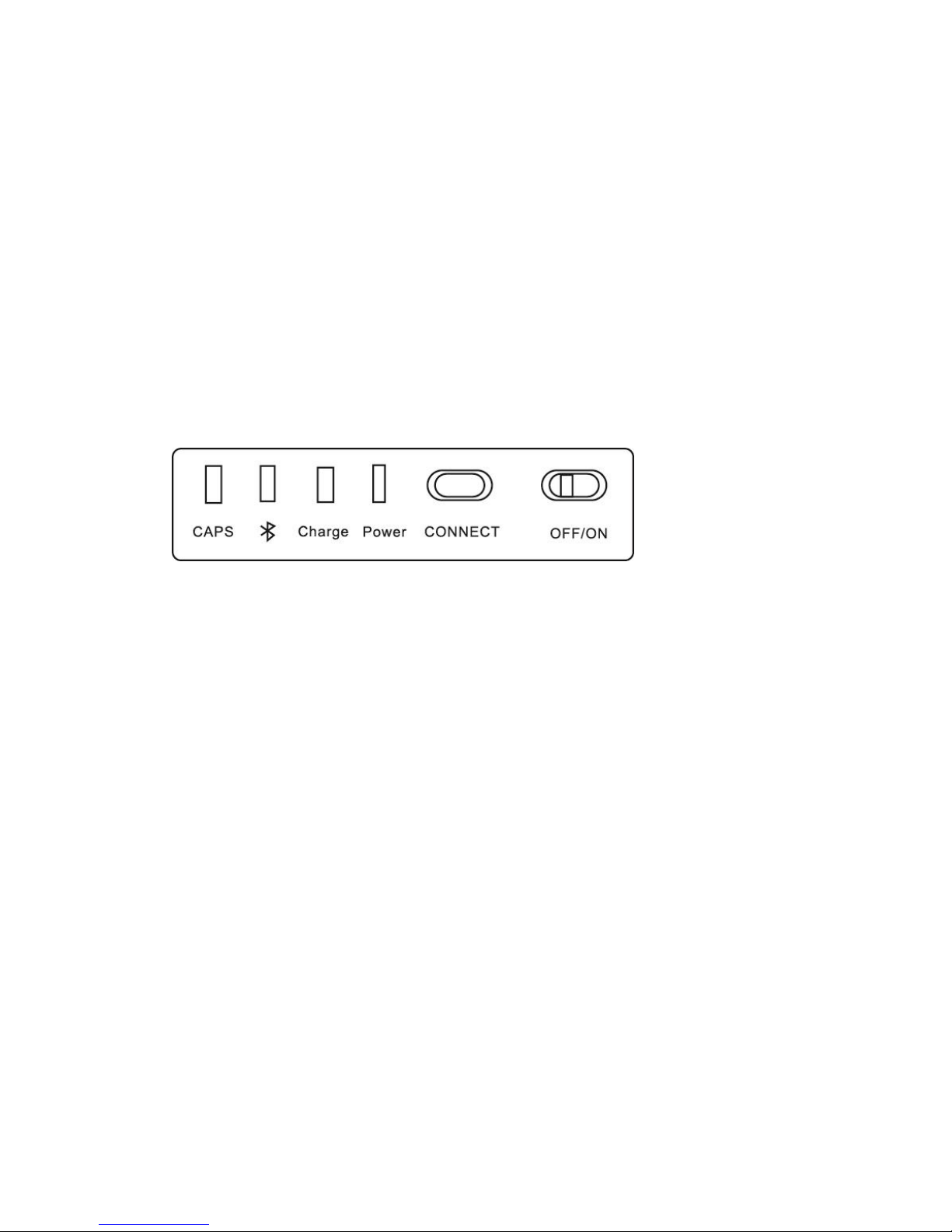
Product Overview
Introduction
The keyCase mini is perfect case for those who want to maximize the use of their iPad mini. It
is a premium leather-bound carry case, stand and Bluetooth™ keyboard that offers protection
and functionality for your iPad mini. It features a slim wireless keyboard that connects via
Bluetooth™ and lets you be in control of all the media files from your tablet. Its stylish outer
leather case compacts the use of your iPad mini like a book, or angled viewing to turn your
tablet into a monitor using its kickstand feature. Simple and slim in size, the keyCase mini is
the cover that would let you get the most of your iPad mini.
Appearance and Interface Description
No. Name
1 Caps status indicator : LED will light up when Caps button is pressed on the
Bluetooth keyboard
2 Bluetooth status indicator: LED will light up when on pairing mode.
3 Charging indicator : LED will light up when charging the Bluetooth keyboard.
4 Power indicator : LED will light up when the Bluetooth keyboard is turned ON.
5 Connect button : Press to enter the keyboard on pairing mode
6 Power switch : Toggle switch to turn the Bluetooth keyboard ON or OFF.
Instructional Usage
Charging the keyCase mini.
Before first use, charge the keyCase Mini using the charging cable provided. When charging,
the LED indicator is red, and when fully charged, it will turn to blue.
Pairing with iPad mini
• Press the CONNECT button on the keyCase mini. The Bluetooth™ LED will flash in blue
and will be under detecting stage for 3 minutes.
• When the Bluetooth™ keyboard is discovered, select the “keyCase mini” from the iPad
Page 4

mini screen, a passkey will appear on the screen of the iPad.
• Type in the passkey provided and press the ENTER key on the keyboard. Your keyCase
mini keyboard will then be successfully paired with your iPad mini.
 Loading...