

Page 1

User Guide
FM13
Universal Smartphone Holder with In-built
Handsfree, FM Transmier and USB Charging Port
Page 2

FM13 is a unique multifunctional Car FM Transmitter that could be used with a
wide range of smartphones. Its functionality combines a few options at the same
time. FM13 is mobile holder, that could be adjusted vertically to hold smartphones.
Additionally, it has an audio cable that connects to the 3.5mm port of any
smartphone and together with its in-built mic provides you with a superb
hands-free function. Another useful usage is as a transmitter which converts the
audio output into an FM radio signal that plays any music and phone calls. What’s
more, the USB charging port and on/off button allow you to charge any USB
chargeable mobile device inside the car. FM13 is a multifunctional product which
simplifies and meanwhile enhances the usage of smartphones in your vehicle.
• Vertically adjustable in-car holder with FM Transmitter function for smartphones
• In-built microphone on audio cable for Hands-free performance
• Flexible gooseneck design for easy device adjustment
• Padded holders with anti-slip for smartphones custom fit
• LED frequency display
• 360° degree adjustable holder rotation view
• USB Charging port for USB chargeable mobile devices
• On and Off power button function
• Height and width fitting: from 106mm to 135mm (height) and from 45mm to
70mm (width)
• Made from ABS and polycarbonate plastic
Introduction
Features
• FM transmitting range: 88.1 to 107.9 Mhz.
• Sound channel separation: 40dB
• Frequency response: 35Hz~20 KHz
• Microphone sensitivity: -46±2dB
• Audio Input interface: 3.5mm stereo jack
• Input voltage: DC 12V~24V
• Working temperature: -15°C~50°C
• Charger output rating: USB 5V, 1A
Specification
1
Page 3
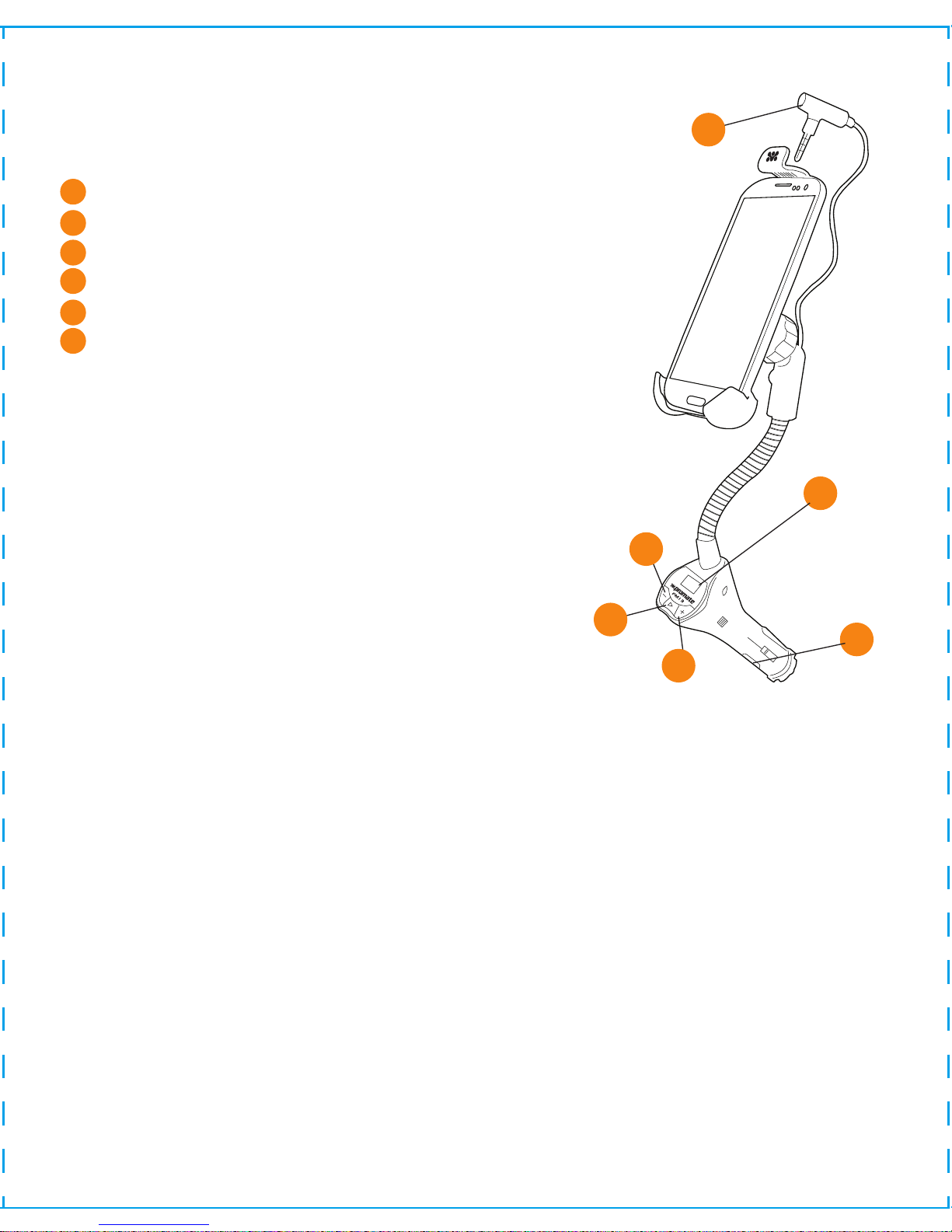
Getting Started
CH+/- key: Short press to adjust frequency by
0.1MHz , long press to adjust the frequency rapidly.
Play Key: Under playing mode, Play or pause by
short press
Short press Play key to answer an incoming call;
under the speaking mode;
Short press the Play key to end a call.
(Car FM transmitter frequency and FM13 frequency should be the same)
Power Switch: Power on/off
3.5 mm Jack Cable
CHPlay/Pause (Answer/ End a Call)
CH+
Power Button
LED Display
Pannel Button Operations
1. Insert the FM13 into the car cigarette lighter. Put your smartphone into the cradle
and lock-in.
2. Connect the 3.5mm jack cable to the smartphone, adjust the transmitting
frequency of FM13 to correspond channel between FM88.1~107.9MHz, set the car
FM channel the same with FM13 channel, and then you can listen to the phone’s
music through the car's FM radio.
Operating Instructions
1
2
3
4
5
6
1
2
3
4
5
6
2
Page 4
Cradle
Ring
Goose Neck
Cigarette
Power Charger
3. Short press Play key to answer the call when call coming; under the speaking
mode, short press the Play key to end a call. (Car FM transmitter frequency and
FM13 frequency should be same)
Charging Function
1. Connect the USB cable to the USB interface and the mobile, then it starts
charging automatically.
2. USB charging maximum output is 5V 1000mA.
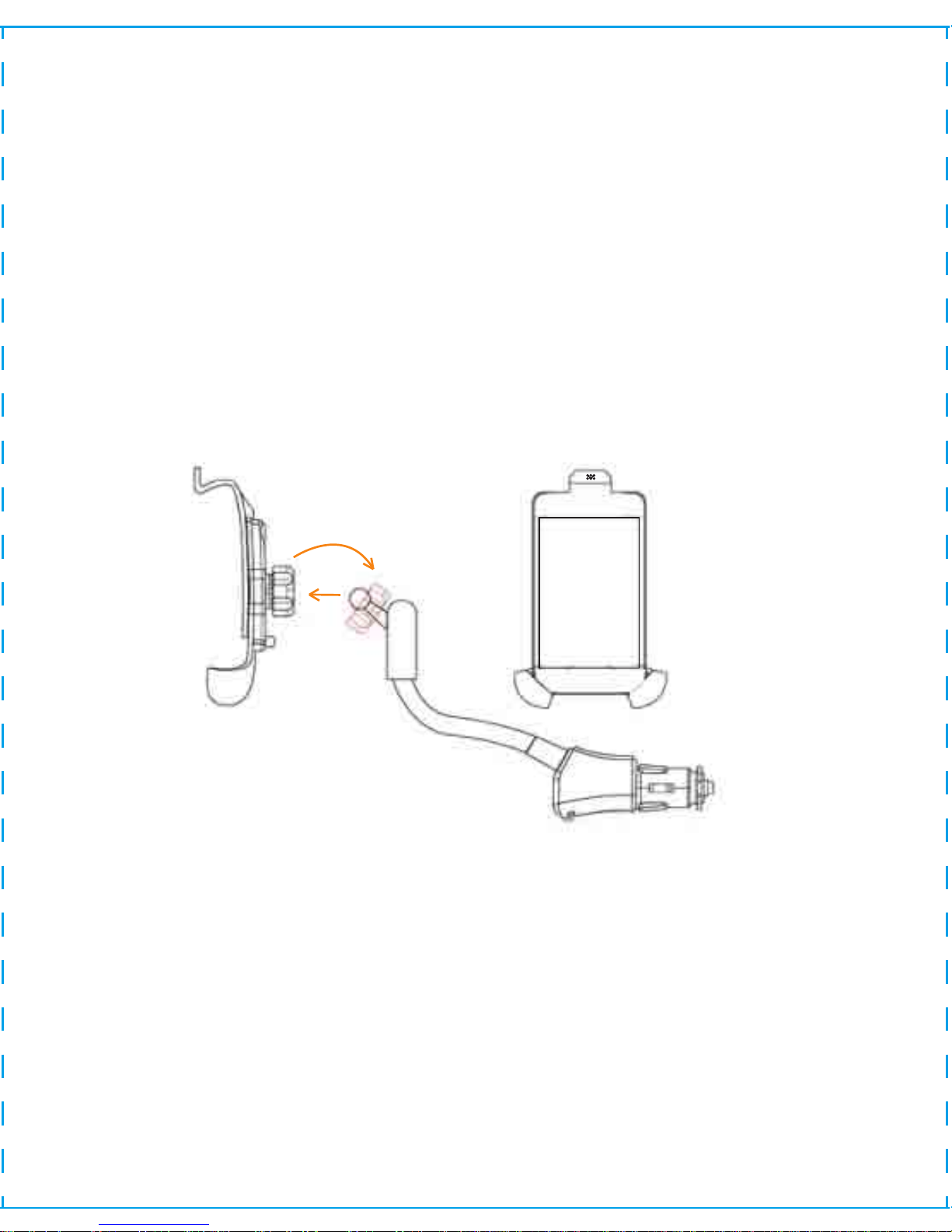
Installation Diagram
Step 1: Screw the ring out of the cradle, then put the ball into the ring.
Step 2: Snap the cradle onto the ball of the cigarette power charger, and
tighten the ring.
Step 3: Depress the push button inside the cradle and slide the upper and
lower arms apart.
Step 4: Place your device inside the cradle and slide the arms together until
they click and hold it firmly in place.
3
Page 5
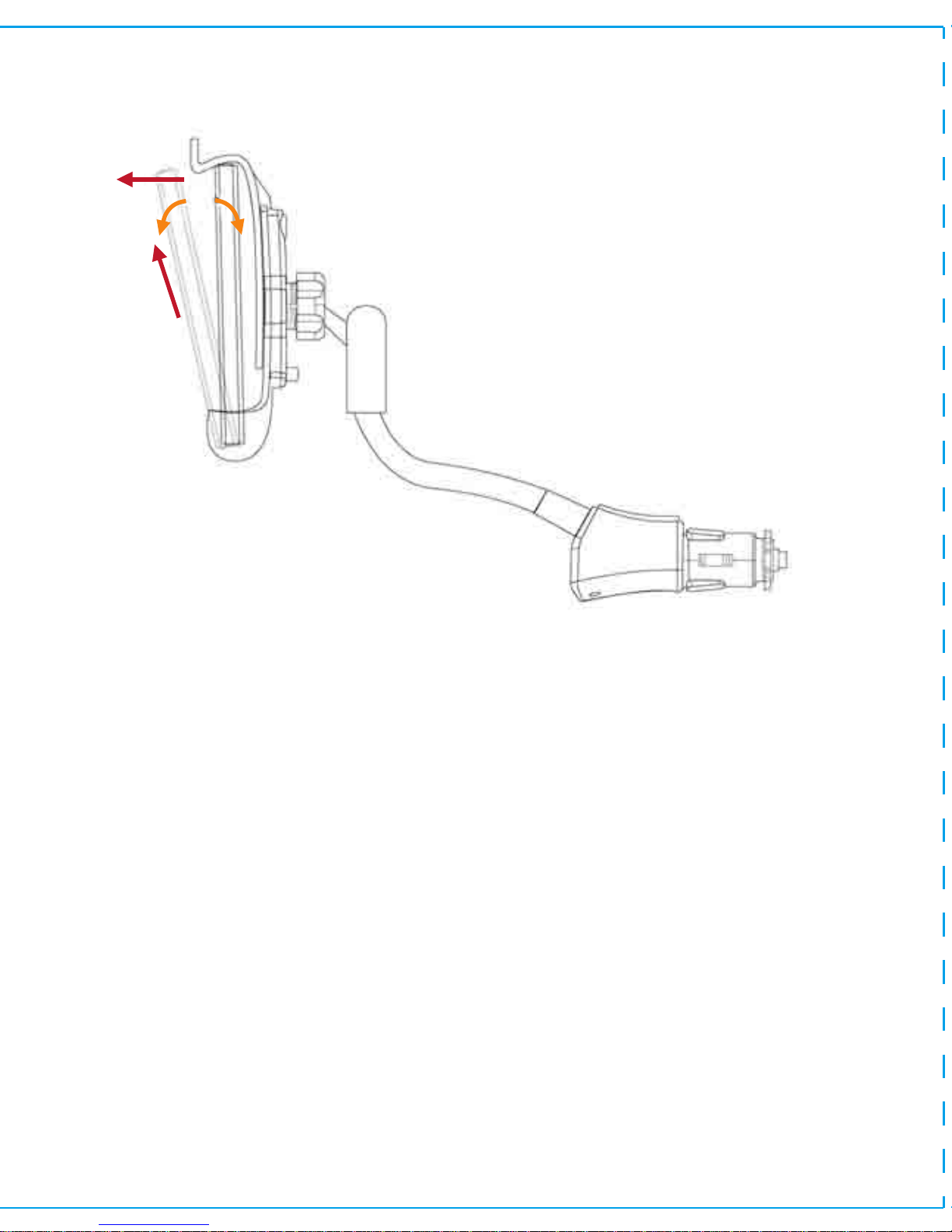
Removing your device from FM13
Step 1: Move the upside of your phone out of the holder around 30 degree in
the direction of the Arrow 1.
Step 2: : Take out of your phone in the direction of Arrow 2.
Note:
1. It is a normal phenomenon that the charger subject to a micro hot when
charging. After the battery is full, its temperature will gradually return to
normal room temperature.
2. In order to make the charger works in the best condition, please use this
charger within the temperature of 0°—40°.
3. Please cut-off the external power supply when the charger stops charging.
30
Arrow 1
Arrow 2
4
Page 6

 Loading...