

Page 1

Dash.Mini
Protective Leather Case with In-Built
6000mAh Back-up battery
User Guide
Page 2

Introduction
Dash.Mini, is a great companion for those always on the go. Make the best of your
iPad mini with this extremely powerful 6000mAh power case in hand. Enjoy
convenient typing and landscape viewing options with Dash.Mini. It not only
provides the power your iPad mini needs when on the go, but also provides
perfect protection to your iPad mini.
Packaging Contents
• Dash.Mini Case
• User Guide
• Warranty Card
Specification:
• Baery type: Li-Polymer
• Capacity: 6000mAh
• Input: DC 5V 1A
• Output: DC 5V 2.1A
• Input type: Standard USB
• Output Type: Lightning Connector
• Charging Time: 6.5Hours
• Material Made From: PU Leather with ABS Plasc
1
Page 3

Features:
• Massive 6000mAh portable back-up battery case
• Durable and protective design
• Charge the battery case using the USB cable built-in the case
• Versatile stand for convenient viewing and typing angles
• Smart cover with auto-sleep and wakeup function
Compatibility:
This case is designed to be used only with iPad mini, please do not attempt to use
this product with any other device.
Precautions
Please read all safety instructions and warnings thoroughly before using this product.
Improper use of this product may result in damage to this or attached products.
1. Do not disassemble the case or attempt to fix it.
2. Do not attempt to replace any part of this case or battery inside.
3. Do not crush, puncture, dispose of in fire, short the contacts or expose the
battery to water or other liquids.
4. Do not store or use the battery in a high temperature environment, including
intense sunlight or heat.
5. Avoid excessive drops, bumps, abrasions and impacts.
6. If there is any reason to believe that there is damage to the battery, discontinue
use immediately.
7. If you find that the battery is too hot, is emitting and odor is deformed,
punctured or exhibits any suspicious or abnormal behavior, discontinue use
immediately and contact our customer service.
8. Always charge this product before extended storage.
2
Page 4
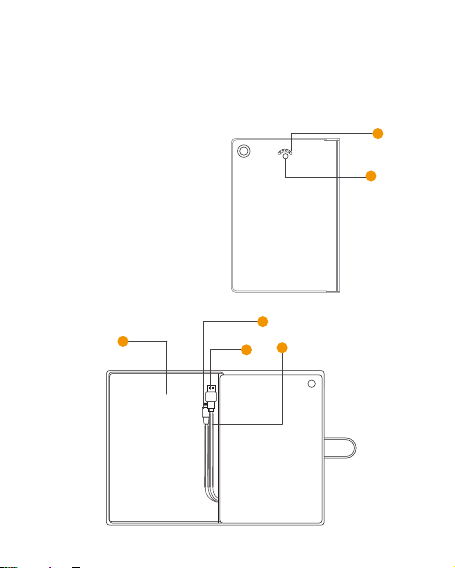
Appearance & Interface Description:
1. Baery Status Indicator LED
2. Power Buon
3. USB Charging Cable
4. Lightning connector
5. Wire Casing
6. Leather Case
1
2
6
4
5
3
3
Page 5

Operation Instructions:
1. Charging Dash.Mini
Connect the USB charging cable to a 110/220V AC power supply with 5V power
adapter or computer USB port. The battery status indicator LED starts flashing
from right to left to indicate the level of charge. When all the four LEDs light up,
Dash.Mini is fully charged. The whole charging process takes around 6.5 hours.
2. Charging iPad mini using Dash.Mini
Place your iPad mini in the case and connect the Lightning connector cable to your
iPad mini. Long press the power button to begin charging your iPad mini. The
battery status indicator LED will flicker to indicate remaining charge available in
Dash.Mini.
3. Battery Status Indicator LED:
Short click the power button to indicate the charge remaining in the case. The
Battery Status Indicator LED’s turn “On” depending upon the charge remaining.
Refer to the table below for more information:
Number of
Baery Status
Indicator LED
flashing
Meaning 25% 50% 75% 100%
1 2
3
4
4
Page 6

 Loading...