

Page 1

36W Wireless Surface Vibration Speaker Boombox
Super Bass Performance • Touch Control System • Dynamic Crystal-clear Sound
Page 2

Take your tunes anywhere, turning anything from a cup to a window into a speaker. The sonic system
within Cyclone vibrates like a regular speaker but amplifies these vibrations to allow them to permeate
through anything from a desk or window to a cup or cardboard box. This means you get the power
of a much larger speaker and amplifier in a portable package. You will never get tired of trying out
new speakers with Cyclone!
• Cyclone
• Aux Cable
• Power Cable
• User Guide
• Bluetooth Version: v4.0
• Bluetooth Chipset: CSR8635
• Bluetooth Frequency:2402-2480MHz
• Bluetooth Profiles: HFP, AVRCP, A2DP
• Battery Type: Li-Ion
• Battery Capacity:3200mAh
• Power Input: DC5V, 1A
• Speaker Output: 36W(26W+5W+5W)
• Impedance: 4Ω
• Operating Distance: 10m
• Music Playback Time: ~3 hours
• Charging Time: 3~4 hours
• Powerful Speaker: A multi-function 36-watt speaker takes your music listening experience on to
the next level
• Call Function: Engage in call function with the built-in hands-free function. The built-in mic
features advanced noise cancellation technology for clear wireless hands-free calling
• Multiple Connectivity Options: Play your favourite tracks via various connectivity options
available with Radiant. Play it wirelessly or via the 3.5mm audio jack.
Page 3

Please read all safety instructions and warnings thoroughly before using this product. Improper use
of this product may result in damage to this or attached products.
• Do not disassemble the device or attempt to fix it.
• Kindly use the included cable to charge the product.
• Do not attempt to replace any part of this product.
• Do not crush, puncture or dispose of in fire.
• Do not store or use the battery in a high temperature environment, including intense sunlight
or heat.
• Avoid excessive drops, bumps, abrasions and impacts.
• If there is any reason to believe that there is internal damage to the device, discontinue use
immediately.
• If you find that the device is too hot, is emitting an odor, or is deformed, punctured or exhibits any
suspicious or abnormal behavior, discontinue use immediately and contact our customer service.
• Always charge this product before extended storage.
• Universal Compatibility: Radiant is compatible with all Bluetooth enabled devices
• Easy Music Navigation: Easy navigation through your playlist with the help of touch control panel
• Turn Any Surface into a Speaker: Cyclone vibrates like a regular speaker but amplifies these
vibrations to allow them to permeate through anything from a desk or window to a cup or
cardboard box.
Page 4
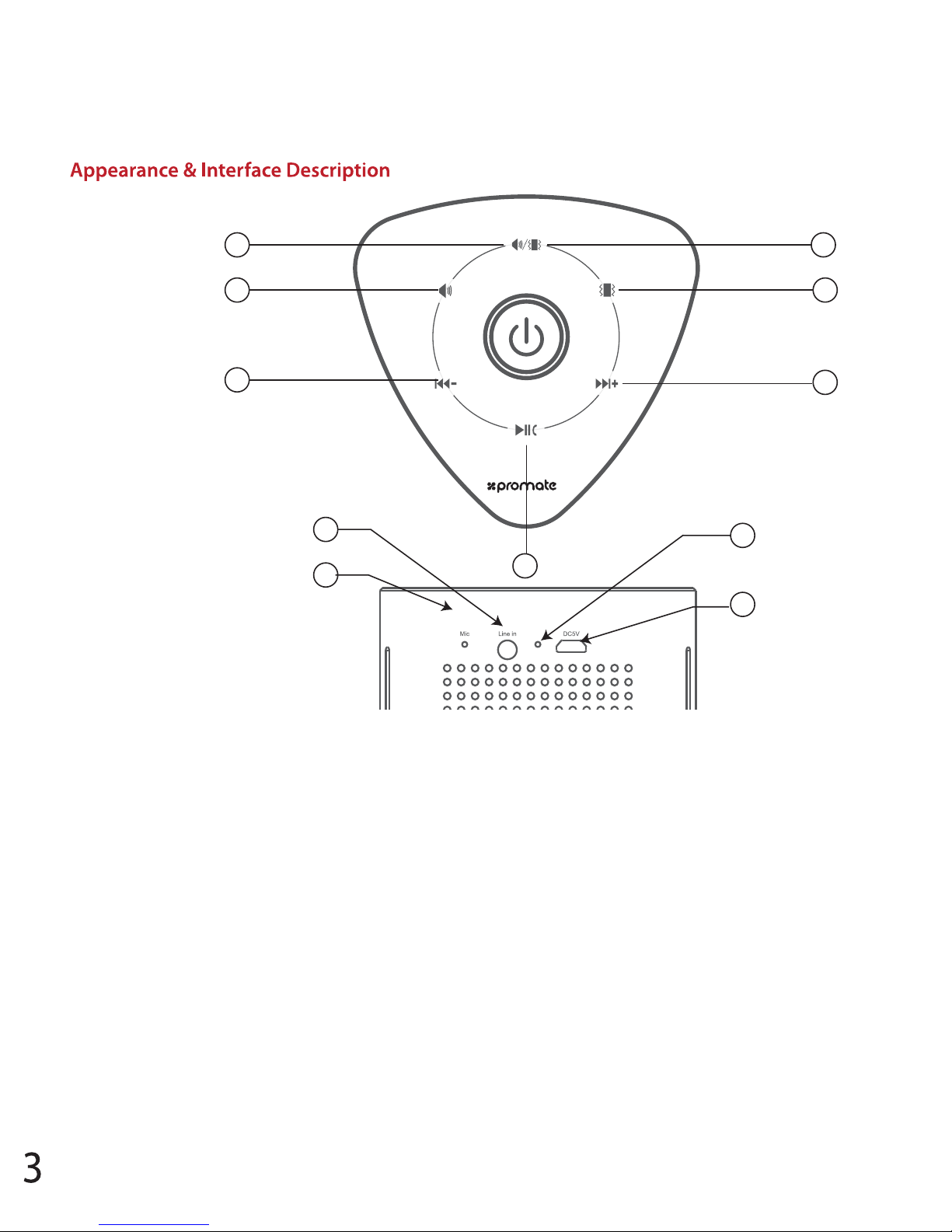
1. Speaker + Surface Vibration Mode
2. Surface Vibration Mode
3. Speaker Mode
4. Next Track
5. Previous Track
6. Power Button
7. Multi-Function Button
8. AUX Line In
9. Microphone
10. Charging LED
11. Charging Input
1 2
3 4
5
8
9
7
6
11
10
Page 5

Operation Instructions
1. Charging Cyclone
• Use the provided USB cable to charge Cyclone.
• Connect one end of the USB Cable provided to Cyclone and other end to a USB Power Socket.
• The Red LED will light up indicating that Cyclone is charging normally.
• The Green LED indicator will turn on once fully charged.
• The Red LED indicator will start flashing when the device is running out of power.
2. Turning Cyclone On/Off
• To switch on Cyclone, press and hold the “Power Button”.
• The Blue LED’s will turn on.
• Press and hold the “Power Button” again to switch off Cyclone.
3. Bluetooth Pairing
• Cyclone automatically enters into Bluetooth pairing mode once powered on.
• To manually enter Bluetooth pairing mode, press and hold the “Multi-Function Button” for about
3 Seconds.
• The Blue LED on the Power Button will begin flashing when in pairing mode.
• Turn on the Bluetooth function on your device and select “Cyclone” in the available devices list.
• Some Bluetooth devices may require you to enter a passcode to pair your device to Cyclone.
Enter “0000” and press submit.
• Once your device is successfully paired, the Blue LED will stop flashing.
4. Playing Music via Auxiliary Connection:
• Connect your device to Cyclone via the 3.5mm Aux cable provided.
• Cyclone will automatically enter into AUX playback mode.
• Control track playback and volume from your connected device.
Page 6

5. Using the Speaker Modes
• Press the corresponding speaker mode buttons for the below modes:
• Surface Vibration Mode: Cyclone amplifies sound vibrations to allow them to permeate through
anything from a desk or window to a cup or cardboard box, turning any surface into a speaker
• Surface Vibration + Speaker Mode: Use this mode for a fuller 360 degree sound experience through
a combination of surface vibration through any surface and powerful sound drivers that deliver
best in class sound performance
• Speaker Mode: Use this mode to deliver super bass sound performance through the powerful
speaker sound drivers that deliver best in class sound performance
6. Call/Hands-free Function:
• Short press the Multi-function button to pick up incoming calls when your device is paired.
• Short press the Multi-function button to end an ongoing call.
• Long press the Multi-function button to reject an incoming call.
7. Volume Control:
• Control volume via the paired devices or by long pressing the “Next Track” or “Previous Track”
buttons on Cyclone.
Troubleshooting
1. Cyclone does not pair with a Bluetooth device:
• Check if the Bluetooth hardware on your device supports A2DP profile which is necessary for sound
transmission over Bluetooth.
Page 7

 Loading...