

Page 1
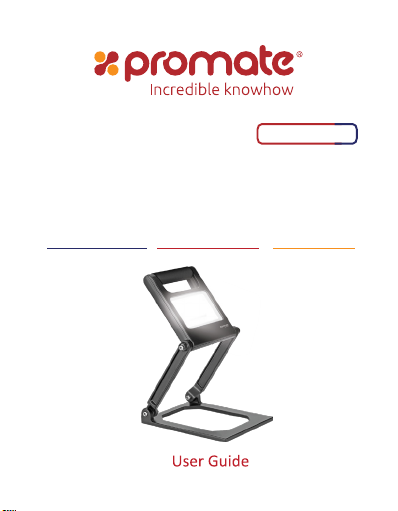
Beacon-2
Super-Bright IP54 Certified Portable
LED Flood Light
Water & Dust Resistant • Portable Foldable Design • Energy Efficient LED
Page 2

Introduction
Beacon-2 handheld LED spotlight is designed to provide a high output and ruggedly durable lighting
solution for applications where portability, light weight, corrosion resistance, and waterproof
high-powered light are required. An adjustable pivot allows for full adjustability, allowing for precise
aiming of this LED light. This housing is constructed of precision machined aluminium for excellent
strength and durability, powder coated for corrosion resistance, and is rated IP54 for ingress protection
against direct exposure to water jets from all directions and dust.
Packaging Contents
• Beacon-2
• Charging Adapter
• User Guide
Specifications
• Battery Capacity: 8800mAh
• Battery Type: Lithium Polymer
• Input: 8.4V, 1A
• LED Brightness: 1440lumens
• Working Time: 2-4 Hours
Features
• Super Bright: 18 watt, 1440 lumen LED lighting that lasts more than 4 hours on a full charge; as
bright as a 300W halogen bulb
• Built Tough: Ultra-durable aluminum housing stands up to whatever you throw at it; IP54 dust and
waterproof.
• Long Battery Life: Beacon-2 has a 8800mAh battery that guarantees you light for 2-4 hours
• Safe & Reliable: Beacon-2 features short-circuit & over-charging protection
Page 3
Precautions
Please read all safety instructions and warnings thoroughly before using this product. Improper
use of this product may result in damage to this or attached products.
1. Do not disassemble the backup battery or attempt to fix it.
2. Kindly use the original charging cable provided to charge the product.
3. Do not attempt to replace any part of this backup battery or battery inside.
4. Do not crush, puncture, dispose of in fire, short the contacts or expose the battery to water or
other liquids.
5. Do not connect input and output in reverse.
6. Do not store or use the battery in a high temperature environment, including intense sunlight or heat.
7. Avoid drops, bumps, abrasions and impacts.
8. If there is any reason to believe that there is damage to the battery, discontinue use immediately.
9. If you find that the battery is too hot, or is emitting an odor, or is deformed, punctured or exhibits
any suspicious or abnormal behavior, discontinue use immediately and contact our customer service.
10. Always charge this product before extended storage.
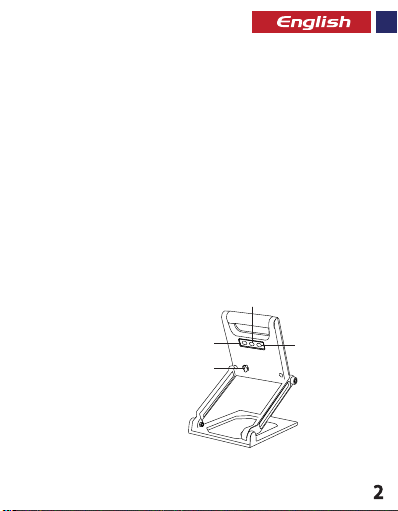
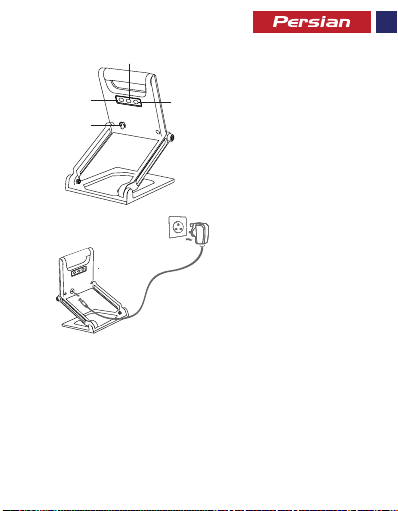
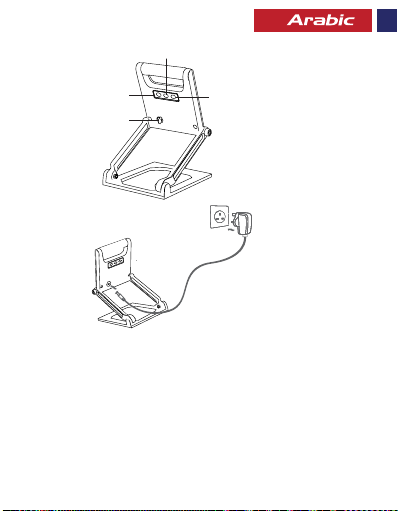
Appearance & Interface Description
1. Power Button
2. 50% Brightness Level Button
3. 100% Brightness Level Button
4. Charging Input Port
2
ON/OFF
50%
1
100%
3
4
Page 4
Operation Instructions:
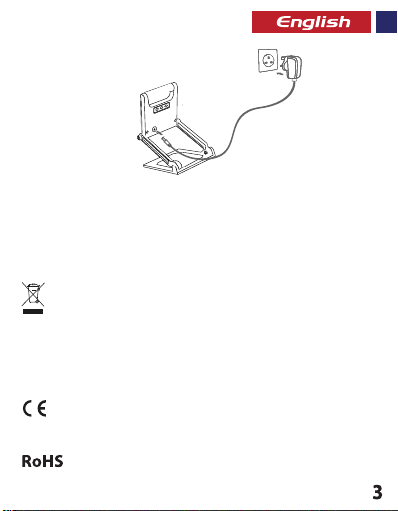
1. Charging Beacon-2
• Connect one end of the Cable Beacon-2 and the other end to a power socket. The red LED on Adapter
will light up indicating that the lamp is charging normally and will turn green once fully charged.
2. Using the Lamp Feature:
• Press the power button to turn on/off the light.
• Press the 50% brightness level button to increase LED brightness by 50%
• Press the 100% brightness level button to increase LED brightness by 100%
Correct disposal of this Product
(Waste Electrical & Electronic Equipment (WEEE)
Your product is designed and manufactured with high quality materials and components
which can be recycled and reused.
This symbol means that electrical and electronic equipment, at their end of-life should be
disposed of separately from your household waste.
Please dispose of this equipment at your local community waste
collection/recycling center.
ON/OFF
ON/OFF
50%
50%
100%
100%
This product complies with European safety and electrical interference directives
This product does not contain environmentally hazardous materials (lead, mercury,
cadmium, hexavalent chromium and brominated flammable agents: PBB and PBDE).
Page 5
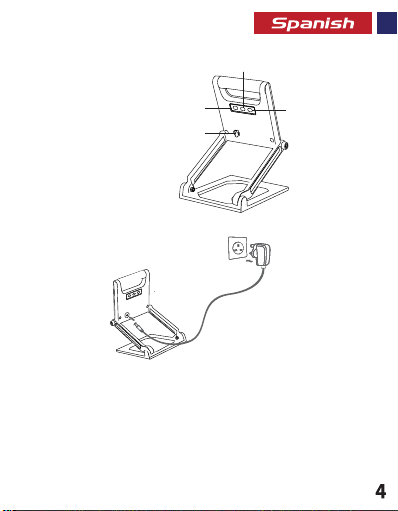
Descripción de la apariencia e interfaz
1. Botón de encendido
2. Botón de nivel de brillo 50 %
3. Botón de nivel de Brillo 100 %
2
ON/OFF
50%
1
100%
3
4
4. Puerto de entrada de carga
Instrucciones de operación:
1. Cargar Beacon-2
ON/OFF
ON/OFF
50%
50%
100%
100%
• Conecte un extremo del Cable Beacon-2 y el otro extremo a una toma de corriente. El LED rojo del adaptador
se encenderá indicando que la lámpara se está cargando normalmente y se pondrá verde cuando esté
completamente cargada
2. Uso de la función de la lámpara:
• Presione el botón de encendido para encender/apagar la luz.
• Pulse el botón de nivel de brillo 50 % para aumentar el brillo del LED en un 50 %
• Pulse el botón de nivel de brillo 100 % para aumentar el brillo del LED en un 100 %
Page 6
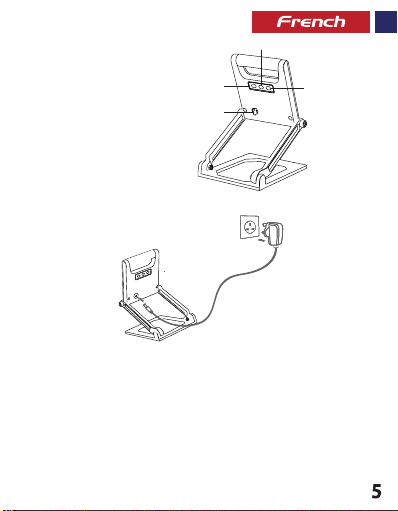
Aspect & Description Interface
1. Bouton de Marche
2. Bouton de niveau de Luminosité 50%
3. Bouton de niveau de Luminosité 100%
4. Port d’Entrée Chargement
Mode d’emploi :
1. Chargement du Beacon-2
ON/OFF
ON/OFF
50%
50%
100%
100%
• Connectez une extrémité du câble au Beacon-2 et l’autre extrémité à une prise de courant. Le voyant LED
rouge de l’Adaptateur s’allume indiquant que la lampe se recharge normalement ; il devient vert lorsque
l’appareil est complètement rechargé.
2. Utilisation de la Lampe :
• Appuyez sur le bouton de marche pour allumer / éteindre la lumière.
• Appuyez le bouton de niveau de luminosité 50% pour augmenter la luminosité LED d’un 50%
• Appuyez sur le bouton de niveau de luminosité 100% pour augmenter la luminosité LED de 100%
2
ON/OFF
50%
1
100%
3
4
Page 7
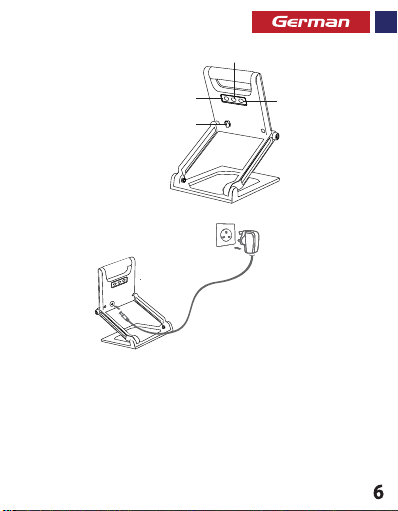
Beschreibung von Aussehen und Interface:
1. Power-Taste
2. Taste 50% Helligkeit
3. Taste 100% Helligkeit
4. Ladeeingang
Bedienungsanleitung:
1. Beacon-2 laden
• Schließen Sie ein Ende des Kabels an den Beacon-2 an und stecken Sie das andere Ende in eine Steckdose.
Die rote LED am Adapter leuchtet rot auf und zeigt somit an, dass die Lampe ordnungsgemäß lädt. Sobald
der Ladevorgang abgeschlossen ist, leuchtet die LED grün.
2. Verwenden der Lampenfunktion:
• Drücken Sie die Power-Taste, um das Licht ein- oder auszuschalten.
• Drücken Sie die Taste 50% Helligkeit, um die Helligkeit der LED auf 50% zu stellen.
• Drücken Sie die Taste 100% Helligkeit, um die Helligkeit der LED auf 100% zu stellen.
ON/OFF
ON/OFF
50%
50%
100%
100%
2
ON/OFF
50%
1
100%
3
4
Page 8
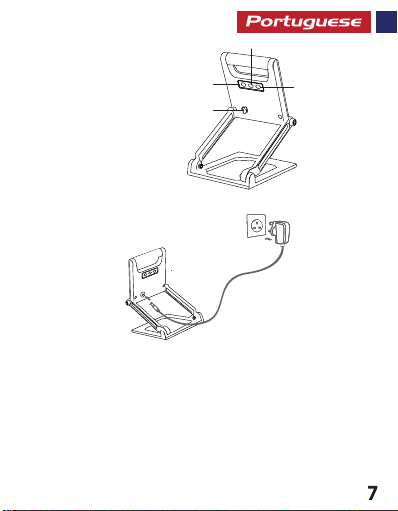
Aparência e Descrição da Interface:
1. Botão liga/desliga
2. 50% Botão de nível de brilho
3. 100% Botão de nível de brilho
4. Porta de entrada para carregar
Instruções de uso:
1. Carregando o Beacon-2
ON/OFF
ON/OFF
50%
50%
100%
100%
• Conecte uma extremidade do cabo do Beacon-2 e a outra extremidade a uma tomada elétrica. A luz
vermelha de LED no adaptador irá acender indicando que a lâmpada está carregando normalmente e ficará
verde quando estiver totalmente carregada.
2. Usando o recurso da lâmpada:
• Aperte o botão liga/desliga para ligar ou desligar a luz.
• Aperte o botão de nível de brilho de 50% para aumentar o brilho de LED em 50%
• Aperte o botão de nível de brilho de 100% para aumentar o brilho de LED em 100%
2
ON/OFF
50%
1
100%
3
4
Page 9
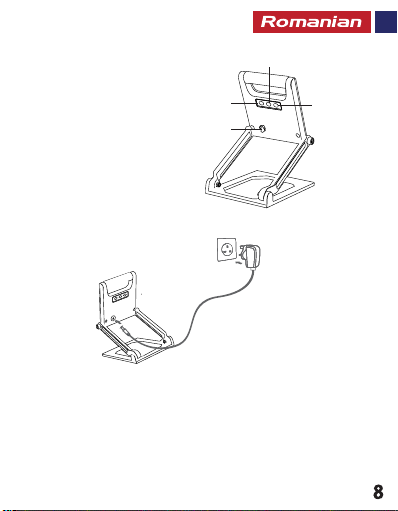
Descrierea aspectului și interfeței
1. Butonul de pornire
2. Butonul pentru nivelul de luminozitate 50%
3. Butonul pentru nivelul de luminozitate 100%
2
ON/OFF
50%
1
100%
3
4
4. Port intrare pentru încărcare
Instrucțiuni de folosire:
1. Încărcarea dispozitivului Beacon-2
ON/OFF
ON/OFF
50%
50%
100%
100%
• Conectați un capăt al cablului la Beacon-2, iar celălalt la o priză de curent. LED-ul roșu al adaptorului se va
aprinde, indicând că lampa se încarcă normal, și va deveni verde când este încărcată complet.
2. Utilizarea funcției Lampă:
• Apăsați butonul de pornire pentru a aprinde/stinge lumina.
• Apăsați butonul pentru nivelul de luminozitate 50% pentru a mări luminozitatea LED-urilor cu 50%
• Apăsați butonul pentru nivelul de luminozitate 100% pentru a mări luminozitatea LED-urilor cu 100%
Page 10
Page 11
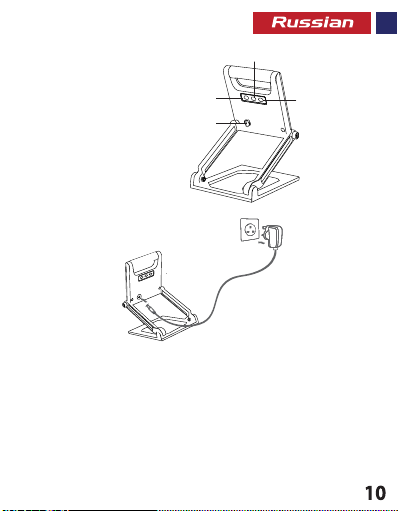
Описание внешнего вида и интерфейса
2
1. Кнопка питания
2. Кнопка уровня яркости 50%
3. Кнопка уровня яркости 100%
ON/OFF
50%
1
100%
3
4
4. Входной порт зарядки
Инструкция по эксплуатации:
1. Зарядка Beacon-2
ON/OFF
ON/OFF
50%
50%
100%
100%
• Подключите один конец кабеля к Beacon-2, а другой конец – к разъему питания. Загорится крас
ный светодиод на адаптере, указывая на то, что лампа заряжается нормально, а когда прибор
будет полностью заряжен, красный свет превратится в зеленый.
2. Использование функции лампы:
• Нажмите кнопку питания, чтобы включить/выключить свет.
• Нажмите кнопку уровня яркости 50%, чтобы увеличить яркость светодиода до 50%
• Нажмите кнопку уровня яркости 100%, чтобы увеличить яркость индикатора до 100%
Page 12
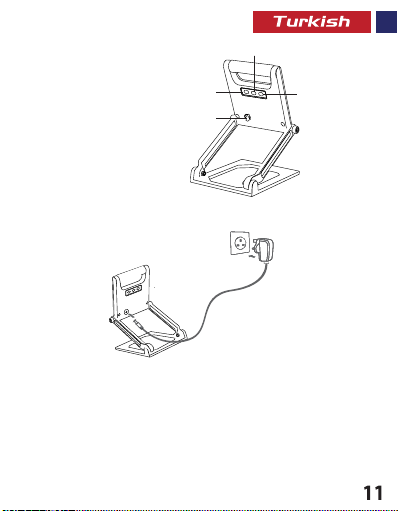
Görünüm ve Arayüz Açıklaması
1. Güç Düğmesi
2. %50 Parlaklık Seviyesi Düğmesi
3. %100 Parlaklık Seviyesi Düğmesi
4. Şarj Girişi
İşletim Talimatları:
1. Beacon-2’yi Şarj Etme:
ON/OFF
ON/OFF
50%
50%
100%
100%
2
ON/OFF
50%
1
100%
3
4
• Kablonun bir ucunu Beacon-2’ye, diğer ucunu güç prizine bağlayın. Adaptörün üzerindeki kırmızı LED ışığı
yandığında lambanın normal bir şekilde şarj olduğunu gösterecek ve tamamen şarj olduğunda yeşile dönecektir.
2. Lamba Özelliğinin Kullanımı:
• Işığı açmak/kapatmak için güç düğmesine basın.
• LED parlaklığını %50 oranında artırmak için %50 parlaklık seviyesi düğmesine basın
• LED parlaklığını %100 oranında artırmak için %100 parlaklık seviyesi düğmesine basın
Page 13
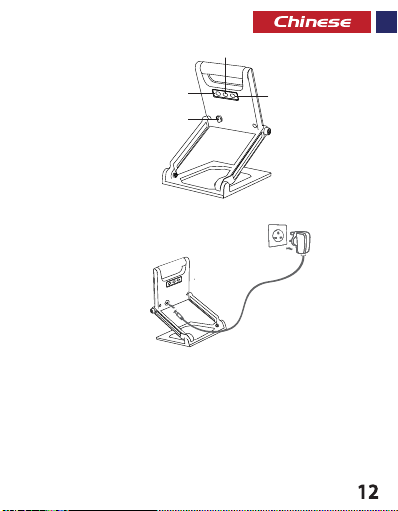
外观和接口说明
1. 电源按钮
2. 50%亮度级别按钮
2
ON/OFF
50%
1
100%
3
4
3. 100%亮度级别按钮
4. 充电输入端口
操作说明:
1. 为Beacon-2充电
ON/OFF
ON/OFF
50%
50%
100%
100%
• 连接Cable Beacon-2的一端,另一端连接到电源插座。 适配器上的红色LED指示灯将亮起,.
表示灯正常充电,并在充满电后变为绿色。
2. 使用灯泡功能:
• 按电源按钮打开/关闭灯。
• 按50%亮度级别按钮可将LED亮度提高50%
• 按100%亮度级别按钮将LED亮度提高100%
Page 14
2
ON/OFF
50%
1
100%
3
4
ON/OFF
ON/OFF
50%
50%
100%
100%
ﻦﺷور رﻮﺘﭘادآ یور LED ﺮﮕﻧﺎﺸﻧ .ﺪﯿﻧﺰﺑ قﺮﺑ ﺰﯾﺮﭘ ﻪﺑ ار ﺮﮕﯾد ﺮﺳ و Beacon-2 ﻪﺑ ار ﻞﺑﺎﮐ ﺮﺳ ﮏﯾ •
ﻪﺑ ﻞﻣﺎﮐ ژرﺎﺷ ﺎﺑ و ﺖﺳا یدﺎﻋ ترﻮﺻ ﻪﺑ نﺪﺷ ژرﺎﺷ لﺎﺣ رد غاﺮﭼ ﺪھد ﯽﻣ نﺎﺸﻧ ﻪﮐ دﻮﺷ ﯽﻣ
.ﺪﻨﮐ اﺪﯿﭘ ﺶﯾاﺰﻓا 50% ﺎﺗ LED ﯽﯾﺎﻨﺷور ﺎﺗ ﺪﯿھد رﺎﺸﻓ ار 50% ﯽﯾﺎﻨﺷور ﺢﻄﺳ ﻪﻤﮐد •
.ﺪﻨﮐ اﺪﯿﭘ ﺶﯾاﺰﻓا 100% ﺎﺗ LED ﯽﯾﺎﻨﺷور ﺎﺗ ﺪﯿھد رﺎﺸﻓ ار 100% ﯽﯾﺎﻨﺷور ﺢﻄﺳ ﻪﻤﮐد •
.ﺪﯿھد رﺎﺸﻓ غاﺮﭼ ندﺮﮐ شﻮﻣﺎﺧ/ﻦﺷور یاﺮﺑ ار شﻮﻣﺎﺧ ﻦﺷور ﻪﻤﮐد •
ﻂﺑار حﺮﺷ و ﺮھﺎﻇ
شﻮﻣﺎﺧ و ﻦﺷور ﻪﻤﮐد .1
50% ﯽﯾﺎﻨﺷور ﺢﻄﺳ ﻪﻤﮐد .2
100% ﯽﯾﺎﻨﺷور ﺢﻄﺳ ﻪﻤﮐد .3
ژرﺎﺷ یدورو هﺎﮔرد .4
:تﺎﯿﻠﻤﻋ یﺎھ ﻞﻤﻌﻟارﻮﺘﺳد
Beacon-2 ندﺮﮐ ژرﺎﺷ .1
.ﺪﯾآ ﯽﻣ رد ﺰﺒﺳ ﮓﻧر
غاﺮﭼ ﯽﮔﮋﯾو زا هدﺎﻔﺘﺳا .2
13
Page 15
2
ON/OFF
50%
1
100%
3
4
ON/OFF
ON/OFF
50%
50%
100%
100%
ﺮﻤﺣﻷا LEd لا ءﻲﻀﻳ فﻮﺳ .ﺔﻗﺎط ﺲﺒﻘﻤﺑ ﺮﺧﻵا فﺮﻄﻟاو -2 رﺎﻨﻤﻟا ﻞﺑﺎﻛ ﻲﻓﺮط ﺪﺣأ ﻞﺻﻮﺑ ﻢﻗ •
ﻦﺤﺸﻟا رﻮﻓ ﺮﻀﺧﻷا ﻲﻟإ لﻮﺤﺘﺗ فﻮﺳو ﺔﻳدﺎﻋ ﺔﻘﻳﺮﻄﺑ ﻦﺤﺸﻳ حﺎﺒﺼﻤﻟا نأ ﻰﻟإ اﺮﯿﺸﻣ لﻮﺤﻤﻟا ﻰﻠﻋ
.50٪ ﺔﺒﺴﻨﺑ LEd لا عﻮﻄﺳ ةدﺎﻳﺰﻟ 50% عﻮﻄﺳ ىﻮﺘﺴﻣ حﺎﺘﻔﻣ ﻰﻠﻋ ﻂﻐﺿا •
100٪ ﺔﺒﺴﻨﺑ LEd لا عﻮﻄﺳ ةدﺎﻳﺰﻟ 100٪ عﻮﻄﺳ ىﻮﺘﺴﻣ حﺎﺘﻔﻣ ﻰﻠﻋ ﻂﻐﺿا •
.ءﻮﻀﻟا ﻞﯿﻐﺸﺗ فﺎﻘﻳإ / ﻞﯿﻐﺸﺘﻟ ﻞﯿﻐﺸﺘﻟا حﺎﺘﻔﻣ ﻰﻠﻋ ﻂﻐﺿا •
ﺔﮭﺟاﻮﻟا و ﺮﮭﻈﻤﻟا ﻒﺻو
.50% عﻮﻄﺳ ىﻮﺘﺴﻤﻟ حﺎﺘﻔﻣ .2
.100% عﻮﻄﺳ ىﻮﺘﺴﻤﻟ حﺎﺘﻔﻣ .3
.ﺔﻗﺎﻄﻟا حﺎﺘﻔﻣ .1
. ﻞﺧﺪﻤﻟا ﻦﺤﺷ ﺬﻔﻨﻣ .4
: ﻞﯿﻐﺸﺘﻟا تﺎﻤﯿﻠﻌﺗ
-2 رﺎﻨﻤﻟا ﻦﺤﺷ .1
.ﻞﻣﺎﻜﻟﺎﺑ
:حﺎﺒﺼﻤﻟا ﺺﺋﺎﺼﺧ ماﺪﺨﺘﺳﺎﺑ .2
14
Page 16

 Loading...