

Page 1

Ultra-Bright Portable LED Flood Light
with Power Bank
IP54 Water & Dust Resistant • 3 LED Modes • Energy Efficient LED
Page 2

Introduction
Ideal as a powerful tent light for camping or personal emergency light with the added
bonus of providing up to 2-3 charges for your smart phone. This very energy has a built in
rechargeable Lithium battery, so there is no need to buy, or carry spare batteries as with
many other portable lights available. The IP54 Water and dust resistance ensures
resistance against water and dust.
Packaging Contents
• Beacon-1
• USB Charging Cable
• User Guide
Specifications
• Battery Capacity: 5400mAh
• Battery Type: Lithium Polymer
• Input: 5V, 1A
• Output : 5V, 1A
• LED Brightness: 640lumens
• Working Time: 4-8 Hours
Features
• Portable Power:
it to charge a mobile device or to power the light.
• Super Bright:
as bright as a 100W halogen bulb
• Built Tough:
IP54 dust and waterproof.
• Multifunctional:
and 5V/1A charging for mobile devices.
• Automatic Voltage Regulation:
provides an optimum output based on the device connected.
• Safe & Reliable:
Portable floodlight that doubles as a battery-charging power bank; use
8 watt, 640 lumen LED lighting that lasts more than 4 hours on a full charge;
Ultra-durable aluminium+PC housing stands up to whatever you throw at it;
Detachable, USB-chargeable battery with an 5400mAh rated capacity
Beacon-1 features Automatic Voltage Regulation i.e. it
Beacon-1 features short-circuit & over-charging protection
Page 3

Precautions:
Please read all safety instructions and warnings thoroughly before using this product. Improper
use of this product may result in damage to this or attached products.
1. Do not disassemble the back-up battery or attempt to fix it.
2. Kindly use an original charging cable provided to charge the product.
3. Do not attempt to replace any part of this Back-up battery or battery inside.
4. Do not crush, puncture, dispose of in fire, short the contacts or expose the battery to water or
other liquids.
5. Do not connect input and output in reverse.
6. Do not store or use the battery in a high-temperature environment, including intense sunlight
or heat.
7. Avoid drops, bumps, abrasions and impacts.
8. If there is any reason to believe that there is damage to the battery, discontinue use
immediately.
9. If you find that the battery is too hot, or is emitting an odour, or is deformed, punctured or
exhibits any suspicious or abnormal behaviour, discontinue use immediately and contact our
customer service.
10. Always charge this product before extended storage.
Page 4

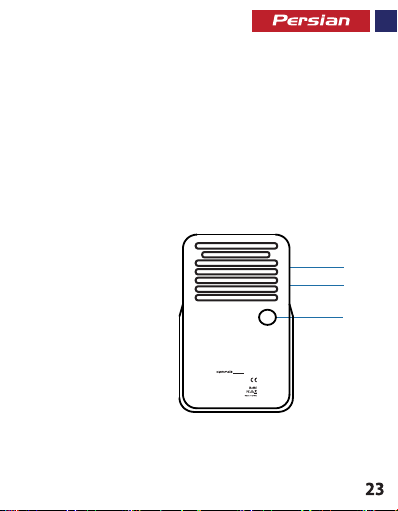
Appearance & Interface Description:
2
3
1
Beacon-1
· Rating Power: 8W
· Input: DC 5V, 1A
1. Power Button
2. Charging Input Port
3. USB Charging Port
· Output: DC 5V, 1A
· Battery Capacity: 5400mAh
S/N:
170266
www.promate.net
Operation Instructions:
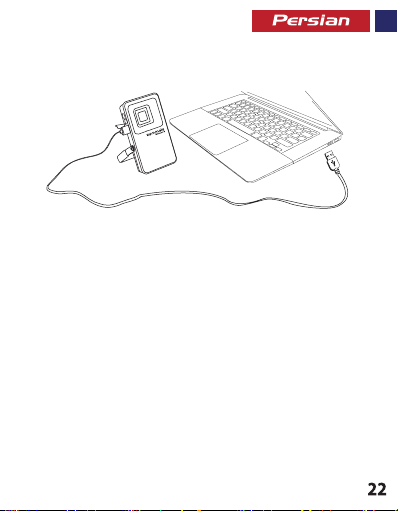
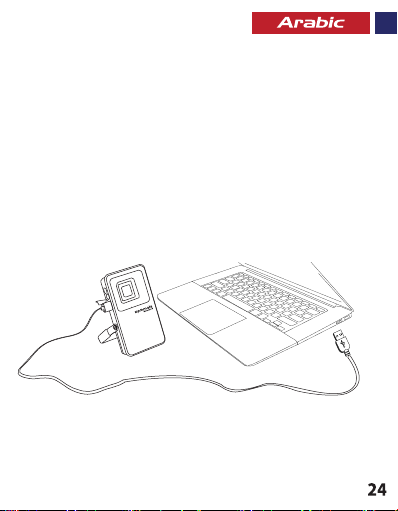
1. Charging Beacon-1
• Connect one end of the Micro-USB Cable Beacon-1 and the other end to a
desktop/laptop or a USB Power Adapter. The red LED will light up indicating that the
lamp is charging normally and will turn green once fully charged.
Page 5

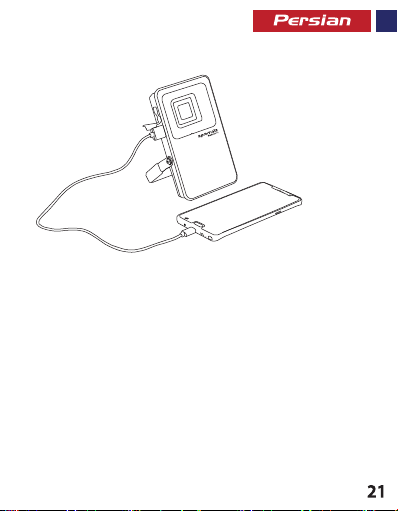
2. Charging USB chargeable devices using Beacon-1
• Plug the USB cable into the USB output port on Beacon-1 and the other end into the device.
3. Using the Lamp Feature:
• Press the power button to turn on/off the light and scroll through the LED modes
Page 6

Apariencia y Descripción de la interface
1. Botón de Encendido
2. Puerto de entrada para carga
3. Puerto de carga USB
· Rating Power: 8W
· Input: DC 5V, 1A
· Output: DC 5V, 1A
· Battery Capacity: 5400mAh
S/N:
170266
www.promate.net
2
3
1
Beacon-1
Page 7

Instrucciones de operación:
1.Carga del Beacon-1
• Conecte un extremo del Cable Micro-USB al Beacon-1 y el otro extremo a una
computadora de sobremesa o portátil o un adaptador de alimentación USB. El LED rojo
se iluminará indicando que la lámpara está cargando normalmente y se volverá verde
una vez esté completamente cargada
2. Carga de dispositivos cargables por el puerto USB con el Beacon-1
• Conecte el cable USB en el puerto de salida de carga USB del Beacon-1 y el otro
extremo en el dispositivo.
3. Uso de la función de lámpara:
• Pulse el botón de encendido para encender/apagar la luz y desplazarse por los
diferentes modos de la luz LED
Page 8

Aspect & Description Interface
1. Bouton de Marche
2. Port d’Entrée Chargement
3. Port Chargement USB
· Rating Power: 8W
· Input: DC 5V, 1A
· Output: DC 5V, 1A
· Battery Capacity: 5400mAh
S/N:
170266
www.promate.net
2
3
1
Beacon-1
Page 9

Mode d’emploi :
Mode d’emploi :
1. Chargement du Beacon-1
1. Chargement du Beacon-1
• Connectez une extrémité du câble Micro-USB au Beacon-1 et l’autre extrémité à
• Connectez une extrémité du câble Micro-USB au Beacon-1 et l’autre extrémité à
un ordinateur de bureau/ordinateur portable ou à un adaptateur d’alimentation USB.
un ordinateur de bureau/ordinateur portable ou à un adaptateur d’alimentation USB.
Le voyant LED rouge s’allume indiquant que la lampe se recharge normalement ;
Le voyant LED rouge s’allume indiquant que la lampe se recharge normalement ;
il devient vert lorsque l’appareil est complètement rechargé.
il devient vert lorsque l’appareil est complètement rechargé.
2. Chargement des périphériques USB avec le Beacon-1
2. Chargement des périphériques USB avec le Beacon-1
• Branchez le câble USB sur le port de sortie USB du Beacon-1 et l’autre
• Branchez le câble USB sur le port de sortie USB du Beacon-1 et l’autre
extrémité dans l’appareil.
extrémité dans l’appareil.
3. Utilisation de la Lampe
3. Utilisation de la Lampe
• Appuyez sur le bouton de marche pour allumer/éteindre et pour faire dérouler
• Appuyez sur le bouton de marche pour allumer/éteindre et pour faire dérouler
les modes LED.
les modes LED.
Page 10
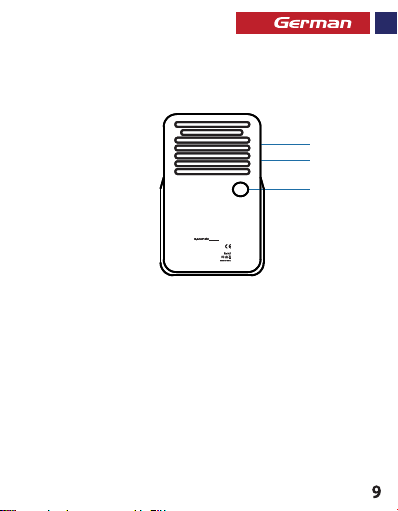
Aussehen & Schnittstellenbeschreibung
Aussehen & Schnittstellenbeschreibung
1. Einschalttaste
1. Einschalttaste
2. Ladeeingang
2. Ladeeingang
3. USB-Ladeanschluss
3. USB-Ladeanschluss
· Rating Power: 8W
· Rating Power: 8W
· Input: DC 5V, 1A
· Input: DC 5V, 1A
· Output: DC 5V, 1A
· Output: DC 5V, 1A
· Battery Capacity: 5400mAh
· Battery Capacity: 5400mAh
S/N:
S/N:
170266
170266
www.promate.net
www.promate.net
2
2
3
3
1
1
Beacon-1
Beacon-1
Page 11
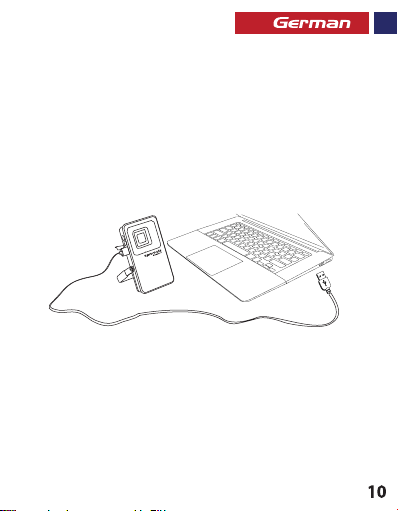
Bedienungsanleitung:
1. Laden des Beacon-1
• Verbinden Sie das eine Ende des Micro-USB-Kabels mit dem Beacon-1 und das
andere mit einem Desktop/Laptop oder einem USB-Stromadapter. Die rote LED
leuchtet auf und gibt an, dass die Lampe normal lädt und wechselt nach vollständiger
Aufladung auf grün.
2. Laden von USB-ladefähigen Geräten mit dem Beacon-1
• Stecken Sie das USB-Kabel in den USB-Ausgang am Beacon-1 und dem Gerät.
3. Verwendung der Lampenfunktion:
• Zum Ein-/Ausschalten des Lichts drücken Sie die Einschalttaste und blättern durch die LED-Modi
Page 12
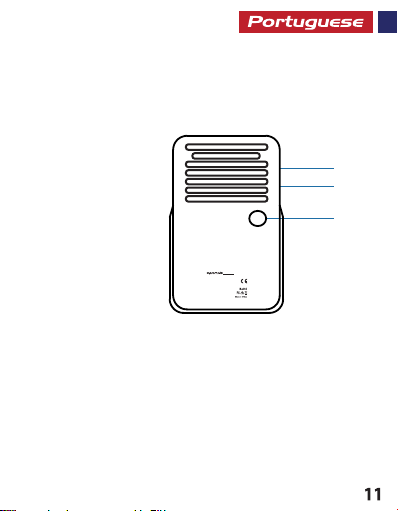
Aspeto e Descrição da Interface
1. Botão ligar/desligar
2. Porta de Entrada de Carregamento
3. Porta de Carregamento USB
· Rating Power: 8W
· Input: DC 5V, 1A
· Output: DC 5V, 1A
· Battery Capacity: 5400mAh
S/N:
170266
www.promate.net
2
3
1
Beacon-1
Page 13
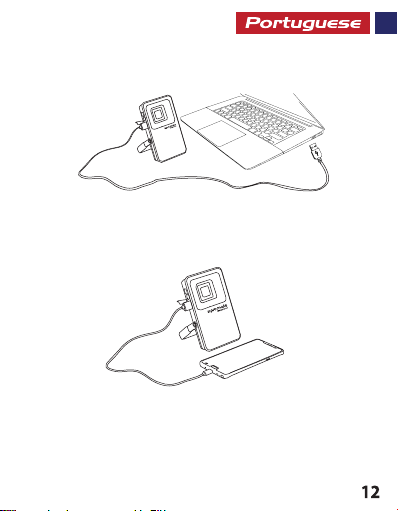
Instruções de Funcionamento:
1. Carregar o Beacon-1
• Ligue uma extremidade do Cabo Micro-USB Beacon-1 e a outra extremidade a um
desktop/portátil ou um Adaptador de Corrente USB. O LED vermelho irá acender a indicar
que a lâmpada está a carregar normalmente e ficará verde quando estiver totalmente
carregado.
2. Carregar dispositivos recarregáveis por USB com o Beacon-1
• Ligue o cabo USB à porta de saída USB no Beacon-1 e a outra extremidade ao dispositivo.
3. Utilizar a Funcionalidade de Lâmpada:
• Carregue no botão ligar/desligar para acender/apagar a luz e percorrer os modos LED
Page 14
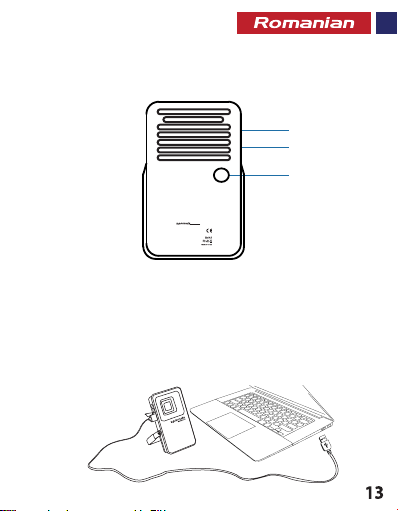
Descrierea aspectului și interfeței
1. Buton de pornire
2. Port intrare încărcare
3. Port USB încărcare
Instrucțiuni de folosire:
1. Încărcarea Beacon-1
· Rating Power: 8W
· Input: DC 5V, 1A
· Output: DC 5V, 1A
· Battery Capacity: 5400mAh
S/N:
170266
www.promate.net
2
3
1
Beacon-1
Page 15
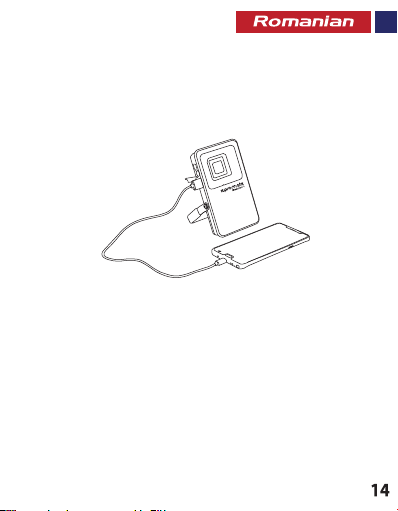
• Conectați un capăt al cablului micro-USB al Beacon-1, iar celălalt capăt la un
desktop/laptop sau un adaptor de alimentare USB. LED-ul roșu se va aprinde,
indicând faptul că lampa se încarcă normal, și va deveni verde când este încărcată
complet.
2. Încărcarea dispozitivelor cu conectare USB folosind Beacon-1
• Conectați cablul USB în portul USB de ieșire al Beacon-1, iar celălalt capăt în dispozitiv.
3. Utilizarea funcției Lampă:
• Apăsați butonul de pornire pentru a aprinde/stinge lumina și navigați printre modurile LED
Page 16
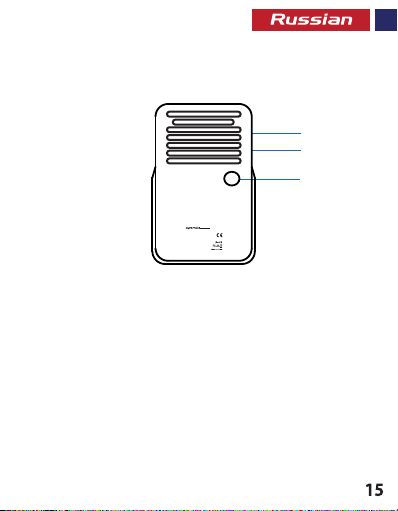
Описание внешнего вида и интерфейса
· Rating Power: 8W
· Input: DC 5V, 1A
· Output: DC 5V, 1A
· Battery Capacity: 5400mAh
S/N:
170266
www.promate.net
1. Кнопка питания
2. Входной порт зарядки
3. Порт зарядки USB
2
3
1
Beacon-1
Page 17
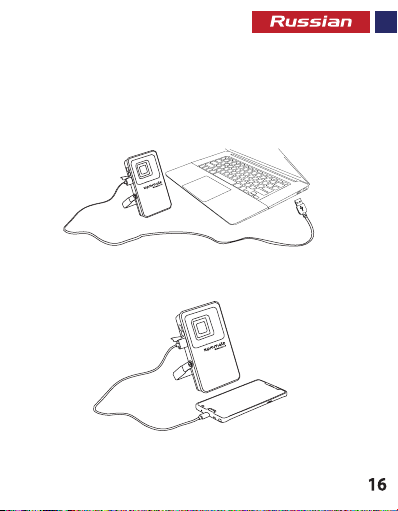
Инструкция по эксплуатации:
1. Зарядка Beacon-1
• Подключите один конец кабеля Micro-USB к Beacon-1, а другой - к
ноутбуку/настольному ПК или к адаптеру питания USB. Загорится красный
светодиодный индикатор, что означает, что выполняется нормальная зарядка
лампочки. Индикатор загорится зеленым цветом, когда зарядка будет
завершена.
2. Зарядка устройств, заряжаемых от USB-порта, при помощи Beacon-1
• Вставьте один конец кабеля USB в выходной порт USB на Beacon-1, а другой конец - в устройство.
3. Использование функции лампочки:
• Нажмите кнопку питания, чтобы включить/выключить свет и пройти по всем режимам светодиода
Page 18
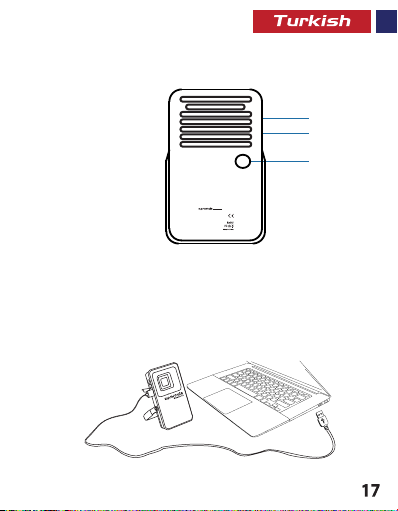
Dış Görünüm & Arayüz Tanımları
1. Güç Düğmesi
2. Şarj Giriş Yuvası
3. USB Şarj Yuvası
Kullanım Talimatları:
1. Beacon-1’i Şarj Etme
· Rating Power: 8W
· Input: DC 5V, 1A
· Output: DC 5V, 1A
· Battery Capacity: 5400mAh
S/N:
170266
www.promate.net
2
3
1
Beacon-1
Page 19
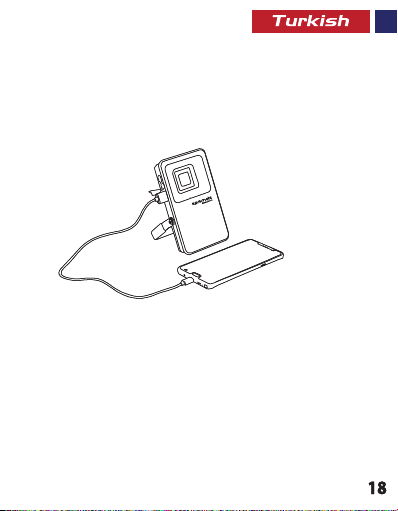
• Mikro-USB kablosunun bir ucunu Beacon-1’e diğer ucunu da bir masaüstü/dizüstü
• Mikro-USB kablosunun bir ucunu Beacon-1’e diğer ucunu da bir masaüstü/dizüstü
veya bir USB Güç Adaptörüne bağlayın. Lambanın normal şekilde şarj olduğunu
veya bir USB Güç Adaptörüne bağlayın. Lambanın normal şekilde şarj olduğunu
gösteren kırmızı LED yanacaktır. Tam şarj olduğunda yeşile dönecektir.
gösteren kırmızı LED yanacaktır. Tam şarj olduğunda yeşile dönecektir.
2. Beacon-1’i Kullanarak USB’den Şarj olan Cihazları Ş arj Etme
2. Beacon-1’i Kullanarak USB’den Şarj olan Cihazları Ş arj Etme
• USB kablosunu Beacon-1’deki USB çıkış yuvasına takın, diğer ucunu da cihazınıza takın.
• USB kablosunu Beacon-1’deki USB çıkış yuvasına takın, diğer ucunu da cihazınıza takın.
3. Lamba Özelliğini Kullanma:
3. Lamba Özelliğini Kullanma:
• Güç Düğmesine basarak ışığı açıp kapatın ve LED modları arasında geçiş yapın
• Güç Düğmesine basarak ışığı açıp kapatın ve LED modları arasında geçiş yapın
Page 20
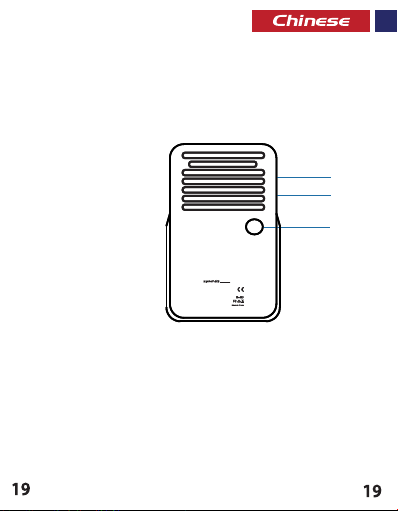
外观和接口说明
外观和接口说明
1. 电源按钮
1. 电源按钮
2. 充电输入端口
2. 充电输入端口
3. USB充电端口
3. USB充电端口
· Rating Power: 8W
· Rating Power: 8W
· Input: DC 5V, 1A
· Input: DC 5V, 1A
· Output: DC 5V, 1A
· Output: DC 5V, 1A
· Battery Capacity: 5400mAh
· Battery Capacity: 5400mAh
S/N:
S/N:
170266
170266
www.promate.net
www.promate.net
2
2
3
3
1
1
Beacon-1
Beacon-1
Page 21
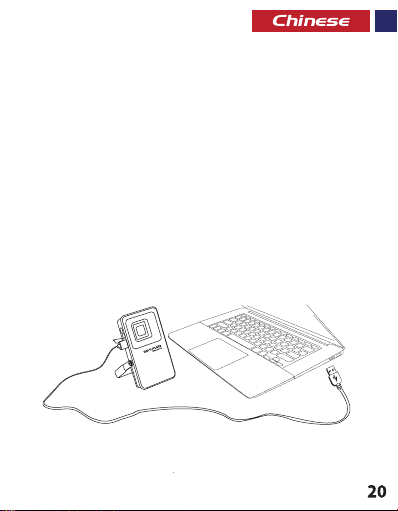
操作说明:
1. 给Beacon-1充电
• 将Beacon-1的Micro-USB线的一端连接到台式机/笔记本电脑或USB电源适配器。
红色LED指示灯将亮起,表明灯泡在正常充电,并且在充满电后会变绿。
2. 使用Beacon-1给可USB充电的设备充电
• 将USB线插入Beacon-1的USB输出端口,将另一端插入设备。
3. 使用灯泡功能:
• 按电源按钮即可开/关灯,并且可以在LED模式之间滚动切换
Page 22
Beacon-1
زا هدﺎﻔﺘﺳا ﺎﺑ USB ﺎﺑ ژرﺎﺷ ﻞﺑﺎﻗ یﺎﮭھﺎﮕﺘﺳد ندﺮﮐ ژرﺎﺷ .2
.ﺪﯿﻧﺰﺑ هﺎﮕﺘﺳد ﻪﺑ ار ﺮﮕﯾد ﺮﺳ و Beacon-1 یور USB ﯽﺟوﺮﺧ هﺎﮔرد ﻪﺑ ار USB ﻞﺑﺎﮐ •
غاﺮﭼ ﯽﮔﮋﯾو زا هدﺎﻔﺘﺳا .3
ﺪﯿھد رﺎﺸﻓ LED یﺎھ ﺖﻟﺎﺣ روﺮﻣ و غاﺮﭼ ندﺮﮐ شﻮﻣﺎﺧ و ﻦﺷور یاﺮﺑ ار شﻮﻣﺎﺧ و ﻦﺷور ﻪﻤﮐد •
Page 23
:تﺎﯿﻠﻤﻋ یﺎھ ﻞﻤﻌﻟارﻮﺘﺳد
Beacon-1 ندﺮﮐ ژرﺎﺷ .1
پﺎﺘﭙﻟ/یﺰﯿﻣور ﺮﺗﻮﯿﭙﻣﺎﮐ ﮏﯾ ﻪﺑ ار ﺮﮕﯾد ﺮﺳ و Beacon-1 ﻪﺑ ار Micro-USB ﻞﺑﺎﮐ ﺮﺳ ﮏﯾ •
رد غاﺮﭼ ﺪھد ﯽﻣ نﺎﺸﻧ ﻪﮐ دﻮﺷ ﯽﻣ ﻦﺷور LED ﺮﮕﻧﺎﺸﻧ .ﺪﯿﻧﺰﺑ ﺮﭙﻣآ USB قﺮﺑ ﺰﯾﺮﭘ ﺎﯾ
.ﺪﯾآ ﯽﻣ رد ﺰﺒﺳ ﮓﻧر ﻪﺑ ﻞﻣﺎﮐ ژرﺎﺷ ﺎﺑ و ﺖﺳا یدﺎﻋ ترﻮﺻ ﻪﺑ نﺪﺷ ژرﺎﺷ لﺎﺣ
Page 24
ﻂﺑار حﺮﺷ و ﺮھﺎﻇ
شﻮﻣﺎﺧ و ﻦﺷور ﻪﻤﮐد .1
ژرﺎﺷ یدورو هﺎﮔرد .2
USB ژرﺎﺷ هﺎﮔرد .3
Beacon-1
· Rating Power: 8W
· Input: DC 5V, 1A
· Output: DC 5V, 1A
· Battery Capacity: 5400mAh
S/N:
170266
www.promate.net
2
3
1
Page 25
:ﻞﯿﻐﺸﺘﻟا تﺎﻤﯿﻠﻌﺗ
Beacon-1 ﻦﺤﺷ .1
لﻮﺤﻤﺑ ﺮﺧﻵا فﺮﻄﻟاو Beacon-1 ﻊ ﻣ USB وﺮﻜﻳﺎﻤﻟا ﻞﺑﺎﻛ فاﺮطأ ﺪﺣأ ﻞﯿﺻﻮﺘ ﺑ ﻢﻗ •
ﻰﻟإ ًاﺮﯿﺸ ﻣ ﺮﻤﺣﻷا LED ﺮﺷﺆﻣ ءﻲﻀﻳ .لﻮﻤﺤﻣ ﺮﺗﻮﯿﺒﻤﻛ/ﻲﺒﺘﻜﻣ ﺮﺗﻮﯿﺒﻤﻜﺑ وأ USB ﺔﻗﺎط
.ﻦﺤﺸ ﻟا لﺎﻤﺘﻛا لﺎﺣ ﺮﻀﺧﻷا ﻰﻟإ ﺮﺷﺆﻤﻟا نﻮﻟ لﻮﺤﺘﻳو ﻦﺤﺸﻟا ﺔﻟﺎﺣ ﻲﻓ حﺎﺒﺼﻤﻟا نأ
Page 26
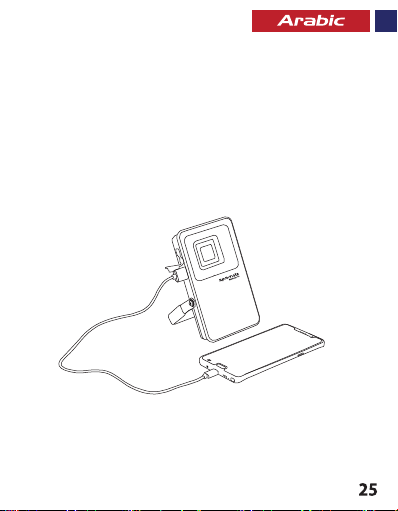
Beacon-1 ماﺪﺨﺘﺳﺎﺑ USBـﻟﺎﺑ ﻦﺤﺸﻠﻟ ﺔﻠﺑﺎﻘﻟا ةﺰﮭﺟﻷا ﻦﺤﺷ .2
.ﻪﻨﺤﺷ داﺮﻤﻟا زﺎﮭﺠﻟﺎﺑ ﺮﺧﻵا فﺮﻄﻟاو Beacon-1 ﻰﻠﻋ دﻮﺟﻮﻤﻟا USB ﺬﻔﻨﻤﺑ USB ـﻟا ﻞﺑﺎﻛ ﻞﯿﺻﻮﺘﺑ ﻢﻗ •
:حﺎﺒﺼﻤﻟا ﺔﯿﺻﺎﺧ ماﺪﺨﺘﺳا .3
ةءﺎﺿﻹا طﺎﻤﻧأ ﻦﯿﺑ ﻞﻳﺪﺒﺘﻟاو ةءﺎﺿﻹا فﺎﻘﻳإ\ﻞﯿﻐﺸﺘﻟ ﺔﻗﺎﻄﻟا رز ﻂﻐﺿا •
Page 27
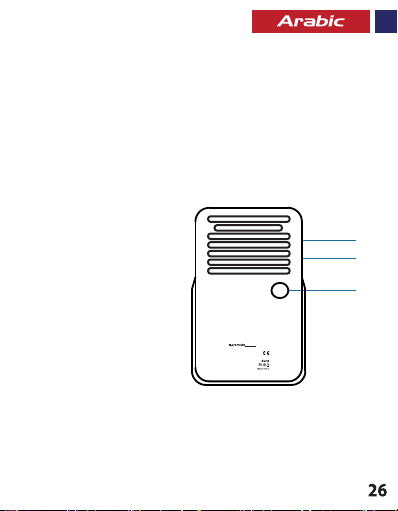
ﺔﮭﺟاﻮﻟا و ﻞﻜﺸﻟا ﻒﺻو
ﺔﻗﺎﻄﻟا رز .1
ﻦﺤﺸﻟا لﺎﺧدإ ﺬﻔﻨﻣ .2
USB ﻦﺤﺷ ﺬﻔﻨﻣ .3
Beacon-1
· Rating Power: 8W
· Input: DC 5V, 1A
· Output: DC 5V, 1A
· Battery Capacity: 5400mAh
S/N:
170266
www.promate.net
2
3
1
Page 28

 Loading...