

Page 1
AuraBoom
Wireless Multi-Function Speaker with Integrated
Qi Charging Station
FM Radio Function • LED Alarm Clock
Page 2

Introduction
Set yourself free of wires with AuraBoom. No more fumbling with charging cables late at night or
knocking things off your bedside table. AuraBoom features a Qi standard wireless charger to
effortlessly recharge your phone simply by placing your phone on the induction charging surface.
The multi-function LED alarm clock has incredibly robust sound from the dual 10 Watt speaker.
Connect your phone via Bluetooth to stream your favourite music or plug in a music player using
the auxiliary line-in.
Packaging Contents:
• Auraboom
• User Guide
• 3.5mm AUX Cable
• Charging Cable
Specification:
• Bluetooth Version: v4.2
• Bluetooth Chipset: ATS2825
• Bluetooth Profile: HFP, HSP, A2DP
• Battery Capacity: 4400mAh
• Battery Type: Lithium-Ion
• Input: 5V, 2A
• Wireless Charger Output: 5V, 1A
• Speaker Output: 5W*2
• Impedance: 4Ω
• Frequency Response: 60Hz-20KHz
• Charging Distance: 4-6mm
• Charging Efficiency: 75%
Features:
• Intuitive Alarm Clock: Basic and easy to use, this single-day alarm features a gentle ramping tone.
• Powerful Speaker: A multi-function 10watt speaker that takes your music listening experience
on to the next level
• Easy Music Navigation: Easy navigation through your playlist with the help of a soft touch
control panel
• Flexible Charging Area: Built-in coil offers you flexible charging area and more unlimited
wireless charging experience.
• Adaptive Charging Technology: The power output adapts to your devices to provide the
safest maximum charging output per port.
• Universal Connectivity: Compatible with all Qi compatible
• Safe: Features a smart circuit which ensures protection from overheating,
over-current & short-circuit
Compatibility:
AuraBoom is compatible with Qi Wireless Chargeable Devices
Page 3

Precautions
Please read all safety instructions and warnings thoroughly before using this product. Improper use
of this product may result in damage to this or attached products.
1. Do not disassemble the product or attempt to fix it.
2. Kindly use an original charging cable provided to charge the product.
3. Do not attempt to replace any part of this product or battery inside.
4. Do not crush, puncture, dispose of in fire, short the contacts or expose the product to water or
other liquids.
5. Do not store or use the product in a high-temperature environment, including intense sunlight or
heat.
6. Avoid drops, bumps, abrasions and impacts.
7. If there is any reason to believe that there is damage to the product, discontinue use immediately.
8. If you find that the product is too hot, is emitting an odour, or is deformed, punctured or exhibits
any suspicious or abnormal behaviour, discontinue use immediately and contact our customer
service.
Page 4
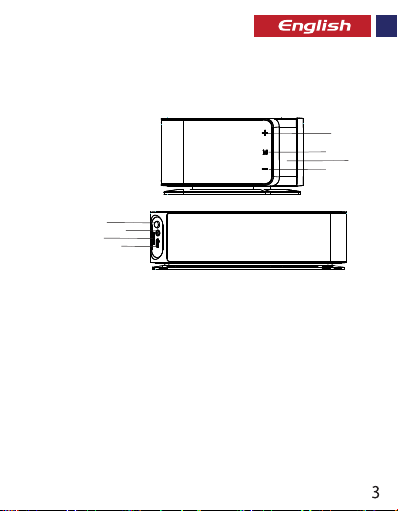
Appearance & Interface Description
1. Volume + Button
2. Multifunction Button
3. LED Display
4. Volume – Button
5. Power Button
6. AUX Port
7. MicroSD Card Slot
8. Charging Input
5
6
7
8
Operation Instructions
Charging The Speaker
•
Use the provided cable to charge the Speaker.
•
Connect one end of the USB Cable provided to The Speaker and the other end to any 5V/2A USB
Power Socket.
•
The LED charging indicator turns Red while charging and turns off once fully charged
Turn the Speaker On/Off
•
When the speaker is powered off, press and hold the power button for about 3 seconds to turn
on the speaker
•
Press and again the power button again to turn off the speaker
Set The Time:
•
Short press the Multifunction button to make the hour digits blink.
•
Set hour by pressing – or + button.
•
Short press Multifunction button again to make the minute digits blink.
•
Set minute by pressing – or + button.
•
Do not press any other buttons for 5 seconds to set the time.
1
2
4
3
Page 5

Set an Alarm
•
Long press Multifunction button to enter into Alarm mode and the hour digit wll blink.
•
Set hour by pressing – or + button.
•
Short press Multifunction button again to make the minute blink.
•
Set minute by pressing – or + button.
•
Do not press any other buttons for 3 seconds to set the alarm.
Turn off alarm
•
To turn off the alarm, press and hold the Multifunction button for a few seconds until
the Alarm icon turns off
Bluetooth Playback
•
When the speaker is powered on, short press the power button to enter Bluetooth
mode.
•
Turn on the Bluetooth function on your device and select the speaker name in the
available devices list.
•
Some Bluetooth devices may require you to enter a passcode to pair your device to The
Speaker. Enter “0000” and press submit.
AUX Function
•
Insert Line-in cable to AUX socket in the back of speaker to connect external player
device or computer.
•
The speaker will automatically enter AUX mode.
Control music Playback
•
Press Multifunction button to play/pause the music.
•
Long Press – or + to control the volume.
•
Short Press – or + to control the music playback.
FM Radio Mode
•
Long press Multifunction button to enter FM mode.
•
Short Press Multifunction Button to search and store the FM Stations
•
Press – or + to choose radio station
•
Press and hold – or + to change volume.
•
Press FM Button one more time to exit FM mode.
•
FM radio mode may not function well, when wirelessly charging your smartphone
Page 6

Call Management
•
While in Bluetooth mode, press Multifunction button to accept a call.
•
Press Multifunction icon again to hang up the call.
•
Long press the Multifunction button to reject an incoming call.
Troubleshooting
The Speaker does not pair with a Bluetooth device:
•
Check if the Bluetooth hardware on your device supports A2DP profile which is necessary for
sound transmission over Bluetooth.
Page 7
Page 8
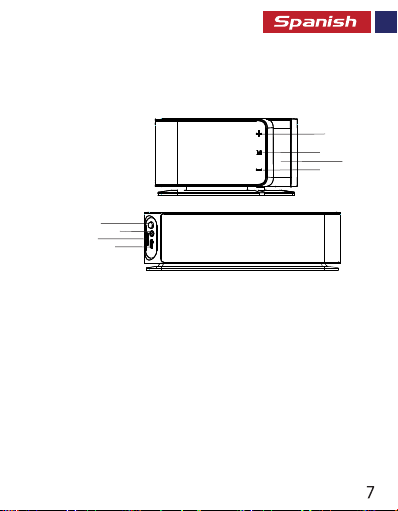
Aspecto y descripción de la interfaz
1. Botón de Volumen
2. Botón multifunción
3. Pantalla LED
4. Botón de Volumen
5. Botón de encendido
6. Puerto AUX
7. Ranura para tarjeta micro SD
8. Entrada de carga
5
6
7
8
Instrucciones de operación:
Encienda/Apague el Altavoz
• Cuando el altavoz está apagado, mantenga presionado el botón de encendido durante
aproximadamente 3 segundos para encenderlo
• Para apagar el altavoz presione el botón de encendido nuevamente
Ajustar la hora:
• Presione brevemente el botón Multifunción para hacer que los dígitos de la hora
parpadeen.
• Ajuste la hora presionando el botón - o +.
• Nuevamente, presione brevemente el botón Multifunción para hacer que los dígitos de los
minutos parpadeen.
• Ajuste los minutos presionando el botón - o +.
• No presione ningún otro botón durante 5 segundos para establecer la hora.
1
2
3
4
Page 9

Ajustar la alarma
• Mantenga presionado el botón Multifunción para ingresar al modo de alarma y el dígito de
la hora parpadeará.
• Ajuste la hora presionando el botón - o +.
• Nuevamente, presione brevemente el botón Multifunción para hacer que los dígitos de los
minutos parpadeen
• Ajuste los minutos presionando el botón - o +.
• No presione ningún otro botón durante 3 segundos para establecer la alarma.
Desactivar la alarma
• Para desactivar la alarma, mantenga presionado el botón Multifunción durante unos segundos
hasta que el icono de alarma se apague
Reproducción de Bluetooth
• Cuando el altavoz está encendido, presione brevemente el botón de encendido para ingresar al
modo Bluetooth.
• Encienda la función Bluetooth en su dispositivo y seleccione el nombre del altavoz en la lista de
dispositivos disponibles.
• Algunos dispositivos Bluetooth pueden requerir que ingrese un código de acceso para
emparejar su dispositivo con el Altavoz. Ingrese "0000" y presione enviar.
Función AUX
• Enchufe el el cable de entrada de línea en el conector AUX en la parte posterior del altavoz para
conectar el dispositivo reproductor externo al ordenador.
• El altavoz entrará automáticamente en modo AUX.
Controle la reproducción de música
• Presione el botón Multifunción para reproducir/pausar la música
• Para controlar el volumen, mantenga presionado - o +.
• Para controlar la reproducción de música. presione brevemente - o +.
Modo de radio FM
• Mantenga presionado el botón Multifunción para ingresar al modo FM.
• Presione brevemente el botón multifunción para buscar y almacenar las estaciones FM
• Presione - o + para elegir la estación de radio
• Mantenga presionado - o + para cambiar el volumen.
• Presione el botón FM una vez más para salir del modo FM.
• El modo de radio FM puede no funcionar bien cuando se carga de forma inalámbrica su
teléfono inteligente
Page 10

Gestión de llamadas
• Mientras está en modo Bluetooth, presione el botón Multifunción para aceptar una llamada.
• Presione el ícono multifunción nuevamente para colgar la llamada.
• Mantenga presionado el botón Multifunción para rechazar una llamada entrante
Solución de problemas
Presione el botón Multifunción para reproducir/pausar la música
• Verifique si el hardware Bluetooth en su dispositivo es compatible con el perfil
A2DP que es necesario para la transmisión de sonido a través de Bluetooth.
Page 11
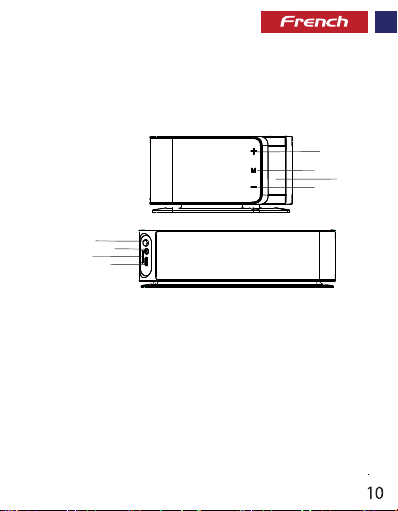
Aspect & Description Interface
1. Bouton Volume +
2. Bouton Multifonction
3. Affichage LED
4. Bouton Volume –
5. Bouton Mise en Marche
6. Port AUX
7. Fente pour Carte MicroSD
8. Entrée Charge
5
6
7
8
Chargement de l’Enceinte
• Utilisez le câble fourni pour charger l’Enceinte.
• Connectez une des extrémités au Câble USB de l’Enceinte et l’autre extrémité à une Prise
Électrique USB 5V/2A.
• L’indicateur LED de charge devient Rouge pour indiquer que l’appareil est en train de se charger.
Il s’éteindra lorsque la charge sera finie.
Allumer et Eteindre l’Enceinte
• Lorsque l'enceinte est éteinte, appuyez pendant 3 secondes sur le bouton de Mise en Marche
pour l’allumer.
• Appuyez à nouveau sur le bouton de mise en marche pour éteindre l’enceinte.
1
2
3
4
Page 12

Réglage de l’Heure :
• Appuyez brièvement sur le bouton Multifonction pour faire clignoter les
chires des heures.
• Réglez l’heure en appuyant sur le bouton – ou +.
• Appuyez brièvement à nouveau sur le bouton Multifonction pour faire clignoter les
chires des minutes.
• Réglez les minutes en appuyant sur le bouton – ou +.
• N’appuyez sur aucune autre touche pendant 5 secondes pour régler l’heure.
clignoter les chires des minutes.
Réglage de l’Alarme :
• Appuyez longuement sur le bouton Multifonction pour passer en mode
Alarme et faire clignoter les chires des heures.
• Réglez en appuyant sur le bouton – ou +.
• Appuyez brièvement sur le bouton Multifonction pour faire clignoter les
chires des minutes.
• Réglez les minutes en appuyant sur le bouton – ou +.
• N’appuyez aucun autre bouton pendant 3 secondes pour régler l’alarme.
clignoter les chires des minutes.
Éteindre l’alarme
• Pour éteindre l’alarme, appuyez pendant quelques secondes sur le bouton
Multifonction jusqu’à ce que l’icône de l’alarme s’éteigne.
chires des minutes.
Lecture Bluetooth
• Lorsque l’enceinte est allumée, appuyez brièvement sur le bouton mise en
marche pour passer en mode Bluetooth.
• Activez la fonction Bluetooth sur votre périphérique et sélectionnez le nom
de l'enceinte sur la liste des périphériques disponibles.
• Certains appareils Bluetooth demandent un mot de passe pour apparier
votre appareil à l'enceinte. Tapez « 0000 » et appuyez sur soumettre (valider).
Page 13

Fonction AUX
• Insérez le câble Line-in dans la prise à l’arrière de l'enceinte pour connecter
le périphérique lecteur externe ou un ordinateur.
• L’enceinte se mettra automatiquement en mode AUX.
Contrôle de la Lecture de la Musique
• Appuyez sur le Bouton Multifonction pour faire lecture/pause pendant la
reproduction de la musique.
• Appuyez longuement sur les boutons – ou + pour contrôler le volume.
• Appuyez brièvement sur les boutons – ou + pour contrôler la musique.
Mode Radio FM
• Appuyez longuement sur le bouton Multifonction pour entrer en mode FM.
• Appuyez brièvement sur le Bouton Multifonction pour chercher et enregistrer des
chaînes FM.
• Appuyez sur les boutons – ou + pour choisir votre chaîne radio.
• Appuyez et gardez appuyé les boutons – ou + pour augmenter ou baisser le volume.
• Appuyez à nouveau sur le Bouton FM pour quitter le mode FM.
• Le mode radio FM peut ne pas marcher très bien lorsque votre smartphone
se charge sans ls.
Gestion des Appels
• Pendant que vous êtes en mode Bluetooth, appuyez sur le bouton Multifonction
pour accepter un appel.
• Appuyez à nouveau sur l’icône Multifonction pour raccrocher un appel.
• Appuyez longuement sur le bouton Multifonction pour rejeter un appel entrant.
Dépannage
L’Enceinte ne peut pas s’apparier avec le périphérique Bluetooth
• Vériez si le matériel Bluetooth sur votre appareil prend en charge le prol A2DP
nécessaire à la transmission des sons via Bluetooth.
Page 14
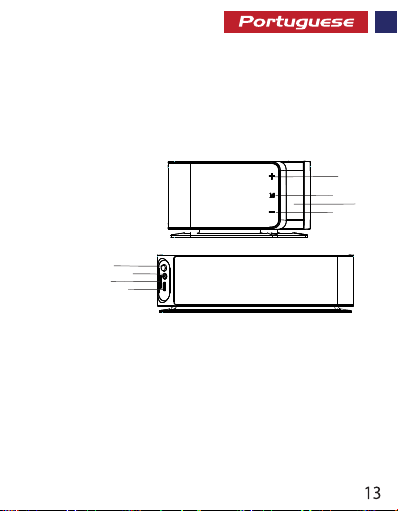
Aparência e descrição da interface
1. Botão de Volume +
2. Botão multifunções
3. Visor LED
4. Botão de Volume –
5. Botão de alimentação
6. Porta AUX
7. Ranhura de cartão Micro SD
8. Entrada de carregamento
5
6
7
8
Instruções de funcionamento
Carregar o altifalante
• Use o cabo fornecido para carregar o altifalante.
• Ligue uma extremidade do cabo USB fornecido ao altifalante e a outra
extremidade a qualquer tomada USB de 5V/2A.
• O LED indicador de carregamento cará vermelho durante o carregamento
e desligar-se-á quando totalmente carregado
1
2
3
4
Page 15

Ligar/desligar o altifalante
• Quando o altifalante estiver desligado, prima e mantenha premido o botão de alimentação
durante cerca de 3 segundos para o ligar
• Prima novamente o botão de alimentação para desligar o altifalante
Acertar a hora
• Prima brevemente o botão multifunções para fazer com que os dígitos das horas quem
intermitentes.
• Denir a hora pressionando – ou +.
• Prima novamente o botão multifunções de forma breve para fazer com que os dígitos dos
minutos quem a piscam.
• Dena os minutos pressionando – ou +.
• Não prima quaisquer outros botões durante 5 segundos para acertar a hora.
Denir um alarme
• Prima o botão multifunções para entrar no modo de Alarme e o dígito das horas
começará a piscar.
• Dena a hora premindo – ou +.
• Prima novamente o botão multifunções de forma breve para que os minutos comecem
a piscar.
• Dena os minutos pressionando o botão – ou +.
• Não prima quaisquer outros botões durante 3 segundos para denir o alarme.
Desligar o alarme
• Para desligar o alarme, prima e segure o botão multifunções por alguns segundos até que
o ícone do alarme se desligue
Reprodução por Bluetooth
• Quando o altifalante estiver ligado, prima o botão de alimentação para selecionar o modo
Bluetooth.
• Ative a função Bluetooth no seu dispositivo e selecione o nome do altifalante na lista de
dispositivos disponíveis.
• Alguns dispositivos Bluetooth podem exigir que digite um código para emparelhar o
dispositivo com o altifalante. Digite "0000" e prima o botão de Enviar.
Função AUX
• Insira o cabo Line-in na tomada AUX na parte de trás do altifalante para ligar um dispositivo
de leitura externa ou um computador.
• O altifalante entrará automaticamente no modo AUX.
Page 16

Controlar a reprodução de música
• Prima o botão multifunções para reproduzir ou colocar a música em pausa.
• Prima longamente – ou + para controlar o volume.
• Prima brevemente – ou + para controlar a reprodução de música.
Modo de rádio FM
• Prima o botão multifunções para entrar no modo FM.
• Prima brevemente o botão multifunções para procurar e guardar as estações de FM
• Prima + ou – para escolher a estação de rádio
• Prima e segure – ou + para alterar o volume.
• Prima o botão FM mais uma vez para sair do modo FM.
• O modo de rádio FM pode não funcionar bem, quando estiver a carregar o seu smartphone
pelo processo sem os
Gestão de chamadas
• Enquanto estiver no modo Bluetooth, prima o botão multifunções para aceitar uma
chamada.
• Prima o ícone de multifunção novamente para desligar a chamada.
• Prima o botão multifunções para rejeitar uma chamada recebida.
Resolução de problemas
O altifalante não emparelha com um dispositivo Bluetooth
• Verique se o hardware de Bluetooth no dispositivo suporta o perl A2DP que é necessário
para a transmissão de som através de Bluetooth.
Page 17
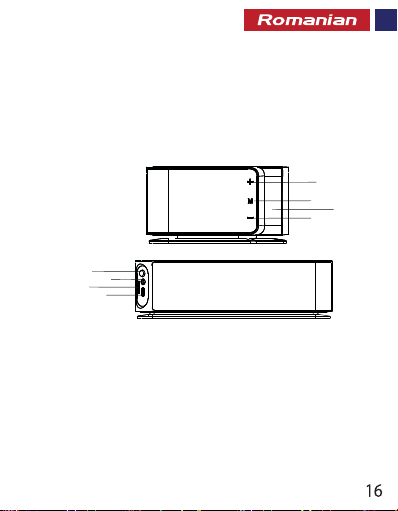
ț
s
e
r
A
i
r
p
c
e
e
s
D
ă
f
r
a
t
I
e
c
t
e
n
i
ș
1. Buton Volum +
2. Buton multifuncțional
3. Așaj LED
4. Buton Volum –
5. Butonul de Alimentare
6. Port AUX
7. Slot Card MicroSD
8. Input de Încărcare
5
7
8
6
1
2
3
4
Instrucțiuni de Utlizare
Încărcarea Difuzorului
• Utilizați cablul furnizat pentru a încărca Difuzorul.
• Conectați un capăt al Cablului USB furnizat la Difuzor și celălalt capăt la orice
Mufă de Alimentare USB de 5V/2A.
• Indicatorul LED de încărcare se aprinde în Roșu în timpul încărcării și se oprește
după încărcarea completă
Page 18

Pornirea/Oprirea Difuzorului
• Când difuzorul este oprit, apăsați și mențineți apăsat butonul de alimentare timp
de aproximativ 3 secunde pentru a porni difuzorul
• Apăsați din nou butonul de alimentare pentru a opri difuzorul
Setați Ora
• Apăsați scurt butonul Multifuncțional pentru ca cifrele să clipească.
• Setați ora apăsând butonul - sau +.
• Apăsați din nou butonul Multifuncțional pentru ca cifrele minutelor să clipească.
• Setați minutul apăsând butonul - sau +.
• Nu apăsați alte butoane timp de 5 secunde pentru a seta ora.
Setați o Alarmă
• Apăsați lung butonul Multifuncțional pentru a intra în modul Alarmă, iar cifra va clipi.
• Setați ora apăsând butonul - sau +.
• Apăsați scurt din nou butonul Multifuncțional pentru ca minutul să clipească.
• Setați minutul apăsând butonul - sau +.
• Nu apăsați alte butoane timp de 3 secunde pentru a seta alarma.
Opriți alarma
• Pentru a opri alarma, apăsați și țineți apăsat butonul Multifuncțional timp de câteva
secunde până când pictograma Alarmă se stinge
Redare Bluetooth
• Când difuzorul este pornit, apăsați scurt butonul de alimentare pentru a intra în
mod Bluetooth.
• Activați funcția Bluetooth pe dispozitivul dvs. și selectați numele difuzoarelor din
lista de dispozitive disponibile.
• Unele dispozitive Bluetooth pot solicita să introduceți un cod de acces pentru a vă
asocia dispozitivul cu Difuzorul. Introduceți "0000" și apăsați trimitere.
Funcția AUX
• ntroduceți cablul de conectare la mufa AUX din spatele difuzorului pentru a conecta
dispozitivul de player extern sau computerul.
• Difuzorul va intra automat în mod AUX.
Page 19

Controlul Redării muzicii
• Apăsați butonul Multifuncțional pentru a reda/întrerupe muzica.
• Apăsați Lung - sau + pentru a controla volumul.
• Apăsați Scurt - sau + pentru a controla redarea muzicii.
Modul Radio FM
• Apăsați lung butonul Multifuncțional pentru a intra in mod FM.
• Apăsați Scurt Butonul Multifuncțional pentru a căuta și stoca Stațiile FM.
• Apăsați – sau + pentru a alege postul de radio
• Apăsați și țineți apăsat – sau + pentru a schimba volumul.
• Apăsați din nou Butonul Fm pentru a ieși din modul FM.
• Este posibil ca modul FM să nu funcționeze bine, atunci când încărcați fără r
smartphone-ul dvs.
Gestionarea Apelurilor
• În modul Bluetooth, apăsați butonul Multifuncțional pentru a accepta un apel.
• Apăsați din nou pictograma Multifuncțional pentru a termina apelul.
• Apăsați lung butonul Multifuncțional pentru a respinge un apel primit.
Depanare
Difuzorul nu se asociază cu un dispozitiv Bluetooth:
• Vericați dacă hardware-ul Bluetooth de pe dispozitivul dvs. acceptă prolul A2DP
necesar pentru transmiterea sunetului prin Bluetooth.
1
8
Page 20
1
9
Page 21
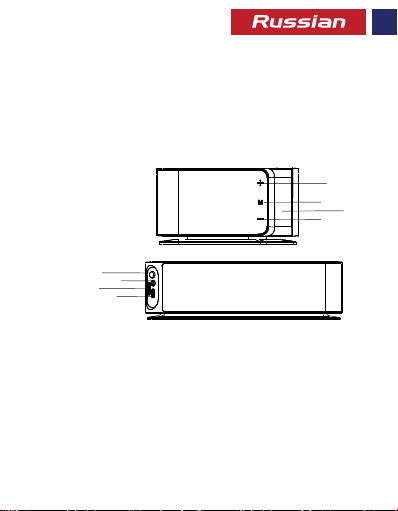
Описание внешнего вида и интерфейса
1. Кнопка увеличения громкости
2. Многофункциональная кнопка
3. Светодиодный дисплей
4. Кнопка уменьшения громкости
5. Кнопка питания
6. Порт AUX
7. Слот для карты microSD
8. Вход для зарядки
5
6
7
8
Инструкция по эксплуатации
Зарядка динамика
• Для зарядки динамика используйте входящий в комплект кабель.
• Подключите один конец входящего в комплект кабеля USB к динамику, а
другой конец – к любому порту USB 5 В/2 А.
• Во время зарядки светодиодный индикатор горит красным цветом, а по
завершении зарядки выключается
1
2
4
3
2
0
Page 22

Включение/выключение динамика
• Если динамик выключен, нажмите и в течение примерно 3 секунд удерживайте
кнопку питания, чтобы включить динамик
• Снова нажмите и удерживайте кнопку питания, чтобы выключить динамик
Установка времени
• Коротко нажмите многофункциональную кнопку, чтобы показывающие часы
цифры начали мигать.
• Установите час при помощи кнопки – или +.
• Снова коротко нажмите многофункциональную кнопку, чтобы показывающие
минуты цифры начали мигать.
• Установите минуты при помощи кнопки – или +.
• Чтобы установить время, не нажимайте никакие другие кнопки на протяжении
5 секунд.
Установка будильника
• Нажмите и удерживайте многофункциональную кнопку, чтобы войти в режим
будильника. Показывающие часы цифры начнут мигать.
• Установите час при помощи кнопки – или +.
• Снова коротко нажмите многофункциональную кнопку, чтобы минуты
начали мигать.
• Установите минуты при помощи кнопки – или +.
• Чтобы установить будильник, не нажимайте никакие другие кнопки на
протяжении 3 секунд.
Выключение будильника
• Чтобы выключить будильник, нажмите и в течение нескольких секунд
удерживайте многофункциональную кнопку, пока значок будильника
не погаснет
Воспроизведение по Bluetooth
• При включенном динамике коротко нажмите кнопку питания, чтобы войти в
режим Bluetooth.
• Включите функцию Bluetooth на своем устройстве и выберите имя динамика
из списка доступных устройств.
• Некоторые устройства Bluetooth могут потребовать от вас ввести код-пароль,
чтобы выполнить сопряжение вашего устройства с динамиком. Введите "0000"
и нажмите "Submit".
2
1
Page 23

Функция AUX
• Вставьте кабель Line-in в разъем AUX на задней части динамика, чтобы
подключить внешнее устройство воспроизведения или компьютер.
• Динамик автоматически войдет в режим AUX.
Управление воспроизведением музыки
• Нажмите многофункциональную кнопку, чтобы воспроизвести/приостановить
воспроизведение музыки.
• Для регулировки громкости нажмите и удерживайте кнопку – или +.
• Для управления воспроизведением музыки коротко нажмите кнопку – или +.
Режим FM-радио
• Нажмите и удерживайте многофункциональную кнопку, чтобы войти в режим FM.
• Коротко нажмите многофункциональную кнопку, чтобы выполнить поиск
FM-радиостанций и сохранить их
• Чтобы выбрать радиостанцию, нажмите - или +.
• Чтобы изменить громкость, нажмите и удерживайте - или +.
• Чтобы выйти из режима FM, еще раз нажмите на кнопку FM.
• Во время беспроводной зарядки смартфона режим FM-радио может работать
с перебоями.
Управление звонками
• В режиме Bluetooth нажмите многофункциональную кнопку, чтобы принять
звонок.
• Еще раз нажмите многофункциональную кнопку, чтобы завершить звонок.
• Нажмите и удерживайте многофункциональную кнопку, чтобы отклонить
входящий звонок.
Поиск и устранение неисправностей
Динамик не может выполнить сопряжение с устройством Bluetooth
• Проверьте, поддерживает ли аппаратное обеспечение Bluetooth на вашем
устройстве профиль A2DP, необходимый для передачи звука через Bluetooth.
2
2
Page 24
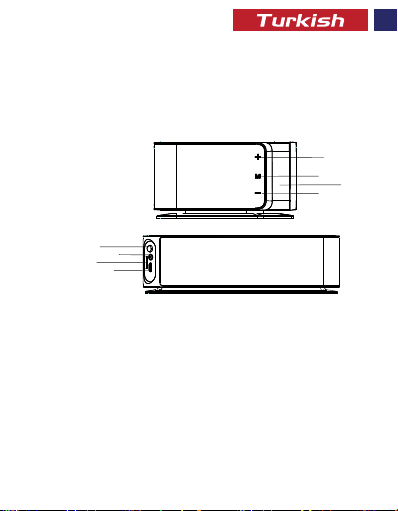
a
ı
ı
r
r
y
z
ü
A
T
ü
n
ü
ö
G
m
1. Ses + Düğmesi
2. Çoklu Fonksiyon Düğmesi
3. LED Ekran
4. Ses – Düğmesi
5. Güç Düğmesi
6. AUX Çıkışı
7. MicroSD Kart Girişi
8. Şarj Girişi
ı
l
l
a
n
m
u
K
Hoparlörü Şarj Etme
• Hoparlörü şarj etmek için, verilen kabloyu kullanın.
• Sağlanan USB Kablosunun bir ucunu Hoparlör ve diğer ucunu herhangi bir 5V / 2A USB
Güç Soketine bağlayın.
• Şarj olurken LED şarj göstergesi Kırmızı yanar ve tam şarj olduğunda kapanır.
Hoparlörün Açılıp / Kapatılması
• Hoparlör kapalıyken, hoparlörü açmak için güç düğmesini yaklaşık 3 saniye basılı tutun.
• Hoparlörü kapatmak için tekrar güç düğmesine basın
a
n
&
T
m
1
2
3
4
5
6
7
8
i
t
ı
l
a
a
m
2
3
Page 25

Saati Ayarlama
• Saat hanelerinin yanıp sönmesini sağlamak için Çoklu Fonksiyon Düğmesine kısa
süreyle basın.
• - veya + düğmesine basarak saati ayarlayın.
• Dakika hanesinin yanıp sönmesini sağlamak için kısa süreli Çoklu Fonksiyon
Düğmesine basın.
• - veya + düğmesine basarak dakikayı ayarlayın.
• Saati ayarlamak için 5 saniye boyunca başka hiçbir düğmeye basmayın.
Alarm Kurma
• Alarm moduna girmek için Uzun basma Çoklu Fonksiyon Düğmesine uzun basın, saat
hanesi yanıp sönmeye başlayacaktır.
• - veya + düğmesine basarak saati ayarlayın.
• Dakika hanesinin yanıp sönmesini sağlamak için Çoklu Fonksiyon Düğmesine kısa
süreli basın.
• - veya + düğmesine basarak dakikayı ayarlayın.
• Alarmı ayarlamak için 3 saniye boyunca başka hiçbir düğmeye basmayın.
Alarmı Kapatma
• Alarmı kapatmak için, Alarm simgesi kapanana kadar Çoklu Fonksiyon Düğmesine
birkaç saniye basılı tutun.
Bluetooth’tan Oynatma
• Hoparlör açıldığında, Bluetooth moduna girmek için kısa bir süre güç düğmesine basın.
• Cihazınızdaki Bluetooth işlevini açın ve mevcut cihazlar listesinden hoparlör adını seçin.
• Bazı Bluetooth cihazları, cihazınızı Hoparlör ile eşleştirmek için bir şifre girmenizi
gerektirebilir. “0000” girin ve onaylayın.
AUX Fonksiyonu
• Harici oynatıcı cihazını veya bilgisayarı bağlamak için Line-In kablosunu hoparlörün
arkasındaki AUX soketine takın.
• Hoparlör otomatik olarak AUX moduna girer.
Çalan Müzik Kontrolü
• Müziği çalmak / duraklatmak için Çoklu Fonksiyon Düğmesine basın.
• Ses seviyesini kontrol etmek için - veya + düğmesine uzun basın.
• Çalan müziği kontrol etmek için - veya + düğmesine kısa basın.
2
4
Page 26

FM Radyo Modu
• FM moduna girmek için Çoklu Fonksiyon Düğmesine uzun basın.
• FM İstasyonlarını aramak ve saklamak için Çoklu Fonksiyon Düğmesine kısa basın.
• Radyo istasyonunu seçmek için - veya + tuşlarına basın.
• Sesi değiştirmek için - veya + tuşunu basılı tutun.
• FM modundan çıkmak için bir kez daha FM düğmesine basın.
• Akıllı telefonunuzu kablosuz olarak şarj ederken, FM radyo modu iyi çalışmayabilir.
Çağrı Yönetimi
• Bluetooth modundayken, bir çağrıyı kabul etmek için Çoklu Fonksiyon Düğmesine basın.
• Aramayı bekletmek için Çoklu Fonksiyon Düğmesi simgesine tekrar basın.
• Gelen aramayı reddetmek için Çoklu Fonksiyon Düğmesi uzun basın.
Sorun Giderme
Hoparlör bir Bluetooth cihazı ile eşleşmiyor ise
• Cihazınızdaki Bluetooth donanımının Bluetooth üzerinden ses iletimi için gereken
A2DP prolini destekleyip desteklemediğini kontrol edin.
2
5
Page 27
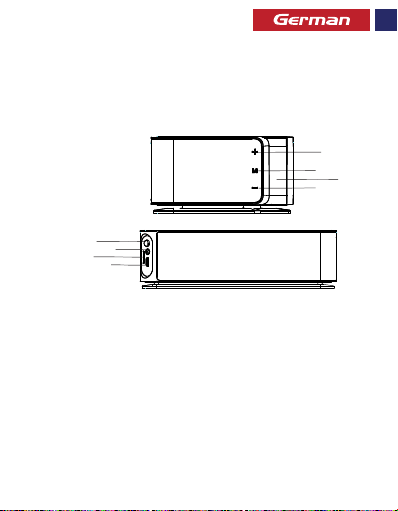
Beschreibung von Aussehen & Interface
1. Taste Lautstärke +
2. Multifunktionstaste
3. LED-Anzeige
4. Taste Lautstärke –
5. Netztaste
6. AUX-Anschluss
7. MicroSD-Kartenschlitz
8. Ladeeingang
5
6
7
8
Bedienungsanleitung
Den Lautsprecher auaden
• Benutzen Sie das mitgelieferte Kabel, um den Lautsprecher aufzuladen.
• Stecken Sie ein Ende des mitgelieferten USB-Kabels in den Lautsprecher und das
andere Ende in eine beliebige USB-Powerbuchse mit 5V/2A.
• Die LED-Ladeanzeige blinkt während des Ladevorgangs rot auf und schaltet sich aus,
wenn das Gerät voll aufgeladen ist.
1
2
3
4
2
6
Page 28

Den Lautsprecher ein-/ ausschalten
• Wenn der Lautsprecher ausgeschaltet ist, halten Sie die Betriebstaste ungefähr 3
Sekunden lang eingedrückt, um den Lautsprecher einzuschalten.
• Halten Sie die Betriebstaste erneut eingedrückt, um den Lautsprecher auszuschalten.
Die Uhrzeit einstellen
• Drücken Sie kurz auf die Multifunktionstaste, damit die Stundenanzeige zu
blinken beginnt.
• Stellen Sie die Stunde durch Druck auf die Taste – oder + ein.
• Drücken Sie erneut kurz auf die Multifunktionstaste, damit die Minutenanzeige
zu blinken beginnt.
• Stellen Sie die Minute durch Druck auf die Taste – oder + ein.
• Drücken Sie 5 Sekunden lang keine weiteren Tasten, um die Zeit einzustellen.
Den Alarm einstellen
• Halten Sie die Multifunktionstaste lang eingedrückt, um in den Alarmmodus zu
gelangen. Die Stundenanzeige beginnt zu blinken.
• Stellen Sie die Stunde durch Druck auf die Taste – oder + ein.
• Drücken Sie kurz auf die Multifunktionstaste, damit die Minutenanzeige zu
blinken beginnt.
• Stellen Sie die Minute durch Druck auf die Taste – oder + ein.
• Drücken Sie 3 Sekunden lang keine weiteren Tasten, um den Alarm einzustellen.
Den Alarm ausschalten
• Um den Alarm auszuschalten, halten Sie die Multifunktionstaste ein paar
Sekunden lang eingedrückt, bis sich das Alarmpiktogramm abschaltet.
Bluetooth-Wiedergabe
• Wenn der Lautsprecher eingeschaltet ist, drücken Sie kurz auf die Betriebstaste,
um in den Bluetooth-Modus zu gelangen.
• Schalten Sie die Bluetooth-Funktion Ihres Gerätes ein und wählen Sie den Namen
des Lautsprechers aus der Liste der verfügbaren Geräte.
• Bei einigen Bluetooth-Geräten müssen Sie einen Zugangscode eingeben, um Ihr
Gerät an den Lautsprecher zu koppeln. Geben Sie „0000“ ein und drücken
Sie auf „Abschicken“.
2
7
Page 29

AUX-Funktion
• Stecken Sie das Line-in-Kabel in die AUX-Buchse an der Rückseite Ihres Lautsprechers,
um ein externes Abspielgerät oder einen externen Computer anzuschließen.
• Der Lautsprecher wechselt automatisch in den AUX-Modus.
Die Musikwiedergabe kontrollieren
• Drücken Sie auf die Multifunktionstaste, um Musik abzuspielen/ die Wiedergabe
kurz zu unterbrechen.
• Drücken Sie lang auf die Taste – oder +, um die Lautstärke zu regeln.
• Drücken Sie kurz auf die Taste – oder +, um die Musikwiedergabe zu regeln.
FM-Radiomodus
• Drücken Sie lang auf die Multifunktionstaste, um in den FM-Modus zu gelangen.
• Drücken Sie kurz auf die Multifunktionstaste, um nach FM-Sendern zu suchen und
diese abzuspeichern.
• Drücken Sie – oder +, um den Radiosender auszuwählen.
• Halten Sie – oder + eingedrückt, um die Lautstärke zu ändern.
• Drücken Sie nochmals auf die FM-Taste, um den FM-Modus zu verlassen.
• Während Sie Ihr Smartphone drahtlos auaden, kann es sein, dass der FM-Radiomodus
nicht gut funktioniert.
Anrufe managen
• Drücken Sie, während Sie im Bluetooth-Modus sind, auf die Multifunktionstaste, um
einen Anruf entgegenzunehmen.
• Drücken Sie erneut auf das Multifunktionspiktogramm, um das Gespräch zu beenden.
• Halten Sie die Multifunktionstaste lang eingedrückt, um einen eingehenden Anruf
abzuweisen.
Fehlersuche
Der Lautsprecher koppelt sich nicht an ein Bluetooth-Gerät:
• Kontrollieren Sie, ob die Bluetooth-Hardware an Ihrem Gerät das A2DP-Prol
unterstützt. Dieses wird für die Tonübertragung über Bluetooth gebraucht.
2
8
Page 30
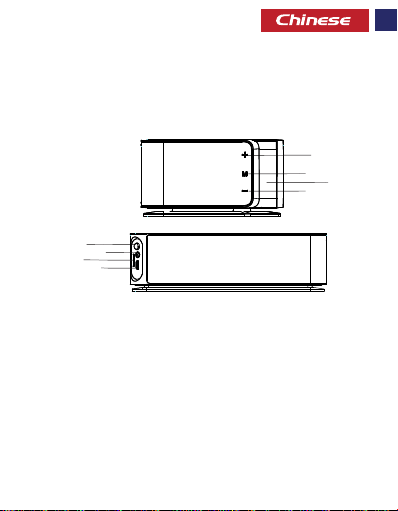
外观和接口说明
1. 音量+按钮
2. 多功能按钮
3. LED显示
4. 音量-按钮
5. 电源按钮
6. AUX端口
7. MicroSD卡插槽
8. 充电输入
5
6
7
8
操作说明
为扬声器充电
· 使用提供的数据线为扬声器充电。
· 将扬声器自带的USB数据线的一端连接到任何5伏/ 2安的USB电源插座。
· LED充电指示灯在充电时变为红色,充满电后熄灭
1
2
3
4
2
9
Page 31

打开/关闭扬声器
·关闭扬声器时,按住电源按钮约3秒即可打开扬声器
·再次按电源按钮即可关闭扬声器
设置时间:
·短按多功能按钮使小时数字闪烁。
·按-或+按钮设置小时。
·再次短按多功能按钮使分钟数字闪烁。
·按-或+按钮设置分钟。
·不按任何其他按钮5秒以设定时间。
设置闹钟:
·长按多功能按钮进入闹铃模式,小时数字将会闪烁。
·按-或+按钮设置小时。
·再次短按多功能按钮使分钟闪烁。
·按-或+按钮设置分钟。
·不按任何其他按钮3秒以设定闹钟。
关闭闹钟
·要关闭闹钟,请按住多功能按钮几秒,直到闹钟图标关闭
蓝牙播放
·扬声器开机时,短按电源按钮进入蓝牙模式。
·打开设备上的蓝牙功能,并在可用设备列表中选择扬声器名称。
·某些蓝牙设备可能会要求您输入密码以将设备与扬声器配对。输入
“0000”,然后按提交。
AUX功能
·将线路输入数据线插入扬声器背面的AUX插孔以连接外接播放器设备或电脑。
·扬声器将自动进入AUX模式。
3
0
Page 32

控制音乐播放
·按多功能按钮播放/暂停音乐。
·长按-或+来控制音量。
·短按-或+可控制音乐播放。
FM收音机模式
·长按多功能按钮进入FM模式。
·短按多功能按钮搜索和存储FM电台
·按-或+选择电台
·按住-或+更改音量。
·再次按FM按钮退出FM模式
·给智能手机进行无线充电时,FM收音机模式可能无法正常工作。
通话管理
·在蓝牙模式下,按多功能按钮接听电话。
·再次按多功能图标挂断电话。
·长按多功能按钮拒绝来电。
故障排除
扬声器无法与蓝牙设备配对:
·检查设备上的蓝牙硬件是否支持A2DP配置文件,
这对于通过蓝牙进行声音传输是必需的。
3
1
Page 33

رﺎﺸﻓ ﻪﯿﻧﺎﺛ ﺪﻨﭼ یاﺮﺑ ار هرﻮﻈﻨﻣ ﺪﻨﭼ ﻪﻤﮐد ،(راﺪﺸھ) یراﺪﯿﺑ ﮓﻧز ندﺮﮐ شﻮﻣﺎﺧ یاﺮﺑ •
تﺪﻣ یاﺮﺑ ار هﺎﮕﺘﺳد ندﺮﮐ شﻮﻣﺎﺧ و ﻦﺷور ﻪﻤﮐد ،ﺪﺷﺎﺑ ﯽﻣ ﻦﺷور هﺎﮕﺘﺳد ﻪﮐ ﯽﻣﺎﮕﻨھ •
رد یﺎھ هﺎﮕﺘﺳد ﺖﺴﯿﻟ رد و هدﺮﮐ ﻦﺷور ار دﻮﺧ هﺪﻨﻨﮐ ﺶﺨﭘ هﺎﮕﺘﺳد یور ثﻮﺗﻮﻠﺑ •
رﻮﺒﻋ ﺪﮐ ﮏﯾ ﺎﻤﺷ زا ﻮﮔﺪﻨﻠﺑ ﺎﺑ نﺪﺷ ﺖﻔﺟ یاﺮﺑ ثﻮﺗﻮﻠﺑ یﺎھ هﺎﮕﺘﺳد ﯽﺧﺮﺑ •
.ﺪﯿﻨﮐ دراو ار "0000" ﺪﮐ ﺖﻟﺎﺣ ﻦﯾا رد .ﺪﻨﻨﮐ ﯽﻣ ﺖﺳاﻮﺧرد ار
ﯽﺟوﺮﺧ ﻪﺑ ار نآ ﺮﮕﯾد ﺮﺳ ﮏﯾ و ﻮﮔﺪﻨﻠﺑ ﺖﺸﭘ AUX یدورو ﻪﺑ ار AUX ﻞﺑﺎﮐ ﺮﺳ ﮏﯾ•
.ﺪھد ﯽﻣ ﺖﯿﻌﺿو ﺮﯿﯿﻐﺗ AUX ﻪﺑ رﺎﮐدﻮﺧ رﻮط ﻪﺑ ﺖﻟﺎﺣ ﻦﯾا رد ﻮﮔﺪﻨﻠﺑ•
.ﺪﯿھد رﺎﺸﻓ ار هرﻮﻈﻨﻣ ﺪﻨﭼ ﻪﻤﮐد نآ رد ﻪﻔﻗو دﺎﺠﯾا ﺎﯾ ﯽﻘﯿﺳﻮﻣ ﺶﺨﭘ یاﺮﺑ•
ار – و + یﺎھ ﻪﻤﮐد ،ﯽﻠﺒﻗ ﺎﯾ یﺪﻌﺑ ﯽﺗﻮﺻ یﺎھ ﻞﯾﺎﻓ/ﺎھ ﮓﻨھآ ﻪﺑ ﻦﺘﻓر یاﺮﺑ•
.ﺪﯿھد هﺎﺗﻮﮐ رﺎﺸﻓ ﮏﯾ ار هرﻮﻈﻨﻣ ﺪﻨﭼ ﻪﻤﮐد FM یﺎھ هﺎﮕﺘﺴﯾا هﺮﯿﺧذ و ﻮﺠﺘﺴﺟ یاﺮﺑ•
ﺖﻟﺎﺣ ﺖﺳا ﻦﮑﻤﻣ ،ﺪﯿﻨﮐ ﯽﻣ ژرﺎﺷ ﻢﯿﺳ ﯽﺑ ترﻮﺻ ﻪﺑ ار دﻮﺧ هاﺮﻤھ ﻦﻔﻠﺗ ﻪﮐ ﯽﻣﺎﮕﻨھ•
ﺪﻨﭼ ﻪﻤﮐد ،ﺪﯿﺘﺴھ ثﻮﺗﻮﻠﺑ ﺖﻟﺎﺣ رد ﻪﮐ ﯽﻟﺎﺣ رد ،هدراو سﺎﻤﺗ ﮏﯾ ندﺮﮐ لﻮﺒﻗ یاﺮﺑ•
ﻪﮐ A2DP ﻞﯾﺎﻓوﺮﭘ زا ﺎﻤﺷ ﺶﺨﭘ هﺎﮕﺘﺳد ثﻮﺗﻮﻠﺑ راﺰﻓا ﺖﺨﺳ ﻪﮐ ﺪﯿﻨﮐ ﯽﺳرﺮﺑ•
.ﺪﯾراد ﻪﮕﻧ و هداد رﺎﺸﻓ ار – و + یﺎھ ﻪﻤﮐد اﺪﺻ لﺮﺘﻨﮐ یاﺮﺑ•
.ﺪﯾﻮﺷ FM ﺖﻟﺎﺣ دراو ﺎﺗ ﺪﯾراد ﻪﮕﻧ و هداد رﺎﺸﻓ ار هرﻮﻈﻨﻣ ﺪﻨﭼ ﻪﻤﮐد•
.ﺪﯿﻨﮐ هدﺎﻔﺘﺳا – و + یﺎھ ﻪﻤﮐد زا ﯽﯾﻮﯾدار یﺎھ هﺎﮕﺘﺴﯾا بﺎﺨﺘﻧا یاﺮﺑ•
.ﺪﯾراد ﻪﮕﻧ و هداد رﺎﺸﻓ ار – و + یﺎھ ﻪﻤﮐد اﺪﺻ ندﺮﮐ ﻢﮐ و دﺎﯾز یاﺮﺑ•
.ﺪﯿھد رﺎﺸﻓ ﺮﮕﯾد رﺎﺒﮑﯾ ار FM ﻪﻤﮐد FM ﺖﻟﺎﺣ زا جوﺮﺧ یاﺮﺑ •
ﺪﯿھد رﺎﺸﻓ هرﺎﺑود ار هرﻮﻈﻨﻣ ﺪﻨﭼ نﻮﮑﯾآ ،سﺎﻤﺗ ﻪﺑ نداد ﻪﻤﺗﺎﺧ یاﺮﺑ•
.ﺪﯾراد ﻪﮕﻧ و هداد رﺎﺸﻓ ار هرﻮﻈﻨﻣ ﺪﻨﭼ ﻪﻤﮐد ،هدراو سﺎﻤﺗ ﮏﯾ در یاﺮﺑ•
:دﻮﺷ ﯽﻤﻧ ﺖﻔﺟ ﺶﺨﭘ هﺎﮕﺘﺳد ﺎﺑ ﻮﮔﺪﻨﻠﺑ ﻪﮐ ﯽﺗرﻮﺻ رد
.ﺪﻨﮐ ﯽﻧﺎﺒﯿﺘﺸﭘ ﺪﺷﺎﺑ ﯽﻣ یروﺮﺿ ثﻮﺗﻮﻠﺑ ﻖﯾﺮط زا اﺪﺻ لﺎﻘﺘﻧا یاﺮﺑ
(راﺪﺸھ) یراﺪﯿﺑ ﮓﻧز ندﺮﮐ شﻮﻣﺎﺧ
.دﻮﺷ شﻮﻣﺎﺧ (راﺪﺸھ) یراﺪﯿﺑ ﮓﻧز نﻮﮑﯾآ ﺎﺗ ﺪﯿھد
ثﻮﺗﻮﻠﺑ شور ﻪﺑ ﯽﻘﯿﺳﻮﻣ ﺶﺨﭘ
.ﺪﯾﻮﺷ ثﻮﺗﻮﻠﺑ ﺖﻟﺎﺣ دراو ﺎﺗ ﺪﯿھد رﺎﺸﻓ ﯽھﺎﺗﻮﮐ
.ﺪﯿﻨﮐ بﺎﺨﺘﻧا ار ﻮﮔﺪﻨﻠﺑ مﺎﻧ سﺮﺘﺳد
:AUX ﯽﮔﮋﯾو
.ﺪﯿﻨﮐ ﻞﺻو دﻮﺧ ﻪﻧﺎﯾار ﺎﯾ ﺶﺨﭘ هﺎﮕﺘﺳد AUX
ﯽﻘﯿﺳﻮﻣ ﺶﺨﭘ لﺮﺘﻨﮐ
.ﺪﯿھد هﺎﺗﻮﮐ رﺎﺸﻓ ﮏﯾ
FM یﻮﯾدار ﺖﻟﺎﺣ
.ﺪﻨﮑﻧ رﺎﮐ ﯽﺘﺳرد ﻪﺑ FM یﻮﯾدار
ﺎھ سﺎﻤﺗ ﺖﯾﺮﯾﺪﻣ
.ﺪﯿھد رﺎﺸﻓ ار هرﻮﻈﻨﻣ
لﺎﮑﺷا ﻊﻓر
3
2
Page 34

هﺎﮕﺘﺳد ﺎﺑ رﺎﮐ هﻮﺤﻧ ﻞﻤﻌﻟار ﻮﺘﺳد
.ﺪﯿﻨﮐ هدﺎﻔﺘﺳا نآ هاﺮﻤھ ﻪﺑ هﺪﺷ ﻪﺋارا ﻞﺑﺎﮐ زا ﻮﮔﺪﻨﻠﺑ ندﺮﮐ ژرﺎﺷ یاﺮﺑ •
قﺮﺑ ﺰﯾﺮﭘ ﻪﻧﻮﮔ ﺮھ ﻪﺑ ار نآ ﺮﮕﯾد ﺮﺳ و ﻮﮔﺪﻨﻠﺑ ﻪﺑ ار USB ﻞﺑﺎﮐ ﺮﺳ ﮏﯾ •
ﯽﻣﺎﮕﻨھ و هﺪﻧﺎﻣ ﻦﺷور ﺰﻣﺮﻗ ﮓﻧر ﻪﺑ LED ﺮﮕﺸﯾﺎﻤﻧ غاﺮﭼ ،ژرﺎﺷ تﺪﻣ ﯽﻣﺎﻤﺗ رد •
تﺪﻣ ﻪﺑ ار هﺎﮕﺘﺳد ندﺮﮐ شﻮﻣﺎﺧ و ﻦﺷور ﻪﻤﮐد ،ﺪﺷﺎﺑ ﯽﻣ شﻮﻣﺎﺧ ﻮﮔﺪﻨﻠﺑ ﻪﮐ ﯽﻣﺎﮕﻨھ•
.ﺪﯿھد رﺎﺸﻓ هرﺎﺑود ار نآ ندﺮﮐ شﻮﻣﺎﺧ و ﻦﺷور ﻪﻤﮐد ،ﻮﮔﺪﻨﻠﺑ ندﺮﮐ شﻮﻣﺎﺧ یاﺮﺑ•
.ﺪﯿھد هﺎﺗﻮﮐ رﺎﺸﻓ ﮏﯾ ار رﻮﻈﻨﻣ ﺪﻨﭼ ﻪﻤﮐد ،ﺖﻋﺎﺳ ﻪﺑ طﻮﺑﺮﻣ مﺎﻗرا ندز ﮏﻤﺸﭼ ﻪﺑ عوﺮﺷ یاﺮﺑ•
ﻪﺑ عوﺮﺷ ﻪﻘﯿﻗد ﻪﺑ طﻮﺑﺮﻣ مﺎﻗرا ﺎﺗ ﺪﯿھد ﺮﮕﯾد هﺎﺗﻮﮐ رﺎﺸﻓ ﮏﯾ ار رﻮﻈﻨﻣ ﺪﻨﭼ ﻪﻤﮐد•
.ﺪﯿھﺪﻧ رﺎﺸﻓ ار یﺮﮕﯾد ﻪﻤﮐد ﭻﯿھ ﻪﯿﻧﺎﺛ 5 تﺪﻣ یاﺮﺑ ،دﻮﺷ ﻢﯿﻈﻨﺗ نﺎﻣز ﻪﮑﻨﯾا یاﺮﺑ•
ﺪﯿھد رﺎﺸﻓ رﺪﻘﻧآ ار هرﻮﻈﻨﻣ ﺪﻨﭼ ﻪﻤﮐد (راﺪﺸھ) یراﺪﯿﺑ ﮓﻧر ﺖﻟﺎﺣ ﻪﺑ نﺪﺷ دراو یاﺮﺑ•
ﻪﺑ عوﺮﺷ ﻪﻘﯿﻗد ﻪﺑ طﻮﺑﺮﻣ مﺎﻗرا ﺎﺗ ﺪﯿھد ﺮﮕﯾد هﺎﺗﻮﮐ رﺎﺸﻓ ﮏﯾ ار رﻮﻈﻨﻣ ﺪﻨﭼ ﻪﻤﮐد•
.ﺪﯿھﺪﻧ رﺎﺸﻓ ار یﺮﮕﯾد ﻪﻤﮐد ﭻﯿھ ﻪﯿﻧﺎﺛ 3 تﺪﻣ یاﺮﺑ ،دﻮﺷ ﻢﯿﻈﻨﺗ نﺎﻣز ﻪﮑﻨﯾا یاﺮﺑ•
.دﻮﺷ ﯽﻣ شﻮﻣﺎﺧ غاﺮﭼ ﻦﯾا ،ﺪﺷ ژرﺎﺷ ﻞﻣﺎﮐ رﻮط ﻪﺑ هﺎﮕﺘﺳد ﻪﮐ
.ﺪﯿﻨﮐ ﻢﯿﻈﻨﺗ ار ﺖﻋﺎﺳ – و + یﺎھ ﻪﻤﮐد زا هدﺎﻔﺘﺳا ﺎﺑ•
.ﺪﯿﻨﮐ ﻢﯿﻈﻨﺗ ار ﻪﻘﯿﻗد – و + یﺎھ ﻪﻤﮐد زا هدﺎﻔﺘﺳا ﺎﺑ•
.ﺪﻨﻨﮐ ندز ﮏﻤﺸﭼ ﻪﺑ عوﺮﺷ ﺖﻋﺎﺳ ﻪﺑ طﻮﺑﺮﻣ مﺎﻗرا ﺎﺗ
.ﺪﯿﻨﮐ ﻢﯿﻈﻨﺗ ار ﺖﻋﺎﺳ – و + یﺎھ ﻪﻤﮐد زا هدﺎﻔﺘﺳا ﺎﺑ•
.ﺪﯿﻨﮐ ﻢﯿﻈﻨﺗ ار ﻪﻘﯿﻗد – و + یﺎھ ﻪﻤﮐد زا هدﺎﻔﺘﺳا ﺎﺑ•
.ﺪﯿﻨﮐ ﻞﺻو ﺮﭙﻣآ 2/ﺖﻟو 5 عﻮﻧ زا USB
.دﻮﺷ ﻦﺷور ﻮﮔﺪﻨﻠﺑ ﺎﺗ ﺪﯿھد رﺎﺸﻓ ﻪﯿﻧﺎﺛ 3
:ﻮﮔﺪﻨﻠﺑ ندﺮﮐ ژرﺎﺷ
:ﻮﮔﺪﻨﻠﺑ ندﺮﮐ شﻮﻣﺎﺧ و ﻦﺷور
:نﺎﻣز ﻢﯿﻈﻨﺗ
.ﺪﻨﻨﮐ ندز ﮏﻤﺸﭼ
:(راﺪﺸھ) یراﺪﯿﺑ ﮓﻧز ﻢﯿﻈﻨﺗ
.ﺪﻨﻨﮐ ندز ﮏﻤﺸﭼ
3
3
Page 35
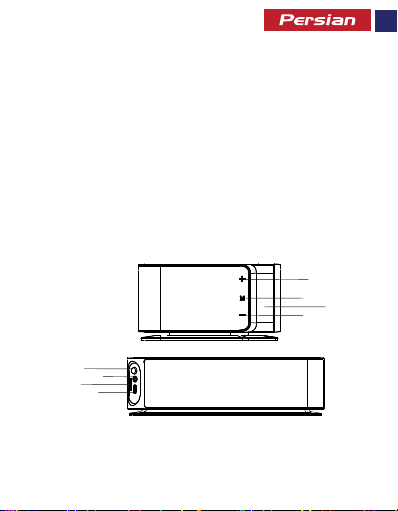
یﺮﺑرﺎﮐ ﻂﺑار ﻒﯿﺻﻮﺗ و یﺮھﺎظ ﻞﮑﺷ
اﺪﺻ ﺶﯾاﺰﻓا ﻪﻤﮐد .1
هرﻮﻈﻨﻣ ﺪﻨﭼ ﻪﻤﮐد .2
LED ﺶﯾﺎﻤﻧ ﻪﺤﻔﺻ .3
هﺎﮕﺘﺳد ندﺮﮐ شﻮﻣﺎﺧ و ﻦﺷور صﻮﺼﺨﻣ ﻪﻤﮐد .5
5
6
7
8
اﺪﺻ ﺶھﺎﮐ ﻪﻤﮐد .4
AUX یدورو .6
MicroSD ترﺎﮐ یدورو .7
ژرﺎﺷ یدورو .8
1
2
3
4
3
4
Page 36

تﻮﺼﻟا ﺮﺒﻜﻣ ﻦﻣ ﻲﻔﻠﺨﻟا ءﺰﺠﻟا ﻲﻓ ﺮﺷﺎﺒﻤﻟا ﻞﯿﺻﻮﺘﻟا ﺬﻔﻨﻣ ﻰﻟإ لﺎﺧدﻹا ﻞﺒﻛ ﻞﺧدا•
.ﻲﻘﯿﺳﻮﻤﻟا ﻞﯿﻐﺸﺗ ﻲﻓ ﻢﻜﺤﺘﻠﻟ + وأ-- ﻰﻠﻋ ةﺮﯿﺼﻗ ﺔﻄﻐﺿ ﻂﻐﺿأ•
.FM ﻊﺿو لﺎﺧدﻹ ﻒﺋﺎظﻮﻟا ةدﺪﻌﺘﻣ حﺎﺘﻔﻣ ﻰﻠﻋ ﺔﻠﻳﻮط ﺔﻄﻐﺿ ﻂﻐﺿأ•
FM تﺎﻄﺤﻣ ﻦﻳﺰﺨﺗو ﺚﺤﺒﻠﻟ ﻒﺋﺎظﻮﻟا ةدﺪﻌﺘﻣ حﺎﺘﻔﻣ ﻰﻠﻋ ةﺮﯿﺼﻗ ﺔﻄﻐﺿ ﻂﻐﺿا•
صﺎﺨﻟا ﻲﻛﺬﻟا ﻒﺗﺎﮭﻟا ﻦﺤﺸﺑ مﻮﻘﺗ ﺎﻣ ﺪﻨﻋ ،ﺪﯿﺟ ﻞﻜﺸﺑ FM ﻮﻳدار ﻊﺿو ﻞﻤﻌﺗ ﻻ ﺪﻗ•
.ﺔﻤﻟﺎﻜﻣ لﻮﺒﻘﻟ ﻒﺋﺎظﻮﻟا دﺪﻌﺘﻣ رز ﻲﻠﻋ ﻂﻐﺿا ،ث ﻮﺗﻮﻠﺒﻟا ﺔﯿﻌﺿو ءﺎﻨﺛأ•
.ﺔﻤﻟﺎﻜﻤﻟا ﻖﯿﻠﻌﺘﻟ ىﺮﺧأ هﺮﻣ ﻒﺋﺎظﻮﻟا ةدﺪﻌﺘﻣ ر ز ﻲﻠﻋ ﻂﻐﺿا•
.هدراو ﺔﻤﻟﺎﻜﻣ ﺾﻓﺮﻟ ﻒﺋﺎظﻮﻟا دﺪﻌﺘﻣ رز ﻲﻠﻋ ﺔﻠﻳﻮط ةﺮﺘﻔﻟ ﻂﻐﺿا•
ﻒﻳﺮﻌﺗ ﻒﻠﻣ ﻢﻋﺪﺗ كزﺎﮭﺟ ﻲﻠﻋ ةدﻮﺟﻮﻤﻟا ثﻮﺗﻮﻠﺒﻟا هﺰﮭﺟأ ﺖﻧﺎﻛ اذإ ﺎﻤﻣ ﻖﻘﺤﺗ•
.ﺮﺗﻮﯿﺒﻤﻜﻟا وأ ﻲﺟرﺎﺨﻟا ﻞﻐﺸﻤﻟ ا زﺎﮭﺟ ﻞﯿﺻﻮﺘﻟ
.AUX ﻊﺿﻮﺑ ﺎﯿﺋﺎﻘﻠﺗ ﺔﻋﺎﻤﺴﻟا ﻞﺧﺪﺗ فﻮﺳ•
.ﻲﻘﯿﺳﻮﻤﻟا فﺎﻘﻳإو/ﻞﯿﻐﺸﺘﻟ ﻒﺋﺎظﻮﻟا دﺪﻌﺘﻣ رز ﻲﻠﻋ ﻂﻐﺿا•
.تﻮﺼﻟا هﺪﺣو ﻲﻓ ﻢﻜﺤﺘﻠﻟ + وأ-- ﻰﻠﻋ ﺔﻠﻳﻮط ﺔﻄﻐﺿ ﻂﻐﺿأ•
.FM ﻊﺿو ﻦﻣ جوﺮﺨﻠﻟ ىﺮﺧأ هﺮﻣ FM رز ﻲﻠﻋ ﻂﻐﺿا•
.ثﻮﺗﻮﻠﺒﻟا ﺮﺒﻋ تﻮﺼﻟا ﻞﻘﻨﻟ ﺎﻳروﺮﺿ ﺮﺒﺘﻌﻳ يﺬﻟا A2DP
ﻲﻘﯿﺳﻮﻤﻟا ﻞﯿﻐﺸﺗ ﻲﻓ ﻢﻜﺤﺘﻟا
ﺔﯿﻋاذإ ﻪﻄﺤﻣ رﺎﯿﺘﺧﻻ + وأ-- ﻰﻠﻋ ﻂﻐﺿأ•
.تﻮﺼﻟا ﺮﯿﯿﻐﺘﻟ + وأ- ﻰﻠﻋ راﺮﻤﺘﺳﻻا ﻊﻣ ﻂﻐﺿا•
ﺎﮭﺣﻼﺻإو ءﺎﻄﺧﻷا فﺎﺸﻜﺘﺳا
:ثﻮﺗﻮﻠﺑ زﺎﮭﺟ ﻊﻣ ﺎﮭﻧاﺮﻗإ ﻦﻜﻤﻳ ﻻ ﺔﻋﺎﻤﺴﻟا
AUX ﺔﻔﯿظو
FM ﻮﻳدار ﻊﺿو
ﺎﯿﻜﻠﺳﻻ ﻚﺑ
تﺎﻤﻟﺎﻜﻤﻟا هرادأ
3
5
Page 37

هﺪﻤﻟ ﺔﻗﺎﻄﻟا رز ﻲﻠﻋ راﺮﻤﺘﺳﺎﺑ ﻂﻐﺿا ،ﻒﻗﻮﺘﻣ تﻮﺼﻟا ﺮﺒﻜﻣ نﻮﻜﻳ ﺎﻣﺪﻨﻋ•
تﻮﺼﻟا ﺮﺒﻜﻣ ﻞﯿﻐﺸﺗ فﺎﻘﻳﻹ ىﺮﺧأ هﺮﻣ ﺔﻗﺎﻄﻟا رز ﻲﻠﻋ ىﺮﺧأ هﺮﻣ ﻂﻐﺿا•
.ﺾﻣﻮﺗ ﺔﻋﺎﺴﻟا مﺎﻗرأ ﻞﻌﺠﻟ ﻒﺋﺎظﻮﻟا دﺪﻌﺘﻣ رز ﻲﻠﻋ ةﺮﯿﺼﻗ ةﺮﺘﻔﻟ ﻂﻐﺿا•
.ﺾﻣﻮﺗ ﺔﻘﯿﻗﺪﻟا مﺎﻗرأ ﻞﻌﺠﻟ ىﺮﺧأ هﺮﻣ ﻒﺋﺎظﻮﻟا ةدﺪﻌﺘﻣ رز ﻰﻠﻋ ةﺮﯿﺼﻗ ةﺮﺘﻔﻟ ﻂﻐﺿأ•
أﺪﺒﺗو ﻪﺒﻨﻤﻟا ﻊﺿو ﻲﻓ لﻮﺧﺪﻠﻟ ﻒﺋﺎظﻮﻟا ة دﺪﻌﺘﻣ رز ﻰﻠﻋ ﺔﻠﻳﻮط ةﺮﺘﻔﻟ ﻂﻐﺿأ•
.ﺾﻣﻮﺗ ﺔﻘﯿﻗﺪﻟا ﻞﻌﺠﻟ ىﺮﺧأ هﺮﻣ ﻒﺋﺎظﻮﻟا ةدﺪﻌﺘﻣ رز ﻰﻠﻋ ةﺮﯿﺼﻗ ةﺮﺘﻔﻟ ﻂﻐﺿأ•
.ﻪﺒﻨﻤﻟا ﻂﺒﻀﻟ ناﻮﺛ 3 هﺪﻤﻟ ىﺮﺧأ رارزأ يأ ﻰﻠﻋ ﻂﻐﻀﺗ ﻻ•
ﻰﺘﺣ نا ﻮﺛ ﻊﻀﺒﻟ ﻒﺋﺎظﻮﻟا دﺪﻌﺘﻣ رز ﻲﻠﻋ راﺮﻤﺘﺳﺎﺑ ﻂﻐﺿا ، ﻪﺒﻨﻤﻟا ﻞﯿﻐﺸﺗ فﺎﻘﻳﻹ•
.ثﻮﺗﻮﻠﺒﻟا ﻊﺿو لﺎﺧدﻹ ﺔﻗﺎﻄﻟا رز ﻲﻠﻋ ﻂﻐﺿا ، تﻮﺼﻟا ﺮﺒﻜﻣ ﻞﯿﻐﺸﺗ ﻢﺘﻳ ﺎﻣﺪﻨﻋ•
ﻪﻤﺋﺎﻗ ﻲﻓ تﻮﺼﻟا ﺮﺒﻜﻣ ﻢﺳا رﺎﺘﺧاو ز ﺎﮭﺠﻟا ﻲﻠﻋ ثﻮﺗﻮﻠﺒﻟا ﺔﻔﯿظو ﻞﯿﻐﺸﺘﺑ ﻢﻗ•
ﻞﺧدا .تﻮﺼﻟا ﺮﺒﻜﻤﺑ زﺎﮭﺠﻟا ناﺮﻗﻹ روﺮﻣ ﺰﻣر لﺎﺧدإ ثﻮﺗﻮﻠﺒﻟا هﺰﮭﺟأ ﺾﻌﺑ ﺐﻠﻄﺘﺗ ﺪﻗ•
تﻮﺼﻟا ﺮﺒﻜﻣ ﻞﯿﻐﺸﺗ فﺎﻘﻳإ/ﻞﯿﻐﺸﺗ
تﻮﺼﻟا ﺮﺒﻜﻣ ﻞﯿﻐﺸﺘﻟ ﺎﺒﻳﺮﻘﺗ ناﻮﺛ 3
:ﺖﻗﻮﻟا ﻂﺒﺿ
.رز + وأ-ﻂﻐﻀﺑ ﺔﻋﺎﺴﻟا ﻂﺒﺿأ•
.ﺖﻗﻮﻟا ﻂﺒﻀﻟ ناﻮﺛ 5 ل ىﺮﺧأ رارزأ يأ ﻰﻠﻋ ﻂﻐﻀﺗ ﻻ•
.رز + وأ-ﻂﻐﻀﺑ ﺔﻘﯿﻗﺪﻟا ﻂﺒﺿا•
:ﻪﺒﻨﻤﻟا ﻂﺒﺿ
.ﺾﯿﻣﻮﻟﺎﺑ مﺎﻗرﻷا ﺔﻋﺎﺳ
.رز + وأ-ﻂﻐﻀﺑ ﺔﻋﺎﺴﻟا ﻂﺒﺿأ•
.رز + وأ-ﻂﻐﻀﺑ ﺔﻘﯿﻗﺪﻟا ﻂﺒﺿ•
ﻪﺒﻨﻤﻟا ﻞﯿﻐﺸﺗ فﺎﻘﻳإ
ﻪﯿﺒﻨﺘﻟا ﺰﻣر ﻒﻗﻮﺘﻳ
ثﻮﺗﻮﻠﺒﻟا ﻞﯿﻐﺸﺗ
.ةﺮﻓﻮﺘﻤﻟا ةﺰﮭﺟﻷا
.لﺎﺳرﻹا ﻲﻠﻋ ﻂﻐﺿاو "0000"
3
6
Page 38
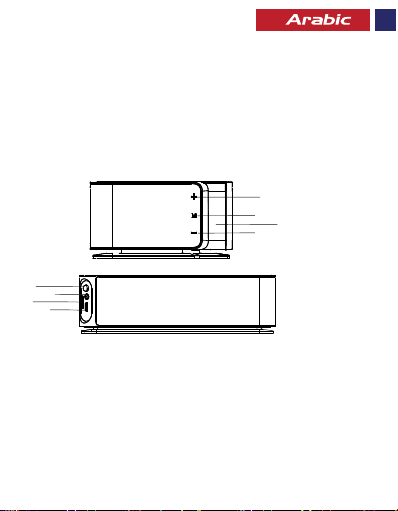
ﺔﮭﺟاﻮﻟاو ﺮﮭﻈﻤﻟا ﻒﺻو
تﻮﺼﻟا + حﺎﺘﻔﻣ.1
ﻒﺋﺎظﻮﻟا دﺪﻌﺘﻣ رز.2
LED ﺔﺷﺎﺷ.3
تﻮﺼﻟا - حﺎﺘﻔﻣ.4
ﺔﻗﺎﻄﻟا حﺎﺘﻔﻣ.5
AUX ﺬﻔﻨﻣ .6
MicroSD ﺔﻗﺎﻄﺑ ﺔﺤﺘﻓ.7
ﻦﺤﺸﻟا ﻞﺧﺪﻣ.8
1
2
3
4
5
6
7
8
ﻞﯿﻐﺸﺘﻟا تﺎﻤﯿﻠﻌﺗ
ﺮﺧﻵا فﺮﻄﻟاو تﻮﺼﻟا ﺮﺒﻜﻤﻟ هﺮﯿﻓﻮﺗ ﻢﺗ يﺬﻟا USB ﻞﺒﻛ ﻦﻣ ﺪﺣاو فﺮط ﻞﯿﺻﻮﺘﺑ ﻢﻗ•
ﻞﻣﺎﻜﻟﺎﺑ ﻪﻨﺤﺷ دﺮﺠﻤﺑ ﻪﻓﺎﻘﻳإو ﻦﺤﺷ ءﺎﻨﺛأ ﺮﻤﺣﻷا نﻮﻠﻟ LED ﻦﺤﺷ ﺮﺷﺆﻣ لﻮﺤﺘﻳ•
.تﻮﺼﻟا ﺮﺒﻜﻣ ﻦﺤﺸﻟ ﺮﻓﻮﺘﻤﻟا ﻞﺒﻜﻟا مﺪﺨﺘﺳا•
تﻮﺼﻟا ﺮﺒﻜﻣ ﻦﺤﺷ
.USB 5V/2a ﺔﻗﺎﻄﻟا ﻞﯿﺻﻮﺗ ﺬﺧﺄﻤﺑ
3
7
Page 39

 Loading...