

Page 1
Quick Installation Guide
Quick Installation Guide
PROLiNK
PROLiNK
Hurricane 9601 USB ADSL Modem
Hurricane 9601 USB ADSL Modem
Version 1.0
Version 1.0
Package Contents
1. One H9601 Modem
1. One H9601 Modem
2. One USB cable
3. One RJ-11 DSL cable
4. Installation CD
5. Quick Installation Gui d e
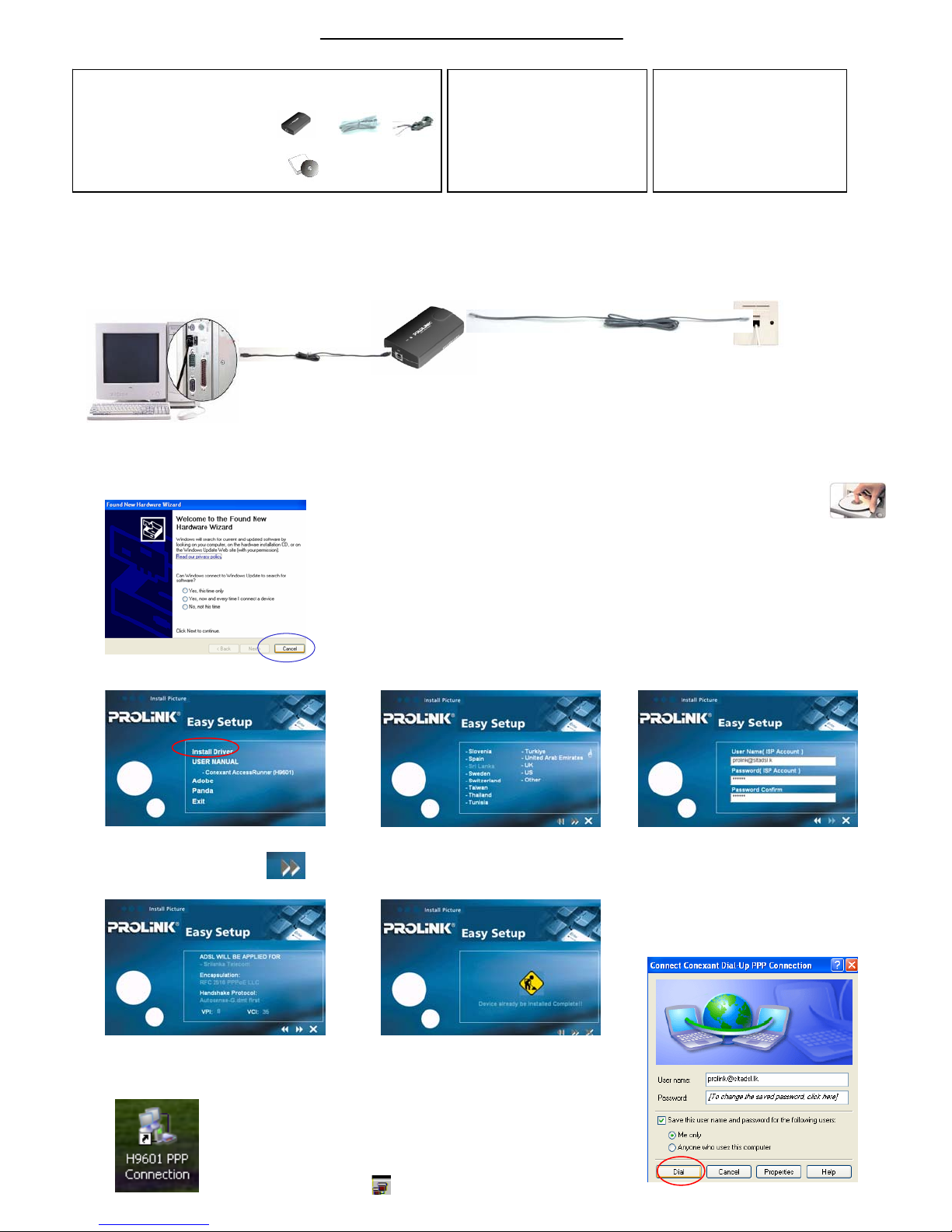
Step A . Hardware Connection
Step
A. Connect one end of the USB cable
to the USB port of your computer.
1
1
4&5
4&5
2
2
B. Connect the other end of USB cable to the ADSL Modem.
C. Connect One end of telephone cable to the ‘LINE’ jack of
3
3
Minimum System Requirement
Minimum System Requirement
. Windows 98SE/ME/2000/XP /Vista
. Windows 98SE/ME/2000/XP /Vista
. 32 MB RAM / 30 MB HD
. 32 MB RAM / 30 MB HD
. CD--
. CD
. USB Port
. USB Port
the ADSL Modem..
Step B. Driver Installation
Step
A. Power on your PC to start Windows. when detecting new
hardware window appears, Click “Ca ncel” to exit
ROM Drive
ROM Drive
Technical Support Information
Technical Support Information
Tel: (65) 62965455
Tel: (65) 62965455
9am--
5:45pm (Mon--
9am
5:45pm (Mon
9am--
1pm (Sat)
9am
1pm (Sat)
Closed on Sundays and Public Holidays
Closed on Sundays and Public Holidays
Email:
Email:
Address:
Blk
Address:
Blk
Singapore 339776
Singapore 339776
105 Boon
105 Boon
Fri)
Fri)
Keng
Keng
Rd #06--1313
Rd #06
D. Plug the other end of the telephone
cable into the telephone wall jacket.
B. Place the Hurricane 9601 installation
CD into your CDROM drive.
The CD should auto-run within seconds.
If not, awake the setup manually:e.g. Start >> Run>> D:\autorun.exe
C. Click “Install Driver” .
D. Select the correct country
and telecom to continue.
F. Click Next to continue. G. When the following appears,
Press X to exit
Step C. Logon to the internet
Step
A. Double Click the “H9601 PPP Connection” Icon.
B. Enter your Username and Password, then click Dial
Button to connect to the internet.
E. Enter Your userName and
password provide by ISP.
C. Connection Icon shows that you have connected to the Internet successfully.
 Loading...