

Page 1
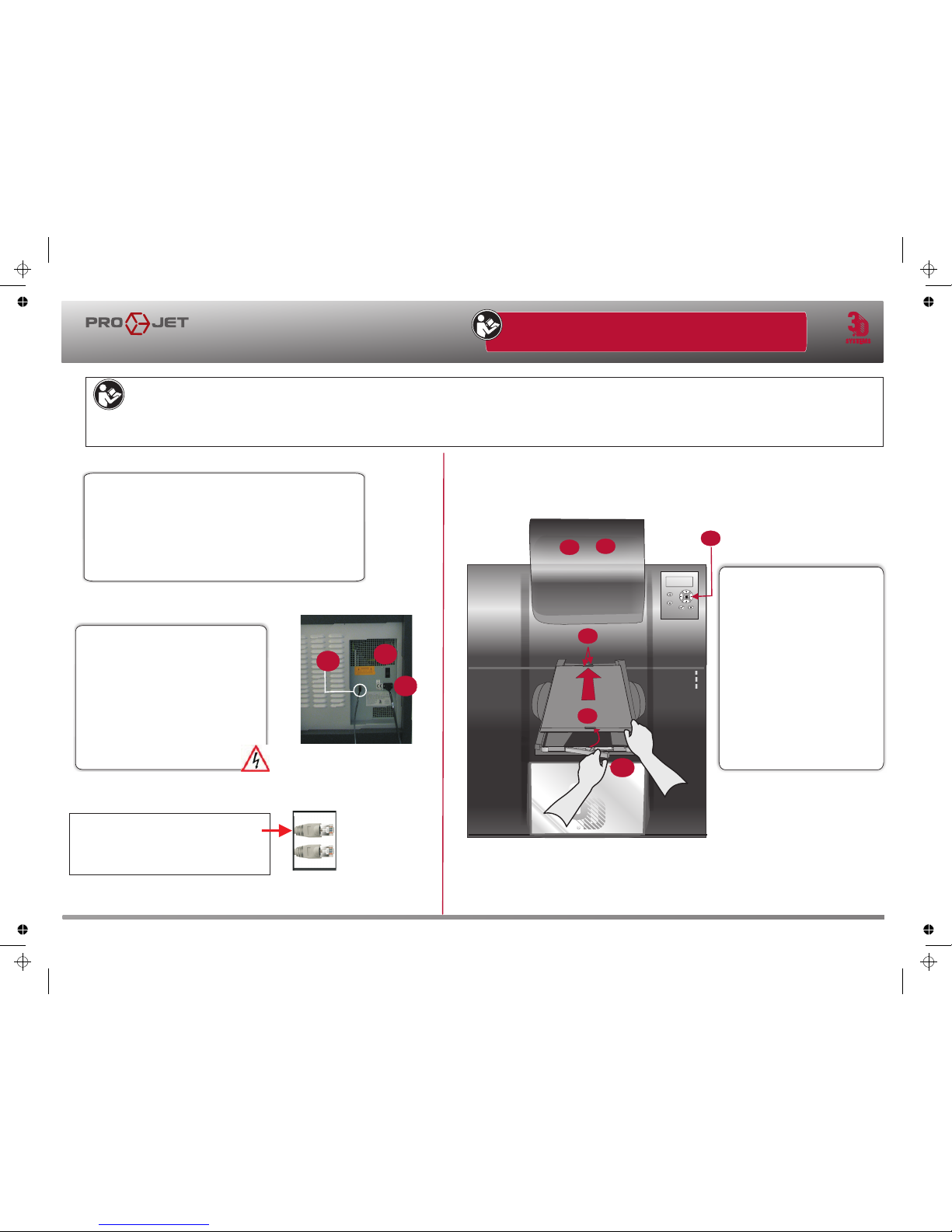
NOTE: Cl ean platform u sing
(2.A)
(2.B)
(2.F)
Isopropyl Alcohol be fore installing
into modeler.
Open t he chamber do or.
Align platfor m’s rear notch
into x-carri age’s locat ing tab
Ali gn platfo rm’s fro nt notch
into latch’s fro nt locat ing tab
and s ecure la tch.
Close the front door
and press ON LINE.
(2.C ).
(2.B )
(2.D )
2.B
POWER SUPPLY
PLATFORM
INSTALLATION
2.D
Quick Reference Guide
Quick Reference Guide
BEFORE OPERATING THE MODELER, ADHERE TO ALL PERSONAL AND
SAFE HANDLING OF MATERIALS DESCRIBED IN THE SAFETY SECTIONS
TM
OF THE PROJET USER GUIDE.
2.A
2.C
2.E
2.F
Plug p
Switch power on
Plug RJ-4C cable into terminal on back
side of modeler and into computer’s USB
terminal.
ower cord into power outlet on
back side of modeler and into facility’s power
outlet.
(A)
(B).
(C)
Verify facilit
y
’s electrical service rating before c
onnec
ting power to
the modeler
.
F
acility elec
trical requirement:
Grounded
, 1-phase elec
trical circuit
Service ra
ting: 100–127
V
A
C, 50/60 Hz, 15A (max.)
3D Systems Confidential
B
C
B
B
A
3-D Modelers
NOTE:
A Ethernet cable is
required when connecting from the
modeler to the end user’s computer.
shielded (C)
PN 305175-00, Rev. C, 10/08
TM TM
It will be necessary to register your ProJet 3-D Production System, to access the ProJet Online User Guide. To register, type in “ projet.3dsystems.com” in
the explorer browser. You will be asked to supply a “User ID” which should be something that is easily remembered; and a password. Your password is your
modeler's serial number that is located on the back side of the machine. Once registered, an email confirmation will be sent to you with a link to 3D
Systems' 3dpedia login page. (http://3dpedia.3dsystems.com) . Please log in using the user name and password as in the confirmation email to access the
user guide.
Page 2
Quick Reference Guide
1
T
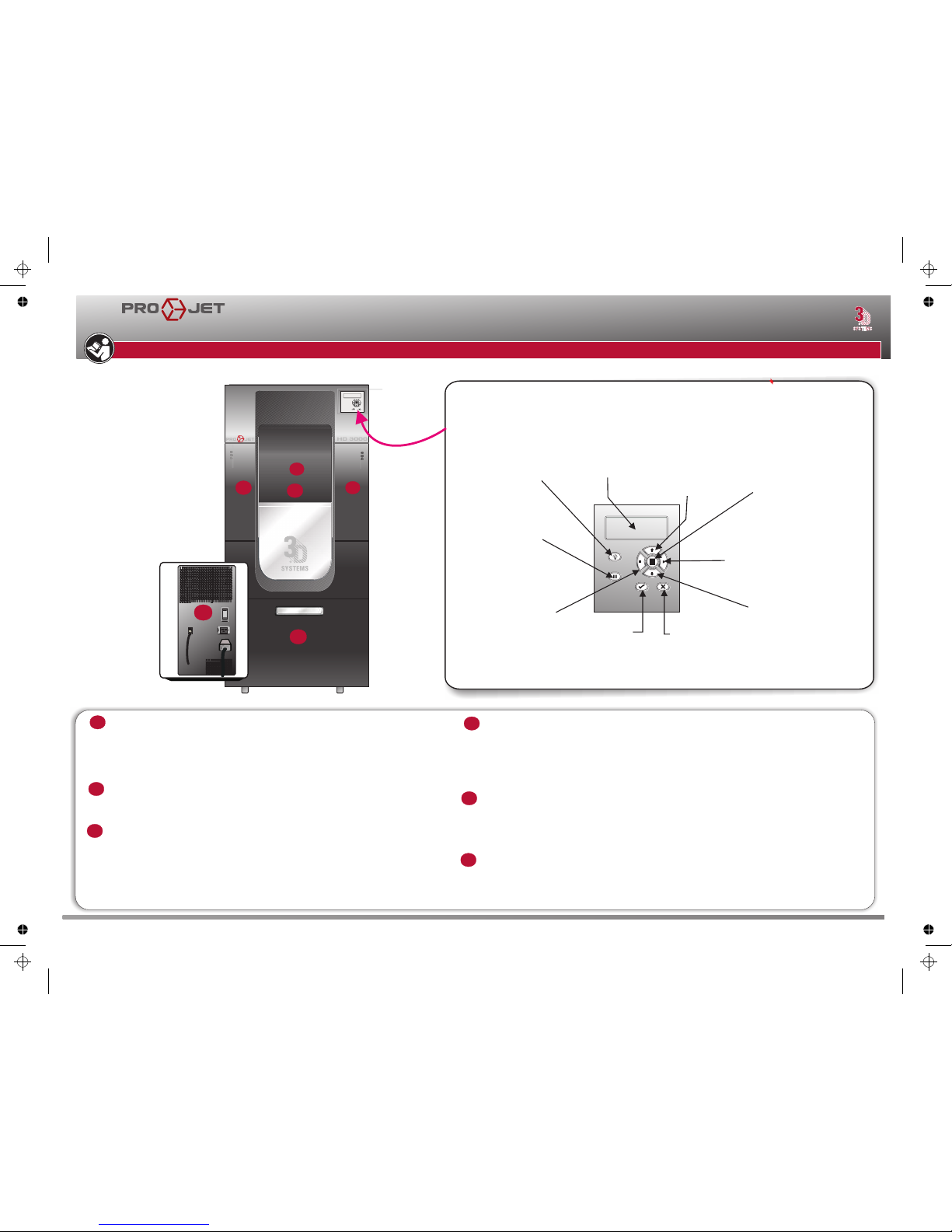
Operator Panel
Bedienungstafel • Panneau de l'opérateur • Panel del operador • Pannello per l’operatore
Operatörspanel • Operatørpanel • Käyttöpaneeli
Pause job
Druckauftrag pausieren
Pause de la réalisation
Pausa del trabajo de impresión
Sospensione del
lavoro di stampa
online / offline
Drucker online / offline
Imprimante en / hors ligne
Impresora en línea / fuera de línea
Stampante in linea / fuori linea
Abort job
Druckauftrag abbrechen
Interrompre la réalisation
Anular trabajo de impresión
Interruzione del lavoro
di stampa
LCD Display
LCD-Display
Affichage LCD
Pantalla LCD
Display LCD
Scroll Down
Menüoptionen rollen
Défilement des options
de menu
Opciones del menú
de desplazamiento
Scorrimento delle
opzioni di menu
Confirm YES
Bestätigen YES
Confirmer YES
Confirmar YES
Conferma YES
Menu options
Menüoptionen
Options de menu
Opciones de menú
Opzioni del menu
Confirm NO
Bestätigen NO
Confirmer NO
Confirmar NO
Conferma NO
Light on/off
Licht an/aus
Éclairage en / hors
Iluminación encendida /
apagada
Spia accesa / spenta
Scroll Up
Menüoptionen rollen
Défilement des options
de menu
Opciones del menú
de desplazamiento
Scorrimento delle
opzioni di menu
C
D
F
E
A
B
B
FAMILIARIZATION
Quick Reference Guide
Build chamber access door Zugangstür zur Prozesskammer
Porte d'accès à la chambre deréalisation Puerta de acceso a la cámara de
construcción Sportello di accesso alla camera di costruzione
Åtkomstlucka till byggkammaren Adgangsdør til byggekammer
Rakennuskammion luukku
Build platform Bauplattform Plate-forme de réalisation
Plataforma deconstrucción Piattaforma di costruzione
Byggplattform Byggeplatform Rakennusalusta
•
•
• •
• •
(Behind (A)• •
•
• •
Support material feed slot door • Tür zur Stützmaterialzufuhr Porte de la
fente de rechargement dumatériau des supports
Puerta con ranura de alimentación para el material del soporte
Sportello della scanalatura di alimentazione del materiale di supporto • Dörr
till stödmaterialurtaget • Dør til påfyldning af støttemateriale • Tukimateriaalin
syöttöaukon luukku
Model material feed slot door • Tür zur Modellmaterialzufuhr
Porte de la fente de rechargement du matériau des modèles
Puerta con ranura de alimentación para el material del modelo
Sportello della scanalatura di alimentazione del materiale del modello
Dörr till modellmaterialurtage • Dør til påfyldning af modelmateriale
Mallimateriaalin syöttöaukon luukku
Power plug and switch (rear) • Netzstecker und -schalter (Rückseite)
Prise d'alimentation etcommutateur (face arrière) • Enchufe e interruptor dealimentación
eléctrica (posterior) • Interruttore e spina dialimentazione (sul retro) • Eluttag och
strömbrytare (baksidan)Netstik og afbryderkontakt (bagsiden) • Vahvavirtapistoke ja
kytkin (takana)
Waste material drawer • Abfallmaterialschublade • Tiroir à déchets • Gaveta para el
material de desecho • Cassetto del materiale discarto • Utdragslåda för avfall • Skuffe til
affaldsmaterialeJätemateriaalilaatikko
A
C
D
E
F
B
B
BEFORE OPERATING THE MODELER, ADHERE TO ALL PERSONAL AND SAFE HANDLING OF MATERIALS DESCRIBED IN THE SAFETY SECTIONS OF THE USER GUIDE.
3D Systems Confidential
3-D Modelers
Page 3
1
A
B
A
B
C
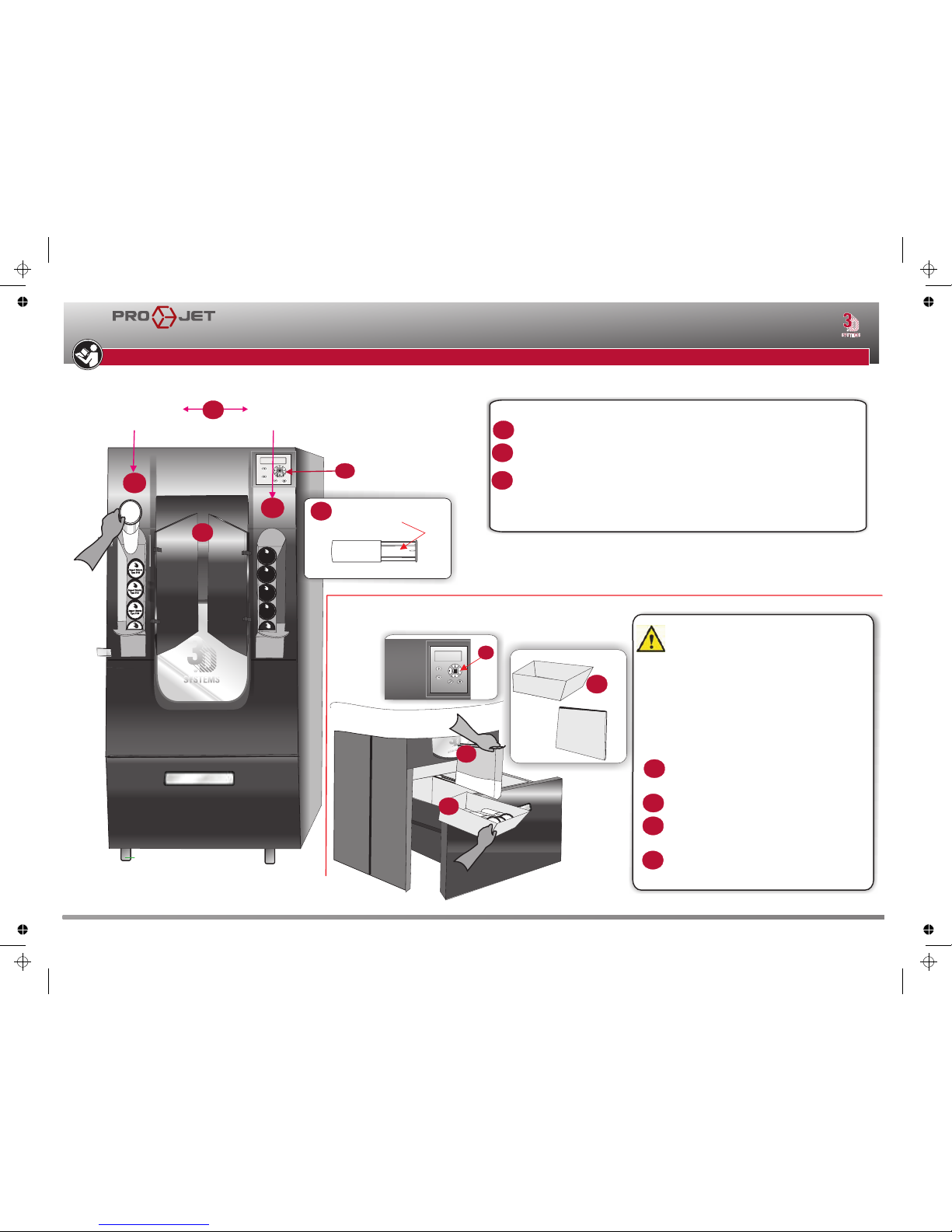
Open left and right material feed slot doors.
Insert white support cartridges in left feed slot and black build cartridges
in the right feed slots.
Orient cartridge flat side up • Lower cartridge into slot • Add 8 max. • Close feed
slot door.
(1.B)
(2.B)
NOTE: For proper operation of the feed system, a minimum of three (3)
support and three (3) build cartridges must be present.
Support Material
Type: S100
Material
Type: 200
Material
Type: 200
Material
Type: 200
Material
Type: 200
B
A
B
C
B
D
CAUTION: Before removing waste materials
from the waste drawer, adhere to all personal,
and safe handling of materials described in
the Material Safety section in the User Guide.
Always follow MSDS guidelines and local
regulations regarding handling and disposal
of regulated materials
Keep disposal records if local law requires.
Press PAUSE and open waste drawer and remove
full cartridge bins.
Remove the material waste bag.
Replace white liner in left bin and black liner in
right bin if the liners are contaminated. Replace
waste bag.
Close drawer and Press RESUME to resume build.
Quick Reference Guide
Quick Reference Guide
BEFORE OPERATING THE MODELER, ADHERE TO ALL PERSONAL AND SAFE HANDLING OF MATERIALS DESCRIBED IN THE SAFETY SECTIONS OF THE USER GUIDE.
SUPPORT & BUILD MATERIAL CARTRIDGES INSTALLATION
Su
pp
o
rt
Ma
t
e
ri
al
T
y
pe:
S
1
00
S
u
ppo
rt
Ma
t
e
r
ial
T
y
pe:
S
1
00
S
u
p
por
t
M
ater
ia
l
T
y
p
e: S100
B
A
B
B
SUPPORT
SIDE
BUILD
SIDE
1
B
1.B
B
2.B
Flat Side of
Cartridges
C
B
A
B
2.F
C
B
D
EMPTYING WASTE DRAWER
3D Systems Confidential
3-D Modelers
Page 4
OPERATION
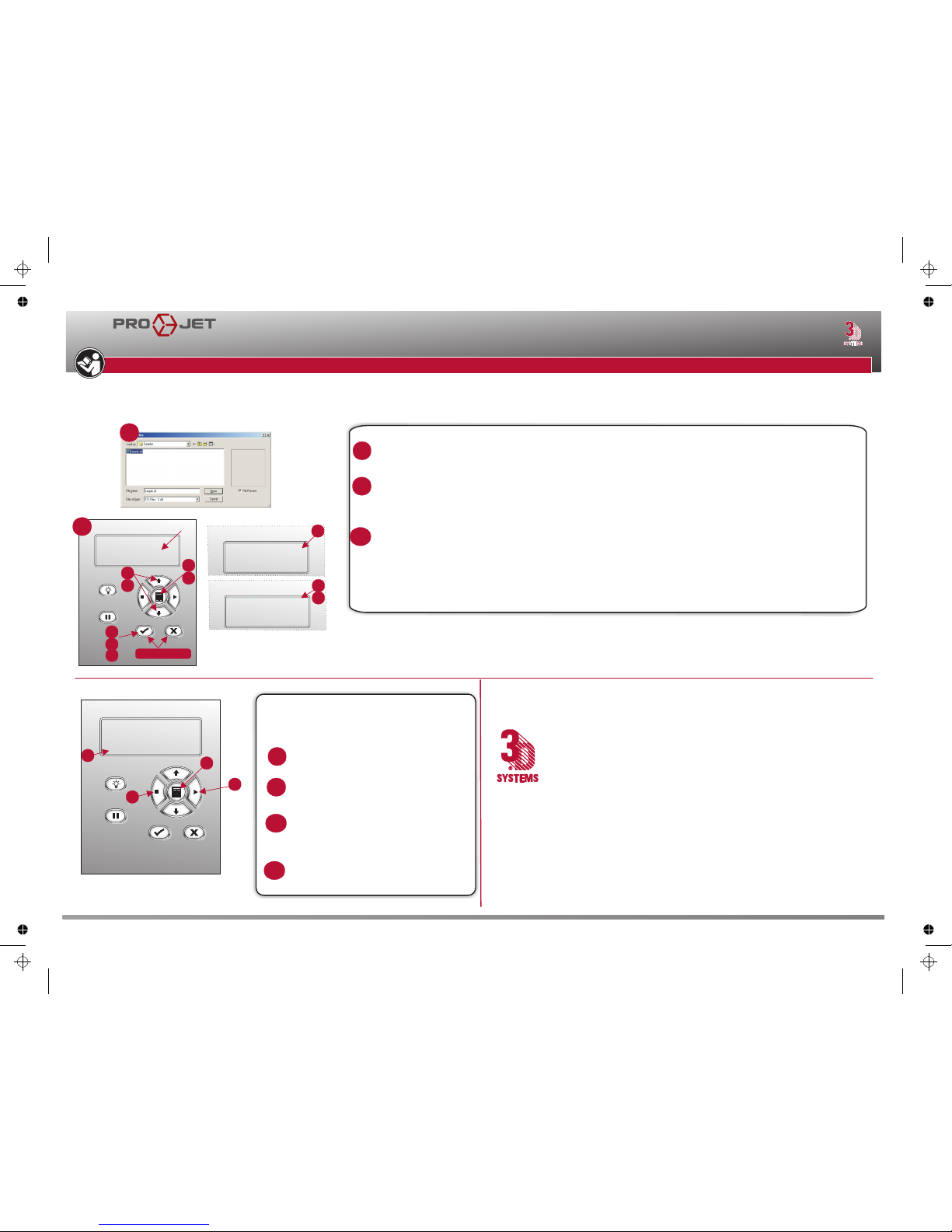
Submit Test Build
(B1) (B2) (B3) P(B4) (B5)
PX (B6) P(B7)
X (B8)
NOTE: It is recommended to submit a Test Build prior to each build job.
Build Demo
(C1) (C2) (C3) P(C4)
(C5)
P(C6)
NOTE: Refer to 3dpedia, Projet HD 3-D Modeler User Guide, under the operation section for the build process,
how to remove parts from the modeler and cleaning parts procedure.
Locate the Sample STL files in 3D Modeling\Samples folder.
Press MENU , Scroll to highlight TEST PRINT and press YES ( ) . The message PLATFORM
CLEAR DOOR CLOSED? Y( ) / N ( ) scrolls across the display, Press YES ( ) if the platform is clear and door
is closed, otherwise press NO( ).
Press MENU , Scroll to highlight BUILD DEMO and press YES ( ) ; the system displays PLATFORM
CLEAR? Y/N .
When platform is clear, press YES ( ) . The modeler will starts the demo build job.
Quick Reference Guide
Quick Reference Guide
BEFORE OPERATING THE MODELER, ADHERE TO ALL PERSONAL AND SAFE HANDLING OF MATERIALS DESCRIBED IN THE SAFETY SECTIONS OF THE USER GUIDE.
A
B
A
B
C
B
TEST BUILD
B3
PLATFORM CLEAR
DOOR CLOSED?
Y/N
DEMO BUILD
A
B
D
E
F
A
D
OK TO POWER OFF XXX
Shut Down Modeler
Verify that modeler is not building.
To shut down immediately, abort the
current job.
Press MENU, scroll to SHUTDOWN, press
YES twice .
When the display shows OK TO POWER
OFF XXX, press the power switch on the
rear panel.
To halt shutdown, press ONLINE before
pressing power switch.
G
E
F
G
B4
C4
C6
B6,B6,B8,C5
B2
C2
B1
C1
C3
B5
C5
3D Systems
333 Three D Systems Circle
Rock Hill, SC 29730 USA
Telephone (803) 326-4080
TollFree (800) 889-2964
3D Systems – France
Telephone (+33) 1 69 35 17 17
3D Systems – Germany
Telephone (+49) 6151 357-0
3D Systems – Italy, Spain and Portugal
Telephone (+39) 039 68904 00
3D Systems-Switzerland
Tel. +41-26-439 95 90
3D Systems – United Kingdom
Telephone (+44) 1442 282 600
3D Systems – Hong Kong
Telephone (+852) 29 23 50 77
3D Systems – Japan
Telephone (+81) 3 5451 1690
3D Systems Contacts
3D Systems Confidential
3-D Modelers
 Loading...