

Page 1
100% DANISH DEVELOPED AND PRODUCED
Quick
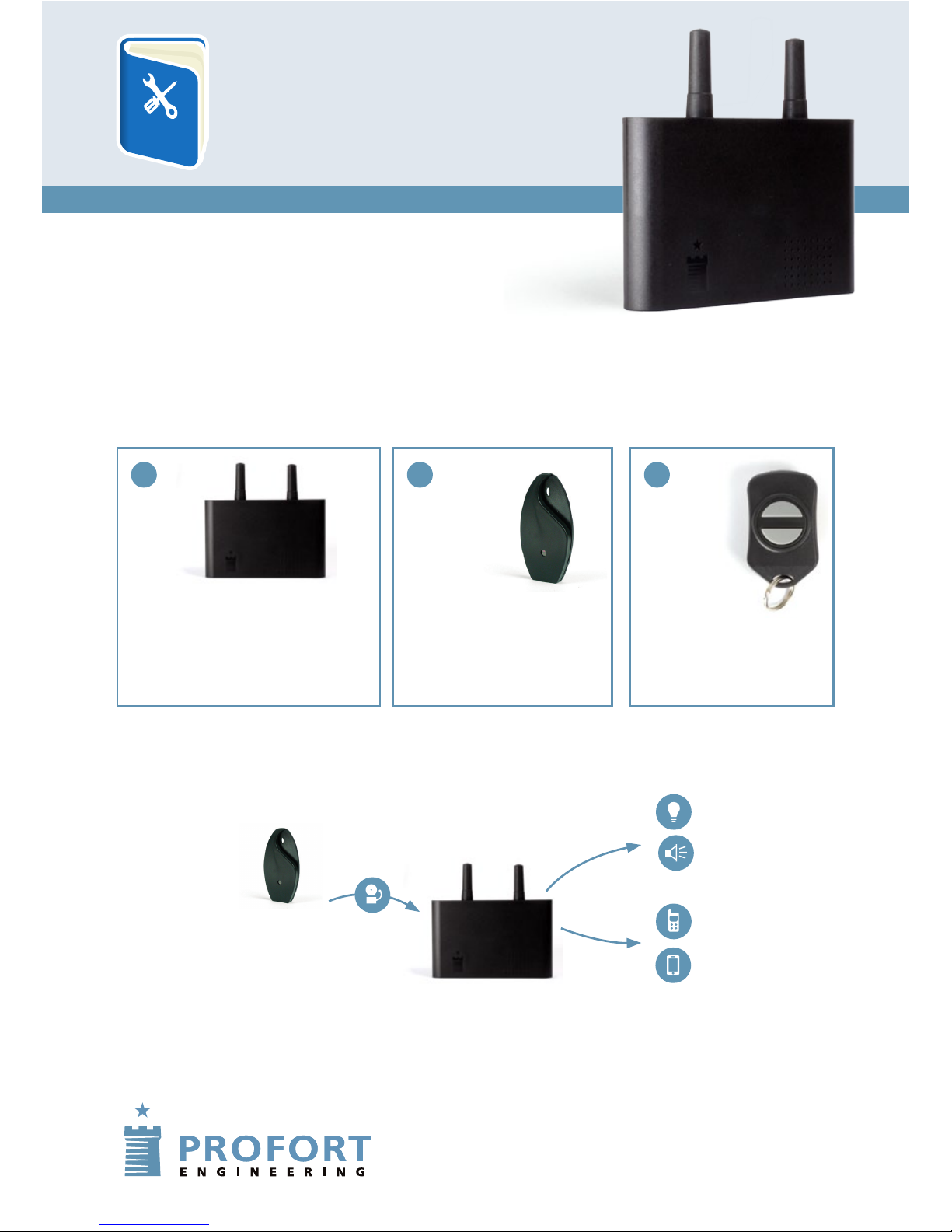
WHAT DOES A PICCOLO® AIR PROTECTION SYSTEM CONSIST OF?
HOW DOES THE PICCOLO® AIR WORK?
Guide to installation and
set-up of the Profort
Piccolo® AIR
QUICK MANUAL
PROFORT
PICCOLO® AIR
On the following pages we go through how to install a SIM card
in the Piccolo® AIR unit; how to mount the wireless detector;
and how to set up the protection system to send
alarms to your mobile or smartphone.
A B C
1.If the detector
is activated, the
alarm is triggered.
It sends a signal to
the Piccolo® AIR
unit.
2. The Piccolo® AIR
receives the alarm.
3. The Piccoloy AIR
unit starts external
alarm units such
as sirene or light.
Simultaneously is a text
with alarm sent by
mobile or smartphone.
Piccolo® AIR
Receives signals from the remote
control and from the sensors.
Sends signals to alarm units and
mobile telephones.
Detektor
Place the
detector
at object.
Remote control
(Extra equipment)
Used for connecting
/disconnecting the
Piccolo® AIR.
Page 2
SIM card
Use a normal microSIM card from a chosen operator
(Not from the mobile organisation '3'). Note the phone
number of the card. In future, use it when you send
text messages to the unit.
1. Check the microSIM card. Place the microSIM card in
a normal mobile phone. Check that you can call and
send/receive messages to/from the phone.
2. Deactivate the PIN code. Whilst the microSIM card is
in the phone, you need to set the microSIM card to
NOT ask for the PIN code (perhaps see how in the
manual of your mobile telephone).
3. Install the microSIM card. Remove the microSIM card
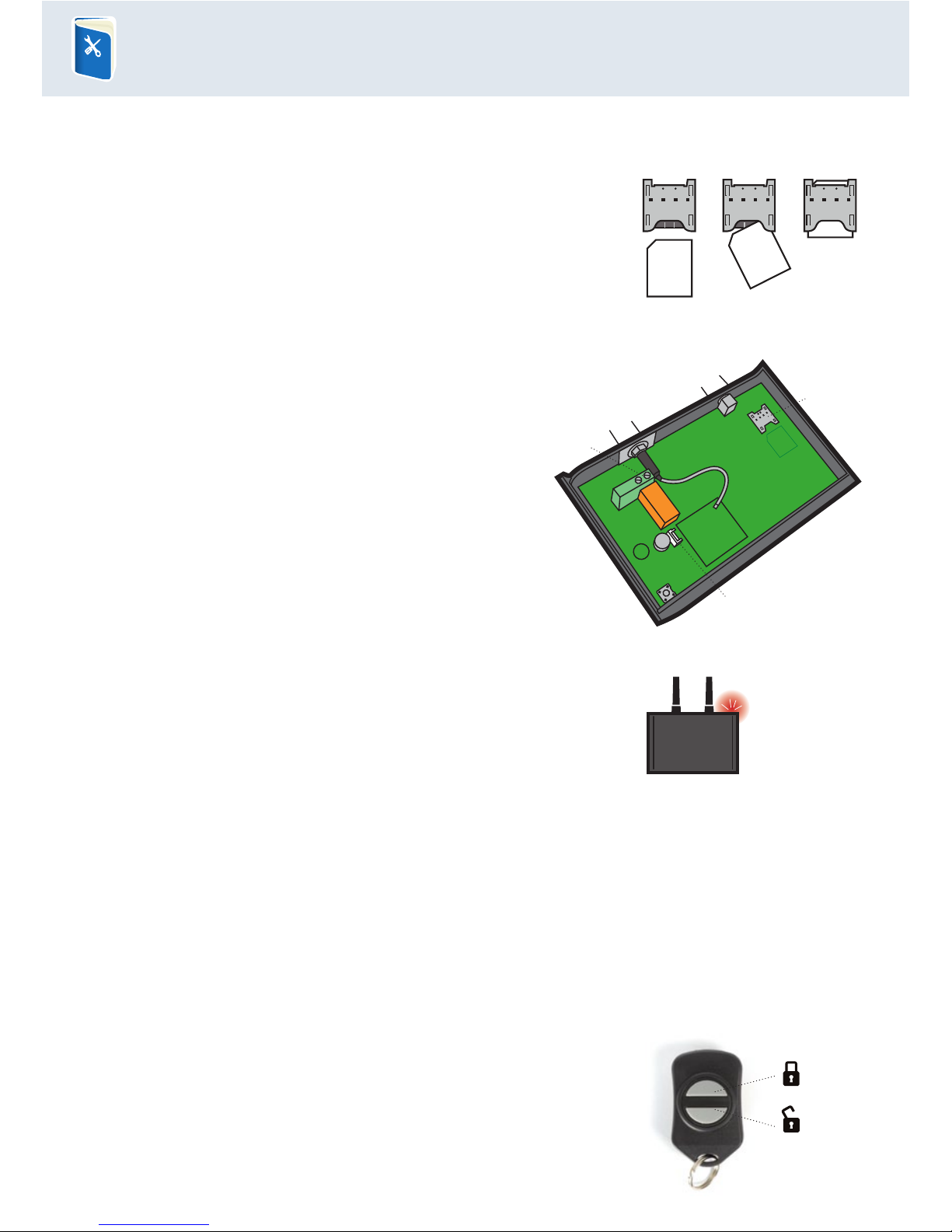
and mount it in the Piccolo® AIR unit (Fig 1 and fig. 2A).
HOW TO GET THE REMOTE CONTROL READY:
A battery from the factory is installed.
See on the back of the unit which button switches the alarm on.
HOW TO GET YOUR PICCOLO® AIR UNIT READY:
Press the SIM card into the holder and
push it carefully in place as shown.
Fig. 1 REMEMBER to turn the SIM card the
right way up. See marking by card holder.
Power
The Piccolo® AIR unit can be supplied with power in 3 ways:
12/24V DC:
Use the screw terminal (Fig. 2B)
230V: Use the included converter
Battery: It is possible to mount a battery in case of
power failure (Fig. 2C)
1. Mount the back-up battery in the plug (optional) (Fig. 2C).
2. Mount the power supply and switch on the power
to the Piccolo® AIR unit.
3. The unit gives a short beep and the red control
diode is lit for approximately 30 seconds.
4. Afterwards the control diode will flash with a single flash every 3 seconds.
It shows that the Piccolo® AIR unit is ready and functions correctly.
Placing of the Piccolo® AIR unit
The Piccolo® AIR unit must be placed centrally in relation to the installed detectors. After the
detectors have been placed at the objects, place the Piccolo® AIR unit in the middle of the
installation.
QUICK MANUAL
Quick
Red control diode
Alarm OFF
Alarm ON
Fig. 2
A
B
C
Page 3
HOW TO CONNECT ALARM UNITS AND REMOTE CONTROLS:
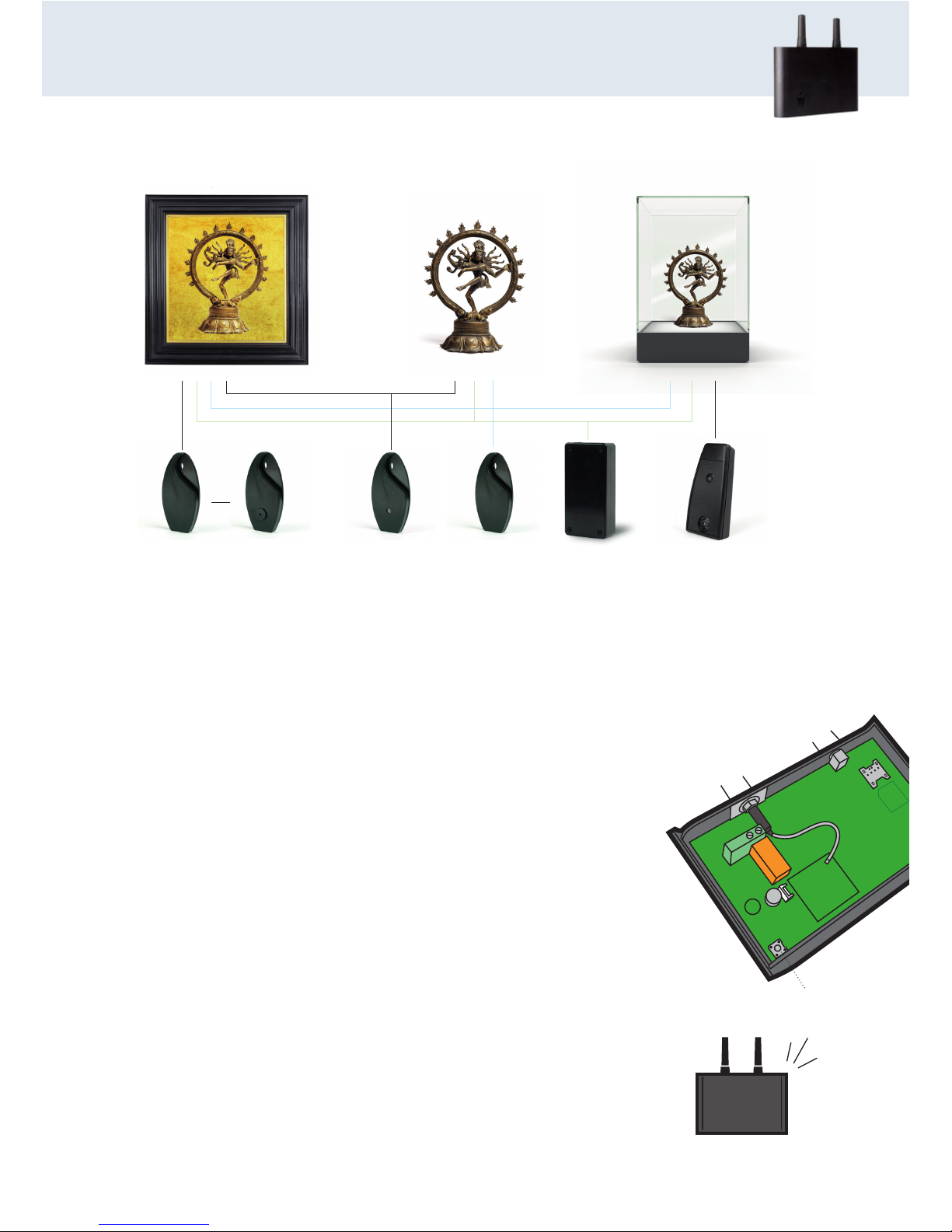
Briefly press down the little button in the Piccolo® AIR unit (Fig. 3A). The unit sends out
a series of beeps. It is now ready to receive encoding of the first detector.
Release an alarm by activating the detector.
The Piccolo® AIR unit acknowledges by beeping quickly and then stopping the
beeping. Screw the cap back on. The first detector is now activated.
Connect more units
It is possible to connect more detector to the same Piccolo® AIR unit
by repeating the process for the additional detectors.
Connect remote control
Connect optionally remote controls in the same way – just press the
'unlock' button on the remote control instead of demounting the
cap. The remote control is hereby connected to all the alarm units
which the Piccolo® AIR unit controls.
Errors or changes in the settings
Do you wish to change the settings or have you made a mistake along the
way, the Piccolo® AIR unit needs to be reset (see how in the manual of the
Piccolo® AIR unit). Afterwards you have to start all over as described above.
Test that the installation works
Activate a detector without having disconnected the alarm.
Test that the alarm works as described on next page.
A full suite of detectors solve any task:
PROFORT PICCOLO® AIR
A
Fig. 3
The Piccolo AIR
unit acknowledges with
sound signal.
Paintings Sculptures and other
free-standing objects
Showcases
combiSpot
Seismic/
magnetic
sensor e.g.
for paintings.
climaSpot
Registers
temperature
and
humidity.
buzzerSpot
As combiSpot
but with
built-in
buzzer.
inSpot
Universal unit
which establishes
wireless connection
to any kind of
wired detection.
infraSpot
Activated in
case of change
in distance to
an object.
ultraSpot
Activated in
case of movement in front
of the unit.
Page 4
QUICK MANUAL
PROFORT PICCOLO® AIR
Quick
HOW TO CONNECT A MOBILE TELEPHONE
FOR RECEPTION OF ALARMS
Send text to the Piccolo® AIR unit with following message: N1[space][number of mobile phone
for reception of alarms] E.g.: N1 22334455
Would you like to connect more phones, then repeat the process. Just change N1 to N2, N3 and so
on for every extra mobile you connect.
How to change the text in the detector: Note the 6-digit number that appears in the alarm. Send
a text message to the unit with the text "DT[space][detector number][space][alarm text]".
E.g. "DT 100123
HOW ARE ALARMS RECEIVED?
Output:
When an alarm comes in the the relay output activate. Connect external alarm system and/or
external siren to this output.
The relay is activated for 10 seconds after an alarm.
Text message:
You receive a text message on the phone/s connected to the Piccolo® AIR unit.
HOW TO CONNECT/DISCONNECT THE
ALARM SYSTEM WHEN FUELLING
Remote control:
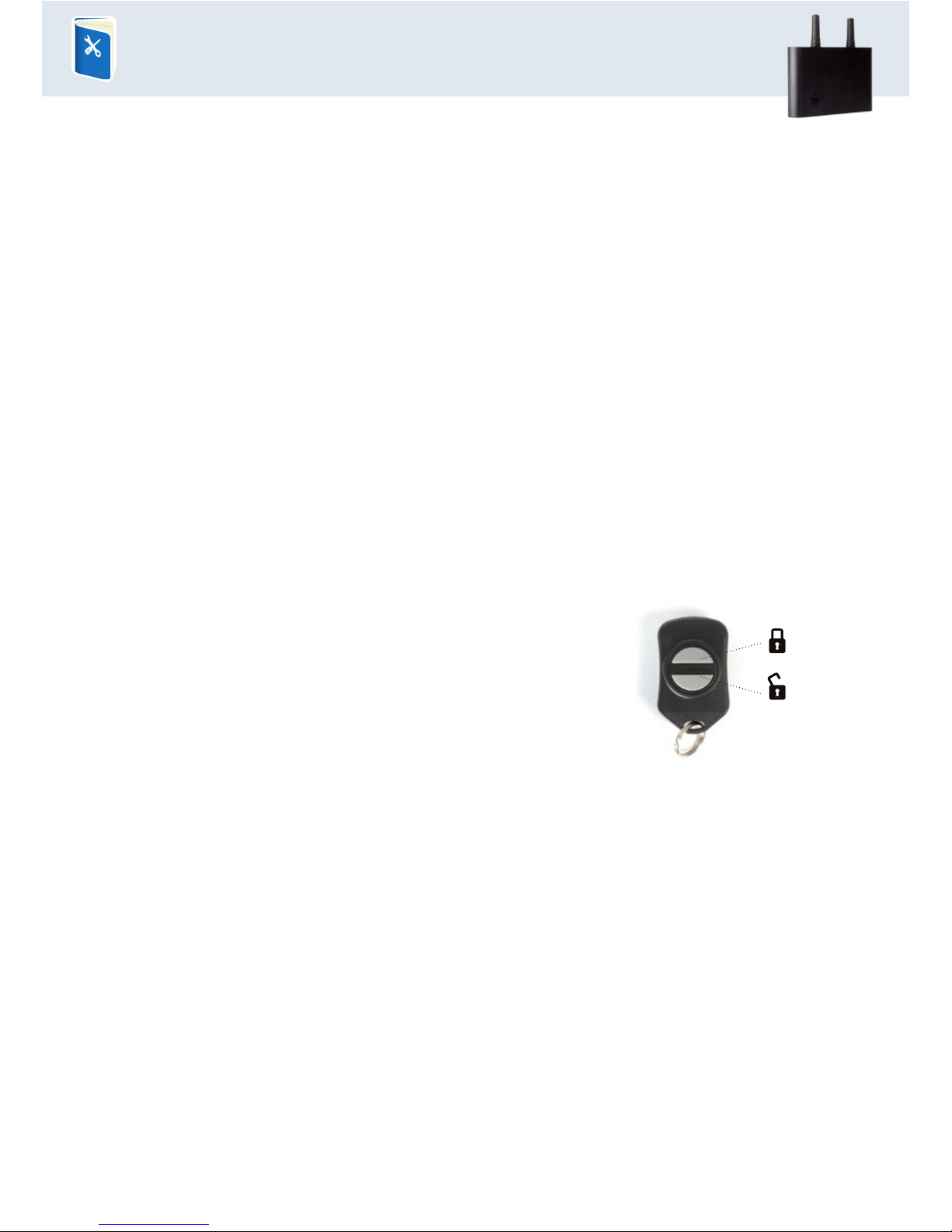
Is a remote control connected, press the Alarm OFF button.
The Piccolo® AIR unit acknowledges with two beeps.
When a detector is activated, the alarm system is activated again
by pressing the Alarm ON button. The Piccolo® AIR unit acknowledges by beeping 4 times.
Text message:
Use a mobile telephone.
Send a text with the message 'OF' (NOTICE! Spelled with only one F) for the phone number of the
Piccolo® AIR unit. You can also use a mobile phone which is not connected to the alarm system.
When the detector is silent again, the alarm system is activated by sending a text with the
message 'ON' to the phone number of the Piccolo® AIR unit.
For further info, see the instruction film and FAQ on our website.
Do you need further help or are you interested in advanced functions?
Read more in the manual on www.profort.dk
Alarm OFF
Alarm ON
 Loading...