

Page 1
®
Model No. 831.299480
Visit our website at
www.proform.com
new products, prizes,
fitness tips, and much more!
Serial No.
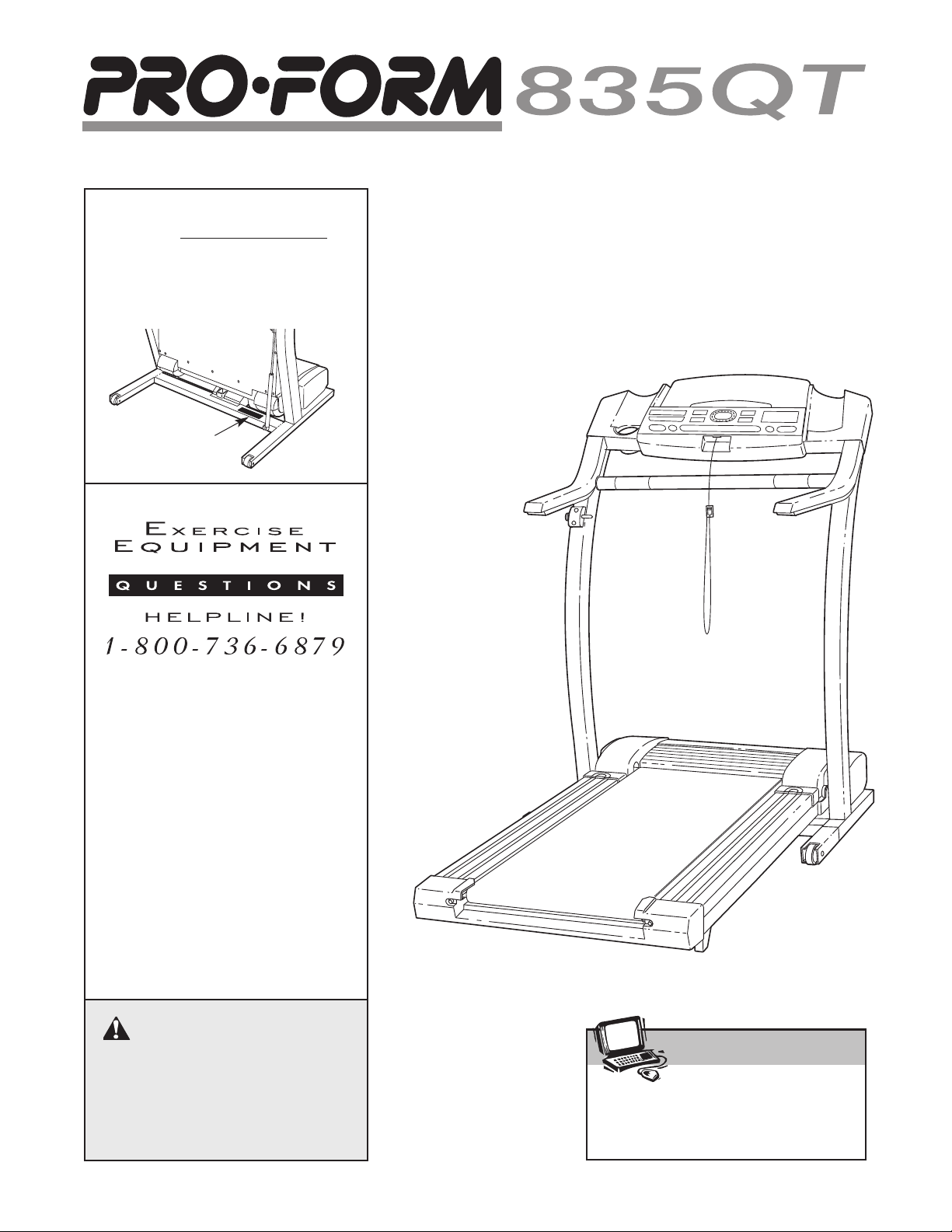
Find the serial number in the location
shown below. Write the serial number
in the space above for reference.
Serial
Number
Decal
USER'S MANUAL
SEARS, ROEBUCK AND CO.
HOFFMAN ESTATES, IL 60179
CAUTION
Read all precautions and instructions in this manual before using
this equipment. Save this manual
for future reference.
Patent Pending
Page 2

TABLE OF CONTENTS
®
IMPORTANT PRECAUTIONS . . . . . . . . . . . . . . . . . . . . . . . . . . . . . . . . . . . . . . . . . . . . . . . . . . . . . . . . . . . . . . . . .3
BEFORE YOU BEGIN . . . . . . . . . . . . . . . . . . . . . . . . . . . . . . . . . . . . . . . . . . . . . . . . . . . . . . . . . . . . . . . . . . . . . . .5
ASSEMBLY . . . . . . . . . . . . . . . . . . . . . . . . . . . . . . . . . . . . . . . . . . . . . . . . . . . . . . . . . . . . . . . . . . . . . . . . . . . . . . .6
OPERATION AND ADJUSTMENT . . . . . . . . . . . . . . . . . . . . . . . . . . . . . . . . . . . . . . . . . . . . . . . . . . . . . . . . . . . . .8
HOW TO FOLD AND MOVE THE TREADMILL . . . . . . . . . . . . . . . . . . . . . . . . . . . . . . . . . . . . . . . . . . . . . . . . . .19
TROUBLE-SHOOTING . . . . . . . . . . . . . . . . . . . . . . . . . . . . . . . . . . . . . . . . . . . . . . . . . . . . . . . . . . . . . . . . . . . . .20
CONDITIONING GUIDELINES . . . . . . . . . . . . . . . . . . . . . . . . . . . . . . . . . . . . . . . . . . . . . . . . . . . . . . . . . . . . . . .22
PART LIST . . . . . . . . . . . . . . . . . . . . . . . . . . . . . . . . . . . . . . . . . . . . . . . . . . . . . . . . . . . . . . . . . . . . . . . . . . . . . . .23
ORDERING REPLACEMENT PARTS . . . . . . . . . . . . . . . . . . . . . . . . . . . . . . . . . . . . . . . . . . . . . . . . . .Back Cover
FULL 90-DAY WARRANTY . . . . . . . . . . . . . . . . . . . . . . . . . . . . . . . . . . . . . . . . . . . . . . . . . . . . . . . . . . .Back Cover
Note: An EXPLODED DRAWING is attached in the center of this manual.
2
Page 3

IMPORTANT PRECAUTIONS
WARNING: To reduce the risk of burns, fire, electric shock, or injury to persons, read the
following important precautions and information before operating the treadmill.
1. It is the responsibility of the owner to ensure
that all users of this treadmill are adequately
informed of all warnings and precautions.
2. Use the treadmill only as described.
3. Place the treadmill on a level surface, with at
least eight feet of clearance behind it. Do not
place the treadmill on any surface that blocks
air openings. To protect the floor or carpet
from damage, place a mat under the treadmill.
4. Keep the treadmill indoors, away from moisture and dust. Do not put the treadmill in a
garage or covered patio, or near water.
5. Do not operate the treadmill where aerosol
products are used or where oxygen is being
administered.
6. Keep children under the age of 12 and pets
away from the treadmill at all times.
7. The treadmill should not be used by persons
weighing more than 250 pounds.
8. Never allow more than one person on the
treadmill at a time.
9. Wear appropriate exercise clothing when
using the treadmill. Do not wear loose clothing that could become caught in the treadmill.
Athletic support clothes are recommended for
both men and women.
shoes. Never use the treadmill with bare feet,
wearing only stockings, or in sandals.
10. When connecting the power cord (see page 8),
plug the power cord into a surge suppressor
(not included) and plug the surge suppressor
into a grounded circuit capable of carrying 15
or more amps. No other appliance should be
on the same circuit. Do not use an extension
cord.
Always wear athletic
pation of 450 joules. The surge suppressor
must be electrically rated for 120 volts AC and
15 amps. To purchase a surge suppressor, see
your local PROFORM dealer or call 1-800-3667278 and order part number 146148.
12. Keep the power cord and the surge suppressor away from heated surfaces.
13. Never move the walking belt while the power
is turned off. Do not operate the treadmill if
the power cord or plug is damaged, or if the
treadmill is not working properly. (See
BEFORE YOU BEGIN on page 5 if the treadmill is not working properly.)
14. Never start the treadmill while you are standing on the walking belt. Always hold the
handrails while using the treadmill.
15. The treadmill is capable of high speeds.
Adjust the speed in small increments to avoid
sudden jumps in speed.
16. The pulse sensor is not a medical device.
Various factors, including the user's movement, may affect the accuracy of heart rate
readings. The pulse sensor is intended only
as an exercise aid in determining heart rate
trends in general.
Never leave the treadmill unattended while it
17.
is running. Always remove the key, unplug
the power cord and move the on/off switch to
the off position when the treadmill is not in
use. (See the drawing on page 5 for the location of the on/off switch.)
18. Do not attempt to raise, lower, or move the
treadmill until it is properly assembled. (See
ASSEMBLY on page 6, and HOW TO FOLD
AND MOVE THE TREADMILL on page 19.) You
must be able to safely lift 45 pounds (20 kg) in
order to raise, lower, or move the treadmill.
11. Use only a single-outlet surge suppressor that
is UL 1449 listed as a transient voltage surge
suppressor (TVSS). The surge suppressor
must have a UL suppressed voltage rating of
400 volts or less and a minimum surge dissi
-
19.
Do not change the incline of the treadmill by
placing objects under the treadmill.
When folding or moving the treadmill, make
20.
sure that the storage latch is fully closed.
3
Page 4
When using i-FIT.com CD’s and videos, an
21.
electronic “chirping” sound will alert you
when the speed and/or incline of the treadmill
is about to change. Always listen for the
“chirp” and be prepared for speed and/or in
cline changes. In some instances, the speed
and/or incline may change before the personal trainer describes the change.
22. When using i-FIT.com CD’s and videos, you
can manually override the speed and incline
settings at any time by pressing the speed
and incline buttons. However, when the next
“chirp” is heard, the speed and/or incline will
change to the next settings of the CD or video
program.
Inspect and tighten all parts of the treadmill
24.
regularly.
25. Never insert or drop any object into any
-
opening.
DANGER: Always unplug the power
26.
cord immediately after use, before cleaning
the treadmill, and before performing the maintenance and adjustment procedures described in this manual. Never remove the
motor hood unless instructed to do so by an
authorized service representative. Servicing
other than the procedures in this manual
should be performed by an authorized service
representative only.
23. Always remove i-FIT.com CD’s and videos
from your CD player or VCR when you are not
using them.
27. This treadmill is intended for in-home use
only. Do not use this treadmill in any commercial, rental, or institutional setting.
WARNING: Before beginning this or any exercise program, consult your physician. This
is especially important for persons over the age of 35 or persons with pre-existing health problems.
Read all instructions before using. SEARS assumes no responsibility for personal injury or property
damage sustained by or through the use of this product.
SAVE THESE INSTRUCTIONS
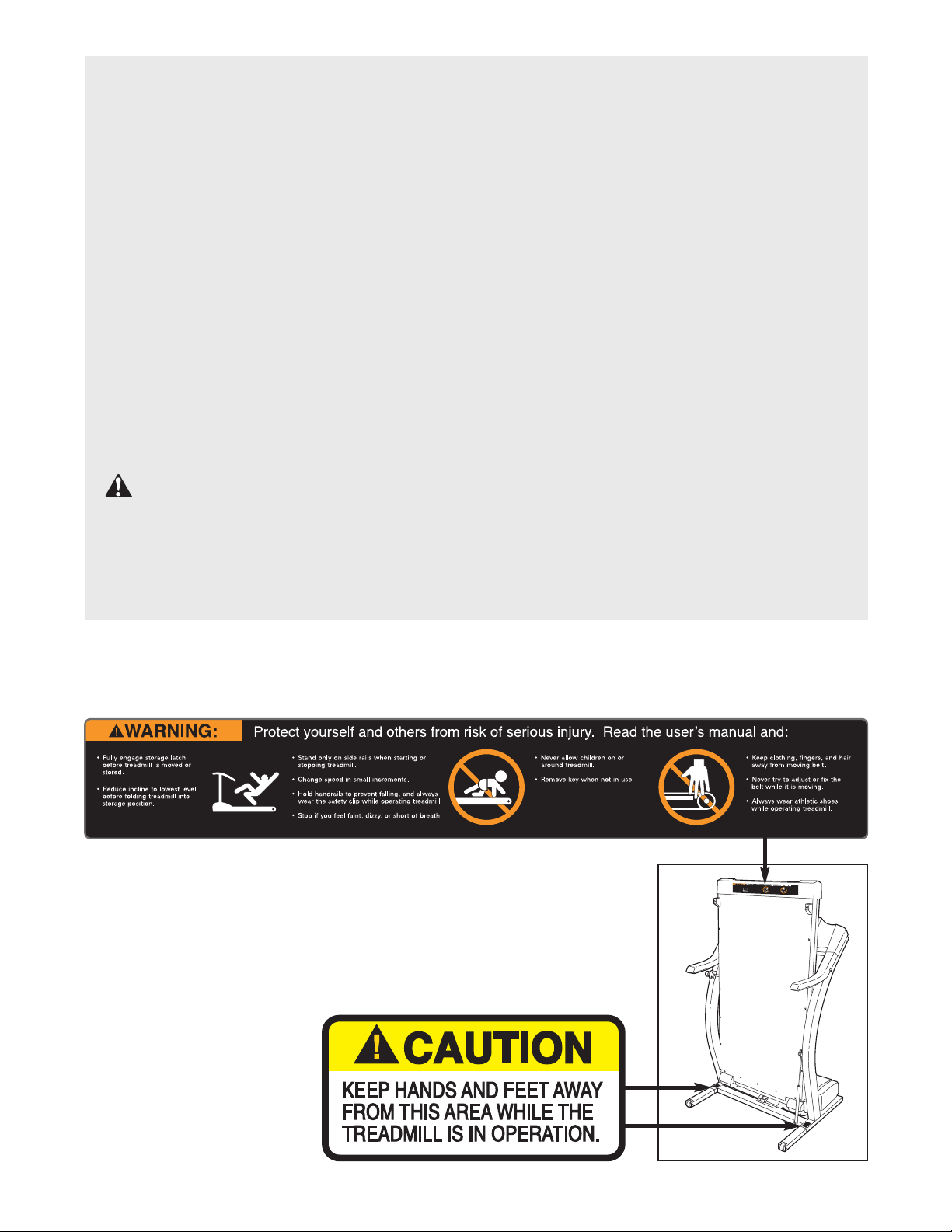
The decals shown below have been placed on your treadmill. If a decal is missing, or if it is not legible,
please call our toll-free HELPLINE to order a free replacement decal (see the front cover of this manual).
Apply the decal in the location shown.
Note: This decal is shown at 38% of actual size.
4
Page 5
BEFORE YOU BEGIN
Thank you for selecting the revolutionary PROFORM
835QT treadmill. The 835QT treadmill combines advanced technology with innovative design to help you
get the most from your exercise program in the convenience and privacy of your home. And when you’re not
exercising, the unique 835QT can be folded up, requiring less than half the floor space of other treadmills.
®
Monday through Saturday, 7 a.m. until 7 p.m. Central
Time (excluding holidays). To help us assist you,
please note the product model number and serial number before calling. The model number of the treadmill
is 831.299480. The serial number can be found on a
decal attached to the treadmill (see the front cover of
this manual for the location).
For your benefit, read this manual carefully before
using the treadmill. If you have additional questions,
please call our toll-free HELPLINE at 1-800-736-6879,
Water Bottle
Holder (Bottle
not included)
Pulse Sensor
Lock Knob
LEFT SIDE
Walking Belt
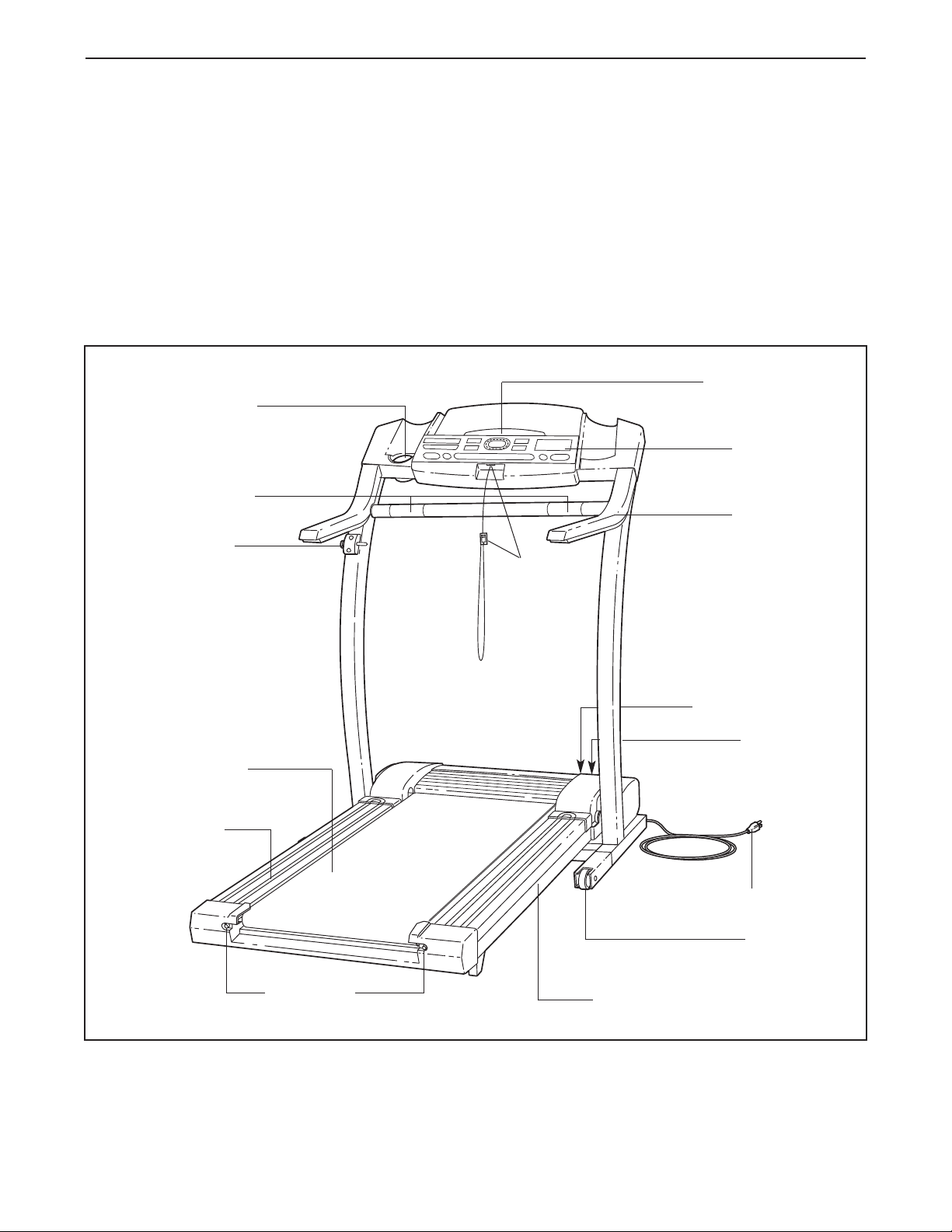
Before reading further, please review the drawing
below and familiarize yourself with the parts that are
labeled.
Book Holder
Console
Handrail
Key/Clip
RIGHT SIDE
On/Off Switch
Circuit
Breaker
Foot Rail
Rear Roller
Adjustment Bolts
Power Cord
Front
Wheel
Cushioned Walking Platform
5
Page 6
ASSEMBLY
Assembly requires two people. Set the treadmill in a cleared area and remove all packing materials. Do not
dispose of the packing materials until assembly is completed. Assembly requires your own Phillips screwdriver and wire cutters .
Note: The underside of the treadmill walking belt is coated with high-performance lubricant. During shipping, a
small amount of lubricant may be transferred to the top of the walking belt or the shipping carton. This is a normal
condition and does not affect treadmill performance. If there is lubricant on top of the walking belt, simply wipe off
the lubricant with a soft cloth and a mild, non-abrasive cleaner.
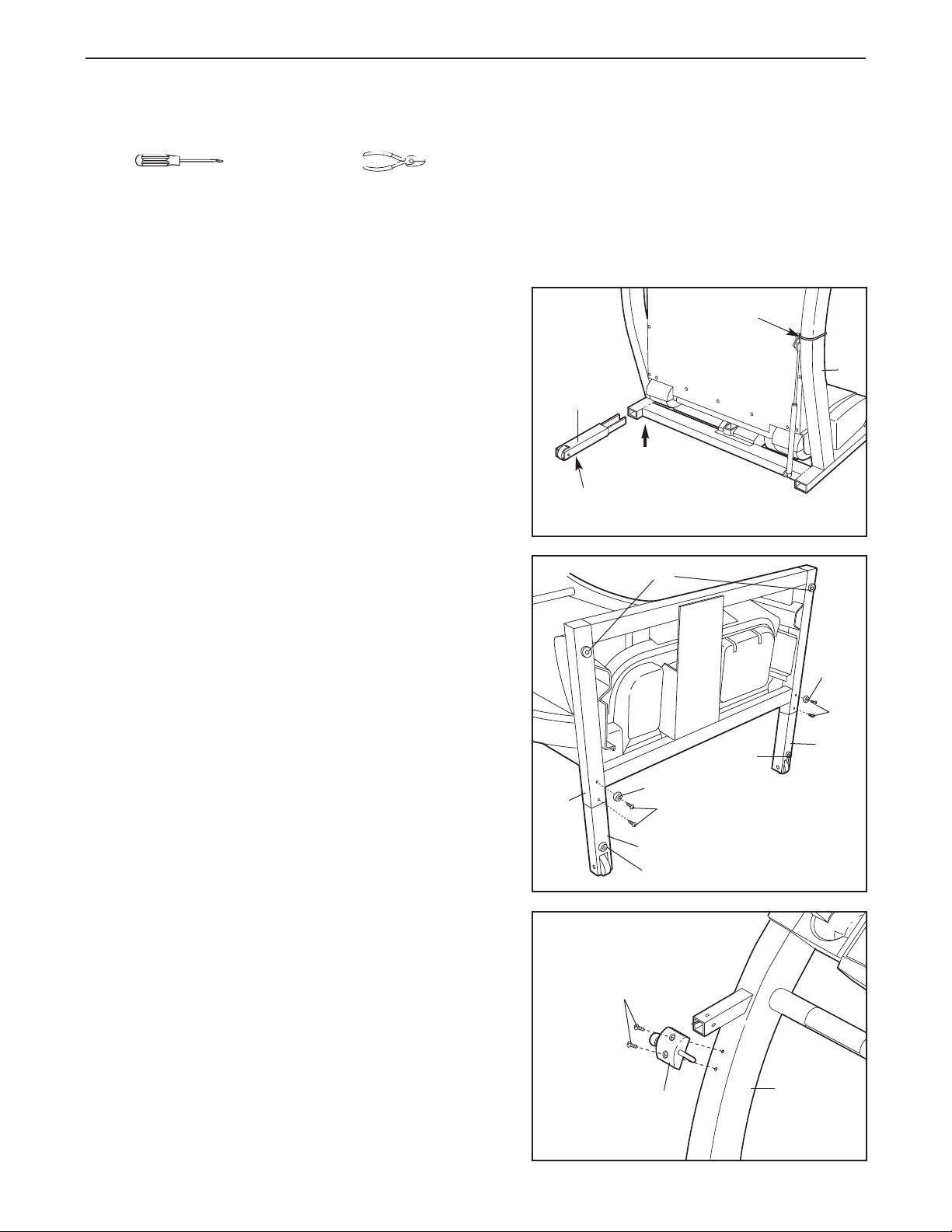
1. With the help of a second person, carefully raise the
treadmill to the upright position.
While a second person tips the treadmill to one side
slightly and holds it, insert one of the Extension Legs (103)
into the treadmill as shown. Make sure that the Extension
Leg is turned so the Base Pad (97) is on the bottom.
Next, tip the treadmill to the other side and insert the
other Extension Leg (not shown) in the same way. Lower
the side of the treadmill so that both Extension Legs
(103) are resting flat on the floor. Cut the Wire Tie from
the Upright (82).
2. With the help of a second person, carefully lower the
treadmill frame and then tip the Uprights (82) down as
shown. Make sure that the Extension Legs (103) re-
main in the Uprights.
Attach each Extension Leg (103) with two of the four
Screws (101) and a Base Pad (126) as shown.
Note: One replacement Base Pad (126) and Spacer (not
shown) are included. If a Base Pad (126) becomes worn
and needs to be replaced, use the replacement Base
Pad. If a Thick Base Pad (97) needs to be replaced, use
the replacement Base Pad with the Spacer.
1
103
97
2
126
82
Wire Tie
82
97
126
101
103
97
101
3. With the help of a second person, carefully tip the
Uprights (82) back to the vertical position.
Attach the Latch Assembly (9) to the left Upright (82) with
the two 1/2” Screws (89).
103
97
3
89
9
82
6
Page 7
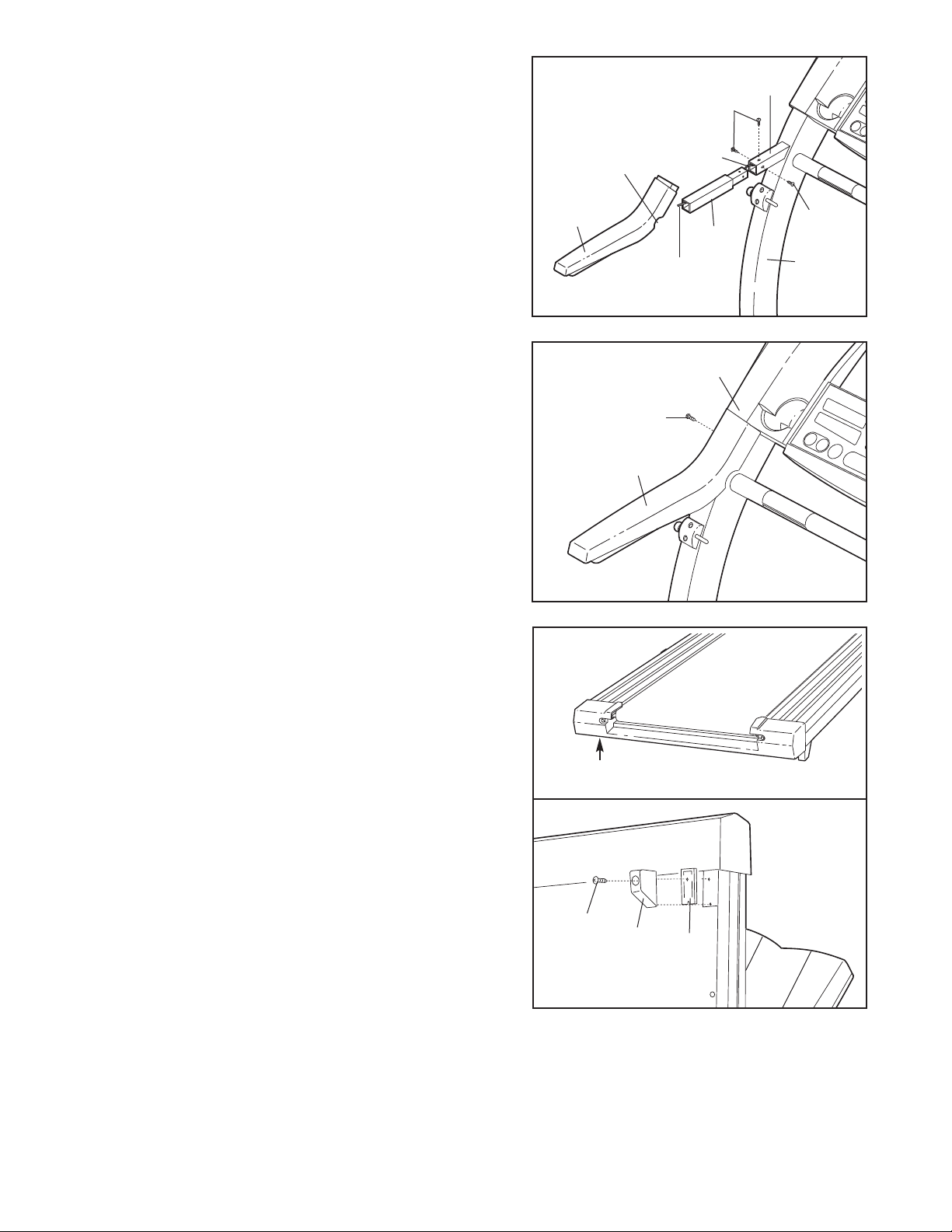
Find the plastic tie inside the post on the left Upright
4.
(82). Insert the plastic tie through a Handrail Extension
(85) and insert the Handrail Extension into the post as
shown. Make sure that the indicated holes are on top. If
necessary, tap the Handrail Extension with a rubber mallet to fully insert it. Attach the Handrail Extension with
three of the eight Small Screws (76) as shown.
4
Post
76
84
Cutout
Identify the Left Foam Grip (110), which has a
cutout in the right side. Slide the Left Foam Grip as far as
possible onto the post on the left Upright (82).
5. Make sure that the Left Foam Grip (110) is flush with the
Console Base (87) as shown. Tighten a Small Screw (76)
into the side of the Left Foam Grip as shown.
Attach the Right Foam Grip (not shown) and the other
Handrail Extension (not shown) as described in step 4
and this step. Note: There is no plastic tie in the right
side.
Extra screws may be included.
6. Refer to drawing 6a. Locate the left Rear Foot (59) on
the treadmill. If the left Rear Foot touches the floor, go to
step 7. If there is a space between the left Rear Foot and
the floor, follow the instructions below.
large
5
6a
110
Plastic Tie
76
110
85
76
82
87
Hold the treadmill firmly with both hands, and raise the
treadmill to the storage position as described on page 19.
60
59
59
11
Refer to drawing 6b. Using a phillips screwdriver, remove
the Screw (60), the right Rear Foot (59), and the Rear
Foot Spacer (11) from the treadmill. Reattach the right
Rear Foot without the Rear Foot Spacer. Hold the tread
mill with both hands, and lower the treadmill as
described on page 19.
Check the left Rear Foot (59 [see drawing 6a]). If the left
Rear Foot is still off the floor, raise the treadmill and remove the left Rear Foot. Snap the Rear Foot Spacer (11)
onto the left Rear Foot and reattach the left Rear Foot
and the Rear Foot Spacer. Carefully lower the treadmill.
7. Make sure that all parts are tightened before you use the treadmill. Keep the included allen wrench in a
secure place. The allen wrench is used to adjust the walking belt (see page 21). To protect the floor or carpet
from damage, place a mat under the treadmill.
-
6b
7
Page 8
OPERATION AND ADJUSTMENT
PERFORMANT LUBE
THE
Your treadmill features a walking belt coated with
PERFORMANT LUBETM, a high-performance lubricant.
IMPORTANT: Never apply silicone spray or other
substances to the walking belt or the walking plat
form. Such substances will deteriorate the walking
belt and cause excessive wear.
HOW TO PLUG IN THE POWER CORD
TM
WALKING BELT
DANGER: Improper connection
of the equipment-grounding conductor can
result in an increased risk of electric shock.
Check with a qualified electrician or serviceman if you are in doubt as to whether the
product is properly grounded. Do not modify
the plug provided with the product—if it will
not fit the outlet, have a proper outlet
installed by a qualified electrician.
Your treadmill, like any other type of sophisticated
electronic equipment, can be seriously damaged by
sudden voltage changes in your home’s power.
Voltage surges, spikes, and noise interference can
result from weather conditions or from other appliances
being turned on or off. To decrease the possibility of
your treadmill being damaged, always use a surge
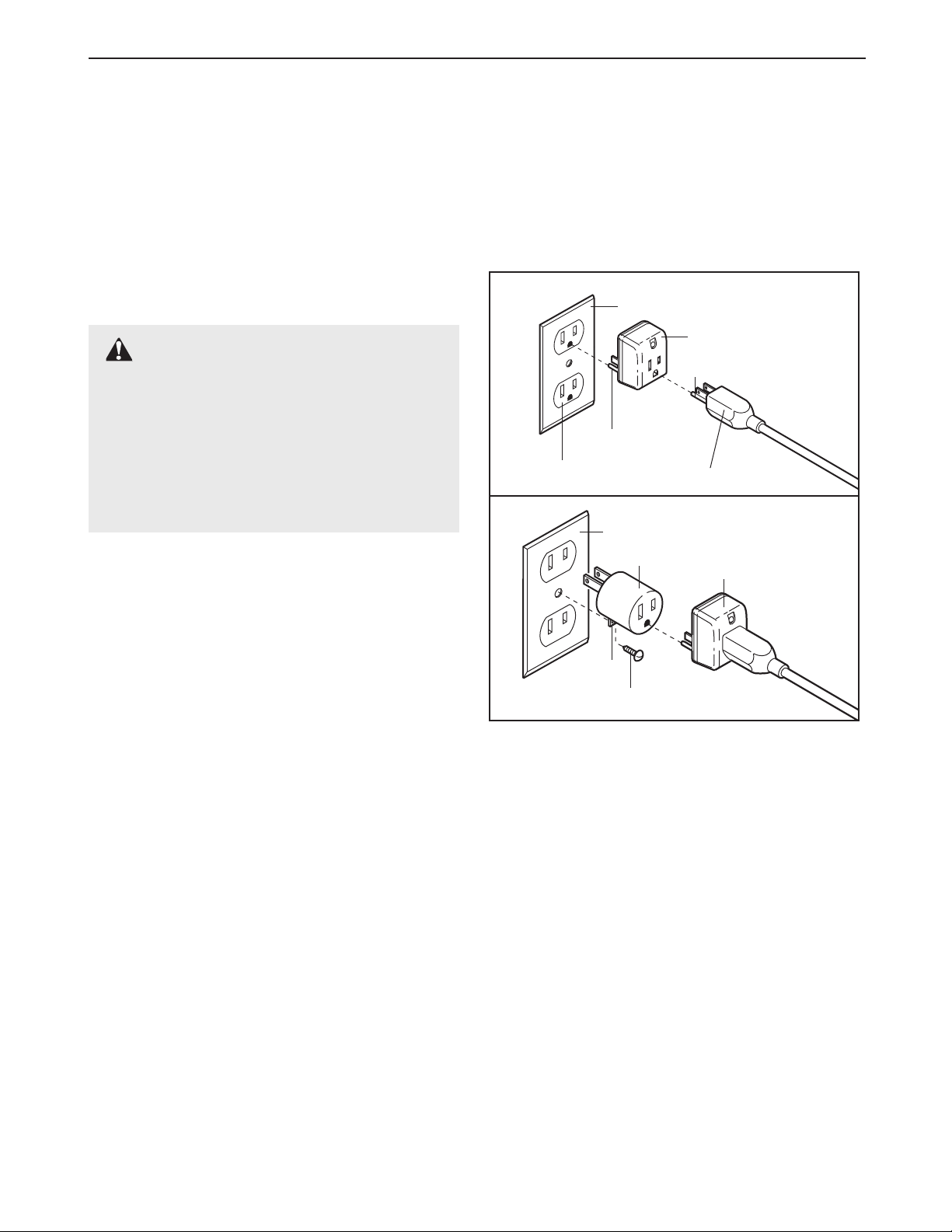
suppressor with your treadmill (see drawing 1 at
the right).
This product is for use on a nominal 120-volt circuit,
and has a grounding plug that looks like the plug illustrated in drawing 1 below. A temporary adapter that
looks like the adapter illustrated in drawing 2 may be
used to connect the surge suppressor to a 2-pole
-
receptacle as shown in drawing 2 if a properly
grounded outlet is not available.
1
Grounded Outlet Box
Surge Suppressor
Grounding Pin
Grounding Pin
Grounded Outlet
2
Grounded Outlet Box
Adapter
Lug
Metal Screw
Grounding Plug
Surge Suppressor
To purchase a surge suppressor, see your local
PROFORM dealer or call toll-free 1-800-366-7278
and order part number 146148. Use only a single-
outlet surge suppressor that is UL 1449 listed as a
transient voltage surge suppressor (TVSS). The surge
suppressor must have a UL suppressed voltage rating
of 400 volts or less and a minimum surge dissipation of
450 joules. The surge suppressor must be electrically
rated for 120 volts AC and 15 amps.
This product must be grounded. If it should malfunction or break down, grounding provides a path of least
resistance for electric current to reduce the risk of electric shock. This product is equipped with a cord having
an equipment-grounding conductor and a grounding
Plug the power cord into a surge suppressor,
plug.
and plug the surge suppressor into an appropriate
outlet that is properly installed and grounded in
accordance with all local codes and ordinances.
Important: The treadmill is not compatible with
GFCI-equipped outlets.
The temporary adapter should be used only until a
properly grounded outlet (drawing 1) can be installed
by a qualified electrician.
The green-colored rigid ear, lug, or the like extending
from the adapter must be connected to a permanent
ground such as a properly grounded outlet box cover.
Whenever the adapter is used it must be held in place
by a metal screw. Some 2-pole receptacle outlet box
covers are not grounded. Contact a qualified elec
trician to determine if the outlet box cover is
grounded before using an adapter.
8
-
Page 9

CONSOLE DIAGRAM
Incline Display
Manual/iFIT.com Indicators
Note: If there is a thin sheet of clear plastic
on the face of the console, remove it.
Displays
LED Track
Key
CAUTION: Before operating the
console, read the following precautions.
• Do not stand on the walking belt when turning on the power.
• Always wear the clip (see the drawing
above) while operating the treadmill.
• Adjust the speed in small increments to
avoid sudden jumps in speed.
• To reduce the possibility of electric shock,
keep the console dry. Avoid spilling liquids
on the console and place only a sealed water
bottle in the water bottle holder.
FEATURES OF THE CONSOLE
The treadmill console offers an impressive array of
features to help you get the most from your exercise.
When the console is in the manual mode, the speed
and incline of the treadmill can be controlled with a
touch of a button. As you exercise, the LED track and
the four displays will provide continuous exercise feed
back. You can even measure your heart rate using the
built-in pulse sensor.
Six certified personal trainer programs are also offered.
Each program automatically controls the speed and incline of the treadmill as it guides you through an effec
tive workout.
The console also features advanced iFIT.com interactive technology. IFIT.com technology is like having a
personal trainer right in your home. Using the included
audio cable, you can connect the treadmill to your
Displays
home stereo, portable stereo, or computer and play
special iFIT.com CD programs (CD’s are available
separately). IFIT.com CD programs automatically control the speed and incline of the treadmill as a personal
trainer guides you through every step of your workout.
High-energy music provides added motivation. Each
CD features two different programs designed by certified personal trainers.
In addition, you can connect the treadmill to your VCR
and TV and play iFIT.com video programs (videocassettes are available separately). Video programs offer
the same benefits as iFIT.com CD programs, but add
the excitement of working out with a class and an instructor—the hottest new trend at health clubs.
With the treadmill connected to your computer, you
can also go to our new internet site at www.iFIT.com
and access even more programs. Choose from a selection of basic programs that interactively control the
speed and incline of your treadmill to help you achieve
your personal exercise goals. Or, use iFIT.com audio
and video programs directly from our internet site. Visit
www.iFIT.com for complete details.
By adding an optional upgrade module to the treadmill,
-
you can use virtually endless features from our internet
site. See www.iFIT.com to learn about other iFIT.com
features.
videocassettes, or an optional upgrade module,
call toll-free 1-800-884-0620. For information about
other optional accessories, see page 18.
-
To use the manual mode of the console
steps beginning on page 10.
program, see page 12. To use iFIT.com CD or video
programs, see page 15. To use iFIT.com programs
from our internet site, see page 17.
To purchase iFIT.com CD’s, iFIT.com
Program Indicators
Speed Buttons
Clip
, follow the
To use a personal trainer
9
Page 10

HOW TO TURN ON THE POWER
Plug in the power cord (see HOW TO PLUG IN
1
THE POWER CORD on page 8).
Locate the on/off
2
switch on the front of
the treadmill. Make
sure the on/off switch
is in the on position.
Stand on the foot rails
3
of the treadmill. Find
the clip attached to the
key, and slide the clip
securely onto the waistband of your clothing.
Test the clip by carefully taking a few steps backward until the key
is pulled from the console. If the key is not
pulled from the console, adjust the position of
the clip as needed.
Next, insert the key into the console. After a moment, the four displays, the LED track, and various
indicators on the console will light.
Note: The console can display speed and distance in
either miles or kilometers (see SPEED/MIN-MILE DISPLAY on page 11). For simplicity, all instructions in this
manual refer to miles.
HOW TO USE THE MANUAL MODE
On
Position
change the speed of the
walking belt as desired by
s
pressing the SPEED
tt
and
buttons. To change
the speed setting quickly,
press the QUICK SPEED
buttons. Note: After the buttons are pressed, it
may take a moment for the treadmill to reach the
selected speed setting.
To stop the walking belt, press the STOP button.
The TIME display will begin to flash. To restart the
walking belt, press the START button or the
s
SPEED
Change the incline of the treadmill as desired.
s
button.
s
4
To change the
incline of the
treadmill, press
the INCLINE
buttons. Each
time a button is
pressed, the incline will change
by 0.5%. The buttons can be held down to change
the incline quickly. Note: After the incline buttons
are pressed, it will take a moment for the treadmill
to reach the selected incline setting.
Note: In the incline display, the first indicator will
light when the incline is set at 1.5%. The second
indicator will light when the incline is set at 2% or
2.5%, the third indicator will light when the incline
is set at 3% or 3.5%, and so forth.
Program Display
Insert the key fully into the console.
1
See HOW TO TURN ON THE POWER above.
Select the manual mode.
2
When the key is inserted, the manual
mode will be selected
and the MANUAL indi
cator will light. If a program has been selected, press the PROGRAM button repeatedly to
select the manual mode.
Press the START button or the SPEED
3
to start
A moment after the button is pressed, the walking
belt will begin to move at 1 mph. Hold the handrails
and carefully begin walking. As you exercise,
the walking belt.
-
ss
button
10
Follow your progress with the LED track and
5
the four displays.
The LED Track—The
LED track represents a
distance of 1/4 mile. As
you exercise, the indicators around the track will
light one at a time until
you have completed 1/4
mile. A new lap will then begin.
DISTANCE/LAPS dis
play—This display shows
the distance that you
have walked or run and
the number of laps you
have completed (one lap
equals 1/4 mile). The display will alternate between
one number and the other every seven seconds,
as shown by the arrows in the display.
-
Arrow
Page 11

TIME display—When
the manual mode or an
iFIT.com program is
selected, this display
shows the elapsed time.
When a personal trainer
program is selected, this display shows both the
time remaining in the program and the time remaining in the current segment of the program.
The display will alternate between one number and
the other every seven seconds.
CALS/FAT CALS/
PULSE display—This
display shows the approximate numbers of
calories and fat calories
you have burned (see
FAT BURNING on page
22). Every seven seconds, the display will change
from one number to the other, as shown by the arrows in the display. This display will also show
your heart rate when the pulse sensor is used (see
step 6 on this page).
Measure your heart rate, if desired.
6
Stand on the
foot rails and
place your
hands on the
metal contacts
on the pulse bar.
Your palms
must be resting
on the upper
contacts, and
your fingers must
be touching the
lower contacts—
avoid moving
your hands.
When your pulse is detected, the heart-shaped indicator in the CALS/FAT CALS/PULSE display will
flash steadily and a series of dashes (– –) will ap
pear. After a few seconds, your heart rate will be
shown.
ing, continue to hold the contacts for about 15
seconds.
For the most accurate heart rate read-
Sensors
-
SPEED/MIN-MILE
display—This display
shows the speed of the
walking belt and your
current pace (pace is
measured in minutes per
mile). Every seven seconds, the display will
change from one number to the other, as shown
by the arrows in the display.
Note: The SPEED/MIN-MILE display can show
speed in either miles per hour or kilometers per
hour. To find which unit of measurement is selected, hold down the STOP button while inserting
the key into the console.
An “E” for English miles
or an “M” for metric kilometers will appear in the
display. Press the
SPEED
change the unit of mea
surement. When the desired unit of measurement
is selected, remove and then reinsert the key.
Note: To reset the displays, press the STOP but
ton, remove the key, and then reinsert the key.
ss
button to
-
-
When you are finished exercising, remove the
7
key.
Step onto the foot rails, press the STOP button,
and adjust the incline of the treadmill to the lowest
level. The incline must be at the lowest level
when the treadmill is raised to the storage position or the treadmill will be damaged. Next,
remove the key from the console and put the key
in a secure place. Note: If the displays and vari-
ous indicators on the console remain lit after
the key is removed, the console is in the
“demo” mode. Refer to page 18 and turn off the
demo mode.
When you are finished using the treadmill
the on/off switch near the power cord to the off
position.
,
move
1
1
Page 12

HOW TO USE PERSONAL TRAINER PROGRAMS
Insert the key into the console.
1
See HOW TO TURN ON THE POWER on page
10.
Select one of the personal trainer programs.
2
When the
key is inserted, the
manual
mode will be
selected and
the MANUAL indicator will light.
To select one of the personal trainer programs,
press the PROGRAM button repeatedly until one
of the six personal trainer program indicators
lights.
The console features two low intensity programs,
two medium intensity programs, and two high intensity programs. The profiles on the console
show how the speed and incline of the treadmill
will change during the programs. The numbers
beside the profiles show the maximum speed and
incline settings for the programs. For example, the
upper profile shows that the treadmill will reach a
maximum speed of 4.5 mph and a maximum incline of 5% during the first program.
One speed setting and one incline setting are programmed for each segment. When only three seconds remain in the first segment,
will sound and the treadmill will automatically adjust to the speed and incline settings for the second
segment.
The program will continue in this way until the
TIME display counts down to zero. The walking
belt will then slow to a stop.
Note: If the speed or incline setting for the current
segment is too high or too low, you can manually
override the setting by pressing the SPEED or
INCLINE buttons on the console. However,
the next segment begins, the treadmill will adjust to the next speed and incline settings of
the program.
To stop the program, press the STOP button. The
TIME display will begin to flash. To restart the program, press the START button or the SPEED
button. To end the program, press the STOP button, remove the key, and then reinsert the key.
Follow your progress with the LED track and
4
the four displays.
Refer to step 5 on page 10.
Measure your heart rate, if desired.
a series of tones
5
See step 6 on page 11.
when
s
s
Press the START button or the SPEED
3
to start the program.
A moment after the button is pressed, the treadmill will automatically adjust to the first speed and
incline settings for the program. Hold the handrails
and begin walking.
Each program is divided
into several time
segments of different
lengths.
display shows both the
time remaining in the program and the time
remaining in the current segment of the program.
The TIME
ss
button
When the program is completed, remove the
6
key from the console.
When the program has ended, make sure that
the treadmill is at the lowest incline level. Next,
remove
secure place.
tors on the console remain lit after the key is
removed, the console is in the “demo” mode.
Refer to page 18 and turn off the demo mode.
When you are finished using the treadmill, move
the
position.
the key from the console and put it in a
Note: If the displays and indica
on/off switch near the power cord to the off
-
12
Page 13

HOW TO CONNECT THE TREADMILL TO YOUR
LINE OUT
PHONES
LINE OUT
PHONES
AUDIO OUT
RIGHT
LEFT
A
LINE OUT
AUDIO OUT
RIGHT
LEFT
A
PHONES
LINE OUT
AUDIO OUT
RIGHT
LEFT
B
A
LINE OUT
PHONES
LINE OUT
PHONES
PHONES
PHONES
CD PLAYER, VCR, OR COMPUTER
To use iFIT.com CD’s
, the treadmill must be connected to your portable CD player, portable stereo,
home stereo, or computer with CD player. See pages
13 and 14 for connecting instructions.
To use iFIT.com
videocassettes, the treadmill must be connected to
your VCR. See page 15 for connecting instructions. To
use iFIT.com programs directly from our internet
site, the treadmill must be connected to your home
computer. See page 14 for connecting instructions.
HOW TO CONNECT YOUR PORTABLE CD PLAYER
Note: If your CD player has separate LINE OUT and
PHONES jacks, see instruction A below. If your CD
player has only one jack, see instruction B.
A. Plug one end of the audio cable into the jack on the
front of the treadmill near the power cord. Plug the
other end of the cable into the LINE OUT jack on
your CD player. Plug your headphones into the
PHONES jack.
A
HOW TO CONNECT YOUR PORTABLE STEREO
Note: If your stereo has an RCA-type AUDIO OUT
jack, see instruction A below. If your stereo has a
3.5mm LINE OUT jack, see instruction B. If your
stereo has only a PHONES jack, see instruction C.
A. Plug one end of the audio cable into the jack on the
front of the treadmill near the power cord. Plug the
other end of the cable into the included adapter. Plug
the adapter into an AUDIO OUT jack on your stereo.
A
Audio
Adapter
Cable
B. Plug one end of the audio cable into the jack on the
front of the treadmill near the power cord. Plug the
other end of the cable into the LINE OUT jack on
your stereo.
Plug one end of the audio cable into the jack on the
B.
front of the treadmill near the power cord. Plug the
other end of the cable into a 3.5mm Y-adapter
(available at electronics stores). Plug the Y-adapter
Audio
Cable
Head-
phones
into the PHONES jack on your CD player. Plug your
headphones into the other side of the Y-adapter.
B
Audio
Cable
Headphones
3.5mm
Y-adapter
B
Audio
Cable
C. Plug one end of the audio cable into the jack on the
front of the treadmill near the power cord. Plug the
other end of the cable into a 3.5mm Y-adapter
(available at electronics stores). Plug the Y-adapter
into the PHONES jack on your stereo. Plug your
headphones into the other side of the Y-adapter.
C
Audio
Cable
3.5mm
Y-adapter
13
Headphones
Page 14

HOW TO CONNECT YOUR HOME STEREO
CD
VCR
Amp
LINE OUT
LINE OUT
LINE OUT
A
CD
VCR
Amp
LINE OUT
LINE OUT
CD
VCR
Amp
LINE OUT
A
PHONES
LINE OUT
HOW TO CONNECT YOUR COMPUTER
Note: If your stereo has an unused LINE OUT jack,
see instruction A below. If the LINE OUT jack is
being used, see instruction B.
A. Plug one end of the audio cable into the jack on the
front of the treadmill near the power cord. Plug the
other end of the cable into the included adapter.
Plug the adapter into the LINE OUT jack on your
stereo.
A
Audio
Adapter
Cable
B. Plug one end of the audio cable into the jack on the
front of the treadmill near the power cord. Plug the
other end of the cable into the included adapter.
Plug the adapter into an RCA adapter (available at
electronics stores). Next, remove the wire that is
currently plugged into the LINE OUT jack on your
stereo and plug the wire into the unused side of the
RCA adapter. Plug the RCA adapter into the LINE
OUT jack on your stereo.
Note:
If your computer has a 3.5mm LINE OUT jack,
see instruction A. If your computer has only a
PHONES jack, see instruction B.
A. Plug one end of the audio cable into the jack on the
front of the treadmill near the power cord. Plug the
other end of the cable into the LINE OUT jack on
your computer.
A
Audio
Cable
B. Plug one end of the audio cable into the jack on the
front of the treadmill near the power cord. Plug the
other end of the cable into a 3.5mm Y-adapter
(available at electronics stores). Plug the Y-adapter
into the PHONES jack on your computer. Plug your
headphones or speakers into the other side of the
Y-adapter.
B
B
Audio
Cable
3.5mm
Y-adapter
Headphones/Speakers
RCA
Audio
Cable
Adapter
Adapter
Wire removed from
LINE OUT jack
14
Page 15

HOW TO CONNECT YOUR VCR
AUDIO OUT
RIGHT
LEFT
VIDEO AUDIO
ANT
. IN
RF OUT
IN
OUT
CH
3
4
VIDEO
AUDIO
ANT
. IN
RF OUT
IN
OUT
CH
34
A
AUDIO OUT
RIGHT
LEFT
VIDEO
AUDIO
ANT. IN
RF OUT
IN
OUT
CH
34
Note: If your VCR has an unused AUDIO OUT jack,
see instruction A below. If the AUDIO OUT jack is
being used, see instruction B. If you have a TV
with a built-in VCR, see instruction B. If your VCR
is connected to your home stereo, see HOW TO
CONNECT YOUR HOME STEREO on page 14.
A. Plug one end of the audio cable into the jack on the
front of the treadmill near the power cord. Plug the
other end of the cable into the included adapter.
Plug the adapter into the AUDIO OUT jack on your
VCR.
A
Audio
Adapter
Cable
HOW TO USE IFIT.COM CD AND VIDEO
PROGRAMS
To use iFIT.com CD’s or videocassettes, the treadmill
must be connected to your portable CD player, portable
stereo, home stereo, computer with CD player, or
VCR. See HOW TO CONNECT THE TREADMILL TO
YOUR CD PLAYER, VCR, OR COMPUTER on page
Note: To purchase iFIT.com CD’s or to pur-
13.
chase iFIT.com videocassettes, call toll-free 1-800735-0768.
Follow the steps below to use an iFIT.com CD or
video. Note: The instructions included in the CD
case describe how to use the CD with a variety of
PROFORM treadmills. Some instructions may not
apply to this treadmill.
Insert the key fully into the console.
1
See HOW TO TURN ON THE POWER on page
10.
B. Plug one end of the audio cable into the jack on the
front of the treadmill near the power cord. Plug the
other end of the cable into the included adapter.
Plug the adapter into an RCA adapter (available at
electronics stores). Next, remove the wire that is
currently plugged into the AUDIO OUT jack on your
VCR and plug the wire into the unused side of the
RCA adapter. Plug the RCA adapter into the AUDIO
OUT jack on your VCR.
B
RCA Adapter
Audio
Cable
Adapter
Wire removed from
AUDIO OUT jack
Press the PROGRAM button.
2
When the key is inserted, the manual
mode will be selected.
To use an iFIT.com CD
or video program, press
the PROGRAM button
repeatedly until the
iFIT.com indicator lights.
Insert the iFIT.com CD or videocassette.
3
If you are using an iFIT.com CD, insert the CD
into your CD player. If you are using an iFIT.com
videocassette, insert the videocassette into your
VCR.
Press the PLAY button on your CD player or
4
VCR.
A moment after the button is pressed, your personal
trainer will begin guiding you through your workout.
Simply follow your personal trainer’s instructions.
Note: If the TIME display is flashing, press the
START button or the SPEED
sole. The treadmill will not respond to a CD or
video program when the TIME display is flashing.
button on the con-
s
s
15
Page 16

During the CD or video program, an electronic
“chirping” sound will alert you when the speed
and/or incline of the treadmill is about to change.
CAUTION: Always listen for the “chirp” and be
prepared for speed
some instances, the speed and/or incline may
change before the personal trainer describes
the change.
If the speed or incline settings are too high or too
low, you can manually override the settings at any
time by pressing the SPEED or INCLINE buttons
on the console. However, when the next “chirp”
is heard, the speed and/or incline will change
to the next settings of the CD or video program.
To stop the program at any time, press the STOP
button on the console. The TIME display will begin
to flash. To restart the program, press the START
button or the SPEED
the walking belt will begin to move at 1 mph.
When the next “chirp” is heard, the speed and
incline will change to the next settings of the
CD or video program
stopped by pressing the STOP button on your CD
player or VCR.
and/or incline changes. In
button. After a moment,
s
s
. The program can also be
TIME display is flashing, press the START
s
button or the SPEED
• adjust the volume of your CD player or VCR. If
the volume is too high or too low, the console
may not detect the program signals
• make sure that the audio cable is properly
connected, that it is fully plugged in, and that
it is not wrapped around a power cord
• if you are using your portable CD player and
the CD skips, set the CD player on the floor or
another flat surface instead of on the console.
Follow your progress with the LED track and
5
the four displays.
See step 5 on page 10.
Measure your heart rate, if desired.
s
button on the console
6
See step 6 on page 11.
When the iFIT.com CD or video program is
7
finished, remove the key.
When the CD or video program is completed, the
walking belt will stop and the TIME display will
begin to flash. Note: To use another CD or video
program, press the STOP button or remove the
key and go to step 1 on page 15.
Note: If the speed or incline of the treadmill
does not change when a “chirp” is heard:
make sure that the iFIT.com indicator is lit and
•
that the TIME display is not flashing. If the
See step 6 on page 12.
CAUTION: Always remove iFIT.com CD’s and
videocassettes from your CD player or VCR
when you are finished using them.
16
Page 17

HOW TO USE PROGRAMS DIRECTLY FROM
OUR INTERNET SITE
Return to the treadmill and stand on the foot
7
rails. Find the clip attached to the key and slide
the key onto the waistband of your clothing.
Our new internet site at www.iFIT.com allows you to
access a large selection of programs that interactively
control your treadmill to help you achieve your specific
exercise goals. In addition, you can play iFIT.com
audio and video programs directly from the internet. By
adding an optional upgrade module to the console, you
can use virtually endless features on our internet site.
Explore www.iFIT.com for details. To purchase an upgrade module, call toll-free 1-800-735-0768.
To use programs from our internet site, the treadmill
must be connected to your home computer. See HOW
TO CONNECT YOUR COMPUTER on page 14. In addition, you must have at least a 56K modem and an
account with an internet service provider. A list of additional system and software requirements will be found
on our internet site.
Follow the steps below to use a program from our
internet site.
Insert the key fully into the console.
1
See HOW TO TURN ON THE POWER on page 10.
Press the PROGRAM button.
2
When the key is inserted, the manual
mode will be selected.
To use an iFIT.com CD
or video program, press
the PROGRAM button
repeatedly until the
iFIT.com indicator lights.
Go to your computer and start an internet
3
connection.
When the on-screen countdown ends, the program
will begin and the walking belt will begin to move.
Hold the handrails, step onto the walking belt, and
begin walking.
During the program, an electronic “chirping” sound
will alert you when the speed and/or incline of the
treadmill is about to change.
listen for the “chirp” and be prepared for speed
and/or incline changes.
If the speed or incline settings are too high or too
low, you can manually override the settings at any
time by pressing the SPEED or INCLINE buttons
on the console. However, when the next “chirp”
is heard, the speed and/or incline will change
to the next settings of the program.
To stop the program at any time, press the STOP
button on the console. The TIME display will begin
to flash. To restart the program, press the START
s
button or the SPEED
the walking belt will begin to move at 1 mph.
When the next “chirp” is heard, the speed and
incline will change to the next settings of the
program.
When the program is completed, the walking belt
will stop and the TIME display will begin to flash.
Note: To use another program, press the STOP
button and go to step 5 on this page.
Note: If the speed or incline of the treadmill
does not change when a “chirp” is heard, make
sure that the iFIT.com indicator is lit and that
the TIME display is not flashing. In addition,
make sure that the audio cable is properly connected, that it is fully plugged in, and that it is
not wrapped around a power cord.
s
CAUTION: Always
button. After a moment,
Start your web browser, if necessary, and go to
4
our internet site at www.iFIT.com .
Follow the desired links on our internet site to
5
select a program.
Read and follow the on-line instructions for using a
program.
Follow the on-line instructions to start the
6
program.
When you start the program, an on-screen countdown will begin.
17
Follow your progress with the LED track and
8
the four displays.
See step 5 on page 10.
Measure your heart rate, if desired.
9
See step 6 on page 11.
When the program is finished, remove the
10
key.
See step 6 on page 12.
Page 18

THE INFORMATION MODE/DEMO MODE
The console features an information mode that keeps
track of the total number of hours that the treadmill has
been operated and the total number of miles that the
walking belt has moved. The information mode also
allows you to switch the console from miles per hour to
kilometers per hour. In addition, the information mode
allows you to turn on and turn off the demo mode.
To select the information mode, hold down the STOP
button while inserting the key into the console. When
the information mode is selected, the following information will be shown:
The DISTANCE/LAPS
display will show the total
number of miles that the
walking belt has moved.
THE OPTIONAL CHEST PULSE SENSOR
An optional chest pulse sensor adds even more
features to the console. The chest pulse sensor provides
hands-free operation and continuously monitors your
heart rate during your workouts. To purchase the
optional chest pulse sensor, call toll-free 1-800366-7278.
THE OPTIONAL IFIT.COM MODULE
The TIME display will show
the total number of hours the
treadmill has been used.
An “E” for English miles or an
“M” for metric kilometers will
appear in the SPEED/MINMILE display. Press the
SPEED
button to change
ss
the unit of measurement.
IMPORTANT: The CALS/
FAT CALS/PULSE display
should be blank.
pears in the display, the con
If a “d” ap-
sole is in the “demo” mode.
This mode is intended to be
used only when a treadmill is displayed in a store.
When the console is in the demo mode, the power cord
can be plugged in, the key can be removed from the
console, and the displays and indicators on
will automatically light in a preset sequence,
the console
although
the buttons on the console will not operate. If a “d” ap-
pears in the
CALS/FAT CALS/PULSE
display when
the information mode is selected, press the SPEED
t
t
button so the CALS/FAT CALS/PULSE display is
blank.
By adding an optional
iFIT.com module to the
treadmill, you can use
virtually endless features from our internet
site. Imagine on-line
competitions, personal
training sessions via
the internet, and the ability to use your computer to
track your workouts. For information about purchas-
ing the optional iFIT.com module, call toll-free 1800-884-0620.
OPTIONAL HAND WEIGHTS
Optional hand weights
let you include upperbody exercise in your
workouts. The hand
weights fit into conve
nience holders in the
console. To purchase
the optional hand
weights, call the tollfree telephone number listed on the back cover of this manual.
To exit the information mode, remove the key from the
console.
18
Page 19

HOW TO FOLD AND MOVE THE TREADMILL
HOW TO FOLD THE TREADMILL FOR STORAGE
Before folding the treadmill, adjust the incline to the
lowest position. If this is not done, the treadmill may be
permanently damaged.
CAUTION: You must be able to safely lift 45 pounds (20
kg) in order to raise, lower, or move the treadmill.
1. Hold the treadmill with your hands in the locations shown
at the right.
jury, bend your legs and keep your back straight. As
you raise the treadmill, make sure to lift with your legs
rather than your back.
to the vertical position.
2. Move your right hand to the position shown and hold the
treadmill firmly. Using your left hand, pull the latch knob
to the left and hold it. Raise the treadmill until the latch
pin is aligned with the hole in the catch. Insert the latch
pin into the catch.
inserted into the catch.
To protect the floor or carpet from damage, place a
mat under the treadmill. Keep the treadmill out of
direct sunlight. Do not leave the treadmill in the storage position in temperatures above 85° Fahrenheit.
CAUTION: To decrease the possibility of in-
Next, unplug the power cord.
Raise the treadmill about halfway
Make sure that the latch pin is fully
1
2
Latch
Knob
Pin
Catch
Open
Closed
HOW TO MOVE THE TREADMILL
Before moving the treadmill, convert the treadmill to the storage position as described above. Make sure that the latch
pin is fully inserted into the catch.
1. Hold the handrails as shown and place one foot against a
wheel.
2. Tilt the treadmill back until it rolls freely on the wheels.
Carefully move the treadmill to the desired location.
move the treadmill without tipping it back. To reduce
the risk of injury, use extreme caution while moving
the treadmill. Do not attempt to move the treadmill
over an uneven surface.
Place one foot on the base, and carefully lower the tread
3.
mill until it is resting in the storage position.
HOW TO LOWER THE TREADMILL FOR USE
1. Refer to drawing 2 above. Hold the treadmill with your right hand as shown. Using your left hand, pull the latch
knob to the left and hold it. Pivot the treadmill down until the frame is past the pin. Slowly release the latch knob.
Never
-
Wheels
Base
2. Refer to drawing 1. Hold the treadmill firmly with both hands, and lower the treadmill to the floor.
To decrease the possibility of injury, bend your legs and keep your back straight.
19
CAUTION:
Page 20

TROUBLE-SHOOTING
Tripped
Reset
Most treadmill problems can be solved by following the simple steps below. Find the symptom that
applies, and follow the steps listed. If further assistance is needed, call our toll-free HELPLINE at
1-800-736-6879, Monday through Saturday, 7 a.m. until 7 p.m. Central Time (excluding holidays).
PROBLEM:
SOLUTION:
PROBLEM: The power turns off during use
SOLUTION: a. Check the circuit breaker located on the treadmill frame near the power cord (see 1. c. above). If
The power does not turn on
a. Make sure that the power cord is plugged into a surge suppressor, and that the surge suppressor
is plugged into a properly grounded outlet (see page 8). Use only a single-outlet surge suppressor
that is UL 1449 listed as a transient voltage surge suppressor (TVSS). The surge suppressor
must have a UL suppressed voltage rating of 400 volts or less and a minimum surge dissipation
of 450 joules. The surge suppressor must be electrically rated for 120 volts AC and 15 amps.
Important: The treadmill is not compatible with GFCI-equipped outlets.
b. After the power cord has been plugged in, make sure that the key is fully inserted into the console.
c. Check the circuit breaker located on the treadmill
near the power cord. If the switch protrudes as
shown, the circuit breaker has tripped. To reset the
circuit breaker, wait for five minutes and then press
the switch back in.
d. Check the on/off switch located on the treadmill near
the power cord. The switch must be in the on position.
the circuit breaker has tripped, wait for five minutes and then press the switch back in.
c
Tripped
d
Reset
On
Position
b. Make sure that the power cord is plugged in.
c. Remove the key from the console. Reinsert the key fully into the console.
d. Make sure that the on/off switch is in the on position.
e. If the treadmill still will not run, please call our toll-free HELPLINE.
PROBLEM: The speed display on the console does not function properly
SOLUTION: a. Remove the key from the console and unplug the
power cord. Remove the screws from the hood and
carefully remove the hood. Locate the Reed Switch
(21) and the Magnet (43) on the left side of the Pulley
(42). Turn the Pulley until the Magnet is aligned with
the Reed Switch. Make sure that the gap between
the Magnet and the Reed Switch is about 1/8”. If
necessary, loosen the Reed Switch Screw (76) and
move the Reed Switch slightly. Retighten the Screw.
Re-attach the hood, and run the treadmill for a few
minutes to check for a correct speed reading.
1/8”
76
21
Top
View
42
43
20
Page 21

PROBLEM: The walking belt slows when walked on
Use only a UL-listed surge suppressor, rated at 15 amps, with a 14-gauge cord of five feet or less
SOLUTION:
a.
in length.
b. If the walking belt is overtightened, treadmill perfor-
mance may decrease and the walking belt may become damaged. Remove the key and UNPLUG THE
POWER CORD. Using the allen wrench, turn both
rear roller adjustment bolts counterclockwise, 1/4 of a
turn. When the walking belt is properly tightened, you
should be able to lift each side of the walking belt 3 to
4 inches off the walking platform. Be careful to keep
the walking belt centered. Plug in the power cord, insert the key and run the treadmill for a few minutes.
Repeat until the walking belt is properly tightened.
c. If the walking belt still slows when walked on, please call our toll-free HELPLINE.
PROBLEM: The walking belt is off-center
SOLUTION:
a. If the walking belt has shifted to the left, first remove
the key and UNPLUG THE POWER CORD. Using the
allen wrench, turn the left rear roller adjustment bolt
clockwise, and the right bolt counterclockwise, 1/4 of a
turn each. Be careful not to overtighten the walking belt.
Plug in the power cord, insert the key and run the treadmill for a few minutes. Repeat until the walking belt is
centered.
b
Rear Roller Adjustment Bolts
a
3”–4”
b. If the walking belt has shifted to the right, first re-
move the key and UNPLUG THE POWER CORD.
Using the allen wrench, turn the left rear roller adjustment bolt counterclockwise, and the right bolt clockwise,
1/4 of a turn each. Be careful not to overtighten the
walking belt. Plug in the power cord, insert the key and
run the treadmill for a few minutes. Repeat until the
walking belt is centered.
he walking belt slips when walked on
PROBLEM:
SOLUTION: a. If the walking belt slips when walked on, first remove
PROBLEM: The incline of the treadmill does not change correctly or does not change when iFIT.com
T
the key and UNPLUG THE POWER CORD. Using the
allen wrench, turn both rear roller adjustment bolts
clockwise, 1/4 of a turn. When the walking belt is correctly tightened, you should be able to lift each side of
the walking belt 3 to 4 inches off the walking platform.
Be careful to keep the walking belt centered. Plug in the
power cord, insert the key and carefully walk on the
treadmill for a few minutes. Repeat until the walking belt
is properly tightened.
CD’s and videos are played
b
a
SOLUTION:
a. With the key inserted in the console, press one of the INCLINE buttons. While the incline is
changing, remove the key. After a few seconds, re-insert the key. The treadmill will automati-
cally rise to the maximum incline level and then return to the minimum level. This will recalibrate
the incline.
21
Page 22

CONDITIONING GUIDELINES
WARNING: Before beginning this
or any exercise program, consult your physician. This is especially important for individu
als over the age of 35 or individuals with preexisting health problems.
The pulse sensor is not a medical device.
Various factors, including your movement,
may affect the accuracy of heart rate readings.
The sensor is intended only as an exercise aid
in determining heart rate trends in general.
The following guidelines will help you to plan your exercise program. Remember—these are general guidelines only. For more detailed exercise information, obtain a reputable book or consult your physician.
EXERCISE INTENSITY
-
ergy. Only after the first few minutes does your body
begin to use stored fat calories for energy. If your goal
is to burn fat, adjust the speed and incline of the tread
mill until your heart rate is near the lowest number in
your training zone.
For maximum fat burning, adjust the speed and incline
of the treadmill until your heart rate is near the middle
number in your training zone.
Aerobic Exercise
If your goal is to strengthen your cardiovascular system, your exercise must be “aerobic.” Aerobic exercise
is activity that requires large amounts of oxygen for
prolonged periods of time. This increases the demand
on the heart to pump blood to the muscles, and on the
lungs to oxygenate the blood. For aerobic exercise,
adjust the speed and incline of the treadmill until your
heart rate is near the highest number in your training
zone.
-
Whether your goal is to burn fat or to strengthen your
cardiovascular system, the key to achieving the
desired results is to exercise with the proper intensity.
The proper intensity level can be found by using your
heart rate as a guide. The chart below shows recommended heart rates for fat burning and aerobic exercise.
To find the proper heart rate for you, first find your age
near the bottom of the chart (ages are rounded off to
the nearest ten years). Next, find the three numbers
above your age. The three numbers define your “training zone.” The lower two numbers are recommended
heart rates for fat burning; the higher number is the
recommended heart rate for aerobic exercise.
To measure your heart rate during exercise, use the
pulse sensor. If your heart rate is too high or too low,
adjust the speed and incline of the treadmill.
Fat Burning
WORKOUT GUIDELINES
Each workout should include the following three parts:
A Warm-up—Start each workout with 5 to 10 minutes
of stretching and light exercise. A proper warm-up increases your body temperature, heart rate and circulation in preparation for exercise.
Training Zone Exercise—After warming up, increase
the intensity of your exercise until your pulse is in your
training zone for 20 to 60 minutes. (During the first few
weeks of your exercise program, do not keep your
pulse in your training zone for longer than 20 minutes.)
Breathe regularly and deeply as you exercise—never
hold your breath.
A Cool-down—Finish each workout with 5 to 10 minutes of stretching to cool down. This will increase the
flexibility of your muscles and will help prevent post-ex
ercise problems.
Exercise Frequency
To maintain or improve your condition, complete three
workouts each week, with at least one day of rest between workouts. After a few months, you may complete up to five workouts each week if desired.
-
To burn fat effectively, you must exercise at a relatively
low intensity level for a sustained period of time.
During the first few minutes of exercise, your body
uses easily accessible carbohydrate calories for en-
The key to success is to make exercise a regular and
enjoyable part of your everyday life.
22
Page 23

PART LIST—Model No. 831.299480 R0800A
To locate the parts listed below, refer to the EXPLODED DRAWING attached in the center of this manual.
Key
No. Qty. Description
1 1 Motor Belt
2 1 Pulley/Flywheel/Fan
3 4 Motor Nut
4* 1 Motor/Pulley/
Flywheel/Fan
5 1 Incline Motor Bolt
6 2 Incline Motor Spacer
7 1 Incline Motor
8 1 Stop Bracket
9* 1 Latch Assembly
10** 1 Hand Weight Set
11 1 Rear Foot Spacer
12 1 Frame
13 2 Interface Bracket
14 1 Incline Motor Pivot Bolt
15 8 Incline Motor Nut
16 4 Hood Screw
17 4 Plastic Stand-off
18 1 Hood Bracket (short)
19 1 Hood Bracket (long)
20 2 Warning Decal
21 1 Reed Switch
22 1 Reed Switch Clip
23 1 Motor/Controller Wire
24 1 Controller
25 1 Electronics Bracket
26 1 Circuit Breaker
27 1 Power Cord
28 1 Power Cord Grommet
29 1 On/Off Switch
30 11 Hood Bracket Screw/
Incline Shield Screw
31 1 Incline Leg
32 2 Frame Pivot Bolt
33
34 1 Upright Wire Harness
35
36
37 2 Motor Tension Nut/
38 4 Motor Bolt
39
40 1 Left Foot Rail Cap
41
42 1 Front Roller/Pulley
43 1 Magnet
44 2 Platform Screw (mid)
45 2 Isolator
46 10 Isolator Screw
47 15 Plastic Fastener
48 1 Foam Grip (Right)
49 2 Belt Guide
2 Frame Pivot Spacer
Front Roller Adj. Bolt
1
3
Roller Adj. Washer
Front Roller Nut
4 Cap Screw
Foot Rail
2
Key
No. Qty. Description
50 1 Book Holder
51 1 Front Belly Pan
52 1 Power Supply
53 4 Cable Tie Clamp
54 4 Cable Tie
55 1 Walking Belt
56 1 Rubber Ring
57 1 Rear Roller
58 1 Belly Pan Spacer
59 2 Rear Foot
60 6 Rear Foot Screw
61 1 Ground Wire
62 5 Ground Wire Screw
63 1 Belly Pan
64 1 Rear Endcap
65 2 Rear Roller Adj. Bolt
66 1 Motor
67 1 Latch Decal
68 4 Platform Screw
69 6 Electronics Screw
70 1 Latch Catch
71 1 Walking Platform
72 5 8” Cable Tie
73 1 Jack
74 1 Motor Tension Bolt
75 2 Foot Rail Insert
76 16 Small Screw
77 1 Console
78 1 Ground Nut
79 4 Long Screw
80 1 iFIT.com Wire
81 4 Motor Star Washer
82 1 Upright
83 2 Incline Leg Pivot Bolt
84
85
86
87 1 Console Base
88 1 Motor Tension Washer
89 12 1/2” Screw
90
91 1 Incline Motor Plate
92
93 1 Motor Tension Bushing
94
95
96 1 Incline Motor Shield
97 4 Thick Base Pad
98 1 12” Audio Wire
99 1 Upright Grommet
100 1 Allen Wrench
1 Hand Pulse
Wire Harness
Handrail Extension
2
2
Wheel Bolt
1 Key/Clip
Right Foot Rail Cap
1
Motor Hood
1
2 Front Wheel
23
Key
No. Qty. Description
101 14 Screw
102 1 Lock Knob
103 2 Extension Leg
104* 2 Base Endcap
105 1 Shock
106 1 Choke
107 2 Pulse Bar Bolt
108 2 Pulse Bar Washer
109 1 Pulse Bar
110 1 Foam Grip (Left)
111 1 Lock Knob Bracket
112 1 Spring
113 1 Lock Pin Collar
114 1 Pin Clip
115 1 Lock Pin
116 1 Console Base Bottom
117 2 Upright Endcap
118** 1 Chest Pulse Sensor
119** 1 iFIT.com CD
120* 2 Extension Leg
Assembly
121 2 Static Decal
122 1 Shield
123 1 Trim Guard
124 1 50” Wire Harness
125 1 Ground Washer
126 2 Base Pad
127 2 Hood Screw (Side)
128** 1 iFIT.com Module
129** 1 iFIT.com Video
130 1 Hood/Choke Bracket
131 1 Console Ground Wire
# 1 10” White Wire, 2F
# 1 8” Blue Wire, 2F
1 4” Blue Wire, 2F
#
# 1 4” Black Wire, 2F
4” Green Wire, F/Ring
1
#
#
1
8” Green Wire, 2 Ring
# 1 4” Red Wire, M/F
# 1 User's Manual
# These parts are not illustrated
Includes all parts shown in the
*
box
These parts are optional. For infor
**
mation about the iFIT.com module,
iFIT.com CD’s, or iFIT.com videocassettes, call toll-free 1-800-884-
0620. For information about the
optional hand weight set or chest
pulse sensor, see page 18.
-
Page 24

17
52
106
16
16
49
24
89
70
100
8
7
15
6
5
122
41
27
28
29
69
26
30
15
19
30
14
15
35
36
32
33
15
31
38
39
15
15
76
18
30
22
21
3
1
3
4*
2
39
40
92
33
43
42
32
68
44
45
46
41
71
55
68
44
101
101
47
45
46
47
47
62
53
54
59
60
62
61
64
65
60
59
47
63
57
67
51
66
36
65
36
68
68
12
75
75
37
74
37
81
98
93
88
16
16
11
37
25
58
101
62
69
16
49
130
EXPLODED DRAWING—Model No. 831.299480 R0800A
Page 25

108
107
109
87
77
89
89
46
46
116
50
117
117
89
20
86
15
86
15
56
Kirk Niebergall
PRODUCT
LIT
. GROUP
103
30
97
101
96
97
101
83
83
82
127
16
127
94
101
91
99
69
72
105
16
34
124
23
80
73
20
110
108
107
85
76
46
46
90
76
10**
79
79
118**
84
84
101
126
101
126
95
103
95
120*
120*
104
104
97
101
97
101
121
121
9*
125
78
48
85
76
76
13
13
123
76
76
119**
129**
128**
131
111
115
102
112
113
114
89
EXPLODED DRAWING—Model No. 831.299480 R0800A
Page 26

Model No. 831.299480
The model number and serial number of your PROFORM®835QT
treadmill are listed on a decal attached to the frame. See the front
cover of this manual to find the location of the decal.
QUESTIONS?
If you find that:
• you need help assembling or
operating the PROFORM
835QT treadmill
• a part is missing
• or you need to schedule repair
service
call our toll-free HELPLINE
1-800-736-6879
Monday–Saturday, 7 am–7 pm
Central Time (excluding holidays)
REPLACEMENT
PARTS
If parts become worn and need
to be replaced, call the following
toll-free number
All replacement parts are available for immediate purchase or
special order when you visit your nearest SEARS Service Center.
To request service or to order parts by telephone, call the toll-free
numbers listed at the left.
When requesting help or service, or ordering parts, please be
prepared to provide the following information:
• The NAME OF THE PRODUCT (PROFORM®835QT treadmill)
• The MODEL NUMBER OF THE PRODUCT (831.299480)
• The KEY NUMBER AND DESCRIPTION OF THE PART (see the
EXPLODED DRAWING in the center of this manual and the
PART LIST on page 23).
1-800-FON-PART
(1-800-366-7278)
FULL 90 DAY WARRANTY
For 90 days from the date of purchase, if failure occurs due to defect in material or workmanship in this
SEARS TREADMILL EXERCISER, contact the nearest SEARS Service Center throughout the United
States and SEARS will repair or replace the TREADMILL EXERCISER, free of charge.
This warranty does not apply when the TREADMILL EXERCISER is used commercially or for rental purposes.
This warranty gives you specific legal rights, and you may also have other rights which vary from state
to state.
SEARS, ROEBUCK AND CO., DEPT. 817WA, HOFFMAN ESTATES, IL 60179
Part No. 166432 R0800A Printed in USA © 2000 Sears, Roebuck and Co.
 Loading...