

Page 1

User Manual
PRO-DIVE
WATERPROOF MP3/FM STEREO PLAYER
MT831
Page 2

2
EN
Package contents
¯ MP3 player with FM radio,
¯ Waterproof earphones (ø2.5mm),
¯ Earphone silicone cushions (2 sizes),
¯ USB cable for charging/data transmission,
¯ Goggles rubber lock ring (2 pcs),
¯ Jogging arm belt,
¯ Quick-drying cleaning tissue.
¯ User manual.
Specifi cation
¯ waterproofi ng international standard IPX-8,
¯ charging time ca. 2 hours,
¯ working time up to 5 hours,
¯ operation temperature under water: 0°C ÷ 50°C,
¯ dimensions: length 60mm, ø21mm,
¯ supports Windows XP/Vista/7.
Introduction
Thank you for buying this waterproof MP3 player with
FM radio for swimmers. To fully enjoy all of its features
please take a moment and read this manual before using the device.
Overview
No Icon Function
1 Earphone
/USB socket
For plugging earphones or USB
cable
2
+
Volume up button
3
–
Volume down button
4
Ᏺ
Next track button
5
Ᏸ
Previous track button
6
Power/switch mode button
7 LED Status indication
Page 3

3
EN
Charging
When you notice fast LED blinking during normal use
of device rechargeable battery is low and need to be
charged. Use attached USB cable and plug MP3 player
to USB port. During charging LED will be blinking slowly. After 2 hours device is fully charged.
Note! Fully charge the device before fi rst use.
Copying MP3 fi les
Use attached USB cable and plug MP3 player to USB
port of PC computer. Windows will recognize new USB
mass storage device and install it automatically. Now
you can copy audio fi les onto MP3 player.
Note! When connected to PC computer LED will be
on – you can transmit fi les onto player and charge
it at one time.
Switching mode
Power ON – when device is in off mode press power
button once, LED will be on and device will be in player
mute mode. Now press again power button to unmute
and start to play music fi les (player mode). Press again
power button to pause and enter into player mute
mode.
FM radio – when device is in player mute mode press
next track button to enter into radio FM mode. Press
power button to enter FM radio mute mode. Now press
next track button to back to player mode.
Power OFF – when device is in player mute mode and
when idle time exceeds 1 min device will automatically
power off . You can also press and hold for 2 sec. power
button to power off device manually. To confi rm this
state LED goes off .
Player mode
To enable pause/mute press power button once –
press again to disable it. When playing in progress
press next/previous track button to navigate or press
volume up/down button to adjust volume level.
FM radio mode
To mute press power button once – press again to unmute it. Press and hold for 2 sec. next/previous track
to seek for next radio station. When in FM radio mute
mode press and hold power button for 2 sec. to enable
autoscan mode – wait until device stop switching radio
stations, now you can simply press next/ previous track
button to switch between saved radio stations.
Reset
If you encounter any problems or strange behaviour
you can reset the device. Use straighten paper clip and
Page 4
4
EN
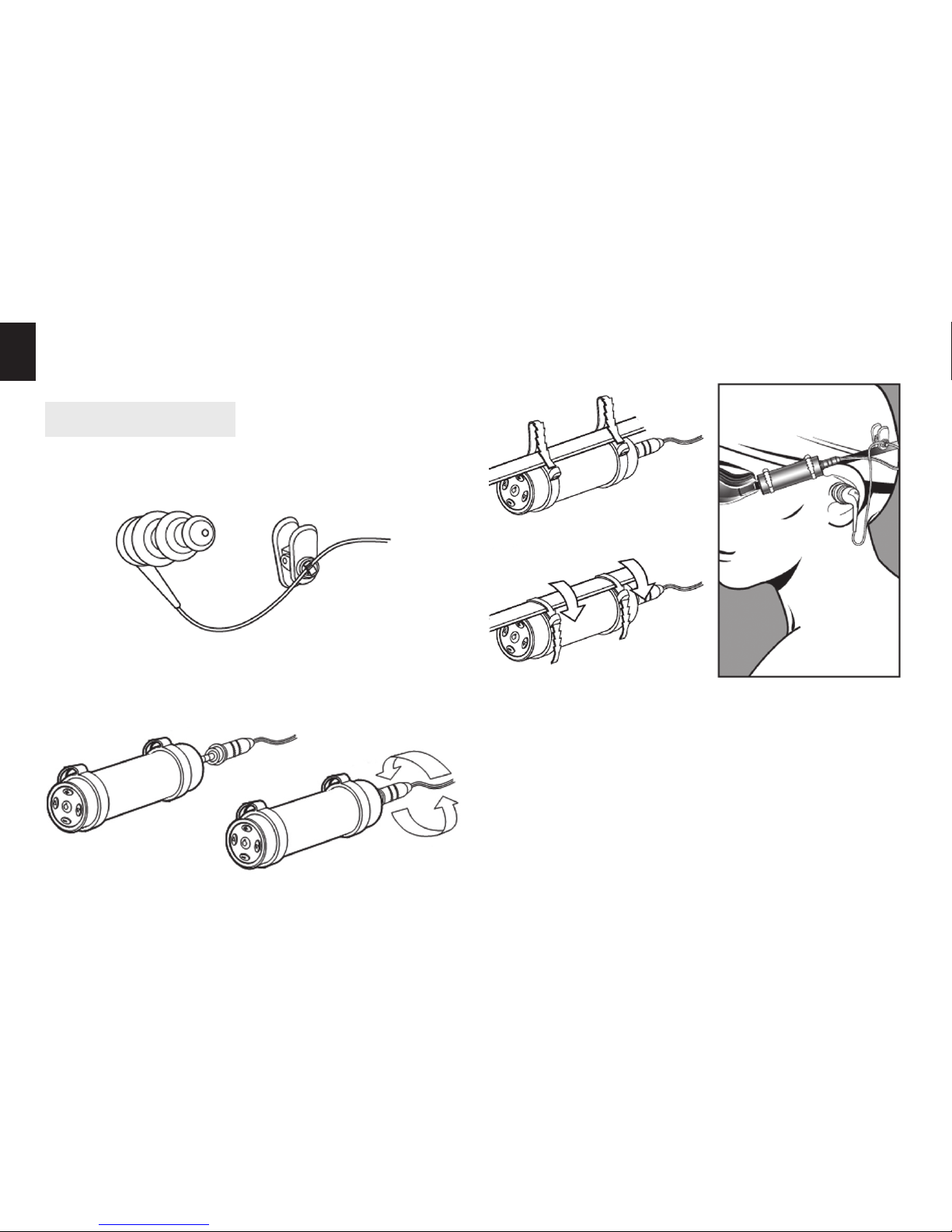
Operation in water
1. Put silicon cushions on each earphone to match
your ear size.
2. Plug earphones to MP3 player and screwed it tightly
as shown below:
3. Fix MP3 player to swimming goggles using attached
rubber lock rings as shown:
Note! Do not dive below level described in waterproofi ng standard IPX-8.
Note! After swimming use attached cleaning tissue
to dry the device.
* Specifi cation and appearance of product are subject to
change without prior notice.
gently insert it into earphone/USB socket. At bottom
there is tangible reset button, press it once and take
out paper clip.
 Loading...