

Page 1

2015-01-13
All preset editing made in prodatum is done in the edit buffer
of your device (volatile memory that basically has an
unlimited amount of program-erase cycles). To keep your
changes, you have to Save the program (write the program
to the non-volatile flash memory. Technically, a preset dump
is uploaded).
However, due to the way the devices work, changes made in
the Arp editor are made directly in flash memory. Since flash
memory has a finite amount of program-erase cycles,
prodatum limits the amount of write operations when using
the offset sliders in the Arp editor: no write happens when
you move the sliders, only when you release them. This
might appear as a bug - you move the slider and there is no
audible change right away - but is actually to save your flash
memory from unnecessary wear.
Why is "control X" disabled?
"Control X" depends on another parameter and that other
parameter switched it off! For example: program selection is
switched on or off by the
section is disabled in MIDI multi mode when the
is set to a channel different from the current channel.
Tooltips often contain information about these
interdependencies.
Every knob and button in prodatum comes with extensive
information about the parameter it controls. There is detailed
filter information for every filter type for example.
Tooltips can be switched on and off globally in the Help
menu.
prodatum comes with undo and redo functionality (arrows in
the upper right of the main window). Additionally, right-
clicking a widget at any time will reset its value to its original,
prodatum online manual https://prodatum.sourceforge.net/doc/manual.html
Editing
prodatum online
manual
for prodatum v2.0.x, updated
Home
Program Change button. The FX
Parameter tooltips
Undo, redo and right-click
FX Channel
1 of 4 12/16/2022, 1:11 PM
Page 2

preset value.
You really can't screw up with prodatum.
prodatum can save your programs to your computer. Using
the Export function in the File menu
created at the location specified in the Preferences dialog.
Export files are standard, valid E-MU sysex preset dumps
and can be used for backup or sharing them with other PXK
devices or the world (eg, you can share them in the
prodatum wiki
To import a program, drag an export file onto prodatum. The
program will then be loaded into the edit buffer of your
device. That means that, if you intend to keep the program,
you also need to save it.
prodatum online manual https://prodatum.sourceforge.net/doc/manual.html
Program im-/export
[Ctrl-X] an export file is
here if you like).
Keyboard shortcuts/misc.
▪ Solo: Alt/Option + 1/2/3/4
▪ Mute: Ctrl + 1/2/3/4
▪ Play an A: B (Note and velocity be changed in the
Minipianos, see tooltip)
▪ Shortcuts for knobs:
▪ Mousewheel: In-/Decrease value by one
▪ Up/Down: In-/Decrease value by one
▪ Shift + Up/Down: Set to zero
▪ Shift + Left: Set to minimum value
▪ Shift + Right: Set to maximum value
▪ Double clicking an entry in one of the arp browsers
will load the pattern into the Arp editor.
▪ Double clicking the Patchcord Amounts will toggle
between zero and it's current value.
▪ If some widget is disabled it means it's not being
used because of some other setting (eg, when you are
in Omni-mode the FX channel selection is disabled
because the FX channel in Omni mode is always the
same as the selected MIDI channel).
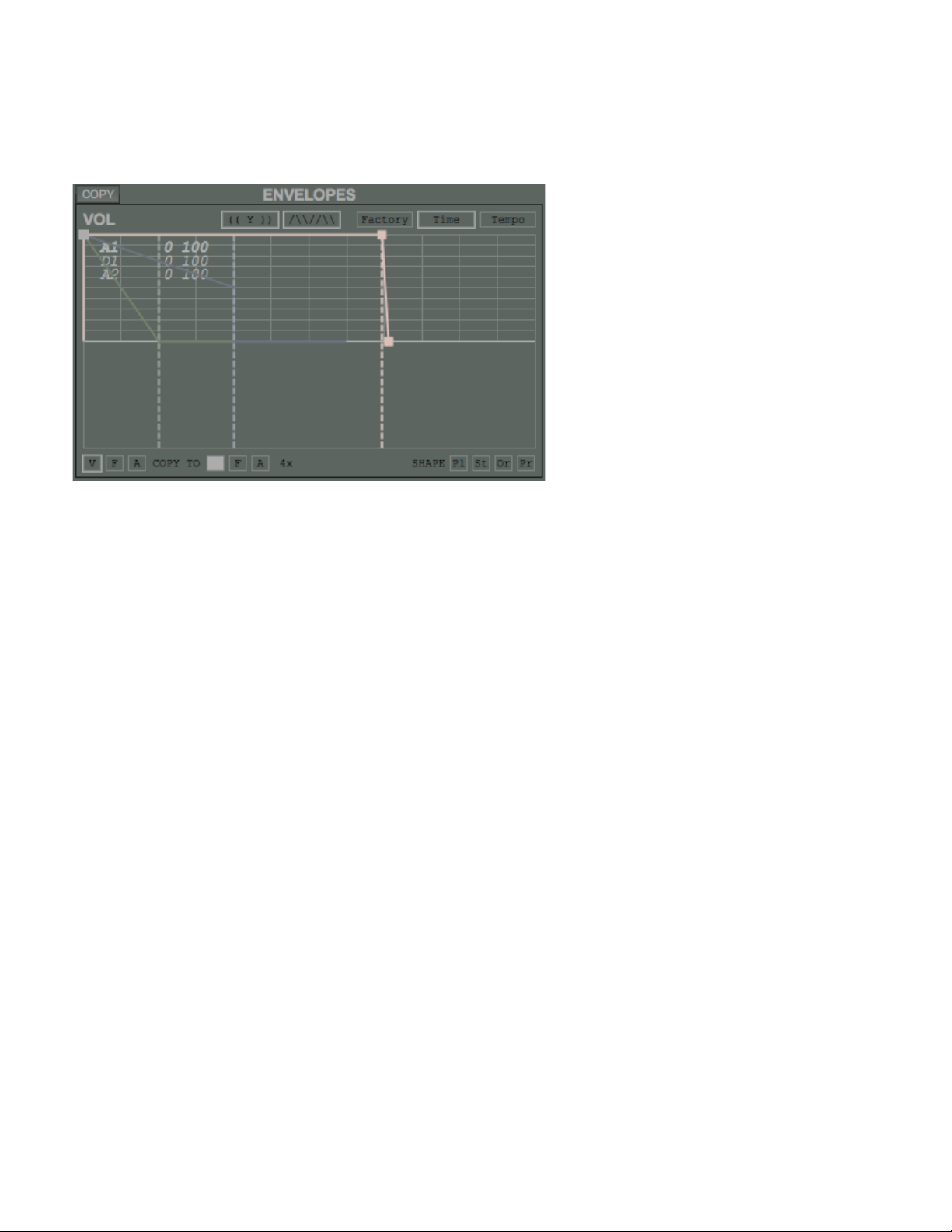
▪ When values overlap in the envelope editor, a list of
those values appears once hovered. Use the
mousewheel to select the desired value for dragging
(see screenshot below).
▪ A second push on any of the
or Main buttons at the top of the window returns to the
previous selection. Example: when you have the Main
screen selected and push Voice 1, a second push on
Voice 1 selects Main again.
▪ If you ever feel lost while browsing the
instruments/programs/riffs/etc, just press the button
Program / Voice 1/2/3/4
2 of 4 12/16/2022, 1:11 PM
Page 3
labeled "C" ("clear filter button") to scroll to the current
selection.
▪ The "Value Output" widget (top left) allows you to
manually enter a value of currently the selected
parameter.
Configuration directory and files
prodatum keeps all it's configuration and synchronization
information in a single directory (
Windows and
If a directory called
directory where prodatum is launched from, prodatum will
use that directory for all it's configuration files instead. This
allows for a portable configuration: you can move the
directory containing prodatum to different computers and
keep your configuration.
You can also have a portable export directory. To do so,
create another directory in the same directory where
prodatum lives in, eg
directory to
doesn't matter, just don't forget the
second option:) in the preferences dialog.
Sysex Device ID's
Every Sysex message that prodatum sends and receives
includes information about the device it is intended for or
coming from, called Sysex Device ID. prodatum will ignore
all messages that do not match this ID. Configuration file
names will include this ID too. For a device with it's device
ID set to 16, files will be saved as
example.
prodatum online manual https://prodatum.sourceforge.net/doc/manual.html
%APPDATA%\prodatum\ on
$HOME/.prodatum/ on Linux and OS X).
Portable configuration
"prodatum-config" exists in the same
"exports". Next, set the export
"exports" or "./exports" (which one you choose
"." when you use the
16.cfg and prs_0_16 for
3 of 4 12/16/2022, 1:11 PM
Page 4

Device selection on startup
Owners of multiple PXK devices might want to make use of
the
specific device on startup. Using this option allows you to
create desktop shortcuts for all of your devices.
prodatum online manual https://prodatum.sourceforge.net/doc/manual.html
"-d ID" command-line option to directly connect to a
COPYLEFT JAN EIDTMANN 2008-2014
4 of 4 12/16/2022, 1:11 PM
 Loading...