

Page 1
Item No. 854548 - ProClip Center Mount
Compatible with:
Jeep Wrangler 2011 - 2017 (EU) / Jeep Wrangler 2011 - 2017 (US)
WARNING:
Please hold the vehicle mount and holder over the place where the mount attaches to the dash before installing them
to insure you like the location of the solution. Once installed and screwed together the products are non-refundable.
Important:
Self-installation instructions and advice are provided for your
convenience. It is your responsibility to determine if you have the
knowledge, skills, and physical ability required to properly perform an
installation. ProClip USA, Inc. shall have no liability for damage or
injury resulting from the installation or use of any ProClip or third
party products. It is your responsibility to ensure that all products are
installed in adherence with local laws and regulations and in such a
manner as to allow a vehicle to be operated safely and without
distraction. ProClip USA, Inc. product warranties do not cover the
installation, removal or re-installation of any product.
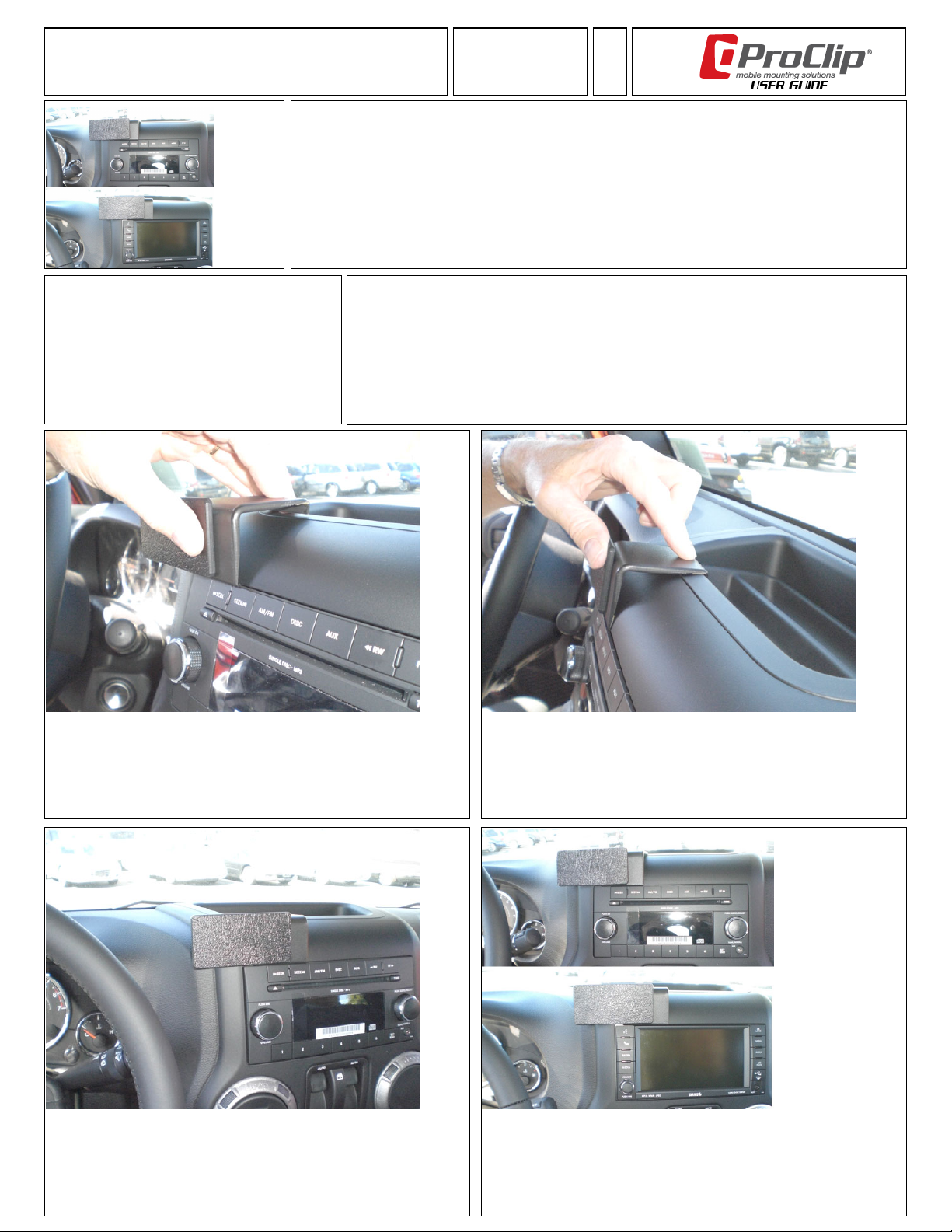
1. Clean the area where the ProClip will be attached. Peel off the cover of
adhesive tape on the ProClip. Note: The adhesive tape does not leave any
marks or damage the dashboard, and it is easy to remove. Place the ProClip in
your hand so the ProClip label (sticker) is in an upright position, or if vertically
positioned; the P in ProClip is at the top.
Press the angled edge on the lower part of the ProClip into the seam/gap
between the stereo/navigation and the surrounding panel frame.
Attention:
Carefully read all instructions and review the images before installing this product.
Do not attach anything to the mount face plate until after installing the mount to the dashboard. Doing so makes
it more difficult to install the mount to the dash and non-refundable since you have screwed into it.
Fits models with and without factory navigation. NOT for tablet devices. The instruction below applies for both
models but is shown using a model with regular stereo.
2. Press firmly forward on the upper part of the ProClip so it flexes forward, and the
angled edge on the back part of the ProClip hooks around the compartment edge.
Then press down on top of the ProClip for best possible attachment of the adhesive
tape.
3. The ProClip is in place.
4. The ProClip Mount is in place.
Page 2
 Loading...