

Page 1
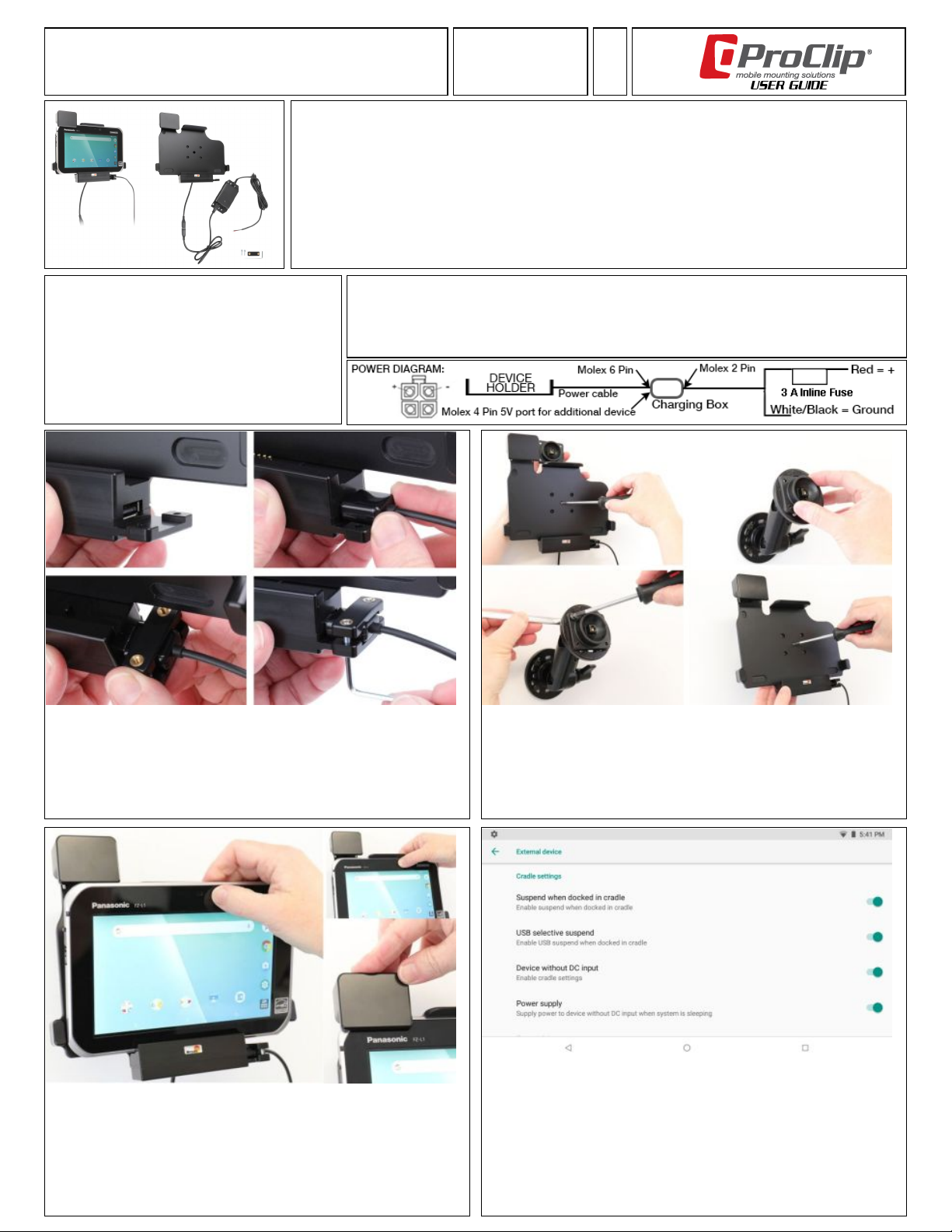
Item No. 747102 - Vehicle Cradle - Spring Lock,
USB Port and Hard-Wired Power
Compatible with:
Panasonic FZ-L1
Important:
Self-installation instructions and advice are provided for your
convenience. It is your responsibility to determine if you have the
knowledge, skills, and physical ability required to properly perform an
installation. ProClip USA, Inc. shall have no liability for damage or
injury resulting from the installation or use of any ProClip or third
party products. It is your responsibility to ensure that all products are
installed in adherence with local laws and regulations and in such a
manner as to allow a vehicle to be operated safely and without
distraction. ProClip USA, Inc. product warranties do not cover the
installation, removal or reinstallation of any product.
1. USB Type-A Host Port
The cradle includes a USB port for attaching scanners, printers and sensors.
This port is connected to the device using the docking connector and does not
occupy the USB Type-C port.
Connect the USB cable and secure it using the included retention clip and Allen
wrench.
Power Rating:Input Voltage: 10-30 VDC, 1A Output Voltage: 5 VDC, 3A
Wiring: Follow the diagram below. Route the wire from the holder behind the dashboard and connect it to a
power source; White or Black to ground or the vehicle chassis, and Red via the 2A in-line fuse to a positive power
source. Professional installation is recommended.
Attention: Carefully read all instructions and review the images before installing this product.
2. Mounting the Cradle
Remove the screw in the center to release the tilt-swivel plate from the cradle.
Using the pre-drilled holes and included fasteners, attach the tilt-swivel plate to any
AMPs compatible mount, pedestal, or flat surface. (Pedestal not included).
Re-attach the cradle with the center screw. Leave the screw slightly loose to allow
adjustments or fully tighten to lock to the desired angle.
3. Inserting the Tablet
Align the bottom of the tablet with the docking connector for the tablet. Allow
the tablet to seat to the bottom of the cradle before pressing the top of the
tablet to snap the top support into place.
Slide they spring lock down over the tablet and to lock the tablet into the cradle.
4. Enable Dock Settings
For correct operation while docked, the following settings need to be set on the FZ-L1.
Open Settings, then Connected Devices and then External Device. Scroll to the
Cradle Settings and then enable the first 4 options:
Suspend when Docked in cradle
USB selective suspend
Device without DC input
Power supply
Page 2
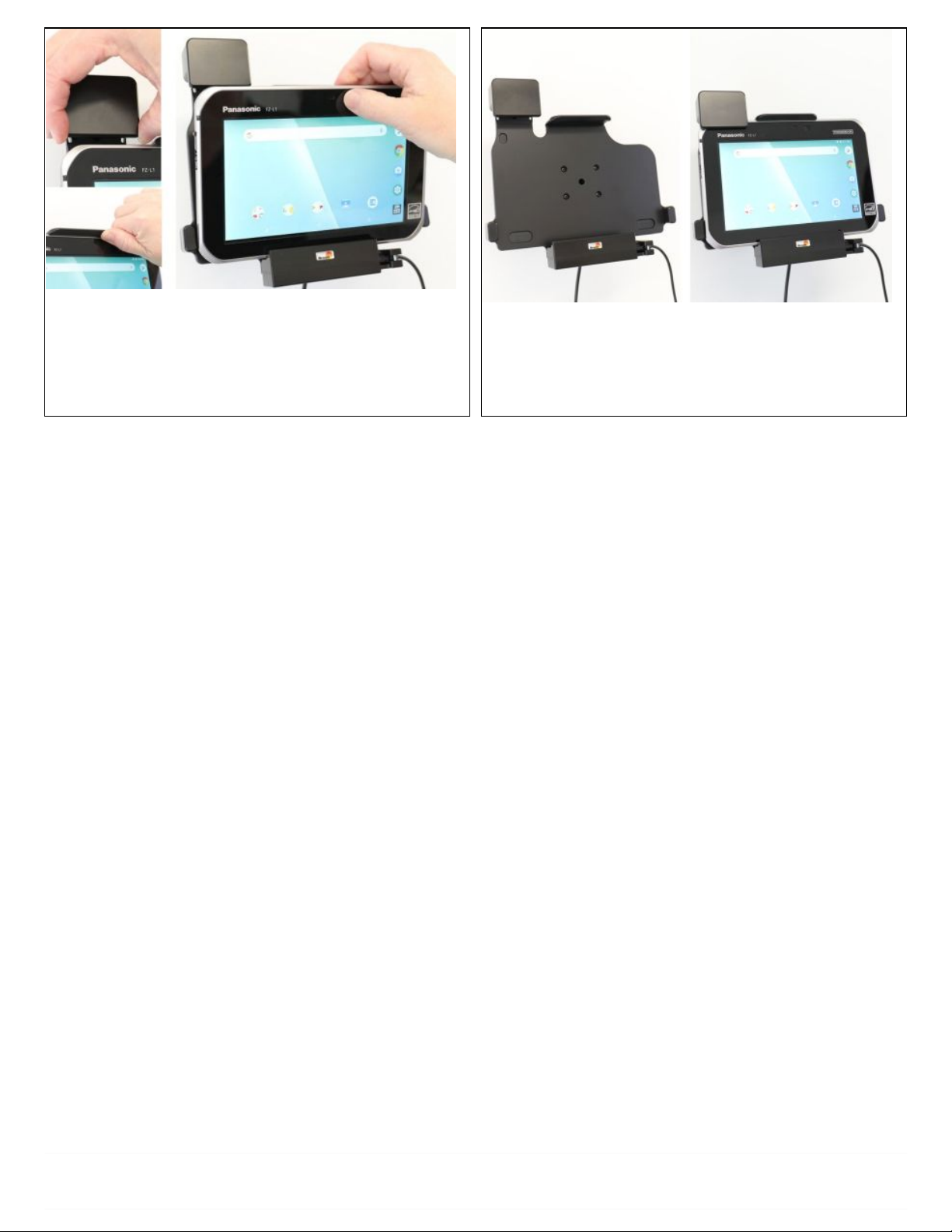
5. Removing the Tablet
Slide the lock up and past the edge of the tablet to allow clearance for removal.
Using a thumb or additional hand, slightly lift the top support up and pull the
tablet towards you. Once free from the top support, lift up and away from the
bottom of the cradle to free the tablet.
6. Installation Complete:
WIth the settings configured and the FZ-L1 docked, USB devices such as bar code
scanners can be used.
Returns
All returns must be made within thirty (30) days of the delivery date and include proof of purchase, a copy of your original order, or invoice. No products shipped hereunder may be returned without ProClip
USA's prior approval. In order to return a product, the buyer must obtain an RMA number (Return Merchandise Authorization Number). Items returned without a valid RMA number may be rejected. Items
that are open, used, damaged, or returned without all original components may have a restocking fee applied.
Limited Warranty and Liabilities
ProClip warrants that the Products will be free of defects in materials and workmanship for a period of one (1) year from the date of purchase. If any Product should become defective within the warranty
period, ProClip, at its option, will replace it, repair it or refund the purchase price. Repair or replacement parts or Products will be furnished on an exchange basis and will either be new or reconditioned. All
replaced Products shall become the property of ProClip. Warranty service is available to you by delivering the Product during the warranty period to the company it was purchased from or to ProClip at 4915
Voges Rd., Madison, WI 53718 USA and providing proof of purchase, price and date. If shipped to ProClip, the buyer must first call ProClip at +1 800-296-3212 or e-mail ProClip at [email protected] to
obtain a return approval and return number. You will bear all shipping, packaging and insurance costs and all other costs, excluding labor and parts, necessary to effectuate repair, replacement or refund
under this warranty. For more information on how to obtain warranty service, write, e-mail or telephone ProClip at 4915 Voges Rd., Madison, WI 53718 USA.Tel: +1 800-296-3212, e-mail:
[email protected].
THIS LIMITED WARRANTY DOES NOT EXTEND TO ANY PRODUCT WHICH HAS BEEN DAMAGED AS A RESULT OF ACCIDENT, MISUSE, ABUSE OR AS A RESULT OF UNAUTHORIZED SERVICE.
THIS WARRANTY IS IN LIEU OF ALL OTHER EXPRESS WARRANTIES FOR THIS PRODUCT. IMPLIED WARRANTIES, INCLUDING THOSE OF MERCHANTABILITY, FITNESS FOR A PARTICULAR
PURPOSE AND NON-INFRINGEMENT SHALL HAVE NO GREATER DURATION THAN 1 YEAR FROM THE DATE OF PURCHASE. IN THE EVENT THIS PRODUCT BECOMES DEFECTIVE DURING
THE WARRANTY PERIOD, THE PURCHASER'S EXCLUSIVE REMEDY SHALL BE REPAIR, REPLACEMENT OR REFUND AS PROVIDED ABOVE. IN NO EVENT SHALL PROCLIP BE LIABLE FOR
INCIDENTAL OR CONSEQUENTIAL DAMAGES, INCLUDING WITHOUT LIMITATION LOSS OF PROPERTY, ARISING FROM BREACH OF ANY EXPRESSED OR IMPLIED WARRANTY. PROCLIP
DISCLAIMS ALL WARRANTIES, EXPRESS OR IMPLIED, OTHER THAN THOSE SET FORTH ABOVE. IN NO EVENT WILL PROCLIP BE LIABLE TO YOU OR ANY THIRD PARTY FOR ANY
INCIDENTAL OR CONSEQUENTIAL DAMAGES, INCLUDING, WITHOUT LIMITATION, INDIRECT, SPECIAL, PUNITIVE, OR EXEMPLARY DAMAGES, INCLUDING ATTORNEY FEES ARISING OUT OF
THE USE OF OR THE INABILITY TO USE THE PRODUCTS, OR FOR ANY CLAIM BY ANY OTHER PARTY, EVEN IF PROCLIP HAS BEEN ADVISED OF THE POSSIBILITY OF SUCH DAMAGES.
Regulatory information:
www.proclipusa.com/regulatory.html
ProClip USA, Inc. • 4915 Voges Road • Madison, WI 53718 • USA
Office: +1 608-807-5320 • Fax: +1 920-372-0066 • Toll free: 800-296-3212 • Internet: www.proclipusa.com
 Loading...